529 Motion and Environmental Sensor Labs
529.1 Learning Objectives
By the end of this chapter, you will be able to:
- Interface the MPU6050 IMU: Configure and read 6-axis accelerometer and gyroscope data via I2C
- Calculate orientation: Derive pitch and roll angles from accelerometer readings
- Implement motion detection: Create algorithms to detect movement using total acceleration
- Use the BMP280 sensor: Read barometric pressure, temperature, and calculate altitude
- Apply sensor calibration: Perform initial calibration to compensate for sensor offsets
529.2 Prerequisites
Required Knowledge:
- Temperature Sensor Labs - Basic sensor interfacing
- Electronics Basics - I2C communication fundamentals
- Sensor Circuits - Signal conditioning
Hardware Requirements:
- ESP32 development board
- MPU6050 6-axis IMU module
- BMP280 barometric pressure sensor
- Breadboard and jumper wires
- 4.7kOhm pull-up resistors (for I2C)
Software Requirements:
- Arduino IDE with ESP32 board support
- Libraries: Wire, MPU6050, Adafruit_BMP280
529.3 Motion & Orientation Sensors
529.3.1 MPU6050 (6-Axis IMU)
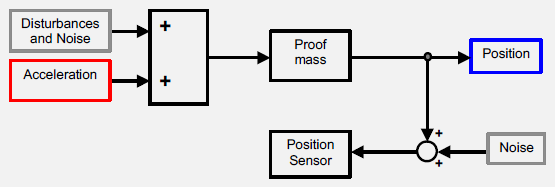
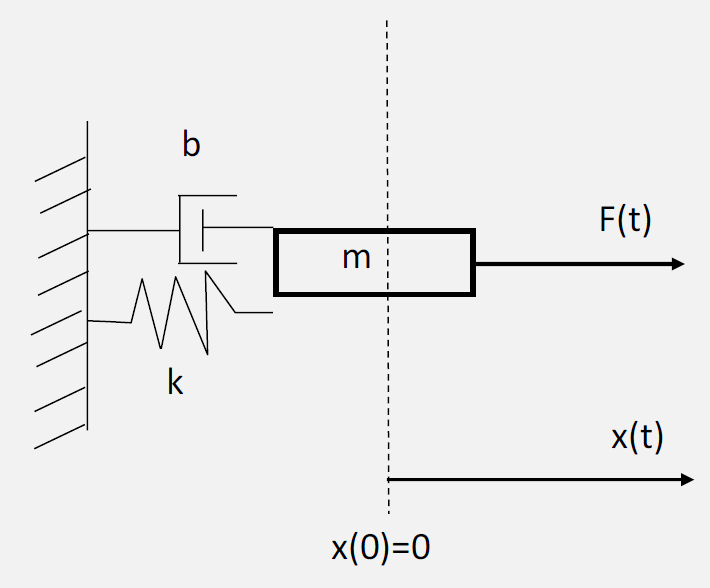
The MPU6050 combines a 3-axis accelerometer and 3-axis gyroscope in a single chip, making it ideal for motion detection, tilt sensing, and orientation tracking.
Specifications:
- Gyroscope: +/-250, +/-500, +/-1000, +/-2000 deg/s
- Accelerometer: +/-2g, +/-4g, +/-8g, +/-16g
- Interface: I2C (400kHz)
- Built-in DMP (Digital Motion Processor)
- 16-bit ADC for each channel
ESP32 Implementation:
#include <Wire.h>
#include <MPU6050.h>

MPU6050 mpu;

// Calibration offsets
int16_t ax, ay, az;
int16_t gx, gy, gz;

void setup() {
  Serial.begin(115200);
  Wire.begin();

  Serial.println("Initializing MPU6050...");

  mpu.initialize();

  // Verify connection
  if (mpu.testConnection()) {
    Serial.println("MPU6050 connection successful");
  } else {
    Serial.println("MPU6050 connection failed");
    while(1);
  }

  // Set sensitivity
  mpu.setFullScaleAccelRange(MPU6050_ACCEL_FS_2);  // +/-2g
  mpu.setFullScaleGyroRange(MPU6050_GYRO_FS_250);  // +/-250deg/s

  // Calibrate (keep sensor still during this)
  calibrateMPU();
}

void loop() {
  // Read raw accel/gyro measurements
  mpu.getMotion6(&ax, &ay, &az, &gx, &gy, &gz);

  // Convert to real-world units
  float accelX = ax / 16384.0;  // For +/-2g range
  float accelY = ay / 16384.0;
  float accelZ = az / 16384.0;

  float gyroX = gx / 131.0;     // For +/-250deg/s range
  float gyroY = gy / 131.0;
  float gyroZ = gz / 131.0;

  // Calculate pitch and roll
  float pitch = atan2(-accelX, sqrt(accelY*accelY + accelZ*accelZ)) * 180/PI;
  float roll = atan2(accelY, accelZ) * 180/PI;

  // Detect motion
  float totalAccel = sqrt(accelX*accelX + accelY*accelY + accelZ*accelZ);
  bool isMoving = abs(totalAccel - 1.0) > 0.1;  // Threshold for motion

  Serial.print("Accel(g): ");
  Serial.print(accelX, 2); Serial.print(", ");
  Serial.print(accelY, 2); Serial.print(", ");
  Serial.print(accelZ, 2);
  Serial.print(" | Gyro(deg/s): ");
  Serial.print(gyroX, 2); Serial.print(", ");
  Serial.print(gyroY, 2); Serial.print(", ");
  Serial.print(gyroZ, 2);
  Serial.print(" | Pitch: ");
  Serial.print(pitch, 1);
  Serial.print(" Roll: ");
  Serial.print(roll, 1);
  Serial.print(" | Moving: ");
  Serial.println(isMoving ? "YES" : "NO");

  delay(100);
}

void calibrateMPU() {
  Serial.println("Calibrating MPU6050... Keep sensor still!");

  long axSum = 0, aySum = 0, azSum = 0;
  long gxSum = 0, gySum = 0, gzSum = 0;
  int samples = 100;

  for(int i = 0; i < samples; i++) {
    mpu.getMotion6(&ax, &ay, &az, &gx, &gy, &gz);
    axSum += ax; aySum += ay; azSum += az;
    gxSum += gx; gySum += gy; gzSum += gz;
    delay(10);
  }

  // Set offsets
  mpu.setXAccelOffset(-(axSum / samples));
  mpu.setYAccelOffset(-(aySum / samples));
  mpu.setZAccelOffset(16384 - (azSum / samples));  // 1g offset for Z
  mpu.setXGyroOffset(-(gxSum / samples));
  mpu.setYGyroOffset(-(gySum / samples));
  mpu.setZGyroOffset(-(gzSum / samples));

  Serial.println("Calibration complete!");
}Understanding the Readings:
When the sensor is stationary on a level surface, you should see: - Accelerometer: [0, 0, 1] g (gravity pulling down on Z-axis) - Gyroscope: [0, 0, 0] deg/s (no rotation)
Sensitivity Settings:
| Range | Sensitivity | Use Case |
|---|---|---|
| +/-2g | 16384 LSB/g | Tilt sensing, gentle motion |
| +/-4g | 8192 LSB/g | General purpose |
| +/-8g | 4096 LSB/g | Sports, vehicles |
| +/-16g | 2048 LSB/g | High-impact detection |
Common Applications: - Step counters (detect walking vibrations) - Fall detection (sudden acceleration spike followed by stationary) - Tilt sensors (measure gravity direction) - Gesture recognition (wave patterns) - Vehicle tracking (acceleration, braking, turning)
529.4 Environmental Sensors
529.4.1 BMP280 (Pressure & Temperature)
The BMP280 is a precision barometric pressure sensor that also measures temperature. It’s commonly used for weather monitoring and altitude estimation.
Specifications:
- Pressure Range: 300-1100 hPa (+/-1 hPa accuracy)
- Temperature Range: -40C to 85C (+/-1C accuracy)
- Interface: I2C or SPI
- Altitude calculation from pressure
- Power: 2.5uA @ 1Hz sampling
ESP32 Implementation:
#include <Wire.h>
#include <Adafruit_BMP280.h>

Adafruit_BMP280 bmp;  // I2C interface

// Sea level pressure for altitude calculation
#define SEALEVELPRESSURE_HPA (1013.25)

void setup() {
  Serial.begin(115200);

  if (!bmp.begin(0x76)) {  // or 0x77
    Serial.println("Could not find BMP280 sensor!");
    while (1);
  }

  // Default settings from datasheet
  bmp.setSampling(Adafruit_BMP280::MODE_NORMAL,     // Operating Mode
                  Adafruit_BMP280::SAMPLING_X2,     // Temp oversampling
                  Adafruit_BMP280::SAMPLING_X16,    // Pressure oversampling
                  Adafruit_BMP280::FILTER_X16,      // Filtering
                  Adafruit_BMP280::STANDBY_MS_500); // Standby time
}

void loop() {
  float temperature = bmp.readTemperature();      // C
  float pressure = bmp.readPressure() / 100.0;    // hPa
  float altitude = bmp.readAltitude(SEALEVELPRESSURE_HPA);  // meters

  Serial.print("Temperature: ");
  Serial.print(temperature);
  Serial.print("C | Pressure: ");
  Serial.print(pressure);
  Serial.print(" hPa | Altitude: ");
  Serial.print(altitude);
  Serial.println(" m");

  // Weather prediction based on pressure trends
  static float lastPressure = pressure;
  float pressureChange = pressure - lastPressure;

  if (pressureChange > 0.5) {
    Serial.println("Weather: Improving (pressure rising)");
  } else if (pressureChange < -0.5) {
    Serial.println("Weather: Worsening (pressure falling)");
  } else {
    Serial.println("Weather: Stable");
  }

  lastPressure = pressure;

  delay(10000);  // 10 seconds
}Altitude from Pressure:
The barometric formula relates pressure to altitude:
altitude = 44330 * (1 - (pressure / sea_level_pressure)^0.1903)Pressure Varies with: - Altitude: ~12 Pa per meter (1.2 hPa per 100m) - Weather: +/-30 hPa due to weather systems - Temperature: Gas expansion affects pressure readings
Floor Detection Application:
For indoor floor detection, use relative accuracy (0.12 hPa) rather than absolute: - Floor height ~3m = 0.36 hPa change - BMP280 can reliably detect 1-floor changes
Oversampling Trade-offs:
| Setting | Resolution | Noise | Time |
|---|---|---|---|
| x1 | 16-bit | Higher | 8ms |
| x2 | 17-bit | Lower | 14ms |
| x16 | 20-bit | Lowest | 62ms |
529.5 Knowledge Check
Question 1: What type of sensor is the MPU6050?
Explanation: The MPU6050 is a 6-axis IMU (Inertial Measurement Unit) containing a 3-axis accelerometer and 3-axis gyroscope. The accelerometer measures linear acceleration while the gyroscope measures angular velocity (rotation rate).
Question 2: Your MPU6050 IMU measures acceleration on a stationary table. You expect [0, 0, 0] g but get [0.05, -0.02, 1.02] g. Is this a problem?
Explanation: This is perfectly normal behavior! When stationary, the accelerometer measures gravity, not motion. On a level surface, expect ~[0, 0, 1] g. The small X/Y values (0.05, -0.02) indicate slight tilt or factory offset, and 1.02g is within typical +/-2% accuracy.
Question 3: Your smart HVAC system uses a BMP280 pressure sensor to detect floor level. The sensor datasheet specifies “+/-1 hPa absolute accuracy” and “+/-0.12 hPa relative accuracy”. Which accuracy matters for floor detection?
Explanation: Relative accuracy matters for floor detection. Each floor (~3m) causes ~0.36 hPa pressure change. The BMP280’s +/-0.12 hPa relative accuracy can easily detect this. Absolute accuracy doesn’t matter because atmospheric pressure varies +/-30 hPa daily due to weather.
529.6 Summary
This chapter covered motion and environmental sensor implementation:
- MPU6050 IMU combines accelerometer and gyroscope for 6-axis motion sensing
- Accelerometer calibration compensates for factory offsets by measuring at rest
- Pitch and roll calculations derive orientation from gravity vector direction
- Motion detection uses total acceleration magnitude deviation from 1g
- BMP280 provides pressure-based altitude estimation and weather monitoring
- Relative vs absolute accuracy determines suitability for different applications
529.7 What’s Next?
Continue learning about light sensors, proximity detection, and touch sensing interfaces.
529.8 See Also
- Temperature Sensor Labs - Temperature sensing fundamentals
- Best Practices & Labs - Implementation guidelines
- Sensor Calibration Lab - Hands-on calibration techniques