%%{init: {'theme': 'base', 'themeVariables': {'primaryColor': '#2C3E50', 'primaryTextColor': '#fff', 'primaryBorderColor': '#16A085', 'lineColor': '#E67E22', 'secondaryColor': '#16A085', 'tertiaryColor': '#7F8C8D'}}}%%
graph TB
    subgraph Device["Smart Light (Node)"]
        EP[Endpoint 1: Light]
        ACL[Access Control List]
    end

    subgraph Fabric1["Apple Home Fabric"]
        CA1[Apple Root CA]
        C1[iPhone Controller]
        C2[HomePod Controller]
    end

    subgraph Fabric2["Google Home Fabric"]
        CA2[Google Root CA]
        C3[Nest Hub Controller]
        C4[Android Phone]
    end

    CA1 -.->|Issued Cert| C1
    CA1 -.->|Issued Cert| C2
    CA2 -.->|Issued Cert| C3
    CA2 -.->|Issued Cert| C4

    C1 -->|Fabric 1 Session| EP
    C2 -->|Fabric 1 Session| EP
    C3 -->|Fabric 2 Session| EP
    C4 -->|Fabric 2 Session| EP

    ACL -->|Authorizes| C1
    ACL -->|Authorizes| C2
    ACL -->|Authorizes| C3
    ACL -->|Authorizes| C4

    style Device fill:#E67E22,stroke:#2C3E50
    style Fabric1 fill:#2C3E50,stroke:#16A085
    style Fabric2 fill:#16A085,stroke:#2C3E50
1029 Matter Fabric and Security Architecture
1029.1 Matter Fabric Management and Security Architecture
NoteLearning Objectives
By the end of this section, you will be able to:
- Understand Matter’s fabric concept and multi-admin architecture
- Explain the fabric certificate chain and Node Operational Certificates
- Describe PASE and CASE session establishment protocols
- Configure Access Control Lists (ACLs) for appropriate privilege levels
- Design network topologies with redundant border routers
- Troubleshoot common security and fabric-related issues
1029.2 Prerequisites
Before diving into this chapter, you should be familiar with:
- Matter Protocol Stack and Data Model: Understanding nodes, endpoints, clusters
- Matter Interactions and Commissioning: How devices are commissioned
- Encryption Architecture: Cryptographic foundations
NoteRelated Chapters
Architecture Deep Dives: - Matter Protocol Stack and Data Model - Layered architecture - Matter Interactions and Commissioning - Commissioning flow
Security: - Thread Security and Matter - Thread-level security - Encryption Architecture - Cryptographic foundations
Transport: - Thread Fundamentals and Roles - Thread mesh networking
1029.3 For Beginners: Understanding Fabrics
TipWhat is a Fabric?
Think of a Matter fabric like a private club membership:
- The Club (Fabric) = An ecosystem like Apple Home or Google Home
- Membership Card (Certificate) = Proves you belong to the club
- Club Rules (ACL) = Who can do what in the club
- Multiple Memberships = Your device can join multiple clubs
When your smart light joins both Apple Home and Google Home: - It gets a separate membership card for each club - Each club can control the light independently - Neither club can see or interfere with the other’s control - If one club closes, the other still works
1029.4 Fabric Architecture
1029.4.1 What is a Fabric?
A Fabric is an administrative domain in Matter - a set of nodes that share: - Common Root Certificate Authority (CA) - Unique Fabric ID (64-bit) - Access Control Lists (ACLs) for authorization
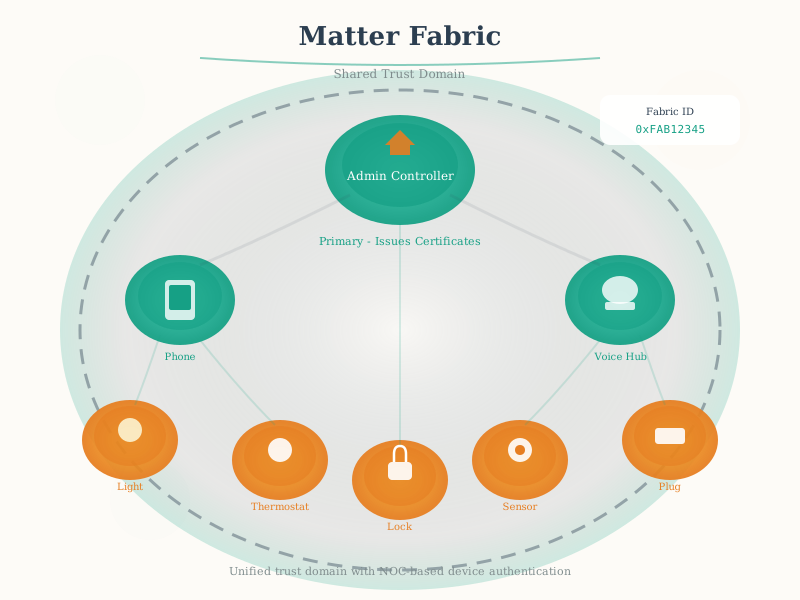
Think of Fabrics as: - Separate “organizations” that can control the same device - Each ecosystem (Apple Home, Google Home) operates its own fabric - A device can belong to multiple fabrics simultaneously
{fig-alt=“Multi-fabric architecture diagram showing Smart Light Node with Endpoint and ACL in center orange box, Apple Home Fabric in navy (with Apple Root CA, iPhone and HomePod Controllers), Google Home Fabric in teal (with Google Root CA, Nest Hub and Android Phone). Dotted lines show certificate issuance, solid lines show fabric sessions, ACL authorizes all controllers from both fabrics.”}
1029.4.2 Multi-Admin Support
Key Multi-Admin Concepts:
| Concept | Description | Limit |
|---|---|---|
| Max Fabrics | Maximum simultaneous fabrics per device | 5 (typical) |
| Commissioning Window | Time window for adding to new fabric | 15 minutes |
| Administrator | Node that can modify device configuration | Per-fabric |
| ACL Entry | Permission grant for a subject | 4 per fabric |
1029.4.3 Fabric Certificate Chain
Each fabric establishes identity through X.509 certificates:
%%{init: {'theme': 'base', 'themeVariables': {'primaryColor': '#2C3E50', 'primaryTextColor': '#fff', 'primaryBorderColor': '#16A085', 'lineColor': '#E67E22', 'secondaryColor': '#16A085', 'tertiaryColor': '#7F8C8D'}}}%%
graph TB
    Root[Root CA Certificate<br/>Self-signed, 20+ years]
    ICA[Intermediate CA<br/>Optional, signed by Root]
    NOC[Node Operational Certificate<br/>Device identity, signed by ICA/Root]

    Root --> ICA
    ICA --> NOC

    NOC --> Device[Device]

    style Root fill:#16A085,stroke:#2C3E50,color:#fff
    style ICA fill:#E67E22,stroke:#2C3E50,color:#fff
    style NOC fill:#2C3E50,stroke:#16A085,color:#fff
{fig-alt=“Fabric certificate chain hierarchy: Root CA Certificate at top (self-signed, 20+ years validity) in teal, optional Intermediate CA in orange, Node Operational Certificate (device identity) in navy at bottom, arrows show signing relationships flowing down to Device.”}
Certificate Contents: - Subject: Node ID + Fabric ID - Issuer: Fabric Root CA or Intermediate CA - Validity: Typically 1 year (renewable) - Public Key: Device’s operational public key - Extensions: Matter-specific attributes
1029.5 Security Architecture
1029.5.1 Session Establishment Protocols
Matter uses two session establishment protocols:
| Protocol | Full Name | Purpose | When Used |
|---|---|---|---|
| PASE | Passcode Authenticated Session Establishment | Initial secure session | Commissioning only |
| CASE | Certificate Authenticated Session Establishment | Operational sessions | Normal operation |
1029.5.2 PASE: Commissioning Security
Purpose: Establish initial secure session using setup code from QR/NFC
PASE uses SPAKE2+ (Simple Password Authenticated Key Exchange):
%%{init: {'theme': 'base', 'themeVariables': {'primaryColor': '#2C3E50', 'primaryTextColor': '#fff', 'primaryBorderColor': '#16A085', 'lineColor': '#E67E22', 'secondaryColor': '#16A085', 'tertiaryColor': '#7F8C8D'}}}%%
sequenceDiagram
    participant C as Commissioner
    participant D as Device

    Note over C,D: PASE (SPAKE2+)

    C->>D: PBKDFParamRequest<br/>[Iterations, Salt request]
    D->>C: PBKDFParamResponse<br/>[PBKDF parameters]

    Note over C: Derives key from passcode

    C->>D: Pake1<br/>[pA commitment]
    D->>C: Pake2<br/>[pB commitment, cB proof]
    C->>D: Pake3<br/>[cA proof]

    Note over C,D: Session keys established

    C->>D: OperationalCredentials::AddNOC<br/>[Device certificate, Fabric info]
    D->>C: NOCResponse<br/>[Success]
{fig-alt=“PASE commissioning sequence showing SPAKE2+ exchange: Commissioner and Device exchange PBKDF parameters, Commissioner derives key from passcode (from QR code), three-message Pake exchange establishes session keys, finally Commissioner provisions device with operational certificate via AddNOC command.”}
PASE Security Properties: - Zero-knowledge proof: Neither party learns the other’s passcode - Forward secrecy: Compromised passcode doesn’t reveal past sessions - Mutual authentication: Both parties prove knowledge of passcode
Setup Code Format: - 11-digit numeric: “34970112332” - Encodes: Discriminator (12-bit) + Passcode (27-bit) - Source: QR code, NFC tag, or manual entry
1029.5.3 CASE: Operational Security
Purpose: Establish secure sessions between fabric members using certificates
CASE uses a three-message Sigma protocol:
%%{init: {'theme': 'base', 'themeVariables': {'primaryColor': '#2C3E50', 'primaryTextColor': '#fff', 'primaryBorderColor': '#16A085', 'lineColor': '#E67E22', 'secondaryColor': '#16A085', 'tertiaryColor': '#7F8C8D'}}}%%
sequenceDiagram
    participant I as Initiator
    participant R as Responder

    Note over I,R: CASE (Sigma Protocol)

    I->>R: Sigma1<br/>[Initiator random, session ID, destination ID]
    R->>I: Sigma2<br/>[Responder random, NOC, signature]
    I->>R: Sigma3<br/>[Initiator NOC, signature]

    Note over I,R: Session established with AES-CCM encryption
{fig-alt=“CASE session establishment sequence using Sigma protocol: Initiator sends Sigma1 with random values and destination ID, Responder sends Sigma2 with NOC and signature, Initiator sends Sigma3 with its NOC and signature, resulting in AES-CCM encrypted session.”}
CASE Security Properties: - Certificate-based identity: Verified by fabric Root CA - Session resumption: Cache session keys for fast reconnection - Perfect forward secrecy: Each session uses fresh ephemeral keys
1029.5.4 Message Encryption
All Matter messages after session establishment are encrypted:
| Security Feature | Algorithm | Key Size |
|---|---|---|
| Encryption | AES-CCM | 128-bit |
| Integrity | AES-CCM MAC | 128-bit tag |
| Key Derivation | HKDF-SHA256 | 256-bit |
| Signatures | ECDSA P-256 | 256-bit curve |
Message Security Layers:
┌─────────────────────────────────────┐
│ Encrypted Payload (AES-CCM)         │
├─────────────────────────────────────┤
│ Message Authentication Code (MAC)   │
├─────────────────────────────────────┤
│ Anti-replay Counter                 │
├─────────────────────────────────────┤
│ Session ID                          │
└─────────────────────────────────────┘
1029.5.5 Access Control Lists (ACLs)
ACLs define what operations each subject can perform:
| Privilege | Capabilities |
|---|---|
| View | Read attributes, subscribe to changes |
| Operate | View + invoke commands |
| Manage | Operate + write attributes |
| Administer | Manage + modify ACLs |
ACL Entry Structure:
{
  "fabricIndex": 1,
  "privilege": "Operate",
  "authMode": "CASE",
  "subjects": [NodeId(0x0001), NodeId(0x0002)],
  "targets": [
    { "cluster": 0x0006, "endpoint": 1 }  // On/Off on Endpoint 1
  ]
}
1029.6 Network Topology Patterns
1029.6.1 Thread + Wi-Fi Hybrid
Most smart homes use a hybrid topology with Thread for low-power devices and Wi-Fi for high-bandwidth:
%%{init: {'theme': 'base', 'themeVariables': {'primaryColor': '#2C3E50', 'primaryTextColor': '#fff', 'primaryBorderColor': '#16A085', 'lineColor': '#E67E22', 'secondaryColor': '#16A085', 'tertiaryColor': '#7F8C8D'}}}%%
graph TB
    subgraph Internet["Cloud / Internet"]
        Cloud[Cloud Services<br/>Optional]
    end

    subgraph HomeNetwork["Home Network"]
        Router[Wi-Fi Router]

        subgraph ThreadMesh["Thread Mesh"]
            BR1[HomePod Mini<br/>Border Router]
            BR2[Nest Hub<br/>Border Router]
            TR1[Smart Plug<br/>Router]
            TR2[Smart Light<br/>Router]
            ED1[Door Sensor<br/>End Device]
            ED2[Motion Sensor<br/>End Device]
        end

        subgraph Wi-FiDevices["Wi-Fi Devices"]
            W1[Thermostat]
            W2[Smart Display]
            W3[Robot Vacuum]
        end
    end

    subgraph Controllers["Controllers"]
        Phone[Smartphone]
        Voice[Voice Assistant]
    end

    Cloud <--> Router
    Router <--> BR1
    Router <--> BR2
    Router <--> W1
    Router <--> W2
    Router <--> W3
    Router <--> Phone
    Router <--> Voice

    BR1 <--> TR1
    BR1 <--> TR2
    BR2 <--> TR1
    BR2 <--> TR2
    TR1 <--> ED1
    TR2 <--> ED2
    TR1 <--> TR2

    style Internet fill:#7F8C8D,stroke:#2C3E50
    style HomeNetwork fill:#2C3E50,stroke:#16A085
    style ThreadMesh fill:#16A085,stroke:#2C3E50
    style Wi-FiDevices fill:#E67E22,stroke:#2C3E50
    style Controllers fill:#27ae60,stroke:#2C3E50
{fig-alt=“Hybrid Matter network topology showing: Cloud in gray at top connected to Wi-Fi Router, Thread Mesh subnet in teal containing two Border Routers (HomePod Mini, Nest Hub), two Routers (Smart Plug, Smart Light), and two End Devices (Door Sensor, Motion Sensor), Wi-Fi Devices subnet in orange (Thermostat, Smart Display, Robot Vacuum), and Controllers in green (Smartphone, Voice Assistant). All interconnected through Wi-Fi Router with Thread mesh having redundant paths.”}
1029.6.2 Border Router Redundancy
Multiple Border Routers provide fault tolerance:
| Scenario | 1 Border Router | 2+ Border Routers |
|---|---|---|
| BR failure | Thread mesh isolated | Seamless failover |
| Wi-Fi outage | Limited local control | Mesh continues locally |
| Range | Limited coverage | Extended coverage |
| Load | Single point of congestion | Load distributed |
Border Router Placement Guidelines: - Place at “edges” of desired coverage area - One BR per 20-30 Thread devices - Mix ecosystems (HomePod + Nest Hub) for redundancy - Consider power reliability (UPS for critical BRs)
1029.7 Common Pitfalls
CautionPitfall: Multi-Admin Fabric Limit Exhaustion
The Mistake: Developers repeatedly commission a Matter device to different test fabrics during development without properly removing old fabric entries. The device eventually reaches its maximum fabric capacity (typically 5 fabrics), and new commissioning attempts fail with “Fabric table full” or “NOC storage exhausted” errors.
Why It Happens: Each Matter fabric commissioning stores a Node Operational Certificate (NOC), fabric credentials, and ACL entries in persistent storage. The MaxFabrics capability is typically 5 for constrained devices. Unlike Wi-Fi credentials that overwrite, Matter fabrics accumulate.
The Fix: Properly remove fabrics before reaching the limit:
// Check current fabric count before commissioning
uint8_t fabricCount = cycleGetFabricCount();
uint8_t maxFabrics = cycleGetMaxFabrics(); // Typically 5

if (fabricCount >= maxFabrics) {
    // Remove unused fabrics via OperationalCredentials cluster
    // Command: RemoveFabric (0x0A) with FabricIndex
    cycleOperationalCredentialsRemoveFabric(fabricIndex);
}

// For complete wipe during development:
cycleFactoryResetCredentials(); // Clears NOCs + fabrics + ACLs
In production apps, implement fabric management UI showing current fabric count.
CautionPitfall: CASE Session Resumption Failures After NOC Rotation
The Mistake: After rotating a device’s Node Operational Certificate (NOC), existing CASE sessions continue using cached session keys. Controllers then fail to communicate with the device, showing “Session expired” or “CASE handshake failed” errors.
Why It Happens: CASE supports session resumption to avoid expensive full handshakes. Session resumption tokens are tied to the specific NOC public key. When the NOC is rotated, the device’s identity changes but controllers may still attempt resumption with stale session data.
The Fix: Implement proper session invalidation during NOC rotation:
// On device side: After NOC update, clear all CASE sessions
void OnNOCUpdated() {
    // Invalidate all active CASE sessions
    CASESessionManager::InvalidateAllSessions();

    // Clear session resumption cache
    SessionResumptionStorage::ClearAll();

    // Force controllers to perform fresh CASE handshake
}

// On controller side: Handle NOC rotation gracefully
void OnDeviceCertificateChanged(NodeId node) {
    // Remove cached session for this node
    SessionManager::EvictSession(node);

    // Next interaction will trigger fresh CASE handshake
}
1029.8 Visual Reference Gallery
Explore alternative visual representations of Matter fabric and security concepts.
NoteMatter Fabric and Multi-Admin
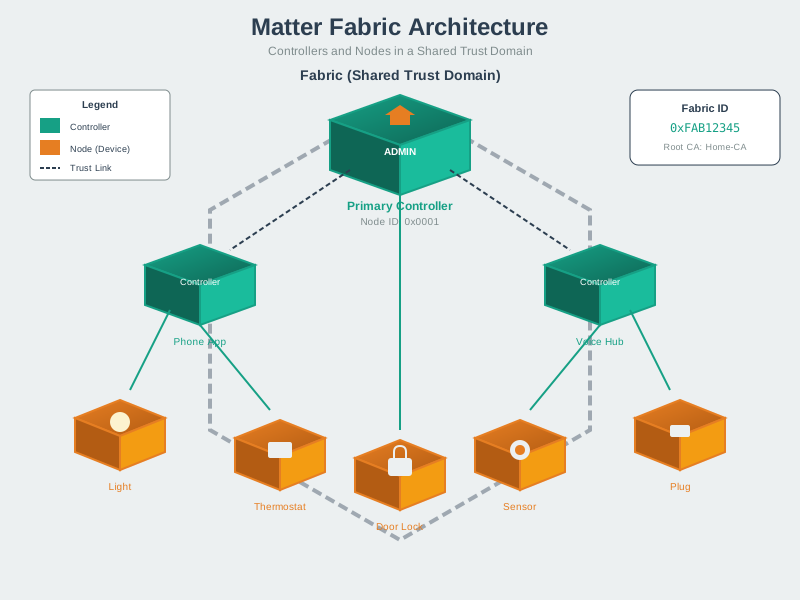
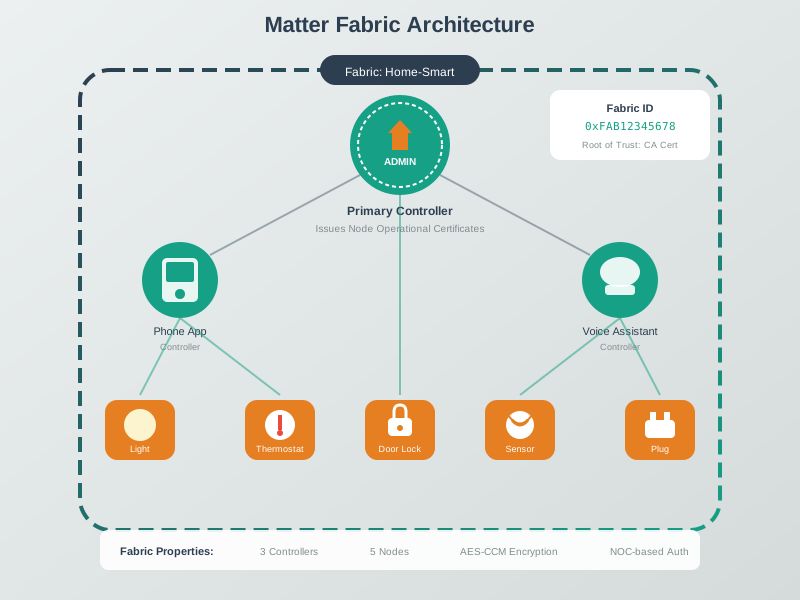
Matter’s fabric architecture enables multi-admin control where devices can belong to multiple ecosystems with independent automation rules.
1029.9 Knowledge Check
WarningQuick Assessment
1029.10 Key Takeaways
TipSummary
Fabrics are administrative domains with shared Root CA, enabling multi-ecosystem control
Multi-admin allows one device to belong to up to 5 fabrics (typically) with independent certificates and ACLs
PASE (passcode-based) secures initial commissioning; CASE (certificate-based) secures ongoing operation
All Matter traffic is encrypted with AES-128-CCM after session establishment
ACL privilege levels: View < Operate < Manage < Administer
Multiple Border Routers provide fault tolerance and extended coverage for Thread mesh
Fabric certificate chain: Root CA -> Intermediate CA (optional) -> Node Operational Certificate
1029.11 What’s Next
Continue your Matter deep-dive with:
- Matter Device Types and Clusters - Explore the complete cluster library and device type definitions
- Matter Implementation - Learn about SDKs, certification, and building Matter products
- Thread Fundamentals and Roles - Understand Thread as Matter’s mesh transport