%%{init: {'theme': 'base', 'themeVariables': {'primaryColor': '#E8F4F8', 'primaryTextColor': '#2C3E50', 'primaryBorderColor': '#16A085', 'lineColor': '#16A085', 'secondaryColor': '#FFF5E6', 'tertiaryColor': '#F0F0F0', 'noteTextColor': '#2C3E50', 'noteBkgColor': '#FFF5E6', 'textColor': '#2C3E50', 'fontSize': '16px'}}}%%
graph TB
    subgraph NFC["NFC"]
        N1["Range: 4 cm"]
        N2["Frequency: 13.56 MHz"]
        N3["No pairing needed"]
        N4["Tags: No battery"]
        N5["Use: Payments,<br/>Quick pairing"]
    end

    subgraph RFID["RFID"]
        R1["Range: cm to 100m"]
        R2["Frequency: LF/HF/UHF"]
        R3["Reader-tag only"]
        R4["Tags: Passive/Active"]
        R5["Use: Inventory,<br/>Access control"]
    end

    subgraph BT["Bluetooth"]
        B1["Range: 10m"]
        B2["Frequency: 2.4 GHz"]
        B3["Requires pairing"]
        B4["Devices: Battery"]
        B5["Use: Audio,<br/>Data transfer"]
    end

    style NFC fill:#E8F4F8,stroke:#16A085,stroke-width:3px
    style RFID fill:#FFF5E6,stroke:#E67E22,stroke-width:3px
    style BT fill:#F8E8E8,stroke:#2C3E50,stroke-width:3px
882 NFC Introduction and Basics
882.1 Learning Objectives
By the end of this chapter, you will be able to:
- Understand NFC Fundamentals: Explain what NFC is and how it differs from RFID and Bluetooth
- Identify Operating Modes: Describe peer-to-peer, read/write, and card emulation modes at a high level
- Recognize NFC Applications: Identify common NFC use cases including payments, access control, and device pairing
- Understand Range as Security: Explain why NFC’s 4 cm range is a deliberate security feature
882.2 Prerequisites
Before diving into this chapter, you should be familiar with:
- Networking Basics: Understanding wireless communication principles, data rates, and protocol basics helps contextualize how NFC fits within the broader IoT communication landscape
- Basic wireless concepts: Familiarity with frequency bands, data encoding, and wireless range concepts will help you understand NFC’s 13.56 MHz operation and short-range characteristics
NoteHow NFC Relates to Bluetooth, Wi-Fi, and RFID
By this point you may have already studied:
- Wi-Fi Fundamentals and Standards - local-area networking for homes and offices
- Bluetooth Fundamentals and Architecture - short-range personal area networking
- RFID Fundamentals and Standards - identification and tagging across a range of frequencies
You can think of NFC as the ultra-short-range, user-intent corner of this family: - very short range (a few centimetres) - usually one-to-one interactions initiated by a tap - often used as a trigger for other links (for example, NFC tap to start Bluetooth pairing)
As you read this chapter, keep comparing NFC to what you know from Bluetooth and RFID: what stays the same (radio waves, tags, readers) and what changes (range, power, and how people interact with the system).
NoteKey Takeaway
In one sentence: NFC enables instant, secure communication within 4 cm range without pairing, making it ideal for payments, access control, and triggering other wireless connections.
Remember this rule: Use NFC when you need intentional “tap to interact” user experience with zero setup time; use Bluetooth when you need continuous streaming or longer range.
TipFor Kids: Meet the Sensor Squad!
NFC is like a secret handshake between your phone and special stickers!
882.2.1 The Sensor Squad Adventure: The Magic Tap
One day, the Sensor Squad discovered something mysterious at the bus stop. There was a colorful poster for a new movie, and when Sammy the Temperature Sensor’s owner tapped their phone against a small circle on the poster - WHOOSH! - the movie trailer started playing on their phone!
“How did that happen?!” Lila the Light Sensor gasped. “There’s no wire, no button, nothing!”
Bella the Button knew the answer. “That’s NFC - Near Field Communication! It’s like a super-secret whisper between devices. But here’s the cool part: they have to be REALLY close to talk - like almost touching, within about the width of your thumb!”
Max the Motion Detector zoomed in for a closer look at the poster. “See that tiny circle? That’s an NFC tag. It’s thinner than a sticker, has NO battery, and can store information like a tiny invisible treasure chest. When you bring your phone super close, the phone’s energy wakes up the tag, and they share secrets!”
“It’s like a magic handshake!” Sammy said excitedly. “You know how you and your best friend might have a special handshake that only you two know? NFC is like that - your phone and the tag have a special language, but they can only use it when they’re touching!”
The Sensor Squad learned that NFC is used everywhere - paying for things at stores (tap to pay!), getting on buses with a card, sharing photos between phones, and even unlocking doors. All with just a tap!
882.2.2 Key Words for Kids
| Word | What It Means |
|---|---|
| NFC (Near Field Communication) | A way for devices to talk by almost touching - like whispering a secret into someone’s ear |
| Tap to Pay | Using your phone like a magic wallet - tap it on the store’s machine and it pays for things |
| NFC Tag | A tiny sticker with a hidden antenna that can store information and share it when you tap it |
882.2.3 Try This at Home!
The Whispering Game: Play a game to understand why NFC’s short range is actually its superpower! Stand in a room with family members. First, SHOUT a message (this is like Wi-Fi - everyone can hear from far away). Then TALK normally across a table (this is like Bluetooth - medium distance). Finally, WHISPER directly into someone’s ear (this is like NFC - super private, only the person right next to you hears). Which way is most private? That’s why banks love NFC for payments - no one can “hear” your credit card number because devices must almost touch!
882.3 Getting Started (For Beginners)
882.3.1 What is NFC? (Simple Explanation)
NFC = Near Field Communication
It’s the technology that lets two devices communicate when they’re almost touching (within ~4 cm).
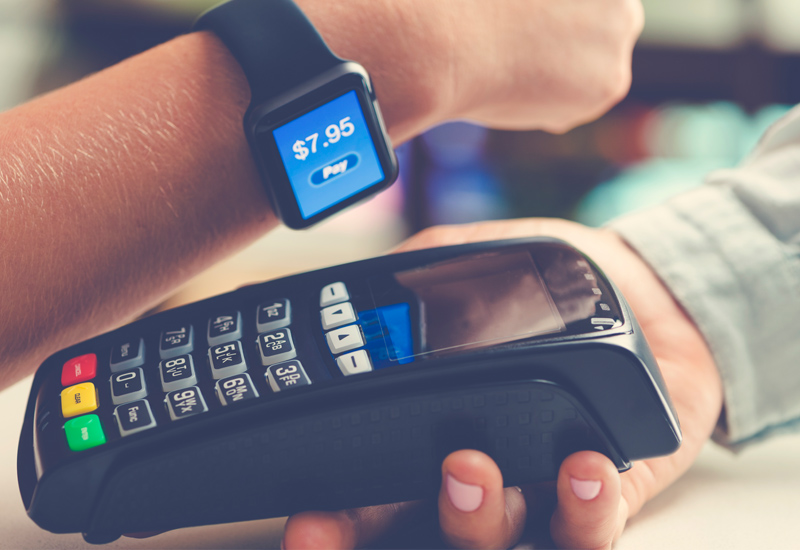
You use NFC for: - Contactless payments (Apple Pay, Google Pay) - Transit cards (tap to enter subway) - Quick pairing (tap phone to speaker) - Smart tags (tap poster for info) - Access cards (tap to unlock door)
882.3.2 How NFC Works: A Simple Analogy
Analogy: Whispered Conversation
Think of wireless technologies like different ways of talking:
| Technology | Range | Analogy | Use Case |
|---|---|---|---|
| Wi-Fi | 50m | Shouting across a field | Home internet |
| Bluetooth | 10m | Normal conversation | Headphones |
| NFC | 4cm | Whisper in someone’s ear | Payments |
NFC is like whispering: - Private - Only the person right next to you can hear - Instant - No pairing needed, just get close - Effortless - Tags don’t even need batteries!
882.3.3 NFC vs. RFID vs. Bluetooth
NoteAlternative View: Interactive Technology Comparison
882.3.4 The Three NFC Modes
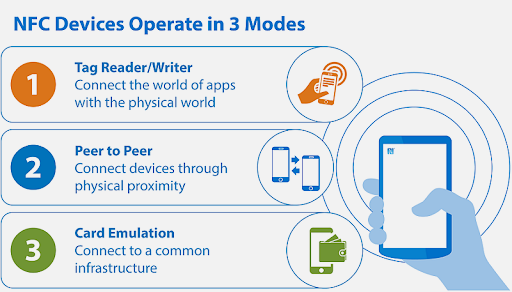
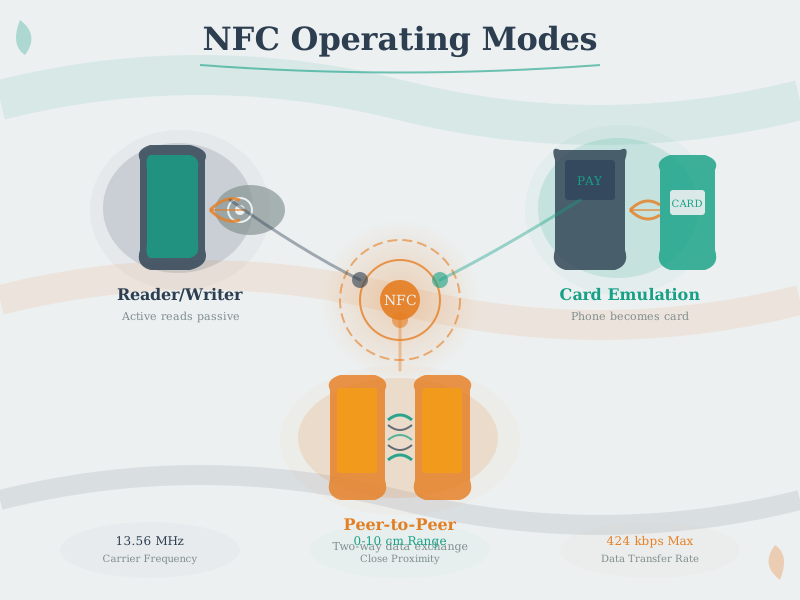
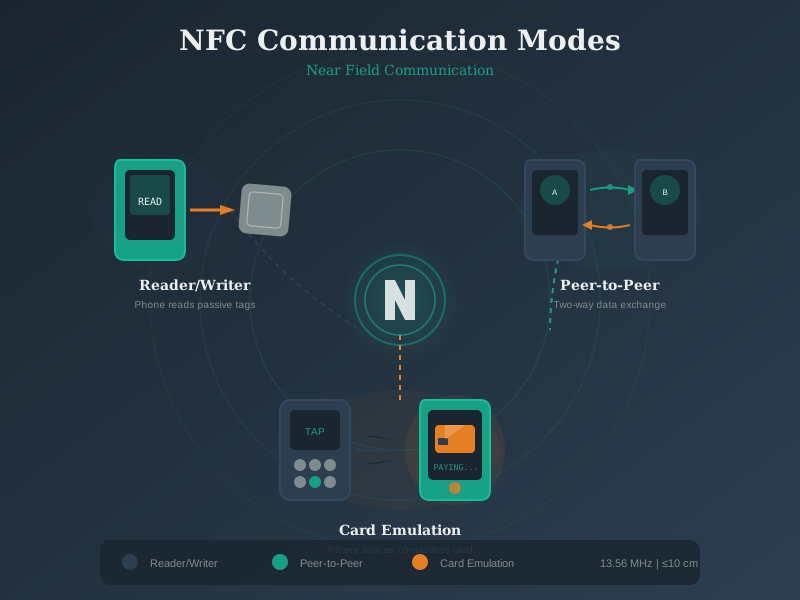
NFC devices can operate in three different modes:
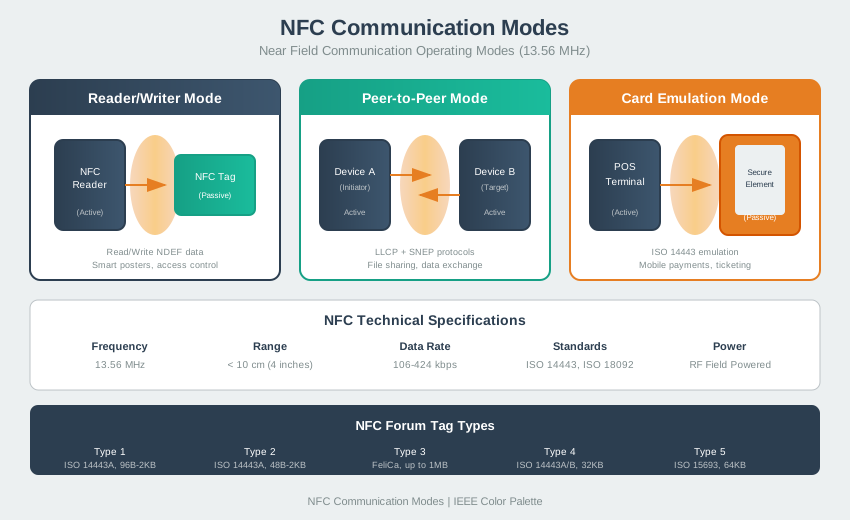
NoteAlternative View: Interactive Modes Diagram

TipAlternative View: NFC Use-Case Decision Tree
This variant helps you decide when to use NFC vs other technologies:
%%{init: {'theme': 'base', 'themeVariables': {'primaryColor': '#2C3E50', 'primaryTextColor': '#fff', 'primaryBorderColor': '#16A085', 'lineColor': '#16A085', 'secondaryColor': '#E67E22', 'tertiaryColor': '#7F8C8D'}}}%%
flowchart TD
    START["IoT Use Case"] --> Q1{"User must<br/>intentionally<br/>interact?"}

    Q1 -->|"Yes"| Q2{"Distance<br/>< 10 cm OK?"}
    Q1 -->|"No"| OTHER["BLE/Wi-Fi<br/>Auto-connect"]

    Q2 -->|"Yes"| Q3{"One-time<br/>trigger or<br/>continuous?"}
    Q2 -->|"No"| BLE["Bluetooth<br/>10m range"]

    Q3 -->|"One-time"| NFC["NFC<br/>Perfect fit!"]
    Q3 -->|"Continuous"| BLE2["Start with NFC<br/>then switch to BLE"]

    style START fill:#2C3E50,stroke:#16A085,color:#fff
    style Q1 fill:#E67E22,stroke:#2C3E50,color:#fff
    style Q2 fill:#E67E22,stroke:#2C3E50,color:#fff
    style Q3 fill:#E67E22,stroke:#2C3E50,color:#fff
    style NFC fill:#16A085,stroke:#2C3E50,color:#fff
    style BLE fill:#7F8C8D,stroke:#2C3E50,color:#fff
    style BLE2 fill:#7F8C8D,stroke:#2C3E50,color:#fff
    style OTHER fill:#7F8C8D,stroke:#2C3E50,color:#fff
NFC is ideal when users must deliberately tap, and it is often used to trigger Bluetooth pairing for ongoing connections.
882.3.5 Real-World NFC Examples
1. Contactless Payments (Apple Pay/Google Pay)
You tap phone -> Phone acts as credit card -> Terminal reads
                card number (encrypted) -> Payment approved
2. Smart Posters
Movie poster has NFC tag -> Tap phone -> Opens trailer in browser3. Quick Device Pairing
New Bluetooth speaker -> Tap phone to speaker -> Automatically pairs!4. Smart Home
NFC tag on nightstand -> Tap phone -> Turns off lights,
                                    sets alarm, enables Do Not Disturb
882.3.6 Why NFC for IoT?
| Advantage | How It Helps IoT |
|---|---|
| No batteries in tags | Passive tags can be long-lived and maintenance-free (though they can still be damaged or removed) |
| Intent required | User must physically tap (secure) |
| Instant connection | No pairing, no passwords |
| Low cost | Many tag types are inexpensive (varies by type and volume) |
| Broad support | Many smartphones support NFC, but availability varies by device and region |
TipAlternative View: NFC Operating Modes Comparison
This variant shows the three NFC operating modes and their typical use cases:
%%{init: {'theme': 'base', 'themeVariables': {'primaryColor': '#2C3E50', 'primaryTextColor': '#fff', 'primaryBorderColor': '#16A085', 'lineColor': '#16A085', 'secondaryColor': '#E67E22', 'tertiaryColor': '#7F8C8D', 'fontSize': '11px'}}}%%
graph TB
    subgraph READER["Reader/Writer Mode"]
        R1["Phone reads NFC tag"]
        R2["Tag contains: URL, text, data"]
        R3["Use: Smart posters, product info"]
        R4["Tag is passive (no battery)"]
    end

    subgraph P2P["Peer-to-Peer Mode"]
        P1["Two active devices"]
        P2["Both can send/receive"]
        P3["Use: Android Beam (deprecated)"]
        P4["Both have power"]
    end

    subgraph CARD["Card Emulation Mode"]
        C1["Phone acts as smart card"]
        C2["Terminal reads phone"]
        C3["Use: Payments, access control"]
        C4["Secure Element stores keys"]
    end

    NFC["NFC 13.56 MHz"] --> READER
    NFC --> P2P
    NFC --> CARD

    style NFC fill:#2C3E50,stroke:#16A085,color:#fff
    style READER fill:#16A085,stroke:#2C3E50,color:#fff
    style P2P fill:#E67E22,stroke:#2C3E50,color:#fff
    style CARD fill:#7F8C8D,stroke:#2C3E50,color:#fff
NFC operates in three modes: Reader/Writer (phone reads passive tags), Peer-to-Peer (two phones exchange data), and Card Emulation (phone becomes a contactless card for payments). Card Emulation is most critical for secure applications.
NoteAlternative View: NFC vs BLE vs RFID Technology Comparison
This variant compares NFC with related short-range technologies:
%%{init: {'theme': 'base', 'themeVariables': {'primaryColor': '#2C3E50', 'primaryTextColor': '#fff', 'primaryBorderColor': '#16A085', 'lineColor': '#16A085', 'secondaryColor': '#E67E22', 'tertiaryColor': '#7F8C8D', 'fontSize': '11px'}}}%%
graph LR
    subgraph NFC["NFC"]
        N1["Range: < 10 cm"]
        N2["Setup: Instant tap"]
        N3["Power: 0W (passive)"]
        N4["Best: Payments, pairing"]
    end

    subgraph BLE["Bluetooth LE"]
        B1["Range: 10-50 m"]
        B2["Setup: Pairing required"]
        B3["Power: Very low"]
        B4["Best: Wearables, sensors"]
    end

    subgraph RFID["HF RFID"]
        R1["Range: < 1 m"]
        R2["Setup: Reader-based"]
        R3["Power: 0W (passive)"]
        R4["Best: Access, inventory"]
    end

    COMBO["NFC + BLE Combo"] --> |"NFC triggers"| BLE2["BLE connects"]

    style NFC fill:#16A085,stroke:#2C3E50,color:#fff
    style BLE fill:#E67E22,stroke:#2C3E50,color:#fff
    style RFID fill:#7F8C8D,stroke:#2C3E50,color:#fff
    style COMBO fill:#2C3E50,stroke:#16A085,color:#fff
NFC excels at intentional, instant interactions. BLE provides continuous connections at longer range. HF RFID (NFC’s parent technology) suits high-volume access/inventory. Common pattern: NFC initiates, BLE sustains.
TipAlternative View: NFC Payment Flow Sequence
This variant shows the detailed message flow during contactless payment:
%%{init: {'theme': 'base', 'themeVariables': {'primaryColor': '#2C3E50', 'primaryTextColor': '#fff', 'primaryBorderColor': '#16A085', 'lineColor': '#16A085', 'secondaryColor': '#E67E22', 'tertiaryColor': '#7F8C8D', 'fontSize': '11px'}}}%%
sequenceDiagram
    participant U as User Phone
    participant SE as Secure Element
    participant T as Payment Terminal
    participant B as Bank Network

    Note over U,B: Contactless Payment (< 500ms)

    U->>T: Tap phone (< 4cm)
    T->>U: RF field activates NFC

    U->>SE: Request payment token
    SE->>SE: Generate cryptogram
    SE->>U: One-time token

    U->>T: Transmit encrypted token
    T->>B: Forward for authorization
    B->>B: Verify & debit account
    B->>T: Approved

    T->>U: Success signal
    Note over U: Vibrate + checkmark
Contactless payment uses Card Emulation mode. The Secure Element generates a one-time cryptographic token that cannot be reused, protecting against skimming. The entire process completes in under 500ms.
NoteVideo: How NFC Works
NoteVideo: Difference RFID NFC BLE
882.3.7 Self-Check: Understanding the Basics
Before continuing, make sure you can answer:
- What range does NFC operate at? - About 4 cm (you need to almost touch devices)
- What’s the main advantage over Bluetooth? - Instant connection without pairing; tags need no batteries
- What are the three NFC modes? - Reader/Writer, Peer-to-Peer, Card Emulation
- How does contactless payment work? - Phone emulates a credit card; terminal reads encrypted card data
882.4 In Plain English: NFC is Like a Secret Handshake
882.5 Real-World Example: Contactless Payment in Action
882.6 What Would Happen If: Distance Attack Scenario
882.7 Summary
This chapter introduced NFC fundamentals:
- What NFC Is: Short-range wireless technology operating at 13.56 MHz with intentionally limited 4 cm range
- Three Operating Modes: Reader/Writer, Peer-to-Peer, and Card Emulation
- Common Applications: Contactless payments, transit cards, smart posters, device pairing
- Security Through Physics: Range limitation is a deliberate security feature, not a technical constraint
- Comparison to Other Technologies: NFC for instant tap-to-interact, Bluetooth for continuous connections, RFID for bulk scanning
882.8 What’s Next
The next chapter, NFC Modes and Protocols, explores the technical details of NFC operating modes, tag types, and the NDEF data format that enables cross-platform compatibility.