%%{init: {'theme': 'base', 'themeVariables': { 'primaryColor': '#2C3E50', 'primaryTextColor': '#fff', 'primaryBorderColor': '#16A085', 'lineColor': '#16A085', 'secondaryColor': '#E67E22', 'tertiaryColor': '#7F8C8D', 'fontSize': '12px'}}}%%
graph LR
    subgraph Sensor["Sensor Layer"]
        S1["Temp Sensor<br/>(I2C)"]
        S2["Accel Sensor<br/>(SPI)"]
        S3["GPS Module<br/>(UART)"]
    end

    subgraph Gateway["Gateway/MCU"]
        direction TB
        Read["Read Raw<br/>Binary Data"]
        Convert["Convert Units<br/>& Format"]
        Encode["Encode as<br/>JSON/CBOR"]
        Publish["Publish via<br/>MQTT/CoAP"]
    end

    subgraph Transport["Transport"]
        Wi-Fi["Wi-Fi/Ethernet"]
        LoRa["LoRaWAN"]
    end

    subgraph Cloud["Cloud"]
        Broker["Message<br/>Broker"]
        DB["Database"]
    end

    S1 --> Read
    S2 --> Read
    S3 --> Read
    Read --> Convert --> Encode --> Publish
    Publish --> Wi-Fi --> Broker
    Publish --> LoRa --> Broker
    Broker --> DB

    style Sensor fill:#16A085,stroke:#2C3E50,color:#fff
    style Gateway fill:#E67E22,stroke:#2C3E50,color:#fff
    style Transport fill:#7F8C8D,stroke:#16A085,color:#fff
    style Cloud fill:#2C3E50,stroke:#16A085,color:#fff
189 Sensor Communication Protocols
189.1 Learning Objectives
By the end of this chapter, you will be able to:
- Compare Serial Protocols: Understand synchronous vs asynchronous serial communication
- Use I2C: Implement two-wire multi-device bus communication for sensor networks
- Use SPI: Configure high-speed synchronous interfaces for fast peripherals
- Use UART: Set up simple point-to-point serial debugging and communication
- Select Protocols: Choose the right protocol based on speed, pins, and device count
189.2 Introduction
Deep dive into sensor-to-microcontroller protocols including I2C, SPI, UART, and system communication methods.
189.3 Sensor Communication Protocols
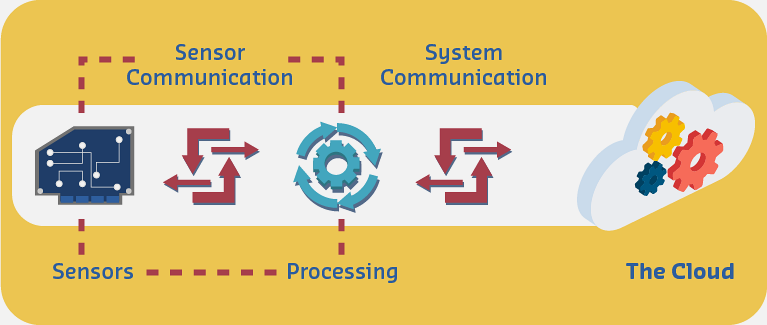
Now that we’ve learned about microcontrollers’ structure and selection criteria, we will consider the appropriate communication protocols for micros to communicate with sensors and other peripherals.
NoteAlternative View: Protocol Selection Decision Tree
%% fig-alt: Decision tree for selecting sensor-to-gateway protocols based on number of sensors, speed requirements, and complexity, guiding choice between I2C, SPI, and UART.
%%{init: {'theme': 'base', 'themeVariables': {'primaryColor': '#2C3E50', 'primaryTextColor': '#FFFFFF', 'primaryBorderColor': '#16A085', 'lineColor': '#7F8C8D', 'secondaryColor': '#ECF0F1', 'tertiaryColor': '#FFFFFF'}}}%%
flowchart TD
    START[Select Sensor Protocol] --> Q1{Multiple<br/>Sensors?}
    Q1 -->|Yes| Q2{Speed<br/>Critical?}
    Q1 -->|No| Q3{Debug<br/>Needed?}

    Q2 -->|Yes, >1 Mbps| SPI["<b>SPI</b><br/>4+ wires<br/>Up to 100 Mbps<br/>1 CS per device"]
    Q2 -->|No, <400 kbps| I2C["<b>I2C</b><br/>2 wires<br/>127 addresses<br/>Shared bus"]

    Q3 -->|Yes| UART["<b>UART</b><br/>2 wires<br/>Simple debug<br/>One device"]
    Q3 -->|No| Q4{Pins<br/>Limited?}
    Q4 -->|Yes| I2C
    Q4 -->|No| SPI

    style START fill:#2C3E50,stroke:#16A085,stroke-width:2px,color:#fff
    style I2C fill:#16A085,stroke:#2C3E50,stroke-width:2px,color:#fff
    style SPI fill:#E67E22,stroke:#2C3E50,stroke-width:2px,color:#fff
    style UART fill:#7F8C8D,stroke:#2C3E50,stroke-width:2px,color:#fff
This decision tree helps select the right sensor-to-MCU protocol. Use I2C when you have many sensors sharing a bus with limited GPIO pins. Choose SPI for high-speed peripherals like displays or SD cards. UART works best for single devices needing simple serial debugging.
%%{init: {'theme': 'base', 'themeVariables': { 'primaryColor': '#2C3E50', 'primaryTextColor': '#fff', 'primaryBorderColor': '#16A085', 'lineColor': '#16A085', 'secondaryColor': '#E67E22', 'tertiaryColor': '#7F8C8D', 'fontSize': '12px'}}}%%
graph TB
    subgraph Left["Sensor Side"]
        L5["Raw Reading<br/>0x0A5A"]
        L4["Register Access<br/>Read 0x00-0x01"]
        L3["I2C Protocol<br/>Addr 0x48"]
        L2["Electrical<br/>3.3V, 400kHz"]
        L1["Physical<br/>2 wires + GND"]
    end

    subgraph Gateway["Gateway Translation"]
        G5["JSON Payload<br/>{temp: 26.5}"]
        G4["MQTT Publish<br/>QoS 1"]
        G3["TLS 1.3<br/>Encrypted"]
        G2["TCP/IP<br/>Port 8883"]
        G1["Wi-Fi 802.11<br/>2.4 GHz"]
    end

    subgraph Right["Cloud Side"]
        R5["Database Insert<br/>time-series"]
        R4["Broker Dispatch<br/>Subscribers"]
        R3["TLS Termination<br/>Certificate verify"]
        R2["Load Balancer<br/>TCP accept"]
        R1["Internet<br/>Public IP"]
    end

    L5 -.->|"Convert 2650 → 26.5°C"| G5
    L4 -.->|"Data transformation"| G4
    L3 -.->|"Protocol bridge"| G3
    L2 -.->|"Signal conversion"| G2
    L1 -.->|"Medium change"| G1

    G5 -.-> R5
    G4 -.-> R4
    G3 -.-> R3
    G2 -.-> R2
    G1 -.-> R1

    style Left fill:#16A085,color:#fff
    style Gateway fill:#E67E22,color:#fff
    style Right fill:#2C3E50,color:#fff
Serial communication protocol is the common protocol used for microcontroller communications. It involves transmitting a series of digital pulses between sender and receiver at a specified data rate, generally divided into synchronous and asynchronous categories.
189.3.1 Asynchronous Serial Communication
⭐⭐ Intermediate
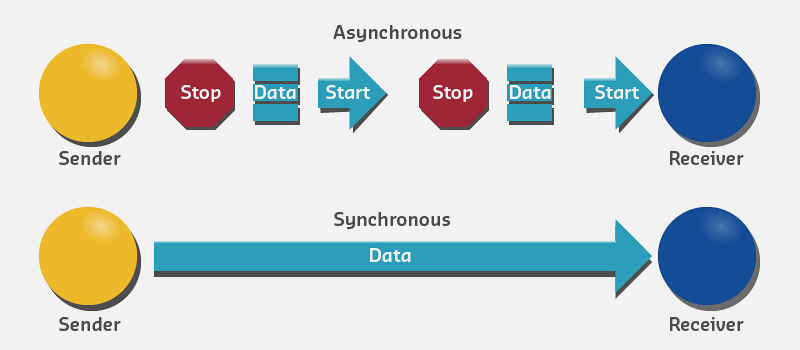
In asynchronous serial communication, transmitter and receiver manually agree on the data rate, and each manages timing independently with no common clock. The data rate for the transmitter sending pulses must be the same as the receiver listening for pulses.
189.3.1.1 Required Agreement Parameters
The transmitter and receiver must agree on: - Data rate (baud rate) - Voltage level corresponding to 1 bit or 0 bit - Signal interpretation: High voltage = 1 and low voltage = 0, or inverted
189.3.1.2 Example: 9600 bps Communication
- Both transmitter and receiver agree on voltage level interpretation for 1 bit and 0 bit
- Both ends require a common ground connection to measure voltage with same reference point
- Wire connection for transmission from sender to receiver
- Wire connection for transmission from receiver to sender
When communication is established with agreed data rate (9600 bps), the receiver reads voltage constantly on the receiving wire and interprets it every 1/9600th of a second.
189.3.1.3 Voltage Levels
Generally, in most microcontrollers: - High voltage (+5V or +3.3V) represents 1 bit - Low voltage (0V) represents 0 bit
At the end of data transmission, the receiver rebuilds the original message using the interpreted bits from voltage levels.
189.3.1.4 Common Asynchronous Protocols
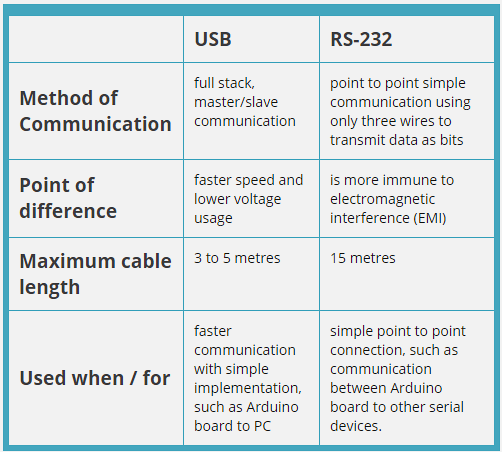
RS-232: - Long-established standard - ±12V signal levels - Long cable runs (up to 15 meters) - Common in industrial equipment
USB (Universal Serial Bus): - High-speed asynchronous serial - Host-device architecture - Power delivery capability - Hot-pluggable
%%{init: {'theme': 'base', 'themeVariables': { 'primaryColor': '#2C3E50', 'primaryTextColor': '#fff', 'primaryBorderColor': '#16A085', 'lineColor': '#16A085', 'secondaryColor': '#E67E22', 'tertiaryColor': '#7F8C8D'}}}%%
graph TB
    subgraph "I2C"
        I2C_Pins["2 Pins<br/>(SDA, SCL)"]
        I2C_Speed["Speed:<br/>100-400 kbps"]
        I2C_Devices["Multiple devices<br/>(127 max)"]
    end

    subgraph "SPI"
        SPI_Pins["4+ Pins<br/>(MISO, MOSI,<br/>SCK, CS)"]
        SPI_Speed["Speed:<br/>1-100 Mbps"]
        SPI_Devices["One device<br/>per CS line"]
    end

    subgraph "UART"
        UART_Pins["2 Pins<br/>(TX, RX)"]
        UART_Speed["Speed:<br/>9600-115200 bps"]
        UART_Devices["Point-to-point<br/>(1 device)"]
    end

    Choose{Choose<br/>Protocol}
    Choose --> |Many sensors| I2C
    Choose --> |High speed| SPI
    Choose --> |Simple serial| UART

    style I2C fill:#16A085,stroke:#2C3E50,color:#fff
    style SPI fill:#E67E22,stroke:#2C3E50,color:#fff
    style UART fill:#2C3E50,stroke:#16A085,color:#fff
%%{init: {'theme': 'base', 'themeVariables': { 'primaryColor': '#2C3E50', 'primaryTextColor': '#fff', 'primaryBorderColor': '#16A085', 'lineColor': '#16A085', 'secondaryColor': '#E67E22', 'tertiaryColor': '#7F8C8D'}}}%%
graph TB
    subgraph Application["Application Layer"]
        APP[IoT Application<br/>Sensor reading, data logging]
    end

    subgraph Driver["Driver Layer"]
        I2C_DRV[I2C Driver<br/>Address-based]
        SPI_DRV[SPI Driver<br/>CS-based]
        UART_DRV[UART Driver<br/>Point-to-point]
    end

    subgraph Physical["Physical Layer"]
        I2C_PHY[I2C Bus<br/>2 wires: SDA + SCL<br/>Open-drain, pull-ups]
        SPI_PHY[SPI Bus<br/>4 wires: MOSI MISO SCK CS<br/>Push-pull]
        UART_PHY[UART<br/>2 wires: TX + RX<br/>Async, no clock]
    end

    subgraph Devices["Connected Devices"]
        I2C_DEV[127 devices max<br/>Each has address]
        SPI_DEV[1 per CS line<br/>Full duplex]
        UART_DEV[1 device only<br/>Bidirectional]
    end

    APP --> I2C_DRV
    APP --> SPI_DRV
    APP --> UART_DRV

    I2C_DRV --> I2C_PHY
    SPI_DRV --> SPI_PHY
    UART_DRV --> UART_PHY

    I2C_PHY --> I2C_DEV
    SPI_PHY --> SPI_DEV
    UART_PHY --> UART_DEV

    style Application fill:#2C3E50,color:#fff
    style Driver fill:#E67E22,color:#fff
    style Physical fill:#16A085,color:#fff
    style Devices fill:#7F8C8D,color:#fff
{fig-alt=“Serial protocol comparison: I2C uses 2 pins (SDA, SCL) at 100-400 kbps supporting multiple devices up to 127 max; SPI uses 4+ pins (MISO, MOSI, SCK, CS) at 1-100 Mbps with one device per chip select; UART uses 2 pins (TX, RX) at 9600-115200 bps for point-to-point one device communication - choose I2C for many sensors, SPI for high speed, UART for simple serial”}
189.3.2 Synchronous Serial Communication
⭐⭐ Intermediate
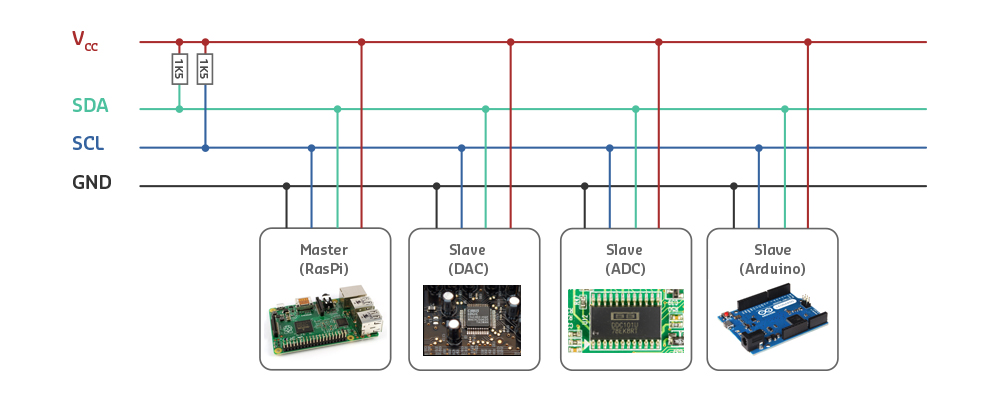
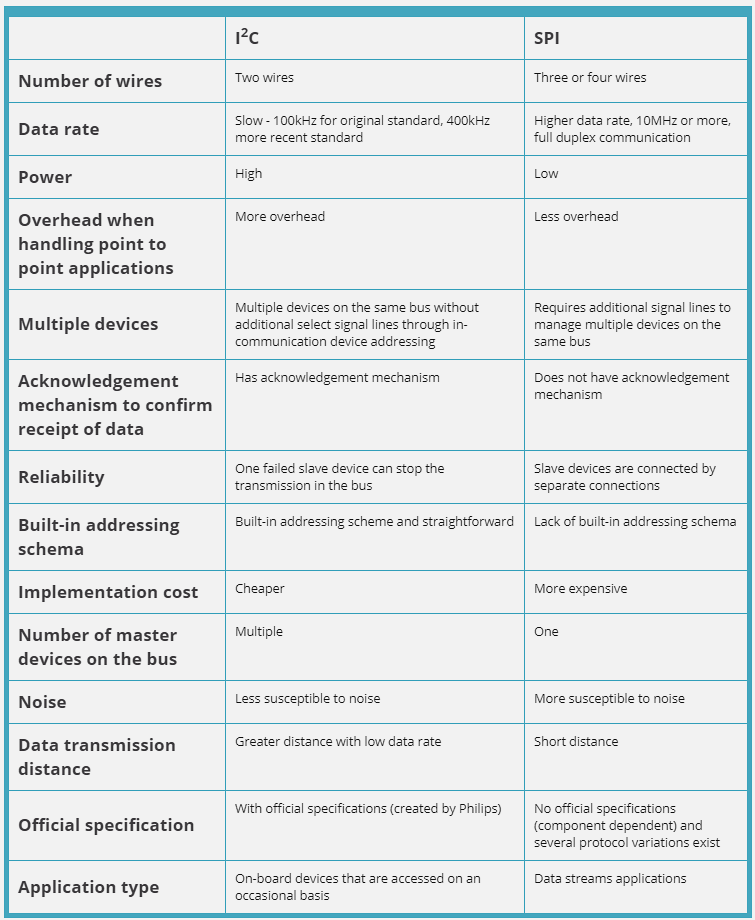
In synchronous serial communication, a clocking system manages synchronization between transmitter and receiver. The clock is either: - Embedded as part of the data frame, or - A separate clock wire manages timing during transmission
189.3.2.1 Clock Sharing
All devices in the communication line share the same clock data. With every clock pulse, one bit moves in the line. The clocking system directs devices regarding: - When to listen to incoming bits - When to discard them
This type of communication is used for simpler devices with no internal clock crystal and few memory registers.
189.3.2.2 Common Synchronous Protocols
I2C (Inter-Integrated Circuit): - 2-wire bus (SDA: data, SCL: clock) - Multi-master capable - Address-based device selection - Lower speed (100 kHz - 3.4 MHz) - Good for many low-speed peripherals
SPI (Serial Peripheral Interface): - 4-wire bus (MOSI, MISO, SCLK, SS/CS) - Master-slave architecture - Full-duplex communication - Higher speed (up to tens of MHz) - Good for high-speed, few peripherals
189.3.2.3 I2C vs SPI Comparison
| Feature | I2C | SPI |
|---|---|---|
| Wires | 2 (SDA, SCL) | 4 (MOSI, MISO, SCLK, SS) |
| Topology | Multi-master bus | Master-slave |
| Speed | 100 kHz - 3.4 MHz | Up to 50+ MHz |
| Device addressing | 7 or 10-bit addresses | Chip select pins |
| Max devices | ~127 devices | Limited by CS pins |
| Complexity | More complex protocol | Simpler protocol |
| Power | Lower | Slightly higher |
| Best for | Many slow peripherals | Few fast peripherals |
| Flow control | Built-in ACK/NACK | No built-in flow control |
%%{init: {'theme': 'base', 'themeVariables': { 'primaryColor': '#2C3E50', 'primaryTextColor': '#fff', 'primaryBorderColor': '#16A085', 'lineColor': '#16A085', 'secondaryColor': '#E67E22', 'tertiaryColor': '#7F8C8D'}}}%%
graph TB
    subgraph "I2C"
        I2C_Pins["2 Pins<br/>(SDA, SCL)"]
        I2C_Speed["Speed:<br/>100-400 kbps"]
        I2C_Devices["Multiple devices<br/>(127 max)"]
    end

    subgraph "SPI"
        SPI_Pins["4+ Pins<br/>(MISO, MOSI,<br/>SCK, CS)"]
        SPI_Speed["Speed:<br/>1-100 Mbps"]
        SPI_Devices["One device<br/>per CS line"]
    end

    subgraph "UART"
        UART_Pins["2 Pins<br/>(TX, RX)"]
        UART_Speed["Speed:<br/>9600-115200 bps"]
        UART_Devices["Point-to-point<br/>(1 device)"]
    end

    Choose{Choose<br/>Protocol}
    Choose --> |Many sensors| I2C
    Choose --> |High speed| SPI
    Choose --> |Simple serial| UART

    style I2C fill:#16A085,stroke:#2C3E50,color:#fff
    style SPI fill:#E67E22,stroke:#2C3E50,color:#fff
    style UART fill:#2C3E50,stroke:#16A085,color:#fff
{fig-alt=“Serial protocol comparison: I2C uses 2 pins (SDA, SCL) at 100-400 kbps supporting multiple devices up to 127 max; SPI uses 4+ pins (MISO, MOSI, SCK, CS) at 1-100 Mbps with one device per chip select; UART uses 2 pins (TX, RX) at 9600-115200 bps for point-to-point one device communication - choose I2C for many sensors, SPI for high speed, UART for simple serial”}
189.3.2.4 Selection Guidelines
According to the distinctions between I2C and SPI:
- I2C is more suitable when:
- Large number of peripherals needed
- High data rate NOT required
- Pin count must be minimized
- Multi-master capability needed
- SPI is a good option when:
- Low power required
- High speed needed
- Few peripherals (pin count not constrained)
- Full-duplex communication needed
Both serial communication protocols are considered stable and robust for embedded applications. The critical part is ensuring both devices on a serial bus are configured to use the exact same protocols.
WarningTradeoff: I2C vs SPI for Sensor Communication
Option A: I2C (Inter-Integrated Circuit) - 2-wire bus (SDA + SCL) supporting up to 127 addressed devices at 100kHz-3.4MHz, ideal for connecting many low-speed sensors with minimal GPIO usage.
Option B: SPI (Serial Peripheral Interface) - 4-wire interface (MOSI, MISO, SCLK, CS) offering speeds up to 50+ MHz with dedicated chip select per device, ideal for high-speed peripherals like displays, ADCs, and SD cards.
Decision Factors:
Choose I2C when: GPIO pins are limited, connecting 5+ sensors (temperature, humidity, IMU), speed under 1 Mbps is acceptable, multi-master capability is needed, or built-in addressing eliminates need for chip select management.
Choose SPI when: High data rates are required (>1 Mbps), connecting displays or high-speed ADCs, full-duplex communication is needed, fewer than 4 peripherals (CS pins available), or simpler protocol reduces debugging complexity.
Common pattern: Use I2C for sensor clusters (environmental monitoring) and SPI for high-bandwidth peripherals (SD card logging, TFT display). Many designs use both buses for different device classes.
189.4 System Communication
The large amount of data collected by sensors must be transferred to servers on the Cloud for analysis and decision making. Then necessary actions are delivered back from the Cloud to microcontrollers.
Communication between sensors to computer/Cloud is done using communication protocols based on: - Power consumption requirements - Coverage requirements - Data rate requirements - Cost requirements
189.4.1 Ethernet (Wired)
A wired network is the traditional way of connecting devices to the Internet, practical for environments with wired connections, such as smart home systems.
Advantages: - High reliability - High data rates (100 Mbps - 10 Gbps) - No interference - Secure physical connection
Disadvantages: - Requires cable infrastructure - Not suitable for mobile devices - Installation costs
Best for: Smart buildings, industrial IoT, data centers
WarningTradeoff: Wired (Ethernet) vs Wireless Connectivity for IoT
Option A: Wired Ethernet - Physical cable connection providing reliable, high-bandwidth, interference-free communication with Power over Ethernet (PoE) capability for device power.
Option B: Wireless (Wi-Fi, BLE, LoRa, Cellular) - Radio-based connectivity enabling flexible deployment, mobility, and reduced installation costs without cable infrastructure.
Decision Factors:
Choose Wired when: Devices are stationary in fixed locations, reliability is critical (industrial control, safety systems), high bandwidth is needed (video cameras, data loggers), PoE simplifies power distribution, or security requires physical network isolation.
Choose Wireless when: Devices are mobile or frequently relocated, cable installation is impractical or expensive, rapid deployment is needed, devices are battery-powered (wired adds power consumption), or legacy buildings lack cabling infrastructure.
Consider Both when: Backbone infrastructure uses Ethernet while wireless extends to end devices. Gateways bridge Ethernet backhaul with Wi-Fi/BLE sensor networks. This hybrid pattern combines reliability with flexibility.
189.4.2 Wireless Communication
However, in most IoT scenarios, Ethernet technology is not sufficient and some kind of wireless communication must be implemented based on power consumption, data rate, coverage, and cost.
%%{init: {'theme': 'base', 'themeVariables': { 'primaryColor': '#2C3E50', 'primaryTextColor': '#fff', 'primaryBorderColor': '#16A085', 'lineColor': '#16A085', 'secondaryColor': '#E67E22', 'tertiaryColor': '#7F8C8D', 'fontSize': '11px'}}}%%
graph TB
    subgraph Short["Short Range (< 100m)"]
        Wi-Fi["Wi-Fi<br/>Speed: 150+ Mbps<br/>Power: High<br/>Cost: Low"]
        BLE["BLE<br/>Speed: 2 Mbps<br/>Power: Very Low<br/>Cost: Very Low"]
        Zigbee["Zigbee<br/>Speed: 250 kbps<br/>Power: Low<br/>Cost: Low"]
    end

    subgraph Long["Long Range (> 1 km)"]
        LoRa["LoRa/LoRaWAN<br/>Speed: 50 kbps<br/>Power: Very Low<br/>Range: 15 km"]
        Cellular["Cellular (LTE-M/NB-IoT)<br/>Speed: 1 Mbps<br/>Power: Medium<br/>Range: Wide Area"]
        Sigfox["Sigfox<br/>Speed: 100 bps<br/>Power: Ultra Low<br/>Range: 40 km"]
    end

    Decision{Select Based On}
    Decision -->|High bandwidth| Wi-Fi
    Decision -->|Battery devices| BLE
    Decision -->|Mesh needed| Zigbee
    Decision -->|Remote sensors| LoRa
    Decision -->|Mobile assets| Cellular
    Decision -->|Simple telemetry| Sigfox

    style Short fill:#16A085,stroke:#2C3E50,color:#fff
    style Long fill:#E67E22,stroke:#2C3E50,color:#fff
189.5 Summary
This chapter covered deep dive into sensor-to-microcontroller protocols including i2c, spi, uart, and system communication methods.
Key Takeaways: - Protocol bridging requires understanding timing semantics, not just message translation - Gateway processor requirements depend on edge processing complexity - Different protocols (I2C, SPI, UART, MQTT) have fundamentally different characteristics - Effective gateways implement buffering, state management, and data transformation
189.7 What’s Next
Continue to Real-World Gateway Examples to learn about study real-world gateway architectures and protocol translation engine designs with practical implementation patterns.