%% fig-alt: "Seven-layer IoT security stack represented as building floors: Floor 1 physical devices at bottom, Floor 2 network, Floor 3 edge computing, Floor 4 data collection, Floor 5 data storage, Floor 6 applications, Floor 7 business and compliance at top. Each layer requires security measures and one weak layer compromises the entire system."
%%{init: {'theme': 'base', 'themeVariables': {'primaryColor':'#2C3E50','primaryTextColor':'#fff','primaryBorderColor':'#16A085','lineColor':'#16A085','secondaryColor':'#E67E22','tertiaryColor':'#7F8C8D'}}}%%
graph TB
    L7["Floor 7: Business & Compliance<br/>Legal contracts, privacy policies"]
    L6["Floor 6: Applications<br/>Mobile apps, web dashboards"]
    L5["Floor 5: Data Storage<br/>Cloud databases"]
    L4["Floor 4: Data Collection<br/>Aggregation servers"]
    L3["Floor 3: Edge Computing<br/>Local processing"]
    L2["Floor 2: Network<br/>Wi-Fi, cellular, LoRaWAN"]
    L1["Floor 1: Physical Devices<br/>Sensors, actuators"]

    L7 --> L6 --> L5 --> L4 --> L3 --> L2 --> L1

    style L1 fill:#E67E22,stroke:#2C3E50,stroke-width:2px,color:#fff
    style L2 fill:#E67E22,stroke:#2C3E50,stroke-width:2px,color:#fff
    style L3 fill:#7F8C8D,stroke:#2C3E50,stroke-width:2px,color:#fff
    style L4 fill:#7F8C8D,stroke:#2C3E50,stroke-width:2px,color:#fff
    style L5 fill:#2C3E50,stroke:#16A085,stroke-width:2px,color:#fff
    style L6 fill:#16A085,stroke:#2C3E50,stroke-width:2px,color:#fff
    style L7 fill:#16A085,stroke:#2C3E50,stroke-width:2px,color:#fff
1453 IoT Security Fundamentals
1453.1 IoT Security Fundamentals
This chapter introduces the foundational concepts of IoT device and network security, including the seven-layer security model, Cisco’s critical requirements, and why IoT security differs from traditional IT security.
TipFor Beginners: IoT Devices and Network Security
What is IoT Device and Network Security? IoT device and network security involves protecting both individual IoT devices (sensors, cameras, smart appliances) and the communication networks they use from unauthorized access, attacks, and compromise. Device security focuses on hardening the device itself through secure boot, firmware signing, and tamper detection, while network security protects data as it travels between devices, gateways, and cloud services using encryption, firewalls, and network segmentation.
Why does it matter? IoT devices are particularly vulnerable because they often have limited processing power for security features, remain deployed for 10-20 years without updates, use default passwords, and are physically accessible in public spaces. A single compromised IoT device can serve as an entry point to attack entire networks—the 2016 Mirai botnet exploited default credentials on 600,000+ IoT devices to launch massive DDoS attacks taking down major websites. Securing IoT requires protecting both the device hardware and the network infrastructure.
Key terms: | Term | Definition | |——|————| | Secure Boot | Cryptographic verification that firmware hasn’t been tampered with before device starts up | | Hardware Trojan | Malicious modification to integrated circuits during manufacturing enabling backdoor access | | Network Segmentation | Isolating IoT devices into separate network zones (VLANs) preventing lateral movement of attacks | | Side-Channel Attack | Extracting secrets by analyzing physical properties like power consumption or electromagnetic emissions | | Defense in Depth | Layering multiple independent security controls so compromise of one doesn’t breach entire system | | TPM (Trusted Platform Module) | Dedicated hardware chip providing secure key storage and cryptographic operations |
1453.2 Learning Objectives
By the end of this section, you will be able to:
- Explain the seven-layer IoT security model
- Identify Cisco’s 10 critical IoT security requirements
- Understand why IoT security differs from traditional computing
- Describe the two pillars of IoT security: device and network protection
1453.3 Getting Started (For Beginners)
1453.3.1 What is Device & Network Security? (Simple Explanation)
Analogy: Think of IoT security as “protecting your home AND the roads leading to it”.
| Security Type | Home Analogy | IoT Equivalent | What It Protects |
|---|---|---|---|
| Device Security | Locks on doors, alarm system, safe | Secure boot, firmware encryption, tamper detection | The device itself from being hacked or physically compromised |
| Network Security | Gated community, security checkpoint, traffic cameras | Firewalls, VPNs, encrypted Wi-Fi | The communication between devices from being intercepted or hijacked |
Both are needed!
- Strong locks (device security) are useless if criminals can intercept your key while you’re transmitting it (weak network security)
- Encrypted network traffic is useless if the device itself is compromised and leaking data
1453.3.2 Why Is IoT Security Harder Than Traditional Computer Security?
| Challenge | Traditional Computer | IoT Device | Why It’s Harder |
|---|---|---|---|
| Updates | Windows Update every week | Firmware update once a year (or never) | IoT devices may be inaccessible (buried in walls, on poles, in vehicles) |
| Lifespan | Replace every 3-5 years | Operate 10-20 years | Security standards from 2025 may be obsolete by 2035 |
| Resources | 16GB RAM, 8-core CPU | 64KB RAM, single-core CPU | Not enough power to run advanced security algorithms |
| Physical Access | In your home/office | On light poles, in factories, outdoors | Attackers can physically access and tamper with devices |
| Diversity | Windows/Mac/Linux | 100+ different OSes and protocols | No standard security model across all devices |
| Scale | 1-10 devices per person | Billions of devices globally | One vulnerability = millions of devices hacked |
1453.3.3 Real-World Device Security Failures
1453.3.3.1 The Jeep Hack: Network Security Bypass (2015)
What happened:
- Researchers hacked a Jeep Cherokee from 10 miles away while it was driving on the highway
- They exploited the Uconnect entertainment system (the screen in the dashboard)
- The system had a cellular connection for features like navigation and music streaming
The vulnerability:
- No authentication required to send commands to the car over the internet
- No network segmentation (entertainment system could control brakes and steering)
- No firmware verification (attackers uploaded malicious code)
Result:
- 1.4 million vehicles recalled
- Proof that network security (internet → car) and device security (entertainment system → brakes) both failed
Lesson: Even if the brakes themselves are secure, if the network path to them isn’t protected, attackers can still control them.
1453.3.3.2 The Smart Lock That Could Be Opened by Anyone (2019)
Device: Certain Bluetooth smart locks
The vulnerability:
- The lock had good encryption (AES-128)
- BUT: The encryption key was hardcoded in the device firmware
- Attackers could:
- Buy one lock ($200)
- Extract the firmware from the chip
- Reverse-engineer the hardcoded key
- Unlock ALL locks of that model using the same key
Lesson: Device security (protecting the key stored on the device) is just as important as network security (encrypting the unlock command).
TipFor Kids: Meet the Sensor Squad!
Network Security is like having guards, secret codes, and safe tunnels to protect your messages!
Imagine you want to send a secret note to your best friend across the playground. Bad kids might try to: - Read your note (spying!) - Change your note to say something different (trickery!) - Pretend to be you and send fake notes (impostor!)
Network security is like having special ways to keep your messages safe from all these sneaky tricks!
1453.3.4 The Sensor Squad Adventure: The Mystery of the Stolen Password
It was a peaceful day at Smart Home Headquarters until Sammy the Sensor noticed something strange. “Someone is trying to guess our secret password!” Sammy announced, detecting hundreds of wrong password attempts.
“Oh no!” worried Lila the LED, flickering nervously. “What if they get in and turn all the lights on and off? Or mess with the thermostat?” The team knew they needed to protect their home network from these digital villains.
Max the Microcontroller sprang into action. “First, let’s build a FIREWALL!” Max explained this was like a big wall with a guard at the gate. “The firewall will only let in messages from people we trust, and block all the strangers trying to sneak in.” Within seconds, the bad password attempts stopped - the firewall was working!
But Bella the Battery had another idea. “What about when we need to send messages outside? We should use ENCRYPTION!” Encryption was like writing in a secret code that only friends could read. Even if someone caught the message, it would look like gibberish: “HELLO” became “X7#mK9!” to anyone without the secret key.
“And one more thing,” added Sammy the Sensor wisely. “Let’s put our IoT devices on a separate network - like having a special playground just for smart devices!” This way, even if a sneaky device got hacked, it couldn’t reach the important family computers.
The Sensor Squad had built three layers of protection: a firewall guard, secret encryption codes, and separate network playgrounds. The hackers gave up and the Smart Home stayed safe! The end!
1453.3.5 Key Words for Kids
| Word | What It Means |
|---|---|
| Firewall | A digital guard that blocks bad messages and only lets good ones through |
| Encryption | Turning your message into a secret code that only your friends can read |
| Password | A secret word that proves you’re really you |
| Hacker | Someone who tries to break into computers without permission |
| Network | The invisible roads that messages travel on between devices |
| Segmentation | Splitting networks into smaller, safer sections (like separate playgrounds) |
1453.3.6 Try This at Home!
Create Your Own Secret Code!
- Write the alphabet: A B C D E F G H I J K L M N O P Q R S T U V W X Y Z
- Below it, write it shifted by 3: D E F G H I J K L M N O P Q R S T U V W X Y Z A B C
- Now encode a message! “HELLO” becomes “KHOOR”
- Give your friend the code key and see if they can decode it!
This is how real encryption works - computers use much more complicated codes, but the idea is the same. Without the secret key, the message is just scrambled letters! That’s why even if hackers catch your message, they can’t read it!
NoteAcademic Resource: Man-in-the-Middle Attack Visualization
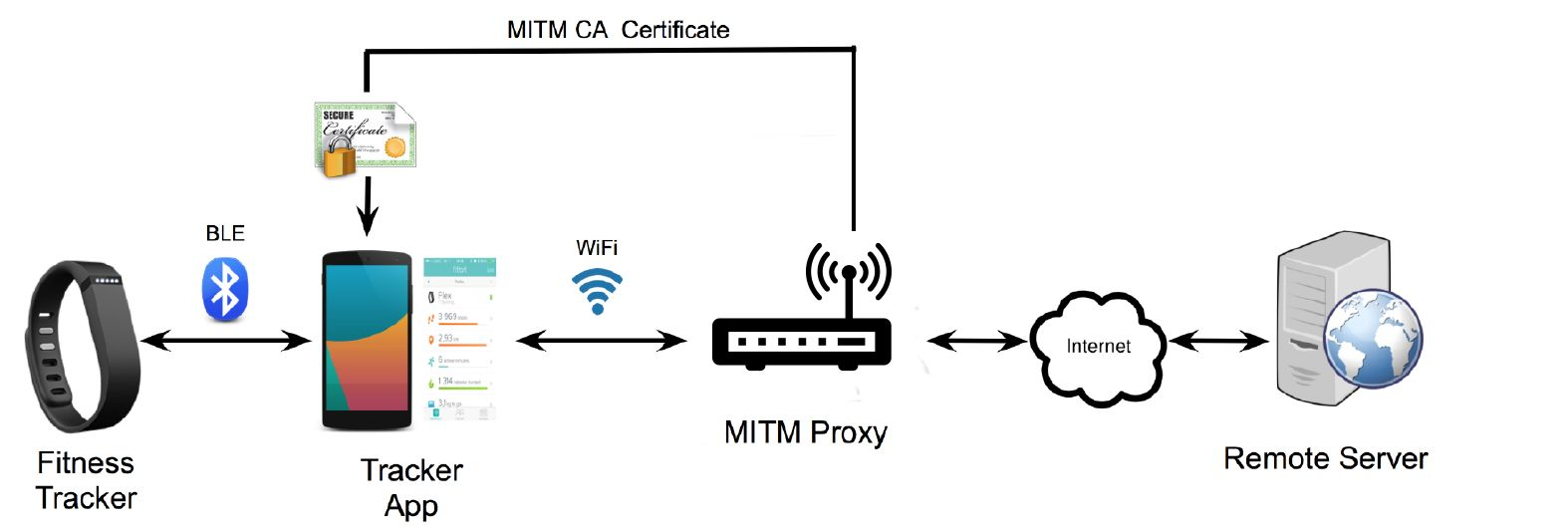
Source: University of Edinburgh - IoT Systems Security Course
This diagram shows a Man-in-the-Middle (MITM) attack against a typical IoT wearable ecosystem:
- Fitness Tracker → BLE → Mobile App: First communication hop (potentially encrypted)
- Mobile App → Wi-Fi → MITM Proxy: Attacker intercepts Wi-Fi traffic
- MITM Proxy → Internet → Remote Server: Attacker forwards (and potentially modifies) traffic
Attack Requirements: - Attacker installs fake CA certificate on victim’s phone - MITM proxy decrypts TLS traffic, reads/modifies data, re-encrypts - Victim sees valid HTTPS but all data is visible to attacker
Protection: Use certificate pinning in mobile apps to reject fake certificates.
1453.3.6.1 The Pacemaker That Could Be Hacked (2017)
Device: St. Jude Medical pacemakers (465,000 implanted patients)
The vulnerability:
- Pacemakers communicated wirelessly with doctors’ programmers for adjustments
- No authentication (any device could send commands)
- No encryption (commands sent in plaintext)
- No access control (couldn’t limit who could program the device)
Potential attack:
- Hacker could send commands to:
- Drain the battery
- Deliver incorrect shocks
- Stop pacing entirely
Result:
- FDA recall for firmware update (465,000 patients)
- Patients had to visit clinics for wireless firmware updates to add encryption
Lesson: Medical IoT devices need military-grade security because lives depend on them.
1453.4 The Two Pillars of IoT Security
NoteAcademic Resource: NPTEL IoT Course (IIT Kharagpur) - IoT Technology Pillars
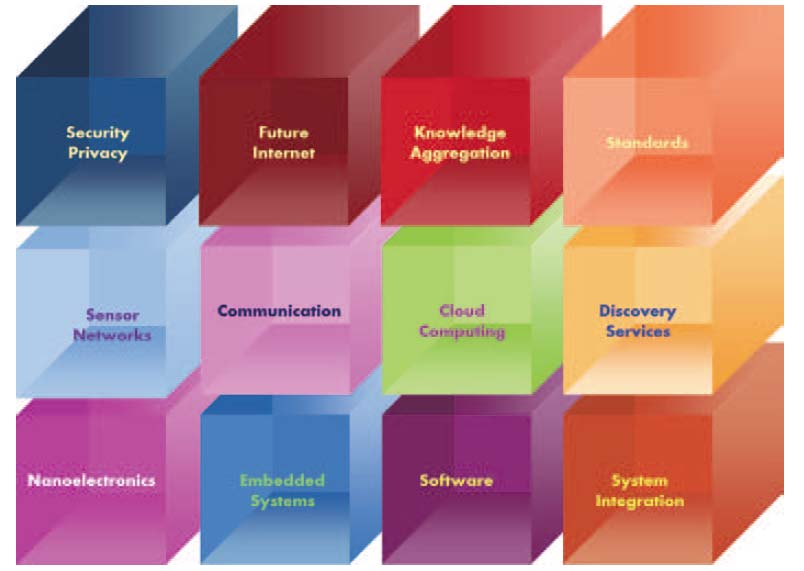
Source: NPTEL Internet of Things Course, IIT Kharagpur - This diagram positions Security/Privacy as one of twelve essential IoT technology pillars, emphasizing that security is not an add-on but a foundational building block alongside networking, cloud computing, and embedded systems.
1453.5 The Seven Layers of IoT Security
IoT security is like protecting a tall building—you need security at every floor:
NoteAlternative View: Attack Surface at Each Layer
This view shows the specific attack vectors that threaten each security layer:

Understanding attack vectors at each layer helps prioritize security investments.
NoteAlternative View: Defense Technologies per Layer
This view maps specific security technologies to each layer:
%% fig-alt: "Defense technologies mapped to security layers: Physical uses TPM, secure boot, tamper detection; Network uses TLS, WPA3, VPNs; Edge uses firewalls, IDS, segmentation; Data uses encryption, access control, audit logs; Business uses policies, training, compliance frameworks."
%%{init: {'theme': 'base', 'themeVariables': {'primaryColor':'#2C3E50','primaryTextColor':'#fff','primaryBorderColor':'#16A085','lineColor':'#16A085','secondaryColor':'#E67E22','tertiaryColor':'#7F8C8D'}}}%%
flowchart TB
    subgraph Physical["PHYSICAL LAYER"]
        P1["TPM 2.0"]
        P2["Secure Boot"]
        P3["Tamper Detection"]
        P4["Unique Device Keys"]
    end

    subgraph Network["NETWORK LAYER"]
        N1["TLS 1.3"]
        N2["WPA3"]
        N3["VPN Tunnels"]
        N4["Certificate Pinning"]
    end

    subgraph Edge["EDGE LAYER"]
        E1["Firewalls"]
        E2["IDS/IPS"]
        E3["Network Segmentation"]
        E4["Local Authentication"]
    end

    subgraph Data["DATA LAYER"]
        D1["Encryption at Rest"]
        D2["Access Control"]
        D3["Audit Logging"]
        D4["Backup & Recovery"]
    end

    subgraph Business["BUSINESS LAYER"]
        B1["Security Policies"]
        B2["Staff Training"]
        B3["Compliance Frameworks"]
        B4["Incident Response"]
    end

    Physical --> Network --> Edge --> Data --> Business

    style P1 fill:#E67E22,stroke:#2C3E50,stroke-width:2px,color:#fff
    style P2 fill:#E67E22,stroke:#2C3E50,stroke-width:2px,color:#fff
    style N1 fill:#7F8C8D,stroke:#2C3E50,stroke-width:2px,color:#fff
    style N2 fill:#7F8C8D,stroke:#2C3E50,stroke-width:2px,color:#fff
    style E1 fill:#2C3E50,stroke:#16A085,stroke-width:2px,color:#fff
    style E2 fill:#2C3E50,stroke:#16A085,stroke-width:2px,color:#fff
    style D1 fill:#16A085,stroke:#2C3E50,stroke-width:2px,color:#fff
    style D2 fill:#16A085,stroke:#2C3E50,stroke-width:2px,color:#fff
    style B1 fill:#16A085,stroke:#2C3E50,stroke-width:2px,color:#fff
    style B2 fill:#16A085,stroke:#2C3E50,stroke-width:2px,color:#fff
A defense-in-depth strategy requires security technologies at every layer.
Security must work at ALL layers:
- Floor 1 (Devices): If a hacker steals the sensor and extracts its keys → game over
- Floor 2 (Network): If they intercept Wi-Fi and decrypt it → they see all data
- Floor 3 (Edge): If they hack the local server → they control all connected devices
- Floors 4-7: Cloud, app, and business layer attacks (SQL injection, phishing, etc.)
One weak layer = entire system compromised.
1453.6 Quick Self-Check Quiz
1453.7 IoT Security Architecture
1453.7.1 Cisco’s 10 Critical IoT Security Requirements
Cisco has defined 10 essential security requirements for IoT deployments. These provide a comprehensive checklist for evaluating and implementing IoT security.
NoteAlternative View: Defense-in-Depth Concentric Rings
This visualization shows security controls as concentric protective layers:
%% fig-alt: "Concentric ring diagram showing defense-in-depth for IoT: outer ring perimeter security with firewalls and IDS, middle ring network security with VLANs and encryption, inner ring device security with secure boot and TPM, core ring data security with encryption at rest. Attackers must breach multiple rings to reach sensitive assets."
%%{init: {'theme': 'base', 'themeVariables': {'primaryColor':'#2C3E50','primaryTextColor':'#fff','primaryBorderColor':'#16A085','lineColor':'#16A085','secondaryColor':'#E67E22','tertiaryColor':'#7F8C8D'}}}%%
flowchart TB
    subgraph outer["PERIMETER SECURITY"]
        direction TB
        p1["Firewalls"]
        p2["IDS/IPS"]
        p3["DDoS Protection"]
    end
    subgraph middle["NETWORK SECURITY"]
        direction TB
        n1["VLANs"]
        n2["Encryption"]
        n3["Certificate Auth"]
    end
    subgraph inner["DEVICE SECURITY"]
        direction TB
        d1["Secure Boot"]
        d2["TPM/HSM"]
        d3["Tamper Detection"]
    end
    subgraph core["DATA SECURITY"]
        direction TB
        c1["Encryption at Rest"]
        c2["Access Control"]
    end

    outer --> middle --> inner --> core

    style outer fill:#E67E22,stroke:#2C3E50,stroke-width:2px,color:#fff
    style middle fill:#7F8C8D,stroke:#2C3E50,stroke-width:2px,color:#fff
    style inner fill:#2C3E50,stroke:#16A085,stroke-width:2px,color:#fff
    style core fill:#16A085,stroke:#2C3E50,stroke-width:2px,color:#fff
Attackers must breach multiple defensive rings to reach core assets.
NoteAlternative View: IoT vs Traditional IT Security Comparison
| Aspect | Traditional IT | IoT Security |
|---|---|---|
| Update Cycle | Weekly patches | Months/years between updates |
| Compute Resources | Abundant (run antivirus, IDS) | Extremely limited |
| Physical Access | Controlled (data centers) | Often public/outdoor |
| Lifespan | 3-5 years | 10-20+ years |
| Protocol Diversity | Standardized (TCP/IP) | Hundreds of protocols |
| Identity | Human users + service accounts | Millions of device identities |
| Scale | Thousands of endpoints | Billions of endpoints |
Understanding these differences is critical for applying appropriate security controls.
NoteAI-Generated Visual: Secure Boot Process

NoteAI-Generated Visual: Secure Element Architecture

NoteAI-Generated Visual: TPM Module Architecture

1453.8 Summary
This chapter introduced the foundational concepts of IoT security:
- Two Pillars: Device security (secure boot, firmware signing, tamper detection) and network security (encryption, firewalls, segmentation) work together
- Seven-Layer Model: Security must be implemented at every layer from physical devices to business policies
- IoT vs Traditional IT: IoT faces unique challenges including limited resources, long lifespans, physical accessibility, and massive scale
- Defense in Depth: Multiple independent security controls ensure that breaching one layer doesn’t compromise the entire system
1453.9 What’s Next
With the fundamentals established, the next chapter explores Secure Boot and Firmware Security where you’ll learn how to implement cryptographic verification of firmware, manage signing keys, and protect the boot process from tampering.
Continue to Secure Boot and Firmware Security →