%%{init: {'theme': 'base', 'themeVariables': { 'primaryColor': '#2C3E50', 'primaryTextColor': '#fff', 'primaryBorderColor': '#16A085', 'lineColor': '#E67E22', 'secondaryColor': '#16A085', 'tertiaryColor': '#E67E22', 'fontSize': '13px'}}}%%
graph TB
    ATK[Password Attack<br/>Methods]

    ATK --> BF[Brute Force<br/>Try all combinations<br/>62^8 = 218 trillion]
    ATK --> DICT[Dictionary Attack<br/>Common passwords<br/>password123, qwerty]
    ATK --> RAIN[Rainbow Tables<br/>Pre-computed hashes<br/>Instant reversal]
    ATK --> PHISH[Phishing<br/>Social engineering<br/>Trick user to reveal]

    BF --> DEF1[Defense:<br/>Account lockout<br/>Rate limiting]
    DICT --> DEF2[Defense:<br/>Complexity requirements<br/>Block common passwords]
    RAIN --> DEF3[Defense:<br/>Salted hashing<br/>bcrypt/Argon2]
    PHISH --> DEF4[Defense:<br/>User training<br/>MFA]

    style ATK fill:#2C3E50,stroke:#16A085,color:#fff
    style BF fill:#e74c3c,stroke:#c0392b,color:#fff
    style DICT fill:#e74c3c,stroke:#c0392b,color:#fff
    style RAIN fill:#e74c3c,stroke:#c0392b,color:#fff
    style PHISH fill:#E67E22,stroke:#d35400,color:#fff
    style DEF1 fill:#16A085,stroke:#0e6655,color:#fff
    style DEF2 fill:#16A085,stroke:#0e6655,color:#fff
    style DEF3 fill:#16A085,stroke:#0e6655,color:#fff
    style DEF4 fill:#16A085,stroke:#0e6655,color:#fff
1470 Authentication and Credential Security
1470.1 Learning Objectives
By the end of this chapter, you will be able to:
- Understand Password Attacks: Identify brute force, dictionary, and rainbow table attack methods
- Implement Secure Password Storage: Use bcrypt/Argon2 with per-user salts to protect credentials
- Deploy Multi-Factor Authentication: Combine knowledge, possession, and biometric factors for IoT
- Eliminate Default Credentials: Implement unique per-device credential generation
- Apply Risk Assessment: Use STRIDE threat modeling and risk formulas for security prioritization
TipFor Beginners: Authentication Security
What is Authentication Security? Authentication verifies identity—proving you are who you claim to be. In IoT, this applies to users accessing dashboards, devices connecting to brokers, and services communicating with each other. Poor authentication (like default passwords) is the #1 cause of IoT compromises.
Why does it matter? The 2016 Mirai botnet used just 62 default username/password combinations to compromise 600,000+ IoT devices. These devices then launched the largest DDoS attack in history, taking down Twitter, Netflix, and major websites for hours.
Key terms: | Term | Definition | |——|————| | Brute Force Attack | Systematically trying all possible passwords until finding the correct one | | Dictionary Attack | Trying common passwords from wordlists (password123, qwerty, admin) | | Rainbow Table | Pre-computed hash-to-password mappings for instant password reversal | | Salt | Random data added to password before hashing to prevent rainbow table attacks | | MFA | Multi-Factor Authentication—requiring multiple proof types (password + phone code) |
1470.2 Prerequisites
Before diving into this chapter, you should be familiar with:
- Encryption Principles: Understanding of hashing, encryption, and key management
- Software Vulnerabilities: Context for why authentication matters
- IoT Protocol Security: MQTT and CoAP authentication concepts
1470.3 Password Security
1470.3.1 Common Password Attacks
NoteAlternative View: Password Strength vs Attack Time
This view visualizes the relationship between password complexity and time-to-crack:
%% fig-alt: "Password strength timeline showing exponential relationship between password complexity and crack time. 4-character lowercase password cracked instantly, 6-character alphanumeric in minutes, 8-character mixed case in hours, 10-character with symbols in weeks, 12-character complex password in years, and 16-character passphrase effectively uncrackable. Each additional character exponentially increases attack difficulty."
%%{init: {'theme': 'base', 'themeVariables': { 'primaryColor': '#2C3E50', 'primaryTextColor': '#fff', 'primaryBorderColor': '#16A085', 'lineColor': '#16A085', 'secondaryColor': '#E67E22', 'tertiaryColor': '#7F8C8D'}}}%%
flowchart LR
    subgraph WEAK["WEAK PASSWORDS"]
        P1["4 chars lowercase<br/>abcd<br/>INSTANT crack"]
        P2["6 chars alphanumeric<br/>abc123<br/>< 1 MINUTE"]
        P3["8 chars mixed<br/>Abc12345<br/>~2 HOURS"]
    end

    subgraph MODERATE["MODERATE PASSWORDS"]
        P4["10 chars + symbols<br/>Abc@12345!<br/>~2 WEEKS"]
        P5["12 chars complex<br/>MyP@ss12!xyz<br/>~200 YEARS"]
    end

    subgraph STRONG["STRONG PASSWORDS"]
        P6["16+ char passphrase<br/>correct-horse-battery-staple<br/>EFFECTIVELY UNCRACKABLE"]
    end

    P1 --> P2 --> P3 --> P4 --> P5 --> P6

    GPU["Modern GPU Cluster<br/>100 billion guesses/sec"]
    GPU -.-> WEAK
    GPU -.-> MODERATE
    GPU -.-x STRONG

    style WEAK fill:#ffebee,stroke:#e74c3c
    style MODERATE fill:#fff3e0,stroke:#E67E22
    style STRONG fill:#e8f5e9,stroke:#16A085
    style P1 fill:#e74c3c,stroke:#c0392b,color:#fff
    style P2 fill:#e74c3c,stroke:#c0392b,color:#fff
    style P3 fill:#E67E22,stroke:#d35400,color:#fff
    style P4 fill:#E67E22,stroke:#d35400,color:#fff
    style P5 fill:#16A085,stroke:#0e6655,color:#fff
    style P6 fill:#16A085,stroke:#0e6655,color:#fff
    style GPU fill:#2C3E50,stroke:#16A085,color:#fff
Password Policy Recommendations: - IoT Device Admin: Minimum 12 characters, random generation required - API Keys: Minimum 32 characters, cryptographically random - User Passwords: Minimum 12 characters, passphrase recommended - Never: Use dictionary words, personal info, or common patterns
NoteAlternative View: Authentication Factor Comparison
This view compares different authentication factors by security strength and usability for IoT contexts:
%% fig-alt: "Authentication factor comparison for IoT showing three categories plotted by security strength and implementation complexity. Something You Know (passwords, PINs) is lowest security but easiest to implement on constrained devices. Something You Have (certificates, hardware tokens) provides medium-high security with moderate complexity. Something You Are (biometrics) provides highest security but requires specialized hardware."
%%{init: {'theme': 'base', 'themeVariables': { 'primaryColor': '#2C3E50', 'primaryTextColor': '#fff', 'primaryBorderColor': '#16A085', 'lineColor': '#16A085', 'secondaryColor': '#E67E22', 'tertiaryColor': '#7F8C8D'}}}%%
flowchart TB
    subgraph KNOW["SOMETHING YOU KNOW"]
        K1["Passwords<br/>Security: Low-Medium<br/>IoT: Easily stolen via network"]
        K2["PINs<br/>Security: Low<br/>IoT: Limited keypad input"]
        K3["Security Questions<br/>Security: Very Low<br/>IoT: Not applicable"]
    end

    subgraph HAVE["SOMETHING YOU HAVE"]
        H1["X.509 Certificates<br/>Security: High<br/>IoT: IDEAL for device auth"]
        H2["Hardware Tokens<br/>Security: High<br/>IoT: Physical connection needed"]
        H3["Smartphone App<br/>Security: Medium<br/>IoT: Good for user auth"]
    end

    subgraph ARE["SOMETHING YOU ARE"]
        A1["Fingerprint<br/>Security: High<br/>IoT: Specialized sensor needed"]
        A2["Face Recognition<br/>Security: Medium-High<br/>IoT: Camera required"]
        A3["Behavioral<br/>Security: Medium<br/>IoT: Continuous auth possible"]
    end

    KNOW -.->|"Combine for MFA"| HAVE
    HAVE -.->|"Combine for MFA"| ARE

    IOT["IoT Best Practice:<br/>Device Certificates (HAVE)<br/>+ API Tokens (KNOW)<br/>+ Behavioral Analysis (ARE)"]

    H1 --> IOT
    K1 --> IOT
    A3 --> IOT

    style KNOW fill:#ffebee,stroke:#e74c3c
    style HAVE fill:#e8f5e9,stroke:#16A085
    style ARE fill:#e3f2fd,stroke:#2C3E50
    style IOT fill:#16A085,stroke:#0e6655,color:#fff
    style H1 fill:#16A085,stroke:#0e6655,color:#fff
IoT Authentication Recommendations: - Device-to-Cloud: X.509 certificates stored in secure element - User-to-Device: OAuth 2.0 with smartphone MFA - Device-to-Device: Pre-shared keys or mutual TLS - Continuous Auth: Behavioral analysis detecting anomalous patterns
1470.3.2 Default IoT Credentials (Never Use!)
Top 5 default credentials compromising IoT devices:
support/supportadmin/adminadmin/0000user/userroot/12345
Mirai Botnet: Used 62 default username/password combinations to compromise thousands of IoT devices.
1470.3.3 Multi-Factor Authentication
%%{init: {'theme': 'base', 'themeVariables': { 'primaryColor': '#2C3E50', 'primaryTextColor': '#fff', 'primaryBorderColor': '#16A085', 'lineColor': '#E67E22', 'secondaryColor': '#16A085', 'tertiaryColor': '#E67E22', 'fontSize': '13px'}}}%%
graph TB
    MFA[Multi-Factor<br/>Authentication]

    MFA --> K[Something You Know<br/>Password, PIN]
    MFA --> H[Something You Have<br/>Phone, Token, Card]
    MFA --> A[Something You Are<br/>Fingerprint, Face ID]

    K --> LOGIN[Secure Login<br/>Requires 2+ Factors]
    H --> LOGIN
    A --> LOGIN

    LOGIN --> SEC[Enhanced Security<br/>Attacker needs multiple factors]

    style MFA fill:#2C3E50,stroke:#16A085,color:#fff
    style K fill:#16A085,stroke:#0e6655,color:#fff
    style H fill:#E67E22,stroke:#d35400,color:#fff
    style A fill:#16A085,stroke:#0e6655,color:#fff
    style LOGIN fill:#2C3E50,stroke:#16A085,color:#fff
    style SEC fill:#16A085,stroke:#0e6655,color:#fff
NIST Authentication Cornerstones: 1. Something you know (password) 2. Something you have (ID badge, cryptographic key) 3. Something you are (biometrics)
1470.4 Risk Assessment and Mitigation
1470.4.1 Risk Components
%%{init: {'theme': 'base', 'themeVariables': { 'primaryColor': '#2C3E50', 'primaryTextColor': '#fff', 'primaryBorderColor': '#16A085', 'lineColor': '#E67E22', 'secondaryColor': '#16A085', 'tertiaryColor': '#E67E22', 'fontSize': '13px'}}}%%
graph LR
    RISK[Risk Assessment]

    RISK --> AV[Asset Value<br/>What needs protection?<br/>$10M smart grid]
    RISK --> VUL[Vulnerability<br/>What are the weaknesses?<br/>Unpatched firmware]
    RISK --> THR[Threat Likelihood<br/>Who might attack?<br/>Nation-state APT]

    AV --> CALC[Risk Score<br/>Value x Vuln x Threat]
    VUL --> CALC
    THR --> CALC

    CALC --> PRIOR[Priority<br/>High/Medium/Low]

    style RISK fill:#2C3E50,stroke:#16A085,color:#fff
    style AV fill:#E67E22,stroke:#d35400,color:#fff
    style VUL fill:#e74c3c,stroke:#c0392b,color:#fff
    style THR fill:#E67E22,stroke:#d35400,color:#fff
    style CALC fill:#2C3E50,stroke:#16A085,color:#fff
    style PRIOR fill:#16A085,stroke:#0e6655,color:#fff
Risk Formula: \(\text{Risk} = \text{Asset Value} \times \text{Vulnerability} \times \text{Threat Likelihood}\)
1470.4.2 STRIDE Threat Model
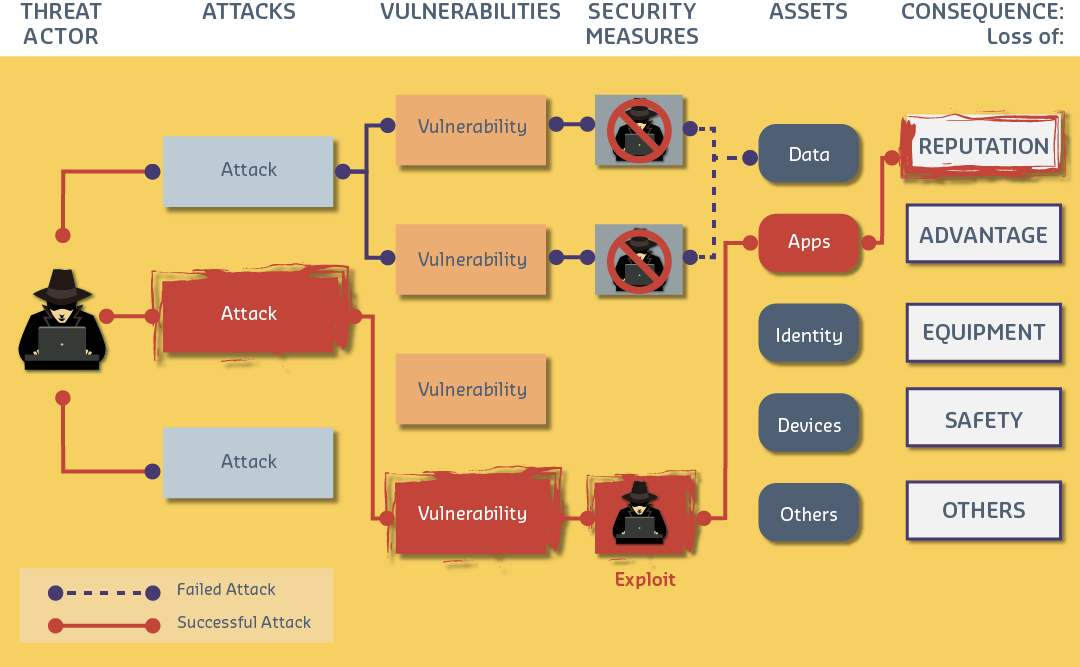
Spoofing - Impersonating user/device Tampering - Modifying data/code Repudiation - Denying actions Information Disclosure - Data leaks Denial of Service - Service disruption Escalation of Privilege - Unauthorized access elevation
1470.4.3 Mitigation Strategies
Risk mitigation frameworks assess vulnerabilities using CVSS scoring, map threats to STRIDE categories, and recommend component-specific and severity-based mitigations. Production systems should integrate with vulnerability management platforms and incident response procedures.
1470.5 Knowledge Check
Question 1: A password database stores: alice:5f4dcc3b5aa765d61d8327deb882cf99, bob:5f4dcc3b5aa765d61d8327deb882cf99. Both hashes are identical. What vulnerability does this reveal?
Unsalted hashes are vulnerable! Identical hashes mean Alice and Bob have the same password. Attack vectors: 1) Rainbow tables: Pre-computed hash tables mapping common passwords to hashes (5f4dcc3b... = “password”), 2) Pattern analysis: If 10% of users have same hash, it’s a common password worth cracking. Proper salting: alice:salt1:hash(password+salt1), bob:salt2:hash(password+salt2). Even with same password, different salts produce different hashes. Modern best practice: bcrypt/scrypt/argon2 with per-user random salt.
Question 2: Using STRIDE threat modeling, an attacker intercepts MQTT messages and modifies a thermostat command from “set_temp:20” to “set_temp:90”. Which STRIDE category is this?
This is Tampering—unauthorized modification of data! STRIDE categories: S - Spoofing: Impersonating another entity, T - Tampering: Modifying data/code (THIS ATTACK), R - Repudiation: Denying actions occurred, I - Information Disclosure: Unauthorized data access, D - Denial of Service: Preventing legitimate access, E - Elevation of Privilege: Gaining unauthorized permissions. Mitigation for Tampering: Message Authentication Code (HMAC), TLS, digital signatures.
Question 3: An IoT system uses default MQTT credentials (username: admin, password: admin). An attacker finds this in device firmware. What attack vector enabled this, and what’s the mitigation?
Default credentials are a critical vulnerability! Attack chain: 1) Firmware extraction: Attacker dumps firmware from device (UART, JTAG), 2) Binary analysis: Extract hardcoded credentials, 3) Mass exploitation: ALL devices of this model use same credentials. Proper mitigation: 1) Unique per-device credentials: Generate during manufacturing, store in secure element, 2) Forced credential change: Require users to change defaults on first boot, 3) Certificate-based auth: Use device-specific X.509 certificates instead of passwords.
Question 4: Risk assessment formula: Risk = Vulnerability x Threat x Asset Value. An IoT system has: Critical vulnerability (10/10), Low threat (2/10, air-gapped network), High asset value (8/10). Calculate risk score and priority.
Risk = 10 x 2 x 8 = 160/1000 = 16% = MEDIUM. All three factors matter! Why not CRITICAL?: The critical vulnerability exists, but low threat likelihood (air-gapped network) reduces overall risk. Comparison: Same vulnerability in internet-facing system with Threat = 10/10 yields Risk = 800/1000 = CRITICAL. Key insight: Don’t prioritize only on vulnerability severity—consider likelihood (threat) and impact (asset value).
Question 5: An IoT company enforces password policy: minimum 8 characters, requires uppercase, lowercase, numbers, symbols. Users complain they can’t remember passwords and write them on sticky notes. What security principle is violated?
Security vs. Usability paradox! Overly strict password policies backfire: 1) Users write passwords down (physical security risk), 2) Users reuse passwords across sites (credential stuffing), 3) Users make predictable patterns (Password1!, Password2!). NIST 800-63B modern guidance: 1) Length > Complexity: Minimum 8 chars but allow passphrases, 2) No mandatory complexity: Users create stronger passwords when not forced into patterns, 3) Check against breach databases: Block “Password123!” even if it meets complexity rules, 4) Multi-Factor Authentication: Stronger than any password policy.
Question 6: A password manager recommends: Tr0ub4dor&3 (11 chars, complex) vs correct horse battery staple (28 chars, simple words). Which is more secure against modern attacks?
Length beats complexity! Entropy comparison: Complex 11-char (Tr0ub4dor&3): ~44 bits entropy. Simple 28-char passphrase (correct horse battery staple): ~77 bits entropy (4 words from 7,776-word wordlist). Why passphrases win: 1) Exponential growth: Each added character/word multiplies combinations, 2) Harder to crack: 77 bits = centuries vs 44 bits = hours-days, 3) Easier to remember: “correct horse battery staple” > “Tr0ub4dor&3”. Best practice: 4-5 random words OR 16+ random characters, password manager for storage, MFA as backup.
1470.6 Summary
This chapter covered authentication and credential security:
Password Security: - Attack methods: Brute force, dictionary, rainbow tables, phishing - Defense: Salted hashing (bcrypt/Argon2), account lockout, complexity requirements - Length beats complexity: 28-char passphrase > 11-char complex password
Default Credentials: - #1 cause of IoT compromise (Mirai botnet used 62 default credentials) - Mitigation: Unique per-device credentials, forced password change on first boot
Multi-Factor Authentication: - Three factors: Know (password), Have (token), Are (biometric) - IoT recommendation: Device certificates + API tokens + behavioral analysis
Risk Assessment: - Risk = Vulnerability x Threat x Asset Value - STRIDE: Spoofing, Tampering, Repudiation, Information Disclosure, DoS, Elevation of Privilege - Prioritize by risk score, not just vulnerability severity
1470.7 What’s Next
Continue to Firmware Security and Updates to learn about secure boot, code signing, OTA updates, and rollback protection for IoT devices.