%%{init: {'theme': 'base', 'themeVariables': { 'primaryColor': '#2C3E50', 'primaryTextColor': '#fff', 'primaryBorderColor': '#16A085', 'lineColor': '#E67E22', 'secondaryColor': '#7F8C8D', 'tertiaryColor': '#ECF0F1', 'fontSize': '14px'}}}%%
graph LR
    subgraph Traditional["Traditional Radio (FSK)"]
        T1[Fixed Frequency Signal] --> T2[Interference at<br/>that frequency] --> T3[Signal Lost]
    end

    subgraph LoRa["LoRa Chirp Spread Spectrum"]
        L1[Sweeping Frequency<br/>Pattern] --> L2[Interference affects<br/>only part of chirp] --> L3[Pattern Still<br/>Detectable]
    end

    style Traditional fill:#E67E22,stroke:#2C3E50,stroke-width:2px,color:#fff
    style LoRa fill:#16A085,stroke:#2C3E50,stroke-width:2px,color:#fff
    style T1 fill:#ECF0F1,stroke:#7F8C8D,stroke-width:1px,color:#2C3E50
    style T2 fill:#ECF0F1,stroke:#7F8C8D,stroke-width:1px,color:#2C3E50
    style T3 fill:#ECF0F1,stroke:#7F8C8D,stroke-width:1px,color:#2C3E50
    style L1 fill:#ECF0F1,stroke:#7F8C8D,stroke-width:1px,color:#2C3E50
    style L2 fill:#ECF0F1,stroke:#7F8C8D,stroke-width:1px,color:#2C3E50
    style L3 fill:#ECF0F1,stroke:#7F8C8D,stroke-width:1px,color:#2C3E50
1083 LoRa Modulation and Spreading Factors
1083.1 Learning Objectives
By the end of this chapter, you should be able to:
- Explain how Chirp Spread Spectrum (CSS) modulation works
- Understand why CSS provides interference immunity
- Configure and calculate spreading factor trade-offs
- Calculate battery life based on spreading factor selection
- Design payload sizes for different spreading factors
- Identify scenarios to avoid with LoRa modulation
1083.2 What is LoRa?
LoRa (Long Range) is a physical layer modulation technique developed by Semtech Corporation. It uses Chirp Spread Spectrum (CSS) modulation to achieve long-range communication with excellent interference immunity.
1083.2.1 How LoRa Works: Chirp Spread Spectrum Explained Simply
Before diving into technical details, let’s understand the core innovation that makes LoRa work: Chirp Spread Spectrum (CSS).
1083.2.1.1 The Whisper vs Shout Analogy
Imagine trying to communicate across a noisy stadium filled with 50,000 screaming fans:
Option 1: Traditional Radio (FSK, like walkie-talkies) - Shout one word loudly at a fixed frequency - If there’s interference at that frequency, the word is completely lost - Like yelling “HELLO” as loud as possible and hoping it gets through the noise
Option 2: LoRa Chirp Spread Spectrum - Whisper the word slowly while continuously changing your pitch from low to high - Even in noise, the receiver can detect the pitch-changing pattern - Like singing “HELLLLLLLOOOOOOO” with rising pitch - the pattern stands out
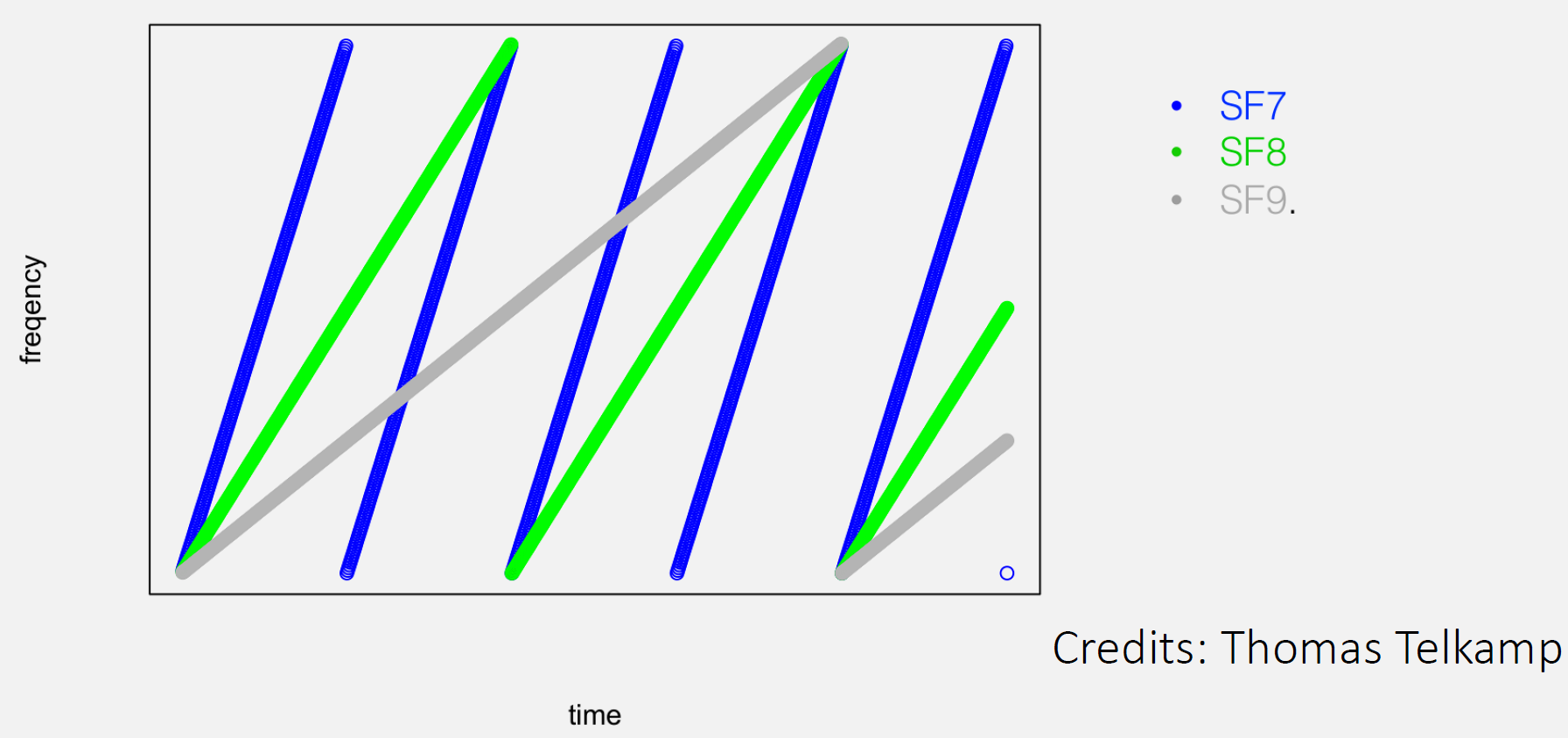
That pitch-changing whisper is a “chirp” - a signal that sweeps from low frequency to high frequency over time.
1083.2.1.2 Why Chirps Work Better Than Fixed Frequencies
Key Advantages:
Interference Resistance: Noise affects specific frequencies, not sweeping patterns. Even if interference corrupts part of the chirp, the overall pattern remains detectable.
Pattern Recognition: The receiver knows the exact chirp pattern to “listen for” - like recognizing a friend’s voice in a crowd. You know their speech pattern even if you can’t hear every word.
Sub-Noise Floor Detection: LoRa receivers can detect signals below the noise floor (signal weaker than background noise) by correlating against the known chirp pattern - impossible with traditional modulation.
Real-World Analogy: Imagine trying to spot your friend in a crowded airport: - Traditional radio: Looking for a person wearing a red shirt (if 100 others wear red, you’re confused) - Chirp Spread Spectrum: Looking for a person doing a specific dance move sequence (even in a crowd, the pattern is unique)
1083.2.1.3 The Trade-off: Time vs Interference Immunity
Chirps take longer to transmit data than traditional modulation:
| Modulation | Time to Send “Hello” | Range | Interference Immunity |
|---|---|---|---|
| FSK (walkie-talkie) | 10 ms | 500 m | Low (noise destroys signal) |
| LoRa SF7 (fast chirp) | 56 ms | 2 km | High (survives 19.5 dB noise) |
| LoRa SF12 (slow chirp) | 1,320 ms | 15 km | Very High (survives 27 dB noise) |
Key Insight: By spreading the signal over time (slower transmission), LoRa gains: - 4-30x longer range than FSK - Works in noise levels that would completely destroy FSK signals - Perfect for IoT sensors (don’t need speed, desperately need range)
This is the fundamental trade-off that makes LoRa ideal for IoT: sacrifice speed to gain range and interference immunity.
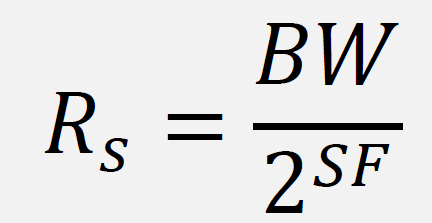
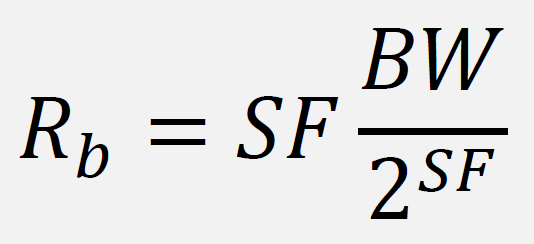
1083.3 Understanding Spreading Factor (SF)
Think of spreading factor like speaking speed when trying to communicate across a noisy room:
- SF7 = Speaking fast and clearly (works when close, 5.5 kbps, ~2 km range)
- SF8 = Speaking a bit slower (medium distance, 3.1 kbps, ~4 km range)
- SF9 = Speaking deliberately (1.8 kbps, ~6 km range)
- SF10 = Speaking very slowly (980 bps, ~8 km range)
- SF11 = Speaking word-by-word (440 bps, ~11 km range)
- SF12 = Speaking syllable-by-syllable (250 bps, ~15 km range)
The Trade-off: Slower speaking (higher SF) = farther reach but uses more battery and airtime
Real Numbers Example:
Sending the same message "Temperature: 23C":
- SF7: Takes 56 milliseconds, reaches 2 km
- SF12: Takes 1,320 milliseconds (1.3 seconds!), reaches 15 km
- SF12 uses 24x MORE POWER than SF7
This is why Adaptive Data Rate (ADR) is crucial - it automatically adjusts SF based on distance to gateway!
NoteAlternative View: Spreading Factor Trade-offs
%%{init: {'theme': 'base', 'themeVariables': { 'primaryColor': '#2C3E50', 'primaryTextColor': '#fff', 'primaryBorderColor': '#16A085', 'lineColor': '#E67E22', 'secondaryColor': '#7F8C8D'}}}%%
graph LR
    subgraph SF7["SF7 (Fast)"]
        S7_1["5.5 kbps"]
        S7_2["~2 km range"]
        S7_3["Low airtime"]
    end

    subgraph SF10["SF10 (Balanced)"]
        S10_1["980 bps"]
        S10_2["~8 km range"]
        S10_3["Medium airtime"]
    end

    subgraph SF12["SF12 (Long Range)"]
        S12_1["250 bps"]
        S12_2["~15 km range"]
        S12_3["High airtime"]
    end

    SF7 -->|"More range"| SF10
    SF10 -->|"More range"| SF12

    style SF7 fill:#16A085,stroke:#2C3E50
    style SF10 fill:#E67E22,stroke:#2C3E50
    style SF12 fill:#2C3E50,stroke:#16A085
This diagram illustrates the LoRa spreading factor trade-off: higher SF gives longer range but slower data rate and more time-on-air (battery consumption).
TipLoRa Key Characteristics
- Modulation: Chirp Spread Spectrum (CSS)
- Frequency Bands: ISM bands (varies by region)
- Range: 2-15 km (urban), up to 40 km (rural)
- Data Rate: 0.3 to 50 kbps
- Proprietary: Owned by Semtech
1083.4 Battery Life Calculation: Real Numbers
Let’s calculate how long a LoRaWAN sensor actually runs on batteries:
Example Setup: Smart agriculture soil moisture sensor - Battery: 2x AA batteries (3000 mAh at 3V) - Transmission: Every 15 minutes (96 messages/day) - Payload: 20 bytes (sensor reading + metadata) - Spreading Factor: SF10 (medium distance, 5 km)
Power Consumption Breakdown:
| Activity | Current Draw | Duration | Energy |
|---|---|---|---|
| Sleep mode | 1 uA (0.001 mA) | 14 min 59.6 sec | 0.25 mAh/day |
| Transmit (SF10) | 120 mA | 370 ms x 96/day | 1.18 mAh/day |
| Receive windows | 15 mA | 2 sec x 96/day | 0.08 mAh/day |
| Sensor reading | 5 mA | 1 sec x 96/day | 0.13 mAh/day |
| TOTAL | - | - | 1.64 mAh/day |
Battery Life Calculation:
Battery capacity: 3000 mAh
Daily consumption: 1.64 mAh
Battery life = 3000 / 1.64 = 1,829 days = 5.0 years
Impact of Spreading Factor on Battery Life:
Same setup but changing only SF:

SF7  (56 ms airtime):  0.18 mAh/day TX -> 10.4 years battery life
SF10 (370 ms airtime): 1.18 mAh/day TX ->  5.0 years battery life
SF12 (1320 ms airtime): 4.22 mAh/day TX ->  1.9 years battery life

Conclusion: Using SF12 when SF7 would work CUTS battery life by 5x!
Key Insight: Sleep current (1 uA) is negligible compared to TX current (120 mA). The radio transmit time dominates power consumption, which is why lower spreading factors (shorter airtime) dramatically extend battery life.
1083.5 LoRa Technology Summary
| Property | Details |
|---|---|
| Name | LoRa |
| Standard protocol is based on | Chirp spread spectrum (CSS) radio modulation technology |
| Designed for | For low power and low cost receivers in IoT environment. Security in LoRaWAN is handled through network and application layers |
| Connection range | Kilometres (greater than cellular) |
| Data rate | 0.3-50 Kbps |
1083.6 What Would Happen If… (Scenarios to Avoid)
Scenario 1: What if you disabled Adaptive Data Rate (ADR)? - Result: All devices use SF12 even when close to gateway - Impact: 24x more power consumption, batteries die in 6 months instead of 10 years - Network impact: Massive congestion, collisions, messages lost - Lesson: ALWAYS enable ADR for stationary devices
Scenario 2: What if you used LoRaWAN for real-time video surveillance? - Result: Complete failure - LoRaWAN’s 0.3-50 kbps is 10,000x too slow - Math: HD video needs 5 Mbps. LoRaWAN SF7 max = 5.5 kbps. Would take 15 minutes to send 1 second of video! - Lesson: LoRaWAN is for SMALL, INFREQUENT messages (sensors, meters), NOT media streaming
Scenario 3: What if your sensor sends messages every 10 seconds? - Result: Violates duty cycle regulations, network bans your device - Duty Cycle: EU allows 1% (36 sec/hour), US allows 4% (144 sec/hour) - Math: At SF10 (370 ms airtime), you can send MAX 97 messages/hour in EU - Every 10 sec = 360 messages/hour = 3.7% duty cycle = ILLEGAL in EU - Lesson: LoRaWAN is designed for infrequent updates (minutes to hours between messages)
Scenario 4: What if you deployed 10,000 Class C devices (always listening)? - Result: Batteries drain in days, massive downlink congestion - Power: Class C consumes 15 mA continuous (sleep impossible) -> battery life <1 week - Network: 10,000 devices all listening = 10,000 ACK messages for every broadcast - Lesson: Use Class A for battery devices, Class C ONLY for mains-powered actuators
Scenario 5: What if your gateway is 20 km away in dense forest? - Result: Even SF12 may not reach - need line of sight or intermediate gateway - Math: SF12 rated for 15 km assumes good conditions (Fresnel zone clear) - Trees: Attenuation of 10-20 dB reduces range by 50-75% - Lesson: LoRaWAN range specs assume clear line of sight - real world needs margin
1083.7 Common Pitfalls with LoRa Modulation
CautionPitfall: Confusing LoRa Range with LoRaWAN Range
The Mistake: Assuming LoRaWAN achieves the same 15-40 km range as raw LoRa modulation in marketing materials.
Why It Happens: Vendors quote maximum LoRa physical layer range (achieved in ideal line-of-sight conditions with high antennas) without accounting for LoRaWAN protocol overhead, duty cycle limits, and real-world deployment conditions.
The Fix: Plan for realistic LoRaWAN ranges: 2-5 km in dense urban, 5-10 km in suburban, and 10-15 km in rural with clear line of sight. Always conduct a site survey with test devices before finalizing gateway placement. Budget for 2-3x more gateways than theoretical calculations suggest.
CautionPitfall: Ignoring Regional Duty Cycle Regulations
The Mistake: Designing LoRaWAN applications assuming unlimited message frequency, then discovering devices are banned from the network for exceeding duty cycle limits.
Why It Happens: Different regions have different duty cycle limits (EU: 1%, US: no limit but dwell time restrictions). Developers test in one region and deploy in another without adjustment.
The Fix: Always calculate worst-case airtime using SF12. Implement duty cycle tracking in firmware. Design for the most restrictive region you’ll deploy in.
1083.8 Real-World Success Stories
TipReal-World Success Story: Smart Agriculture
Company: A vineyard in Napa Valley, California Challenge: Monitor soil moisture across 300 acres with no cellular coverage Solution: Deployed 200 LoRaWAN sensors with 2 gateways
Results: - 25% reduction in water usage through precision irrigation - Sensors run 8+ years on batteries (Class A, SF9 average) - Total infrastructure cost: $4,000 (vs $50,000+ for cellular) - ROI achieved in 6 months through water savings
Key Insight: LoRaWAN’s long range (8 km coverage per gateway) and low power made this deployment economically viable where no other technology could work.
TipReal-World Success Story: Healthcare Fall Detection
Company: Eldercare facility in the Netherlands Challenge: Detect resident falls and wandering in a 10-building campus Solution: Deployed 500 LoRaWAN wearable pendants with 4 indoor gateways
Results: - Average alert time: 12 seconds from fall to staff notification - Pendant battery life: 2 years (one charge per week via inductive charging) - Coverage: 100% including basements and elevators - False positive rate: <2% using accelerometer + barometer fusion
Key Insight: LoRaWAN’s excellent indoor penetration (sub-GHz frequencies) and low power enabled always-on safety monitoring that Bluetooth or Wi-Fi couldn’t achieve across multiple buildings.
1083.9 Summary
This chapter covered LoRa modulation fundamentals:
- Chirp Spread Spectrum: LoRa uses CSS modulation for excellent interference immunity
- Spreading Factors: SF7-SF12 trade off range, data rate, and power consumption
- Battery Life: Lower SF = dramatically longer battery life (SF7 vs SF12 = 5x difference)
- Key Trade-off: Speed sacrificed for range and interference immunity
- Common Pitfalls: Confusing marketing range with real-world range, ignoring duty cycle
1083.10 What’s Next
Continue to LoRaWAN vs Other LPWANs to understand how LoRaWAN compares to Sigfox and NB-IoT, and when to choose each technology.
Alternative paths: - LoRaWAN Network Architecture - Understand gateways, network servers, and device classes - ADR Optimization - Deep dive into Adaptive Data Rate algorithm