709  RPL Routing Modes and Traffic Patterns

709.1 RPL Routing Modes

RPL supports two modes with different memory/performance trade-offs:

709.1.1 Storing Mode

Each node maintains routing table for its sub-DODAG.

%%{init: {'theme': 'base', 'themeVariables': { 'primaryColor': '#2C3E50', 'primaryTextColor': '#fff', 'primaryBorderColor': '#16A085', 'lineColor': '#16A085', 'secondaryColor': '#E67E22', 'tertiaryColor': '#7F8C8D'}}}%%
graph TB
    A["ROOT A<br/>Rank: 0<br/>Routing Table:<br/>B→B, C→B, D→C<br/>E→B, F→B"]
    B["Node B<br/>Rank: 100<br/>Routing Table:<br/>E→E, F→F"]
    C["Node C<br/>Rank: 100<br/>Routing Table:<br/>D→D"]
    D["Node D<br/>Rank: 200"]
    E["Node E<br/>Rank: 200"]
    F["Node F<br/>Rank: 200"]

    A --> B
    A --> C
    B --> E
    B --> F
    C --> D

    style A fill:#2C3E50,stroke:#16A085,color:#fff,stroke-width:3px
    style B fill:#16A085,stroke:#2C3E50,color:#fff
    style C fill:#16A085,stroke:#2C3E50,color:#fff
    style D fill:#E67E22,stroke:#2C3E50,color:#fff
    style E fill:#E67E22,stroke:#2C3E50,color:#fff
    style F fill:#E67E22,stroke:#2C3E50,color:#fff

Figure 709.1: RPL Storing mode with distributed routing tables at each node for optimal downward path forwarding

{fig-alt=“RPL Storing mode showing distributed routing tables: ROOT maintains routes to all nodes, intermediate nodes B and C maintain routes to their descendants, enabling distributed forwarding decisions”}
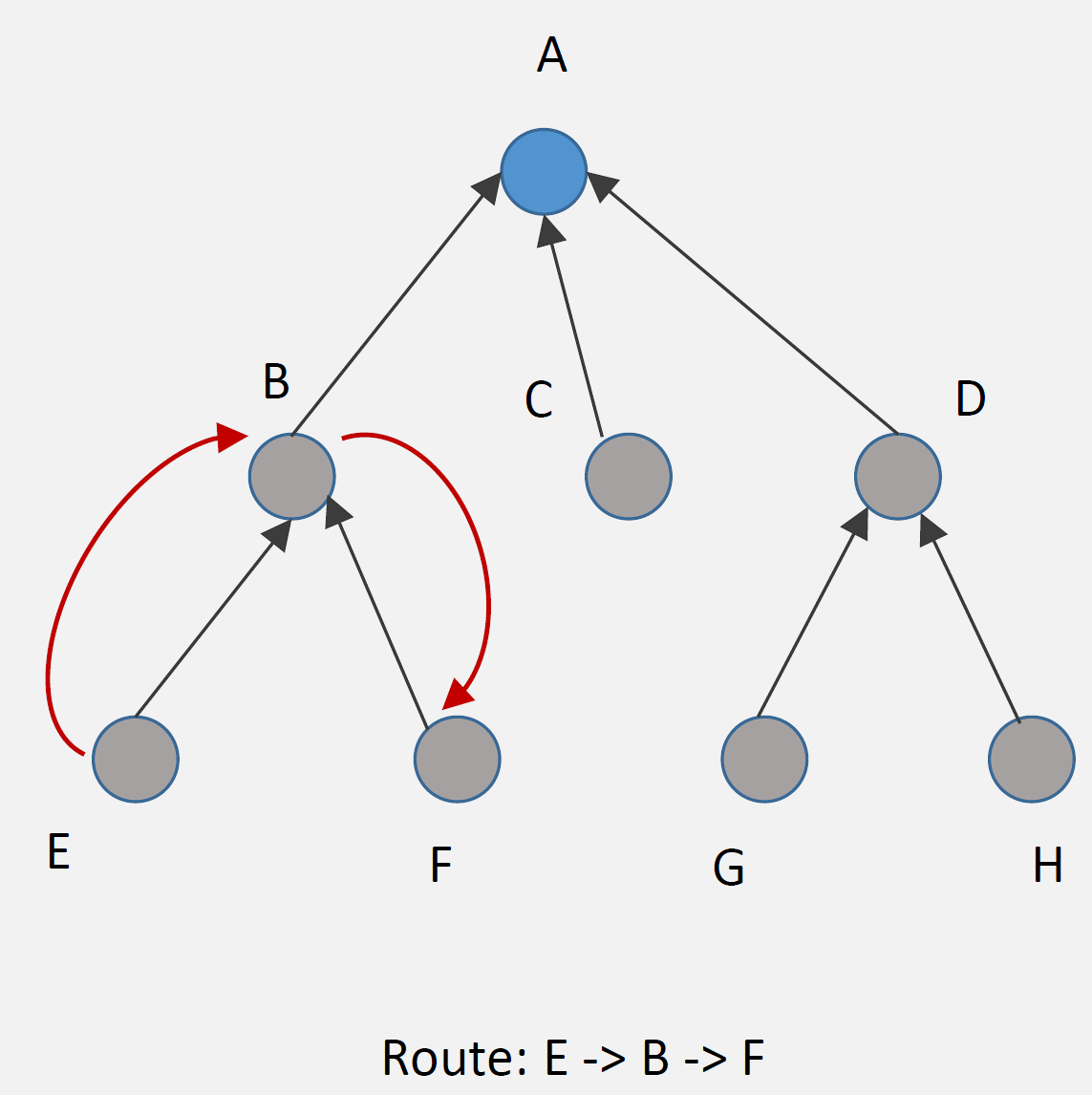
Storing mode operation
Figure 709.2: RPL storing mode with distributed routing tables

How It Works: 1. DAO messages: Nodes advertise reachability to parents 2. Routing tables: Each node stores routes to descendants 3. Packet forwarding: Node looks up destination in table, forwards to appropriate child

Example Route (E → F):

Step 1: E sends packet to parent B (upward)
Step 2: B checks routing table: "F is my child"
Step 3: B forwards directly to F (downward)

Route: E → B → F (optimal)

Advantages: - Efficient routing: Optimal paths (no detour through root) - Low latency: Direct routes between any nodes - Root not bottleneck: Distributed routing decisions

Disadvantages: - Memory overhead: Each node stores routing table - Scalability: Routing tables grow with network size - Updates: DAO messages for every node change

Best For: - Devices with sufficient memory (32+ KB RAM) - Networks requiring low latency - Point-to-point communication common

709.1.2 Non-Storing Mode

Only root maintains routing information; exploits source routing.

%%{init: {'theme': 'base', 'themeVariables': { 'primaryColor': '#2C3E50', 'primaryTextColor': '#fff', 'primaryBorderColor': '#16A085', 'lineColor': '#16A085', 'secondaryColor': '#E67E22', 'tertiaryColor': '#7F8C8D'}}}%%
graph TB
    A["ROOT A<br/>Rank: 0<br/>Routing Table:<br/>B→B, C→C, D→C,D<br/>E→B,E, F→B,F<br/>(Complete topology)"]
    B["Node B<br/>Rank: 100<br/>Parent pointer only<br/>(No routing table)"]
    C["Node C<br/>Rank: 100<br/>Parent pointer only<br/>(No routing table)"]
    D["Node D<br/>Rank: 200<br/>Parent: C"]
    E["Node E<br/>Rank: 200<br/>Parent: B"]
    F["Node F<br/>Rank: 200<br/>Parent: B"]

    A --> B
    A --> C
    B --> E
    B --> F
    C --> D

    style A fill:#2C3E50,stroke:#16A085,color:#fff,stroke-width:3px
    style B fill:#16A085,stroke:#2C3E50,color:#fff
    style C fill:#16A085,stroke:#2C3E50,color:#fff
    style D fill:#7F8C8D,stroke:#2C3E50,color:#fff
    style E fill:#7F8C8D,stroke:#2C3E50,color:#fff
    style F fill:#7F8C8D,stroke:#2C3E50,color:#fff

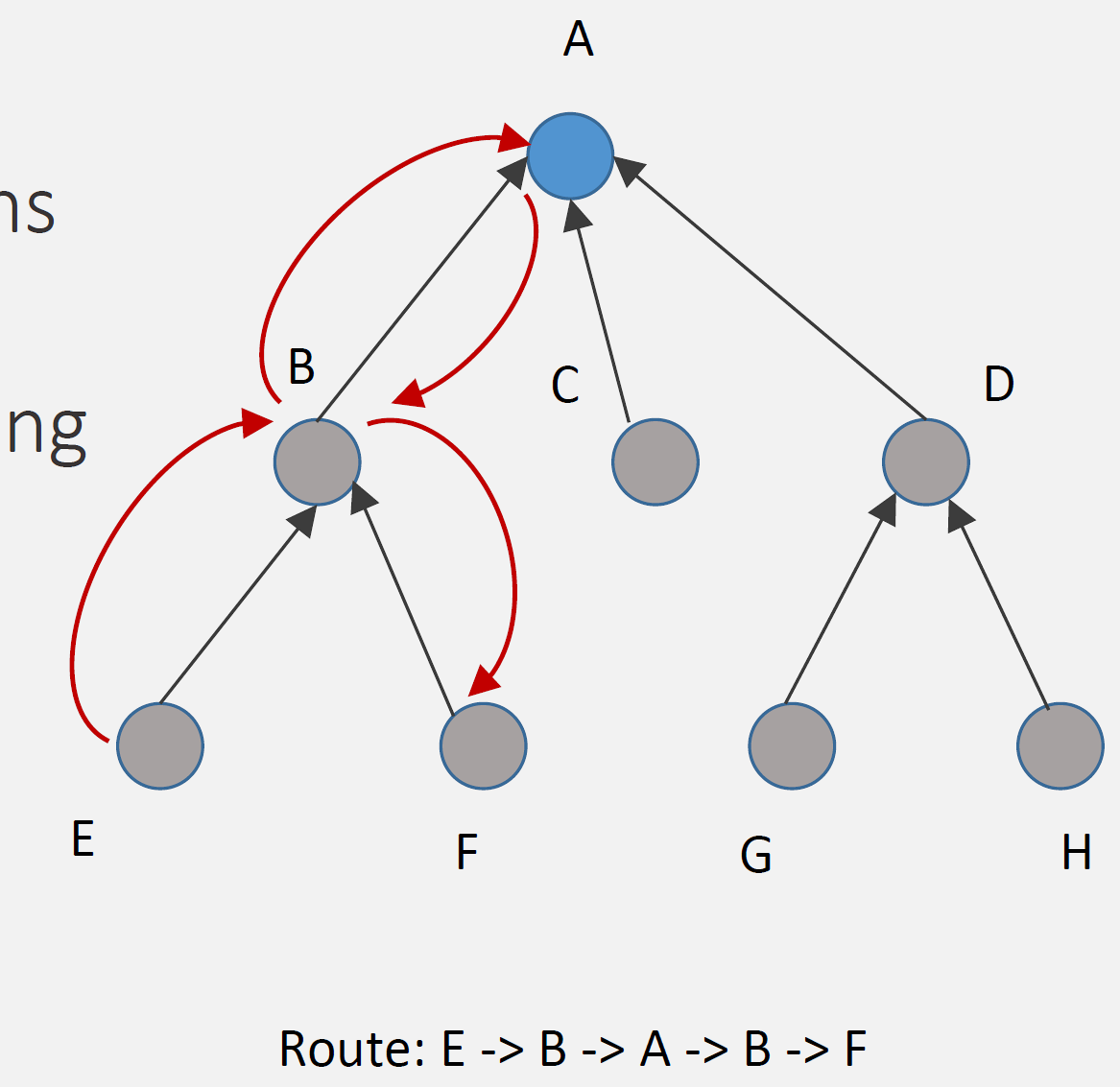
Figure 709.3: RPL Non-Storing mode with centralized routing at root and source routing headers for downward traffic

{fig-alt=“RPL Non-Storing mode showing centralized routing at ROOT with complete topology, intermediate nodes maintain only parent pointers, downward routing uses source routing headers from root”}
Non-storing mode operation
Figure 709.4: RPL non-storing mode with source routing via root

How It Works: 1. DAO to root: All nodes send DAO directly to root (upward) 2. Root stores all routes: Only root has complete routing table 3. Source routing: Root inserts complete path in packet header 4. Nodes forward: Follow instructions in packet header (no table lookup)

Example Route (E → F):

Step 1: E sends packet to parent B (upward, default route)
Step 2: B forwards to parent A (root) (upward, default route)
Step 3: A (root) checks routing table: "F via B"
Step 4: A inserts source route: [B, F]
Step 5: A sends to B with route in header
Step 6: B forwards to F following route

Route: E → B → A → B → F (via root)

Advantages: - Low memory: Nodes don’t store routing tables (just parent) - Simple nodes: Minimal routing logic - Scalability: Network size doesn’t affect node memory

Disadvantages: - Suboptimal routes: All point-to-point traffic via root - Higher latency: Extra hops through root - Root bottleneck: All routing decisions at root - Header overhead: Source route in every packet

Best For: - Resource-constrained devices (< 16 KB RAM) - Primarily many-to-one traffic (sensors → gateway) - Point-to-point communication rare - Large networks (many nodes)

709.1.3 Storing vs Non-Storing Comparison

Aspect Storing Mode Non-Storing Mode
Routing Table Distributed (all nodes) Centralized (root only)
Node Memory Higher (routing table) Lower (parent pointer only)
Route Optimality Optimal (direct paths) Suboptimal (via root)
Latency Lower Higher (extra hops)
Root Load Low High (all routing decisions)
Scalability Limited by node memory Limited by root capacity
DAO Destination Parent Root (through parents)
Header Overhead Low High (source routing)
Best For Powerful nodes, low latency Constrained nodes, many-to-one

This variant provides a practical decision guide for choosing between Storing and Non-Storing modes based on your network characteristics.

%%{init: {'theme': 'base', 'themeVariables': {'primaryColor': '#2C3E50', 'primaryTextColor': '#fff', 'primaryBorderColor': '#16A085', 'lineColor': '#E67E22', 'secondaryColor': '#16A085', 'tertiaryColor': '#E8F6F3', 'fontSize': '10px'}}}%%
flowchart TD
    START["RPL Mode<br/>Selection"] --> Q1{"Primary traffic<br/>pattern?"}

    Q1 -->|"Many-to-One<br/>(sensors→gateway)"| Q2{"Node memory<br/>available?"}
    Q1 -->|"Point-to-Point<br/>(device↔device)"| Q3{"Latency<br/>requirement?"}

    Q2 -->|"< 64KB RAM"| NS1["NON-STORING<br/>━━━━━━━━━━<br/>Memory efficient<br/>Root handles routing<br/>Best: Sensor networks"]
    Q2 -->|"> 64KB RAM"| Q4{"Network size?"}

    Q3 -->|"< 100ms"| ST1["STORING<br/>━━━━━━━━━━<br/>Direct P2P routes<br/>Lower latency<br/>Best: Industrial control"]
    Q3 -->|"> 100ms OK"| NS2["NON-STORING"]

    Q4 -->|"< 200 nodes"| ST2["STORING<br/>━━━━━━━━━━<br/>Optimal paths<br/>Distributed load<br/>Best: Building automation"]
    Q4 -->|"> 200 nodes"| NS3["NON-STORING<br/>━━━━━━━━━━<br/>Scales better<br/>Root manages all"]

    style START fill:#2C3E50,stroke:#16A085,color:#fff
    style Q1 fill:#16A085,stroke:#2C3E50,color:#fff
    style Q2 fill:#16A085,stroke:#2C3E50,color:#fff
    style Q3 fill:#16A085,stroke:#2C3E50,color:#fff
    style Q4 fill:#16A085,stroke:#2C3E50,color:#fff
    style NS1 fill:#E67E22,stroke:#2C3E50,color:#fff
    style NS2 fill:#E67E22,stroke:#2C3E50,color:#fff
    style NS3 fill:#E67E22,stroke:#2C3E50,color:#fff
    style ST1 fill:#2C3E50,stroke:#16A085,color:#fff
    style ST2 fill:#2C3E50,stroke:#16A085,color:#fff

Figure 709.5: RPL Mode Selection Decision Tree - Choose based on traffic patterns, memory, and network size

Key Insight: Non-Storing mode is the default choice for resource-constrained sensor networks. Only move to Storing mode when you have both the memory budget AND specific P2P or latency requirements.

The following sequence diagrams illustrate how RPL handles point-to-point (P2P) traffic in Non-Storing and Storing modes.

Non-Storing Mode P2P Traffic (Steps 1-3):
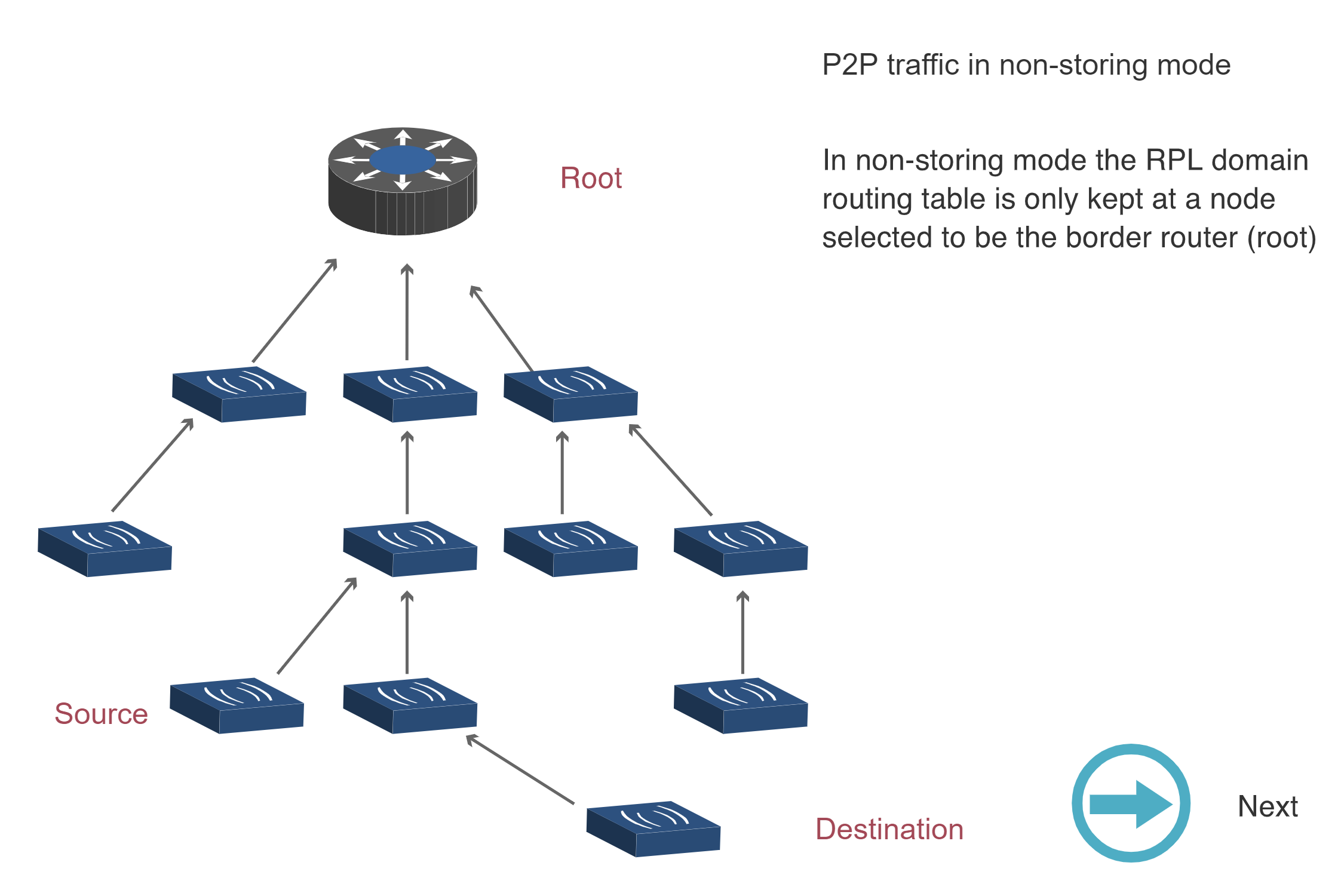
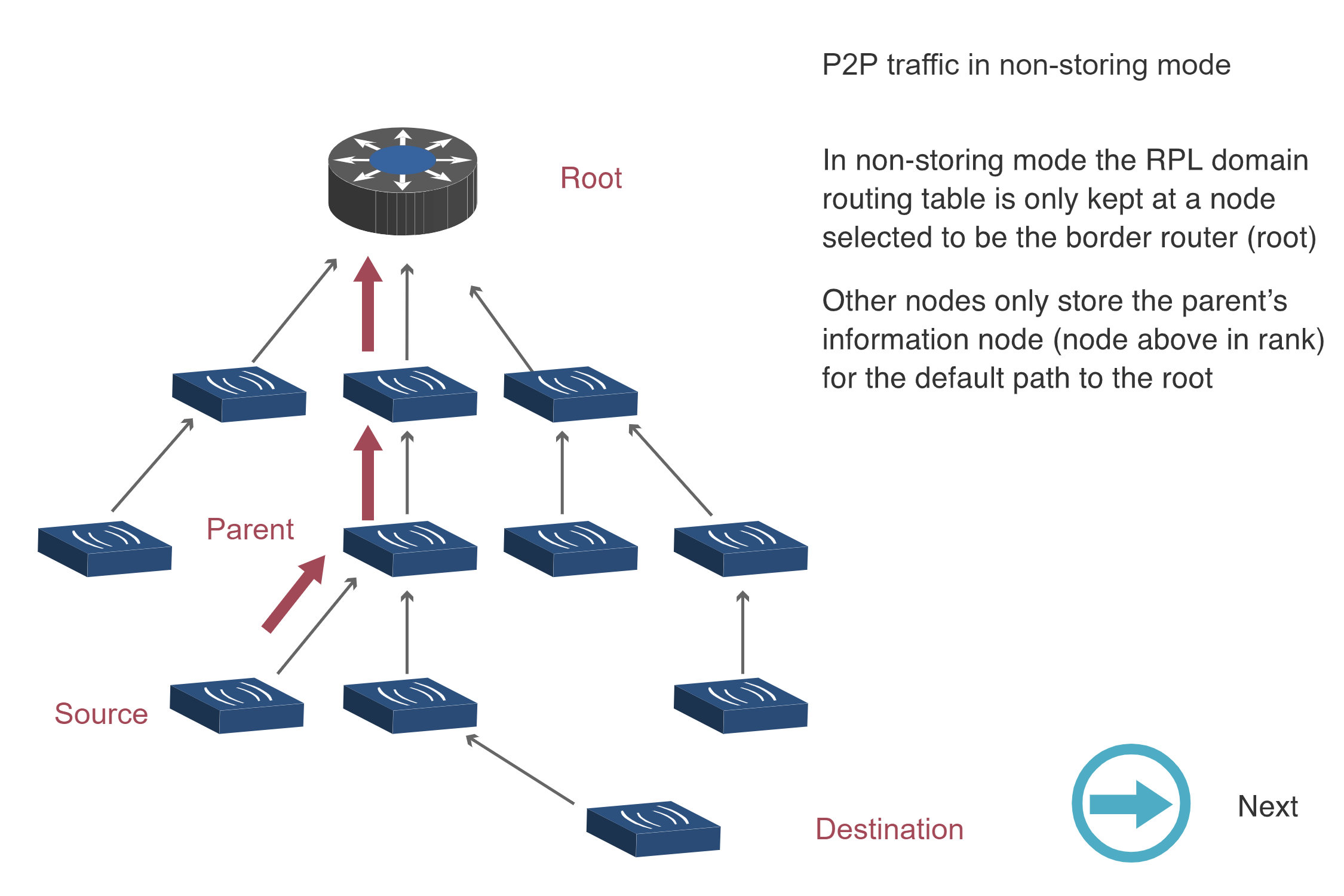
RPL P2P traffic in Non-Storing mode Step 1 showing network topology with root router at top and multiple nodes arranged in tree hierarchy. Source node at lower left needs to send data to Destination node at lower right. In non-storing mode the RPL domain routing table is only kept at the border router root node.

RPL P2P traffic in Non-Storing mode - Step 1
Figure 709.6: Step 1: Initial state - Source needs to reach Destination, but only root has routing table

RPL P2P traffic in Non-Storing mode Step 2 showing upward arrows from Source through Parent nodes toward Root. Other nodes only store parent information node above in rank for the default path to the root. Data flows upward through tree hierarchy.

RPL P2P traffic in Non-Storing mode - Step 2
Figure 709.7: Step 2: Source forwards packet upward to parent (default route), continuing until root

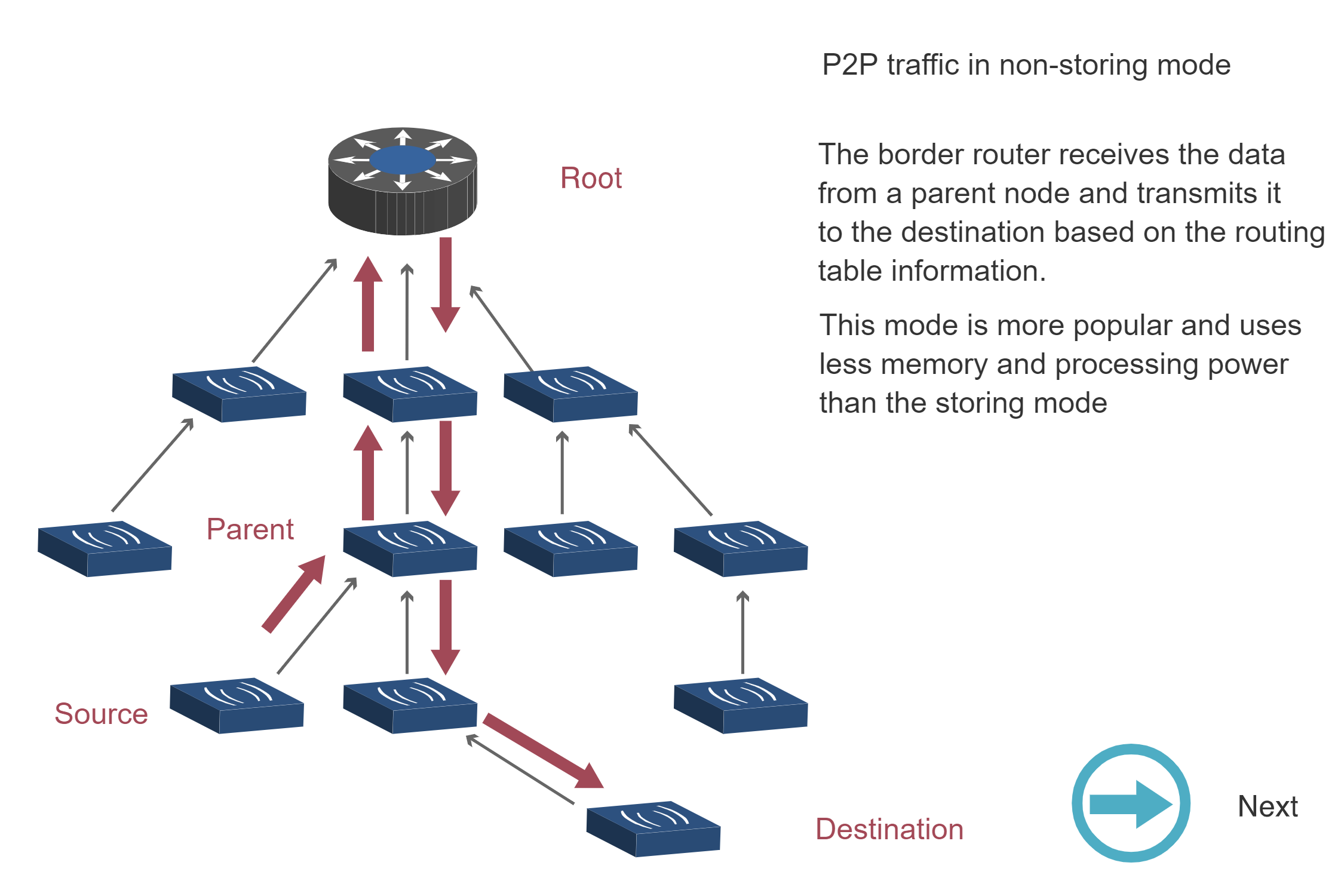
RPL P2P traffic in Non-Storing mode Step 3 showing border router (root) receiving data from child node after upward traversal, then transmitting it downward to destination using source routing based on its complete routing table. This mode is more popular and uses less memory and processing power than storing mode. Downward arrows show path from root to destination.

RPL P2P traffic in Non-Storing mode - Step 3
Figure 709.8: Step 3: Root uses routing table to forward packet downward to Destination via source routing

Storing Mode P2P Traffic:

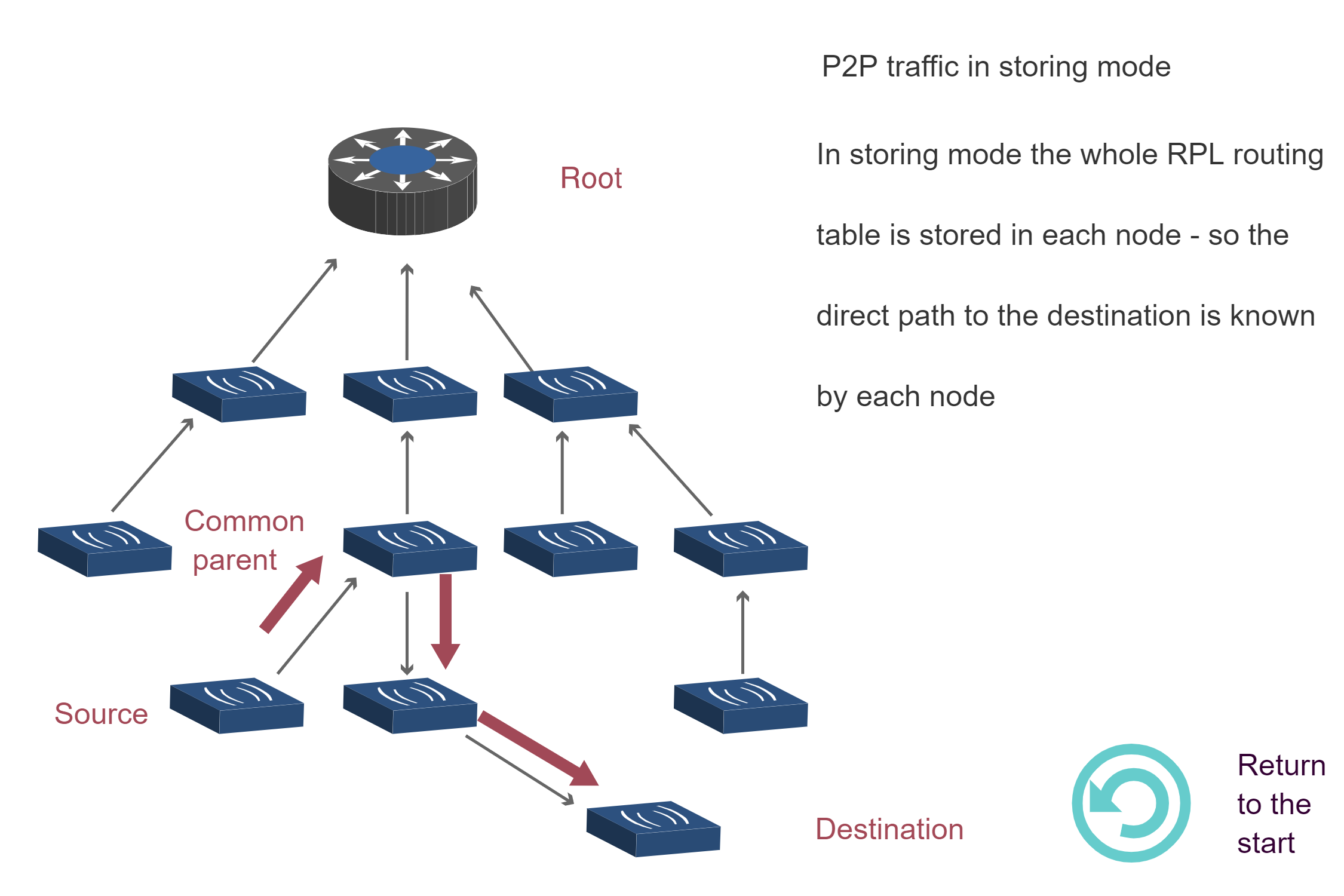
RPL P2P traffic in Storing mode showing direct routing path from Source to Destination via common parent without going through root. In storing mode the whole RPL routing table is stored in each node so the direct path to the destination is known by each node. Arrows show optimized path through common parent.

RPL P2P traffic in Storing mode
Figure 709.9: Storing Mode: Direct routing through common parent - no root involvement needed

Key Insight: Non-Storing mode requires all P2P traffic to traverse the root (3 diagrams showing upward then downward path), while Storing mode enables direct routing through the nearest common ancestor (1 diagram showing optimized path). This explains why Storing mode has lower latency for P2P traffic despite higher memory requirements.

Source: CP IoT System Design Guide, Chapter 4 - Routing

Question 8: A factory monitoring network uses RPL with two instances: Instance 1 for high-priority safety alerts (latency metric) and Instance 2 for routine telemetry (energy metric). How does a node handle routing for different traffic types?

💡 Explanation: RPL supports multiple instances on the same physical network, each with its own DODAG, root, and objective function. A node can simultaneously participate in Instance 1 (optimizing for latency) and Instance 2 (optimizing for energy), maintaining separate parent selections and RANK values. When forwarding a safety alert, the node uses Instance 1’s routing (e.g., parent with lowest latency path). For telemetry, it uses Instance 2’s routing (e.g., parent with best energy efficiency). Example: Instance 1 might select a 1-hop mains-powered parent (fast, high power), while Instance 2 selects a 3-hop battery-powered parent (slower, low power). This allows traffic differentiation without QoS complexity. Each instance has a unique RPLInstanceID (0-255).

709.2 RPL Traffic Patterns

RPL optimizes for different traffic directions:

%%{init: {'theme': 'base', 'themeVariables': { 'primaryColor': '#2C3E50', 'primaryTextColor': '#fff', 'primaryBorderColor': '#16A085', 'lineColor': '#16A085', 'secondaryColor': '#E67E22', 'tertiaryColor': '#7F8C8D'}}}%%
graph TB
    subgraph ManyToOne["Many-to-One<br/>(Upward)"]
        S1["Sensor 1"] --> GW1["Gateway"]
        S2["Sensor 2"] --> GW1
        S3["Sensor 3"] --> GW1
        S4["Sensor 4"] --> GW1
    end

    subgraph OneToMany["One-to-Many<br/>(Downward)"]
        GW2["Gateway"] --> A1["Actuator 1"]
        GW2 --> A2["Actuator 2"]
        GW2 --> A3["Actuator 3"]
    end

    subgraph P2P["Point-to-Point"]
        SEN["Sensor"] --> ACT["Actuator"]
    end

    style ManyToOne fill:#16A085,stroke:#2C3E50,color:#fff
    style OneToMany fill:#E67E22,stroke:#2C3E50,color:#fff
    style P2P fill:#7F8C8D,stroke:#2C3E50,color:#fff
    style GW1 fill:#2C3E50,stroke:#16A085,color:#fff
    style GW2 fill:#2C3E50,stroke:#16A085,color:#fff
    style S1 fill:#F8F9FA,stroke:#16A085,color:#2C3E50
    style S2 fill:#F8F9FA,stroke:#16A085,color:#2C3E50
    style S3 fill:#F8F9FA,stroke:#16A085,color:#2C3E50
    style S4 fill:#F8F9FA,stroke:#16A085,color:#2C3E50
    style A1 fill:#F8F9FA,stroke:#E67E22,color:#2C3E50
    style A2 fill:#F8F9FA,stroke:#E67E22,color:#2C3E50
    style A3 fill:#F8F9FA,stroke:#E67E22,color:#2C3E50
    style SEN fill:#F8F9FA,stroke:#7F8C8D,color:#2C3E50
    style ACT fill:#F8F9FA,stroke:#7F8C8D,color:#2C3E50

Figure 709.10: RPL traffic patterns: Many-to-One (upward), One-to-Many (downward), and Point-to-Point routing

{fig-alt=“RPL traffic patterns: Many-to-One shows multiple sensors sending to gateway (upward routing), One-to-Many shows gateway sending to multiple actuators (downward), Point-to-Point shows direct sensor to actuator communication”}

709.2.1 Many-to-One (Upward Routing)

Pattern: Many sensors → Single gateway/root

How: - Each node knows parent (from DODAG construction) - Default route: Send to parent (toward root) - No routing table needed (upward)

Example: Temperature sensors reporting to cloud

Sensor 3 → Node 1 → Root → Internet → Cloud
(Upward along DODAG tree)

Optimization: - Most common traffic in IoT (data collection) - Minimal state: Just parent pointer - Efficient: Direct path to root

709.2.2 One-to-Many (Downward Routing)

Pattern: Single controller → Many actuators

How: - Storing mode: Each node has routing table, forwards optimally - Non-storing mode: Root inserts source route, nodes follow

Example: Controller sends “turn off” to all lights

Root → [Multicast or unicast to each light]

Modes: - Storing: Root → Node 1 → Light 3 (optimal) - Non-storing: Root inserts route [Node 1, Light 3]

709.2.3 Point-to-Point (P2P)

Pattern: Sensor ↔︎ Actuator (peer-to-peer)

How: - Upward then downward (via common ancestor, often root) - Storing mode: May find shorter path - Non-storing mode: Always via root

Example: Motion sensor triggers light

Storing: Sensor 3 → Node 1 → Light 4 (3 hops, if both under Node 1)
Non-Storing: Sensor 3 → Node 1 → Root → Node 2 → Light 4 (4 hops)

709.3 Hands-On Lab: RPL Network Design

NoteLab Activity: Designing RPL Network for Smart Building

Objective: Design an RPL network and compare Storing vs Non-Storing modes

Scenario: 3-floor office building

Devices: - 1 Border Router (roof, internet connection) - 15 mains-powered sensors (temperature, humidity) - can be routers - 30 battery-powered sensors (door, motion) - end devices - 10 actuators (lights, HVAC) - mains powered

Floor Layout:

Floor 3: BR + 5 mains sensors + 10 battery sensors + 3 actuators
Floor 2: 5 mains sensors + 10 battery sensors + 4 actuators
Floor 1: 5 mains sensors + 10 battery sensors + 3 actuators

709.3.1 Task 1: DODAG Topology Design

Design the DODAG: 1. Place border router (root) 2. Identify routing nodes (mains-powered devices) 3. Draw DODAG showing parent-child relationships 4. Assign RANK values (assume RANK increase = 100 per hop)

Click to see solution

DODAG Design:

Smart building DODAG topology with three floors showing BR root node (Navy), mains-powered sensors (Teal), battery-powered sensors (Orange), and actuators (Gray). RANK values increase from 0 at root to 500 at leaf nodes, with a long-range link connecting Floor 3 BR to Floor 2 Sensor 2-1.

Smart building DODAG topology with three floors showing BR root node (Navy), mains-powered sensors (Teal), battery-powered sensors (Orange), and actuators (Gray). RANK values increase from 0 at root to 500 at leaf nodes, with a long-range link connecting Floor 3 BR to Floor 2 Sensor 2-1.
Figure 709.11: Smart building DODAG topology with three floors showing BR root node (Navy), mains-powered sensors (Teal), battery-powered sensors (Orange), and actuators (Gray). RANK values increase from 0 at root to 500 at leaf nodes, with a long-range link connecting Floor 3 BR to Floor 2 Sensor 2-1.

RANK Distribution: - BR: RANK 0 - Floor 3 mains sensors: RANK 100-200 - Floor 2 mains sensors: RANK 200-400 - Floor 1 mains sensors: RANK 300-500 - Battery/actuators: RANK based on parent + 100

Routing Nodes: 15 mains-powered sensors (can route for battery devices)

Total Nodes: 1 BR + 15 mains + 30 battery + 10 actuators = 56 devices

709.3.2 Task 2: Memory Requirements Comparison

Calculate memory requirements for Storing vs Non-Storing:

Assumptions: - IPv6 address: 16 bytes - Next-hop pointer: 2 bytes - Routing entry: 18 bytes total

Calculate: 1. Memory per node (Storing mode) 2. Memory at root (Non-Storing mode) 3. Memory at leaf nodes (both modes)

Click to see solution

Storing Mode:

Routing Table Size per Node: - Root (BR): All 55 devices reachable - 55 entries × 18 bytes = 990 bytes - Mains sensor (typical, 3 children): - 3 entries × 18 bytes = 54 bytes - Battery sensor/actuator (leaf): - 0 entries (just parent pointer: 2 bytes) = 2 bytes

Total network memory (Storing): - BR: 990 bytes - 15 mains sensors × 54 bytes avg = 810 bytes - 40 battery/actuators × 2 bytes = 80 bytes - Total: ~1,880 bytes distributed across network

Non-Storing Mode:

Routing Table Size: - Root (BR): All 55 devices - 55 entries × 18 bytes = 990 bytes - All other nodes: Just parent pointer - 55 nodes × 2 bytes = 110 bytes

Total network memory (Non-Storing): - BR: 990 bytes - 55 other nodes × 2 bytes = 110 bytes - Total: ~1,100 bytes (mostly at root)

Comparison:

Mode Root Memory Node Memory (avg) Total Memory
Storing 990 bytes 15-54 bytes 1,880 bytes
Non-Storing 990 bytes 2 bytes 1,100 bytes
Analysis: - Non-Storing saves ~780 bytes network-wide - Mains sensors: Can afford 54 bytes (have 32-128 KB RAM) - Battery sensors: Benefit from 2 bytes vs 0 (minimal difference) - Trade-off: Memory savings vs routing efficiency

709.3.3 Task 3: Traffic Pattern Analysis

Analyze routing for different traffic patterns:

Scenarios: 1. Many-to-One: All battery sensors report temperature every 5 minutes to cloud 2. One-to-Many: Cloud sends firmware update to all sensors 3. Point-to-Point: Motion sensor (Floor 1) triggers light (Floor 3)

For each scenario, calculate: - Average hop count (Storing vs Non-Storing) - Messages per minute - Network load

Click to see solution

Scenario 1: Many-to-One (Sensor → Cloud)

Route (any battery sensor to BR): - Storing: Sensor → Parent (mains) → Parent → … → BR - Average: 2-3 hops (battery→mains, mains→BR, possibly intermediate) - Non-Storing: Same (upward routing identical) - Average: 2-3 hops

Messages: - 30 battery sensors × 12 msgs/hour = 360 msgs/hour = 6 msgs/min

Conclusion: Identical performance (many-to-one is RPL’s strength)

Scenario 2: One-to-Many (Cloud → All Sensors)

Route (BR to any sensor): - Storing: BR → optimal path to sensor - BR has routing table, knows best path - Average: 2-3 hops (BR → mains → battery) - Non-Storing: BR → mains → battery (same path, but source routed) - BR inserts source route - Average: 2-3 hops

Difference: Minimal - Storing: routing table lookup at each hop - Non-Storing: source route in header (extra ~10 bytes overhead)

Messages: 55 devices × 1 update = 55 messages (infrequent)

Conclusion: Non-Storing adds header overhead but same hop count

Scenario 3: Point-to-Point (Floor 1 Sensor → Floor 3 Light)

Route: - Storing Mode: ``` Floor 1 Sensor → Parent (Floor 1 mains) Floor 1 mains checks table: “Floor 3 Light not in my sub-tree” → Forward to parent (Floor 2 mains) Floor 2 mains checks table: “Floor 3 Light not in my sub-tree” → Forward to parent (BR) BR checks table: “Floor 3 Light via Sensor 3-2” → Forward to Sensor 3-2 Sensor 3-2 → Floor 3 Light

Path: F1-Sensor → F1-mains → F2-mains → BR → F3-mains → F3-Light Hops: 5 ```

  • Non-Storing Mode:

    Floor 1 Sensor → Parent → ... → BR (upward, default route)
    BR inserts source route: [F3-mains, F3-Light]
    BR → F3-mains → F3-Light
    
    Path: F1-Sensor → F1-mains → F2-mains → BR → F3-mains → F3-Light
    Hops: 5 (same)

Conclusion: For this topology, same hop count, but: - Storing: Distributed routing decisions (higher memory) - Non-Storing: Centralized at root (source routing overhead)

If topology were flatter (e.g., many sensors directly under BR): - Storing: F1-Sensor → BR → F3-Light (2 hops) - Non-Storing: F1-Sensor → BR → F3-Light (2 hops) - Same performance

Summary:

Traffic Pattern Storing Advantage Non-Storing Advantage
Many-to-One None (equal) None (equal)
One-to-Many None (equal) Lower node memory
Point-to-Point Can optimize locally Simpler nodes
Recommendation: Non-Storing for this scenario - Battery-powered sensors dominate (low memory) - Many-to-one traffic primary (sensors reporting) - Point-to-point rare (motion→light scenarios uncommon)

Question 1: A smart building has 100 temperature sensors reporting to a central gateway every 5 minutes, and occasionally the gateway sends configuration updates to individual sensors. Which RPL mode is most appropriate?

💡 Explanation: Non-Storing mode is ideal for primarily many-to-one traffic (sensors → gateway). While configuration updates are downward, they’re infrequent and can tolerate the slightly higher latency of source routing through the root. Non-Storing mode saves ~40% memory network-wide and scales better (limited by root capacity, not individual node memory). Storing mode would be overkill unless downward/P2P traffic was frequent and latency-critical.

Question 12: A smart building uses RPL with 80 nodes in Storing mode. The network has been stable for 2 hours. Suddenly, 15 new nodes join simultaneously. What happens to the DIO transmission pattern?

💡 Explanation: RPL’s trickle timer algorithm adaptively balances network stability with responsiveness:

Normal operation (stable network): - Trickle interval exponentially increases: 1s → 2s → 4s → 8s → … → maximum (e.g., 1 hour) - Nodes rarely transmit DIOs, saving energy

When new nodes join: 1. New nodes send DIS (DODAG Information Solicitation) to request DODAG info 2. Nodes receiving DIS reset their trickle timer to minimum interval 3. These nodes send DIO messages more frequently 4. New nodes receive DIOs, join DODAG, and select parents 5. As network stabilizes, trickle intervals increase again

This is localized - only nearby nodes reset timers, not the entire network. The trickle algorithm detects “inconsistency” (new nodes, topology changes) and automatically increases DIO frequency. Once consistent, it backs off exponentially. Result: Fast joining for new devices without constant overhead in stable networks.

709.4 Quiz: RPL Routing Protocol

What is the primary purpose of RANK in RPL?

  1. To measure the distance in meters from the root
  2. To prevent routing loops by defining hierarchical position
  3. To prioritize packets based on importance
  4. To encrypt routing information
Click to see answer

Answer: B) To prevent routing loops by defining hierarchical position

Explanation:

RANK Definition: RANK is a scalar value representing a node’s position in the DODAG hierarchy relative to the root.

Primary Purpose: Loop Prevention

How RANK Prevents Loops:

  1. Root has minimum RANK (typically 0)
  2. RANK increases as you move away from root
  3. Upward routing rule: Packets forwarded to nodes with lower RANK
  4. Parent selection rule: Node cannot choose parent with higher RANK

Loop Prevention Example:

RANK-based loop prevention mechanism showing valid parent selection (Node C can choose Node A, RANK 100 < 400) versus forbidden loop creation (Node A cannot choose Node C, RANK 400 > 100)

RANK-based loop prevention mechanism showing valid parent selection (Node C can choose Node A, RANK 100 < 400) versus forbidden loop creation (Node A cannot choose Node C, RANK 400 > 100)
Figure 709.12: RANK-based loop prevention mechanism showing valid parent selection (Node C can choose Node A, RANK 100 < 400) versus forbidden loop creation (Node A cannot choose Node C, RANK 400 > 100).

Attempt to create loop:

Node C wants to choose Node A as parent: - Current RANK: 400 - Node A RANK: 100 - ✅ ALLOWED (100 < 400, moving toward root)

Node A wants to choose Node C as parent: - Current RANK: 100 - Node C RANK: 400 - ❌ FORBIDDEN (400 > 100, moving away from root = loop!)

Without RANK (e.g., simple hop count):

Without RANK mechanism, routing loops can form when Node C chooses Node A as parent, creating a circular path (ROOT → A → B → C → A)

Without RANK mechanism, routing loops can form when Node C chooses Node A as parent, creating a circular path (ROOT → A → B → C → A)
Figure 709.13: Without RANK mechanism, routing loops can form when Node C chooses Node A as parent, creating a circular path (ROOT → A → B → C → A).

With RANK:

With RANK mechanism, Node C cannot choose Node A as parent because RANK 400 > 100 would create a loop by moving away from root

With RANK mechanism, Node C cannot choose Node A as parent because RANK 400 > 100 would create a loop by moving away from root
Figure 709.14: With RANK mechanism, Node C cannot choose Node A as parent because RANK 400 > 100 would create a loop by moving away from root.

Option Analysis:

A) Distance in meters ❌ - RANK is not physical distance - RANK is a logical hierarchy in DODAG - Two nodes same distance from root can have different RANKs - Via good link: RANK 100 - Via poor link: RANK 300

B) Prevent routing loops ✅ - Correct: RANK enforces hierarchy - Acyclic property: Prevents cycles in DAG - Rule: Can only route “upward” (decreasing RANK)

C) Prioritize packets ❌ - RANK is for routing, not QoS - Packet prioritization uses different mechanisms: - IPv6 Traffic Class field - RPL can support different objective functions (latency vs energy) - But RANK itself doesn’t prioritize packets

D) Encrypt routing ❌ - RANK is plaintext in DIO messages - Security handled separately: - RPL can use secured mode (RPL Security) - Encryption at link layer (802.15.4 security) - IPsec for end-to-end security - RANK is not a security mechanism

RANK Calculation Factors:

RANK is calculated by objective function, which may consider: - Hop count: Each hop adds fixed amount - ETX: Expected Transmission Count (link quality) - Latency: Time to reach root - Energy: Remaining battery, power consumption - Throughput: Link bandwidth

Example Objective Function (OF0 - Hop Count):

RANK = Parent_RANK + MinHopRankIncrease

MinHopRankIncrease = DEFAULT_MIN_HOP_RANK_INCREASE = 256

Node A (parent: ROOT): RANK = 0 + 256 = 256
Node B (parent: A):    RANK = 256 + 256 = 512
Node C (parent: B):    RANK = 512 + 256 = 768

Example Objective Function (ETX-based):

RANK = Parent_RANK + (ETX × MULTIPLIER)

Good link (ETX = 1.2): RANK increase = 1.2 × 100 = 120
Poor link (ETX = 3.5): RANK increase = 3.5 × 100 = 350

Node might prefer 2 good hops (RANK increase: 240)
over 1 poor hop (RANK increase: 350)
Conclusion: RANK’s primary purpose is loop prevention by establishing a strict hierarchy where packets can only flow “upward” (toward lower RANK), preventing cycles in the DODAG.

In a network of 100 battery-powered sensors sending data to a single gateway (many-to-one traffic), which RPL mode is more appropriate?

  1. Storing mode (better routing efficiency)
  2. Non-Storing mode (lower memory requirements)
  3. Both modes have identical performance for this scenario
  4. RPL doesn’t support many-to-one traffic well
Click to see answer

Answer: C) Both modes have identical performance for this scenario

Explanation:

Many-to-One Traffic is RPL’s primary use case and is handled identically in both modes.

How Many-to-One Works in RPL:

Upward Routing (toward root): - Every node knows its parent (from DODAG construction) - Default route: Send to parent - No routing table needed for upward routes

Both Modes:

Sensor 50 (RANK 500)
  → Parent Node 20 (RANK 300)
    → Parent Node 10 (RANK 150)
      → ROOT (RANK 0)

Process:
1. Sensor 50 has data for gateway
2. Looks up default route: "Send to parent (Node 20)"
3. Node 20 receives, looks up default route: "Send to parent (Node 10)"
4. Node 10 receives, looks up default route: "Send to parent (ROOT)"
5. ROOT receives - destination reached!

Storing Mode - Many-to-One: - Upward routing: Uses parent pointer (NOT routing table) - Routing table: Used for downward/P2P, not many-to-one - Memory: Routing table stored but not used for this traffic

Non-Storing Mode - Many-to-One: - Upward routing: Uses parent pointer (same as Storing) - No routing table: Not needed for upward routing - Memory: Lower (no table), but doesn’t matter for this traffic

Performance Comparison:

Aspect Storing Mode Non-Storing Mode
Hop Count Same (upward to root) Same (upward to root)
Latency Same Same
Forwarding Complexity Same (parent lookup) Same (parent lookup)
Memory Used Parent pointer + routing table Parent pointer only
Bandwidth Same Same

Key Insight: Routing tables are for downward/P2P routes!

Option Analysis:

A) Storing mode (better routing efficiency) ❌ - Storing mode adds no efficiency for many-to-one - Routing tables help with downward (root→sensors) and P2P (sensor↔︎sensor) - Upward routing doesn’t use routing tables

B) Non-Storing mode (lower memory) ⚠️ - True: Non-Storing saves memory - But: Not more appropriate for this traffic pattern - Memory savings, but same routing performance

C) Both modes have identical performance ✅ - Correct: Many-to-one uses same mechanism (parent pointers) - Same hop count: Both follow DODAG upward - Same latency: Identical routing path

D) RPL doesn’t support many-to-one ❌ - Wrong: Many-to-one is RPL’s primary design goal - RPL specifically optimized for: - Many sensors → Single gateway (IoT data collection) - Upward routing (toward root)

When Modes Differ:

Scenario 1: Many-to-One (100 sensors → gateway) - Performance: Identical - Memory: Non-Storing wins (lower) - Best choice: Non-Storing (if sensors constrained)

Scenario 2: One-to-Many (gateway → 100 actuators) - Storing: Gateway → direct path to each actuator - Non-Storing: Gateway adds source route to packets - Performance: Similar (same hops), but Non-Storing adds header overhead - Best choice: Non-Storing still OK (infrequent traffic)

Scenario 3: Point-to-Point (sensor 1 ↔︎ sensor 2) - Storing: Sensor 1 → common parent → Sensor 2 (may optimize path) - Non-Storing: Sensor 1 → root → Sensor 2 (always via root) - Performance: Storing can be better (depends on topology) - Best choice: Storing (if P2P common)

Recommendation for Question Scenario:

Given: - 100 battery-powered sensors - Single gateway - Many-to-one traffic only (sensors → gateway)

Best Choice: Non-Storing - Not because of better routing (identical) - But because of lower memory (battery devices benefit)

However, the question asks about performance, and performance is identical for many-to-one traffic.

Conclusion: For many-to-one traffic, both RPL modes have identical routing performance (same path, same hop count, same latency). The choice between modes should be based on memory constraints and other traffic patterns (downward, P2P), not many-to-one routing efficiency.

Which RPL control message is used by a node to request DODAG information from neighbors?

  1. DIO (DODAG Information Object)
  2. DIS (DODAG Information Solicitation)
  3. DAO (Destination Advertisement Object)
  4. DAO-ACK (DAO Acknowledgment)
Click to see answer

Answer: B) DIS (DODAG Information Solicitation)

Explanation:

RPL Control Messages (all ICMPv6):

%%{init: {'theme': 'base', 'themeVariables': { 'primaryColor': '#2C3E50', 'primaryTextColor': '#fff', 'primaryBorderColor': '#16A085', 'lineColor': '#16A085', 'secondaryColor': '#E67E22', 'tertiaryColor': '#7F8C8D'}}}%%
graph TB
    subgraph Messages["RPL Control Messages"]
        DIO["DIO<br/>DODAG Information Object<br/>Sent by: ROOT, Routers<br/>Purpose: Advertise DODAG"]
        DIS["DIS<br/>DODAG Information Solicitation<br/>Sent by: New nodes<br/>Purpose: Request DODAG info"]
        DAO["DAO<br/>Destination Advertisement<br/>Sent by: All nodes<br/>Purpose: Build downward routes"]
        DAOACK["DAO-ACK<br/>DAO Acknowledgment<br/>Sent by: Parents<br/>Purpose: Confirm DAO receipt"]
    end

    style Messages fill:#F8F9FA,stroke:#2C3E50,color:#2C3E50
    style DIO fill:#2C3E50,stroke:#16A085,color:#fff
    style DIS fill:#16A085,stroke:#2C3E50,color:#fff
    style DAO fill:#E67E22,stroke:#2C3E50,color:#fff
    style DAOACK fill:#7F8C8D,stroke:#2C3E50,color:#fff

Figure 709.15: RPL control message types: DIO for DODAG advertisement, DIS for solicitation, DAO for route building

{fig-alt=“RPL Control Messages showing DIO (advertise DODAG from ROOT/routers), DIS (request info from new nodes), DAO (build downward routes from all nodes), DAO-ACK (confirm receipt from parents)”}

DIS (DODAG Information Solicitation):

Purpose: Request DODAG information from neighbors

When Used: 1. New node joins network: Doesn’t know about any DODAG 2. Node loses DODAG info: Parent moved, connection lost 3. Proactive discovery: Node wants to find better DODAG

Message Flow:

New Node:  "Is there a DODAG I can join?"
           ↓ (sends DIS - multicast)
Neighbors: "Yes, here's my DODAG info"
           ↓ (respond with DIO - unicast or multicast)
New Node:  Receives DIO(s), chooses DODAG and parent

DIS Contents: - Solicitation flags: What kind of DODAG information desired - Predicates: Conditions for response (optional) - Usually sent to multicast address (all RPL nodes)

Example Scenario:

Scenario: Sensor powers on for first time

Step 1: Sensor sends DIS (multicast)
  "Hello, any RPL DODAGs nearby?"

Step 2: Multiple neighbors respond with DIO
  Node A: "I'm in DODAG X, RANK 256"
  Node B: "I'm in DODAG X, RANK 300"
  Node C: "I'm in DODAG Y, RANK 128"

Step 3: Sensor evaluates DIOs
  - Chooses DODAG X (two neighbors, better connectivity)
  - Chooses Node A as parent (lower RANK)

Step 4: Sensor joins DODAG X with Node A as parent
  - Calculates own RANK: 256 + 100 = 356
  - Starts sending own DIOs (advertising DODAG to others)

Option Analysis:

A) DIO (DODAG Information Object) ❌ - Purpose: Advertise DODAG information (not request) - Direction: Root/nodes → neighbors (downward/broadcast) - Contents: DODAG ID, RANK, objective function, configuration - Sent: Periodically by root and nodes (using Trickle timer) - Used for: New nodes to discover DODAG, existing nodes to update info

B) DIS (DODAG Information Solicitation) ✅ - Purpose: Request DODAG information - Direction: Node → neighbors (multicast query) - Trigger: DIO response from neighbors - Used for: Active discovery when joining network or recovering from failure

C) DAO (Destination Advertisement Object) ❌ - Purpose: Advertise reachability (not request DODAG info) - Direction: Node → parent (upward, toward root) - Contents: “I am reachable via you” + node addresses/prefixes - Used for: Building downward routes (root→nodes) - Storing mode: DAO to parent, parent updates routing table - Non-Storing mode: DAO to root (via parents), root stores all routes

D) DAO-ACK (DAO Acknowledgment) ❌ - Purpose: Confirm DAO receipt (not request DODAG info) - Direction: Parent → child (downward) - Optional: Used for reliability in critical networks - Contents: Status (accepted/rejected), DAO sequence number - Used for: Ensuring DAO was received and processed

Message Relationships:

Network Formation:

1. ROOT sends DIO (periodic)
   ↓
2. Nodes receive DIO, join DODAG
   ↓
3. Nodes send DIO (periodic, propagate DODAG)
   ↓
4. New nodes send DIS (if haven't heard DIO)
   ↓
5. Neighbors respond with DIO (unicast or multicast)
   ↓
6. Nodes send DAO (advertise reachability to parents)
   ↓
7. Parents send DAO-ACK (confirm receipt)

Trickle Timer and DIS:

Without DIS (passive): - Nodes wait for periodic DIO - Trickle timer: DIOs sent infrequently when network stable (minutes) - Problem: New node may wait long time to join

With DIS (active): - New node sends DIS immediately - Neighbors respond with DIO promptly - Benefit: Fast joining (seconds instead of minutes)

DIS Use Cases:

  1. Initial Network Join:

    New sensor powers on
    → Sends DIS
    → Receives DIOs from neighbors
    → Joins DODAG
  2. Parent Loss Recovery:

    Node's parent moves/fails
    → Loses DODAG connection
    → Sends DIS
    → Discovers new parent
    → Rejoins DODAG
  3. Better Path Discovery:

    Node wants to check for better routes
    → Sends DIS
    → Receives DIOs from neighbors
    → May switch parent if better path available
Conclusion: DIS (DODAG Information Solicitation) is the RPL control message used to request DODAG information from neighbors, enabling active network discovery and faster DODAG joining compared to waiting for periodic DIOs.

Why is OSPF (Open Shortest Path First) not suitable for IoT Low-Power and Lossy Networks?

  1. OSPF doesn’t support IPv6
  2. OSPF requires too much processing power and memory
  3. OSPF can’t handle mesh topologies
  4. OSPF is proprietary and requires licensing
Click to see answer

Answer: B) OSPF requires too much processing power and memory

Explanation:

OSPF is a link-state routing protocol designed for traditional IP networks (enterprise, ISP). It’s fundamentally incompatible with resource-constrained IoT devices.

Resource Requirements Comparison:

Resource OSPF RPL
CPU GHz, multi-core MHz, single-core
RAM MB-GB KB (10-128 KB)
Flash MB-GB KB (32-512 KB)
Power Watts (mains) Milliwatts (battery)
Algorithm Dijkstra’s SPF Distance-vector
Database Link-state DB (entire network) Parent pointer / routing table

Why OSPF Doesn’t Work for IoT:

1. Memory Requirements:

OSPF: - Link-State Database (LSDB): Stores topology of entire network - Every router knows everything: All links, all routers - Example: 100-node network - Average 3 links per node = 300 links - Link-state data: ~50 bytes per link - LSDB size: 300 × 50 = 15 KB (minimum, just topology) - Add routing table, neighbor table, etc.: 50-100 KB total

IoT Device (e.g., nRF52840): - Total RAM: 256 KB - OSPF would use: 50-100 KB (~40% of RAM!) - Application left with: 150 KB (including OS, app, buffers)

RPL: - Storing mode: Routing table for sub-DODAG only (KBs) - Non-Storing mode: Just parent pointer (2 bytes) - Typical: 1-5 KB for routing state

2. Processing Requirements:

OSPF Algorithm:

1. Receive Link-State Advertisements (LSAs)
2. Update Link-State Database
3. Run Dijkstra's Shortest Path First (SPF) algorithm
   - For 100-node network: O(N^2) = 10,000 operations
   - Recalculate entire routing table
4. Update forwarding table

CPU Time (traditional router): - 100-node network: ~10-50ms (GHz processor) - Acceptable for mains-powered router

CPU Time (IoT device, 32 MHz): - 100-node network: ~500ms - 2 seconds - Energy: 20 mA × 1s = 20 mA·s (significant battery drain) - Worse: Runs every topology change!

RPL Algorithm:

1. Receive DIO from parent
2. Update RANK = parent_RANK + increase
3. (Storing mode) Update routing table for children
4. Done

CPU Time: < 1ms (simple calculation)

3. Protocol Overhead:

OSPF: - Hello packets: Every 10 seconds (keep neighbors alive) - LSA flooding: Every topology change - LSA refresh: Every 30 minutes (even if no change) - Packets: Large (detailed link-state info)

Example overhead (10 neighbors): - Hello: 10 packets/10s = 1 packet/s - Each hello: ~50-100 bytes - Bandwidth: ~800 bps continuous (just hellos!) - Power: RX always on to receive hellos

RPL: - DIO: Trickle timer (adaptive, minutes when stable) - DAO: Only when topology changes - Packets: Smaller (compressed headers with 6LoWPAN)

Example overhead (stable network): - DIO: 1 packet / 16 minutes (Trickle timer) - Bandwidth: ~10 bps average - Power: Can sleep between DIOs

4. Convergence Time:

OSPF Convergence:

Link fails
→ Detect failure (Hello timeout: 40s)
→ Flood LSAs (100ms-1s)
→ Run SPF algorithm (10ms-100ms on traditional router, seconds on IoT)
→ Update routing table
→ Convergence: 1-5 seconds (fast on traditional hardware)

Problem for IoT: SPF computation drains battery

RPL Convergence:

Link fails (parent unreachable)
→ Node detects (missed DIOs or data failure)
→ Select backup parent (if available, instantaneous)
→ Or send DIS (request new parent)
→ Join new parent's DODAG
→ Convergence: Seconds (no complex computation)

Option Analysis:

A) OSPF doesn’t support IPv6 ❌ - Wrong: OSPFv3 fully supports IPv6 - RFC 5340 (OSPFv3 for IPv6) published 2008 - IPv6 support is not the issue

B) OSPF requires too much processing power and memory ✅ - Correct: OSPF’s link-state database and SPF algorithm exceed IoT capabilities - Memory: LSDB stores entire network (50-100+ KB) - CPU: Dijkstra’s SPF algorithm computationally expensive - Power: Frequent Hello packets, always-on receiver

C) OSPF can’t handle mesh topologies ❌ - Wrong: OSPF excels at mesh topologies - Designed for arbitrary topologies (mesh, star, etc.) - Calculates shortest path in any topology - Not a limitation

D) OSPF is proprietary and requires licensing ❌ - Wrong: OSPF is open standard (IETF RFC 2328, RFC 5340) - No licensing fees - Multiple open-source implementations (Quagga, BIRD, FRRouting) - Not a barrier

Real-World Example:

IoT Device: nRF52840 (common for Thread, Zigbee) - CPU: 64 MHz ARM Cortex-M4 - RAM: 256 KB - Flash: 1 MB - Power: 5 mA RX, 5 µA sleep

Running OSPF: - LSDB: 50 KB (20% of RAM) - Hello packets: RX always on (5 mA continuous = 120 mA·h per day) - Battery (2000 mAh): Lasts 16 days (vs years with RPL)

Running RPL: - Routing state: 2 KB (< 1% of RAM) - Trickle DIOs: RX on briefly every 16 minutes - Battery: Lasts years (duty cycle < 1%)

Conclusion: OSPF is unsuitable for IoT LLNs primarily because its link-state database and SPF algorithm require far more memory and processing power than battery-powered IoT devices can afford, while RPL is specifically designed for these constraints.