%%{init: {'theme': 'base', 'themeVariables': {'primaryColor': '#2C3E50', 'primaryTextColor': '#fff', 'primaryBorderColor': '#16A085', 'lineColor': '#16A085', 'secondaryColor': '#E67E22', 'tertiaryColor': '#7F8C8D'}}}%%
graph LR
    subgraph FOUND["⭐ Foundational (4)"]
        F1["Topologies"]
        F2["RFID Basics"]
        F3["Protocol Intro"]
        F4["User Research"]
    end

    subgraph INTER["⭐⭐ Intermediate (25)"]
        I1["MQTT/CoAP"]
        I2["Bluetooth/NFC"]
        I3["802.15.4"]
        I4["Security Basics"]
        I5["Edge Patterns"]
        I6["UX Design"]
        I7["...and more"]
    end

    subgraph ADV["⭐⭐⭐ Advanced (9)"]
        A1["Routing Deep"]
        A2["LoRaWAN Full"]
        A3["Threat Modeling"]
        A4["ML Inference"]
        A5["DTLS Security"]
    end

    FOUND -->|"Master 80%+"| INTER
    INTER -->|"Master 80%+"| ADV

    style FOUND fill:#16A085,stroke:#2C3E50,stroke-width:2px
    style INTER fill:#E67E22,stroke:#2C3E50,stroke-width:2px
    style ADV fill:#9B59B6,stroke:#2C3E50,stroke-width:2px
13 Quiz Navigator
TipHow to Use This Hub
Recommended Learning Path: 1. Study first - Complete the relevant chapter before attempting quizzes 2. Self-test - Try questions without looking at answers 3. Review explanations - Read the detailed answer explanations to deepen understanding 4. Track progress - Note topics you struggled with and revisit the Knowledge Gaps Hub 5. Aim for mastery - Retake quizzes until you consistently score 80%+
Quiz Difficulty Levels: - ⭐ Foundational: Fundamental concepts and definitions - ⭐⭐ Intermediate: Application and analysis scenarios - ⭐⭐⭐ Advanced: Design decisions and evaluation
Three-Phase Mastery Journey: - Diagnostic (40-60%): Identify what you don’t know yet - Practice (60-80%): Reinforce concepts after studying - Mastery (80-100%): Confirm deep understanding before exams
13.1 Learning Objectives
By using this quiz navigator, you will be able to:
- Locate relevant quizzes: Find formative assessments organized by topic and difficulty
- Self-assess your understanding: Identify knowledge gaps through targeted quiz questions
- Track your progress: Monitor which topics you’ve mastered and which need review
- Reinforce learning: Use explanations provided with each answer to deepen understanding
NoteKey Takeaway
In one sentence: Quizzes are formative learning tools, not summative judgments - use them to discover gaps early and target your study efforts.
Remember this rule: Aim for 80% mastery before moving on, and always read the explanations even for questions you answered correctly.
13.2 Prerequisites
Before Taking Quizzes: Complete the relevant chapter(s) for each quiz category:
| Quiz Category | Required Reading |
|---|---|
| Networking | Networking Fundamentals, protocol chapters |
| Architecture | Architectural Enablers, WSN chapters |
| Security | Security Overview |
| Data Analytics | Edge Computing |
| Human Factors | UX Design |
Quiz Strategy Guide:
| Approach | When to Use | Expected Score |
|---|---|---|
| Diagnostic | Before studying a topic | 40-60% (identifies gaps) |
| Practice | After first reading | 60-80% (reinforcement) |
| Mastery | Before exams | 80-100% (confirms understanding) |
Tips for Success: 1. Don’t guess randomly - mark uncertain questions for review 2. Read explanations even for correct answers 3. Track your scores to measure progress 4. Use Knowledge Gaps Hub to address weak areas
13.3 Quiz Categories Overview

Quiz Distribution by Difficulty:
| Difficulty Level | Count | Topics |
|---|---|---|
| ⭐ Foundational | 4 quizzes | Topologies, RFID, Protocol Fundamentals, User Research |
| ⭐⭐ Intermediate | 25 quizzes | Most protocol implementations, security, UX |
| ⭐⭐⭐ Advanced | 9 quizzes | Routing, threat modeling, ML inferencing, DTLS |
13.4 Quiz Mastery Journey

%%{init: {'theme': 'base', 'themeVariables': {'primaryColor': '#2C3E50', 'primaryTextColor': '#fff', 'primaryBorderColor': '#16A085', 'lineColor': '#16A085', 'secondaryColor': '#E67E22', 'tertiaryColor': '#7F8C8D'}}}%%
stateDiagram-v2
    [*] --> Novice: First Quiz Attempt

    Novice --> Developing: Study Chapter + Video
    Developing --> Proficient: Targeted Practice
    Proficient --> Mastery: Quick Review
    Mastery --> [*]: Topic Complete

    Developing --> Novice: Major Gaps Found
    Proficient --> Developing: Retention Faded

    state Novice {
        [*] --> Score_0_40
        Score_0_40: 0-40% Score
        Score_0_40: Major knowledge gaps
        Score_0_40: Full chapter review needed
    }

    state Developing {
        [*] --> Score_40_60
        Score_40_60: 40-60% Score
        Score_40_60: Partial understanding
        Score_40_60: Focus on missed concepts
    }

    state Proficient {
        [*] --> Score_60_80
        Score_60_80: 60-80% Score
        Score_60_80: Good grasp, minor gaps
        Score_60_80: Targeted review
    }

    state Mastery {
        [*] --> Score_80_100
        Score_80_100: 80-100% Score
        Score_80_100: Ready for next level
        Score_80_100: Maintain with periodic review
    }
Understanding how to progress through quizzes effectively is key to learning success. The three-phase approach ensures you move from awareness to mastery.
NoteSample Quiz Question: What to Expect
Example: MQTT QoS Levels (Intermediate Difficulty)
Scenario: You are designing a smart home temperature monitoring system. Sensor readings are sent every 30 seconds. Occasional data loss is acceptable, but you want minimal overhead. Which MQTT QoS level should you use?
- QoS 0 (At most once)
- QoS 1 (At least once)
- QoS 2 (Exactly once)
- QoS 3 (Guaranteed delivery with encryption)
Correct Answer: A) QoS 0
Detailed Explanation: QoS 0 is the right choice here because: - Acceptable data loss: The scenario states “occasional data loss is acceptable” - Minimal overhead: QoS 0 has no acknowledgments or retransmissions (lowest bandwidth) - High frequency: With readings every 30 seconds, missing one reading won’t impact the system - Temperature monitoring: Unlike critical alarms, temperature trends don’t need guaranteed delivery
Why other answers are incorrect: - QoS 1 adds unnecessary overhead (acknowledgments) when data loss is acceptable - QoS 2 adds even more overhead (4-way handshake) for exact-once delivery not needed here - QoS 3 doesn’t exist in MQTT (only QoS 0, 1, 2 are defined)
Key Takeaway: Match QoS level to application requirements - don’t over-engineer reliability when it’s not needed.
This example shows how our quizzes test application of concepts, not just memorization.
ImportantMisconception Alert: Common Quiz-Taking Mistakes
Don’t Just Memorize - Understand WHY!
❌ Common Mistakes Students Make:
- Memorizing without context: “MQTT uses QoS 0/1/2” without understanding when to use each
- Skipping explanations: Only checking if your answer was right/wrong
- Rushing through quizzes: Taking quizzes before reading the chapter
- Ignoring scenarios: Not reading the context carefully (e.g., “acceptable data loss” is a key clue)
- One-and-done approach: Taking a quiz once and never revisiting weak areas
✅ How to Use Quizzes Effectively:
- Read the full scenario: Context clues often point to the correct answer
- Eliminate wrong answers first: Use process of elimination for complex questions
- Read ALL explanations: Even for questions you got right (you might have guessed correctly for the wrong reason)
- Track patterns in mistakes: If you miss 3 security questions, that’s a signal to review the Security Overview
- Retake quizzes after studying: Aim for consistent 80%+ scores before moving on
Remember: These are formative assessments designed to help you learn, not summative exams to stress about!
TipStudy Strategy: How to Improve Your Quiz Scores
If you score below 60% on any quiz:
- Don’t panic - This is the diagnostic phase (identifying what you don’t know yet)
- Review the chapter - Go back and read the relevant sections carefully
- Watch the video - Visit the Videos Hub for the topic (e.g., 15-minute MQTT overview)
- Check knowledge gaps - See if this topic is listed in the Knowledge Gaps Hub
- Wait 24 hours - Let the material sink in before retaking the quiz
- Retake the quiz - Aim for 60-80% on the second attempt
If you score 60-80%:
- You’re in the practice phase - Good understanding, but need reinforcement
- Review the explanations for questions you missed
- Try the Simulations Hub for hands-on practice (if available for the topic)
- Focus on why each answer is correct, not just what the answer is
If you score 80-100%:
- You’ve reached mastery for this topic - Well done!
- Move on to the next topic or quiz
- Come back to this quiz in 1-2 weeks to ensure retention
Example Study Plan (MQTT Topic): - Day 1: Read MQTT Overview → Take quiz → Score 55% (diagnostic) - Day 2: Watch “MQTT Explained” video (15 min) → Review QoS section in chapter - Day 3: Retake quiz → Score 75% (practice phase) - Day 4: Review missed questions → Read explanations carefully - Day 5: Final attempt → Score 85% (mastery achieved!)
NoteCross-Hub Connections: Navigate Your Learning Journey
Quizzes work best when combined with other learning hubs:
🔗 Related Learning Hubs:
| Hub | How It Connects to Quizzes | Example Use Case |
|---|---|---|
| Knowledge Gaps Hub | Identifies common misconceptions that quizzes test | Scored low on MQTT quiz? Check “MQTT QoS Misconceptions” |
| Videos Hub | Provides visual explanations for quiz topics | Before retaking a quiz, watch the 15-min video review |
| Simulations Hub | Offers hands-on practice for concepts tested in quizzes | After passing the Network Topology quiz, try the topology visualizer |
| Chapter Content | Deep dives into topics covered by quizzes | Use quiz results to identify which chapter sections to re-read |
🎯 Recommended Learning Flow:
1. Read Chapter → 2. Take Quiz (Diagnostic) → 3. Score < 60%?
   ↓ No (60%+)                                    ↓ Yes
4. Move to next topic                      4. Watch Video (Videos Hub)
                                           5. Check Knowledge Gaps Hub
                                           6. Try Simulation (if available)
                                           7. Retake Quiz → Aim for 80%+
Cross-Reference Guide:
- Weak on Protocols? → IoT Protocols Overview + Protocol Selection Quiz
- Struggling with Security? → Security Overview + Videos Hub: Security Fundamentals
- Need hands-on practice? → Simulations Hub for interactive tools that reinforce quiz concepts
13.5 Find Your Next Quiz
Stay sharp by tackling quick knowledge checks after each topic. Every quiz includes explanations so you always know why an answer is correct.
13.6 Quiz Sets by Topic
13.6.1 Networking Fundamentals
| Topic | Quiz | Difficulty |
|---|---|---|
| Network Topologies | Topologies Knowledge Check | ⭐ Foundational |
| Network Mechanisms | IP & Subnets Review | ⭐⭐ Intermediate |
| Transport Protocols | UDP Knowledge Check | ⭐⭐ Intermediate |
| Transport Protocols | TCP Knowledge Check | ⭐⭐ Intermediate |
| Routing | Routing Comprehensive Review | ⭐⭐⭐ Advanced |
13.6.2 IoT Protocols
| Topic | Quiz | Difficulty |
|---|---|---|
| IoT Protocols Overview | Protocol Fundamentals | ⭐ Foundational |
| MQTT | MQTT Architecture Quiz | ⭐⭐ Intermediate |
| CoAP | CoAP Scenario Quiz | ⭐⭐ Intermediate |
| RPL Routing | RPL Fundamentals | ⭐⭐ Intermediate |
| RPL Advanced | RPL Production Review | ⭐⭐⭐ Advanced |
13.6.3 Wireless Technologies
| Topic | Quiz | Difficulty |
|---|---|---|
| RFID | RFID Fundamentals | ⭐ Foundational |
| NFC | NFC Operating Modes | ⭐⭐ Intermediate |
| Bluetooth | Bluetooth Review | ⭐⭐ Intermediate |
| IEEE 802.15.4 | 802.15.4 Fundamentals | ⭐⭐ Intermediate |
| LoRaWAN | LoRaWAN Comprehensive | ⭐⭐⭐ Advanced |
13.6.4 Sensing & Edge Data
| Topic | Quiz | Difficulty |
|---|---|---|
| Sensor Fundamentals | Sensing Review | ⭐⭐ Intermediate |
| Edge Data Acquisition | Sampling & Power | ⭐⭐ Intermediate |
| Edge vs Cloud Placement | Edge Compute Patterns | ⭐⭐ Intermediate |
13.6.5 Data Analytics
| Topic | Quiz | Difficulty |
|---|---|---|
| Big Data Overview | Lambda Architecture | ⭐⭐ Intermediate |
| Data Storage & Databases | Time-Series Databases | ⭐⭐ Intermediate |
| Modeling & Inferencing | Comprehensive Review | ⭐⭐⭐ Advanced |
| Multi-Sensor Fusion | Why Sensor Fusion? | ⭐⭐ Intermediate |
13.6.6 Security & Privacy
| Topic | Quiz | Difficulty |
|---|---|---|
| Threat Modeling | Threat Modeling Review | ⭐⭐⭐ Advanced |
| Security & Privacy Overview | CIA Triad | ⭐⭐ Intermediate |
| Privacy by Design | Foundations Quiz | ⭐⭐ Intermediate |
| Mobile Privacy | Mobile Data Collection | ⭐⭐ Intermediate |
| DTLS Security | DTLS Performance | ⭐⭐⭐ Advanced |
13.6.7 Human Factors & UX
| Topic | Quiz | Difficulty |
|---|---|---|
| Understanding Users | Why Understanding Users Matters | ⭐ Foundational |
| User Experience Design | UX Evaluation Framework | ⭐⭐ Intermediate |
| Connected Devices | Device Taxonomy Review | ⭐⭐ Intermediate |
| Connecting Together | Orchestration Framework | ⭐⭐ Intermediate |
| Interface & Interaction | Interaction Patterns Intro | ⭐⭐ Intermediate |
13.7 Coming Soon
- Full-progress dashboard for completed quizzes
- Adaptive difficulty mode that surfaces follow-up questions
- Downloadable quiz packs for offline teaching
💡 Looking for a specific quiz? Use the search bar above and filter for “Quiz” to see all available question sets as they launch.
13.8 Visual Reference Gallery
NoteAI-Generated Figure Variants: Quiz Topic Illustrations
These AI-generated SVG figures represent key concepts tested across the quiz categories. Each illustration corresponds to major topic areas in the formative assessments.
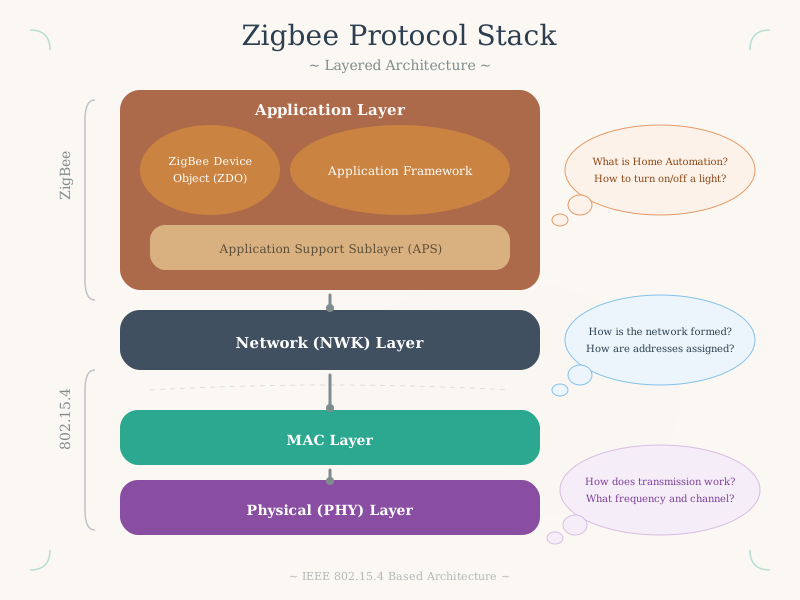
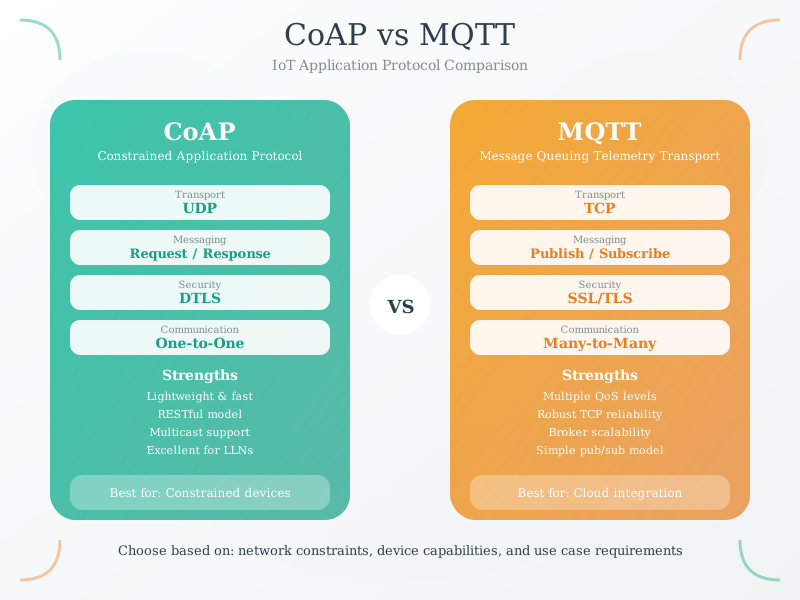
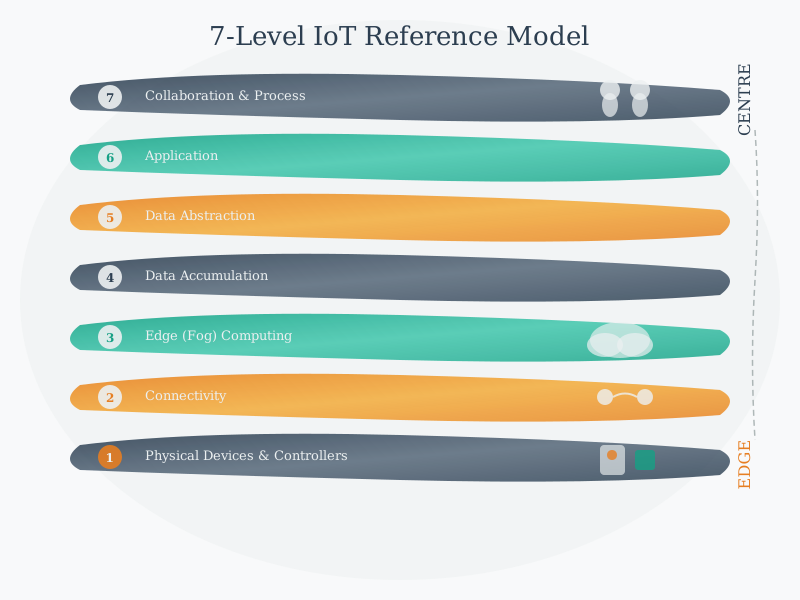
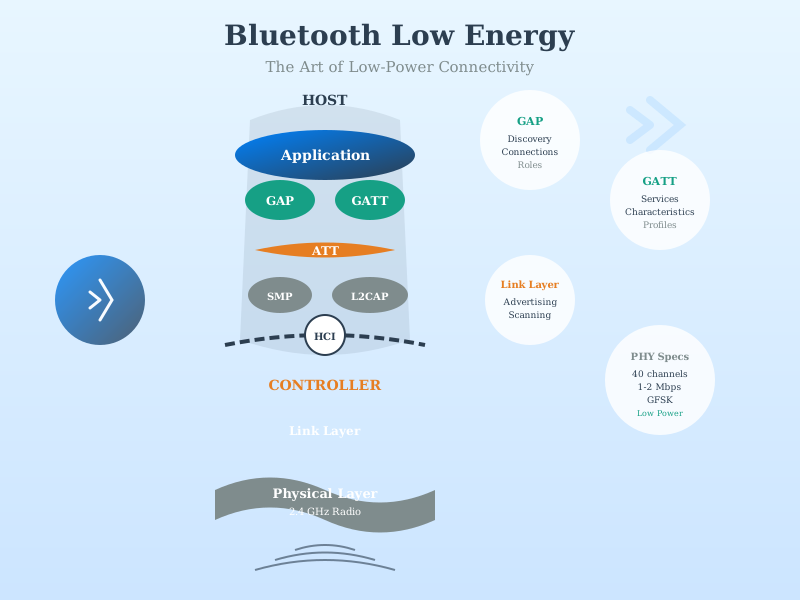
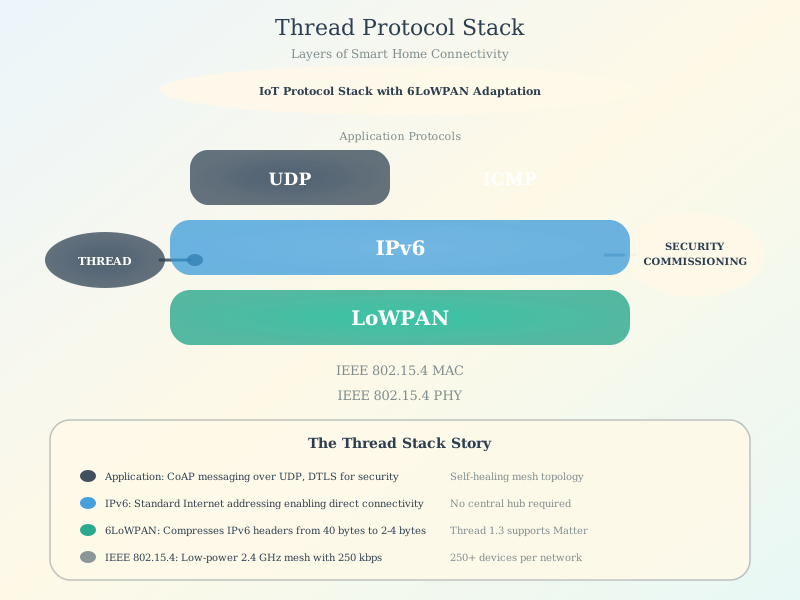
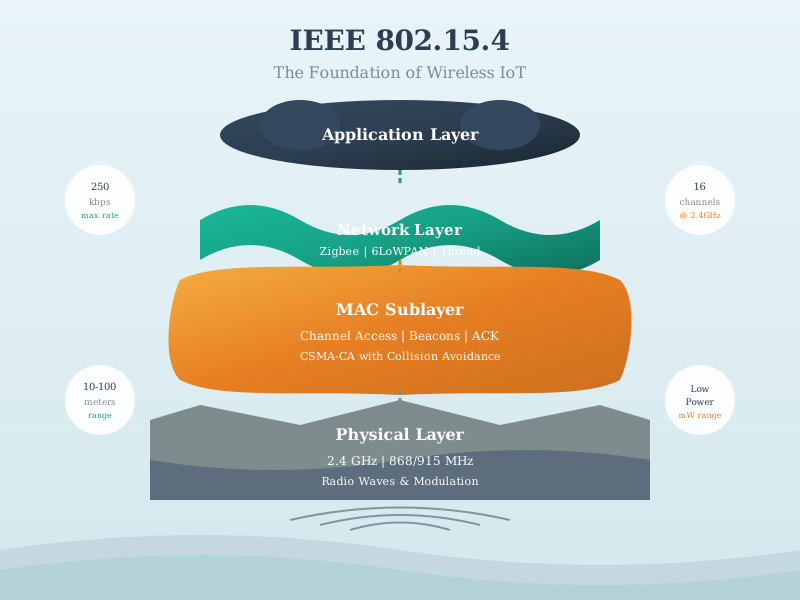
Figure Styles Available: These AI-generated figures come in multiple styles (artistic, modern, geometric) - access alternatives via the image version switcher when viewing in the book.
13.9 Summary
This quiz navigator serves as your central hub for formative assessment throughout the IoT course:
- Featured Quiz Sets: Quick access to the most popular and fundamental quizzes
- Chapter-Based Organization: Find quizzes relevant to your current study topic
- Instant Feedback: Every quiz includes explanations to help you learn from mistakes
13.10 Knowledge Check
13.11 What’s Next
- Start with the Networking Basics Self Check if you’re new to the course
- After completing quizzes, visit the Knowledge Gaps Tracker to address weak areas
- Try the Simulations Playground for hands-on practice