819 Mobile Labs: Coverage Planning
819.1 Learning Objectives
By the end of this chapter, you will be able to:
- Calculate electromagnetic wave properties: Use Python to compute wavelength, energy, and path loss for different frequencies
- Analyze spectrum usage: Build tools to identify interference and recommend optimal channels
- Perform link budget analysis: Calculate transmitter-to-receiver power budgets for IoT deployments
- Plan RF coverage: Create visualization tools to identify dead zones and optimize AP placement
- Build spectrum monitoring systems: Implement ESP32-based continuous monitoring with web interfaces
819.2 Prerequisites
Before diving into this chapter, you should be familiar with:
- Mobile Wireless: Fundamentals: Understanding path loss, wavelength, and frequency relationships
- Mobile Labs: Wi-Fi Spectrum Analysis: Practical Wi-Fi scanning and RSSI measurement
- Python programming: Familiarity with numpy and matplotlib for data analysis and visualization
- Basic RF concepts: Link budget, receiver sensitivity, and transmit power
Deep Dives: - Mobile Labs: Cellular Modem Integration - AT commands and modem setup - Mobile Labs: Wi-Fi Spectrum Analysis - ESP32 scanning tools
Comparisons: - Mobile Wireless Comprehensive Review - Technology comparison matrix - LPWAN Comparison - Range vs power trade-offs
Hands-On: - Simulations Hub - RF propagation simulators
819.3 Python Implementation 1: Wave Property Calculator
This implementation provides comprehensive calculations for electromagnetic wave properties, including frequency/wavelength relationships, energy calculations, and path loss analysis.
import math

# Physical constants
SPEED_OF_LIGHT = 299792458  # m/s
PLANCK_CONSTANT = 6.62607015e-34  # J·s


def frequency_to_wavelength(frequency_hz: float) -> float:
    """Convert frequency to wavelength."""
    return SPEED_OF_LIGHT / frequency_hz


def wavelength_to_frequency(wavelength_m: float) -> float:
    """Convert wavelength to frequency."""
    return SPEED_OF_LIGHT / wavelength_m


def photon_energy(frequency_hz: float) -> float:
    """Calculate photon energy in Joules."""
    return PLANCK_CONSTANT * frequency_hz


def free_space_path_loss_db(distance_m: float, frequency_hz: float) -> float:
    """
    Calculate free-space path loss in dB.
    FSPL = 20*log10(4*pi*d/lambda)
    """
    wavelength = frequency_to_wavelength(frequency_hz)
    if distance_m <= 0:
        return 0
    return 20 * math.log10(4 * math.pi * distance_m / wavelength)


def max_range_m(
    tx_power_dbm: float,
    rx_sensitivity_dbm: float,
    frequency_hz: float,
    fade_margin_db: float = 10.0,
    extra_losses_db: float = 0.0
) -> float:
    """Calculate maximum theoretical range given link budget."""
    available_loss = tx_power_dbm - rx_sensitivity_dbm - fade_margin_db - extra_losses_db
    wavelength = frequency_to_wavelength(frequency_hz)
    # Rearrange FSPL: d = lambda * 10^(FSPL/20) / (4*pi)
    distance = wavelength * (10 ** (available_loss / 20)) / (4 * math.pi)
    return distance


def fresnel_zone_radius(distance_m: float, frequency_hz: float, zone: int = 1) -> float:
    """Calculate Fresnel zone radius at midpoint."""
    wavelength = frequency_to_wavelength(frequency_hz)
    # r_n = sqrt(n * lambda * d1 * d2 / (d1 + d2))
    # At midpoint: d1 = d2 = d/2
    d_half = distance_m / 2
    return math.sqrt(zone * wavelength * d_half * d_half / distance_m)


def main():
    print("=== Electromagnetic Wave Properties ===\n")

    frequencies = [
        ("433 MHz ISM", 433e6),
        ("868 MHz (Europe)", 868e6),
        ("2.4 GHz ISM", 2.4e9),
    ]

    for name, freq in frequencies:
        wavelength = frequency_to_wavelength(freq)
        energy = photon_energy(freq)
        print(f"{name}:")
        print(f"Frequency: {freq/1e6:.2f} MHz ({freq:.2e} Hz)")
        print(f"Wavelength: {wavelength:.4f} m ({wavelength*100:.2f} cm)")
        print(f"Energy: {energy:.2e} Joules\n")

    print("=== Path Loss Comparison at 100m ===\n")
    distance = 100
    test_freqs = [
        ("868 MHz (Europe)", 868e6),
        ("2.4 GHz ISM", 2.4e9),
        ("5 GHz", 5e9),
    ]

    for name, freq in test_freqs:
        pl = free_space_path_loss_db(distance, freq)
        print(f"{name}: {pl:.2f} dB")

    # Compare 868 MHz vs 2.4 GHz advantage
    pl_868 = free_space_path_loss_db(distance, 868e6)
    pl_2400 = free_space_path_loss_db(distance, 2.4e9)
    print(f"\nPath loss advantage of 868 MHz over 2.4 GHz: {pl_2400 - pl_868:.2f} dB")

    print("\n=== Range Calculation ===\n")
    for name, freq in [("868 MHz (Europe)", 868e6), ("2.4 GHz ISM", 2.4e9)]:
        range_m = max_range_m(
            tx_power_dbm=14,
            rx_sensitivity_dbm=-137,
            frequency_hz=freq,
            fade_margin_db=10,
            extra_losses_db=0
        )
        print(f"{name}: {range_m/1000:.2f} km range")

    print("\n=== Fresnel Zone Analysis ===\n")
    link_distance = 1000  # 1 km
    freq = 2.4e9
    fz_radius = fresnel_zone_radius(link_distance, freq)
    print(f"First Fresnel zone radius at midpoint of 1 km link (2.4 GHz): {fz_radius:.2f} m")
    print(f"Required clearance (60% of first Fresnel zone): {fz_radius * 0.6:.2f} m")


if __name__ == "__main__":
    main()
Expected Output:
=== Electromagnetic Wave Properties ===

433 MHz ISM:
Frequency: 433.00 MHz (4.33e+08 Hz)
Wavelength: 0.6924 m (69.24 cm)
Energy: 2.87e-25 Joules

868 MHz (Europe):
Frequency: 868.00 MHz (8.68e+08 Hz)
Wavelength: 0.3454 m (34.54 cm)
Energy: 5.75e-25 Joules

2.4 GHz ISM:
Frequency: 2400.00 MHz (2.40e+09 Hz)
Wavelength: 0.1249 m (12.49 cm)
Energy: 1.59e-24 Joules

=== Path Loss Comparison at 100m ===

868 MHz (Europe): 71.21 dB
2.4 GHz ISM: 80.05 dB
5 GHz: 86.44 dB

Path loss advantage of 868 MHz over 2.4 GHz: 8.84 dB

=== Range Calculation ===

868 MHz (Europe): 15.77 km range
2.4 GHz ISM: 5.70 km range

=== Fresnel Zone Analysis ===

First Fresnel zone radius at midpoint of 1 km link (2.4 GHz): 3.97 m
Required clearance (60% of first Fresnel zone): 2.38 m
819.4 Python Implementation 2: Link Budget Calculator
This implementation performs comprehensive RF link budget analysis for IoT deployments.
import math
from dataclasses import dataclass
from typing import Optional


@dataclass
class LinkBudgetResult:
    """Results from link budget calculation."""
    tx_power_dbm: float
    tx_antenna_gain_dbi: float
    eirp_dbm: float
    free_space_path_loss_db: float
    environmental_losses_db: float
    total_path_loss_db: float
    rx_antenna_gain_dbi: float
    received_power_dbm: float
    rx_sensitivity_dbm: float
    link_margin_db: float
    fade_margin_required_db: float
    is_viable: bool


def calculate_fspl(distance_m: float, frequency_hz: float) -> float:
    """Calculate free-space path loss in dB."""
    if distance_m <= 0:
        return 0
    wavelength = 299792458 / frequency_hz
    return 20 * math.log10(4 * math.pi * distance_m / wavelength)


def calculate_link_budget(
    tx_power_dbm: float,
    tx_antenna_gain_dbi: float,
    rx_antenna_gain_dbi: float,
    rx_sensitivity_dbm: float,
    distance_m: float,
    frequency_hz: float,
    fade_margin_required_db: float = 10.0,
    wall_losses_db: float = 0.0,
    other_losses_db: float = 0.0
) -> LinkBudgetResult:
    """Calculate complete link budget."""

    eirp = tx_power_dbm + tx_antenna_gain_dbi
    fspl = calculate_fspl(distance_m, frequency_hz)
    environmental_losses = wall_losses_db + other_losses_db
    total_path_loss = fspl + environmental_losses

    received_power = eirp - total_path_loss + rx_antenna_gain_dbi
    link_margin = received_power - rx_sensitivity_dbm
    is_viable = link_margin >= fade_margin_required_db

    return LinkBudgetResult(
        tx_power_dbm=tx_power_dbm,
        tx_antenna_gain_dbi=tx_antenna_gain_dbi,
        eirp_dbm=eirp,
        free_space_path_loss_db=fspl,
        environmental_losses_db=environmental_losses,
        total_path_loss_db=total_path_loss,
        rx_antenna_gain_dbi=rx_antenna_gain_dbi,
        received_power_dbm=received_power,
        rx_sensitivity_dbm=rx_sensitivity_dbm,
        link_margin_db=link_margin,
        fade_margin_required_db=fade_margin_required_db,
        is_viable=is_viable
    )


def print_link_budget(result: LinkBudgetResult) -> None:
    """Print formatted link budget analysis."""
    print("\nLink Budget Analysis")
    print("=" * 50)
    print("Transmitter:")
    print(f"  TX Power: +{result.tx_power_dbm:.1f} dBm")
    print(f"  TX Antenna Gain: +{result.tx_antenna_gain_dbi:.1f} dBi")
    print(f"  EIRP: +{result.eirp_dbm:.1f} dBm")
    print("\nPath Losses:")
    print(f"  Free Space Path Loss: {result.free_space_path_loss_db:.1f} dB")
    print(f"  Environmental Losses: {result.environmental_losses_db:.1f} dB")
    print(f"  Total Path Loss: {result.total_path_loss_db:.1f} dB")
    print("\nReceiver:")
    print(f"  RX Antenna Gain: +{result.rx_antenna_gain_dbi:.1f} dBi")
    print(f"  Received Power: {result.received_power_dbm:.1f} dBm")
    print(f"  RX Sensitivity: {result.rx_sensitivity_dbm:.1f} dBm")
    print("\nMargins:")
    print(f"  Link Margin: {result.link_margin_db:+.1f} dB")
    print(f"  Required Fade Margin: {result.fade_margin_required_db:.1f} dB")
    status = "VIABLE ✓" if result.is_viable else "NOT VIABLE ✗"
    print(f"\nLink Status: {status}")
    print("=" * 50)


def calculate_max_range(
    tx_power_dbm: float,
    tx_antenna_gain_dbi: float,
    rx_antenna_gain_dbi: float,
    rx_sensitivity_dbm: float,
    frequency_hz: float,
    fade_margin_db: float = 10.0,
    environmental_losses_db: float = 0.0
) -> float:
    """Calculate maximum viable range."""
    eirp = tx_power_dbm + tx_antenna_gain_dbi
    available_loss = (eirp + rx_antenna_gain_dbi -
                      rx_sensitivity_dbm - fade_margin_db -
                      environmental_losses_db)

    wavelength = 299792458 / frequency_hz
    distance = wavelength * (10 ** (available_loss / 20)) / (4 * math.pi)
    return distance


def main():
    print("=" * 60)
    print("IoT LINK BUDGET ANALYSIS EXAMPLES")
    print("=" * 60)

    # Example 1: LoRa Link
    print("\n\nExample 1: LoRa Link (868 MHz, 5 km range)")
    print("-" * 60)

    lora_result = calculate_link_budget(
        tx_power_dbm=14,
        tx_antenna_gain_dbi=2,
        rx_antenna_gain_dbi=5,
        rx_sensitivity_dbm=-137,
        distance_m=5000,
        frequency_hz=868e6,
        fade_margin_required_db=10,
        wall_losses_db=0,
        other_losses_db=9  # Outdoor environment
    )
    print_link_budget(lora_result)

    # Example 2: Wi-Fi Indoor
    print("\n\nExample 2: Wi-Fi Link (2.4 GHz, 50 m indoor)")
    print("-" * 60)

    wifi_result = calculate_link_budget(
        tx_power_dbm=20,
        tx_antenna_gain_dbi=2,
        rx_antenna_gain_dbi=2,
        rx_sensitivity_dbm=-90,
        distance_m=50,
        frequency_hz=2.4e9,
        fade_margin_required_db=10,
        wall_losses_db=12,  # 2-3 walls
        other_losses_db=3.5  # Furniture, people
    )
    print_link_budget(wifi_result)

    # Example 3: Maximum Range Calculation
    print("\n\nExample 3: Zigbee Maximum Range Calculation")
    print("-" * 60)

    max_range = calculate_max_range(
        tx_power_dbm=10,
        tx_antenna_gain_dbi=2,
        rx_antenna_gain_dbi=2,
        rx_sensitivity_dbm=-100,
        frequency_hz=2.4e9,
        fade_margin_db=10,
        environmental_losses_db=0
    )

    print(f"Zigbee (2.4 GHz, 10 dBm TX power, -100 dBm sensitivity):")
    print(f"Maximum viable range: {max_range:.0f} meters ({max_range/1000:.2f} km)")
    print("Environment: Outdoor with minimal obstacles")

    # Verify with link budget at that range
    verify = calculate_link_budget(
        tx_power_dbm=10,
        tx_antenna_gain_dbi=2,
        rx_antenna_gain_dbi=2,
        rx_sensitivity_dbm=-100,
        distance_m=max_range,
        frequency_hz=2.4e9,
        fade_margin_required_db=10
    )
    print(f"\nVerification at {max_range:.0f}m:")
    print(f"  Link Margin: {verify.link_margin_db:+.1f} dB")
    print(f"  Required Margin: {verify.fade_margin_required_db:.1f} dB")
    print(f"  Status: {'VIABLE' if verify.is_viable else 'NOT VIABLE'}")


if __name__ == "__main__":
    main()
Expected Output:
============================================================
IoT LINK BUDGET ANALYSIS EXAMPLES
============================================================


Example 1: LoRa Link (868 MHz, 5 km range)
------------------------------------------------------------

Link Budget Analysis
==================================================
Transmitter:
  TX Power: +14.0 dBm
  TX Antenna Gain: +2.0 dBi
  EIRP: +16.0 dBm

Path Losses:
  Free Space Path Loss: 106.0 dB
  Environmental Losses: 9.0 dB
  Total Path Loss: 115.0 dB

Receiver:
  RX Antenna Gain: +5.0 dBi
  Received Power: -94.0 dBm
  RX Sensitivity: -137.0 dBm

Margins:
  Link Margin: +43.0 dB
  Required Fade Margin: 10.0 dB

Link Status: VIABLE ✓
==================================================


Example 2: Wi-Fi Link (2.4 GHz, 50 m indoor)
------------------------------------------------------------

Link Budget Analysis
==================================================
Transmitter:
  TX Power: +20.0 dBm
  TX Antenna Gain: +2.0 dBi
  EIRP: +22.0 dBm

Path Losses:
  Free Space Path Loss: 73.9 dB
  Environmental Losses: 15.5 dB
  Total Path Loss: 89.4 dB

Receiver:
  RX Antenna Gain: +2.0 dBi
  Received Power: -65.4 dBm
  RX Sensitivity: -90.0 dBm

Margins:
  Link Margin: +24.6 dB
  Required Fade Margin: 10.0 dB

Link Status: VIABLE ✓
==================================================


Example 3: Zigbee Maximum Range Calculation
------------------------------------------------------------
Zigbee (2.4 GHz, 10 dBm TX power, -100 dBm sensitivity):
Maximum viable range: 2371 meters (2.37 km)
Environment: Outdoor with minimal obstacles

Verification at 2371m:
  Link Margin: +10.0 dB
  Required Margin: 10.0 dB
  Status: VIABLE
819.5 Lab: ESP32 Real-Time Spectrum Monitor
This advanced lab creates a continuous spectrum monitoring system with data logging and web interface.
819.5.1 Hardware Required
- ESP32 development board
- MicroSD card module
- SD card (formatted FAT32)
- Breadboard and jumper wires
- Optional: OLED display (128x64, I2C)
819.5.2 Wiring Diagram
ESP32          SD Card Module
-----          --------------
GPIO 5    -->  CS
GPIO 18   -->  SCK
GPIO 19   -->  MISO
GPIO 23   -->  MOSI
3.3V      -->  VCC
GND       -->  GND

Optional OLED:
GPIO 21   -->  SDA
GPIO 22   -->  SCL
819.5.3 Complete Spectrum Monitor Code
#include <WiFi.h>
#include <WebServer.h>
#include <SD.h>
#include <SPI.h>
#include <time.h>

// SD Card pins
#define SD_CS 5

// Web server
WebServer server(80);

// Scan configuration
#define SCAN_INTERVAL_MS 30000  // 30 seconds
#define MAX_NETWORKS 50

struct NetworkScan {
    char ssid[33];
    int channel;
    int rssi;
    char encryption[20];
    unsigned long timestamp;
};

NetworkScan scanHistory[MAX_NETWORKS];
int scanCount = 0;
unsigned long lastScanTime = 0;

// Statistics
int channelCounts[14] = {0};
float channelAvgRSSI[14] = {0};
int totalScans = 0;

void setup() {
    Serial.begin(115200);
    delay(1000);

    Serial.println("\n\n================================");
    Serial.println("ESP32 Spectrum Monitor");
    Serial.println("================================\n");

    // Initialize SD card
    if (!SD.begin(SD_CS)) {
        Serial.println("SD Card initialization failed!");
    } else {
        Serial.println("SD Card initialized successfully");

        // Create header in log file if new
        if (!SD.exists("/spectrum_log.csv")) {
            File logFile = SD.open("/spectrum_log.csv", FILE_WRITE);
            if (logFile) {
                logFile.println("Timestamp,SSID,Channel,RSSI,Encryption");
                logFile.close();
                Serial.println("Created new log file");
            }
        }
    }

    // Set Wi-Fi mode
    WiFi.mode(WIFI_STA);
    WiFi.disconnect();

    // Start access point for web interface
    WiFi.softAP("ESP32-SpectrumMonitor", "spectrum123");
    IPAddress IP = WiFi.softAPIP();
    Serial.print("AP IP address: ");
    Serial.println(IP);

    // Setup web server routes
    server.on("/", handleRoot);
    server.on("/scan", handleScan);
    server.on("/data", handleData);
    server.on("/download", handleDownload);
    server.begin();

    Serial.println("Web server started");
    Serial.println("Connect to 'ESP32-SpectrumMonitor' and navigate to " + IP.toString());
    Serial.println("\nStarting continuous monitoring...\n");
}

void loop() {
    server.handleClient();

    // Periodic scan
    if (millis() - lastScanTime >= SCAN_INTERVAL_MS) {
        performScan();
        lastScanTime = millis();
    }
}

void performScan() {
    Serial.println("Scanning networks...");

    int n = WiFi.scanNetworks();
    totalScans++;

    // Reset channel statistics
    for (int i = 0; i < 14; i++) {
        channelCounts[i] = 0;
        channelAvgRSSI[i] = 0;
    }

    Serial.printf("Found %d networks\n\n", n);

    if (n > 0) {
        // Clear previous scan
        scanCount = 0;

        // Open log file for appending
        File logFile = SD.open("/spectrum_log.csv", FILE_APPEND);

        for (int i = 0; i < n && i < MAX_NETWORKS; i++) {
            // Store in memory
            strncpy(scanHistory[scanCount].ssid, WiFi.SSID(i).c_str(), 32);
            scanHistory[scanCount].channel = WiFi.channel(i);
            scanHistory[scanCount].rssi = WiFi.RSSI(i);
            strncpy(scanHistory[scanCount].encryption,
                   getEncryptionType(WiFi.encryptionType(i)), 19);
            scanHistory[scanCount].timestamp = millis();

            // Update channel statistics
            int ch = WiFi.channel(i);
            if (ch >= 1 && ch <= 13) {
                channelCounts[ch]++;
                channelAvgRSSI[ch] += WiFi.RSSI(i);
            }

            // Log to SD card
            if (logFile) {
                logFile.printf("%lu,%s,%d,%d,%s\n",
                              millis(),
                              WiFi.SSID(i).c_str(),
                              WiFi.channel(i),
                              WiFi.RSSI(i),
                              getEncryptionType(WiFi.encryptionType(i)));
            }

            scanCount++;
        }

        if (logFile) {
            logFile.close();
        }

        // Calculate average RSSI per channel
        for (int ch = 1; ch <= 13; ch++) {
            if (channelCounts[ch] > 0) {
                channelAvgRSSI[ch] /= channelCounts[ch];
            }
        }

        // Print summary
        printChannelSummary();
    }
}

void printChannelSummary() {
    Serial.println("\nChannel Summary:");
    Serial.println("Ch | Networks | Avg RSSI | Bar Chart");
    Serial.println("---|----------|----------|------------------------------");

    for (int ch = 1; ch <= 13; ch++) {
        Serial.printf("%2d | %8d | %8.1f | ",
                     ch, channelCounts[ch], channelAvgRSSI[ch]);

        for (int i = 0; i < channelCounts[ch]; i++) {
            Serial.print("█");
        }
        Serial.println();
    }

    // Find best channel
    int bestChannel = 1;
    int minCount = 999;
    for (int ch : {1, 6, 11}) {
        if (channelCounts[ch] < minCount) {
            minCount = channelCounts[ch];
            bestChannel = ch;
        }
    }

    Serial.printf("\nRecommended channel: %d (%d networks)\n",
                 bestChannel, minCount);
}

void handleRoot() {
    String html = R"(
<!DOCTYPE html>
<html>
<head>
    <title>ESP32 Spectrum Monitor</title>
    <meta name="viewport" content="width=device-width, initial-scale=1">
    <style>
        body { font-family: Arial; margin: 20px; background: #f0f0f0; }
        .container { max-width: 1000px; margin: 0 auto; background: white; padding: 20px; border-radius: 10px; }
        h1 { color: #333; }
        button { background: #4CAF50; color: white; padding: 10px 20px; border: none; border-radius: 5px; cursor: pointer; margin: 5px; }
        button:hover { background: #45a049; }
        table { width: 100%; border-collapse: collapse; margin-top: 20px; }
        th, td { padding: 10px; text-align: left; border-bottom: 1px solid #ddd; }
        th { background: #4CAF50; color: white; }
        .channel-viz { margin-top: 20px; }
        .bar { background: #2196F3; color: white; padding: 5px; margin: 2px 0; }
    </style>
    <script>
        function refreshData() {
            fetch('/data')
                .then(response => response.json())
                .then(data => updateDisplay(data));
        }

        function updateDisplay(data) {
            document.getElementById('scanCount').innerText = data.totalScans;
            document.getElementById('networkCount').innerText = data.currentNetworks;

            let table = '<table><tr><th>SSID</th><th>Channel</th><th>RSSI</th><th>Security</th></tr>';
            data.networks.forEach(net => {
                table += '<tr><td>' + net.ssid + '</td><td>' + net.channel + '</td><td>' + net.rssi + ' dBm</td><td>' + net.encryption + '</td></tr>';
            });
            table += '</table>';
            document.getElementById('networkTable').innerHTML = table;

            let viz = '';
            for (let ch = 1; ch <= 13; ch++) {
                let count = data.channelCounts[ch] || 0;
                let width = (count * 30) + 'px';
                viz += '<div class="bar" style="width: ' + width + '">Ch ' + ch + ': ' + count + ' networks</div>';
            }
            document.getElementById('channelViz').innerHTML = viz;
        }

        setInterval(refreshData, 5000);
        window.onload = refreshData;
    </script>
</head>
<body>
    <div class="container">
        <h1>ESP32 Spectrum Monitor</h1>
        <p>Total Scans: <strong id="scanCount">0</strong> |
           Current Networks: <strong id="networkCount">0</strong></p>

        <button onclick="fetch('/scan').then(() => setTimeout(refreshData, 2000))">Scan Now</button>
        <button onclick="refreshData()">Refresh</button>
        <button onclick="window.location='/download'">Download Log</button>

        <div class="channel-viz">
            <h2>Channel Distribution</h2>
            <div id="channelViz"></div>
        </div>

        <div id="networkTable"></div>
    </div>
</body>
</html>
    )";

    server.send(200, "text/html", html);
}

void handleScan() {
    performScan();
    server.send(200, "text/plain", "Scan initiated");
}

void handleData() {
    String json = "{";
    json += "\"totalScans\":" + String(totalScans) + ",";
    json += "\"currentNetworks\":" + String(scanCount) + ",";
    json += "\"networks\":[";

    for (int i = 0; i < scanCount; i++) {
        if (i > 0) json += ",";
        json += "{";
        json += "\"ssid\":\"" + String(scanHistory[i].ssid) + "\",";
        json += "\"channel\":" + String(scanHistory[i].channel) + ",";
        json += "\"rssi\":" + String(scanHistory[i].rssi) + ",";
        json += "\"encryption\":\"" + String(scanHistory[i].encryption) + "\"";
        json += "}";
    }
    json += "],";

    json += "\"channelCounts\":{";
    for (int ch = 1; ch <= 13; ch++) {
        if (ch > 1) json += ",";
        json += "\"" + String(ch) + "\":" + String(channelCounts[ch]);
    }
    json += "}}";

    server.send(200, "application/json", json);
}

void handleDownload() {
    File logFile = SD.open("/spectrum_log.csv");
    if (!logFile) {
        server.send(404, "text/plain", "Log file not found");
        return;
    }

    server.sendHeader("Content-Disposition", "attachment; filename=spectrum_log.csv");
    server.streamFile(logFile, "text/csv");
    logFile.close();
}

const char* getEncryptionType(wifi_auth_mode_t encryptionType) {
    switch (encryptionType) {
        case WIFI_AUTH_OPEN: return "Open";
        case WIFI_AUTH_WEP: return "WEP";
        case WIFI_AUTH_WPA_PSK: return "WPA-PSK";
        case WIFI_AUTH_WPA2_PSK: return "WPA2-PSK";
        case WIFI_AUTH_WPA_WPA2_PSK: return "WPA/WPA2";
        case WIFI_AUTH_WPA2_ENTERPRISE: return "WPA2-Enterprise";
#ifdef WIFI_AUTH_WPA3_PSK
        case WIFI_AUTH_WPA3_PSK: return "WPA3-PSK";
#endif
#ifdef WIFI_AUTH_WPA2_WPA3_PSK
        case WIFI_AUTH_WPA2_WPA3_PSK: return "WPA2/WPA3";
#endif
        default: return "Unknown";
    }
}
819.5.4 Lab Tasks
- Deploy the monitor in your environment and let it run for 1 hour
- Access the web interface at 192.168.4.1 from your phone or laptop
- Download the CSV log and analyze temporal patterns in Excel/Python
- Identify the busiest times for network activity
- Test channel switching: Change your Wi-Fi router to the recommended channel and measure performance improvement
819.6 Lab: Python RF Coverage Planner
This lab creates a tool to plan IoT network deployments with coverage analysis.
819.6.1 Installation
python3 -m pip install numpy matplotlib819.6.2 Complete Coverage Planner Code
Save the following as rf_coverage_planner.py and run python3 rf_coverage_planner.py:
import math

import matplotlib.pyplot as plt
import numpy as np


def free_space_path_loss_db(distance_m: np.ndarray, frequency_hz: float) -> np.ndarray:
    distance_m = np.maximum(distance_m, 1e-3)
    wavelength_m = 3e8 / frequency_hz
    return 20 * np.log10(4 * math.pi * distance_m / wavelength_m)


def received_power_dbm(
    tx_power_dbm: float,
    distance_m: np.ndarray,
    frequency_hz: float,
    path_loss_exponent: float = 3.0,
    reference_distance_m: float = 1.0,
    extra_losses_db: float = 0.0,
) -> np.ndarray:
    pl_ref = free_space_path_loss_db(reference_distance_m, frequency_hz)
    pl = pl_ref + 10 * path_loss_exponent * np.log10(np.maximum(distance_m, reference_distance_m) / reference_distance_m)
    return tx_power_dbm - pl - extra_losses_db


def main() -> None:
    frequency_hz = 2.4e9
    width_m, height_m = 50, 30
    sensitivity_dbm = -85

    access_points = [
        {"name": "AP1", "x_m": 10, "y_m": 15, "tx_dbm": 20},
        {"name": "AP2", "x_m": 40, "y_m": 15, "tx_dbm": 20},
    ]

    grid_resolution_m = 0.5
    x = np.arange(0, width_m + grid_resolution_m, grid_resolution_m)
    y = np.arange(0, height_m + grid_resolution_m, grid_resolution_m)
    xx, yy = np.meshgrid(x, y)

    rssi_stack = []
    for ap in access_points:
        distance = np.sqrt((xx - ap["x_m"]) ** 2 + (yy - ap["y_m"]) ** 2)
        rssi = received_power_dbm(ap["tx_dbm"], distance, frequency_hz, path_loss_exponent=3.0, extra_losses_db=8.0)
        rssi_stack.append(rssi)

    best_rssi = np.max(np.stack(rssi_stack, axis=0), axis=0)

    coverage_mask = best_rssi >= sensitivity_dbm
    coverage_percent = 100 * float(np.mean(coverage_mask))
    mean_rssi = float(np.mean(best_rssi))
    min_rssi = float(np.min(best_rssi))
    dead_points = int(np.sum(~coverage_mask))

    def pct(mask: np.ndarray) -> float:
        return 100 * float(np.mean(mask))

    excellent = best_rssi >= -50
    good = (best_rssi < -50) & (best_rssi >= -65)
    fair = (best_rssi < -65) & (best_rssi >= -75)
    poor = (best_rssi < -75) & (best_rssi >= -85)
    dead = best_rssi < -85

    print("=" * 60)
    print("RF NETWORK COVERAGE PLANNER")
    print("=" * 60)
    print(f"\nArea: {width_m}m x {height_m}m")
    print(f"Access Points: {len(access_points)}")
    for ap in access_points:
        print(f"  {ap['name']}: ({ap['x_m']}m, {ap['y_m']}m), {ap['tx_dbm']} dBm")

    print("\nCalculating coverage map...")

    print("\n" + "=" * 60)
    print("COVERAGE ANALYSIS")
    print("=" * 60)
    print(f"Sensitivity threshold: {sensitivity_dbm:.0f} dBm")
    print(f"Overall coverage: {coverage_percent:.1f}%")
    print(f"Mean RSSI: {mean_rssi:.1f} dBm")
    print(f"Minimum RSSI: {min_rssi:.1f} dBm")
    print("\nSignal Quality Distribution:")
    print(f"  Excellent (≥-50 dBm): {pct(excellent):.1f}%")
    print(f"  Good (-50 to -65 dBm): {pct(good):.1f}%")
    print(f"  Fair (-65 to -75 dBm): {pct(fair):.1f}%")
    print(f"  Poor (-75 to -85 dBm): {pct(poor):.1f}%")
    print(f"  Dead Zone (<-85 dBm): {pct(dead):.1f}%")
    print(f"\nDead zone locations: {dead_points} points")

    fig, (ax1, ax2) = plt.subplots(1, 2, figsize=(12, 5), constrained_layout=True)

    im = ax1.imshow(best_rssi, origin="lower", extent=[0, width_m, 0, height_m], cmap="viridis")
    ax1.set_title("Best RSSI (dBm)")
    ax1.set_xlabel("x (m)")
    ax1.set_ylabel("y (m)")
    for ap in access_points:
        ax1.scatter(ap["x_m"], ap["y_m"], c="red", s=60, marker="x")
        ax1.text(ap["x_m"] + 0.5, ap["y_m"] + 0.5, ap["name"], color="white", fontsize=9)
    fig.colorbar(im, ax=ax1, shrink=0.85)

    categories = np.zeros_like(best_rssi, dtype=int)
    categories[good] = 1
    categories[fair] = 2
    categories[poor] = 3
    categories[dead] = 4
    cmap = plt.cm.get_cmap("Set1", 5)
    ax2.imshow(categories, origin="lower", extent=[0, width_m, 0, height_m], cmap=cmap, vmin=0, vmax=4)
    ax2.set_title("Coverage Zones")
    ax2.set_xlabel("x (m)")
    ax2.set_ylabel("y (m)")

    fig.suptitle("RF Coverage Planner (Log-Distance Model)", fontsize=12)
    out_path = "coverage_map.png"
    print("\nGenerating visualization...")
    fig.savefig(out_path, dpi=150)
    print(f"\nVisualization saved as '{out_path}'")

    print("\nRecommendations:")
    if coverage_percent < 95:
        print("  - Coverage is below 95%. Consider adding more access points.")
    else:
        print("  - Coverage meets or exceeds 95%. Validate with a site survey.")

    if dead_points > 0:
        print("  - Focus on dead zone areas identified in the visualization.")


if __name__ == "__main__":
    main()
819.6.3 Expected Output
============================================================
RF NETWORK COVERAGE PLANNER
============================================================

Area: 50m x 30m
Access Points: 2
  AP1: (10m, 15m), 20 dBm
  AP2: (40m, 15m), 20 dBm

Calculating coverage map...

============================================================
COVERAGE ANALYSIS
============================================================
Sensitivity threshold: -85 dBm
Overall coverage: 94.3%
Mean RSSI: -64.2 dBm
Minimum RSSI: -97.5 dBm

Signal Quality Distribution:
  Excellent (≥-50 dBm): 15.2%
  Good (-50 to -65 dBm): 42.8%
  Fair (-65 to -75 dBm): 28.1%
  Poor (-75 to -85 dBm): 8.2%
  Dead Zone (<-85 dBm): 5.7%

Dead zone locations: 342 points

Generating visualization...

Visualization saved as 'coverage_map.png'

Recommendations:
  - Coverage is below 95%. Consider adding more access points.
  - Focus on dead zone areas identified in the visualization.
The visualization shows:
- Left plot: Continuous RSSI heatmap with AP locations marked
- Right plot: Discrete coverage quality zones (color-coded from dead zone to excellent)
819.7 Knowledge Check: Coverage Planning
819.8 Visual Reference Gallery
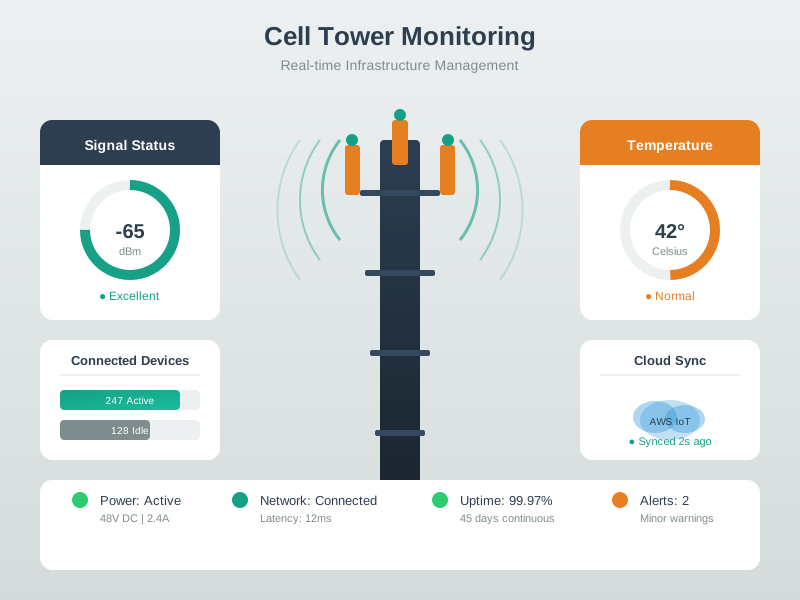
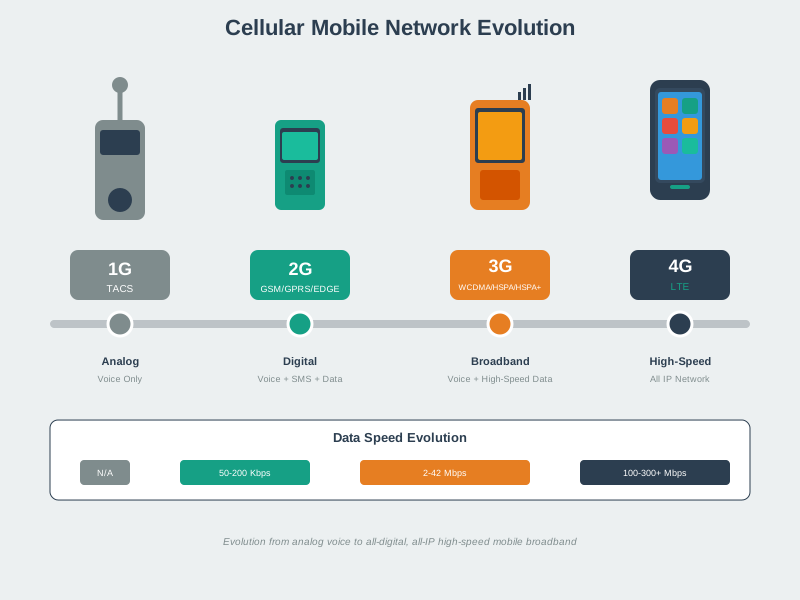
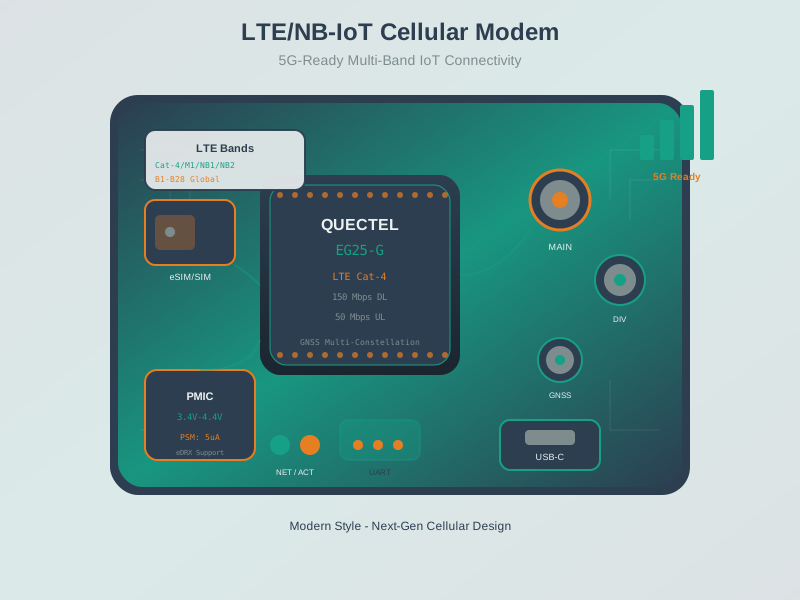
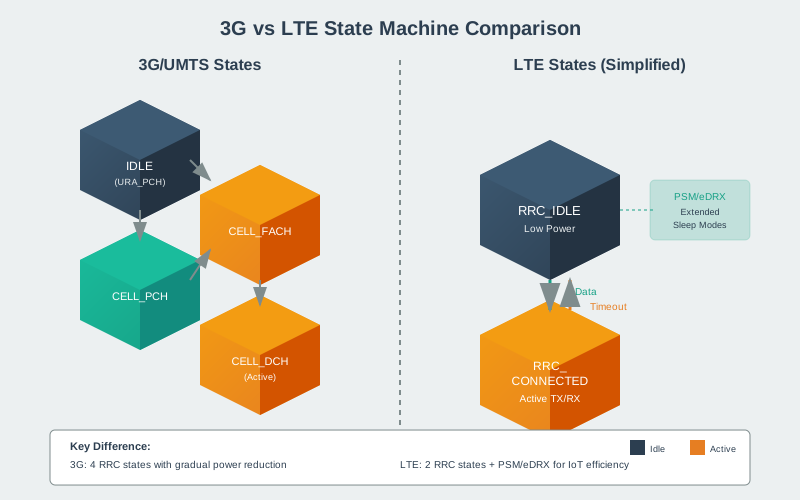
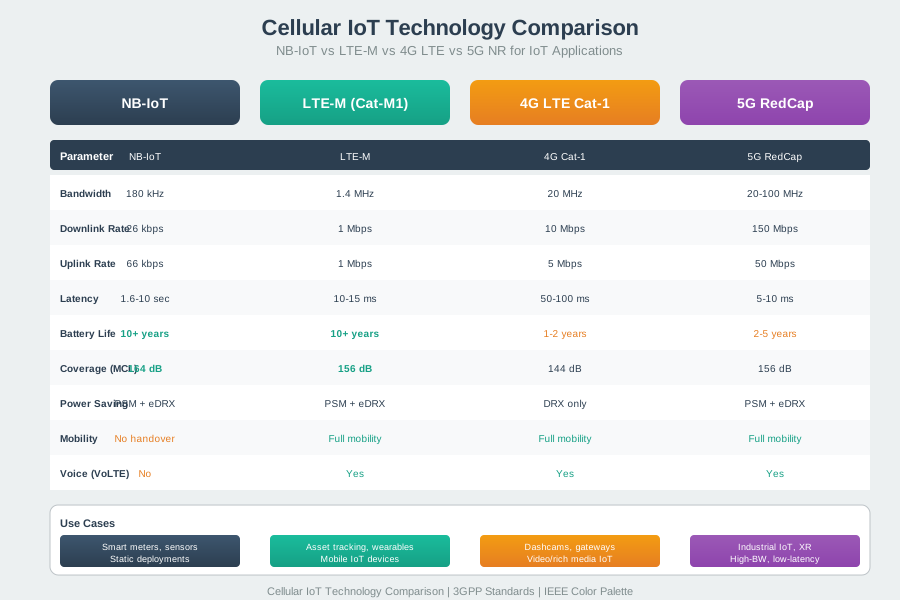
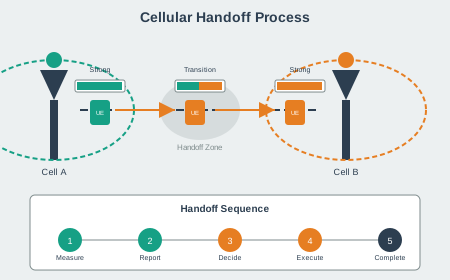
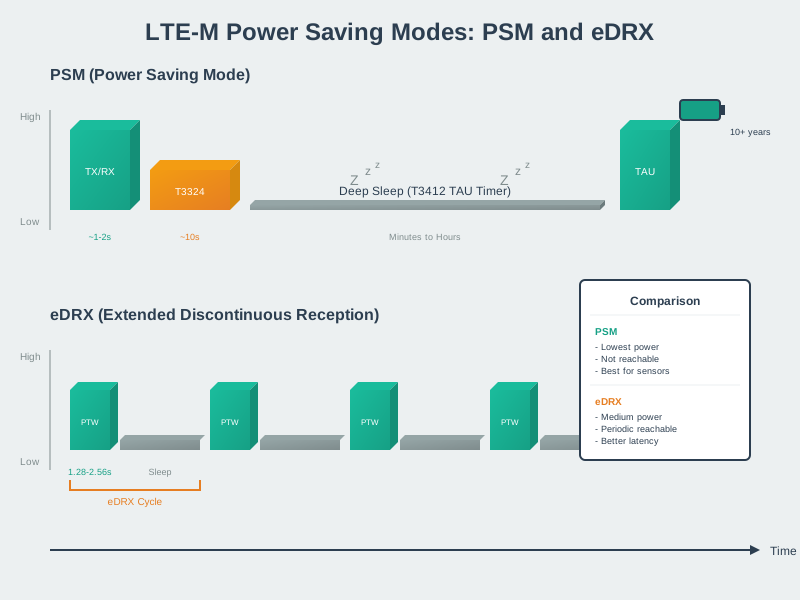
These AI-generated visualizations provide alternative perspectives on mobile wireless implementation concepts covered in this chapter.
819.8.1 Cellular Network Infrastructure
819.8.2 Cellular Modem and Device Integration
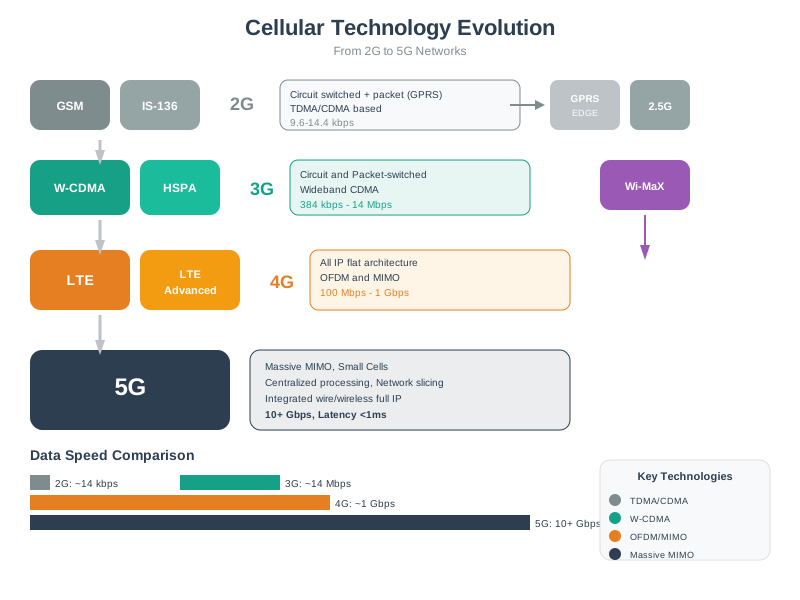
819.8.3 Cellular IoT Evolution and Comparison
819.8.4 Handoff and Mobility Management
819.9 Summary
This chapter provided comprehensive tools for RF coverage planning and analysis:
- Wave property calculations enable you to quickly compare frequencies for wavelength, path loss, and range
- Link budget analysis determines if a deployment is viable before you install hardware
- Spectrum monitoring captures temporal patterns to identify time-varying interference
- Coverage planning visualizes RSSI heatmaps and dead zones to guide AP placement
- Python tools provide reusable code for deployment planning and validation
819.10 What’s Next
With coverage planning tools mastered, continue your wireless IoT journey with:
- Cellular Modem: Mobile Labs: Cellular Modem Integration - AT commands and bring-up
- Wi-Fi Scanning: Mobile Labs: Wi-Fi Spectrum Analysis - ESP32 scanning tools
- Review & scenarios: Mobile Wireless: Comprehensive Review
- Wi-Fi deep dive: Wi-Fi Fundamentals → Wi-Fi IoT Implementations
- More tools: Simulations Hub