%%{init: {'theme': 'base', 'themeVariables': {'primaryColor': '#2C3E50', 'primaryTextColor': '#fff', 'primaryBorderColor': '#16A085', 'lineColor': '#16A085', 'secondaryColor': '#E67E22', 'tertiaryColor': '#7F8C8D'}}}%%
graph TB
    subgraph MQTT["MQTT over Wi-Fi"]
        M7["Layer 7: MQTT<br/>(Application)"]
        M4["Layer 4: TCP<br/>(Transport)"]
        M3["Layer 3: IPv4/IPv6<br/>(Network)"]
        M2["Layer 2: Wi-Fi 802.11<br/>(Data Link)"]
        M1["Layer 1: 2.4 GHz radio<br/>(Physical)"]
        M7 --> M4 --> M3 --> M2 --> M1
    end

    subgraph CoAP["CoAP over 6LoWPAN"]
        C7["Layer 7: CoAP<br/>(Application)"]
        C4["Layer 4: UDP<br/>(Transport)"]
        C3["Layer 3: IPv6 + 6LoWPAN<br/>(Network)"]
        C2["Layer 2: 802.15.4<br/>(Data Link)"]
        C1["Layer 1: 868/915 MHz<br/>(Physical)"]
        C7 --> C4 --> C3 --> C2 --> C1
    end

    subgraph LoRa["LoRaWAN"]
        L7["Layer 7: App Payload<br/>(Custom Format)"]
        L43["Layer 4-3: LoRaWAN MAC<br/>(Combined)"]
        L21["Layer 2-1: LoRa PHY<br/>(Modulation)"]
        L7 --> L43 --> L21
    end

    style M7 fill:#2C3E50,stroke:#16A085,stroke-width:2px,color:#fff
    style M4 fill:#16A085,stroke:#2C3E50,stroke-width:2px,color:#fff
    style M3 fill:#E67E22,stroke:#2C3E50,stroke-width:2px,color:#fff
    style M2 fill:#7F8C8D,stroke:#2C3E50,stroke-width:2px,color:#fff
    style M1 fill:#7F8C8D,stroke:#2C3E50,stroke-width:2px,color:#fff

    style C7 fill:#2C3E50,stroke:#16A085,stroke-width:2px,color:#fff
    style C4 fill:#16A085,stroke:#2C3E50,stroke-width:2px,color:#fff
    style C3 fill:#E67E22,stroke:#2C3E50,stroke-width:2px,color:#fff
    style C2 fill:#7F8C8D,stroke:#2C3E50,stroke-width:2px,color:#fff
    style C1 fill:#7F8C8D,stroke:#2C3E50,stroke-width:2px,color:#fff

    style L7 fill:#2C3E50,stroke:#16A085,stroke-width:2px,color:#fff
    style L43 fill:#E67E22,stroke:#2C3E50,stroke-width:2px,color:#fff
    style L21 fill:#7F8C8D,stroke:#2C3E50,stroke-width:2px,color:#fff
627 Networking Basics: Reference and Glossary
627.1 Learning Objectives
By the end of this chapter, you will be able to:
- Master Core Terminology: Define and apply essential networking terms
- Compare Protocol Stacks: Understand how IoT protocols map to network layers
- Apply Network Concepts: Use reference tables to solve real-world IoT problems
- Pass Comprehensive Assessments: Demonstrate mastery through advanced MCQ questions
627.2 Prerequisites
Before using this reference, ensure you have completed:
- Networking Basics: Knowledge Check: Self-assessment questions with detailed answers
- Networking Basics: Labs: Hands-on practice with ESP32 and Python
627.3 Visual Reference Gallery
NoteVisual: Common Networking Concepts
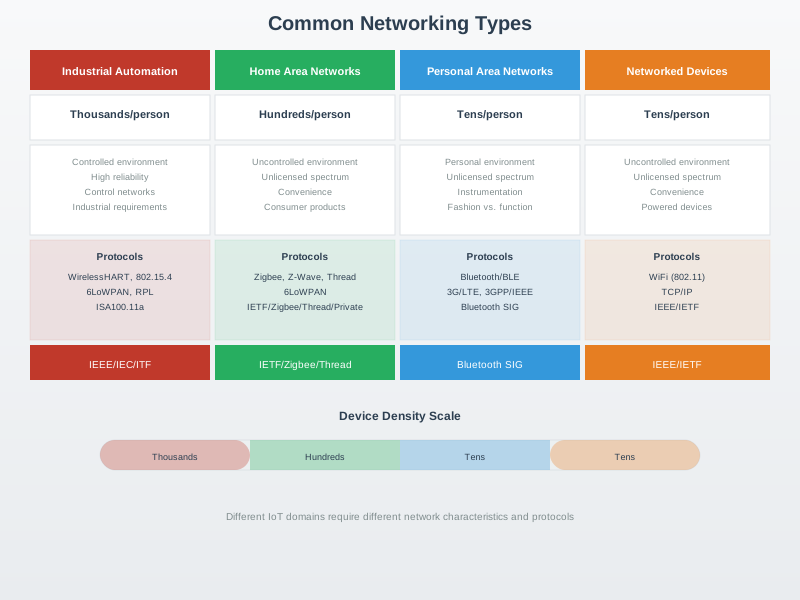
This visualization provides an overview of core networking concepts that form the foundation for understanding IoT communication systems.
NoteVisual: Star and Mesh Topologies
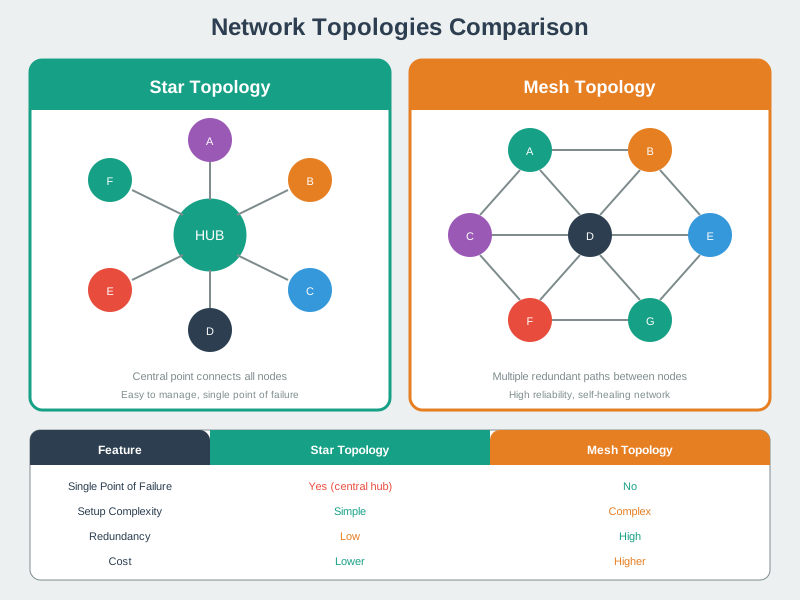
Understanding topology differences helps in selecting the right network structure for IoT deployments based on reliability, scalability, and management requirements.
NoteVisual: Logical Network Topologies
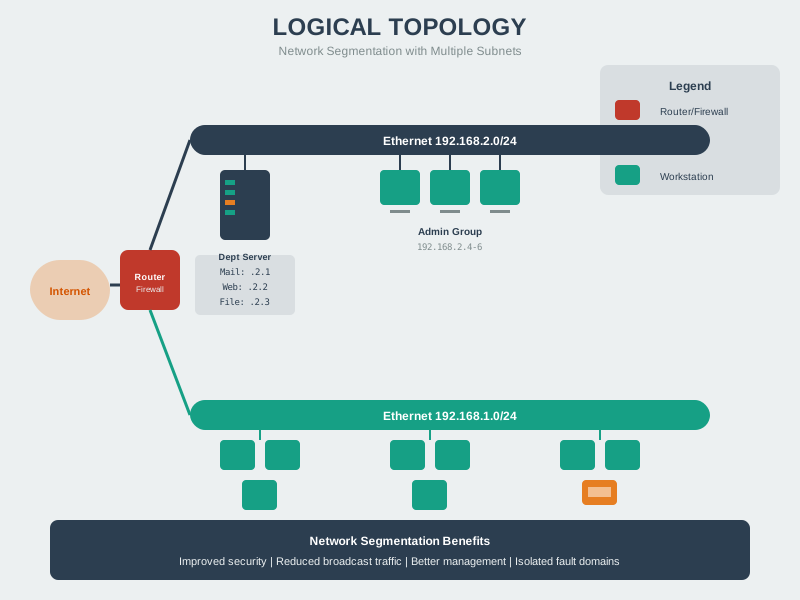
Logical topologies describe data flow patterns independent of physical cabling, helping network designers understand communication pathways.
627.4 Key Concepts Reference
These are the essential networking concepts you should be able to explain and apply:
- OSI Model: 7-layer theoretical framework for network communication (Physical, Data Link, Network, Transport, Session, Presentation, Application)
- TCP/IP Model: 4-layer practical model actually used on the internet (Link, Internet, Transport, Application)
- IPv4 Addressing: 32-bit addresses (e.g., 192.168.1.100) with public, private, and reserved ranges; facing exhaustion
- IPv6 Addressing: 128-bit addresses (e.g., 2001:0db8:85a3::8a2e:0370:7334) with virtually unlimited space for IoT devices
- MAC Addresses: 48-bit hardware identifiers (Layer 2) for local network communication; format: AA:BB:CC:DD:EE:FF
- TCP vs UDP: TCP provides guaranteed delivery with higher overhead; UDP offers speed with best-effort delivery
- Network Topologies: Point-to-point, star, mesh, and tree/hierarchical arrangements each with different trade-offs
- MQTT and CoAP: Application-layer protocols; MQTT uses TCP (port 1883) for reliable messaging, CoAP uses UDP (port 5683) for constrained devices
- Network Troubleshooting: Systematic layer-by-layer approach from Physical (signal strength, obstacles) to Application (DNS, ports)
- IoT Security: Default credential changes, TLS encryption, network segmentation, firmware updates, and minimal port exposure
- RSSI: Received Signal Strength Indicator in dBm; values above -70 dBm are considered good for reliable connections
- Bandwidth and Latency: IoT data is typically small; sensor readings measured in bytes not megabytes; optimize for constrained networks
627.5 Comprehensive Quiz
Test your mastery with these advanced scenario-based questions.
627.6 Quick Glossary
NoteCore Networking Terms
This glossary provides quick definitions for essential networking concepts used throughout this chapter.
| Term | Definition | Example/Context |
|---|---|---|
| IP Address | Unique numerical identifier for a device on a network | IPv4: 192.168.1.100, IPv6: 2001:db8::1 |
| MAC Address | Hardware address burned into network interface card (NIC) | 00:1A:2B:3C:4D:5E (48 bits, Layer 2) |
| Port Number | 16-bit number identifying application/service on a device | HTTP: 80, HTTPS: 443, MQTT: 1883 |
| Router | Layer 3 device that forwards packets between different networks | Home router connects LAN to internet |
| Switch | Layer 2 device that forwards frames within same network | Connects multiple devices in LAN |
| Gateway | Device connecting different network types/protocols | IoT gateway: Zigbee sensors -> Wi-Fi -> cloud |
| NAT | Network Address Translation, maps private IPs to single public IP | 192.168.1.x -> 203.0.113.42:port |
| Subnet | Logical subdivision of IP network for organization/security | Home: 192.168.1.0/24 (256 addresses) |
| Subnet Mask | Defines which portion of IP is network vs host | 255.255.255.0 = /24 (first 3 octets = network) |
| DNS | Domain Name System, converts names to IP addresses | iot.example.com -> 203.0.113.42 |
| DHCP | Dynamic Host Configuration Protocol, assigns IPs automatically | Router assigns 192.168.1.100 to new device |
| Packet | Unit of data at Layer 3 (Network), contains IP headers | IP packet = header + payload |
| Frame | Unit of data at Layer 2 (Data Link), contains MAC addresses | Ethernet frame = preamble + header + payload + FCS |
| Datagram | UDP packet (connectionless) | Sensor sends UDP datagram with reading |
| Segment | TCP packet (connection-oriented) | TCP segment = header + data + checksum |
| MTU | Maximum Transmission Unit, largest packet size without fragmentation | Ethernet: 1500 bytes, LoRaWAN: 51-242 bytes |
| Bandwidth | Maximum data transfer rate of a connection | Wi-Fi 802.11ac: up to 1.3 Gbps |
| Latency | Time delay for packet to travel from source to destination | Wi-Fi: 2-5ms, LoRaWAN: 1-10 seconds |
| Throughput | Actual data rate achieved (always < bandwidth) | 100 Mbps link might achieve 85 Mbps throughput |
| Protocol | Set of rules governing communication between devices | TCP, UDP, IP, MQTT, CoAP |
| TCP | Transmission Control Protocol, reliable connection-oriented transport | HTTP, MQTT, FTP use TCP (Layer 4) |
| UDP | User Datagram Protocol, unreliable connectionless transport | DNS, CoAP, streaming video use UDP |
| IPv4 | Internet Protocol version 4, 32-bit addresses (4.3 billion) | 192.168.1.1, exhausted for IoT scale |
| IPv6 | Internet Protocol version 6, 128-bit addresses (340 undecillion) | 2001:0db8:85a3::8a2e:0370:7334 |
| 6LoWPAN | IPv6 over Low-power Wireless PANs, compresses IPv6 for 802.15.4 | 40-byte IPv6 header -> 2-8 bytes |
| OSI Model | 7-layer reference model for network protocols | Physical, Data Link, Network, Transport, Session, Presentation, Application |
| TCP/IP Model | 4-layer practical internet model | Link, Internet, Transport, Application |
NoteNetwork Topologies Reference
| Topology | Description | Pros | Cons | IoT Use Case |
|---|---|---|---|---|
| Star | All devices connect to central hub/switch | Easy to add devices, failure isolated | Hub is single point of failure | Wi-Fi access point, home network |
| Mesh | Devices interconnect with multiple paths | Redundant, self-healing | Complex routing, more power | Zigbee, Thread, WSN |
| Bus | All devices on single cable | Simple, cheap | Collisions, single point of failure | CAN bus (automotive) |
| Tree | Hierarchical star networks | Scalable, organized | Central points of failure | Industrial networks, buildings |
| Ring | Devices in closed loop | Predictable latency | Break disrupts all | Rarely used in IoT |
NoteOSI 7-Layer Model Reference
| Layer | Name | Function | Protocols | IoT Examples |
|---|---|---|---|---|
| 7 | Application | User applications, APIs | HTTP, MQTT, CoAP | Sensor data APIs |
| 6 | Presentation | Data format, encryption | TLS, SSL, JSON | Data serialization |
| 5 | Session | Connection management | NetBIOS, RPC | Session establishment |
| 4 | Transport | End-to-end delivery | TCP, UDP | Reliable vs fast delivery |
| 3 | Network | Routing between networks | IP, ICMP, RPL | Internet routing |
| 2 | Data Link | Local delivery, MAC | Wi-Fi, Ethernet, BLE | Wireless protocols |
| 1 | Physical | Physical transmission | Radio waves, cables | 2.4 GHz, sub-GHz |
NoteTCP vs UDP Comparison
| Feature | TCP | UDP | When to Use |
|---|---|---|---|
| Connection | Connection-oriented (3-way handshake) | Connectionless | TCP: Critical data; UDP: Real-time |
| Reliability | Guaranteed delivery, retransmissions | Best-effort, no guarantees | TCP: Commands; UDP: Streaming |
| Ordering | In-order delivery | No ordering guarantee | TCP: File transfer; UDP: Gaming |
| Overhead | 20+ bytes header, state management | 8 bytes header, no state | TCP: MQTT; UDP: CoAP, DNS |
| Speed | Slower (reliability mechanisms) | Faster (no handshake) | TCP: Cloud sync; UDP: Voice |
| Use Cases | HTTP, MQTT, FTP, email | DNS, CoAP, streaming, VoIP | TCP: Accuracy; UDP: Latency |
NoteIoT Protocol Stacks Comparison
NoteIP Address Classes (IPv4)
| Class | Range | Default Mask | Typical Use |
|---|---|---|---|
| A | 1.0.0.0 - 126.0.0.0 | /8 (255.0.0.0) | Large enterprises |
| B | 128.0.0.0 - 191.255.0.0 | /16 (255.255.0.0) | Medium networks |
| C | 192.0.0.0 - 223.255.255.0 | /24 (255.255.255.0) | Small networks, home |
| Private | 10.0.0.0/8, 172.16.0.0/12, 192.168.0.0/16 | Various | Internal networks, NAT |
| Loopback | 127.0.0.1 | /8 | Testing on same device |
| Link-Local | 169.254.0.0/16 | /16 | Auto-config (no DHCP) |
NoteWell-Known Port Numbers
| Port | Protocol | Service | IoT Relevance |
|---|---|---|---|
| 80 | TCP | HTTP | Web APIs, REST endpoints |
| 443 | TCP | HTTPS | Secure web, cloud APIs |
| 1883 | TCP | MQTT | IoT messaging (unencrypted) |
| 8883 | TCP | MQTTS | MQTT over TLS/SSL |
| 5683 | UDP | CoAP | Constrained devices |
| 5684 | UDP | CoAPS | CoAP over DTLS |
| 8080 | TCP | HTTP Alt | Alternate web port |
| 123 | UDP | NTP | Time synchronization |
| 53 | UDP/TCP | DNS | Domain name resolution |
| 22 | TCP | SSH | Secure shell access |
| 502 | TCP | Modbus | Industrial IoT |
| 5353 | UDP | mDNS | Local device discovery |
NoteRSSI (Signal Strength) Reference
| RSSI (dBm) | Quality | Description | IoT Impact |
|---|---|---|---|
| -30 to -50 | Excellent | Very close to AP/gateway | Max throughput, reliable |
| -50 to -60 | Good | Normal operating range | Good performance |
| -60 to -70 | Fair | Distant, obstacles | Reduced speed, occasional drops |
| -70 to -80 | Poor | Edge of range | Frequent reconnections |
| < -80 | Very Poor | Out of range | Connection unstable/impossible |
627.7 Chapter Summary
Networking is the foundation of IoT - without connectivity, you have isolated devices instead of the “Internet of Things.” This reference chapter consolidated essential networking concepts for IoT developers.
Core Concepts Covered:
We explored the OSI and TCP/IP models, understanding how they structure network communication from physical transmission through application-level protocols. While OSI provides a 7-layer theoretical framework, TCP/IP’s 4-layer practical model reflects what actually runs on the internet.
IP addressing is central to IoT. IPv4’s 4.3 billion addresses are exhausted, making IPv6 critical for IoT’s future with its 340 undecillion possible addresses. Private IPv4 ranges enable local networks, while NAT translates between private and public addresses.
Transport protocols determine reliability vs. speed trade-offs: TCP guarantees delivery with higher overhead, while UDP prioritizes speed with best-effort delivery. For IoT, UDP is often preferred for sensor readings where occasional loss is acceptable.
Network topologies significantly impact system design. Star topology is simple but creates single points of failure. Mesh topology is self-healing and extends range but adds routing complexity.
Key Takeaways:
- OSI provides theoretical framework; TCP/IP is practical implementation
- IPv6 solves address exhaustion; essential for massive IoT
- Topology choice impacts reliability, range, and complexity
- Protocol selection depends on power, bandwidth, reliability needs
- Security must be designed in, not added later
627.8 Additional Resources
Books:
- “Computer Networking: A Top-Down Approach” by Kurose and Ross
- “TCP/IP Illustrated” by W. Richard Stevens
Videos:
- Layered models in practice: Layered Network Models Review
- See the course-wide Video Gallery: Video Hub
Tools:
- Wireshark: Network traffic analysis
- nmap: Network scanning
- PingPlotter: Visual traceroute
- MQTT Explorer: MQTT broker monitoring
Standards:
- IEEE 802.15.4 - Low-power wireless
- RFC 791 - IPv4 Specification
- RFC 8200 - IPv6 Specification
627.9 What’s Next
You’ve completed the Networking Basics Assessment series! Continue your IoT journey with:
- IoT Protocols Overview - Deep dive into MQTT, CoAP, and other protocols
- Transport Protocols - TCP, UDP, and IoT-specific transport considerations
- Wi-Fi Fundamentals - IEEE 802.11 for IoT
Return to the Networking Basics: Assessment Overview for navigation.