%%{init: {'theme': 'base', 'themeVariables': {'primaryColor': '#2C3E50', 'primaryTextColor': '#fff', 'primaryBorderColor': '#16A085', 'lineColor': '#E67E22', 'secondaryColor': '#16A085', 'tertiaryColor': '#7F8C8D'}}}%%
graph TB
    subgraph Traditional["Traditional Wi-Fi"]
        T1[2.4/5 GHz]
        T2[20-40 MHz channels]
        T3[Short range (tens of meters)]
        T4[Practical device limits]
    end

    subgraph HaLow["Wi-Fi HaLow"]
        H1[Sub-1 GHz<br/>(region-dependent)]
        H2[1-16 MHz channels]
        H3[Longer range (100s of meters)]
        H4[8,191 devices/AP]
    end

    T1 -->|Lower frequency<br/>better propagation| H3
    T2 -->|Narrower<br/>channels| H2
    T4 -->|Hierarchical<br/>AID| H4

    style Traditional fill:#7F8C8D,stroke:#2C3E50
    style HaLow fill:#16A085,stroke:#2C3E50
855 Wi-Fi HaLow (802.11ah) for IoT
855.1 Wi-Fi HaLow: Long-Range, Low-Power Wi-Fi for IoT
NoteLearning Objectives
By the end of this section, you will be able to:
- Understand Wi-Fi HaLow (802.11ah) technology and its IoT advantages
- Compare Wi-Fi HaLow with LoRaWAN, Sigfox, and traditional Wi-Fi
- Design Wi-Fi HaLow networks for long-range IoT deployments
- Evaluate Wi-Fi HaLow for different IoT use cases
- Understand power-saving mechanisms specific to Wi-Fi HaLow
- Navigate spectrum regulations for sub-1 GHz Wi-Fi
855.2 Prerequisites
Before diving into this chapter, you should be familiar with:
- Wi-Fi Fundamentals and Standards: Wi-Fi basics
- LPWAN Introduction: Low-power wide-area networking
- IoT Protocols Overview: Protocol landscape
NoteRelated Chapters
Wi-Fi: - Wi-Fi Fundamentals and Standards - Wi-Fi basics - Wi-Fi 6E and Wi-Fi 7 for IoT - High-bandwidth Wi-Fi
Comparisons: - LoRaWAN Overview - LPWAN alternative - Sigfox - Ultra-narrowband alternative - NB-IoT Fundamentals - Cellular LPWAN
855.3 For Beginners: Understanding Wi-Fi HaLow
TipWhat is Wi-Fi HaLow and Why Does It Exist?
The Problem with Traditional Wi-Fi for IoT: - Shorter range indoors (often tens of meters; environment dependent) - High power consumption (not battery-friendly) - Crowded spectrum (2.4/5 GHz congestion) - Designed for high-bandwidth, not sensors
The Problem with LPWAN (LoRaWAN, Sigfox): - Often low data rates (bps to tens of kbps, PHY and region dependent) - Specialized LPWAN stacks (often requires gateways + a network server); some are proprietary (e.g., Sigfox) - Not native IP/Wi-Fi ecosystem
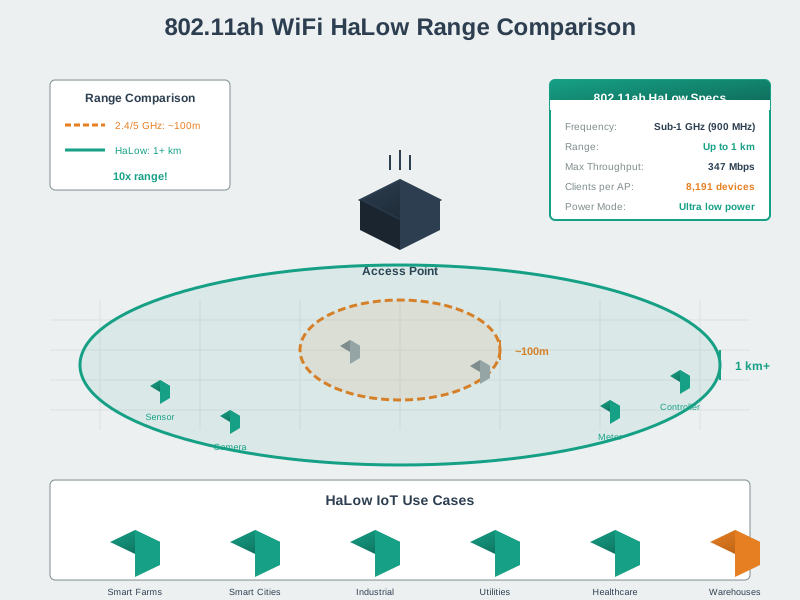
Wi-Fi HaLow’s Solution: Wi-Fi HaLow (pronounced “HAY-low”) is like Wi-Fi’s country cousin: - Uses sub-1 GHz spectrum (e.g., 902–928 MHz in the US; varies by region) - Range often hundreds of meters to ~1 km+ (environment/regulatory dependent) - Native IP (works with existing Wi-Fi tools) - Low power (multi-year battery life is possible with aggressive duty-cycling)
Analogy: - Traditional Wi-Fi = Sports car (fast but short range, high fuel consumption) - LoRaWAN = Marathon runner (long distance but slow) - Wi-Fi HaLow = Efficient truck (reasonable speed, long range, good fuel economy)
TipFor Kids: Meet the Sensor Squad! 🌟
Wi-Fi HaLow is like a super-efficient delivery truck that can travel really far without using much gas!
855.3.1 The Sensor Squad Adventure: The Big Farm Challenge
The Sensor Squad had a new mission! Farmer Jenny needed help watching over her HUGE farm - it was so big that you could walk for an entire hour and still not reach the other side! She needed sensors to check on her apple trees, her vegetable garden, and her greenhouse, but there was one big problem.
“Regular Wi-Fi can’t reach that far!” said Bella the Button, looking worried. “It only works inside houses and a little bit outside.”
Max the Motion Detector scratched his head. “We could use LoRa - it can send messages really far. But it’s SO slow! It would take forever to send anything more than a tiny message.”
Then Lila the Light Sensor had a brilliant idea! “What about Wi-Fi HaLow? It’s like Wi-Fi’s super-powered cousin! It uses special low radio waves that can travel WAY farther than regular Wi-Fi.”
Sammy the Temperature Sensor got excited. “So it’s like having a delivery truck instead of a bicycle? The truck can carry more stuff AND go farther!”
“Exactly!” said Lila. “And the best part? Wi-Fi HaLow is so energy-efficient that we can run on batteries for YEARS without needing new ones. We just take little naps between sending messages!”
The Sensor Squad set up Wi-Fi HaLow sensors all across Farmer Jenny’s farm. Now she can check on her entire farm from her phone - the apple trees, the vegetables, even the greenhouse temperature - all connected by invisible waves that travel through walls, over hills, and across the whole farm!
855.3.2 Key Words for Kids
| Word | What It Means |
|---|---|
| Wi-Fi HaLow | A special type of Wi-Fi that uses slower waves to travel much farther (like shouting low instead of high) |
| Sub-1 GHz | Radio waves that wiggle less than 1 billion times per second - slow but powerful travelers! |
| Target Wake Time | A schedule that lets sensors sleep most of the time and only wake up when needed (like setting an alarm) |
855.3.3 Try This at Home! 🏠
The Wi-Fi Distance Detective Game
- Find out where your home Wi-Fi router is located
- Walk around your house with a parent’s phone, watching the Wi-Fi signal strength bars
- Count how many bars you have in each room - write them down!
- Go outside (in your yard) - how far can you go before you lose the signal?
- Now imagine a Wi-Fi that could reach 10 TIMES farther - that’s Wi-Fi HaLow!
Bonus: Notice that the signal gets weaker when you go through walls or go upstairs? Wi-Fi HaLow’s special low waves can go through obstacles much better, which is why farmers use it to cover huge fields!
855.4 Wi-Fi HaLow Overview
855.4.1 Technical Specifications
| Parameter | Wi-Fi HaLow (802.11ah) | Traditional Wi-Fi (802.11n) |
|---|---|---|
| Frequency | Sub-1 GHz (e.g., 902-928 MHz in the US; varies by region) | 2.4 GHz, 5 GHz |
| Range | Hundreds of meters to ~1 km+ (outdoor LOS, environment-dependent) | Tens of meters to ~100 m (environment-dependent) |
| Data Rate | Hundreds of kbps to tens of Mbps (peak PHY; depends on channel width/MCS) | 150 - 600 Mbps (theoretical PHY) |
| Channel Width | 1, 2, 4, 8, 16 MHz | 20, 40 MHz |
| Devices per AP | Up to 8,191 (spec max) | Practical limits vary widely (often dozens to hundreds; AP/security dependent) |
| Power | Lower average (TWT/RAW; duty-cycle dependent) | Higher average (chip and duty-cycle dependent) |
| Modulation | OFDM (like Wi-Fi) | OFDM |
Note: Ranges and data rates are approximate; real deployments depend on antennas, bandwidth/MCS, channel conditions, and regional regulations.
855.4.2 How Wi-Fi HaLow Differs
TipAlternative View: Wi-Fi HaLow Advantages as Trade-off Diagram
This variant shows the same Wi-Fi HaLow vs Traditional Wi-Fi comparison as a trade-off analysis, emphasizing what you gain and what you give up.
%% fig-alt: "Wi-Fi HaLow trade-off diagram showing what you gain versus what you give up: Gain longer range, lower power, more devices per AP, and native IP; Give up high data rates and 2.4/5 GHz compatibility. Shows balanced trade-off making HaLow ideal for IoT sensors but not video streaming."
%%{init: {'theme': 'base', 'themeVariables': { 'primaryColor': '#2C3E50', 'primaryTextColor': '#fff', 'primaryBorderColor': '#16A085', 'lineColor': '#E67E22', 'secondaryColor': '#16A085', 'tertiaryColor': '#7F8C8D', 'fontSize': '11px'}}}%%
flowchart LR
    subgraph GAIN["WHAT YOU GAIN"]
        direction TB
        G1["Range<br/>100s of meters"]
        G2["Power<br/>Multi-year battery"]
        G3["Devices<br/>8,191 per AP"]
        G4["Native IP<br/>Standard Wi-Fi stack"]
    end

    subgraph TRADEOFF["Wi-Fi HaLow<br/>Trade-offs"]
        direction TB
        T["Optimized for<br/>IoT Sensors"]
    end

    subgraph LOSE["WHAT YOU GIVE UP"]
        direction TB
        L1["Speed<br/>Max ~tens Mbps"]
        L2["2.4/5 GHz<br/>Needs new hardware"]
        L3["Ecosystem<br/>Fewer devices today"]
    end

    GAIN --> T
    T --> LOSE

    style G1 fill:#16A085,stroke:#2C3E50,color:#fff
    style G2 fill:#16A085,stroke:#2C3E50,color:#fff
    style G3 fill:#16A085,stroke:#2C3E50,color:#fff
    style G4 fill:#16A085,stroke:#2C3E50,color:#fff
    style T fill:#E67E22,stroke:#2C3E50,color:#fff
    style L1 fill:#7F8C8D,stroke:#2C3E50,color:#fff
    style L2 fill:#7F8C8D,stroke:#2C3E50,color:#fff
    style L3 fill:#7F8C8D,stroke:#2C3E50,color:#fff
Key Insight: Wi-Fi HaLow is purpose-built for IoT - it trades speed for range, power efficiency, and massive device support. Choose HaLow when you need to cover large areas with battery-powered sensors, but stick with traditional Wi-Fi for video streaming or high-bandwidth applications.
855.4.3 Spectrum Allocation
Wi-Fi HaLow uses license-exempt sub‑1 GHz spectrum. Exact frequency ranges, power limits, and required mechanisms (duty cycle, LBT/AFA, etc.) vary by region and change over time.
| Region | Example band (illustrative) | Notes |
|---|---|---|
| USA | 902–928 MHz (ISM) | Wide unlicensed band; specific limits depend on rules and device behavior |
| Europe | parts of 863–870 MHz (SRD) | Narrower allocations; duty-cycle or LBT/AFA constraints may apply |
| Other regions | varies | Always verify current local rules before deploying |
855.5 Wi-Fi HaLow vs LPWAN Comparison
855.5.1 Technology Comparison
| Feature | Wi-Fi HaLow | LoRaWAN | Sigfox | NB-IoT |
|---|---|---|---|---|
| Data Rate | Hundreds of kbps to tens of Mbps (peak PHY; depends on bandwidth/MCS) | kbps‑class (PHY and region dependent) | very low | kbps‑class (coverage and network dependent) |
| Range | Hundreds of meters to ~1 km+ in favorable conditions | km‑scale possible | long range in some deployments | km‑scale (coverage dependent) |
| Latency | Often lower on a local LAN (coverage/retry dependent) | Downlink/latency depends on device class and uplink interval | network dependent | network dependent |
| Battery | Multi‑year possible (duty cycle + sleep current dependent) | Multi‑year common for low duty cycle | Multi‑year possible | Multi‑year possible (coverage + PSM/eDRX dependent) |
| IP Native | ✅ Yes | ❌ No (uses gateways/server) | ❌ No | ✅ Yes |
| Spectrum | Unlicensed | Unlicensed | Unlicensed | Licensed |
| Downlink | ✅ Full (Wi-Fi-style) | Limited in Class A; better in Class B/C with power trade-offs | Very limited | ✅ Full |
Note: Wi-Fi HaLow supports up to 8,191 associated stations per AP (spec max). LPWAN scalability depends heavily on airtime, payload size, device class, and operator/network configuration.
%%{init: {'theme': 'base', 'themeVariables': {'primaryColor': '#2C3E50', 'primaryTextColor': '#fff', 'primaryBorderColor': '#16A085', 'lineColor': '#E67E22', 'secondaryColor': '#16A085', 'tertiaryColor': '#7F8C8D'}}}%%
quadrantChart
    title Range vs Data Rate Comparison
    x-axis Low Data Rate --> High Data Rate
    y-axis Short Range --> Long Range
    quadrant-1 HaLow
    quadrant-2 LoRa/Sigfox
    quadrant-3 BLE/Zigbee
    quadrant-4 Wi-Fi 6
    Wi-Fi HaLow: [0.65, 0.6]
    LoRaWAN: [0.15, 0.85]
    Sigfox: [0.05, 0.95]
    NB-IoT: [0.25, 0.7]
    Wi-Fi 6: [0.9, 0.3]
    BLE: [0.3, 0.2]
    Zigbee: [0.2, 0.25]
855.6 Wi-Fi HaLow Architecture
855.6.1 Network Topology
%%{init: {'theme': 'base', 'themeVariables': {'primaryColor': '#2C3E50', 'primaryTextColor': '#fff', 'primaryBorderColor': '#16A085', 'lineColor': '#E67E22', 'secondaryColor': '#16A085', 'tertiaryColor': '#7F8C8D'}}}%%
graph TB
    subgraph Network["Wi-Fi HaLow Network"]
        AP[HaLow Access Point<br/>802.11ah]

        subgraph Sensors["IoT Devices (up to 8,191)"]
            S1[Sensor 1]
            S2[Sensor 2]
            S3[Sensor N]
        end

        subgraph Relay["Relay Stations (optional)"]
            R1[Relay 1]
            R2[Relay 2]
        end
    end

    S1 & S2 --> AP
    S3 --> R1
    R1 --> AP
    R2 --> AP

    AP --> Router[IP Router]
    Router --> Cloud[Cloud/Internet]

    style AP fill:#16A085,stroke:#2C3E50,color:#fff
    style Sensors fill:#E67E22,stroke:#2C3E50
    style Relay fill:#7F8C8D,stroke:#2C3E50
855.6.2 Hierarchical AID (Association ID)
Wi-Fi HaLow supports up to 8,191 associated stations per AP because 802.11ah expands the Association ID (AID) space to 13 bits (AID values 1–8191; 0 is reserved). To keep signaling efficient when most stations sleep, the AID is structured hierarchically so the AP can reference groups of stations compactly (used by the hierarchical TIM and related scheduling mechanisms).
| AID field | Bits | Values | What it groups |
|---|---|---|---|
| Page | 2 | 0–3 | A large group of stations (up to 2048 per page) |
| Block | 5 | 0–31 | 64 stations within a page |
| Sub‑block | 3 | 0–7 | 8 stations within a block |
| Station index | 3 | 0–7 | 1 station within a sub‑block |
855.7 Power Saving Mechanisms
855.7.1 Target Wake Time (TWT)
Introduced in 802.11ah and later adopted across newer Wi-Fi generations (including Wi-Fi 6):
%%{init: {'theme': 'base', 'themeVariables': {'primaryColor': '#2C3E50', 'primaryTextColor': '#fff', 'primaryBorderColor': '#16A085', 'lineColor': '#E67E22', 'secondaryColor': '#16A085', 'tertiaryColor': '#7F8C8D'}}}%%
sequenceDiagram
    participant S as HaLow Sensor
    participant AP as HaLow AP

    S->>AP: TWT Request<br/>(wake every 1 hour)
    AP->>S: TWT Response<br/>(SP: 50ms, Interval: 1hr)

    Note over S: Sleep (1 hour)

    S->>AP: Wake, send data (50ms)
    AP->>S: ACK

    Note over S: Sleep (1 hour)

    loop Every Hour
        S->>AP: Wake, send data
        AP->>S: ACK
    end
855.7.2 Restricted Access Window (RAW)
Groups devices into scheduled access windows:
| RAW Type | Description | Benefit |
|---|---|---|
| Generic RAW | Time-divided access | Reduce contention |
| Triggered RAW | AP-initiated access | Power save |
| Periodic RAW | Recurring schedule | More predictable access timing |
855.7.3 Power Consumption Comparison
Peak TX/RX power can be in the same broad order of magnitude across Wi-Fi-class radios; HaLow’s practical advantage is often average power via scheduling (TWT/RAW), narrower channels, and reduced idle listening—when the module and deployment are configured for low duty cycle.
Battery-life planning (recommended approach): - Start from the module datasheet (TX/RX peaks, idle listening, deep sleep) - Model duty cycle (how often you wake, associate/maintain link, and transmit) - Validate with a bench measurement (sleep current and retry rate often dominate)
855.8 Use Cases
855.8.1 Wi-Fi HaLow Ideal Applications
%%{init: {'theme': 'base', 'themeVariables': {'primaryColor': '#2C3E50', 'primaryTextColor': '#fff', 'primaryBorderColor': '#16A085', 'lineColor': '#E67E22', 'secondaryColor': '#16A085', 'tertiaryColor': '#7F8C8D'}}}%%
mindmap
    root((Wi-Fi HaLow<br/>Use Cases))
        Smart Agriculture
            Soil sensors
            Weather stations
            Irrigation control
            Livestock tracking
        Smart Cities
            Street lighting
            Parking sensors
            Environmental monitoring
            Asset tracking
        Industrial
            Factory sensors
            Tank monitoring
            Leak detection
            Equipment health
        Buildings
            HVAC sensors
            Occupancy
            Energy metering
            Security cameras
855.8.2 Use Case Comparison
| Scenario | Wi-Fi HaLow | LoRaWAN | Best Choice |
|---|---|---|---|
| Farm sensors (~1 km) | ✅ Low latency + IP | ✅ Long range + battery | Depends on downlink/latency needs |
| Smart meters (city-wide) | ⚠️ More APs | ✅ Coverage | LoRaWAN/NB-IoT |
| Warehouse cameras | ⚠️ Limited throughput | ❌ Data rate | Wi-Fi 6 / Ethernet |
| Asset tracking (mobile) | ⚠️ AP coverage required | ✅ Wide-area coverage | NB-IoT/LoRaWAN |
| Industrial sensors | ✅ Lower latency | ⚠️ Telemetry OK | Depends on control/latency needs |
855.9 Implementation Considerations
855.9.1 Hardware Availability
802.11ah silicon and modules are available from multiple vendors; availability changes quickly. Check current options and regional certifications (frequency band support, antenna options, and regulatory approvals) before committing to a platform.
855.9.2 Development Platforms
# Example: Wi-Fi HaLow sensor configuration (pseudocode)
# Vendor SDK APIs and Linux support vary by module.

device.configure_radio(channel=1, bandwidth_mhz=1)  # 1/2/4/8/16 MHz depending on region/module
device.configure_twt(interval_s=3600, service_period_ms=50)  # optional, if supported
device.connect(ssid="HaLow_Network", password="...")  # provision securely in production

while True:
    payload = read_sensor()
    device.send(payload)
    device.sleep_until_next_wake()
855.9.3 Network Design Guidelines
| Factor | Recommendation |
|---|---|
| Channel width | Start with 1-2 MHz, increase if needed |
| TX power | Minimum needed for reliability |
| TWT interval | Based on data freshness requirements |
| Relay stations | Use for obstacles, extend range |
| AP density | Site survey and link budget; coverage depends heavily on antenna height, terrain, and interference |
855.10 Regulatory Considerations
855.10.1 Spectrum Regulations by Region
| Region | Example band | Notes |
|---|---|---|
| USA (FCC) | 902–928 MHz | Rules depend on device class/modulation; confirm applicable Part 15 sections and antenna constraints |
| Europe (ETSI) | parts of 863–870 MHz | Power and duty-cycle/LBT/AFA rules vary by sub-band; confirm the SRD requirements for your product |
| Other regions | varies | Always verify current rules and product certification requirements |
Regulations evolve and depend on channel bandwidth and device behavior; verify current rules with your local regulator before deploying sub-1 GHz products.
855.10.2 Coexistence
Wi-Fi HaLow shares sub-1 GHz spectrum with: - LoRa/LoRaWAN - Z-Wave - Wireless M-Bus - Industrial equipment
Mitigation: - CSMA/CA provides listen-before-talk behavior; in some regions devices must satisfy specific LBT/AFA requirements—verify compliance for your product - Channel and bandwidth planning - RAW/TWT scheduling to reduce airtime and collisions
855.11 Knowledge Check: MCQ Questions
Test your understanding of Wi-Fi HaLow concepts:
855.12 Understanding Check: Design Scenario
WarningDesign Challenge
Scenario: A vineyard wants to deploy 500 soil moisture sensors across 50 hectares: - Report soil moisture every 15 minutes - Battery-powered (target: 3+ year life) - Need real-time alerts for irrigation triggers - Budget-conscious solution
Questions:
- Would Wi-Fi HaLow or LoRaWAN be better for this deployment?
- How many HaLow access points would be needed?
- What channel width and TWT settings would you use?
- What’s the advantage of Wi-Fi HaLow for real-time alerts?
NoteSolution
1. Wi-Fi HaLow vs LoRaWAN:
Both can work; the right choice depends on how interactive the system needs to be:
- Choose Wi-Fi HaLow if you want IP-native connectivity and frequent/interactive downlink (e.g., near-real-time valve control or configuration updates).
- Choose LoRaWAN if your workload is primarily uplink telemetry and you want wide-area coverage with very low energy per message.
LoRaWAN downlink latency depends on the device class. In Class A, downlinks are constrained to receive windows after an uplink. If sensors only uplink every 15 minutes, actuation commands can be delayed unless you switch to Class B/C or increase uplink frequency (power trade-off).
2. Access Point Count:
Area: 50 hectares = 500,000 m²
Outdoor coverage is environment-dependent. Start with a site survey (or a small pilot) to validate:
- Link margin at the farthest sensor locations (terrain + foliage + antenna height)
- Retry rate under real interference conditions
- Whether you need relays/repeaters for valleys, buildings, or other blockers

For reliability, plan overlap (multiple APs or relays) so a single point failure or local fade doesn’t isolate a large area.
3. Configuration:
Channel: 1–2 MHz (often sufficient for low-rate sensors; validate with load testing)
  - Data rate: varies by MCS and channel conditions
  - Offered load here is small (hundreds of bytes per device per hour), so coverage and reliability usually dominate over raw throughput

TWT Settings:
  - Wake interval: 15 minutes (900 seconds)
  - Service period: tune based on association strategy, retries, and payload size
  - Consider RAW grouping if many devices share the same wake time

Power planning:
- Measure sleep current on the actual board (it often dominates multi-year designs)
- Measure retries in the field (poor link margin can dominate energy)
- Use TWT/RAW only when supported end-to-end (AP + station)
4. Real-Time Alert Advantage: Wi-Fi HaLow advantages for alerts: - Lower latency on a local network for both uplink and downlink when devices are associated - Bidirectional IP connectivity: simpler interactive control loops than many LPWAN setups - MAC scheduling features (TWT/RAW): can reduce contention when many sensors report
Example alert flow:
HaLow (local):
1. Sensor detects threshold and transmits immediately
2. AP forwards to local controller/cloud
3. Controller can send a command back without waiting for a scheduled receive window

LoRaWAN Class A:
1. Uplink can be immediate, but downlink is typically available only after an uplink
2. With 15-minute reporting, command latency can approach the reporting interval unless you change class or uplink rate (power trade-off)
855.13 Visual Reference Gallery
Explore these AI-generated figures that illustrate Wi-Fi HaLow concepts and architecture.
NoteWi-Fi HaLow Extended Range
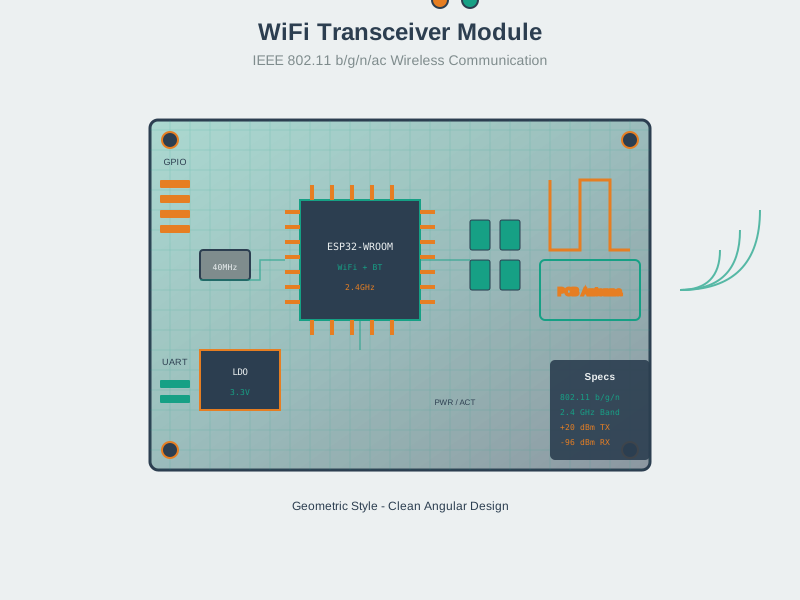
NoteWi-Fi Module Hardware
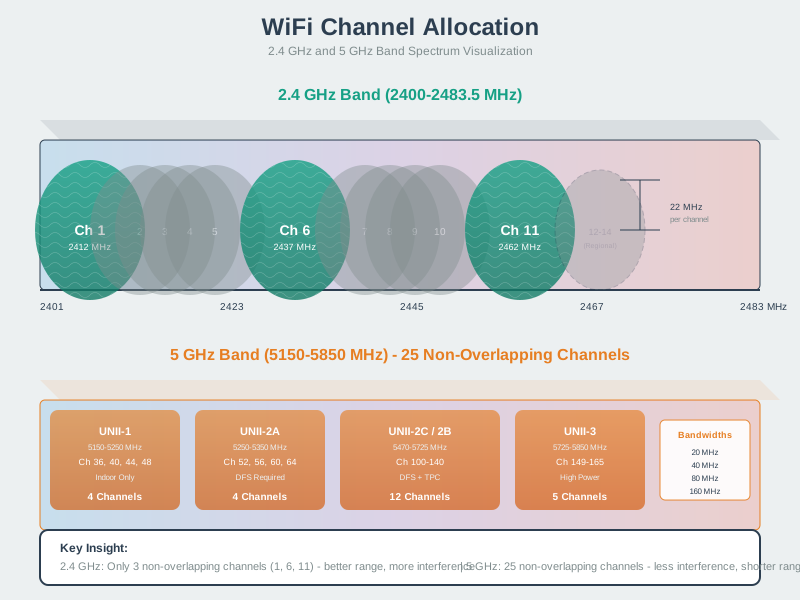
NoteWi-Fi Channel Allocation
855.13.1 Wi-Fi HaLow Use Case Selection
This decision tree helps you determine when Wi-Fi HaLow is the right choice:
%%{init: {'theme': 'base', 'themeVariables': {'primaryColor':'#2C3E50','primaryTextColor':'#fff','primaryBorderColor':'#16A085','lineColor':'#16A085','secondaryColor':'#E67E22','tertiaryColor':'#7F8C8D'}}}%%
flowchart TB
    START([IoT Protocol<br/>Selection]) --> Q1{Range<br/>Requirement?}

    Q1 -->|Short: <50m| Wi-Fi[Traditional Wi-Fi<br/>802.11n/ac/ax]
    Q1 -->|Long: 100m-1km| Q2{Data Rate<br/>Needed?}

    Q2 -->|Very Low: <50 kbps| LPWAN[LoRaWAN / Sigfox<br/>LPWAN]
    Q2 -->|Moderate: 50kbps-10Mbps| Q3{IP Native<br/>Required?}

    Q3 -->|No| Q4{Licensed<br/>Spectrum?}
    Q3 -->|Yes| HALOW[Wi-Fi HaLow<br/>802.11ah]

    Q4 -->|Yes| NBIOT[NB-IoT<br/>Cellular LPWAN]
    Q4 -->|No| LPWAN

    HALOW --> USE1[Smart Agriculture<br/>Industrial Monitoring<br/>Campus IoT]

    Wi-Fi --> USE2[Home Automation<br/>Video Streaming<br/>High Bandwidth]

    LPWAN --> USE3[Asset Tracking<br/>Utility Meters<br/>Environmental]

    NBIOT --> USE4[Mobile Assets<br/>National Coverage<br/>Carrier SLA]

    style START fill:#2C3E50,stroke:#16A085,stroke-width:3px,color:#fff
    style HALOW fill:#16A085,stroke:#2C3E50,stroke-width:3px,color:#fff
    style Wi-Fi fill:#E67E22,stroke:#2C3E50,stroke-width:2px,color:#fff
    style LPWAN fill:#7F8C8D,stroke:#2C3E50,stroke-width:2px,color:#fff
    style NBIOT fill:#7F8C8D,stroke:#2C3E50,stroke-width:2px,color:#fff
    style USE1 fill:#16A085,stroke:#2C3E50,stroke-width:1px,color:#fff
    style USE2 fill:#7F8C8D,stroke:#2C3E50,stroke-width:1px,color:#fff
    style USE3 fill:#7F8C8D,stroke:#2C3E50,stroke-width:1px,color:#fff
    style USE4 fill:#7F8C8D,stroke:#2C3E50,stroke-width:1px,color:#fff
855.13.2 Wi-Fi HaLow Power Management Timeline
Wi-Fi HaLow’s power-saving features enable long battery life:
%%{init: {'theme': 'base', 'themeVariables': {'primaryColor':'#2C3E50','primaryTextColor':'#fff','primaryBorderColor':'#16A085','lineColor':'#16A085','secondaryColor':'#E67E22','tertiaryColor':'#7F8C8D'}}}%%
sequenceDiagram
    participant AP as HaLow AP
    participant D1 as Device 1
    participant D2 as Device 2

    Note over AP,D2: TWT (Target Wake Time) Negotiation
    AP->>D1: TWT Agreement: Wake at T+100ms
    AP->>D2: TWT Agreement: Wake at T+200ms

    Note over D1,D2: Deep Sleep Phase
    D1--xD1: Sleeping (uA power)
    D2--xD2: Sleeping (uA power)

    Note over AP,D2: RAW (Restricted Access Window)
    rect rgb(22, 160, 133)
        Note over AP,D1: RAW Slot for Device 1
        D1->>AP: Wake + Transmit Data
        AP->>D1: ACK
        D1--xD1: Return to Sleep
    end

    rect rgb(230, 126, 34)
        Note over AP,D2: RAW Slot for Device 2
        D2->>AP: Wake + Transmit Data
        AP->>D2: ACK
        D2--xD2: Return to Sleep
    end

    Note over AP,D2: Result: Multi-year battery life
855.14 Key Takeaways
TipSummary
Wi-Fi HaLow operates in sub-1 GHz (region-dependent), often enabling hundreds of meters to ~1 km+ range in favorable conditions
Native IP/Wi-Fi means existing tools, security, and infrastructure work
Up to 8,191 devices per AP (spec limit) with hierarchical AID addressing
Power-saving features (TWT, RAW) can enable multi-year battery operation for low-duty-cycle devices
Higher data rates than LPWAN (hundreds of kbps to tens of Mbps, theoretical PHY)
Best for: Long-range IoT needing real-time response and moderate bandwidth
Regional spectrum varies: the USA has a wide 902–928 MHz band, while many European SRD allocations are much narrower—always verify local rules
855.15 What’s Next
Explore related technologies:
- Wi-Fi 6E and Wi-Fi 7 for IoT - High-bandwidth Wi-Fi
- LoRaWAN Overview - Long-range alternative
- LPWAN Introduction - LPWAN comparison