%%{init: {'theme': 'base', 'themeVariables': { 'primaryColor': '#2C3E50', 'primaryTextColor': '#fff', 'primaryBorderColor': '#16A085', 'lineColor': '#16A085', 'secondaryColor': '#E67E22', 'tertiaryColor': '#7F8C8D'}}}%%
graph TB
    subgraph STORING["Storing Mode"]
        direction TB
        ST_ROOT["Root<br/>Routes: All 500"]
        ST_R1["Router 1<br/>Routes: 150"]
        ST_R2["Router 2<br/>Routes: 200"]
        ST_S1["Sensor<br/>Routes: 0"]
        ST_ROOT --> ST_R1
        ST_ROOT --> ST_R2
        ST_R1 --> ST_S1
    end

    subgraph NONSTORING["Non-Storing Mode"]
        direction TB
        NS_ROOT["Root<br/>Routes: All 500<br/>Source routes"]
        NS_R1["Router 1<br/>Routes: 0<br/>Parent only"]
        NS_R2["Router 2<br/>Routes: 0<br/>Parent only"]
        NS_S1["Sensor<br/>Routes: 0<br/>Parent only"]
        NS_ROOT --> NS_R1
        NS_ROOT --> NS_R2
        NS_R1 --> NS_S1
    end

    MEMORY["Memory Usage"]
    STORING -->|"15-25 KB<br/>per router"| MEMORY
    NONSTORING -->|"<5 KB<br/>per node"| MEMORY

    style ST_ROOT fill:#2C3E50,stroke:#16A085,color:#fff
    style ST_R1 fill:#E67E22,stroke:#2C3E50,color:#fff
    style ST_R2 fill:#E67E22,stroke:#2C3E50,color:#fff
    style ST_S1 fill:#16A085,stroke:#2C3E50,color:#fff
    style NS_ROOT fill:#2C3E50,stroke:#16A085,color:#fff
    style NS_R1 fill:#7F8C8D,stroke:#2C3E50,color:#fff
    style NS_R2 fill:#7F8C8D,stroke:#2C3E50,color:#fff
    style NS_S1 fill:#7F8C8D,stroke:#2C3E50,color:#fff
724 RPL Production Framework and Architecture
724.1 Learning Objectives
By the end of this chapter, you will be able to:
- Build RPL Implementations: Create complete DODAG construction and RANK calculation systems
- Compare Storage Modes: Evaluate Storing vs Non-Storing modes for different network sizes
- Understand Framework Architecture: Learn production-ready RPL protocol patterns
- Deploy Production Systems: Apply RPL framework to real-world LLN deployments
724.2 Prerequisites
Required Chapters:
- RPL Fundamentals - Core RPL concepts
- RPL Operation - DODAG mechanics
- 6LoWPAN - IPv6 adaptation layer
Technical Background:
- IPv6 addressing
- DODAG topology
- Objective functions
Key RPL Concepts:
| Concept | Description |
|---|---|
| DODAG | Destination Oriented DAG |
| DIO | DODAG Information Object |
| DAO | Destination Advertisement Object |
| DIS | DODAG Information Solicitation |
| OF0 | Objective Function Zero |
Estimated Time: 30 minutes
TipFor Beginners: Understanding RPL Production Frameworks
What is this chapter? This chapter covers how RPL is implemented in production systems, focusing on the architecture and design patterns used in real-world deployments.
Difficulty: Advanced
When to use:
- After mastering RPL fundamentals and labs
- When planning production deployments
- For understanding framework architecture
Topics Covered:
| Topic | Why It Matters |
|---|---|
| DODAG Structure | Foundation for routing hierarchy |
| Storage Modes | Memory vs routing trade-offs |
| Framework Patterns | Production-ready implementation |
| Mode Selection | Choosing the right approach |
Recommended Path:
- Master RPL Fundamentals first
- Complete RPL Labs
- Then study this framework chapter
724.3 Production RPL Framework
This section provides a comprehensive production-ready Python framework for RPL (IPv6 Routing Protocol for Low-Power and Lossy Networks), including DODAG construction, RANK calculation, Trickle timer, and both Storing and Non-Storing modes.
724.3.1 Framework Architecture

This production framework provides comprehensive RPL protocol capabilities:
- DODAG Construction: Distance-vector routing with RANK-based hierarchy, automatic parent selection
- Trickle Timer: RFC 6206 implementation for adaptive DIO transmission (Imin to Imax intervals)
- Routing Modes: Storing mode with distributed routing tables, non-storing mode support
- Objective Functions: OF0 (hop count), MRHOF (ETX), Energy, Latency-based routing
- Loop Prevention: RANK mechanism prevents routing loops, acyclic graph guaranteed
- Control Messages: DIO (DODAG Information), DAO (Destination Advertisement), DIS, DAO-ACK
- Traffic Patterns: Upward (many-to-one), downward (one-to-many), point-to-point routing
- Network Repair: DODAG version increment for global topology changes
- Parent Selection: Preferred parent with backup parent set for reliability
The framework demonstrates production-ready patterns for IPv6-based IoT networks with comprehensive statistics tracking, realistic link metrics, and complete DODAG lifecycle management.
724.4 Storing vs Non-Storing Mode Trade-offs
WarningCommon Misconception: “Non-Storing Mode is Always Slower”
The Misconception: Many students believe Non-Storing mode causes higher latency for all traffic because it requires source routing headers. This leads to incorrect mode selection in production deployments.
The Reality (Quantified): Non-Storing mode has identical latency for the most common traffic pattern (many-to-one upward routing), and only adds overhead for rare downward traffic.
Real-World Example: Smart Factory Deployment
A manufacturing facility with 500 sensors reporting machine health data made this mistake:
Initial Decision (Wrong):
- Mode selected: Storing Mode (believing it would be faster)
- Node hardware: 64KB RAM sensors
- Result: Memory exhaustion on intermediate routers after 200 nodes deployed
- Routing table bloat: Mid-level routers storing 80-150 descendant routes
- Memory pressure: 15-25 KB routing tables + application code exceeded 64KB
- Symptoms: Random node crashes, routing loops, data loss
Corrected Decision:
- Mode selected: Non-Storing Mode (after analyzing traffic patterns)
- Traffic analysis: 99.2% upward (sensors to gateway), 0.8% downward (firmware updates)
- Upward latency: Identical in both modes (parent forwarding, no route lookup)
- Downward latency: 40 bytes source routing header on 200-byte packets = 16.7% overhead
- But downward is only 0.8% of traffic: Net overhead = 16.7% x 0.8% = 0.13% total
- Memory savings: 64KB sensors use <10KB for RPL (no routing tables)
- Successful scale: 500 nodes deployed without memory issues
Key Numbers:
- Upward routing (99.2% of traffic): 0ms latency difference between modes
- Downward routing (0.8% of traffic): +5ms latency due to source routing header
- Average latency impact: 5ms x 0.8% = 0.04ms network-wide
- Memory savings: 15-20 KB per node x 500 nodes = 7.5-10 MB network-wide
Correct Understanding:
- Storing Mode: Faster for point-to-point and downward traffic (optimal routes), but requires more memory
- Non-Storing Mode: Identical speed for upward traffic (most common), slight overhead for downward (rare)
- Mode selection rule: Choose based on traffic pattern dominance, not absolute performance
- Smart factory optimization: 99%+ upward traffic leads to Non-Storing Mode as optimal choice
Why the Misconception Persists: Students focus on the “source routing overhead” without analyzing which traffic patterns it affects. They miss that RPL is designed for convergent many-to-one traffic where Non-Storing mode has zero overhead.
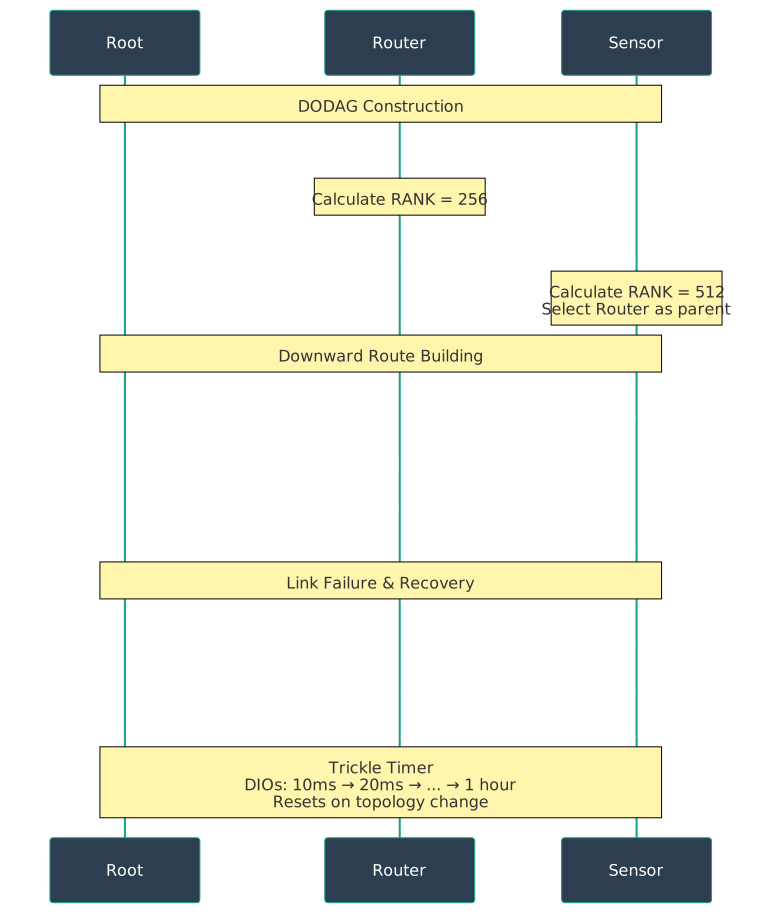
724.5 RPL Control Messages
Understanding control message flow is essential for production deployments:

Nodes maintain a preferred parent (primary) and backup parent set for resilience. When preferred parent fails, nodes can quickly switch to backup, enabling self-healing mesh networks.
Control messages are ICMPv6-based:
- DIO (DODAG Information Object): Root advertises DODAG; nodes forward DIO when joining DODAG. Contains RANK, Objective Function, DODAG ID
- DIS (DODAG Information Solicitation): Orphaned node requests DODAG information to join network
- DAO (Destination Advertisement Object): Node advertises reachability to upstream nodes (for downward routing in Storing mode)
- DAO-ACK: Acknowledgment of DAO receipt
724.6 Two Operational Modes
- Storing mode: Each node caches routing table with paths to other nodes; enables optimal point-to-point paths but requires more memory
- Non-Storing mode: Each node stores only parent pointer; downward routes use source routing (root specifies full path); saves memory

724.7 Traffic Pattern Optimization
Upward routing (sensors to root) is identical in both modes: each node sends to parent. Downward routing (root to sensors) differs: Storing mode uses cached routes, Non-Storing uses source routing from root. Point-to-point routing (sensor to sensor) uses upward path to common ancestor then downward path in Storing mode, or via root in Non-Storing mode.
Traffic patterns RPL optimizes for:
- Many-to-one: Sensors report to gateway (most common); both modes identical
- One-to-many: Gateway commands actuators; Storing better (optimal paths), Non-Storing uses source routing
- Point-to-point: Device-to-device communication; Storing can optimize, Non-Storing routes via root
724.8 Summary
This chapter covered the production RPL framework architecture:
- DODAG structure with RANK-based hierarchy and parent selection
- Storing vs Non-Storing modes with detailed memory and latency trade-offs
- Control message flow including DIO, DAO, DIS, and DAO-ACK
- Traffic pattern optimization for different routing scenarios
- Common misconceptions about mode selection and performance
724.9 What’s Next
Continue to RPL Production Scenarios for hands-on knowledge checks and real-world deployment scenarios, or see RPL Production Summary for comprehensive concepts and case studies.