1235 CoAP Review: Labs and Implementation
1235.1 Learning Objectives
By the end of this chapter, you will be able to:
- Build CoAP Servers: Implement CoAP resources on ESP32 for sensor monitoring and actuator control
- Configure Resource Endpoints: Design RESTful URI structures for temperature, humidity, and LED control
- Implement Observables: Set up CoAP observe mode for real-time sensor updates
- Debug CoAP Communication: Use tools to inspect request/response exchanges and diagnose issues
- Integrate Hardware: Wire DHT22 sensors and LEDs to ESP32 for complete IoT systems
1235.2 Prerequisites
Required Reading:
- CoAP Review: Protocol Fundamentals - Message types and architecture
- CoAP Review: Observe Patterns - Push notifications
Estimated Time: 45 minutes
This is Part 3 of the CoAP Comprehensive Review:
- Protocol Fundamentals - Message types, architecture, comparisons
- Observe Patterns - Push notifications, subscriptions
- Labs and Implementation (this chapter) - Hands-on ESP32 and Python
- Knowledge Assessment - Quizzes and scenario questions
1235.3 Lab 1: ESP32 CoAP Environmental Monitoring Station
Build a complete CoAP server on ESP32 with DHT22 temperature/humidity sensor and LED control.
Hardware Required:
- ESP32 Development Board
- DHT22 Temperature/Humidity Sensor
- LED (any color)
- 220 Ohm Resistor
- 10k Ohm Pull-up resistor (for DHT22)
Wiring:
| Component | ESP32 Pin |
|---|---|
| DHT22 VCC | 3.3V |
| DHT22 DATA | GPIO 4 (with 10k pullup to 3.3V) |
| DHT22 GND | GND |
| LED Anode (+) | GPIO 2 (via 220 Ohm resistor) |
| LED Cathode (-) | GND |
Complete Code:
#include <WiFi.h>
#include <coap-simple.h>
#include <DHT.h>

// WiFi credentials
const char* ssid = "YourWiFi";
const char* password = "YourPassword";

// DHT sensor configuration
#define DHTPIN 4
#define DHTTYPE DHT22
DHT dht(DHTPIN, DHTTYPE);

// LED configuration
#define LED_PIN 2
bool ledState = false;

// CoAP server
Coap coap;

// Sensor readings (cached)
float currentTemp = 0.0;
float currentHumidity = 0.0;
unsigned long lastSensorRead = 0;
const unsigned long SENSOR_INTERVAL = 5000;  // Read every 5 seconds

// Forward declarations
void callback_temperature(CoapPacket &packet, IPAddress ip, int port);
void callback_humidity(CoapPacket &packet, IPAddress ip, int port);
void callback_led_get(CoapPacket &packet, IPAddress ip, int port);
void callback_led_put(CoapPacket &packet, IPAddress ip, int port);
void callback_discovery(CoapPacket &packet, IPAddress ip, int port);

void setup() {
  Serial.begin(115200);
  delay(1000);

  Serial.println("\n=== ESP32 CoAP Environmental Station ===");

  // Initialize LED
  pinMode(LED_PIN, OUTPUT);
  digitalWrite(LED_PIN, LOW);

  // Initialize DHT sensor
  dht.begin();
  Serial.println("DHT22 initialized");

  // Connect to WiFi
  Serial.print("Connecting to WiFi");
  WiFi.begin(ssid, password);

  while (WiFi.status() != WL_CONNECTED) {
    delay(500);
    Serial.print(".");
  }

  Serial.println("\nWiFi connected");
  Serial.print("IP Address: ");
  Serial.println(WiFi.localIP());

  // Setup CoAP server resources
  coap.server(callback_discovery, "discovery");  // /.well-known/core
  coap.server(callback_temperature, "temperature");  // /temperature
  coap.server(callback_humidity, "humidity");        // /humidity
  coap.server(callback_led_get, "led");             // GET /led
  coap.server(callback_led_put, "led");             // PUT /led

  coap.start();

  Serial.println("\nCoAP server started on port 5683");
  Serial.println("\nAvailable resources:");
  Serial.println("  GET  coap://" + WiFi.localIP().toString() + "/temperature");
  Serial.println("  GET  coap://" + WiFi.localIP().toString() + "/humidity");
  Serial.println("  GET  coap://" + WiFi.localIP().toString() + "/led");
  Serial.println("  PUT  coap://" + WiFi.localIP().toString() + "/led");
  Serial.println("  GET  coap://" + WiFi.localIP().toString() + "/.well-known/core");
  Serial.println("\nReady for requests!");
}

void loop() {
  // Read sensor periodically
  unsigned long now = millis();
  if (now - lastSensorRead >= SENSOR_INTERVAL) {
    lastSensorRead = now;

    currentTemp = dht.readTemperature();
    currentHumidity = dht.readHumidity();

    if (isnan(currentTemp) || isnan(currentHumidity)) {
      Serial.println("Failed to read from DHT sensor!");
    }
  }

  // Process CoAP requests
  coap.loop();

  delay(10);
}

// Resource discovery (/.well-known/core)
void callback_discovery(CoapPacket &packet, IPAddress ip, int port) {
  Serial.println("\n-> CoAP Request: GET /.well-known/core");

  String response = "</temperature>;ct=0;rt=\"sensor\","
                   "</humidity>;ct=0;rt=\"sensor\","
                   "</led>;ct=0;rt=\"actuator\";if=\"light\"";

  coap.sendResponse(ip, port, packet.messageid, response.c_str());

  Serial.println("<- Response: 2.05 CONTENT");
  Serial.println("   Resources: " + String(3));
}

// Temperature resource
void callback_temperature(CoapPacket &packet, IPAddress ip, int port) {
  Serial.println("\n-> CoAP Request: GET /temperature");

  // Build JSON response
  String json = "{";
  json += "\"value\":" + String(currentTemp, 1) + ",";
  json += "\"unit\":\"celsius\",";
  json += "\"timestamp\":" + String(millis());
  json += "}";

  coap.sendResponse(ip, port, packet.messageid, json.c_str());

  Serial.println("<- Response: 2.05 CONTENT");
  Serial.println("   Temperature: " + String(currentTemp, 1) + " C");
}

// Humidity resource
void callback_humidity(CoapPacket &packet, IPAddress ip, int port) {
  Serial.println("\n-> CoAP Request: GET /humidity");

  // Build JSON response
  String json = "{";
  json += "\"value\":" + String(currentHumidity, 1) + ",";
  json += "\"unit\":\"percent\",";
  json += "\"timestamp\":" + String(millis());
  json += "}";

  coap.sendResponse(ip, port, packet.messageid, json.c_str());

  Serial.println("<- Response: 2.05 CONTENT");
  Serial.println("   Humidity: " + String(currentHumidity, 1) + "%");
}

// LED GET resource
void callback_led_get(CoapPacket &packet, IPAddress ip, int port) {
  if (packet.code == COAP_GET) {
    Serial.println("\n-> CoAP Request: GET /led");

    String json = "{";
    json += "\"state\":\"" + String(ledState ? "on" : "off") + "\",";
    json += "\"pin\":" + String(LED_PIN);
    json += "}";

    coap.sendResponse(ip, port, packet.messageid, json.c_str());

    Serial.println("<- Response: 2.05 CONTENT");
    Serial.println("   LED State: " + String(ledState ? "ON" : "OFF"));
  }
}

// LED PUT resource
void callback_led_put(CoapPacket &packet, IPAddress ip, int port) {
  if (packet.code == COAP_PUT) {
    Serial.println("\n-> CoAP Request: PUT /led");

    // Parse payload
    String payload = String((char*)packet.payload);
    payload = payload.substring(0, packet.payloadlen);

    Serial.println("   Payload: " + payload);

    // Extract state from JSON
    if (payload.indexOf("\"on\"") >= 0 || payload.indexOf("true") >= 0) {
      ledState = true;
      digitalWrite(LED_PIN, HIGH);
    } else if (payload.indexOf("\"off\"") >= 0 || payload.indexOf("false") >= 0) {
      ledState = false;
      digitalWrite(LED_PIN, LOW);
    }

    String response = "{\"success\":true,\"state\":\"" +
                      String(ledState ? "on" : "off") + "\"}";

    coap.sendResponse(ip, port, packet.messageid, response.c_str(),
                     strlen(response.c_str()), COAP_CHANGED);

    Serial.println("<- Response: 2.04 CHANGED");
    Serial.println("   LED turned " + String(ledState ? "ON" : "OFF"));
  }
}Experience CoAP in action! This simulator demonstrates ESP32 with sensors, showing how CoAP requests work with RESTful IoT resources. Watch the Serial Monitor for request/response logs.
What to Observe:
- CoAP Resources:
/temperature,/humidity,/ledendpoints - Request Methods: GET for reading sensors, PUT for controlling LED
- Resource Discovery:
/.well-known/corereturns available endpoints - Compare to HTTP: Notice the simpler message format (4-byte header vs HTTP’s text headers)
Install Library:
# Arduino IDE: Sketch -> Include Library -> Manage Libraries
# Search for: "CoAP simple ESP32" and "DHT sensor library"
Testing with Python Client:
import asyncio
from aiocoap import *

async def test_esp32_coap():
    """Test ESP32 CoAP server"""

    ESP32_IP = "192.168.1.100"  # Replace with your ESP32 IP

    protocol = await Context.create_client_context()

    # 1. Discovery
    print("1. Resource Discovery:")
    request = Message(code=Code.GET, uri=f'coap://{ESP32_IP}/.well-known/core')
    response = await protocol.request(request).response
    print(f"   {response.payload.decode('utf-8')}\n")

    # 2. Get Temperature
    print("2. Get Temperature:")
    request = Message(code=Code.GET, uri=f'coap://{ESP32_IP}/temperature')
    response = await protocol.request(request).response
    print(f"   {response.payload.decode('utf-8')}\n")

    # 3. Get Humidity
    print("3. Get Humidity:")
    request = Message(code=Code.GET, uri=f'coap://{ESP32_IP}/humidity')
    response = await protocol.request(request).response
    print(f"   {response.payload.decode('utf-8')}\n")

    # 4. Turn LED ON
    print("4. Turn LED ON:")
    request = Message(code=Code.PUT, uri=f'coap://{ESP32_IP}/led',
                     payload=b'{"state":"on"}')
    response = await protocol.request(request).response
    print(f"   {response.payload.decode('utf-8')}\n")

    await asyncio.sleep(2)

    # 5. Turn LED OFF
    print("5. Turn LED OFF:")
    request = Message(code=Code.PUT, uri=f'coap://{ESP32_IP}/led',
                     payload=b'{"state":"off"}')
    response = await protocol.request(request).response
    print(f"   {response.payload.decode('utf-8')}\n")

asyncio.run(test_esp32_coap())
Expected Output (Serial Monitor):
=== ESP32 CoAP Environmental Station ===
DHT22 initialized
Connecting to WiFi.....
WiFi connected
IP Address: 192.168.1.100

CoAP server started on port 5683

Available resources:
  GET  coap://192.168.1.100/temperature
  GET  coap://192.168.1.100/humidity
  GET  coap://192.168.1.100/led
  PUT  coap://192.168.1.100/led
  GET  coap://192.168.1.100/.well-known/core

Ready for requests!

-> CoAP Request: GET /temperature
<- Response: 2.05 CONTENT
   Temperature: 23.5 C

-> CoAP Request: PUT /led
   Payload: {"state":"on"}
<- Response: 2.04 CHANGED
   LED turned ON
1235.4 Lab 2: Python CoAP Smart Home Automation Server
Build a complete smart home automation server with multiple rooms and devices.
Testing the Server:
# Terminal 1: Start server
python3 smart_home_server.py

# Terminal 2: Test with coap-client
# Install: sudo apt-get install libcoap2-bin

# 1. Discovery
coap-client -m get coap://localhost/.well-known/core

# 2. Dashboard
coap-client -m get coap://localhost/dashboard

# 3. Get light state
coap-client -m get coap://localhost/devices/light_living

# 4. Turn light on
coap-client -m put coap://localhost/devices/light_living -e '{"power":true,"brightness":80}'

# 5. Set thermostat
coap-client -m put coap://localhost/devices/thermostat_main -e '{"target_temp":24.0}'

# 6. Turn off all lights in living room
coap-client -m put coap://localhost/rooms/Living_Room -e '{"all_lights":"off"}'
Expected Output:
=== CoAP Smart Home Automation Server ===

Server started on coap://localhost:5683

Available resources:
  GET  coap://localhost/.well-known/core
  GET  coap://localhost/dashboard

Devices:
  GET/PUT coap://localhost/devices/light_living (Living Room)
  GET/PUT coap://localhost/devices/light_bedroom (Bedroom)
  GET/PUT coap://localhost/devices/light_kitchen (Kitchen)
  GET/PUT coap://localhost/devices/thermostat_main (Living Room)

Rooms:
  GET/PUT coap://localhost/rooms/Living_Room
  GET/PUT coap://localhost/rooms/Bedroom
  GET/PUT coap://localhost/rooms/Kitchen

Example commands:
  coap-client -m get coap://localhost/dashboard
  coap-client -m get coap://localhost/devices/light_living
  coap-client -m put coap://localhost/devices/light_living -e '{"power":true}'
  coap-client -m put coap://localhost/rooms/Living_Room -e '{"all_lights":"off"}'
1235.5 Worked Example: REST API Design with CoAP Content Negotiation
Scenario: A smart irrigation system exposes sensor data that must be consumed by both constrained devices (CBOR format, low bandwidth) and web dashboards (JSON format, human-readable). Design the CoAP API with proper content negotiation.
Given:
- Resource:
/sensors/soil-moisture - Supported formats: CBOR (ct=60), JSON (ct=50), plain text (ct=0)
- Sensor readings: moisture percentage, battery voltage, timestamp
- Constrained client: 6LoWPAN, 127-byte MTU
- Web client: HTTP-CoAP proxy, prefers JSON
Steps:
Define response payloads by content type:
JSON (ct=50) - 89 bytes:
{"moisture":45.2,"battery":3.21,"ts":"2025-01-12T10:30:00Z"}CBOR (ct=60) - 32 bytes:
A3                    # map(3)
  68 6D6F6973747572  # "moisture"
  FB 40469999999999A # 45.2 (float64)
  67 62617474657279  # "battery"
  FB 400B70A3D70A3D7 # 3.21 (float64)
  62 7473            # "ts"
  1A 678A2430        # 1737193520 (Unix timestamp)
Plain text (ct=0) - 18 bytes:
45.2%,3.21V,1737193520Calculate message sizes with headers:
Format Payload Header+Options Total Fits 127B MTU? JSON 89 B 12 B 101 B Yes CBOR 32 B 12 B 44 B Yes Text 18 B 12 B 30 B Yes Handle Accept option in request:
Request 1 (constrained device):
GET /sensors/soil-moisture
Accept: 60 (CBOR)

Response: 2.05 Content
Content-Format: 60
Payload: [32 bytes CBOR]

Request 2 (web proxy):
GET /sensors/soil-moisture
Accept: 50 (JSON)

Response: 2.05 Content
Content-Format: 50
Payload: [89 bytes JSON]

Request 3 (no Accept option):
GET /sensors/soil-moisture

Response: 2.05 Content
Content-Format: 60 (server default: most efficient)
Payload: [32 bytes CBOR]
Handle unsupported format request:
Request:
GET /sensors/soil-moisture
Accept: 110 (XML - not supported)

Response: 4.06 Not Acceptable
Payload: "Supported formats: 0, 50, 60"
Result: The API serves the same resource in three formats based on client preference. Constrained devices receive 32-byte CBOR (64% smaller than JSON), while web dashboards get human-readable JSON. The server defaults to CBOR for maximum efficiency when no preference is specified.
Key Insight: Content negotiation via Accept option enables single-resource APIs that serve diverse clients efficiently. CBOR reduces payload size by 50-70% compared to JSON with equivalent data. Always define a server default format (prefer efficient formats like CBOR) and return 4.06 Not Acceptable with supported options for unsupported requests.
1235.6 Visual Reference Gallery
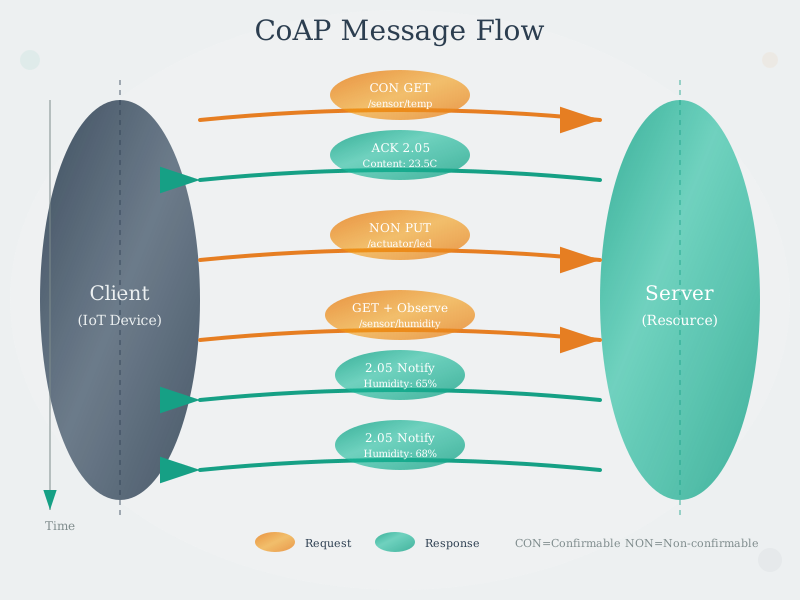
This diagram illustrates CoAP’s request-response pattern over UDP, showing how confirmable messages achieve reliability through application-layer acknowledgments rather than TCP’s transport-layer guarantees.
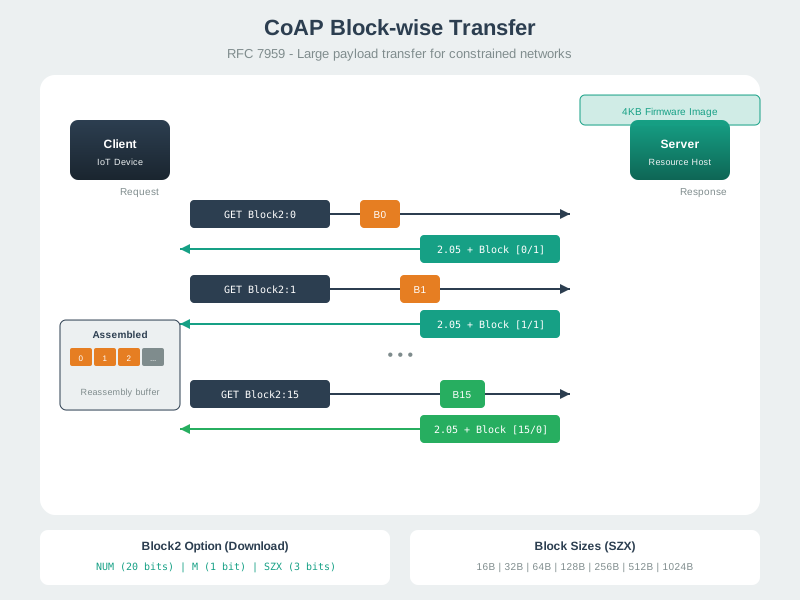
Block transfer enables reliable large payload transmission (firmware updates, bulk data) over constrained networks with small MTU limits by splitting data into individually acknowledged blocks.
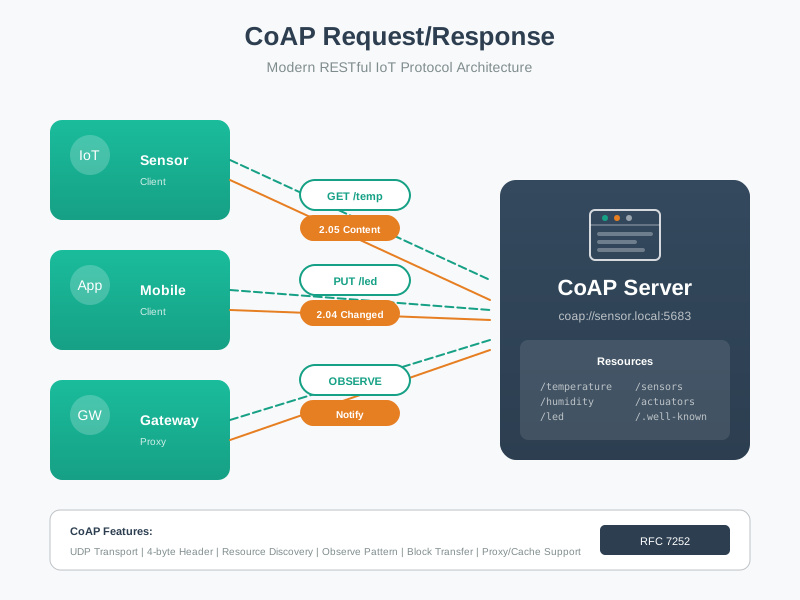
Understanding CoAP server architecture helps developers design efficient resource hierarchies for IoT devices, organizing sensors and actuators into logical RESTful endpoints.
1235.7 Summary
This chapter covered CoAP implementation and testing through comprehensive hands-on labs:
- ESP32 CoAP Server: Built environmental monitoring station with DHT22 sensor, implementing GET/PUT endpoints for temperature, humidity, and LED control with resource discovery
- Python Smart Home Server: Developed complete automation system with multiple device types (lights, thermostats), room-level control, and dashboard aggregation
- Content Negotiation: Designed APIs that serve CBOR (64% smaller) for constrained devices and JSON for web dashboards
- RESTful Resource Design: Applied HTTP-like semantics (GET for sensors, PUT for actuators) to CoAP endpoints
1235.8 What’s Next
Continue to CoAP Review: Knowledge Assessment to test your understanding with quiz questions and scenario-based exercises covering all aspects of CoAP protocol.
1235.9 See Also
Related Topics:
- MQTT Protocol: Alternative pub-sub protocol for comparison
- Edge Computing: CoAP deployment patterns at the edge
- IoT Device Security: Implementing DTLS for CoAP