%%{init: {'theme': 'base', 'themeVariables': {'primaryColor': '#2C3E50', 'primaryTextColor': '#fff', 'primaryBorderColor': '#16A085', 'lineColor': '#E67E22', 'secondaryColor': '#16A085', 'tertiaryColor': '#7F8C8D'}}}%%
graph TB
    Internet((Internet))
    BR[Border Router<br/>Gateway + Leader Capable]

    subgraph "Always-On Mesh Backbone"
        R1[Router]
        R2[Router]
        R3[Router]
        REED[REED<br/>Router Eligible]
    end

    subgraph "End Devices"
        FED[FED<br/>Full End Device<br/>Always Listening]
        MED[MED<br/>Minimal End Device<br/>Polls Parent]
        SED[SED<br/>Sleepy End Device<br/>Low Power Polling]
    end

    Internet <--> BR
    BR <--> R1
    BR <--> R2
    R1 <--> R3
    R2 <--> R3
    R2 <--> REED
    R1 --> FED
    R2 --> MED
    R3 --> SED

    style Internet fill:#7F8C8D,stroke:#2C3E50,color:#fff
    style BR fill:#E67E22,stroke:#2C3E50,color:#fff
    style R1 fill:#16A085,stroke:#2C3E50,color:#fff
    style R2 fill:#16A085,stroke:#2C3E50,color:#fff
    style R3 fill:#16A085,stroke:#2C3E50,color:#fff
    style REED fill:#3498db,stroke:#2C3E50,color:#fff
    style FED fill:#2C3E50,stroke:#16A085,color:#fff
    style MED fill:#2C3E50,stroke:#16A085,color:#fff
    style SED fill:#2C3E50,stroke:#16A085,color:#fff
1010 Thread Network Architecture and Device Roles
1010.1 Thread Network Architecture
NoteLearning Objectives
By the end of this section, you will be able to:
- Understand Thread’s mesh network architecture and topology
- Identify and explain all Thread device roles (Border Router, Leader, Router, REED, FED, MED, SED)
- Design Thread networks with proper router placement for reliable coverage
- Understand the Border Router’s gateway functions including NAT64/DNS64
- Use interactive visualization to explore Thread network behavior
Thread networks consist of different device types, each with specific roles:
NoteAlternative Views: Thread Network Architecture Visualizations
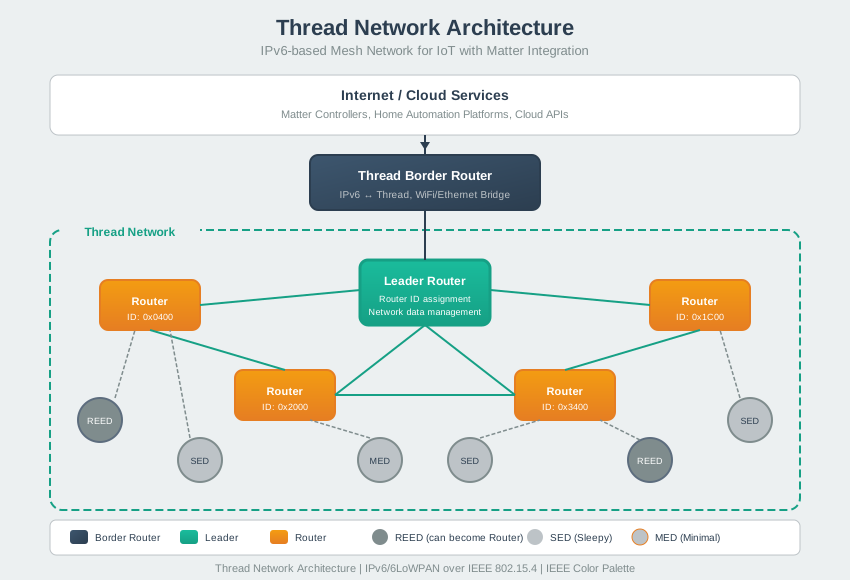
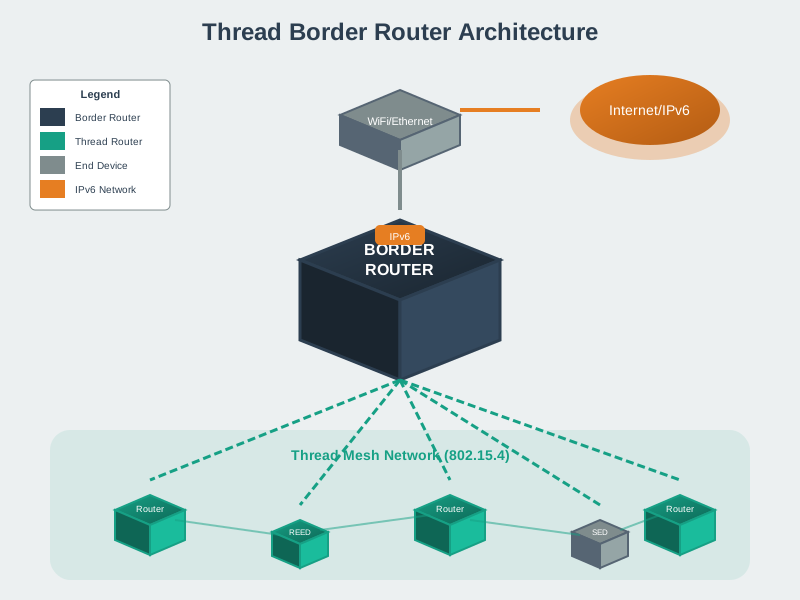
The Thread network architecture enables seamless connectivity from constrained IoT devices all the way to cloud services. The Border Router bridges between the Thread mesh (802.15.4 radio) and IP infrastructure (Wi-Fi/Ethernet), translating between the compact Thread packets and standard IPv6 traffic while maintaining end-to-end addressing.
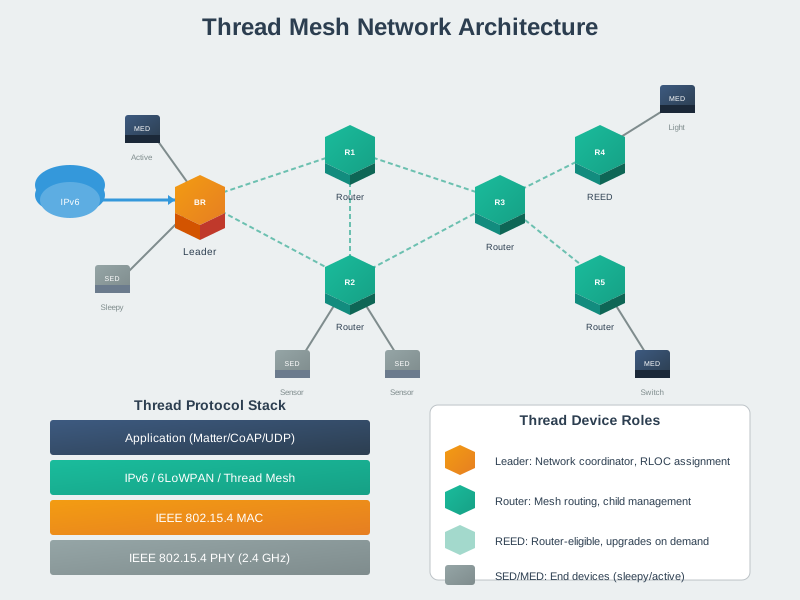
The mesh topology provides inherent reliability through path redundancy. If any router fails, the network automatically discovers alternative routes through neighboring routers, maintaining connectivity without manual intervention. This self-healing behavior is critical for smart home reliability.
1010.2 Border Router (Thread-Wi-Fi Gateway)
Role: Connects Thread network to other IP networks (Wi-Fi, Ethernet, Internet)
Functions: - Routing: Routes packets between Thread network and external networks - NAT64: Translates IPv6 (Thread) ↔︎ IPv4 (Internet) - DNS64: DNS service for Thread devices - Service Discovery: Advertises network services - Firewall: Secures Thread network from external threats
Examples: - Google Nest Hub (2nd gen) - Apple HomePod mini - Amazon Echo (4th gen) - Dedicated Thread border routers
Requirements: - Two radios: Thread (802.15.4) + Wi-Fi/Ethernet - Always powered on (mains power) - Sufficient CPU/memory for routing
1010.3 Leader (Network Manager)
Role: Manages router ID assignment and network partition merging
Functions: - Router ID Assignment: Assigns 16-bit router IDs - Partition Management: Merges network partitions - Network Data Distribution: Maintains network configuration - Automatic Failover: If leader fails, new leader elected
Characteristics: - One per partition: Only one leader in connected network - Elected automatically: From routers using distributed algorithm - Transparent to applications: Leadership is invisible to apps - Dynamic: Leader can change if network topology changes
Important: Applications don’t need to know which device is leader
1010.4 Router (Always-On Routing Devices)
NoteRouter (Always-On Routing Devices)
Role: Forward packets and provide routing services
Functions: - Packet Routing: Route packets between devices - End Device Parent: Serve as parent for end devices - Network Stability: Always on to maintain mesh - Leader Eligible: Can become leader if needed
Characteristics: - Always On: Never sleep (mains powered or large battery) - Limit: Maximum 32 routers per network - Automatic: Devices automatically promote/demote to maintain optimal count
Examples: - Smart light bulbs (mains powered) - Smart plugs - HVAC controllers - Mains-powered sensors
1010.5 REED (Router-Eligible End Device)
NoteREED (Router-Eligible End Device)
Role: End device that can be promoted to router if needed
Functions: - Normal Operation: Acts as end device - Automatic Promotion: Becomes router if network needs more routers - Network Optimization: Helps maintain optimal router count
Characteristics: - Conditional: Promoted only when needed - Flexible: Can be router or end device - Typically: Mains-powered devices
Example Scenario: - Start as REED (11 active routers in network) - If routers drop to < 16, REED promotes to router - If routers reach 32, router may demote to REED
1010.6 FED (Full End Device)
NoteFED (Full End Device)
Role: End device with full rx-on-when-idle capability
Functions: - Always Listening: Receiver always on (low latency) - Direct Communication: Can send/receive anytime - No Routing: Doesn’t forward packets for others
Characteristics: - Always On: Receiver enabled continuously - Higher Power: More power than sleepy devices - Faster Response: Low latency communication
Examples: - Mains-powered sensors requiring fast response - Security keypads - Smart displays
1010.7 MED (Minimal End Device) & SED (Sleepy End Device)
NoteMED (Minimal End Device) & SED (Sleepy End Device)
Role: Battery-powered devices that sleep to conserve power
Functions: - Poll for Messages: Wake periodically to poll parent router - Transmit When Needed: Wake, send data, return to sleep - Years on Battery: Ultra-low power consumption
Characteristics: - Sleep Cycle: Sleep 99%+ of time - Parent Router: Must have router parent to hold messages - Low Power: Optimized for battery life
Polling Intervals: - MED: Poll every few seconds (moderate latency) - SED: Poll every tens of seconds to minutes (higher latency)
Examples: - Door/window sensors - Motion sensors - Temperature sensors - Smart locks (battery powered)
1010.8 Device Type Comparison
| Type | Always On | Can Route | Can Be Leader | Power | Use Case |
|---|---|---|---|---|---|
| Border Router | Yes | Yes | Yes | Mains | Gateway to internet |
| Leader | Yes | Yes | Yes | Mains | One per network (auto) |
| Router | Yes | Yes | Yes | Mains | Mesh backbone |
| REED | Yes | If promoted | If promoted | Mains | Flexible role |
| FED | Yes | No | No | Mains/Battery | Low latency |
| MED/SED | No (sleeps) | No | No | Battery | Ultra-low power |
1010.9 Interactive Thread Network Demo
NoteInteractive: Thread Network Demo
Explore how Thread networks self-organize with different device roles. Adjust network size to see how routers form the mesh backbone, end devices attach to parents, and the leader coordinates the network. Simulate leader failure to watch automatic failover in action.
How to Use This Demo:
- Adjust Network Size: Slide to add/remove devices. Watch how routers form the mesh backbone.
- Change Router Ratio: Higher ratios mean more mains-powered devices that can route traffic.
- Simulate Leader Failure: Toggle to see automatic leader election.
- Show Link Quality: Toggle to see simulated link quality percentages.
Key Observations: - Orange node (Border Router) connects Thread mesh to Internet - Purple node (Leader) manages network state - any router can become leader - Teal nodes (Routers) form always-on mesh backbone - Blue nodes (REED) can become routers if needed - Dark/Gray nodes (SED/MED) are battery-powered end devices - Dashed circles indicate sleeping devices (power saving)
1010.10 Summary
This chapter covered Thread network architecture and device roles:
- Border Router: Gateway between Thread mesh and Wi-Fi/Internet, provides NAT64/DNS64
- Leader: Network coordinator elected from routers, manages partition state
- Router: Always-on mesh backbone, forwards packets, can host end devices
- REED: Can be promoted to router when network needs more routing capacity
- FED: Always-listening end device for low-latency applications
- MED/SED: Battery-powered devices that sleep to conserve power
1010.11 What’s Next
Continue to Thread Deployment Guide for real-world deployment examples, common pitfalls, and best practices for Thread network design.