936 IEEE 802.15.4 Overview and Introduction
936.1 Low-Rate Wireless Personal Area Networks (IEEE 802.15.4)
NoteLearning Objectives
By the end of this section, you will be able to:
- Understand the features and specifications of IEEE 802.15.4
- Compare beacon-enabled and non-beacon-enabled network modes
- Distinguish between Full Function Devices (FFD) and Reduced Function Devices (RFD)
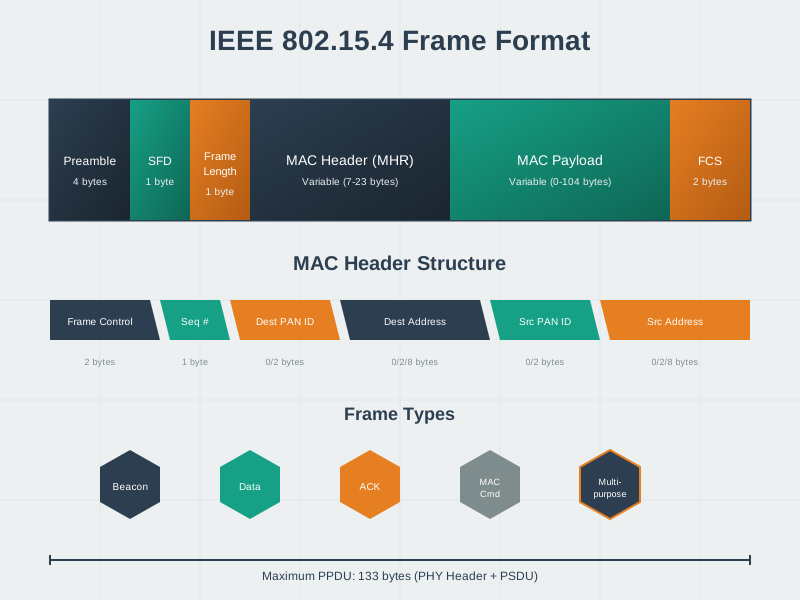
- Understand the frame structure and types in IEEE 802.15.4
- Evaluate different IEEE 802.15.4 variants for specific applications
- Understand the role of IEEE 802.15.4 as the foundation for Zigbee, Thread, and 6LoWPAN
936.2 Prerequisites
Before diving into this chapter, you should be familiar with:
- Layered Network Models: IEEE 802.15.4 defines the Physical (PHY) and Media Access Control (MAC) layers, so understanding the OSI/TCP-IP models helps you see where 802.15.4 fits in the protocol stack
- Networking Basics: Fundamental networking concepts like addressing, frame structure, and channel access methods provide context for understanding how 802.15.4 operates differently from Ethernet and Wi-Fi
- IoT Protocols Overview: Knowing why IoT requires low-power, low-data-rate protocols helps you appreciate 802.15.4’s design trade-offs between power consumption, range, and throughput
NoteRelated Chapters
This Series: - IEEE 802.15.4 Overview and Introduction ← You are here - IEEE 802.15.4 Features and Specifications - Technical details and interactive calculator - IEEE 802.15.4 Knowledge Checks - Test your understanding - IEEE 802.15.4 Pitfalls and Best Practices - Common mistakes to avoid - IEEE 802.15.4 Advanced Topics - Group testing and collision resolution
Deep Dives: - 802.15.4 Comprehensive Review - Complete specification details - 802.15.4 Topic Review - Quick reference guide - 802.15.4 Quiz Bank - Test your knowledge
Built on 802.15.4: - Zigbee Fundamentals and Architecture - Mesh networking protocol - Thread Fundamentals and Roles - IPv6-based mesh protocol - 6LoWPAN Fundamentals and Architecture - IPv6 compression
Comparisons: - Bluetooth Overview - Alternative low-power protocol - LPWAN Fundamentals - Long-range alternatives - Wi-Fi Fundamentals - High-power comparison
Architecture: - Wireless Sensor Networks - WSN applications - IoT Reference Models - Protocol stack placement
Learning: - Quizzes Hub - 802.15.4 assessments - Simulations Hub - Channel capacity calculator
936.3 🌱 Getting Started (For Beginners)
936.3.1 What is IEEE 802.15.4?
Simple Answer: It’s the “radio rules” that tell IoT devices how to send wireless signals to each other at the most basic level.
Analogy: Building Codes for Houses
Think of wireless protocols like building a house:
%%{init: {'theme': 'base', 'themeVariables': { 'primaryColor': '#2C3E50', 'primaryTextColor': '#fff', 'primaryBorderColor': '#16A085', 'lineColor': '#16A085', 'secondaryColor': '#E67E22', 'tertiaryColor': '#7F8C8D', 'fontSize': '16px'}}}%%
flowchart TD
    A["🏗️ Building a House<br/>(Complete IoT System)"] --> B["Foundation & Walls<br/>(IEEE 802.15.4)<br/>PHY + MAC layers"]
    A --> C["Plumbing & Electrical<br/>(Zigbee/Thread/6LoWPAN)<br/>Network layer"]
    A --> D["Interior Design<br/>(Application)<br/>User functionality"]

    B --> E["✅ Strong foundation<br/>defines radio rules"]
    C --> F["✅ Routing & addressing<br/>between devices"]
    D --> G["✅ Smart home control<br/>sensor apps"]

    style A fill:#2C3E50,stroke:#16A085,stroke-width:3px,color:#fff
    style B fill:#16A085,stroke:#2C3E50,stroke-width:2px,color:#fff
    style C fill:#E67E22,stroke:#2C3E50,stroke-width:2px,color:#fff
    style D fill:#7F8C8D,stroke:#2C3E50,stroke-width:2px,color:#fff
    style E fill:#d4edda,stroke:#16A085,stroke-width:1px,color:#000
    style F fill:#fff3cd,stroke:#E67E22,stroke-width:1px,color:#000
    style G fill:#e2e3e5,stroke:#7F8C8D,stroke-width:1px,color:#000
936.3.2 Why Does 802.15.4 Exist?
The Problem: Wi-Fi and Bluetooth weren’t designed for IoT’s needs.
| Technology | Power | Range | Battery Life | Best For |
|---|---|---|---|---|
| Wi-Fi | High | 50-100m | Days | Streaming video |
| Bluetooth | Medium | 10-30m | Weeks | Headphones |
| IEEE 802.15.4 | Very Low | 10-100m | Years | Sensors |
802.15.4 was designed specifically for: - ✅ Battery-powered devices lasting years (not days) - ✅ Simple devices that just send small data packets - ✅ Many devices in one network (hundreds or thousands) - ✅ Low-cost radio chips
936.3.3 How 802.15.4 Relates to Zigbee, Thread, and 6LoWPAN
These are all built ON TOP of 802.15.4:
%%{init: {'theme': 'base', 'themeVariables': { 'primaryColor': '#2C3E50', 'primaryTextColor': '#fff', 'primaryBorderColor': '#16A085', 'lineColor': '#16A085', 'secondaryColor': '#E67E22', 'tertiaryColor': '#7F8C8D', 'fontSize': '16px'}}}%%
graph TB
    subgraph APP["Application Layer"]
        A1["Smart Home Apps"]
        A2["Industrial Control"]
        A3["IoT Services"]
    end

    subgraph NET["Network Layer<br/>(Routing & Addressing)"]
        N1["Zigbee<br/>Mesh"]
        N2["Thread<br/>IPv6 Mesh"]
        N3["6LoWPAN<br/>IPv6"]
    end

    subgraph MAC["IEEE 802.15.4 Foundation"]
        M1["MAC Layer<br/>(CSMA/CA, Channel Access)"]
        M2["PHY Layer<br/>(2.4GHz Radio, 250kbps)"]
    end

    APP --> NET
    NET --> MAC

    style APP fill:#7F8C8D,stroke:#2C3E50,stroke-width:2px,color:#fff
    style NET fill:#E67E22,stroke:#2C3E50,stroke-width:2px,color:#fff
    style MAC fill:#16A085,stroke:#2C3E50,stroke-width:3px,color:#fff
    style A1 fill:#e2e3e5,stroke:#7F8C8D,stroke-width:1px,color:#000
    style A2 fill:#e2e3e5,stroke:#7F8C8D,stroke-width:1px,color:#000
    style A3 fill:#e2e3e5,stroke:#7F8C8D,stroke-width:1px,color:#000
    style N1 fill:#fff3cd,stroke:#E67E22,stroke-width:1px,color:#000
    style N2 fill:#fff3cd,stroke:#E67E22,stroke-width:1px,color:#000
    style N3 fill:#fff3cd,stroke:#E67E22,stroke-width:1px,color:#000
    style M1 fill:#d4edda,stroke:#16A085,stroke-width:1px,color:#000
    style M2 fill:#d4edda,stroke:#16A085,stroke-width:1px,color:#000
TipAlternative View: Protocol Selection Decision Tree
This variant helps you choose which protocol to use on top of IEEE 802.15.4:
%%{init: {'theme': 'base', 'themeVariables': { 'primaryColor': '#2C3E50', 'primaryTextColor': '#fff', 'primaryBorderColor': '#16A085', 'lineColor': '#16A085', 'secondaryColor': '#E67E22', 'tertiaryColor': '#7F8C8D'}}}%%
flowchart TD
    START["Need wireless<br/>sensor network"] --> Q1{"Need IP/Internet<br/>connectivity?"}

    Q1 -->|Yes| Q2{"Device-level<br/>or Gateway?"}
    Q1 -->|No| ZB["Zigbee<br/>Proprietary mesh<br/>Good for appliances"]

    Q2 -->|"Direct IPv6"| TH["Thread<br/>Native IPv6 mesh<br/>Modern smart home"]
    Q2 -->|"Via Gateway"| LP["6LoWPAN<br/>IPv6 compression<br/>Industrial/WSN"]

    ALL["All use IEEE 802.15.4<br/>PHY and MAC layers"]

    ZB --> ALL
    TH --> ALL
    LP --> ALL

    style START fill:#2C3E50,stroke:#16A085,color:#fff
    style Q1 fill:#E67E22,stroke:#2C3E50,color:#fff
    style Q2 fill:#E67E22,stroke:#2C3E50,color:#fff
    style ZB fill:#16A085,stroke:#2C3E50,color:#fff
    style TH fill:#16A085,stroke:#2C3E50,color:#fff
    style LP fill:#16A085,stroke:#2C3E50,color:#fff
    style ALL fill:#7F8C8D,stroke:#2C3E50,color:#fff
This decision tree guides protocol selection based on your IP connectivity needs while showing how all protocols share the same 802.15.4 radio foundation.
In short: IEEE 802.15.4 defines the radio rules everyone follows—how to send signals on the air (PHY) and how devices take turns talking (MAC)—so higher‑level protocols like Zigbee, Thread, and 6LoWPAN can focus on routing and applications.
Analogy: 802.15.4 is like the standard size of roads. Different vehicles (Zigbee cars, Thread trucks, 6LoWPAN bikes) all use the same roads but follow different rules for navigation.
936.3.4 Device Types in 802.15.4
802.15.4 defines two types of devices:
%%{init: {'theme': 'base', 'themeVariables': { 'primaryColor': '#2C3E50', 'primaryTextColor': '#fff', 'primaryBorderColor': '#16A085', 'lineColor': '#16A085', 'secondaryColor': '#E67E22', 'tertiaryColor': '#7F8C8D', 'fontSize': '16px'}}}%%
graph LR
    subgraph FFD["Full Function Device (FFD)"]
        F1["Can be PAN Coordinator"]
        F2["Can route packets"]
        F3["Can talk to any device"]
        F4["More memory & power"]
    end

    subgraph RFD["Reduced Function Device (RFD)"]
        R1["Cannot route"]
        R2["Only talks to FFD parent"]
        R3["Minimal memory"]
        R4["Ultra-low power"]
    end

    FFD -.->|"Manages"| RFD

    style FFD fill:#2C3E50,stroke:#16A085,stroke-width:3px,color:#fff
    style RFD fill:#E67E22,stroke:#2C3E50,stroke-width:2px,color:#fff
    style F1 fill:#d4edda,stroke:#16A085,stroke-width:1px,color:#000
    style F2 fill:#d4edda,stroke:#16A085,stroke-width:1px,color:#000
    style F3 fill:#d4edda,stroke:#16A085,stroke-width:1px,color:#000
    style F4 fill:#d4edda,stroke:#16A085,stroke-width:1px,color:#000
    style R1 fill:#fff3cd,stroke:#E67E22,stroke-width:1px,color:#000
    style R2 fill:#fff3cd,stroke:#E67E22,stroke-width:1px,color:#000
    style R3 fill:#fff3cd,stroke:#E67E22,stroke-width:1px,color:#000
    style R4 fill:#fff3cd,stroke:#E67E22,stroke-width:1px,color:#000
TipAlternative View: FFD/RFD Deployment Topology
This variant shows how FFDs and RFDs are typically arranged in a network:
%%{init: {'theme': 'base', 'themeVariables': { 'primaryColor': '#2C3E50', 'primaryTextColor': '#fff', 'primaryBorderColor': '#16A085', 'lineColor': '#16A085', 'secondaryColor': '#E67E22', 'tertiaryColor': '#7F8C8D'}}}%%
flowchart TD
    subgraph COORD["Coordinator (FFD)"]
        C["PAN Coordinator<br/>Mains Powered<br/>Manages Network"]
    end

    subgraph ROUTERS["Routers (FFD)"]
        R1["Router 1<br/>Mains/Battery"]
        R2["Router 2<br/>Mains/Battery"]
    end

    subgraph SENSORS["End Devices (RFD)"]
        S1["Temp Sensor<br/>Battery: 5 yr"]
        S2["Motion Sensor<br/>Battery: 3 yr"]
        S3["Door Sensor<br/>Battery: 5 yr"]
        S4["Light Switch<br/>Battery: 2 yr"]
    end

    C --> R1
    C --> R2
    R1 --> S1
    R1 --> S2
    R2 --> S3
    R2 --> S4

    style C fill:#2C3E50,stroke:#16A085,color:#fff
    style R1 fill:#16A085,stroke:#2C3E50,color:#fff
    style R2 fill:#16A085,stroke:#2C3E50,color:#fff
    style S1 fill:#E67E22,stroke:#2C3E50,color:#fff
    style S2 fill:#E67E22,stroke:#2C3E50,color:#fff
    style S3 fill:#E67E22,stroke:#2C3E50,color:#fff
    style S4 fill:#E67E22,stroke:#2C3E50,color:#fff
RFDs (orange) are typically battery-powered sensors that only talk to their FFD parent, while FFDs (teal/navy) can route packets and extend network coverage.
TipAlternative View: 802.15.4-Based Protocol Family
This variant shows how multiple IoT protocols build upon IEEE 802.15.4 as their foundation:
%%{init: {'theme': 'base', 'themeVariables': { 'primaryColor': '#2C3E50', 'primaryTextColor': '#fff', 'primaryBorderColor': '#16A085', 'lineColor': '#16A085', 'secondaryColor': '#E67E22', 'tertiaryColor': '#7F8C8D', 'fontSize': '11px'}}}%%
graph TB
    subgraph APP["Application Layer"]
        ZA["Zigbee<br/>Clusters"]
        TA["Thread<br/>Matter/HomeKit"]
        LA["6LoWPAN<br/>CoAP/HTTP"]
        WA["WirelessHART<br/>HART Commands"]
    end

    subgraph NET["Network Layer"]
        ZN["Zigbee NWK<br/>Mesh Routing"]
        TN["Thread<br/>IPv6 Mesh"]
        LN["6LoWPAN<br/>IPv6 Adaptation"]
        WN["WirelessHART<br/>Graph Routing"]
    end

    subgraph FOUNDATION["IEEE 802.15.4"]
        MAC["MAC Layer<br/>CSMA-CA, Beacon"]
        PHY["PHY Layer<br/>2.4 GHz, 250 kbps"]
    end

    ZA --> ZN --> MAC
    TA --> TN --> MAC
    LA --> LN --> MAC
    WA --> WN --> MAC
    MAC --> PHY

    style FOUNDATION fill:#2C3E50,stroke:#16A085,color:#fff
    style ZN fill:#E67E22,stroke:#2C3E50,color:#fff
    style TN fill:#16A085,stroke:#2C3E50,color:#fff
    style LN fill:#7F8C8D,stroke:#2C3E50,color:#fff
    style WN fill:#c0392b,stroke:#2C3E50,color:#fff
IEEE 802.15.4 serves as the common PHY/MAC foundation for Zigbee (home automation), Thread (smart home), 6LoWPAN (Internet integration), and WirelessHART (industrial). Each adds specialized network/application layers for different use cases.
NoteAlternative View: 802.15.4 Channel Allocation
This variant shows channel allocation across different frequency bands:
%%{init: {'theme': 'base', 'themeVariables': { 'primaryColor': '#2C3E50', 'primaryTextColor': '#fff', 'primaryBorderColor': '#16A085', 'lineColor': '#16A085', 'secondaryColor': '#E67E22', 'tertiaryColor': '#7F8C8D', 'fontSize': '11px'}}}%%
graph LR
    subgraph BAND868["868 MHz (Europe)"]
        C0["Channel 0<br/>868.3 MHz<br/>20 kbps"]
    end

    subgraph BAND915["915 MHz (Americas)"]
        C1["Ch 1-10<br/>902-928 MHz<br/>40 kbps"]
    end

    subgraph BAND24["2.4 GHz (Global)"]
        C11["Ch 11<br/>2405 MHz"]
        C15["Ch 15<br/>2425 MHz"]
        C20["Ch 20<br/>2450 MHz"]
        C25["Ch 25<br/>2475 MHz"]
        C26["Ch 26<br/>2480 MHz"]
        NOTE["16 channels<br/>250 kbps each"]
    end

    BEST["Best Practice:<br/>Use Ch 15, 20, 25<br/>Avoid Wi-Fi overlap"]

    BAND24 --> BEST

    style BAND868 fill:#7F8C8D,stroke:#2C3E50,color:#fff
    style BAND915 fill:#E67E22,stroke:#2C3E50,color:#fff
    style BAND24 fill:#16A085,stroke:#2C3E50,color:#fff
    style BEST fill:#2C3E50,stroke:#16A085,color:#fff
The 2.4 GHz band offers 16 channels (11-26) at 250 kbps each - the most commonly used for IoT. Channels 15, 20, and 25 offer best coexistence with Wi-Fi. Sub-GHz bands (868/915 MHz) provide longer range but lower data rates.
936.3.5 Self-Check: Understanding the Basics
Before continuing, make sure you can answer:
- What layers does 802.15.4 define? → Physical (PHY) and MAC layers—the basic radio rules
- Why was 802.15.4 created instead of using Wi-Fi? → Wi-Fi uses too much power; 802.15.4 is designed for years of battery life
- How does 802.15.4 relate to Zigbee? → Zigbee builds on top of 802.15.4, adding mesh networking and application profiles
- What’s the difference between FFD and RFD? → FFD can route and coordinate; RFD is simple, low-power, end-node only
TipCross-Hub Connections
Practice with interactive tools: - Simulations Hub - Use the 802.15.4 Data Rate & Capacity Calculator to explore channel utilization limits before your deployment fails at 80% capacity - Knowledge Gaps Hub - See “Why does my 250 kbps 802.15.4 network fail with only 200 sensors?” for the CSMA/CA collision trap
Test your knowledge: - Quizzes Hub - Take the 802.15.4 Architecture Quiz covering FFD vs RFD power trade-offs, channel planning, and frame structure
Visual learning: - Videos Hub - Watch “802.15.4 Explained: The Foundation of Zigbee, Thread, and 6LoWPAN” for animated protocol stack comparisons
WarningCommon Misconception: “250 kbps Means I Can Send 250 Kilobits/Second”
The Myth: “IEEE 802.15.4 runs at 250 kbps, so 200 sensors sending 50 bytes/second (80 kbps total) should be fine—I’m only using 32% of capacity!”
Real-World Reality: A warehouse deployed exactly this configuration and saw: - 70% packet loss after 6 months of operation - 500ms+ latency (10× slower than expected) - Battery life dropped from 3 years to 4 months due to retry storms
Why the Math Was Wrong:
The student forgot that 250 kbps is the PHY layer raw data rate, not usable application throughput:
%%{init: {'theme': 'base', 'themeVariables': {'primaryColor': '#2C3E50', 'primaryTextColor': '#fff', 'primaryBorderColor': '#16A085', 'lineColor': '#16A085', 'secondaryColor': '#E67E22', 'tertiaryColor': '#7F8C8D'}}}%%
flowchart TD
    A["📡 Raw PHY Capacity<br/><b>250 kbps</b><br/>(what datasheets advertise)"] -->|"÷ 2"| B["🔄 After CSMA/CA Overhead<br/><b>125 kbps</b><br/>(listen-before-talk, backoffs, ACKs)"]
    B -->|"÷ 2"| C["📦 After Frame Overhead<br/><b>62 kbps</b><br/>(MAC headers, addressing, security)"]
    C -->|"× 30%"| D["✅ Safe Operating Point<br/><b>18 kbps</b><br/>(avoid collision death spiral)"]

    D --> E["≈ 2,250 bytes/second<br/>Usable Application Data"]

    F["🏭 Actual Deployment<br/>200 sensors × 50 bytes/s<br/>= 10,000 bytes/s = <b>80 kbps</b>"] --> G["❌ 80 kbps > 18 kbps<br/><b>Network oversubscribed by 4.4×!</b>"]

    style A fill:#2C3E50,stroke:#16A085,stroke-width:2px,color:#fff
    style B fill:#16A085,stroke:#2C3E50,stroke-width:2px,color:#fff
    style C fill:#E67E22,stroke:#2C3E50,stroke-width:2px,color:#fff
    style D fill:#27ae60,stroke:#2C3E50,stroke-width:2px,color:#fff
    style E fill:#d4edda,stroke:#27ae60,stroke-width:2px,color:#000
    style F fill:#7F8C8D,stroke:#2C3E50,stroke-width:2px,color:#fff
    style G fill:#e74c3c,stroke:#2C3E50,stroke-width:3px,color:#fff
What Actually Happened: 1. Month 1-3: Network seems fine (low utilization periods) 2. Month 4: Collision rate increases as devices synchronize reporting 3. Month 5: CSMA/CA backoffs exponentially increase (2^4 = 16× longer waits) 4. Month 6: Retry storms—failed packets retry 3× each, consuming 4× more airtime, creating positive feedback loop of collisions
The Real Capacity Rule: - Physical layer: 250 kbps - Effective throughput: 50-75 kbps (with overhead) - Safe operating point: 15-25 kbps (30% channel utilization) - Rule of thumb: Assume 100 kbps effective ÷ 10 = 10 kbps usable for dense networks
How to Fix It: 1. Reduce reporting rate: 50 bytes/s → 10 bytes/s per sensor (5× reduction) 2. Split into multiple PANs: 4 PANs × 50 sensors on different channels 3. Use event-driven reporting: Only transmit when values change >10% 4. Enable beacon mode with GTS: Coordinator allocates guaranteed time slots (eliminates collisions but requires synchronization overhead)
Verify Your Design with the Interactive Calculator: Use the 802.15.4 Data Rate & Capacity Calculator in the next chapter to test your deployment before ordering hardware. Watch what happens when you: - Increase devices from 50 → 200 at the same reporting rate - Change payload from 20 → 80 bytes - Compare channel utilization at 30% (safe) vs 80% (disaster)
936.4 In Plain English: What Is IEEE 802.15.4?
936.5 Introduction to IEEE 802.15.4
TipMinimum Viable Understanding: Antenna Selection for Short-Range IoT
Core Concept: Antenna choice directly impacts range, coverage pattern, and device form factor. For IEEE 802.15.4 devices at 2.4 GHz (wavelength ~12.5 cm), the three main options are: chip antennas (0 dBi gain, smallest, omnidirectional), PCB trace antennas (1-2 dBi, no extra cost, requires careful layout), and external antennas (2-5 dBi, largest range, requires connector and enclosure hole).
Why It Matters: Every 3 dB of antenna gain doubles your effective range or lets you halve transmit power for the same range. A poorly placed chip antenna inside a metal enclosure can lose 10-20 dB, reducing your 100m theoretical range to 10m actual. Common mistakes include placing antennas near metal, batteries, or LCD displays, and failing to provide adequate ground plane clearance.
Key Takeaway: For prototypes, use modules with external antenna connectors to maximize flexibility. For production, design antenna placement first, not last. Keep the antenna at least 10mm from metal objects and ground plane edges. Run range tests in your actual deployment environment (not just the lab) before finalizing antenna selection, as real-world performance varies significantly from datasheet specifications.
IEEE 802.15.4 is a well-known standard for low data-rate WPAN (Wireless Personal Area Network). It was developed specifically for low-data-rate monitoring and control applications with extended battery life and low power consumption.
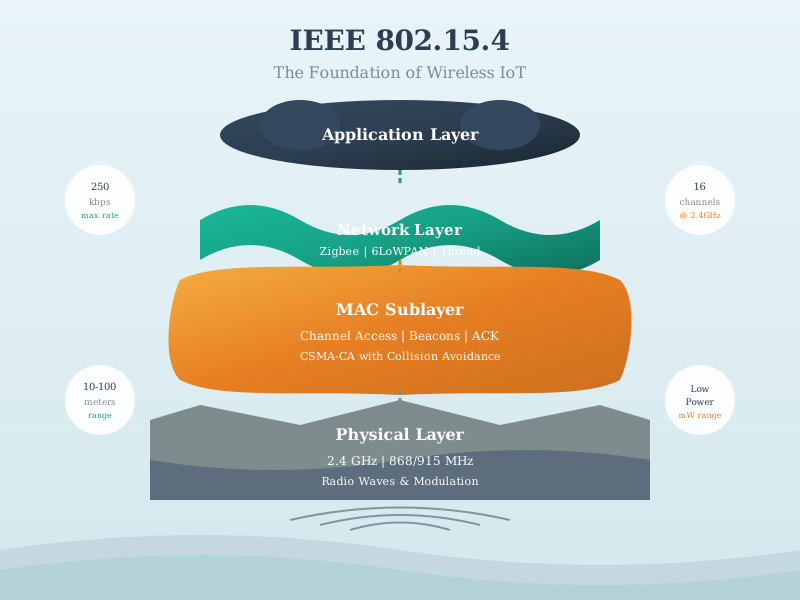
IEEE 802.15.4 Protocol Stack:
| Layer | Protocols | Purpose |
|---|---|---|
| Application | Custom Apps, Home Automation, Industrial Control, Healthcare | End-user applications |
| Network | Zigbee (Mesh), Thread (IPv6 Mesh), 6LoWPAN, WirelessHART | Routing and addressing |
| MAC | IEEE 802.15.4 MAC (CSMA/CA, Addressing) | Channel access control |
| PHY | IEEE 802.15.4 PHY (2.4 GHz, 868/915 MHz) | Radio transmission |
ImportantKey Characteristic: Layered Foundation
IEEE 802.15.4 defines only the first two layers (PHY, MAC) plus: - LLC (Logical Link Control) - SSCS (Service Specific Convergence Sub-layer)
This allows upper-layer protocols like Zigbee, Thread, and 6LoWPAN to build upon a common foundation while implementing different network and application layer features.
936.6 Real-World Example: Smart Home Motion Sensor
Key Takeaway: IEEE 802.15.4’s 250 kbps data rate and ultra-low sleep current (5 µA) enable battery-powered sensors to operate for years while transmitting small packets (8-50 bytes) with excellent responsiveness (15 ms latency).
936.7 What’s Next
Now that you understand the basics of IEEE 802.15.4, continue with:
- IEEE 802.15.4 Features and Specifications - Detailed technical specifications and interactive capacity calculator
- IEEE 802.15.4 Knowledge Checks - Test your understanding with scenario-based questions
- IEEE 802.15.4 Pitfalls and Best Practices - Common deployment mistakes and how to avoid them
- IEEE 802.15.4 Advanced Topics - Group testing for collision resolution