%%{init: {'theme': 'base', 'themeVariables': {'primaryColor': '#2C3E50', 'primaryTextColor': '#fff', 'primaryBorderColor': '#1A252F', 'lineColor': '#16A085', 'secondaryColor': '#E67E22', 'tertiaryColor': '#ECF0F1', 'fontSize': '14px'}}}%%
flowchart LR
    TX["Transmitter"]

    subgraph Paths["Signal Paths"]
        D["Direct Path<br/>(Line of Sight)"]
        R1["Reflected<br/>(Wall)"]
        R2["Reflected<br/>(Ground)"]
        R3["Diffracted<br/>(Corner)"]
    end

    RX["Receiver"]

    TX --> D --> RX
    TX -.-> R1 -.-> RX
    TX -.-> R2 -.-> RX
    TX -.-> R3 -.-> RX

    style TX fill:#16A085,stroke:#0D6655
    style RX fill:#2C3E50,stroke:#1A252F
76 Fading, Multipath, and RF Interference
76.1 Learning Objectives
By the end of this chapter, you will be able to:
- Explain how multipath propagation causes signal fading
- Differentiate between slow fading (shadowing) and fast fading (multipath)
- Calculate appropriate fading margins for different deployment environments
- Identify common sources of RF interference in IoT deployments
- Implement interference mitigation strategies including channel selection and frequency hopping
- Select appropriate frequency bands based on application requirements
76.2 Prerequisites
Before diving into this chapter, you should be comfortable with:
- Radio wave basics: Radio Wave Basics for IoT
- Path loss and link budgets: Path Loss and Link Budgets
76.3 Fading and Multipath
76.3.1 What is Multipath?
Radio waves reflect off surfaces (walls, ground, buildings). The receiver sees multiple copies of the signal arriving at slightly different times:
%%{init: {'theme': 'base', 'themeVariables': {'primaryColor': '#2C3E50', 'primaryTextColor': '#fff', 'primaryBorderColor': '#16A085', 'lineColor': '#16A085', 'secondaryColor': '#E67E22', 'tertiaryColor': '#7F8C8D'}}}%%
sequenceDiagram
    participant TX as Transmitter
    participant RX as Receiver

    Note over TX,RX: Signal "Hello" sent at t=0

    TX->>RX: Direct path arrives t=10ns
    Note over RX: First copy received

    TX-->>RX: Wall reflection t=15ns
    Note over RX: Delayed copy (+5ns)

    TX-->>RX: Ground reflection t=18ns
    Note over RX: Another copy (+8ns)

    TX-->>RX: Building reflection t=25ns
    Note over RX: Late copy (+15ns)

    Note over RX: Result: Multiple overlapping<br/>"Hello" signals interfere<br/>Can add (boost) or<br/>cancel (fade)!
76.3.2 Types of Fading
| Type | Cause | Time Scale | Mitigation |
|---|---|---|---|
| Path Loss | Distance | Static | Increase power, better antennas |
| Slow Fading (Shadowing) | Obstacles | Seconds-minutes | Fading margin in link budget |
| Fast Fading (Multipath) | Reflections | Milliseconds | Diversity, spread spectrum |
| Frequency-Selective Fading | Different delays per frequency | Varies | OFDM, wideband techniques |
76.3.3 Fading Margin
To account for unpredictable fading, we add a fading margin to the link budget:
| Application | Typical Fading Margin |
|---|---|
| Indoor, stationary | 10-15 dB |
| Indoor, mobile | 15-20 dB |
| Outdoor, urban | 15-25 dB |
| Outdoor, rural | 10-15 dB |
| Critical/safety | 25-30 dB |
76.4 Frequency Band Selection
TipMinimum Viable Understanding: RF Interference Patterns
Core Concept: RF interference occurs when multiple signals occupy the same frequency band simultaneously, causing packet loss, reduced throughput, or complete communication failure - and the 2.4 GHz ISM band (used by Wi-Fi, Bluetooth, Zigbee, and microwave ovens) is the most crowded spectrum in IoT.
Why It Matters: Interference is the hidden cause of most “mysterious” IoT connectivity problems. A sensor network that works perfectly during testing may fail during business hours when Wi-Fi traffic peaks, or when the break room microwave runs. The 2.4 GHz band can see 40-60 overlapping networks in dense urban environments, while sub-GHz bands (868/915 MHz) typically have less than 5 competing signals.
Key Takeaway: Design for interference from day one using the “3C strategy”: Choose frequencies wisely (sub-GHz for critical sensors, avoid 2.4 GHz channels 1-6-11 overlap with Wi-Fi), use Clear Channel Assessment (listen-before-talk), and implement Channel hopping (frequency diversity). If your sensor node reports intermittent failures but RSSI looks good, suspect interference - measure SNR (signal-to-noise ratio) instead of just signal strength.
76.4.1 Choosing the Right Band for Your Application
%%{init: {'theme': 'base', 'themeVariables': {'primaryColor': '#2C3E50', 'primaryTextColor': '#fff', 'primaryBorderColor': '#1A252F', 'lineColor': '#16A085', 'secondaryColor': '#E67E22', 'tertiaryColor': '#ECF0F1', 'fontSize': '14px'}}}%%
flowchart TD
    Start["What are your<br/>requirements?"]

    Start --> Range{"Need > 1km<br/>range?"}
    Range -->|Yes| SubGHz["Consider Sub-GHz<br/>LoRa, Sigfox, NB-IoT"]
    Range -->|No| Data{"Need > 1 Mbps<br/>data rate?"}

    Data -->|Yes| WiFi["Consider Wi-Fi<br/>2.4/5 GHz"]
    Data -->|No| Power{"Ultra-low power<br/>critical?"}

    Power -->|Yes| BLE["Consider BLE<br/>2.4 GHz, low duty cycle"]
    Power -->|No| Mesh{"Need mesh<br/>networking?"}

    Mesh -->|Yes| ZigThread["Consider Zigbee/Thread<br/>2.4 GHz"]
    Mesh -->|No| Default["Default: BLE<br/>or Wi-Fi depending on range"]

    SubGHz --> Licensed{"Licensed spectrum<br/>acceptable?"}
    Licensed -->|Yes| Cellular["Consider NB-IoT/LTE-M"]
    Licensed -->|No| Unlicensed["LoRa or Sigfox"]

    style Start fill:#2C3E50,stroke:#1A252F
    style SubGHz fill:#16A085,stroke:#0D6655
    style WiFi fill:#E67E22,stroke:#AF5F1A
    style BLE fill:#27AE60,stroke:#1E8449
    style ZigThread fill:#3498DB,stroke:#2471A3
    style Cellular fill:#9B59B6,stroke:#7D3C98
    style Unlicensed fill:#16A085,stroke:#0D6655
%%{init: {'theme': 'base', 'themeVariables': {'primaryColor': '#2C3E50', 'primaryTextColor': '#fff', 'primaryBorderColor': '#16A085', 'lineColor': '#16A085', 'secondaryColor': '#E67E22', 'tertiaryColor': '#7F8C8D'}}}%%
graph TB
    subgraph SUBGHZ["Sub-GHz (868/915 MHz)"]
        S1["Range: 5-15 km"]
        S2["Walls: Excellent penetration"]
        S3["Data: 0.3-50 kbps"]
        S4["Apps: Agriculture, Smart City"]
    end

    subgraph GHZ24["2.4 GHz"]
        T1["Range: 50-200 m"]
        T2["Walls: Good penetration"]
        T3["Data: Up to 2 Mbps"]
        T4["Apps: Smart Home, Wearables"]
    end

    subgraph GHZ5["5 GHz"]
        F1["Range: 30-100 m"]
        F2["Walls: Poor penetration"]
        F3["Data: Up to 1 Gbps"]
        F4["Apps: Video, High-speed"]
    end

    LOWER["Lower Frequency<br/>Longer range<br/>Better penetration<br/>Slower data"]

    HIGHER["Higher Frequency<br/>Shorter range<br/>Worse penetration<br/>Faster data"]

    LOWER --> SUBGHZ
    SUBGHZ --> GHZ24
    GHZ24 --> GHZ5
    GHZ5 --> HIGHER

    style S1 fill:#16A085,stroke:#2C3E50,stroke-width:1px,color:#fff
    style S2 fill:#16A085,stroke:#2C3E50,stroke-width:1px,color:#fff
    style S3 fill:#16A085,stroke:#2C3E50,stroke-width:1px,color:#fff
    style S4 fill:#16A085,stroke:#2C3E50,stroke-width:1px,color:#fff
    style T1 fill:#E67E22,stroke:#2C3E50,stroke-width:1px,color:#fff
    style T2 fill:#E67E22,stroke:#2C3E50,stroke-width:1px,color:#fff
    style T3 fill:#E67E22,stroke:#2C3E50,stroke-width:1px,color:#fff
    style T4 fill:#E67E22,stroke:#2C3E50,stroke-width:1px,color:#fff
    style F1 fill:#2C3E50,stroke:#E67E22,stroke-width:1px,color:#fff
    style F2 fill:#2C3E50,stroke:#E67E22,stroke-width:1px,color:#fff
    style F3 fill:#2C3E50,stroke:#E67E22,stroke-width:1px,color:#fff
    style F4 fill:#2C3E50,stroke:#E67E22,stroke-width:1px,color:#fff
    style LOWER fill:#16A085,stroke:#2C3E50,stroke-width:2px,color:#fff
    style HIGHER fill:#2C3E50,stroke:#16A085,stroke-width:2px,color:#fff
76.5 RF Interference Analysis and Mitigation
Real-world IoT deployments rarely operate in isolation. Understanding and mitigating RF interference is essential for reliable wireless communication, especially in crowded ISM bands.
76.5.1 Sources of Interference
Co-Channel Interference (Same Frequency):
| Source | Affected Technologies | Severity |
|---|---|---|
| Wi-Fi networks | BLE, Zigbee, Thread (2.4 GHz) | High |
| Microwave ovens | All 2.4 GHz devices | Very High (localized) |
| Other IoT networks | LoRa, Sigfox (sub-GHz) | Medium |
| Bluetooth audio | BLE sensors | Medium |
| Baby monitors | 2.4 GHz mesh networks | High |
Adjacent-Channel Interference:
Channel allocation example (2.4 GHz):
Wi-Fi Ch 1 -----------------
           |  Overlap Zone  |
Zigbee Ch 11-14 -------------
           |  Overlap Zone  |
Wi-Fi Ch 6 -----------------
76.5.2 Interference Measurement Techniques
Spectrum Analysis:
# Pseudo-code for interference survey
def conduct_rf_survey(center_freq, bandwidth, duration_min):
    """Measure RF environment over time"""
    samples = []

    for t in range(duration_min * 60):  # Sample every second
        reading = spectrum_analyzer.measure(
            center_freq=center_freq,
            span=bandwidth,
            rbw=100000  # 100 kHz resolution bandwidth
        )
        samples.append({
            'timestamp': time.time(),
            'peak_power_dbm': reading.peak,
            'avg_power_dbm': reading.average,
            'channel_occupancy': reading.duty_cycle
        })
        time.sleep(1)

    return analyze_interference(samples)

def analyze_interference(samples):
    """Classify interference patterns"""
    return {
        'avg_noise_floor': np.mean([s['avg_power_dbm'] for s in samples]),
        'peak_interference': max([s['peak_power_dbm'] for s in samples]),
        'duty_cycle': np.mean([s['channel_occupancy'] for s in samples]),
        'interference_events': count_peaks_above_threshold(samples, -60)
    }
Key Metrics to Capture:
| Metric | Threshold | Interpretation |
|---|---|---|
| Noise floor | > -90 dBm | Elevated background interference |
| Peak power | > -40 dBm | Strong interferer present |
| Duty cycle | > 50% | Channel heavily occupied |
| Interference events/hour | > 100 | Bursty interference source |
76.5.3 Channel Planning and Avoidance
2.4 GHz Coexistence Strategy:
Non-overlapping channel sets:

Wi-Fi-friendly Zigbee channels:
- Zigbee 15, 20, 25, 26 (avoid Wi-Fi 1, 6, 11 overlap)

Recommended layout:
+--------------------------------------------------+
| 2400    2412    2437    2462    2480 MHz         |
| |       | Wi-Fi1 | Wi-Fi6 | Wi-Fi11|        |    |
| |       +--------+--------+--------+        |    |
| |                                           |    |
| +-----Zigbee 15-----Zigbee 20-----Zigbee 25-----|
|         (2425)        (2450)        (2475)       |
+--------------------------------------------------+
Sub-GHz Channel Selection (LoRa/Sigfox):
| Region | Frequency Band | Duty Cycle Limit | Best Channels |
|---|---|---|---|
| EU868 | 868-868.6 MHz | 1% | 868.1, 868.3, 868.5 |
| US915 | 902-928 MHz | No limit (FCC) | Use all 64 uplink |
| AS923 | 923-923.5 MHz | Varies | 923.2, 923.4 |
76.5.4 Adaptive Frequency Hopping (AFH)
Bluetooth AFH Implementation:
Standard hopping: 79 channels, 1600 hops/sec

AFH channel map (example with 30% blocked):
Good channels:  [0,1,2,5,6,7,8,9,12,13,...]  (55 channels)
Bad channels:   [3,4,10,11,40,41,42,...]     (24 blocked)

Update frequency: Every 30 seconds based on:
- Packet error rate per channel
- RSSI measurements
- Blacklist from master
Implementation Considerations:
- Minimum channels: Bluetooth requires at least 20 good channels
- Update latency: Changes propagate to all slaves within 6 slots
- Hysteresis: Don’t thrash channels based on single errors
76.5.5 Physical Layer Mitigation
Antenna Techniques:
| Technique | Benefit | Application |
|---|---|---|
| Directional antenna | 6-15 dB rejection of off-axis interference | Fixed outdoor links |
| Antenna diversity | 3-6 dB gain against multipath fading | Indoor gateways |
| Polarization isolation | 20-30 dB between cross-polarized signals | Collocated systems |
| Spatial separation | 6 dB per doubling of distance | Antenna placement |
Power Control Strategy:
def adaptive_power_control(current_rssi, target_rssi, current_tx_power):
    """Adjust transmit power to minimize interference contribution"""
    margin = 6  # dB safety margin

    if current_rssi > target_rssi + margin:
        # Signal too strong, reduce power
        new_power = current_tx_power - (current_rssi - target_rssi - margin)
    elif current_rssi < target_rssi - margin:
        # Signal too weak, increase power
        new_power = current_tx_power + (target_rssi - current_rssi)
    else:
        new_power = current_tx_power

    # Clamp to regulatory limits
    return max(min(new_power, MAX_TX_POWER), MIN_TX_POWER)
76.5.6 Protocol-Level Mitigation
Clear Channel Assessment (CCA):
Before transmit:
1. Listen for energy on channel (ED threshold: -62 dBm for 802.15.4)
2. If busy, defer and backoff
3. After backoff, check again
4. Maximum retries: typically 4-5

Backoff algorithm:
backoff_time = random(0, 2^BE - 1) x unit_period
where BE starts at 3, increments to max 5 on collision
Listen Before Talk (LBT) for Sub-GHz:
Required in EU868: - Minimum listen time: 5 ms - Threshold: -80 dBm (or technology-specific) - Penalty: Must wait 1 second if channel busy
76.5.7 Troubleshooting Interference Issues
Symptom: High Packet Error Rate
- Measure RSSI and SNR (signal-to-noise ratio)
- If RSSI good but SNR poor -> interference present
- Conduct spectrum sweep during peak interference
- Identify interferer by frequency, duty cycle, modulation
Symptom: Intermittent Connectivity
- Log connection events with timestamps
- Correlate with known interference sources (work schedules, microwave use)
- Check for hidden node problem in mesh networks
- Verify antenna orientation hasn’t changed
Symptom: Reduced Range
- Verify transmit power setting
- Check antenna connection (2 dB loss from poor SMA connection)
- Measure noise floor vs. commissioning baseline
- Look for new interference sources (new Wi-Fi APs, industrial equipment)
76.5.8 Site Survey Checklist
Pre-Deployment Survey:
76.6 Visual Reference Gallery
NoteStatic Diagram: IoT Frequency Band Selection Flowchart

A practical decision tree to help select the appropriate wireless technology based on application requirements including range, data rate, power consumption, and networking topology.
NoteStatic Diagram: Multipath Signal Propagation

Visualization of multipath propagation showing how radio signals take multiple paths from transmitter to receiver through reflection, diffraction, and direct line-of-sight.
NoteVisual: Fresnel Zone Clearance
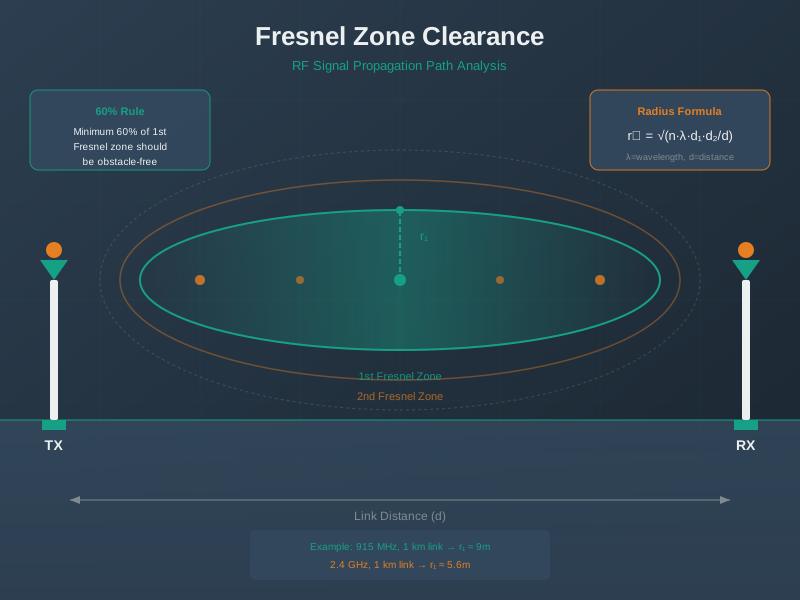
Fresnel zone clearance is critical for reliable line-of-sight wireless links, especially for long-range IoT deployments.
NoteVisual: Antenna Radiation Pattern
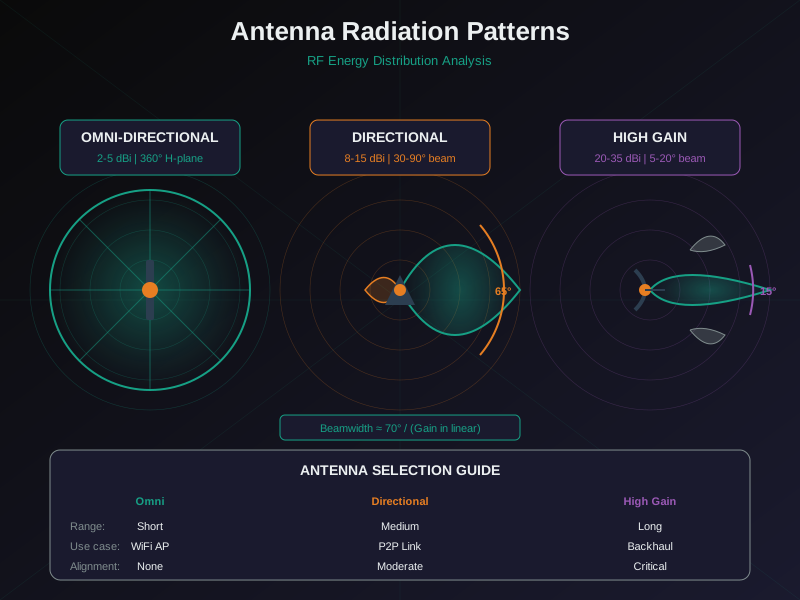
Antenna pattern selection affects coverage area, range, and interference characteristics of IoT deployments.
76.7 Summary
| Concept | Key Points |
|---|---|
| Multipath | Multiple signal copies arrive at different times, causing fading |
| Slow Fading | Shadowing from obstacles, seconds-minutes time scale |
| Fast Fading | Multipath reflections, milliseconds time scale |
| Fading Margin | Add 10-30 dB depending on environment and criticality |
| 2.4 GHz Interference | Wi-Fi, Bluetooth, microwaves compete for same spectrum |
| Sub-GHz Advantage | Less crowded, better penetration, longer range |
| CCA/LBT | Listen-before-talk protocols reduce collisions |
| Frequency Hopping | Spread interference across channels |
76.8 What’s Next
With fading and interference understood, continue to:
- Practical Wireless Lab - Hands-on experiments with RSSI and packet loss
NoteRelated Chapters
- Radio Wave Basics for IoT - Frequency bands and trade-offs
- Path Loss and Link Budgets - Calculate link margins
- LPWAN Introduction - Long-range IoT technologies
- Protocol Selection Framework - Choose the right protocol