%%{init: {'theme': 'base', 'themeVariables': {'primaryColor': '#2C3E50', 'primaryTextColor': '#fff', 'primaryBorderColor': '#1A252F', 'lineColor': '#16A085', 'secondaryColor': '#E67E22', 'tertiaryColor': '#ECF0F1', 'fontSize': '14px'}}}%%
xychart-beta
    title "Path Loss vs Distance (Different Environments)"
    x-axis "Distance (m)" [1, 10, 50, 100, 200, 500]
    y-axis "Path Loss (dB)" 40 --> 140
    line "Free Space (n=2)" [40, 60, 74, 80, 86, 94]
    line "Indoor Open (n=3)" [40, 70, 91, 100, 109, 121]
    line "Indoor Walls (n=4)" [40, 80, 108, 120, 132, 148]
77 Path Loss and Link Budgets
77.1 Learning Objectives
By the end of this chapter, you will be able to:
- Calculate free-space path loss (FSPL) for different frequencies and distances
- Apply real-world path loss models for indoor and outdoor environments
- Construct a complete link budget for an IoT wireless system
- Interpret signal strength measurements (dBm, RSSI) and their practical meaning
- Determine whether a wireless link will work before deployment
77.2 Prerequisites
Before diving into this chapter, you should be comfortable with:
- Radio wave basics: Radio Wave Basics for IoT
- Basic algebra and logarithms (dB math): Mathematical Foundations
TipMVU: IoT Deployment Link Budget
Core Concept: A link budget is a simple equation that predicts whether your wireless IoT system will work: Received Power = Transmit Power + Antenna Gains - Path Loss - Fading Margin. If received power exceeds receiver sensitivity, communication succeeds.
Why It Matters: Link budgets prevent expensive field failures. Industry data shows that 40% of IoT pilot failures are due to connectivity issues that could have been predicted with a 5-minute link budget calculation. The FCC and ETSI define regulatory transmit power limits (14 dBm EU, 30 dBm US for ISM bands), so you cannot simply “turn up the power” when deployments fail.
Key Takeaway: Always include a 20 dB fading margin for outdoor deployments and 15 dB for indoor. The difference between a “working” lab demo and a reliable production system is margin. Sub-GHz frequencies (LoRa at 868/915 MHz) provide approximately 9 dB better path loss than 2.4 GHz at the same distance - equivalent to 3x the range with identical hardware.
77.3 Path Loss: Signal Attenuation Over Distance
TipMinimum Viable Understanding: Path Loss Fundamentals
Core Concept: Path loss is the reduction in radio signal strength as it travels through space, following the inverse-square law where signal power decreases proportionally to the square of the distance - doubling distance reduces power by 6 dB (a factor of 4).
Why It Matters: Path loss determines whether your IoT devices can communicate at all. Every wireless link budget calculation starts with path loss, and underestimating it is the most common cause of IoT deployment failures. A sensor that works perfectly at 100m in the lab may fail completely at 200m in the field because path loss increased by 6 dB - and that is free-space loss only, before accounting for walls, terrain, or interference.
Key Takeaway: Use the “6-20 rule” for quick mental calculations: every doubling of distance adds 6 dB loss, and every doubling of frequency adds another 6 dB. For real-world deployments, multiply free-space loss by the path loss exponent (n=2 for free space, n=3-4 for indoor, n=4-5 for obstructed urban). Always add 15-25 dB fading margin to your calculations - if your link budget is exactly zero, your system will fail half the time.
77.3.1 Free Space Path Loss (FSPL)
In perfect conditions (no obstacles, no reflections), signal strength decreases with distance following the inverse square law:
\[FSPL_{dB} = 20\log_{10}(d) + 20\log_{10}(f) + 20\log_{10}\left(\frac{4\pi}{c}\right)\]
Simplified for common units:
\[FSPL_{dB} = 20\log_{10}(d_{km}) + 20\log_{10}(f_{MHz}) + 32.45\]
Example calculations:
| Distance | 868 MHz (LoRa) | 2.4 GHz (Wi-Fi) | 5 GHz (Wi-Fi) |
|---|---|---|---|
| 1 m | 31 dB | 40 dB | 47 dB |
| 10 m | 51 dB | 60 dB | 67 dB |
| 100 m | 71 dB | 80 dB | 87 dB |
| 1 km | 91 dB | 100 dB | 107 dB |
| 10 km | 111 dB | 120 dB | 127 dB |
ImportantKey Insight
At 2.4 GHz, you lose an additional 9 dB compared to 868 MHz at the same distance. That’s why LoRa and Sigfox (sub-GHz) achieve much longer ranges than Wi-Fi and Bluetooth.
77.3.2 Real-World Path Loss Models
Free space is ideal; real environments add extra loss. The log-distance path loss model accounts for this:
\[PL(d) = PL(d_0) + 10n\log_{10}\left(\frac{d}{d_0}\right) + X_\sigma\]
Where: - \(PL(d_0)\) = path loss at reference distance (usually 1m) - \(n\) = path loss exponent (environment-dependent) - \(X_\sigma\) = random variable for shadowing (obstacles)
| Environment | Path Loss Exponent (n) | Notes |
|---|---|---|
| Free space | 2.0 | Ideal, no obstacles |
| Urban cellular | 2.7-3.5 | Buildings cause reflection |
| Urban (obstructed) | 4-5 | Non-line-of-sight |
| Indoor (open office) | 2.5-3.0 | Few walls |
| Indoor (partitioned) | 3.5-4.5 | Cubicles, walls |
| Indoor (through walls) | 4-6 | Multiple walls |
| Factory/Industrial | 3.0-4.0 | Metal, machinery |
77.4 Link Budget: Will Your System Work?
A link budget calculates whether a wireless link will function by comparing transmitted power to receiver sensitivity.
77.4.1 The Link Budget Equation
\[P_{rx} = P_{tx} + G_{tx} - L_{cable,tx} - L_{path} - L_{other} + G_{rx} - L_{cable,rx}\]
Where: - \(P_{tx}\) = Transmitter output power (dBm) - \(G_{tx}\), \(G_{rx}\) = Antenna gains (dBi) - \(L_{path}\) = Path loss (dB) - \(L_{other}\) = Other losses (fading margin, body loss, etc.) - \(P_{rx}\) = Received power (dBm)
%%{init: {'theme': 'base', 'themeVariables': {'primaryColor': '#2C3E50', 'primaryTextColor': '#fff', 'primaryBorderColor': '#1A252F', 'lineColor': '#16A085', 'secondaryColor': '#E67E22', 'tertiaryColor': '#ECF0F1', 'fontSize': '14px'}}}%%
flowchart LR
    subgraph TX["Transmitter"]
        P["Power<br/>+14 dBm"]
        GT["Antenna<br/>+2 dBi"]
    end

    subgraph Path["Propagation"]
        PL["Path Loss<br/>-100 dB"]
        FM["Fading Margin<br/>-10 dB"]
    end

    subgraph RX["Receiver"]
        GR["Antenna<br/>+2 dBi"]
        S["Sensitivity<br/>-137 dBm"]
    end

    P --> GT --> PL --> FM --> GR --> S

    style TX fill:#16A085,stroke:#0D6655
    style Path fill:#E67E22,stroke:#AF5F1A
    style RX fill:#2C3E50,stroke:#1A252F
%%{init: {'theme': 'base', 'themeVariables': {'primaryColor': '#2C3E50', 'primaryTextColor': '#fff', 'primaryBorderColor': '#16A085', 'lineColor': '#16A085', 'secondaryColor': '#E67E22', 'tertiaryColor': '#7F8C8D'}}}%%
graph TD
    subgraph GAINS["Signal Gains (+)"]
        G1["TX Power<br/>+14 dBm"]
        G2["TX Antenna<br/>+2 dBi"]
        G3["RX Antenna<br/>+2 dBi"]
    end

    subgraph LOSSES["Signal Losses (-)"]
        L1["Path Loss<br/>-100 dB"]
        L2["Fading Margin<br/>-10 dB"]
        L3["Cable Losses<br/>-2 dB"]
    end

    subgraph RESULT["Link Analysis"]
        R1["Received Power<br/>-94 dBm"]
        R2["RX Sensitivity<br/>-137 dBm"]
        R3["Link Margin<br/>+43 dB<br/>Excellent!"]
    end

    G1 --> G2 --> G3 --> L1 --> L2 --> L3 --> R1
    R2 --> R3
    R1 --> R3

    style G1 fill:#16A085,stroke:#2C3E50,stroke-width:2px,color:#fff
    style G2 fill:#16A085,stroke:#2C3E50,stroke-width:2px,color:#fff
    style G3 fill:#16A085,stroke:#2C3E50,stroke-width:2px,color:#fff
    style L1 fill:#E67E22,stroke:#2C3E50,stroke-width:2px,color:#fff
    style L2 fill:#E67E22,stroke:#2C3E50,stroke-width:2px,color:#fff
    style L3 fill:#E67E22,stroke:#2C3E50,stroke-width:2px,color:#fff
    style R1 fill:#2C3E50,stroke:#16A085,stroke-width:2px,color:#fff
    style R2 fill:#7F8C8D,stroke:#2C3E50,stroke-width:1px,color:#fff
    style R3 fill:#16A085,stroke:#2C3E50,stroke-width:3px,color:#fff
77.4.2 Link Budget Example: LoRaWAN Sensor
| Parameter | Value | Notes |
|---|---|---|
| Tx Power | +14 dBm | EU regulatory limit |
| Tx Antenna Gain | +2 dBi | Simple dipole |
| Tx Cable Loss | -1 dB | Short cable |
| Available EIRP | +15 dBm | Sum of above |
| Rx Antenna Gain | +3 dBi | Gateway antenna |
| Rx Cable Loss | -2 dB | Longer cable |
| Rx Sensitivity | -137 dBm | SF12 at 125kHz |
| Required Rx Power | -138 dBm | Sensitivity + gains - losses |
| Link Budget | 153 dB | EIRP - Required Rx Power |
Maximum range calculation:
Using path loss formula for urban environment (n=3.5): \[153 = 32.45 + 20\log_{10}(868) + 35\log_{10}(d_{km})\] \[d_{km} = 10^{(153-91.2)/35} \approx 8.5 km\]
With fading margin of 20 dB: practical range approximately 2-3 km urban
77.4.3 Link Margin
Link margin is the difference between received power and receiver sensitivity: \[\text{Link Margin} = P_{rx} - P_{sensitivity}\]
- < 0 dB: Link will not work
- 0-10 dB: Unreliable, occasional dropouts
- 10-20 dB: Acceptable for most applications
- > 20 dB: Very reliable, robust link
NoteWorked Example: Outdoor Sensor Link Budget Calculation
Scenario: You are deploying a LoRa sensor on a farm to monitor soil moisture. The sensor is 3 km from the gateway, with a clear line of sight across open fields.
Given:
- Frequency: 915 MHz (US ISM band)
- Sensor transmit power: +20 dBm
- Sensor antenna gain: +2 dBi (simple dipole)
- Gateway antenna gain: +6 dBi (fiberglass omnidirectional)
- Gateway receiver sensitivity: -137 dBm (SF12, 125 kHz bandwidth)
- Environment: Rural open field (path loss exponent n = 2.2)
- Required fading margin: 15 dB (outdoor, rural)
Solution:
Step 1: Calculate Free Space Path Loss (FSPL)
Using the simplified formula for FSPL: \[FSPL_{dB} = 20\log_{10}(d_{km}) + 20\log_{10}(f_{MHz}) + 32.45\]
\[FSPL = 20\log_{10}(3) + 20\log_{10}(915) + 32.45\] \[FSPL = 9.54 + 59.23 + 32.45 = 101.22 \text{ dB}\]
Step 2: Adjust for Real Environment
For rural open field with n = 2.2 (slightly worse than free space n = 2.0): \[PL_{real} = FSPL \times \frac{n}{2.0} = 101.22 \times \frac{2.2}{2.0} = 111.34 \text{ dB}\]
Step 3: Calculate Received Power
\[P_{rx} = P_{tx} + G_{tx} + G_{rx} - PL_{real}\] \[P_{rx} = 20 + 2 + 6 - 111.34 = -83.34 \text{ dBm}\]
Step 4: Calculate Link Margin
\[\text{Link Margin} = P_{rx} - P_{sensitivity}\] \[\text{Link Margin} = -83.34 - (-137) = 53.66 \text{ dB}\]
Step 5: Apply Fading Margin
\[\text{Available Margin} = \text{Link Margin} - \text{Fading Margin}\] \[\text{Available Margin} = 53.66 - 15 = 38.66 \text{ dB}\]
Result: The link has 38.66 dB of margin after accounting for fading. This is excellent - the system will work reliably even in adverse conditions.
Maximum Range Estimate: With 53.66 dB total link budget margin, you could theoretically extend range until margin drops to the 15 dB fading requirement. Solving for distance:
\[d_{max} = 3 \text{ km} \times 10^{(38.66)/(22)} \approx 22 \text{ km}\]
Key Insight: LoRa’s exceptional receiver sensitivity (-137 dBm) combined with sub-GHz frequencies creates massive link budgets. This is why LoRaWAN achieves 10-15 km ranges in rural areas. However, always design for 15-25 dB fading margin to handle weather variations, vegetation growth, and seasonal changes.
77.5 Understanding Signal Strength Measurements
77.5.1 dBm: Absolute Power
dBm measures absolute power in milliwatts on a logarithmic scale: \[P_{dBm} = 10\log_{10}(P_{mW})\]
| dBm | mW | Typical Source |
|---|---|---|
| +30 | 1000 | Maximum Wi-Fi (US, with antenna) |
| +20 | 100 | High-power Wi-Fi router |
| +14 | 25 | LoRaWAN EU limit |
| +4 | 2.5 | Bluetooth Class 2 |
| 0 | 1 | Reference level |
| -10 | 0.1 | |
| -30 | 0.001 | |
| -70 | 10^-10 | Typical Wi-Fi signal at 20m |
| -90 | 10^-12 | Weak but usable Wi-Fi |
| -120 | 10^-15 | Near noise floor |
| -137 | 10^-16.7 | LoRa SF12 sensitivity |
77.5.2 RSSI: Received Signal Strength Indicator
RSSI is a vendor-specific measurement of signal strength. It’s often (but not always) related to dBm:
%%{init: {'theme': 'base', 'themeVariables': {'primaryColor': '#2C3E50', 'primaryTextColor': '#fff', 'primaryBorderColor': '#1A252F', 'lineColor': '#16A085', 'secondaryColor': '#E67E22', 'tertiaryColor': '#ECF0F1', 'fontSize': '14px'}}}%%
flowchart TD
    subgraph RSSI["RSSI Quality Levels"]
        E["Excellent<br/>RSSI > -50 dBm<br/>Very close to AP"]
        G["Good<br/>-50 to -60 dBm<br/>Reliable connection"]
        F["Fair<br/>-60 to -70 dBm<br/>Usually works"]
        W["Weak<br/>-70 to -80 dBm<br/>Occasional issues"]
        P["Poor<br/>-80 to -90 dBm<br/>Unreliable"]
        N["No Connection<br/>< -90 dBm<br/>Link failure"]
    end

    E --> G --> F --> W --> P --> N

    style E fill:#16A085,stroke:#0D6655
    style G fill:#27AE60,stroke:#1E8449
    style F fill:#F39C12,stroke:#D68910
    style W fill:#E67E22,stroke:#AF5F1A
    style P fill:#E74C3C,stroke:#B03A2E
    style N fill:#7F8C8D,stroke:#5D6D7E
%%{init: {'theme': 'base', 'themeVariables': {'primaryColor': '#2C3E50', 'primaryTextColor': '#fff', 'primaryBorderColor': '#16A085', 'lineColor': '#16A085', 'secondaryColor': '#E67E22', 'tertiaryColor': '#7F8C8D'}}}%%
graph LR
    subgraph EXCELLENT["-40 to -50 dBm"]
        E1["Video streaming"]
        E2["VoIP calls"]
        E3["Real-time gaming"]
    end

    subgraph GOOD["-50 to -67 dBm"]
        G1["Web browsing"]
        G2["Email/messaging"]
        G3["IoT sensors"]
    end

    subgraph FAIR["-67 to -80 dBm"]
        F1["Basic web pages"]
        F2["Sensor data"]
        F3["Low-rate LPWAN"]
    end

    subgraph POOR["-80 to -90 dBm"]
        P1["Packet loss likely"]
        P2["Retransmissions"]
        P3["LoRa still works!"]
    end

    EXCELLENT -->|"Degrading"| GOOD -->|"Degrading"| FAIR -->|"Degrading"| POOR

    style E1 fill:#16A085,stroke:#2C3E50,stroke-width:1px,color:#fff
    style E2 fill:#16A085,stroke:#2C3E50,stroke-width:1px,color:#fff
    style E3 fill:#16A085,stroke:#2C3E50,stroke-width:1px,color:#fff
    style G1 fill:#27AE60,stroke:#2C3E50,stroke-width:1px,color:#fff
    style G2 fill:#27AE60,stroke:#2C3E50,stroke-width:1px,color:#fff
    style G3 fill:#27AE60,stroke:#2C3E50,stroke-width:1px,color:#fff
    style F1 fill:#E67E22,stroke:#2C3E50,stroke-width:1px,color:#fff
    style F2 fill:#E67E22,stroke:#2C3E50,stroke-width:1px,color:#fff
    style F3 fill:#E67E22,stroke:#2C3E50,stroke-width:1px,color:#fff
    style P1 fill:#E74C3C,stroke:#2C3E50,stroke-width:1px,color:#fff
    style P2 fill:#E74C3C,stroke:#2C3E50,stroke-width:1px,color:#fff
    style P3 fill:#2C3E50,stroke:#16A085,stroke-width:2px,color:#fff
WarningRSSI vs SNR
RSSI only tells you signal strength, not quality. A strong signal can still be useless if there’s strong interference.
SNR (Signal-to-Noise Ratio) tells you how much your signal stands out from the noise: \[SNR_{dB} = P_{signal,dBm} - P_{noise,dBm}\]
For reliable communication, you typically need SNR > 10-20 dB, depending on the modulation scheme.
77.6 Understanding Check
CautionTest Your Understanding
Scenario: You’re designing a smart agriculture system. Soil moisture sensors are deployed across a 500-acre (2 km squared) field. A gateway is placed at the farm building in the center.
Given: - Sensors transmit at +14 dBm with 2 dBi antenna - Gateway has sensitivity of -137 dBm with 6 dBi antenna - Environment is rural/open (path loss exponent n approximately 2.5) - Frequency: 915 MHz
Questions:
- What is the maximum theoretical range in free space?
- What is the practical range with the real environment?
- Will sensors at the field edges (1 km away) work reliably?
- What fading margin would you recommend?
TipSolution
1. Maximum theoretical range (free space):
Link budget: +14 + 2 - 1 (cable) + 6 - 1 (cable) - (-137) = 157 dB
Free space path loss: 157 = 32.45 + 20log(915) + 20log(d_km) 157 = 32.45 + 59.2 + 20log(d) 65.35 = 20log(d) d = 10^(65.35/20) = 1850 km (theoretical!)
Note: This is a mathematical upper bound in an idealized free-space model. In practice, line-of-sight/horizon limits, Fresnel clearance, interference, and regulations dominate long before this distance.
2. Practical range (n=2.5):
Using log-distance model with n=2.5: 157 = 91.65 + 25log(d_km) 65.35 = 25log(d) d = 10^(65.35/25) = 46 km (without fading margin)
3. Sensors at 1 km:
Path loss at 1 km: 91.65 + 25log(1) = 91.65 dB Received power: +14 + 2 + 6 - 91.65 = -69.65 dBm Link margin: -69.65 - (-137) = 67.35 dB
Yes! Sensors at 1 km will work very reliably.
4. Recommended fading margin:
For outdoor agriculture: 15 dB is typically sufficient With 67 dB margin, you have excellent reliability even in adverse conditions.
77.7 Visual Reference Gallery
NoteStatic Diagram: RSSI Signal Quality Levels

A visual scale showing how to interpret RSSI measurements in practical deployments, from excellent signal strength to complete link failure.
NoteStatic Diagram: Path Loss vs Distance (Different Environments)
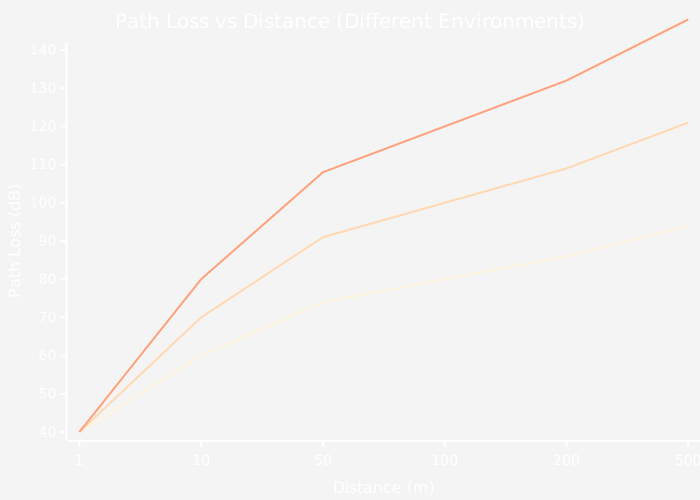
This chart demonstrates how different environments dramatically affect signal propagation, with indoor environments containing walls showing nearly 50 dB more loss than free space at 500 meters.
NoteStatic Diagram: Link Budget Calculation Flow

Step-by-step visualization of a wireless link budget calculation, showing how power flows from transmitter through the propagation environment to the receiver.
NoteVisual: Path Loss Model Visualization
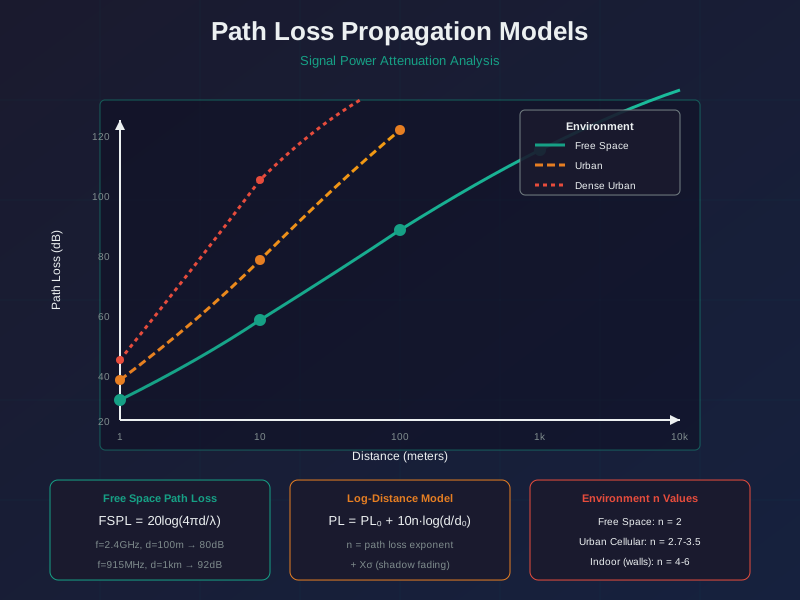
Understanding path loss is fundamental to calculating link budgets and predicting wireless communication range.
77.8 Summary
| Concept | Key Points |
|---|---|
| Path Loss | Signal weakens with distance; lower frequencies lose less |
| FSPL Formula | \(FSPL = 20\log(d) + 20\log(f) + 32.45\) |
| Path Loss Exponent | n=2 (free space), n=3-4 (indoor), n=4-5 (obstructed) |
| Link Budget | Balance transmit power, gains, losses, and sensitivity |
| dBm | Absolute power measure (0 dBm = 1 mW) |
| RSSI | Received signal strength; > -70 dBm is typically good |
| Link Margin | > 20 dB for reliable links |
77.9 What’s Next
With path loss and link budgets understood, continue to:
- Fading, Multipath, and Interference - Understand real-world signal variations
- Practical Wireless Lab - Hands-on experiments with RSSI and packet loss
NoteRelated Chapters
- Radio Wave Basics for IoT - Frequency bands and trade-offs
- LPWAN Introduction - Apply these concepts to long-range IoT
- LoRaWAN Overview - See how LoRa achieves long range