%% fig-alt: "Hardware trojan anatomy showing trigger mechanism (what activates the malicious behavior - could be specific input sequence, time-based, or environmental condition) and payload (the malicious action - could be key leakage, denial of service, or privilege escalation). Both components are embedded in the silicon during manufacturing."
%%{init: {'theme': 'base', 'themeVariables': {'primaryColor':'#2C3E50','primaryTextColor':'#fff','primaryBorderColor':'#16A085','lineColor':'#16A085','secondaryColor':'#E67E22','tertiaryColor':'#7F8C8D'}}}%%
flowchart TB
    subgraph trojan["HARDWARE TROJAN"]
        subgraph trigger["TRIGGER MECHANISM"]
            T1["Combinational<br/>(input pattern)"]
            T2["Sequential<br/>(state machine)"]
            T3["Analog<br/>(voltage, temp)"]
            T4["Time-based<br/>(counter)"]
        end
        subgraph payload["PAYLOAD"]
            P1["Key Leakage"]
            P2["Denial of Service"]
            P3["Privilege Escalation"]
            P4["Information Leak"]
        end
    end

    trigger --> payload

    style trigger fill:#E67E22,stroke:#2C3E50,stroke-width:2px,color:#fff
    style payload fill:#c0392b,stroke:#2C3E50,stroke-width:2px,color:#fff
1455 Hardware Vulnerabilities
1455.1 Hardware Vulnerabilities
This chapter covers hardware-level security threats to IoT devices, including hardware trojans, side-channel attacks, supply chain risks, and countermeasures for protecting physical device integrity.
1455.2 Learning Objectives
By the end of this chapter, you will be able to:
- Identify hardware trojan trigger mechanisms and payloads
- Understand side-channel attack techniques (SPA, DPA, CPA)
- Assess supply chain security risks
- Implement hardware security countermeasures
- Detect hardware tampering in production devices
1455.3 Hardware Trojans
Hardware trojans are malicious modifications to integrated circuits that can: - Leak cryptographic keys - Create backdoors for unauthorized access - Disable security functions under specific conditions - Cause device failure at critical moments
1455.3.1 Trojan Anatomy
1455.3.2 Trigger Types
| Trigger Type | Description | Example | Detection Difficulty |
|---|---|---|---|
| Combinational | Activates on specific input pattern | Magic password enables debug mode | Medium |
| Sequential | Requires sequence of events | After 1000 boot cycles, leak keys | High |
| Analog | Temperature, voltage, EM conditions | At >50°C, disable encryption | Very High |
| Time-based | After specific time period | After 1 year, enable backdoor | High |
1455.4 Supply Chain Security Risk
The IC supply chain has multiple insertion points for hardware trojans:
%% fig-alt: "IC supply chain attack points showing Design (IP cores, EDA tools), Fabrication (foundry, mask making), Assembly (packaging, testing), Distribution (logistics, resellers), and Integration (OEM, contract manufacturer). Each stage presents opportunities for trojan insertion or device tampering."
%%{init: {'theme': 'base', 'themeVariables': {'primaryColor':'#2C3E50','primaryTextColor':'#fff','primaryBorderColor':'#16A085','lineColor':'#16A085','secondaryColor':'#E67E22','tertiaryColor':'#7F8C8D'}}}%%
flowchart LR
    subgraph design["DESIGN"]
        D1["IP Cores"]
        D2["EDA Tools"]
        D3["RTL/Netlist"]
    end

    subgraph fab["FABRICATION"]
        F1["Mask Making"]
        F2["Foundry"]
        F3["Wafer Testing"]
    end

    subgraph asm["ASSEMBLY"]
        A1["Die Packaging"]
        A2["Final Testing"]
        A3["Marking"]
    end

    subgraph dist["DISTRIBUTION"]
        S1["Logistics"]
        S2["Resellers"]
        S3["Brokers"]
    end

    subgraph integ["INTEGRATION"]
        I1["OEM"]
        I2["Contract Mfg"]
        I3["End Product"]
    end

    design --> fab --> asm --> dist --> integ

    style design fill:#16A085,stroke:#2C3E50,stroke-width:2px,color:#fff
    style fab fill:#2C3E50,stroke:#16A085,stroke-width:2px,color:#fff
    style asm fill:#7F8C8D,stroke:#2C3E50,stroke-width:2px,color:#fff
    style dist fill:#E67E22,stroke:#2C3E50,stroke-width:2px,color:#fff
    style integ fill:#c0392b,stroke:#2C3E50,stroke-width:2px,color:#fff
1455.5 Side-Channel Attacks
Side-channel attacks extract secrets by analyzing physical properties of a device during operation:
1455.5.1 Simple Power Analysis (SPA)
Directly observes power consumption patterns to identify cryptographic operations:
Power Trace During RSA:
        │
  High  │    ██    ██████    ██
Power   │   ████  ████████  ████
        │  ██████████████████████
  Low   │──────────────────────────
        └─────────────────────────► Time
              ^       ^
              │       │
          Square  Multiply (reveals key bit = 1)
1455.5.2 Differential Power Analysis (DPA)
Uses statistical analysis of many power traces to extract keys:
- Collect thousands of power traces during encryption
- Hypothesize key byte values
- Correlate hypothesis with power consumption
- Correct key hypothesis shows higher correlation
1455.5.3 Countermeasures
| Technique | Description | Overhead |
|---|---|---|
| Constant-time code | Same operations regardless of data | ~10-20% slower |
| Power randomization | Add random delays/operations | ~30% power increase |
| Masking | Split secrets into random shares | 2-3x computation |
| Noise injection | Add power noise during operations | 10% power increase |
| Shielding | Metal mesh over chip | Manufacturing cost |
1455.6 Physical Attack Vectors
1455.6.1 Debug Interface Exploitation
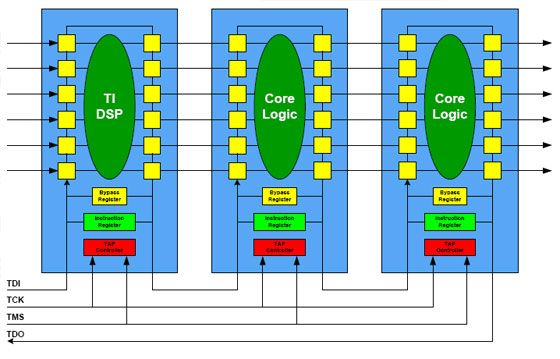
NoteAcademic Reference: JTAG Chain Architecture (University of Edinburgh)
Source: University of Edinburgh - IoT Systems Security Course
This diagram illustrates the JTAG daisy-chain architecture - a critical hardware attack vector in IoT devices:
How JTAG Chains Work: - TDI (Test Data In): Serial data input to the chain - TDO (Test Data Out): Serial data output from the chain - TCK (Test Clock): Synchronizes all chips in the chain - TMS (Test Mode Select): Controls the TAP state machine
Security Implications for IoT: - Multi-chip access: A single JTAG port provides access to ALL chips in the chain - Boundary scan: Yellow cells around chip perimeter allow testing/controlling every I/O pin - Bypass register: Attackers can selectively target specific chips while bypassing others - Daisy-chain vulnerability: Compromising one debug port compromises the entire system
Why This Matters for Device Security: IoT devices often contain multiple processors (main CPU, wireless radio, sensor MCU) connected via JTAG. If debug ports are not disabled in production: 1. Attacker connects to single exposed JTAG header 2. Gains access to ALL processors in the chain 3. Can read/write firmware, extract keys, inject malware on any chip 4. Even “secure” chips become vulnerable through chain access
Mitigation: Disable JTAG by burning eFuse bits, remove test points from production PCBs, or implement JTAG authentication.
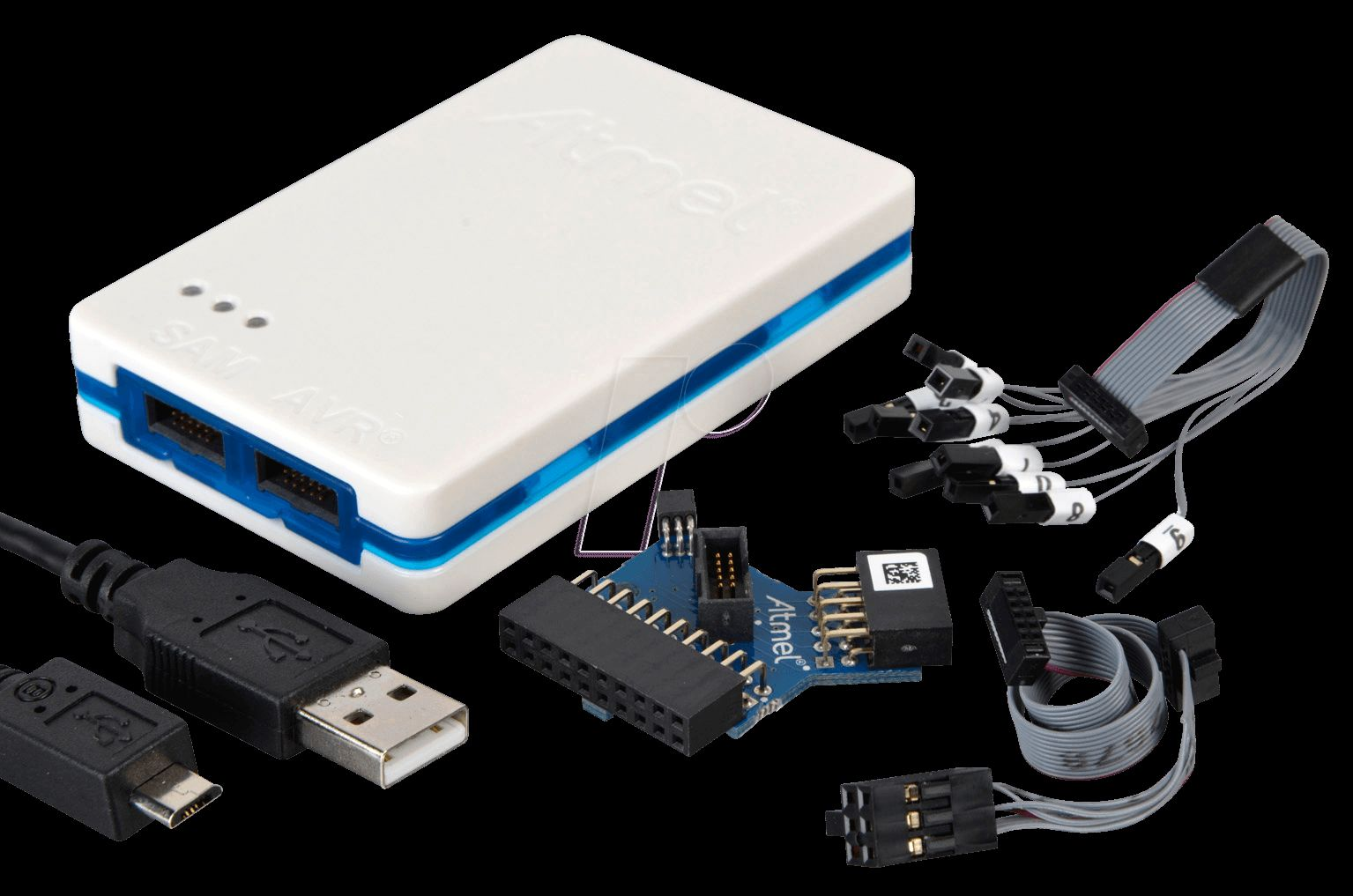
NoteAcademic Resource: Hardware Debugging Tools
Source: University of Edinburgh - IoT Systems Security Course
This image shows typical hardware hacking tools used for IoT security assessments:
- Logic analyzer/debugger: Captures signals from JTAG, SWD, UART, SPI interfaces
- Probe clips: Connect to test points on PCBs without soldering
- JTAG ribbon cable: Standard 10/20-pin connector for ARM Cortex debug
Why this matters for device security: These tools cost under $100 and allow attackers with physical device access to: 1. Extract firmware for reverse engineering 2. Read encryption keys from memory 3. Bypass secure boot by debugging bootloader 4. Inject malicious code into flash memory
Production IoT devices must disable these debug interfaces to prevent exploitation.
1455.6.2 Tamper Detection and Response
| Level | Protection | Response |
|---|---|---|
| Level 1 | Tamper-evident seals | Visual inspection |
| Level 2 | Mesh break detection | Log event |
| Level 3 | Active monitoring | Alert + log |
| Level 4 | Key zeroization | Wipe secrets on breach |
| Level 5 | Device destruction | Self-destruct circuit |
1455.7 Detecting Hardware Trojans in Production
1455.7.1 Detection Methods
| Method | When Applied | Detection Rate | Cost |
|---|---|---|---|
| Visual Inspection | Incoming QC | Low (obvious only) | Low |
| X-ray Imaging | Sample testing | Medium | Medium |
| Side-channel analysis | Production testing | Medium-High | Medium |
| Formal verification | Design phase | High (known patterns) | High |
| Golden model comparison | Production | High | Very High |
ImportantCommon Misconception: “Firewalls Protect IoT Devices”
The Myth: “Our IoT devices are behind a corporate firewall, so they’re protected from hackers.”
The Reality: Firewalls protect against network-based attacks from outside the perimeter, but they cannot defend against:
- Physical attacks: Attacker with device access extracts keys via JTAG
- Supply chain attacks: Trojan inserted during manufacturing
- Insider threats: Employee with network access
- Compromised internal hosts: Malware on workstation pivots to IoT
- Side-channel attacks: Power analysis extracts keys through the power plug
The Truth: Firewalls are ONE layer of defense. IoT security requires: - Device-level hardening (secure boot, encrypted storage) - Network segmentation (VLANs isolate IoT) - Zero-trust architecture (authenticate every connection) - Physical security (tamper detection)
1455.8 Hardware Security Assessment Exercise
TipExercise: Hardware Security Assessment and Countermeasures
Scenario: You’re tasked with assessing the hardware security of a new IoT gateway being considered for industrial deployment. The device will handle sensitive process control data and must resist physical tampering.
Assessment Checklist:
- Debug Interface Analysis:
- Physical Security:
- Component Analysis:
- Side-Channel Assessment:
Countermeasure Recommendations:
| Finding | Countermeasure | Implementation Cost |
|---|---|---|
| JTAG enabled | Burn eFuse to disable | $0 (software) |
| Exposed test points | Epoxy fill, remove from layout | $0.50/device |
| No tamper detection | Add mesh + accelerometer | $2-5/device |
| Readable flash | Enable encryption | $0 (if chip supports) |
| Side-channel leakage | Add countermeasures in firmware | Development time |
1455.9 Summary
This chapter covered hardware vulnerabilities:
- Hardware Trojans: Malicious circuit modifications with triggers and payloads
- Supply Chain Risks: Multiple insertion points from design to deployment
- Side-Channel Attacks: SPA, DPA, CPA extract secrets through physical analysis
- Physical Attacks: JTAG, UART, flash access enable firmware extraction
- Countermeasures: Disable debug, add tamper detection, use constant-time code
1455.10 What’s Next
The next chapter explores Access Control models for IoT including RBAC, ABAC, OAuth 2.0, and identity management strategies for device fleets.
Continue to Access Control →