%%{init: {'theme': 'base', 'themeVariables': {'primaryColor': '#2C3E50', 'primaryTextColor': '#fff', 'primaryBorderColor': '#16A085', 'lineColor': '#E67E22', 'secondaryColor': '#16A085', 'tertiaryColor': '#7F8C8D'}}}%%
graph TB
    subgraph App["Application Layer"]
        Info[Information Model<br/>Nodes, References, Types]
        Services[Service Sets<br/>Read, Write, Subscribe, Call]
    end

    subgraph Comm["Communication Layer"]
        Sec[Security Layer<br/>Authentication, Encryption]
        Msg[Message Layer<br/>Encoding, Chunking]
    end

    subgraph Transport["Transport Layer Options"]
        TCP[OPC TCP<br/>Binary, Port 4840]
        HTTPS[HTTPS<br/>REST/JSON]
        WS[WebSocket<br/>Browser clients]
        PubSub[Pub/Sub<br/>MQTT, AMQP, UDP]
    end

    Info --> Services
    Services --> Sec
    Sec --> Msg
    Msg --> TCP
    Msg --> HTTPS
    Msg --> WS
    Msg --> PubSub

    style App fill:#16A085,stroke:#2C3E50,color:#fff
    style Comm fill:#E67E22,stroke:#2C3E50,color:#fff
    style Transport fill:#2C3E50,stroke:#16A085
1253 OPC-UA Fundamentals
1253.1 OPC-UA: The Industrial Interoperability Standard
NoteLearning Objectives
By the end of this section, you will be able to:
- Understand OPC-UA architecture and its role in industrial systems
- Navigate the OPC-UA information model and address space
- Implement OPC-UA clients and servers using modern SDKs
- Configure OPC-UA security with certificates and encryption
- Design OPC-UA pub/sub architectures for scalable deployments
- Integrate OPC-UA with cloud platforms and MQTT
1253.2 Prerequisites
Before diving into this chapter, you should be familiar with:
- Industrial Protocols Overview: IT/OT convergence context
- Networking Basics: TCP/IP fundamentals
- IIoT and Industry 4.0: Industrial IoT context
NoteRelated Chapters
Industrial Protocols: - Industrial Protocols Overview - Protocol landscape - Modbus Protocol - Legacy protocol integration - Industrial Ethernet - Real-time protocols
Integration: - MQTT Fundamentals - OPC-UA to MQTT bridging - Data in the Cloud - Cloud integration
TipFor Beginners: Understanding OPC-UA
The Problem: In a typical factory, you might have: - PLCs from Siemens, Rockwell, Mitsubishi - Sensors from 10 different manufacturers - SCADA software from one vendor - MES software from another - Cloud analytics from yet another
Each speaks a different “language” (protocol). Getting them to talk to each other traditionally required custom integration for every pair—expensive and fragile.
OPC-UA’s Solution: One universal language that everyone speaks.
Analogy: OPC-UA is like English in international business: - Everyone agrees to communicate in English (OPC-UA) - Each company still has their native language internally (Modbus, PROFINET, etc.) - But when they need to share information, they use English (OPC-UA)
Key Benefits: - Platform-independent: Windows, Linux, embedded systems - Secure by design: Built-in encryption and authentication - Rich data model: Not just values, but context and relationships - Scalable: From tiny sensors to enterprise systems
1253.3 OPC-UA Architecture
1253.3.1 Protocol Stack
NoteAlternative View: Information Model Structure
%%{init: {'theme': 'base', 'themeVariables': {'primaryColor': '#2C3E50', 'primaryTextColor': '#fff', 'primaryBorderColor': '#16A085', 'lineColor': '#E67E22', 'secondaryColor': '#16A085', 'tertiaryColor': '#7F8C8D'}}}%%
graph TD
    Root["Root Node<br/>Address Space"]

    subgraph Objects["Object Nodes"]
        Machine["Machine1<br/>(Object)"]
        Sensor["TempSensor<br/>(Object)"]
    end

    subgraph Variables["Variable Nodes"]
        Temp["Temperature<br/>Value: 25.3C"]
        Status["Status<br/>Value: Running"]
    end

    subgraph Methods["Method Nodes"]
        Start["StartMachine()"]
        Stop["StopMachine()"]
    end

    Root -->|"Organizes"| Machine
    Machine -->|"HasComponent"| Sensor
    Machine -->|"HasComponent"| Status
    Machine -->|"HasMethod"| Start
    Machine -->|"HasMethod"| Stop
    Sensor -->|"HasComponent"| Temp

    style Root fill:#2C3E50,stroke:#16A085,color:#fff
    style Objects fill:#16A085,stroke:#2C3E50
    style Variables fill:#E67E22,stroke:#2C3E50
    style Methods fill:#7F8C8D,stroke:#2C3E50
This diagram shows OPC-UA’s information model structure: Objects contain Variables (data) and Methods (actions), connected by typed References that define relationships.
{fig-alt=“OPC-UA protocol stack showing three layers: Application Layer in teal (Information Model with Nodes/References/Types, Service Sets with Read/Write/Subscribe/Call), Communication Layer in orange (Security with Authentication/Encryption, Message Layer with Encoding/Chunking), and Transport Layer options in navy (OPC TCP on port 4840, HTTPS for REST/JSON, WebSocket for browsers, Pub/Sub via MQTT/AMQP/UDP).”}
1253.3.2 Client-Server Model
The traditional OPC-UA communication pattern:
%%{init: {'theme': 'base', 'themeVariables': {'primaryColor': '#2C3E50', 'primaryTextColor': '#fff', 'primaryBorderColor': '#16A085', 'lineColor': '#E67E22', 'secondaryColor': '#16A085', 'tertiaryColor': '#7F8C8D'}}}%%
sequenceDiagram
    participant Client as OPC-UA Client
    participant Server as OPC-UA Server

    Note over Client,Server: 1. Discovery
    Client->>Server: GetEndpoints()
    Server->>Client: Available endpoints + security

    Note over Client,Server: 2. Secure Channel
    Client->>Server: OpenSecureChannel()
    Server->>Client: SecurityToken

    Note over Client,Server: 3. Session
    Client->>Server: CreateSession()
    Server->>Client: SessionId
    Client->>Server: ActivateSession(credentials)
    Server->>Client: Session activated

    Note over Client,Server: 4. Operations
    Client->>Server: Browse(), Read(), Write()
    Server->>Client: Results

    Note over Client,Server: 5. Subscription
    Client->>Server: CreateSubscription()
    Server->>Client: SubscriptionId
    Client->>Server: CreateMonitoredItems()
    Server-->>Client: Publish (data changes)
{fig-alt=“OPC-UA client-server communication sequence showing five phases: Discovery (GetEndpoints), Secure Channel establishment (OpenSecureChannel with SecurityToken), Session creation and activation with credentials, Operations (Browse, Read, Write), and Subscription with monitored items and publish notifications for data changes.”}
1253.4 Information Model
TipUnderstanding OPC-UA Information Model
Core Concept: The OPC-UA information model is a structured address space where all data is represented as typed nodes connected by semantic references, enabling machines to understand not just values but their meaning and relationships.
Why It Matters: Unlike flat register-based protocols (Modbus), OPC-UA’s information model allows devices to describe themselves. A client connecting to an unknown server can browse its address space, discover what data is available, understand data types and units, and call methods—all without prior configuration or documentation.
Key Takeaway: Think of nodes as objects in object-oriented programming: they have properties (attributes), can contain other nodes (composition), inherit from types (polymorphism), and expose callable functions (methods).
1253.4.1 Node Classes
Everything in OPC-UA is a Node. There are eight node classes:
| Node Class | Purpose | Example |
|---|---|---|
| Object | Container for other nodes | Device, Folder |
| Variable | Data value with type | Temperature, Status |
| Method | Callable function | Calibrate(), Start() |
| ObjectType | Template for objects | DeviceType, SensorType |
| VariableType | Template for variables | AnalogItemType |
| ReferenceType | Relationship definition | HasComponent, Organizes |
| DataType | Data type definition | Int32, String, custom |
| View | Subset of address space | Production view |
1253.4.2 Address Space Structure
%%{init: {'theme': 'base', 'themeVariables': {'primaryColor': '#2C3E50', 'primaryTextColor': '#fff', 'primaryBorderColor': '#16A085', 'lineColor': '#E67E22', 'secondaryColor': '#16A085', 'tertiaryColor': '#7F8C8D'}}}%%
graph TB
    Root[Root<br/>i=84]

    Root -->|Organizes| Objects[Objects<br/>i=85]
    Root -->|Organizes| Types[Types<br/>i=86]
    Root -->|Organizes| Views[Views<br/>i=87]

    Objects -->|HasComponent| Server[Server<br/>i=2253]
    Objects -->|Organizes| DeviceSet[DeviceSet]

    DeviceSet -->|HasComponent| Sensor1[TemperatureSensor<br/>ns=2;s=Sensor1]

    Sensor1 -->|HasComponent| Temp[Temperature<br/>Value: 25.5°C]
    Sensor1 -->|HasComponent| Status[Status<br/>Value: Running]
    Sensor1 -->|HasComponent| Calibrate[Calibrate<br/>Method]

    Types -->|Organizes| ObjectTypes[ObjectTypes]
    ObjectTypes -->|HasSubtype| SensorType[SensorType]

    style Root fill:#2C3E50,stroke:#16A085,color:#fff
    style Objects fill:#16A085,stroke:#2C3E50,color:#fff
    style Types fill:#7F8C8D,stroke:#2C3E50,color:#fff
    style Sensor1 fill:#E67E22,stroke:#2C3E50,color:#fff
    style Temp fill:#27ae60,stroke:#2C3E50,color:#fff
    style Status fill:#27ae60,stroke:#2C3E50,color:#fff
    style Calibrate fill:#27ae60,stroke:#2C3E50,color:#fff
{fig-alt=“OPC-UA Address Space tree structure: Root node (i=84) organizes Objects, Types, and Views folders. Objects contains Server node and DeviceSet which contains TemperatureSensor in orange with Temperature variable (25.5°C), Status variable (Running), and Calibrate method in green. Types folder contains ObjectTypes with SensorType. Shows node IDs and references.”}
1253.4.3 Node Identifiers
Every node has a unique identifier (NodeId):
| Format | Example | Use Case |
|---|---|---|
| Numeric | i=2253 |
Standard OPC-UA nodes |
| String | s=MyDevice.Temperature |
Application nodes |
| GUID | g=09087e75-8e5e-499b-954f-... |
Unique identifiers |
| Opaque | b=M/RbKBsRVk... |
Binary data |
Namespace Index: - ns=0: OPC-UA standard namespace - ns=1: Server-specific - ns=2+: Application namespaces
1253.4.4 References
Nodes are connected by typed references:
| Reference Type | Meaning | Example |
|---|---|---|
| HasComponent | Contains as part | Device → Sensor |
| HasProperty | Has metadata | Variable → EngineeringUnits |
| Organizes | Logical grouping | Folder → Items |
| HasTypeDefinition | Instance of type | Sensor → SensorType |
| HasSubtype | Type inheritance | SensorType → TemperatureSensorType |
1253.5 Service Sets
1253.5.1 Discovery Services
# Python example using asyncua library
from asyncua import Client

async def discover_server():
    # Get endpoints from discovery URL
    client = Client("opc.tcp://localhost:4840")
    endpoints = await client.get_endpoints()

    for ep in endpoints:
        print(f"Endpoint: {ep.EndpointUrl}")
        print(f"Security: {ep.SecurityPolicyUri}")
        print(f"Mode: {ep.SecurityMode}")
1253.5.2 Attribute Services (Read/Write)
async def read_write_example():
    client = Client("opc.tcp://localhost:4840")
    await client.connect()

    # Read a variable
    node = client.get_node("ns=2;s=Temperature")
    value = await node.read_value()
    print(f"Temperature: {value}")

    # Read multiple attributes
    attrs = await node.read_attributes([
        ua.AttributeIds.Value,
        ua.AttributeIds.DataType,
        ua.AttributeIds.DisplayName
    ])

    # Write a value
    setpoint = client.get_node("ns=2;s=Setpoint")
    await setpoint.write_value(75.0)

    await client.disconnect()
1253.5.3 Subscription Services
class DataChangeHandler:
    def datachange_notification(self, node, val, data):
        print(f"Data change: {node} = {val}")

async def subscribe_example():
    client = Client("opc.tcp://localhost:4840")
    await client.connect()

    # Create subscription
    handler = DataChangeHandler()
    subscription = await client.create_subscription(500, handler)  # 500ms interval

    # Monitor nodes
    temp_node = client.get_node("ns=2;s=Temperature")
    await subscription.subscribe_data_change(temp_node)

    # Keep running to receive notifications
    await asyncio.sleep(3600)
1253.5.4 Method Services
async def call_method():
    client = Client("opc.tcp://localhost:4840")
    await client.connect()

    # Find the method
    device = client.get_node("ns=2;s=Device1")
    calibrate = client.get_node("ns=2;s=Device1.Calibrate")

    # Call with arguments
    result = await device.call_method(calibrate, 25.0, "high")
    print(f"Calibration result: {result}")
1253.6 Worked Examples: OPC-UA Real-Time System Design
These worked examples demonstrate practical OPC-UA implementation decisions for real-world industrial scenarios.
NoteWorked Example: Designing a Real-Time Production Line Monitor
Scenario: A beverage bottling line has 20 machines (fillers, cappers, labelers, packers) that must be monitored with sub-second latency. The production manager needs a real-time dashboard showing machine states, current speeds, and fault conditions. Historical data must be logged for quality audits.
Given: - 20 machines, each with 15-30 data points (speeds, counts, temperatures, states) - Dashboard update requirement: 200ms maximum latency - Fault notifications: < 500ms from occurrence to operator alert - Data retention: 90 days for regulatory compliance - Existing infrastructure: Siemens PLCs with OPC-UA server capability
Steps:
- Design the OPC-UA address space hierarchy:
%%{init: {'theme': 'base', 'themeVariables': {'primaryColor': '#2C3E50', 'primaryTextColor': '#fff', 'primaryBorderColor': '#16A085', 'lineColor': '#16A085', 'secondaryColor': '#E67E22', 'tertiaryColor': '#7F8C8D'}}}%%
graph TB
    Objects["Objects/"]

    Objects --> PL1["ProductionLine1/"]

    PL1 --> Filler["Filler01/"]
    PL1 --> Capper["Capper01/<br/>(same structure)"]
    PL1 --> Labeler["Labeler01/<br/>(same structure)"]

    Filler --> Speed["Speed<br/>(Variable, Float)<br/>units: bottles/min"]
    Filler --> Temp["Temperature<br/>(Variable, Float)<br/>units: C"]
    Filler --> State["State<br/>(Variable, Enumeration)<br/>Running|Stopped|Faulted"]
    Filler --> FaultCode["FaultCode<br/>(Variable, UInt16)"]
    Filler --> TotalCount["TotalCount<br/>(Variable, UInt64)"]
    Filler --> Start["Start<br/>(Method)"]

    style Objects fill:#2C3E50,stroke:#16A085,color:#fff
    style PL1 fill:#16A085,stroke:#2C3E50,color:#fff
    style Filler fill:#E67E22,stroke:#2C3E50,color:#fff
    style Capper fill:#7F8C8D,stroke:#2C3E50,color:#fff
    style Labeler fill:#7F8C8D,stroke:#2C3E50,color:#fff
    style Speed fill:#27ae60,stroke:#2C3E50,color:#fff
    style Temp fill:#27ae60,stroke:#2C3E50,color:#fff
    style State fill:#27ae60,stroke:#2C3E50,color:#fff
    style FaultCode fill:#27ae60,stroke:#2C3E50,color:#fff
    style TotalCount fill:#27ae60,stroke:#2C3E50,color:#fff
    style Start fill:#3498db,stroke:#2C3E50,color:#fff
Configure subscriptions for real-time monitoring:
from asyncua import Client, ua

async def setup_monitoring():
    client = Client("opc.tcp://plc.factory.local:4840")
    await client.connect()

    # Create subscription with 100ms publishing interval
    # This gives us 200ms worst-case latency (100ms sampling + 100ms publish)
    subscription = await client.create_subscription(
        period=100,  # 100ms publishing interval
        handler=DashboardHandler()
    )

    # Monitor all critical variables
    machines = ['Filler01', 'Capper01', 'Labeler01', 'Packer01']
    monitored_items = []

    for machine in machines:
        for var in ['Speed', 'State', 'FaultCode', 'TotalCount']:
            node = client.get_node(f"ns=2;s=Line1.{machine}.{var}")
            handle = await subscription.subscribe_data_change(
                node,
                queuesize=1,  # Only keep latest value
                sampling_interval=100  # 100ms at server
            )
            monitored_items.append(handle)

    print(f"Monitoring {len(monitored_items)} variables at 100ms intervals")
    return subscription

class DashboardHandler:
    def datachange_notification(self, node, val, data):
        # Called automatically when any monitored value changes
        node_id = node.nodeid.Identifier
        timestamp = data.monitored_item.Value.SourceTimestamp

        # Update dashboard widget
        dashboard.update(node_id, val, timestamp)

        # Check for faults
        if 'FaultCode' in node_id and val != 0:
            send_operator_alert(node_id, val)
Implement historical logging with batch writes:
import asyncio
from collections import deque

class HistorianLogger:
    def __init__(self, batch_size=100, flush_interval=5):
        self.buffer = deque(maxlen=10000)
        self.batch_size = batch_size
        self.flush_interval = flush_interval

    def datachange_notification(self, node, val, data):
        # Buffer values for batch writing
        self.buffer.append({
            'node_id': str(node.nodeid),
            'value': val,
            'timestamp': data.monitored_item.Value.SourceTimestamp,
            'quality': data.monitored_item.Value.StatusCode.value
        })

        # Flush if batch is full
        if len(self.buffer) >= self.batch_size:
            asyncio.create_task(self.flush_to_database())

    async def flush_to_database(self):
        if not self.buffer:
            return

        # Batch insert to time-series database
        batch = [self.buffer.popleft()
                 for _ in range(min(self.batch_size, len(self.buffer)))]

        await timescaledb.insert_batch('opc_history', batch)
Result: The dashboard receives updates within 200ms (100ms server sampling + 100ms publish interval). Fault codes trigger immediate operator alerts. Historical data is buffered and batch-written to TimescaleDB every 5 seconds or 100 records, ensuring efficient database writes without blocking real-time updates.
Key Insight: Separate real-time monitoring from historical logging using different handlers on the same subscription. Real-time dashboards need immediate processing with minimal buffering (queuesize=1), while historians should batch writes to avoid overwhelming the database. OPC-UA subscriptions handle both patterns elegantly by pushing data changes to registered handlers.
NoteWorked Example: OPC-UA to Cloud Bridge with Store-and-Forward
Scenario: A pharmaceutical manufacturing plant must send batch records to a cloud-based quality management system. The cloud connection is unreliable (occasional 5-minute outages). Regulatory requirements (FDA 21 CFR Part 11) mandate that no batch data is ever lost, and all data must include tamper-proof timestamps.
Given: - 5 batch reactors with OPC-UA servers - Batch completion events: ~20 per day per reactor - Each batch record: ~50KB of process data (temperatures, pressures, pH levels over time) - Cloud connectivity: 99.5% uptime (occasional 5-minute outages) - Compliance: FDA 21 CFR Part 11 (electronic records, audit trails) - Data integrity: No lost records, original timestamps preserved
Steps:
Design edge gateway with local persistence:
from asyncua import Client
import sqlite3
import json

class PharmaBridge:
    def __init__(self):
        # Local SQLite for store-and-forward
        self.db = sqlite3.connect('batch_buffer.db')
        self.db.execute('''
            CREATE TABLE IF NOT EXISTS pending_batches (
                id INTEGER PRIMARY KEY,
                reactor_id TEXT,
                batch_id TEXT UNIQUE,
                data JSON,
                source_timestamp TEXT,
                received_timestamp TEXT,
                signature TEXT,
                upload_status TEXT DEFAULT 'pending'
            )
        ''')

    async def on_batch_complete(self, node, val, data):
        """Called when BatchComplete event fires on any reactor"""
        reactor_id = extract_reactor_id(node.nodeid)
        batch_id = val['BatchID']

        # Read complete batch record from OPC-UA server
        batch_data = await self.read_batch_record(reactor_id, batch_id)

        # Preserve original OPC-UA timestamps (FDA requirement)
        source_timestamp = data.monitored_item.Value.SourceTimestamp

        # Sign the record for tamper detection
        signature = self.sign_record(batch_data, source_timestamp)

        # Store locally first (guaranteed persistence)
        self.db.execute('''
            INSERT INTO pending_batches
            (reactor_id, batch_id, data, source_timestamp,
             received_timestamp, signature)
            VALUES (?, ?, ?, ?, ?, ?)
        ''', (
            reactor_id,
            batch_id,
            json.dumps(batch_data),
            source_timestamp.isoformat(),
            datetime.utcnow().isoformat(),
            signature
        ))
        self.db.commit()

        # Attempt immediate upload
        await self.upload_pending()
Implement reliable cloud upload with retry:
async def upload_pending(self):
    """Upload pending batches to cloud QMS"""
    pending = self.db.execute('''
        SELECT id, reactor_id, batch_id, data, source_timestamp, signature
        FROM pending_batches
        WHERE upload_status = 'pending'
        ORDER BY source_timestamp
    ''').fetchall()

    for record in pending:
        try:
            # Upload to cloud with original timestamps
            response = await cloud_qms.upload_batch({
                'reactor_id': record[1],
                'batch_id': record[2],
                'data': json.loads(record[3]),
                'source_timestamp': record[4],  # Original OPC-UA time
                'signature': record[5]
            })

            if response.status == 200:
                # Mark as uploaded, keep for audit trail
                self.db.execute('''
                    UPDATE pending_batches
                    SET upload_status = 'uploaded',
                        upload_timestamp = ?
                    WHERE id = ?
                ''', (datetime.utcnow().isoformat(), record[0]))
                self.db.commit()
                log.info(f"Batch {record[2]} uploaded successfully")

        except ConnectionError:
            log.warning(f"Cloud unavailable, batch {record[2]} queued")
            # Will retry on next cycle
            break  # Stop trying others until connection restored

async def retry_loop(self):
    """Background task: retry pending uploads every 30 seconds"""
    while True:
        await asyncio.sleep(30)
        await self.upload_pending()
Configure OPC-UA subscription for batch events:
async def connect_reactors(self):
    for reactor in ['Reactor1', 'Reactor2', 'Reactor3', 'Reactor4', 'Reactor5']:
        client = Client(f"opc.tcp://{reactor}.pharma.local:4840")

        # Use SignAndEncrypt for FDA compliance
        await client.set_security(
            security_policy=SecurityPolicy.Basic256Sha256,
            mode=MessageSecurityMode.SignAndEncrypt,
            certificate="gateway.der",
            private_key="gateway.pem"
        )

        await client.connect()

        # Subscribe to BatchComplete events
        subscription = await client.create_subscription(
            period=1000,  # 1 second is fine for batch events
            handler=self
        )

        event_node = client.get_node(f"ns=2;s={reactor}.BatchCompleteEvent")
        await subscription.subscribe_events(event_node)
Result: Batch records are stored locally immediately upon completion with cryptographic signatures preserving data integrity. The background retry loop uploads to cloud every 30 seconds. During a 5-minute cloud outage, up to 10 batch completions are buffered locally and uploaded automatically when connectivity resumes. Original OPC-UA timestamps are preserved for FDA audit trail requirements.
Key Insight: Store-and-forward is essential for reliable cloud connectivity. Always persist data locally before attempting cloud upload, especially for compliance-critical applications. OPC-UA’s built-in timestamps (SourceTimestamp) provide the authoritative record time for audit trails - preserve these rather than using gateway arrival time. The edge gateway acts as a reliability buffer between deterministic OT systems and best-effort IT networks.
1253.7 Security Architecture
1253.7.1 Security Modes
| Mode | Encryption | Signing | Use Case |
|---|---|---|---|
| None | ❌ | ❌ | Development only |
| Sign | ❌ | ✅ | Integrity protection |
| SignAndEncrypt | ✅ | ✅ | Production systems |
1253.7.2 Security Policies
| Policy | Key Size | Algorithm | Status |
|---|---|---|---|
| None | - | - | Deprecated |
| Basic128Rsa15 | 1024 | RSA, AES-128 | Deprecated |
| Basic256 | 2048 | RSA, AES-256 | Legacy |
| Basic256Sha256 | 2048 | RSA, SHA-256 | Recommended |
| Aes128_Sha256_RsaOaep | 2048 | AES-128, SHA-256 | Current |
| Aes256_Sha256_RsaPss | 4096 | AES-256, SHA-256 | High security |
1253.7.3 Certificate Management
%%{init: {'theme': 'base', 'themeVariables': {'primaryColor': '#2C3E50', 'primaryTextColor': '#fff', 'primaryBorderColor': '#16A085', 'lineColor': '#E67E22', 'secondaryColor': '#16A085', 'tertiaryColor': '#7F8C8D'}}}%%
graph TB
    subgraph PKI["OPC-UA PKI Structure"]
        CA[Certificate Authority]
        Server[Server Certificate]
        Client[Client Certificate]
    end

    CA -->|Signs| Server
    CA -->|Signs| Client

    subgraph Trust["Trust Stores"]
        ServerTrust[Server Trust Store<br/>Contains client certs]
        ClientTrust[Client Trust Store<br/>Contains server cert]
    end

    Client -->|Stored in| ServerTrust
    Server -->|Stored in| ClientTrust

    style PKI fill:#16A085,stroke:#2C3E50
    style Trust fill:#E67E22,stroke:#2C3E50
{fig-alt=“OPC-UA PKI structure showing Certificate Authority signing both Server and Client certificates, with bidirectional trust: Server Trust Store contains client certificates, Client Trust Store contains server certificate. Demonstrates mutual certificate validation for secure channel establishment.”}
1253.8 OPC-UA Pub/Sub
1253.8.1 Pub/Sub Architecture
For scalable, one-to-many communication:
%%{init: {'theme': 'base', 'themeVariables': {'primaryColor': '#2C3E50', 'primaryTextColor': '#fff', 'primaryBorderColor': '#16A085', 'lineColor': '#E67E22', 'secondaryColor': '#16A085', 'tertiaryColor': '#7F8C8D'}}}%%
graph TB
    subgraph Publishers["Publishers"]
        P1[PLC 1]
        P2[PLC 2]
        P3[Sensor Gateway]
    end

    subgraph Broker["Message Broker"]
        MQTT[MQTT Broker]
        AMQP[AMQP Broker]
    end

    subgraph Subscribers["Subscribers"]
        S1[SCADA]
        S2[Historian]
        S3[Cloud Analytics]
    end

    P1 -->|Publish| MQTT
    P2 -->|Publish| MQTT
    P3 -->|Publish| AMQP

    MQTT -->|Subscribe| S1
    MQTT -->|Subscribe| S2
    MQTT -->|Subscribe| S3
    AMQP -->|Subscribe| S2
    AMQP -->|Subscribe| S3

    style Publishers fill:#16A085,stroke:#2C3E50
    style Broker fill:#E67E22,stroke:#2C3E50
    style Subscribers fill:#2C3E50,stroke:#16A085
{fig-alt=“OPC-UA Pub/Sub architecture showing Publishers (PLC 1, PLC 2, Sensor Gateway) in teal publishing to Message Brokers (MQTT, AMQP) in orange, which distribute to Subscribers (SCADA, Historian, Cloud Analytics) in navy. Multiple publishers can share data with multiple subscribers through broker intermediary.”}
1253.8.2 Pub/Sub vs Client-Server
| Aspect | Client-Server | Pub/Sub |
|---|---|---|
| Connection | Direct, stateful | Indirect via broker |
| Scaling | 1:1 connections | 1:N distribution |
| Latency | Lower | Higher (broker hop) |
| Reliability | Session-based | Message-based QoS |
| Firewall | Requires inbound | Outbound only |
| Use Case | Configuration, methods | Data distribution |
1253.9 Companion Specifications
OPC-UA is extended through standardized companion specifications:
| Specification | Domain | Key Features |
|---|---|---|
| OPC 40001 | Devices (DI) | Device identification, diagnostics |
| OPC 40010 | Robotics | Robot programs, motion control |
| OPC 40100 | Injection Molding | Machine cycles, parameters |
| OPC 40083 | Weighing | Weighing instruments |
| OPC 30000 | ISA-95 | Manufacturing operations |
| OPC 40223 | Pumps | Pump monitoring, control |
1253.9.1 Example: DI (Devices) Model
%%{init: {'theme': 'base', 'themeVariables': {'primaryColor': '#2C3E50', 'primaryTextColor': '#fff', 'primaryBorderColor': '#16A085', 'lineColor': '#E67E22', 'secondaryColor': '#16A085', 'tertiaryColor': '#7F8C8D'}}}%%
graph TB
    DeviceSet[DeviceSet]

    DeviceSet --> Device1[Device: TemperatureSensor]

    Device1 --> DI1[Manufacturer<br/>ACME Corp]
    Device1 --> DI2[Model<br/>TempSensor-500]
    Device1 --> DI3[SerialNumber<br/>SN-12345]
    Device1 --> DI4[HardwareRevision<br/>1.2]
    Device1 --> DI5[SoftwareRevision<br/>2.0.1]

    Device1 --> Params[ParameterSet]
    Params --> P1[Temperature]
    Params --> P2[Status]

    style DeviceSet fill:#16A085,stroke:#2C3E50,color:#fff
    style Device1 fill:#E67E22,stroke:#2C3E50,color:#fff
    style Params fill:#2C3E50,stroke:#16A085,color:#fff
{fig-alt=“OPC-UA DI (Devices) companion specification model showing DeviceSet containing Device TemperatureSensor in orange with standard properties (Manufacturer, Model, SerialNumber, HardwareRevision, SoftwareRevision) and ParameterSet in navy containing Temperature and Status variables.”}
1253.10 OPC-UA Server Implementation
1253.10.1 Basic Server Structure (Python)
from asyncua import Server, ua
import asyncio

async def main():
    # Initialize server
    server = Server()
    await server.init()
    server.set_endpoint("opc.tcp://0.0.0.0:4840/freeopcua/server/")

    # Setup namespace
    uri = "http://example.org/sensor"
    idx = await server.register_namespace(uri)

    # Create device object
    objects = server.get_objects_node()
    device = await objects.add_object(idx, "TemperatureSensor")

    # Add variables
    temperature = await device.add_variable(idx, "Temperature", 25.0)
    await temperature.set_writable()  # Allow clients to write

    status = await device.add_variable(idx, "Status", "Running")

    # Add method
    async def calibrate(parent, offset):
        current = await temperature.read_value()
        await temperature.write_value(current + offset)
        return f"Calibrated with offset {offset}"

    await device.add_method(idx, "Calibrate", calibrate,
                            [ua.VariantType.Float], [ua.VariantType.String])

    # Start server
    async with server:
        while True:
            await asyncio.sleep(1)
            # Update temperature (simulation)
            current = await temperature.read_value()
            await temperature.write_value(current + 0.1)

asyncio.run(main())
1253.11 Integration Patterns
1253.11.1 OPC-UA to MQTT Bridge
%%{init: {'theme': 'base', 'themeVariables': {'primaryColor': '#2C3E50', 'primaryTextColor': '#fff', 'primaryBorderColor': '#16A085', 'lineColor': '#E67E22', 'secondaryColor': '#16A085', 'tertiaryColor': '#7F8C8D'}}}%%
graph LR
    subgraph OT["OT Network"]
        PLC[PLC<br/>OPC-UA Server]
    end

    subgraph Edge["Edge Gateway"]
        OPCClient[OPC-UA Client]
        Transform[Data Transform]
        MQTTClient[MQTT Publisher]
    end

    subgraph Cloud["Cloud"]
        Broker[MQTT Broker]
        Analytics[Analytics]
    end

    PLC -->|OPC-UA| OPCClient
    OPCClient --> Transform
    Transform --> MQTTClient
    MQTTClient -->|MQTT| Broker
    Broker --> Analytics

    style OT fill:#16A085,stroke:#2C3E50
    style Edge fill:#E67E22,stroke:#2C3E50
    style Cloud fill:#2C3E50,stroke:#16A085
{fig-alt=“OPC-UA to MQTT bridge architecture: OT Network with PLC running OPC-UA Server connects to Edge Gateway containing OPC-UA Client, Data Transform module, and MQTT Publisher. MQTT publishes to Cloud MQTT Broker which feeds Analytics. Shows protocol translation from industrial OPC-UA to cloud-friendly MQTT.”}
1253.12 Common Implementation Pitfalls
CautionPitfall: OPC-UA WebSocket Transport Session Timeout Mismanagement
The Mistake: Using default browser WebSocket timeouts (30-60 seconds) for OPC-UA WebSocket transport, causing sessions to drop unexpectedly when operators leave dashboards open during shift breaks.
Why It Happens: OPC-UA over WebSocket (for browser-based HMI/SCADA) inherits HTTP/WebSocket timeout behavior. Developers assume the OPC-UA session keep-alive handles everything, but proxy servers, load balancers, and browser idle detection can close the underlying WebSocket independently of OPC-UA session state.
The Fix: Configure timeouts at all layers to match OPC-UA session lifetime:
// Browser client: Send WebSocket ping frames
const ws = new WebSocket('wss://opcua.factory.local/ua');
const PING_INTERVAL = 15000;  // 15 seconds (less than typical 30s timeout)

setInterval(() => {
    if (ws.readyState === WebSocket.OPEN) {
        ws.send(new Uint8Array([0x89, 0x00]));  // WebSocket ping frame
    }
}, PING_INTERVAL);

// Server-side (nginx): Extend WebSocket timeouts
location /ua {
    proxy_pass http://opcua_backend;
    proxy_http_version 1.1;
    proxy_set_header Upgrade $http_upgrade;
    proxy_set_header Connection "upgrade";
    proxy_read_timeout 3600s;    # 1 hour for long-running dashboards
    proxy_send_timeout 3600s;
}

// OPC-UA session: Match session timeout to WebSocket config
session.requestedSessionTimeout = 3600000;  // 1 hour in milliseconds
Also implement automatic WebSocket reconnection with OPC-UA session reactivation to handle inevitable disconnects gracefully.
CautionPitfall: OPC-UA HTTPS/REST Gateway Throttling Subscription Updates
The Mistake: Exposing OPC-UA subscriptions through an HTTP REST gateway without rate limiting, allowing a single high-frequency subscription (e.g., 100ms updates) to overwhelm the REST API and block other clients.
Why It Happens: OPC-UA subscriptions can push updates at 10-100Hz for real-time monitoring. When bridged to REST (for mobile apps or web dashboards), each OPC-UA notification becomes an HTTP response. Without buffering, 100 updates/second from one PLC floods the gateway, exhausting connection pools and starving other API consumers.
The Fix: Implement subscription aggregation and rate limiting at the gateway:
# BAD: Direct 1:1 OPC-UA notification to HTTP response
def on_datachange(node, value):
    # Called 100 times/second - floods HTTP clients!
    broadcast_to_all_http_clients(node, value)

# GOOD: Aggregate and throttle with configurable intervals
class SubscriptionAggregator:
    def __init__(self, min_interval_ms=100):
        self.buffer = {}
        self.min_interval = min_interval_ms / 1000
        self.last_send = {}

    def on_datachange(self, node, value):
        node_id = str(node.nodeid)
        self.buffer[node_id] = value  # Always keep latest

    async def publish_loop(self):
        while True:
            await asyncio.sleep(self.min_interval)
            if self.buffer:
                # Send batch update to HTTP clients
                batch = dict(self.buffer)
                self.buffer.clear()
                await broadcast_batch(batch)  # One HTTP response with all changes

# Also configure OPC-UA subscription parameters
subscription = await client.create_subscription(
    period=500,           # 500ms publishing interval (not faster)
    handler=aggregator,
    sampling_interval=100  # 100ms sampling, but batched publishes
)
This reduces HTTP traffic by 5-10x while maintaining data freshness. Configure the minimum interval based on dashboard refresh requirements (typically 100-500ms is sufficient for human viewing).
1253.13 Understanding Check
WarningKnowledge Check
Scenario: You’re implementing an OPC-UA solution for a pharmaceutical manufacturing line with: - 5 mixing tanks with temperature, pressure, level sensors - 2 packaging machines with speed, count, status - Requirement: All data must be encrypted - Cloud analytics needs access for batch reporting
Questions:
- How would you structure the OPC-UA address space?
- What security policy would you use and why?
- How would you efficiently get data to cloud analytics?
- What companion specification might be relevant?
NoteSolution
1. Address Space Structure:
%%{init: {'theme': 'base', 'themeVariables': {'primaryColor': '#2C3E50', 'primaryTextColor': '#fff', 'primaryBorderColor': '#16A085', 'lineColor': '#16A085', 'secondaryColor': '#E67E22', 'tertiaryColor': '#7F8C8D'}}}%%
graph TB
    Objects["Objects/"]

    Objects --> DeviceSet["DeviceSet/"]
    Objects --> BatchInfo["BatchInfo/"]

    DeviceSet --> MT1["MixingTank1/"]
    DeviceSet --> MT2["MixingTank2/<br/>(same structure)"]
    DeviceSet --> PM1["PackagingMachine1/"]
    DeviceSet --> PM2["PackagingMachine2/<br/>(same structure)"]

    MT1 --> MT1Temp["Temperature<br/>(Variable)"]
    MT1 --> MT1Pres["Pressure<br/>(Variable)"]
    MT1 --> MT1Level["Level<br/>(Variable)"]
    MT1 --> MT1Start["StartBatch<br/>(Method)"]

    PM1 --> PM1Speed["Speed<br/>(Variable)"]
    PM1 --> PM1Count["Count<br/>(Variable)"]
    PM1 --> PM1Status["Status<br/>(Variable)"]
    PM1 --> PM1Reset["Reset<br/>(Method)"]

    BatchInfo --> BID["CurrentBatchID"]
    BatchInfo --> BStart["StartTime"]
    BatchInfo --> BProduct["ProductCode"]

    style Objects fill:#2C3E50,stroke:#16A085,color:#fff
    style DeviceSet fill:#16A085,stroke:#2C3E50,color:#fff
    style BatchInfo fill:#16A085,stroke:#2C3E50,color:#fff
    style MT1 fill:#E67E22,stroke:#2C3E50,color:#fff
    style MT2 fill:#7F8C8D,stroke:#2C3E50,color:#fff
    style PM1 fill:#E67E22,stroke:#2C3E50,color:#fff
    style PM2 fill:#7F8C8D,stroke:#2C3E50,color:#fff
    style MT1Temp fill:#27ae60,stroke:#2C3E50,color:#fff
    style MT1Pres fill:#27ae60,stroke:#2C3E50,color:#fff
    style MT1Level fill:#27ae60,stroke:#2C3E50,color:#fff
    style MT1Start fill:#3498db,stroke:#2C3E50,color:#fff
    style PM1Speed fill:#27ae60,stroke:#2C3E50,color:#fff
    style PM1Count fill:#27ae60,stroke:#2C3E50,color:#fff
    style PM1Status fill:#27ae60,stroke:#2C3E50,color:#fff
    style PM1Reset fill:#3498db,stroke:#2C3E50,color:#fff
    style BID fill:#9b59b6,stroke:#2C3E50,color:#fff
    style BStart fill:#9b59b6,stroke:#2C3E50,color:#fff
    style BProduct fill:#9b59b6,stroke:#2C3E50,color:#fff
2. Security Policy: Aes256_Sha256_RsaPss - Pharmaceutical requires high security (FDA 21 CFR Part 11 compliance) - SignAndEncrypt mode mandatory - All certificates from trusted CA - User authentication with Active Directory integration
3. Cloud Analytics Data Path: - Option A: OPC-UA Pub/Sub → MQTT Broker → Cloud - Option B: Edge gateway with OPC-UA client → Sparkplug B → Cloud - Recommended: Sparkplug B for standardized topic structure - Data filtering at edge (only publish on change or 1-second intervals)
4. Relevant Companion Specifications: - OPC 40084-1: ISA-95 Manufacturing Operations Management - OPC 40001-1: Devices (DI) for device identification - OPC 40223: Pharmaceutical-specific batch models (if available) - Custom information model based on ISA-88 batch control
1253.14 Visual Reference Gallery
Explore these AI-generated diagrams that visualize OPC-UA concepts:
NoteVisual: OPC-UA Architecture Overview
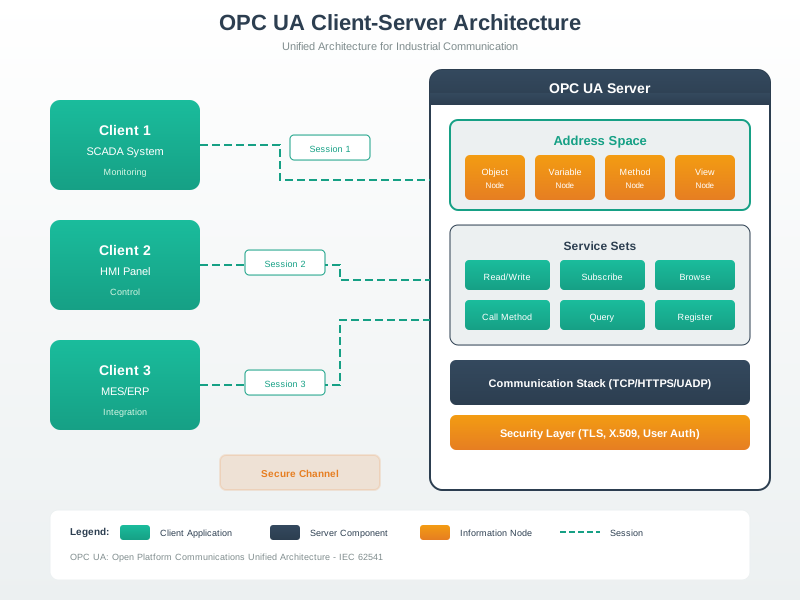
OPC-UA provides a complete industrial interoperability stack, from information modeling through secure transport to discovery services.
NoteVisual: OPC-UA Information Model
The OPC-UA address space organizes all data as nodes with typed references, enabling semantic data access across the industrial enterprise.
NoteVisual: OPC-UA Pub/Sub Integration
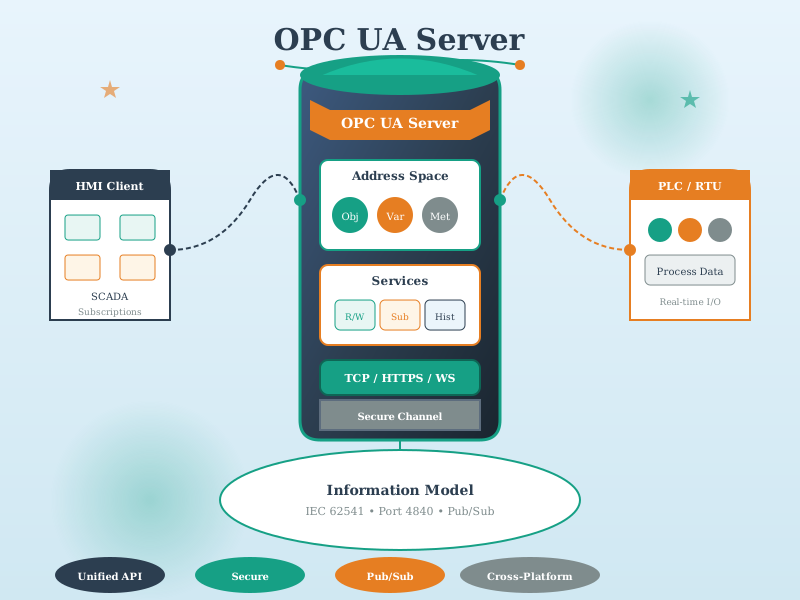
OPC-UA Pub/Sub enables efficient one-to-many data distribution through standard messaging protocols like MQTT and AMQP, bridging IT and OT domains.
1253.14.1 Industrial Protocol Selection (Variant View)
This decision flowchart provides an alternative approach to selecting the optimal industrial protocol based on application complexity and integration requirements:
%%{init: {'theme': 'base', 'themeVariables': {'primaryColor': '#2C3E50', 'primaryTextColor': '#fff', 'primaryBorderColor': '#16A085', 'lineColor': '#E67E22', 'secondaryColor': '#16A085', 'tertiaryColor': '#7F8C8D'}}}%%
flowchart TD
    START(["Select Industrial<br/>Protocol"])
    Q1{"Complex information<br/>model required?"}
    Q2{"Enterprise/IT<br/>integration needed?"}
    Q3{"Real-time<br/>deterministic?"}
    Q4{"Simple register<br/>access sufficient?"}

    OPCUA["OPC-UA<br/>Unified Architecture"]
    MQTT["MQTT/AMQP<br/>Message Broker"]
    PROFINET["PROFINET IRT<br/>Industrial Ethernet"]
    MODBUS["Modbus TCP/RTU<br/>Legacy Protocol"]

    OPC_FEATURES["Features:<br/>• Semantic data model<br/>• Built-in security<br/>• Discovery services<br/>• Method calls"]
    MQ_FEATURES["Features:<br/>• Lightweight pub/sub<br/>• Cloud integration<br/>• QoS levels<br/>• Scalable"]
    PRO_FEATURES["Features:<br/>• Sub-ms cycle times<br/>• Synchronized motion<br/>• TSN support<br/>• Deterministic"]
    MOD_FEATURES["Features:<br/>• Simple, reliable<br/>• Universal support<br/>• Low overhead<br/>• Easy debug"]

    OPC_USE["Use Cases:<br/>• MES/ERP integration<br/>• Multi-vendor plants<br/>• Data analytics<br/>• Digital twin"]
    MQ_USE["Use Cases:<br/>• Cloud connectivity<br/>• Remote monitoring<br/>• IoT telemetry<br/>• Event notification"]
    PRO_USE["Use Cases:<br/>• Motion control<br/>• CNC machines<br/>• Robotics<br/>• Synchronized lines"]
    MOD_USE["Use Cases:<br/>• Simple sensors<br/>• PLCs/HMIs<br/>• HVAC/BMS<br/>• Retrofit systems"]

    START --> Q1
    Q1 -->|"Yes"| Q2
    Q1 -->|"No"| Q3
    Q2 -->|"Yes"| OPCUA
    Q2 -->|"No"| MQTT
    Q3 -->|"Yes"| PROFINET
    Q3 -->|"No"| Q4
    Q4 -->|"Yes"| MODBUS
    Q4 -->|"No"| MQTT

    OPCUA --> OPC_FEATURES --> OPC_USE
    MQTT --> MQ_FEATURES --> MQ_USE
    PROFINET --> PRO_FEATURES --> PRO_USE
    MODBUS --> MOD_FEATURES --> MOD_USE

    style START fill:#7F8C8D,color:#fff
    style Q1 fill:#2C3E50,color:#fff
    style Q2 fill:#2C3E50,color:#fff
    style Q3 fill:#2C3E50,color:#fff
    style Q4 fill:#2C3E50,color:#fff
    style OPCUA fill:#16A085,color:#fff
    style MQTT fill:#E67E22,color:#fff
    style PROFINET fill:#3498db,color:#fff
    style MODBUS fill:#27ae60,color:#fff
    style OPC_FEATURES fill:#d4efdf,color:#2C3E50
    style MQ_FEATURES fill:#fdebd0,color:#2C3E50
    style PRO_FEATURES fill:#d6eaf8,color:#2C3E50
    style MOD_FEATURES fill:#d5f5e3,color:#2C3E50
    style OPC_USE fill:#d4efdf,color:#2C3E50
    style MQ_USE fill:#fdebd0,color:#2C3E50
    style PRO_USE fill:#d6eaf8,color:#2C3E50
    style MOD_USE fill:#d5f5e3,color:#2C3E50
1253.15 Key Takeaways
TipSummary
OPC-UA is the industrial interoperability standard—platform-independent, secure, extensible
Information Model: Everything is a Node with typed references forming an address space tree
Services: Discovery → Secure Channel → Session → Read/Write/Subscribe/Call
Security is built-in: Certificates, encryption, authentication at protocol level
Pub/Sub enables scaling: MQTT/AMQP for one-to-many data distribution
Companion Specifications standardize domain-specific models (robotics, packaging, etc.)
Use OPC-UA as the IT/OT bridge—connect legacy protocols to modern cloud systems
1253.16 What’s Next
Continue exploring industrial protocols:
- Modbus Protocol - Legacy protocol still dominating simple I/O
- Industrial Ethernet - PROFINET, EtherCAT, TSN
- MQTT Fundamentals - For OPC-UA to cloud bridging