1034 Matter Testing and Certification
1034.1 Matter Testing and Certification
NoteLearning Objectives
By the end of this section, you will be able to:
- Use CHIP Tool for command-line device testing
- Enable and interpret Matter debug logs
- Capture and analyze network traffic for Matter debugging
- Understand the Matter certification process and requirements
- Develop a testing strategy for pre-certification validation
1034.2 Prerequisites
Before diving into this chapter, you should be familiar with:
- Matter SDKs and Development Environment: SDK selection and environment setup
- Matter Device Implementation and Commissioning: Device implementation and commissioning flows
- Matter Architecture and Fabric: Data model, security, and fabric concepts
TipFor Beginners: Why Is Testing So Important for Matter?
Matter certification ensures that any device with the Matter logo will work with any Matter controller (Apple Home, Google Home, Amazon Alexa, etc.). This requires rigorous testing:
- Protocol Conformance: Does your device follow the Matter specification exactly?
- Interoperability: Does it work with reference devices and controllers?
- Security: Are cryptographic implementations correct and secure?
Analogy: Think of it like a driving test. You can’t just claim you can drive - you need to prove it by passing standardized tests. Matter certification is the “driving test” for smart home devices.
1034.3 Testing and Debugging
1034.3.1 CHIP Tool (Command Line Testing)
The CHIP Tool is the official Matter testing utility:
# Build CHIP Tool
cd ~/connectedhomeip
source scripts/activate.sh
./scripts/examples/gn_build_example.sh examples/chip-tool out/chip-tool

# Commission device
./out/chip-tool/chip-tool pairing ble-thread 1 hex:THREAD_DATASET \
    20202021 3840

# Control light
./out/chip-tool/chip-tool onoff toggle 1 1
./out/chip-tool/chip-tool levelcontrol move-to-level 128 10 0 0 1 1

# Read attributes
./out/chip-tool/chip-tool onoff read on-off 1 1
./out/chip-tool/chip-tool basic read vendor-name 1 0

# Subscribe to changes
./out/chip-tool/chip-tool onoff subscribe on-off 1 60 1 1
1034.3.2 Debug Logging
Enable verbose logging:
// In sdkconfig or menuconfig
CONFIG_LOG_DEFAULT_LEVEL_VERBOSE=y
CONFIG_CHIP_LOG_LEVEL_DEBUG=y
Log categories:
| Tag | Description |
|---|---|
chip[DL] |
Device layer |
chip[DMG] |
Data model |
chip[IN] |
Interaction model |
chip[SC] |
Security |
chip[BLE] |
Bluetooth commissioning |
chip[DIS] |
Discovery |
1034.3.3 Network Sniffing
Thread Network Capture:
# Using nRF52840 Dongle with Wireshark
# 1. Flash nRF Sniffer firmware
# 2. Install Wireshark nRF Sniffer plugin
# 3. Configure Thread network key

# Decrypt Thread traffic
# Edit > Preferences > Protocols > Thread
# Add Network Key from Border Router
Wi-Fi Matter Capture:
# Capture Matter over Wi-Fi
wireshark -i wlan0 -k -f "udp port 5540"

# Matter uses UDP port 5540 by default1034.4 Matter Certification
1034.4.1 Certification Process Overview
%%{init: {'theme': 'base', 'themeVariables': {'primaryColor': '#2C3E50', 'primaryTextColor': '#fff', 'primaryBorderColor': '#16A085', 'lineColor': '#E67E22', 'secondaryColor': '#16A085', 'tertiaryColor': '#7F8C8D'}}}%%
flowchart TB
    Start[Start Development] --> Join[Join CSA<br/>$7,500-$170,000/year]
    Join --> VID[Obtain Vendor ID<br/>Unique 16-bit ID]
    VID --> Develop[Develop Product]
    Develop --> Self[Self-Testing<br/>Test Harness]
    Self --> ATL[ATL Testing<br/>Authorized Test Lab]
    ATL --> Submit[Submit to CSA<br/>Declaration of Conformity]
    Submit --> Cert[Certification Granted<br/>Logo Usage Rights]
    Cert --> Launch[Product Launch]

    style Start fill:#7F8C8D,stroke:#2C3E50,color:#fff
    style Join fill:#2C3E50,stroke:#16A085,color:#fff
    style VID fill:#2C3E50,stroke:#16A085,color:#fff
    style Develop fill:#16A085,stroke:#2C3E50,color:#fff
    style Self fill:#E67E22,stroke:#2C3E50,color:#fff
    style ATL fill:#E67E22,stroke:#2C3E50,color:#fff
    style Submit fill:#2C3E50,stroke:#16A085,color:#fff
    style Cert fill:#27ae60,stroke:#2C3E50,color:#fff
    style Launch fill:#27ae60,stroke:#2C3E50,color:#fff
{fig-alt=“Matter certification flowchart showing steps: Start Development, Join CSA ($7,500-$170,000/year), Obtain Vendor ID, Develop Product, Self-Testing with Test Harness, ATL Testing at Authorized Test Lab, Submit Declaration of Conformity to CSA, Certification Granted with logo rights, Product Launch. Green endpoints indicate successful certification completion.”}
1034.4.2 CSA Membership Tiers
| Tier | Annual Fee | Benefits |
|---|---|---|
| Adopter | $7,500 | Certify products, basic logo |
| Participant | $25,000 | + Working group access |
| Promoter | $75,000 | + Steering committee |
| Board | $170,000 | + Board representation |
1034.4.3 Certification Requirements
Required Testing:
| Category | Tests | Purpose |
|---|---|---|
| Protocol Conformance | ~1,000+ | Verify Matter protocol |
| Interoperability | Varies | Test with reference devices |
| Security | ~50 | Verify cryptographic implementation |
| Device Type | Per type | Verify cluster implementation |
1034.4.4 Test Harness
The Matter Test Harness automates certification testing:
# Run Test Harness
cd ~/connectedhomeip
python3 scripts/tests/run_test.py \
    --target-app chip-tool \
    --target-type all \
    --tests TC_OO_1_1 TC_OO_2_1  # On/Off cluster tests
Test Categories:
| Prefix | Category | Example |
|---|---|---|
| TC_OO | On/Off | TC_OO_2_1 (Toggle command) |
| TC_LVL | Level Control | TC_LVL_3_1 (Move command) |
| TC_CC | Color Control | TC_CC_5_1 (Color temperature) |
| TC_SC | Security | TC_SC_3_1 (CASE handshake) |
| TC_CADMIN | Commissioning | TC_CADMIN_1_3 (Multi-admin) |
1034.5 Pre-Certification Testing Strategy
1034.5.1 Comprehensive Testing Approach
1. Self-testing with Test Harness: - Run full TC_* test suite - Focus on device-type-specific tests (e.g., On/Off Plug-In Unit) - Run interoperability tests
2. Controller compatibility testing: - Test with Apple Home (HomePod) - Test with Google Home (Nest Hub) - Test with Amazon Alexa (Echo) - Test with Home Assistant
3. Stress testing: - 10,000 on/off cycles - Multi-admin (3+ fabrics) - Network disconnection/reconnection - OTA update scenarios
4. Pre-ATL review: - Contact ATL early for consultation - Review common failure points - Ensure manufacturing data provisioning works
1034.6 Understanding Check
WarningKnowledge Check
Scenario: You’re developing a Matter smart plug with energy monitoring for commercial sale. The plug should: - Support both Thread and Wi-Fi - Include power measurement (W, Wh) - Work with Apple, Google, and Amazon ecosystems - Ship in 6 months
Questions:
- Which SDK would you recommend and why?
- What CSA membership tier do you need?
- What unique data needs to be provisioned per device?
- How would you test before submitting for certification?
NoteSolution
1. SDK Recommendation: ESP-Matter (ESP32-C6) - ESP32-C6 supports both Wi-Fi 6 and Thread (802.15.4) - Cost-effective ($3-5 in volume) - Well-documented with active community - Pre-certified RF modules available (reduces certification cost) - ESP-Matter includes energy monitoring examples
2. CSA Membership: Adopter ($7,500/year) - Minimum tier to certify products - Sufficient for product launch - Upgrade to Participant later if joining working groups
3. Per-Device Provisioning Data: - Device Attestation Certificate (DAC) - Device private key (in secure element or flash) - Unique 11-digit setup code - 12-bit discriminator - Serial number - QR code label with full payload
4. Pre-Certification Testing: 1. Self-testing with Test Harness: - Run full TC_* test suite - Focus on device-type-specific tests (On/Off Plug-In Unit) - Run interoperability tests
- Controller compatibility testing:
- Test with Apple Home (HomePod)
- Test with Google Home (Nest Hub)
- Test with Amazon Alexa (Echo)
- Test with Home Assistant
- Stress testing:
- 10,000 on/off cycles
- Multi-admin (3+ fabrics)
- Network disconnection/reconnection
- OTA update scenarios
- Pre-ATL review:
- Contact ATL early for consultation
- Review common failure points
- Ensure manufacturing data provisioning works
1034.7 Summary
TipKey Takeaways
CHIP Tool is essential for development - Command-line testing, attribute inspection, and automated test execution that commercial apps don’t provide
Debug logs reveal protocol-level issues - Enable verbose logging and learn the chip[XX] tag categories to diagnose problems quickly
Network sniffing helps with transport issues - Use Wireshark with Thread network keys or capture Wi-Fi on port 5540 for Matter traffic
Certification requires CSA membership - Minimum Adopter tier ($7,500/year) plus ATL testing costs
Test early and often - Run Test Harness throughout development, not just before certification submission
Multi-ecosystem testing is critical - Verify operation with Apple Home, Google Home, and Amazon Alexa before ATL submission
1034.8 Visual Reference Gallery
NoteVisual: Matter Protocol Stack Architecture
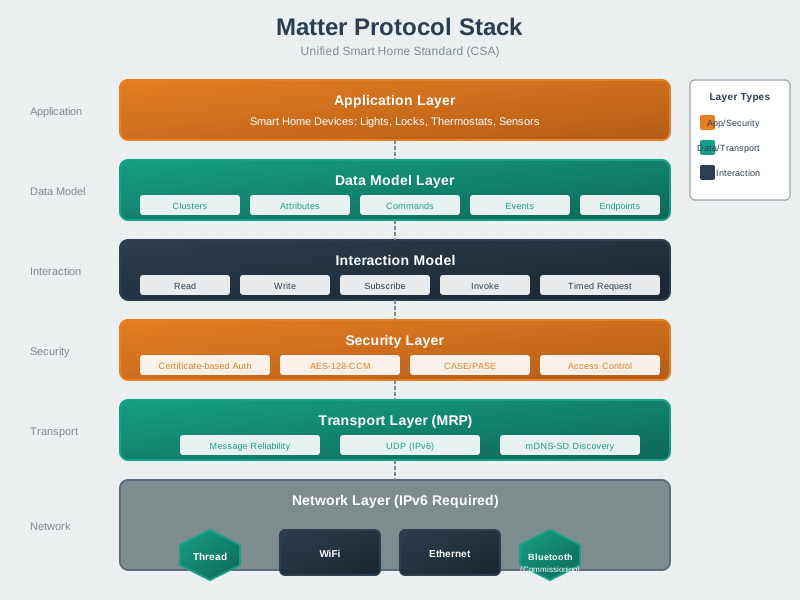
The Matter protocol stack abstracts the underlying transport (Thread, Wi-Fi, Ethernet) and provides a unified application layer with standardized clusters and device types. This architecture enables the same application code to run across different network technologies.
NoteVisual: Matter Fabric and Multi-Admin
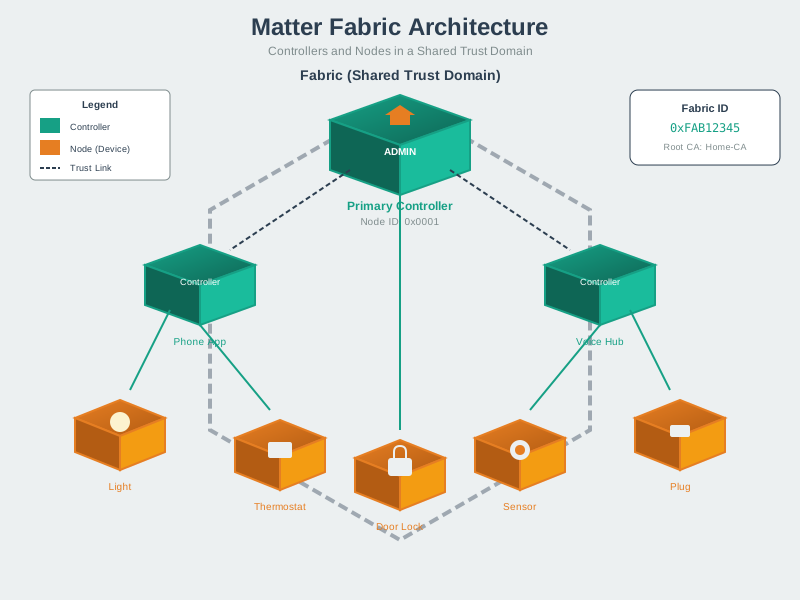
Matter’s fabric architecture enables multi-admin control where a single device can be managed by multiple ecosystems simultaneously. Each controller maintains its own fabric credentials while sharing device access securely.
NoteVisual: Matter Device Types Taxonomy
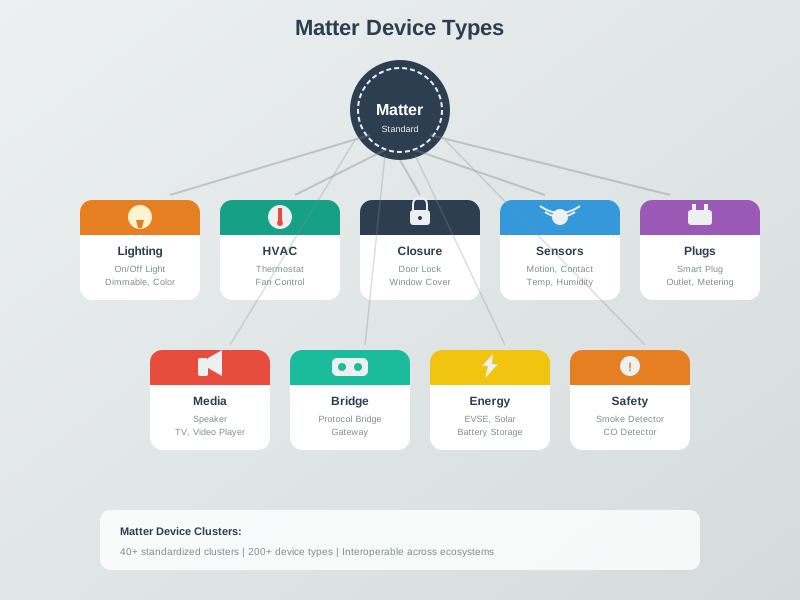
Matter defines standardized device types that ensure interoperability across ecosystems. Each device type specifies required and optional clusters, enabling consistent behavior regardless of manufacturer.
1034.9 What’s Next
Explore related topics:
- Thread Fundamentals and Roles - Understand Thread mesh networking
- Prototyping Hardware - Hardware development platforms
- CI/CD for IoT - Automated testing pipelines
- Testing and Validation - Comprehensive testing strategies