%% fig-alt: "Ethernet frame field structure showing header components including destination MAC, source MAC, type, payload, and FCS"
%%{init: {'theme': 'base', 'themeVariables': { 'primaryColor': '#E67E22', 'primaryTextColor': '#fff', 'primaryBorderColor': '#2C3E50', 'lineColor': '#16A085', 'secondaryColor': '#16A085', 'tertiaryColor': '#2C3E50', 'fontSize': '13px'}}}%%
graph LR
    Preamble["Preamble<br/>8 bytes<br/>Sync pattern"]
    DestMAC["Dest MAC<br/>6 bytes<br/>Target device"]
    SrcMAC["Source MAC<br/>6 bytes<br/>Sender device"]
    Type["Type/Length<br/>2 bytes<br/>Protocol (0x0800=IP)"]
    Payload["Payload<br/>46-1500 bytes<br/>IP packet"]
    FCS["FCS<br/>4 bytes<br/>Error check"]

    Preamble --> DestMAC --> SrcMAC --> Type --> Payload --> FCS

    style Preamble fill:#7F8C8D,stroke:#2C3E50,color:#fff
    style DestMAC fill:#2C3E50,stroke:#2C3E50,color:#fff
    style SrcMAC fill:#2C3E50,stroke:#2C3E50,color:#fff
    style Type fill:#16A085,stroke:#2C3E50,color:#fff
    style Payload fill:#E67E22,stroke:#2C3E50,color:#fff
    style FCS fill:#7F8C8D,stroke:#2C3E50,color:#fff
652 Layered Models: Labs and Implementation
652.1 Learning Objectives
By the end of this chapter, you will be able to:
- Work with MAC Addresses: Read, interpret, and configure hardware addresses on IoT devices
- Implement Layer 2 Communication: Use Ethernet and Wi-Fi protocols for local network communication
- Analyze Network Frames: Capture and dissect data link layer frames using packet analyzers
- Configure ARP: Understand Address Resolution Protocol for IP-to-MAC mapping
- Design Local Networks: Plan L2 topologies for IoT deployments with switches and access points
- Troubleshoot Connectivity: Diagnose MAC-level issues including duplicate addresses and broadcast storms
652.2 Prerequisites
Before diving into this chapter, you should be familiar with:
- Layered Models: Fundamentals: Understanding of the OSI and TCP/IP layered models is essential for grasping how Layer 2 (Data Link) and Layer 3 (Network) work together through encapsulation
- Networking Basics for IoT: Basic networking concepts including network topologies, addressing schemes, and protocol fundamentals provide context for MAC and IP addressing
- Binary and hexadecimal arithmetic: MAC addresses are 48-bit values represented in hexadecimal, and subnet calculations require binary operations, so comfort with these number systems is important
- Command-line basics: Labs use terminal commands (ipconfig, arp, ifconfig) to explore network configuration, so familiarity with command-line interfaces is helpful
652.3 🌱 Getting Started (For Beginners)
TipFor Beginners: Using Labs to Make the OSI Model Concrete
The fundamentals chapter introduced layered models in theory. This chapter shows you what those layers look like on real devices.
- As you run the labs (
ipconfig,arp, packet captures), always ask:- Which layer am I looking at right now? (MAC, IP, TCP/UDP, application)
- How does this field relate to the diagrams in
layered-models-fundamentals.qmd?
- If you cannot run the commands:
- Study the sample outputs and highlight which parts are Layer 2 (MAC) vs Layer 3 (IP).
Helpful mapping while you work:
| Layer | Examples in this chapter |
|---|---|
| L2 | MAC addresses, Ethernet frames, ARP table |
| L3 | IPv4 addresses, subnet masks, routing entries |
| L4 | TCP/UDP ports shown in packet captures |
If layer boundaries still feel abstract, revisit layered-models-fundamentals.qmd and then use these labs as a “field guide” that ties the conceptual stack to actual commands and packet traces.
NoteRelated Chapters
Fundamentals: - Layered Models Fundamentals - OSI/TCP-IP model theory - Layered Network Models - Complete layered model exploration - Networking Basics - Network fundamentals and topologies
Addressing: - Addressing and Subnetting - IP addressing and subnet design - Network Access and Physical - Physical layer protocols
Implementation: - Networking Labs - Additional hands-on exercises - Wired Communication - UART, I2C, SPI protocols
Review: - Layered Models Review - Assessment and comprehensive quiz
Learning: - Simulations Hub - Network protocol simulators and tools
652.4 Data Link Layer: MAC Addressing
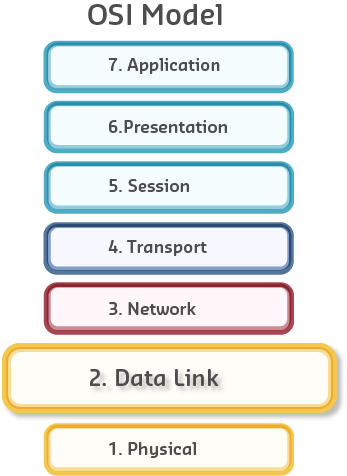
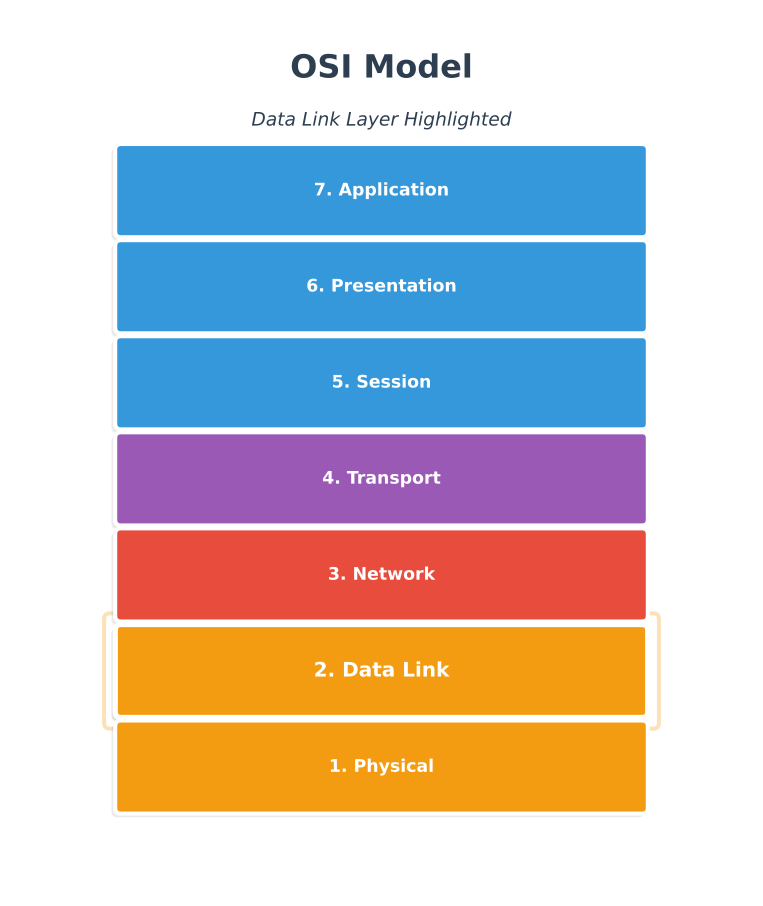
652.4.1 What is a MAC Address?
MAC (Media Access Control) address is the hardware address assigned to network interface controllers.

Purpose: Send and receive data frames at the Data Link layer (OSI Layer 2)
Used by: - Ethernet (IEEE 802.3) - Wi-Fi (IEEE 802.11) - Bluetooth (IEEE 802.15.1) - Most IEEE 802 standard technologies
652.4.2 Ethernet Frame Structure

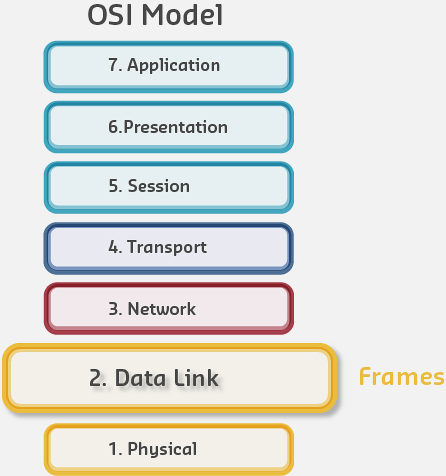
Frame header contains: - Destination MAC address: Where is this frame going? - Source MAC address: Where did this frame come from? - Type/Length: What protocol is in the payload? - Payload: Actual data (IP packet) - Frame Check Sequence: Error detection
652.4.3 MAC Address Format
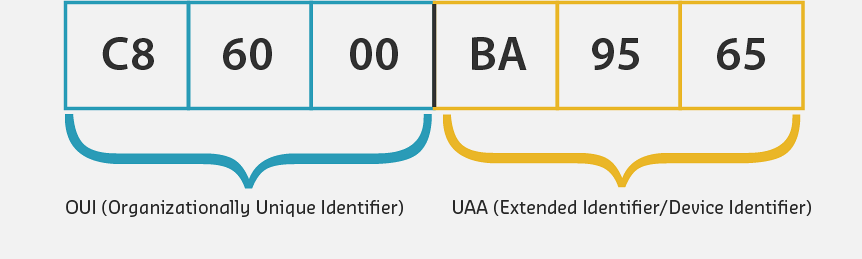
Structure: 48 bits (6 bytes) = 12 hexadecimal digits
Common formats: - 01-23-45-67-89-AB (hyphens) - 01:23:45:67:89:AB (colons - most common) - 0123.4567.89AB (dots - Cisco style) - 0123456789AB (no separators - printed on labels)
652.4.4 OUI (Organizationally Unique Identifier)
First 24 bits identify the manufacturer:
%% fig-alt: "MAC address OUI structure showing the 48-bit address divided into two parts: the first 24 bits form the Organizationally Unique Identifier (OUI) assigned to the manufacturer, and the remaining 24 bits form the Device ID uniquely assigned by the manufacturer"
%%{init: {'theme': 'base', 'themeVariables': {'primaryColor': '#2C3E50', 'primaryTextColor': '#fff', 'primaryBorderColor': '#16A085', 'lineColor': '#16A085', 'secondaryColor': '#E67E22', 'tertiaryColor': '#7F8C8D'}}}%%
graph LR
    subgraph MAC["MAC Address: 00:1A:2B:3C:4D:5E"]
        subgraph OUI["OUI (First 24 bits)"]
            B1["00"]
            B2["1A"]
            B3["2B"]
        end
        subgraph DevID["Device ID (Last 24 bits)"]
            B4["3C"]
            B5["4D"]
            B6["5E"]
        end
    end

    OUI_Label["Manufacturer<br/>(Assigned by IEEE)"]
    Dev_Label["Unique Device<br/>(Assigned by Vendor)"]

    OUI -.-> OUI_Label
    DevID -.-> Dev_Label

    style B1 fill:#16A085,stroke:#2C3E50,color:#fff
    style B2 fill:#16A085,stroke:#2C3E50,color:#fff
    style B3 fill:#16A085,stroke:#2C3E50,color:#fff
    style B4 fill:#E67E22,stroke:#2C3E50,color:#fff
    style B5 fill:#E67E22,stroke:#2C3E50,color:#fff
    style B6 fill:#E67E22,stroke:#2C3E50,color:#fff
    style OUI_Label fill:#16A085,stroke:#2C3E50,color:#fff
    style Dev_Label fill:#E67E22,stroke:#2C3E50,color:#fff
Example OUIs: - 00:1A:2B - Cisco Systems - A4:CF:12 - Espressif (ESP32 manufacturer) - B8:27:EB - Raspberry Pi Foundation - DC:A6:32 - Raspberry Pi Trading
Lookup: IEEE OUI Search
652.4.5 Types of MAC Addresses
| Type | Address | Purpose | Example |
|---|---|---|---|
| Unicast | Unique device address | One-to-one communication | A4:CF:12:34:56:78 |
| Broadcast | All 1s | Send to all devices on network | FF:FF:FF:FF:FF:FF |
| Multicast | Group address | Send to specific group | 01:00:5E:xx:xx:xx |
IoT Note: Wireless MAC addresses may not be constant (privacy features), but each MAC on a network segment must be unique.
TipAlternative View: MAC vs IP Address Comparison
This variant presents the key differences between Layer 2 (MAC) and Layer 3 (IP) addressing side-by-side:
%%{init: {'theme': 'base', 'themeVariables': { 'primaryColor': '#2C3E50', 'primaryTextColor': '#fff', 'primaryBorderColor': '#16A085', 'lineColor': '#E67E22', 'secondaryColor': '#16A085'}}}%%
graph TB
    subgraph MAC["MAC Address (Layer 2)"]
        M1["48 bits = 6 bytes"]
        M2["Burned into NIC"]
        M3["Flat namespace"]
        M4["Local delivery only"]
        M5["Example: A4:CF:12:34:56:78"]
    end

    subgraph IP["IP Address (Layer 3)"]
        I1["32 bits (IPv4) or 128 bits (IPv6)"]
        I2["Assigned by DHCP or static"]
        I3["Hierarchical (network.host)"]
        I4["Global routing"]
        I5["Example: 192.168.1.100"]
    end

    MAC -->|"Used by"| SW["Switch<br/>Forwards frames"]
    IP -->|"Used by"| RT["Router<br/>Forwards packets"]

    style M1 fill:#16A085,stroke:#2C3E50,color:#fff
    style M2 fill:#16A085,stroke:#2C3E50,color:#fff
    style M3 fill:#16A085,stroke:#2C3E50,color:#fff
    style M4 fill:#16A085,stroke:#2C3E50,color:#fff
    style M5 fill:#16A085,stroke:#2C3E50,color:#fff
    style I1 fill:#E67E22,stroke:#2C3E50,color:#fff
    style I2 fill:#E67E22,stroke:#2C3E50,color:#fff
    style I3 fill:#E67E22,stroke:#2C3E50,color:#fff
    style I4 fill:#E67E22,stroke:#2C3E50,color:#fff
    style I5 fill:#E67E22,stroke:#2C3E50,color:#fff
    style SW fill:#2C3E50,stroke:#16A085,color:#fff
    style RT fill:#2C3E50,stroke:#16A085,color:#fff
MAC addresses work on local network segments (same switch), while IP addresses enable routing across different networks.
TipAlternative View: Frame vs Packet Encapsulation
This variant shows how IP packets are encapsulated inside Ethernet frames for transmission:
%%{init: {'theme': 'base', 'themeVariables': { 'primaryColor': '#2C3E50', 'primaryTextColor': '#fff', 'primaryBorderColor': '#16A085', 'lineColor': '#E67E22', 'secondaryColor': '#16A085'}}}%%
graph LR
    subgraph FRAME["Ethernet Frame (Layer 2)"]
        FH["Frame Header<br/>Dest MAC, Src MAC"]
        subgraph PACKET["IP Packet (Layer 3)"]
            PH["Packet Header<br/>Dest IP, Src IP"]
            subgraph SEG["TCP/UDP (Layer 4)"]
                SH["Segment<br/>Port numbers"]
                DATA["Application Data"]
            end
        end
        FT["FCS"]
    end

    FH --> PH --> SH --> DATA --> FT

    style FH fill:#2C3E50,stroke:#16A085,color:#fff
    style PH fill:#16A085,stroke:#2C3E50,color:#fff
    style SH fill:#E67E22,stroke:#2C3E50,color:#fff
    style DATA fill:#7F8C8D,stroke:#2C3E50,color:#fff
    style FT fill:#2C3E50,stroke:#16A085,color:#fff
Each layer adds its own header containing addressing information for that layer. This is encapsulation - layers wrap around each other like envelopes.
652.5 Internet Layer: IP Addressing
652.5.1 IPv4 vs MAC Addresses
Key difference: MAC addresses are typically fixed (burned into hardware), while IP addresses are configurable and change based on network.
652.5.2 IPv4 Address Structure
Size: 32 bits (4 bytes)
Format: Four octets separated by dots (dotted-decimal notation)
Examples: - 10.0.122.57 - 172.16.11.202 - 192.168.100.4

Conversion: - Each octet: 0-255 (8 bits) - 10.0.122.57 in binary: 00001010.00000000.01111010.00111001
652.6 IPv4 Subnet Masks
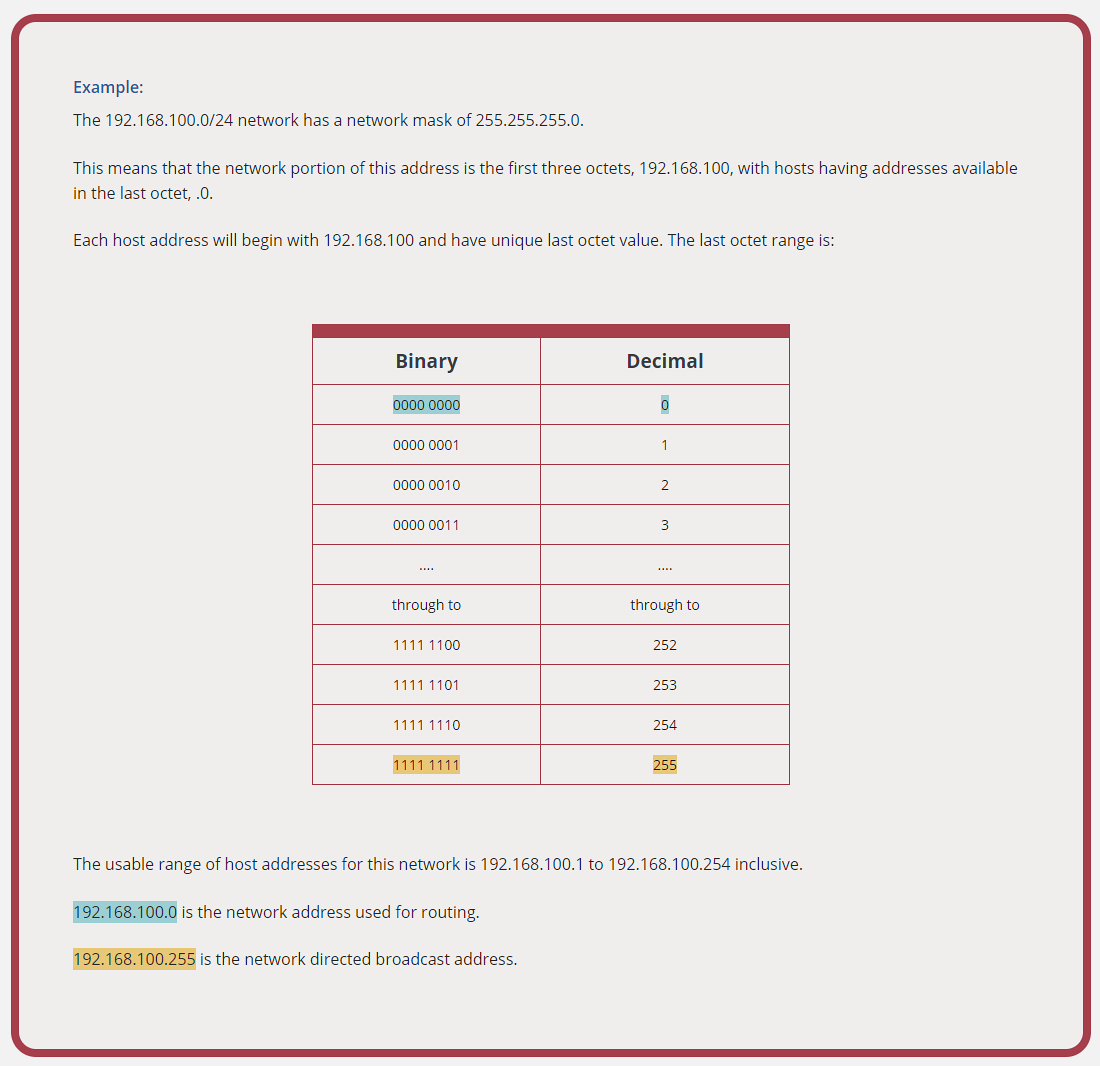
652.6.1 Purpose
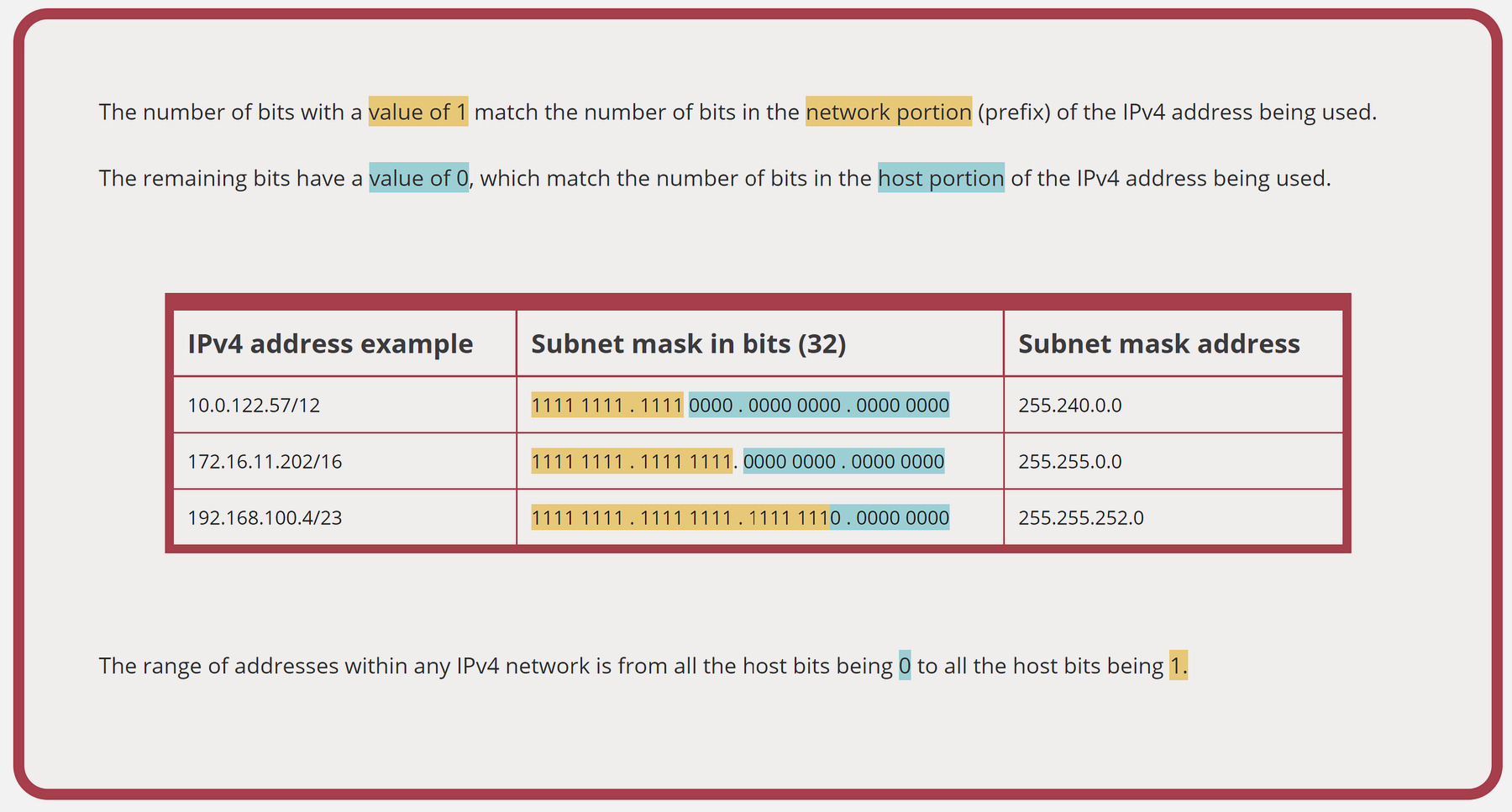
Subnet mask determines which part of the IP address is the network portion and which is the host portion.

652.6.2 Binary Perspective
Subnet mask: Most significant bits are 1, least significant bits are 0
Example:
%% fig-alt: "Subnet mask binary breakdown showing IP address 192.168.1.100 and subnet mask 255.255.255.0 in both decimal and binary format. The binary representation shows how the first 24 bits (all 1s in the mask) identify the network portion, while the last 8 bits (all 0s in the mask) identify the host portion"
%%{init: {'theme': 'base', 'themeVariables': {'primaryColor': '#2C3E50', 'primaryTextColor': '#fff', 'primaryBorderColor': '#16A085', 'lineColor': '#16A085', 'secondaryColor': '#E67E22', 'tertiaryColor': '#7F8C8D'}}}%%
graph TB
    subgraph IP["IP Address: 192.168.1.100"]
        IP1["192<br/>11000000"]
        IP2["168<br/>10101000"]
        IP3["1<br/>00000001"]
        IP4["100<br/>01100100"]
    end

    subgraph Mask["Subnet Mask: 255.255.255.0"]
        M1["255<br/>11111111"]
        M2["255<br/>11111111"]
        M3["255<br/>11111111"]
        M4["0<br/>00000000"]
    end

    subgraph Result["Network/Host Division"]
        Net["Network Portion<br/>192.168.1<br/>(First 24 bits)"]
        Host["Host Portion<br/>.100<br/>(Last 8 bits)"]
    end

    IP1 --> M1
    IP2 --> M2
    IP3 --> M3
    IP4 --> M4

    M1 --> Net
    M2 --> Net
    M3 --> Net
    M4 --> Host

    style IP1 fill:#16A085,stroke:#2C3E50,color:#fff
    style IP2 fill:#16A085,stroke:#2C3E50,color:#fff
    style IP3 fill:#16A085,stroke:#2C3E50,color:#fff
    style IP4 fill:#E67E22,stroke:#2C3E50,color:#fff
    style M1 fill:#16A085,stroke:#2C3E50,color:#fff
    style M2 fill:#16A085,stroke:#2C3E50,color:#fff
    style M3 fill:#16A085,stroke:#2C3E50,color:#fff
    style M4 fill:#E67E22,stroke:#2C3E50,color:#fff
    style Net fill:#16A085,stroke:#2C3E50,color:#fff
    style Host fill:#E67E22,stroke:#2C3E50,color:#fff
Result: - Network: 192.168.1.0 (where all host bits = 0) - Hosts: 192.168.1.1 to 192.168.1.254 - Broadcast: 192.168.1.255 (where all host bits = 1)
652.6.3 Common Subnet Masks
| Mask | CIDR | Network Bits | Host Bits | # of Hosts | Use Case |
|---|---|---|---|---|---|
255.255.255.252 |
/30 | 30 | 2 | 2 | Point-to-point links |
255.255.255.0 |
/24 | 24 | 8 | 254 | Small networks |
255.255.0.0 |
/16 | 16 | 16 | 65,534 | Large networks |
255.0.0.0 |
/8 | 8 | 24 | 16,777,214 | Huge networks |
652.6.4 Calculating Available Hosts
Formula: 2^(host bits) - 2
Why -2? - Network address (all host bits = 0) - used for routing - Broadcast address (all host bits = 1) - used for broadcast
Example: 255.255.255.0 (/24) - Host bits: 8 - Total addresses: 2^8 = 256 - Usable hosts: 256 - 2 = 254
Tip📹 Video: Subnet Mask Explained
Understanding subnet masks: Subnet Mask Explained
Visualizing subnet masks: Visualizing the Subnet Mask
Essential for IP network configuration and troubleshooting.
652.7 IPv6: The Future of IP Addressing
652.7.1 Why IPv6?
The Problem: - IPv4: 32 bits = ~4.3 billion addresses - Problem: IPv4 addresses exhausted! - IoT needs: Trillions of devices - NAT workaround: Complex, breaks end-to-end connectivity
The Solution: - IPv6: 128 bits = 3.4 × 10^38 addresses - Enough to assign: ~670 million addresses per square millimeter of Earth’s surface!

652.7.2 IPv6 Address Structure
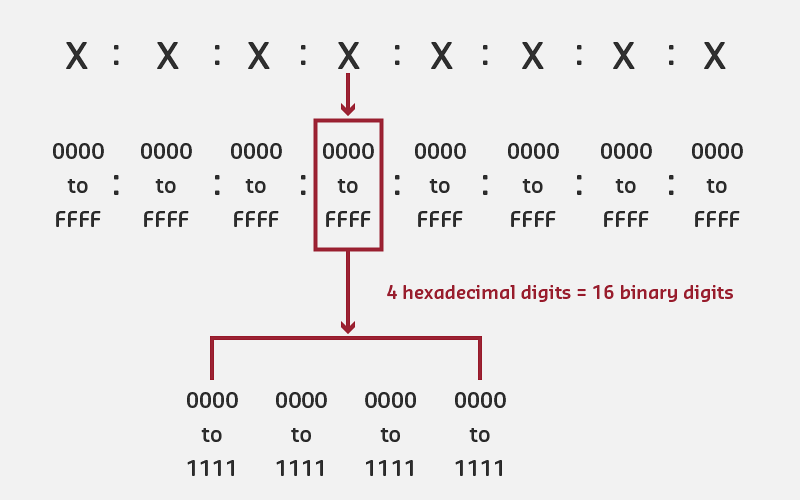
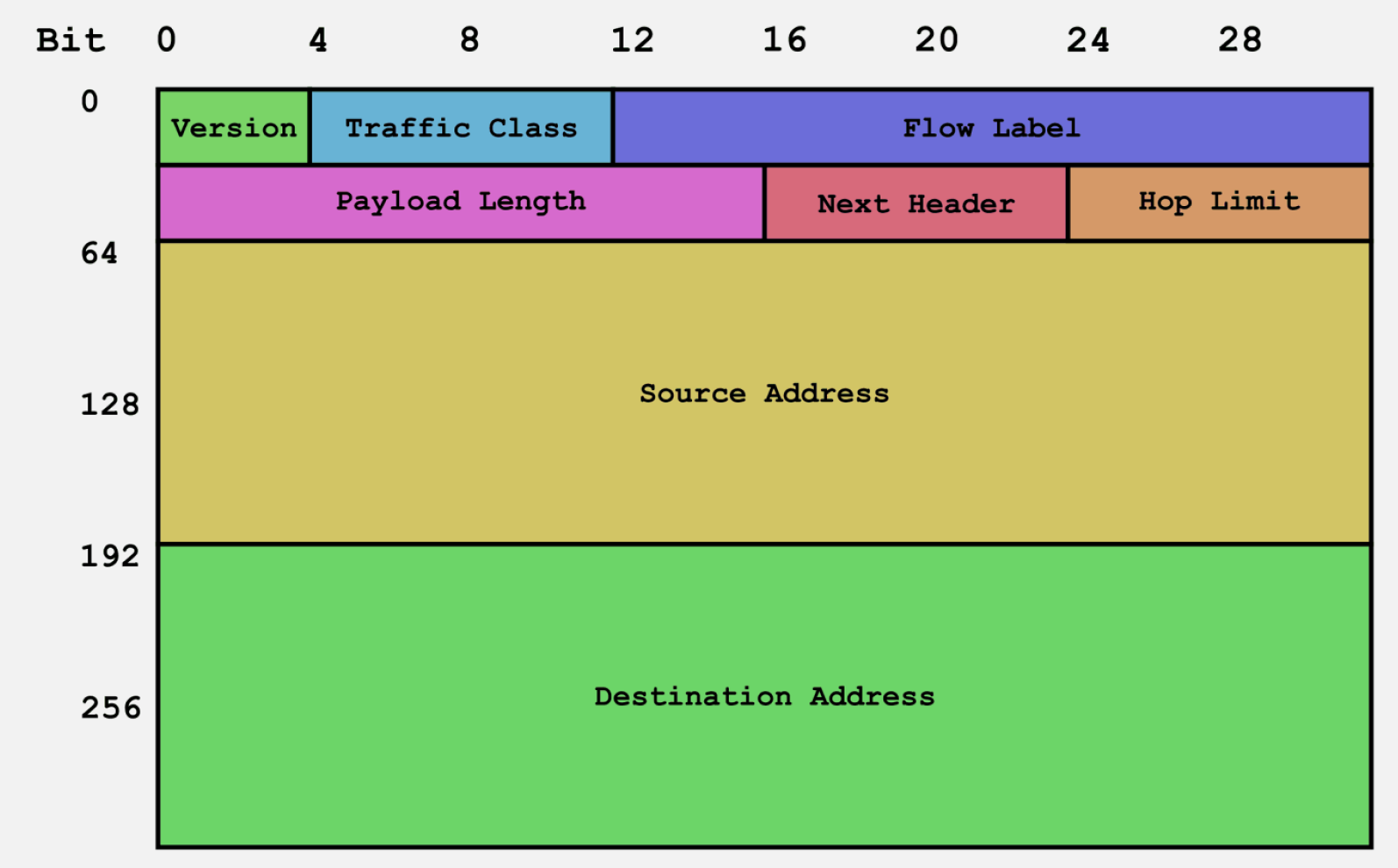
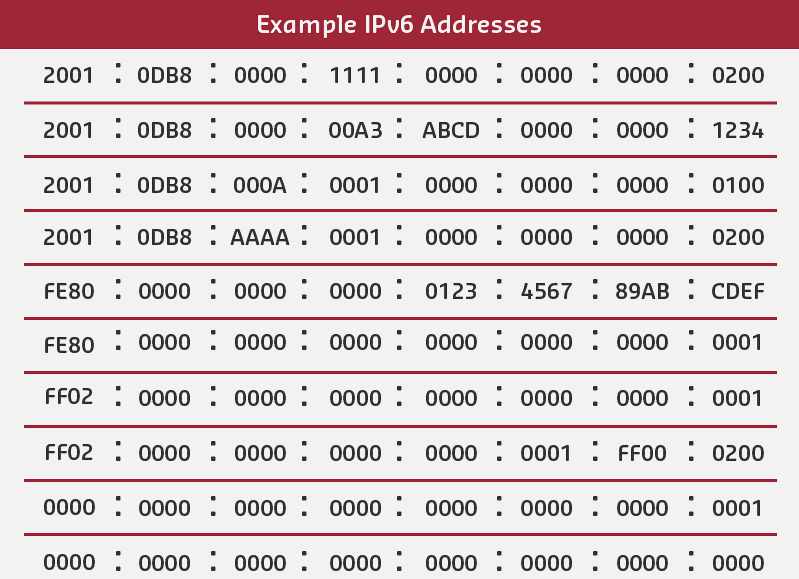
Size: 128 bits (16 bytes)
Format: Eight groups of 16 bits (hextets), separated by colons
Full address example:
2001:0DB8:0000:0000:0000:0000:0000:0001Representation: Each hextet = 4 hexadecimal digits (0-9, A-F)

652.7.3 IPv6 Address Compression

Rules to shorten IPv6 addresses:
- Remove leading zeros in each hextet
- Replace consecutive groups of zeros with
::
Example compressions:
| Original | Compressed | Notes |
|---|---|---|
2001:0DB8:0000:0000:0000:0000:0000:0001 |
2001:DB8::1 |
Removed leading zeros, replaced zeros with :: |
FE80:0000:0000:0000:0202:B3FF:FE1E:8329 |
FE80::202:B3FF:FE1E:8329 |
Replaced middle zeros |
FF02:0000:0000:0000:0000:0000:0000:0001 |
FF02::1 |
Multicast all-nodes address |
0000:0000:0000:0000:0000:0000:0000:0001 |
::1 |
Localhost (loopback) |
0000:0000:0000:0000:0000:0000:0000:0000 |
:: |
Unspecified address |
Important: :: can only appear once in an address!
652.7.4 IPv6 Prefix Notation
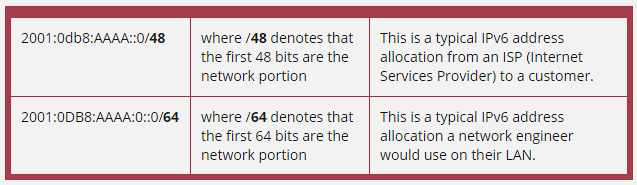

No subnet masks needed! IPv6 uses prefix length instead.
Format: address/prefix
Example:
%% fig-alt: "IPv6 prefix notation breakdown showing address 2001:DB8:ACAD:1::1/64 divided into network prefix (first 64 bits: 2001:DB8:ACAD:1) and interface identifier (last 64 bits: ::1). The /64 suffix indicates the prefix length in bits"
%%{init: {'theme': 'base', 'themeVariables': {'primaryColor': '#2C3E50', 'primaryTextColor': '#fff', 'primaryBorderColor': '#16A085', 'lineColor': '#16A085', 'secondaryColor': '#E67E22', 'tertiaryColor': '#7F8C8D'}}}%%
graph TB
    Full["Full Address: 2001:DB8:ACAD:1::1/64"]

    subgraph Prefix["Network Prefix (First 64 bits)"]
        P1["2001"]
        P2["DB8"]
        P3["ACAD"]
        P4["1"]
    end

    subgraph IID["Interface Identifier (Last 64 bits)"]
        I1["0000"]
        I2["0000"]
        I3["0000"]
        I4["0001"]
    end

    Notation["/64 = 64-bit prefix length"]

    Full --> Prefix
    Full --> IID
    Full --> Notation

    style Full fill:#2C3E50,stroke:#16A085,color:#fff
    style P1 fill:#16A085,stroke:#2C3E50,color:#fff
    style P2 fill:#16A085,stroke:#2C3E50,color:#fff
    style P3 fill:#16A085,stroke:#2C3E50,color:#fff
    style P4 fill:#16A085,stroke:#2C3E50,color:#fff
    style I1 fill:#E67E22,stroke:#2C3E50,color:#fff
    style I2 fill:#E67E22,stroke:#2C3E50,color:#fff
    style I3 fill:#E67E22,stroke:#2C3E50,color:#fff
    style I4 fill:#E67E22,stroke:#2C3E50,color:#fff
    style Notation fill:#7F8C8D,stroke:#2C3E50,color:#fff
Network and Host Portions: - Network prefix (first 64 bits): 2001:DB8:ACAD:1 - Interface identifier (last 64 bits): ::1
Standard allocation: - /64 for end networks (LANs) - /48 for sites/organizations - /32 for ISPs
652.7.5 IPv6 Benefits for IoT
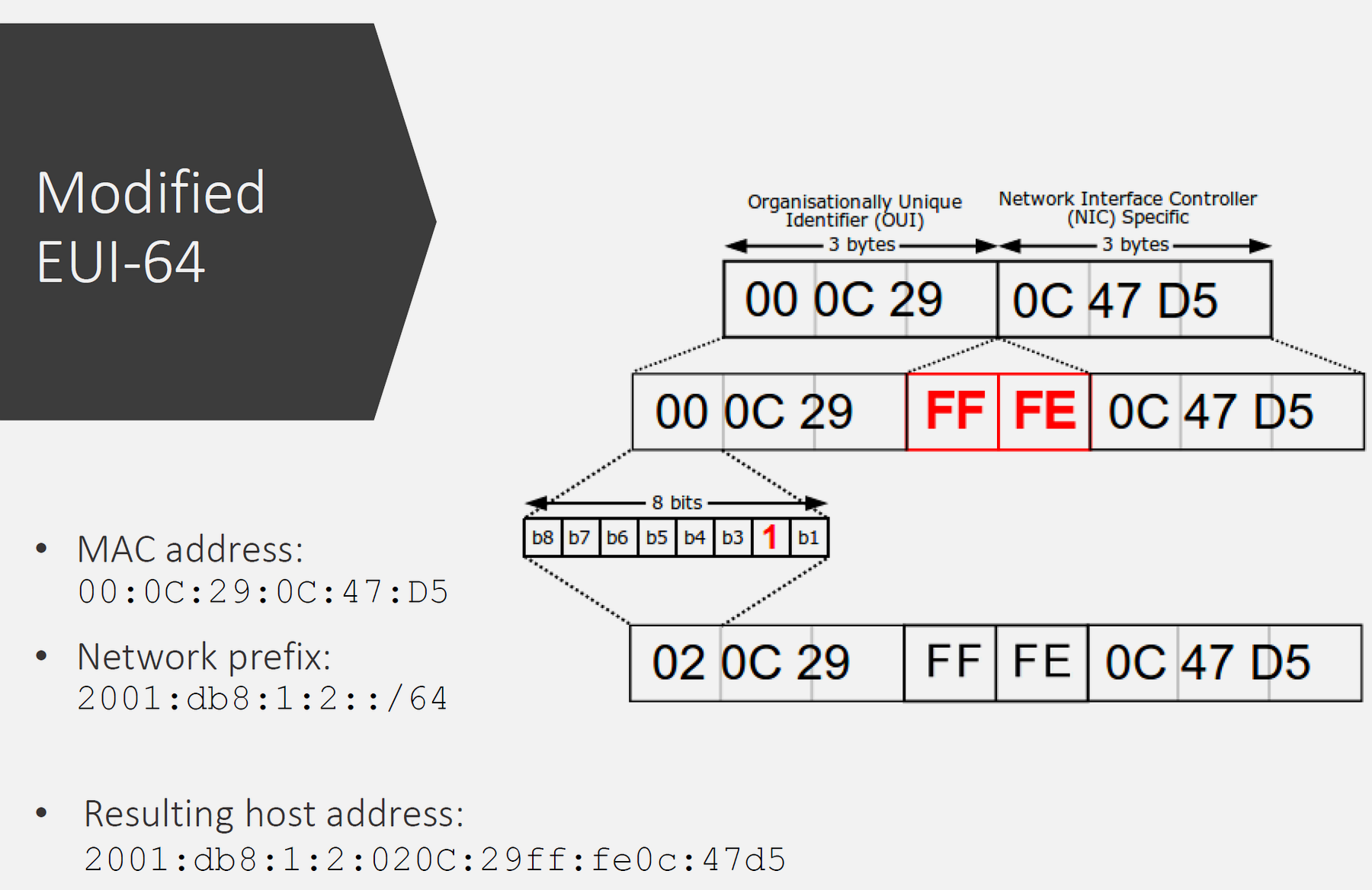
1. Abundant Addresses - Every device gets unique global address - No NAT complications - End-to-end connectivity
2. Simplified Configuration - Stateless Address Autoconfiguration (SLAAC) - Plug-and-play for IoT devices - DHCPv6 optional, not required
3. Improved Security - IPsec built into IPv6 - Better encryption support - Privacy extensions
4. Efficient Routing - Simplified header structure - Faster packet processing - Hierarchical addressing
652.8 MAC vs IP Addresses: Comparison
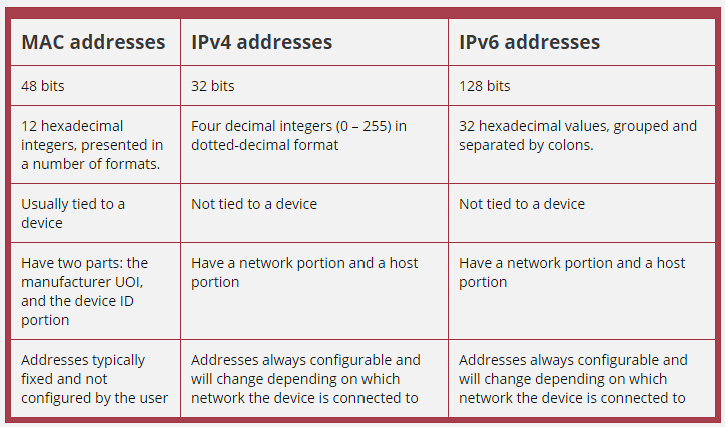
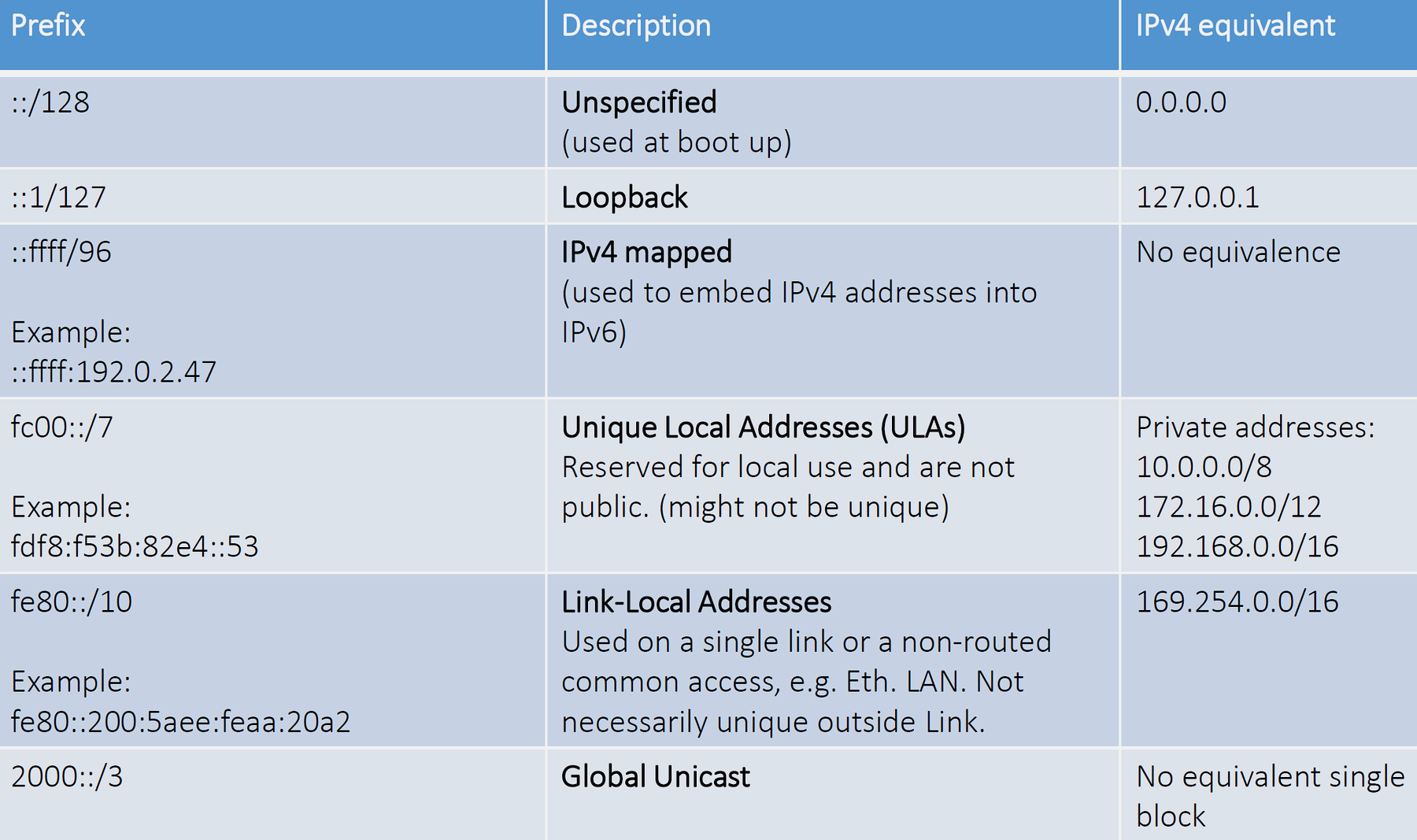
| Feature | MAC Address | IP Address (IPv4/IPv6) |
|---|---|---|
| Layer | Data Link (Layer 2) | Network (Layer 3) |
| Size | 48 bits | 32 bits (IPv4) / 128 bits (IPv6) |
| Assigned by | Manufacturer (OUI + unique) | Network administrator or DHCP |
| Scope | Local network segment | Global (routable across Internet) |
| Changes? | Usually fixed (hardware) | Changes when connecting to different networks |
| Format | 00:1A:2B:3C:4D:5E |
192.168.1.100 or 2001:DB8::1 |
| Purpose | Local frame delivery | End-to-end routing |
| Uniqueness | Globally unique (in theory) | Unique within network |
Analogy: - MAC address = Your house (fixed location) - IP address = Your mailing address (changes when you move)
652.9 Address Resolution Protocol (ARP)
652.9.1 The Problem
To send data on a local network: - Know destination IP address (for routing) - Need destination MAC address (for frame delivery)
How to find the MAC address for a given IP address?
652.9.2 ARP Solution
Address Resolution Protocol (ARP) maps IP addresses to MAC addresses.

652.9.3 ARP Process
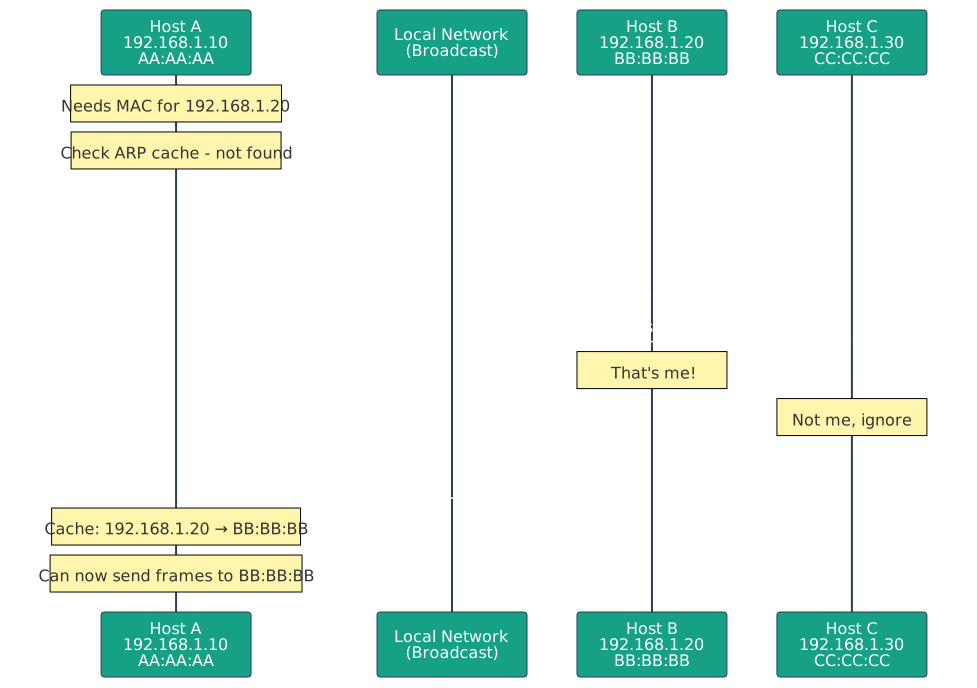
1. Host A wants to send data to 192.168.1.20 - Checks ARP cache (table of IP→MAC mappings) - If not found, sends ARP request
2. ARP Request (Broadcast) - Destination MAC: FF:FF:FF:FF:FF:FF (broadcast) - Message: “Who has IP 192.168.1.20? Tell 192.168.1.10” - All hosts on network receive request
3. ARP Reply (Unicast) - Host B recognizes its IP address - Sends reply: “192.168.1.20 is at MAC BB:BB:BB” - Reply sent directly to Host A (unicast)
4. Host A updates ARP cache - Stores mapping: 192.168.1.20 → BB:BB:BB - Cache entry expires after timeout (typically 2-20 minutes) - Now can send Ethernet frames to Host B
652.9.4 IPv6 Equivalent: NDP
Neighbor Discovery Protocol (NDP) serves the same purpose for IPv6: - Maps IPv6 addresses to MAC addresses - Uses ICMPv6 messages - More efficient than ARP - Includes additional features (router discovery, address autoconfiguration)
652.10 💻 Hands-On Labs
652.10.1 Lab 1: Explore Network Configuration
Objective: Examine IP, subnet mask, gateway, and MAC addresses on your device.
652.10.1.1 Windows:
ipconfig /allLook for: - IPv4 Address - Subnet Mask - Default Gateway - Physical Address (MAC) - DNS Servers
652.10.1.2 macOS/Linux:
ifconfig
# OR
ip addr show
652.10.1.3 ESP32 Code:
#include <Wi-Fi.h>

const char* ssid = "YourNetwork";
const char* password = "YourPassword";

void setup() {
  Serial.begin(115200);
  Wi-Fi.begin(ssid, password);

  while (Wi-Fi.status() != WL_CONNECTED) {
    delay(500);
    Serial.print(".");
  }

  Serial.println("\n\n=== Network Configuration ===");
  Serial.print("IP Address: ");
  Serial.println(Wi-Fi.localIP());
  Serial.print("Subnet Mask: ");
  Serial.println(Wi-Fi.subnetMask());
  Serial.print("Gateway: ");
  Serial.println(Wi-Fi.gatewayIP());
  Serial.print("DNS: ");
  Serial.println(Wi-Fi.dnsIP());
  Serial.print("MAC Address: ");
  Serial.println(Wi-Fi.macAddress());
}

void loop() {
  // Nothing
}
652.10.2 Lab 2: View ARP Table
Objective: See IP-to-MAC address mappings on your system.
652.10.2.1 Windows:
arp -a652.10.2.2 macOS/Linux:
arp -a
# OR
ip neigh show
Expected output:
Internet Address      Physical Address      Type
192.168.1.1          aa-bb-cc-dd-ee-ff    dynamic
192.168.1.20         11-22-33-44-55-66    dynamic
652.10.3 Lab 3: Subnet Calculation Practice
Given: - IP: 192.168.10.50 - Subnet mask: 255.255.255.0
Calculate: 1. Network address? 2. Broadcast address? 3. First usable host? 4. Last usable host? 5. Number of usable hosts?
Show Answers
- Network address:
192.168.10.0 - Broadcast address:
192.168.10.255 - First usable host:
192.168.10.1 - Last usable host:
192.168.10.254 - Number of usable hosts: 254 (2^8 - 2)
652.11 Knowledge Check
Test your understanding of network layers, protocol encapsulation, and addressing with these questions.
652.12 🎯 Quiz: Test Your Understanding
NotePython Implementation: Network Layer Tools
Let’s implement comprehensive Python tools for analyzing network layers, protocol encapsulation, and addressing:
652.12.1 Protocol Encapsulation and Layer Simulator
652.12.2 IPv4/IPv6 Address and Subnet Calculator
652.12.3 ARP Table and MAC/IP Mapping Simulator
652.13 Visual Reference Gallery
NoteAI-Generated Figure Variants for Network Addressing and Layering
These AI-generated SVG figures provide alternative visual representations of network addressing and protocol layering concepts. Each figure uses the IEEE color palette for consistency.



652.14 Additional Visual References
NoteVisual: OSI Model Layers
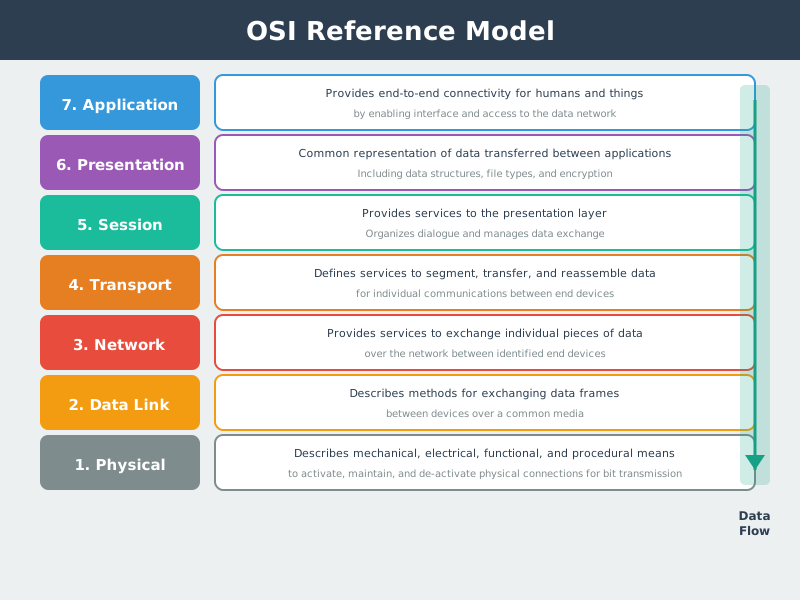
The OSI model provides the theoretical framework for understanding network communication, with each layer performing specific functions from physical transmission to application services.
NoteVisual: Data Link Layer Functions
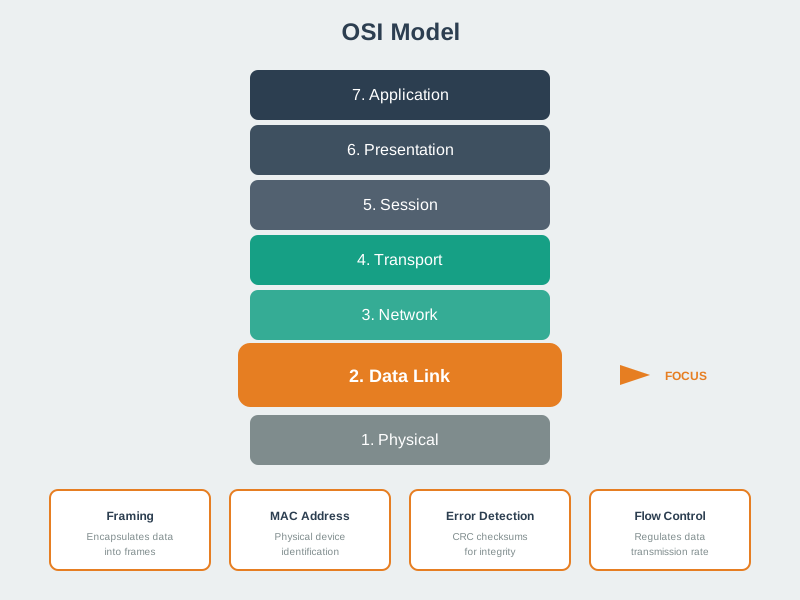
The Data Link layer handles MAC addressing, framing, and error detection - critical functions for local network frame delivery between adjacent devices.
NoteVisual: Encapsulation and Decapsulation
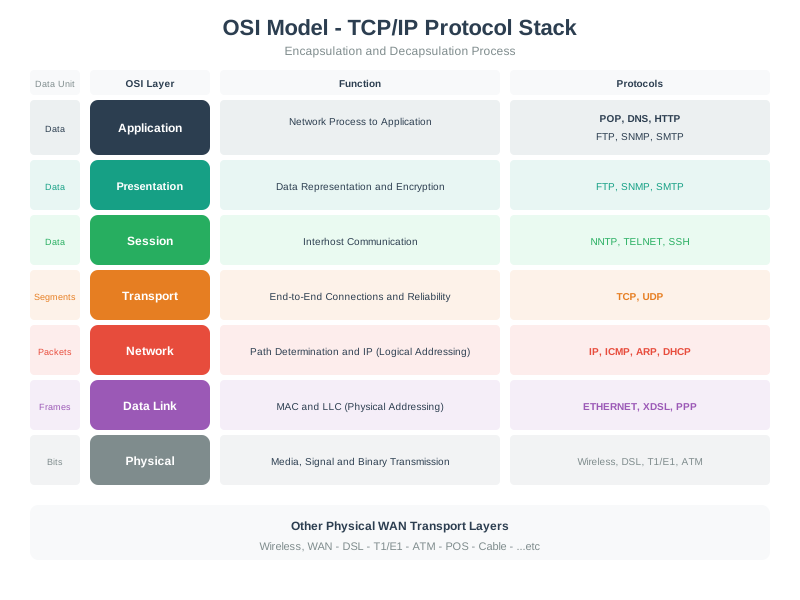
Understanding encapsulation reveals how data transforms as it passes through network layers, with each layer adding its own header for addressing and control.
652.15 Summary
This chapter provided hands-on implementation of network addressing and protocol layering concepts:
- MAC addresses (48-bit) identify network interfaces at Layer 2, with first 24 bits (OUI) identifying manufacturer and last 24 bits providing device-specific identifier
- IPv4 addressing (32-bit) uses dotted-decimal notation with subnet masks to divide networks into network and host portions, enabling hierarchical routing
- Subnet masks determine network boundaries: /24 provides 254 usable hosts, /30 provides 2 (point-to-point links), calculated as 2^(host bits) - 2 (network + broadcast reserved)
- IPv6 (128-bit) solves address exhaustion with 340 undecillion addresses, supporting auto-configuration (SLAAC), built-in security (IPsec), and compression (6LoWPAN) for IoT
- ARP (Address Resolution Protocol) maps Layer 3 IP addresses to Layer 2 MAC addresses through broadcast requests and unicast replies, enabling local frame delivery
- Encapsulation simulator demonstrates header addition at each layer: application data → UDP/TCP segment → IP packet → Ethernet frame → physical bits
- Python implementations provide practical tools: IPv4/IPv6 calculators, subnet planners, ARP table simulators, and protocol overhead analyzers showing efficiency vs payload size
652.16 What’s Next
Having implemented addressing and analyzed protocol encapsulation, consolidate your understanding with comprehensive review and assessment:
- Layered Models: Review: Test mastery of OSI/TCP-IP models, encapsulation, addressing, and IoT reference architectures with scenario-based questions
- Routing protocols: Explore how routers use routing tables and algorithms to guide packets across networks using the Layer 3 addresses you’ve learned
- Wireless IoT technologies: Apply layering concepts to Wi-Fi, Bluetooth LE, LoRaWAN, and Zigbee, understanding which OSI layers each technology implements
- Network design patterns: Design complete IoT networks from edge sensors through gateways to cloud, selecting appropriate protocols and addressing schemes at each layer