Synthesize Wi-Fi Knowledge: Connect concepts across standards, security, power, and deployment planning
Apply Case Study Methods: Use systematic analysis approaches for real-world Wi-Fi IoT deployments
Navigate Visual References: Use the gallery to quickly locate key Wi-Fi concepts
Identify Next Steps: Plan hands-on activities to reinforce Wi-Fi IoT skills
834.2 Chapter Organization
NoteWorked Examples and Case Studies
This summary section links to three detailed case study analyses. Each provides step-by-step calculations and decision-making frameworks for real-world Wi-Fi IoT deployments:
Power Optimization for Battery-Powered IoT - Energy budgeting, optimization strategies (connection reuse, interval adjustment), anti-patterns to avoid, and Wi-Fi vs LoRaWAN comparison
Wi-Fi 6 for High-Density Deployments - Throughput vs airtime analysis, OFDMA resource allocation, TWT power savings, and channel planning for 500+ device deployments
834.2.2 Recommended Path
For comprehensive review: Work through all three case studies sequentially (estimated 1-1.5 hours total)
For specific topics: Jump directly to the relevant case study
For quick reference: Use the visual gallery below
834.3 Chapter Summary
Wi-Fi is one of the most versatile and widely-used connectivity options for IoT. Key takeaways:
Standards: Wi-Fi 4/5/6 for different IoT needs, Wi-Fi 6 optimized with TWT and OFDMA
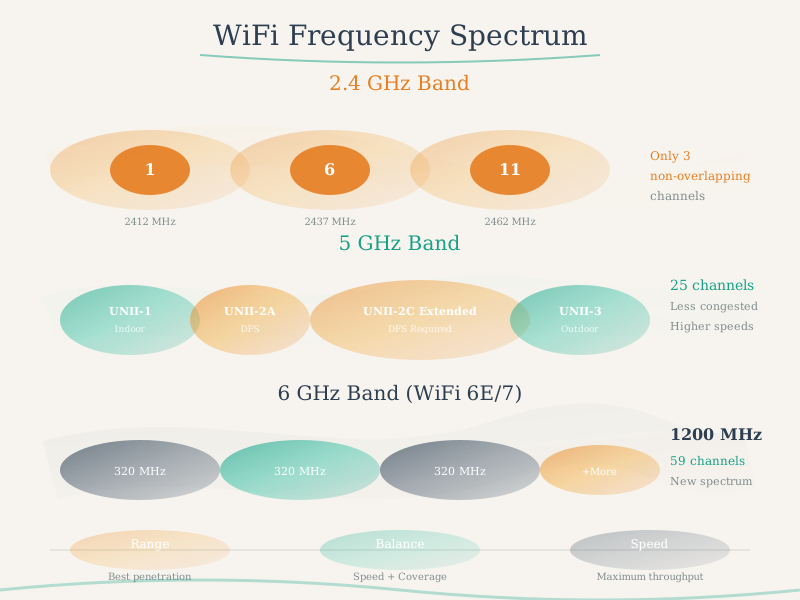
Frequency Bands: 2.4 GHz for range, 5 GHz for bandwidth
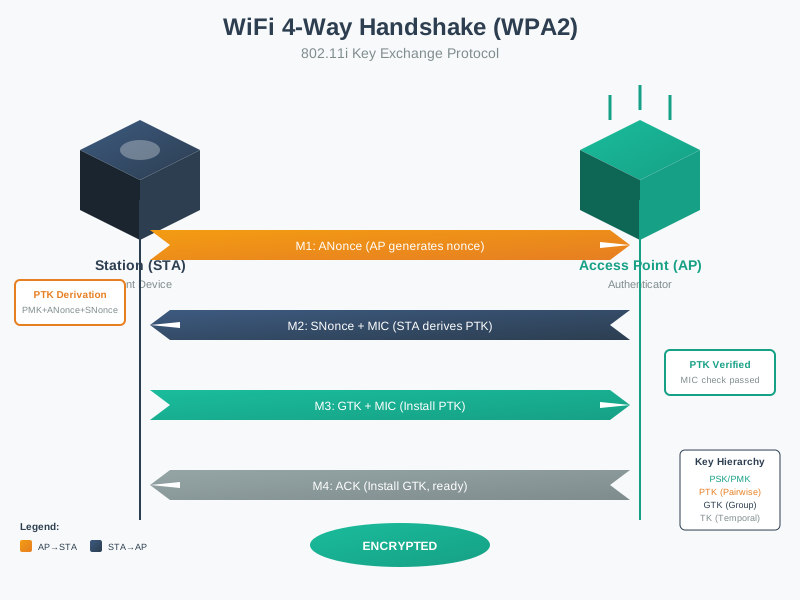
Security: WPA2 minimum, WPA3 for modern deployments, network segmentation critical
Power: Medium to high consumption, use sleep modes and deep sleep for battery devices
Platforms: ESP32 and Raspberry Pi are popular Wi-Fi-enabled IoT platforms
Use Cases: Smart home, industrial monitoring, cameras, high-bandwidth sensors
Compared to others: Higher power than Zigbee/LoRa, but much higher bandwidth and easier setup
Next Steps:
Set up ESP32 with Wi-Fi connectivity
Implement power-saving modes for battery operation
Create a Wi-Fi mesh network for extended coverage
Secure your IoT Wi-Fi with WPA2/WPA3 and VLANs
Build a complete IoT sensor system with MQTT over Wi-Fi
Show code
kc_wifi_10 = {const container =document.createElement('div'); container.className='inline-kc-container';if (typeof InlineKnowledgeCheck !=='undefined') { container.appendChild(InlineKnowledgeCheck.create({question:"A healthcare organization is deploying Wi-Fi-connected medical devices that transmit patient data. Regulatory compliance requires protection against eavesdropping even if an attacker captures traffic over time and later compromises the network password. Which Wi-Fi security feature specifically addresses this requirement?",options: [ {text:"WPA2-Enterprise with 802.1X and certificate-based authentication",correct:false,feedback:"Incorrect. While WPA2-Enterprise provides strong authentication, it doesn't inherently provide forward secrecy. If the server's private key is later compromised, previously captured traffic could potentially be decrypted. The question specifically asks about protection when the password is later compromised."}, {text:"WPA3-Personal with SAE providing forward secrecy through ephemeral key exchange",correct:true,feedback:"Correct! WPA3-SAE (Simultaneous Authentication of Equals) uses Diffie-Hellman key exchange to establish unique session keys. Even if an attacker later learns the password, they cannot decrypt previously captured traffic because each session uses ephemeral keys that aren't derivable from the password alone. This 'forward secrecy' is a key WPA3 improvement."}, {text:"WPA2-Personal with AES-256 encryption for stronger key length",correct:false,feedback:"Incorrect. WPA2-Personal uses the same PSK-derived key for key derivation. If the PSK is compromised, an attacker with captured handshakes can derive session keys and decrypt past traffic. AES-256 provides stronger encryption but doesn't provide forward secrecy - that requires ephemeral key exchange."}, {text:"MAC address filtering combined with hidden SSID to prevent unauthorized capture",correct:false,feedback:"Incorrect. MAC filtering and hidden SSIDs are easily bypassed and provide no encryption protection. Hidden SSIDs are revealed in probe requests, and MAC addresses can be spoofed. Neither prevents traffic capture or provides forward secrecy. WPA3-SAE's ephemeral keys are the solution."} ],difficulty:"hard",topic:"wifi-security" })); }return container;}
kc_wifi_11 = {const container =document.createElement('div'); container.className='inline-kc-container';if (typeof InlineKnowledgeCheck !=='undefined') { container.appendChild(InlineKnowledgeCheck.create({question:"A manufacturing facility uses Wi-Fi-connected tablets on forklifts that move throughout a 200,000 sq ft warehouse. Operators report that their warehouse management app freezes for 3-5 seconds when driving between areas. The IT team measures 15 APs with good coverage overlap. What is the most likely cause and solution?",options: [ {text:"Insufficient coverage overlap - add more APs to eliminate dead zones",correct:false,feedback:"Incorrect. The problem description states there is good coverage overlap and 15 APs. Dead zones would cause disconnections, not 3-5 second freezes followed by recovery. The freeze duration suggests roaming delay, not coverage gaps."}, {text:"Slow roaming due to full re-authentication at each AP - enable 802.11r Fast BSS Transition",correct:true,feedback:"Correct! The 3-5 second freeze is classic roaming delay. Without 802.11r (Fast BSS Transition), devices perform full 802.1X re-authentication at each AP (EAP exchange + 4-way handshake = 2-5 seconds). 802.11r pre-establishes security associations with neighboring APs, reducing handoff to under 50ms. This explains why the app freezes briefly then recovers as the forklift moves between AP coverage areas."}, {text:"AP overload causing dropped connections - upgrade to Wi-Fi 6 APs for higher capacity",correct:false,feedback:"Incorrect. AP overload would cause consistent slowness across all areas, not location-specific 3-5 second freezes during movement. The pattern of freezing while driving (transitioning between APs) points to roaming issues, not capacity issues."}, {text:"Incorrect channel planning causing interference - run a site survey and reassign channels",correct:false,feedback:"Incorrect. Channel interference causes packet loss and retransmissions, resulting in degraded throughput - not consistent 3-5 second freezes. The specific duration and movement-triggered pattern indicate roaming authentication delay, which 802.11r solves."} ],difficulty:"medium",topic:"wifi-roaming" })); }return container;}
834.5 Visual Reference Gallery
Explore these AI-generated figures that summarize key Wi-Fi concepts covered in this comprehensive review.
NoteWi-Fi 6 Feature Set
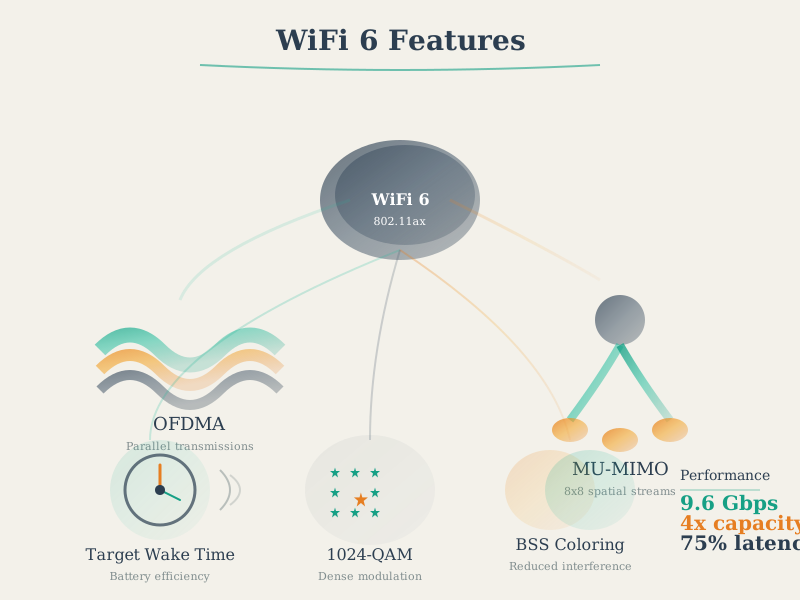
Wi-Fi 6 Features
Figure 834.1: Wi-Fi 6 feature overview showing OFDMA, TWT, BSS Coloring, and MU-MIMO for IoT optimization.
Figure 834.3: Wi-Fi security authentication flows for WPA3-Personal and WPA3-Enterprise deployments.
Show code
kc_wifi_12 = {const container =document.createElement('div'); container.className='inline-kc-container';if (typeof InlineKnowledgeCheck !=='undefined') { container.appendChild(InlineKnowledgeCheck.create({question:"A smart home enthusiast has deployed 35 Wi-Fi IoT devices (smart lights, thermostats, cameras, door locks) on their consumer mesh router. After a security audit, they learn that a compromised smart bulb could potentially access their home network, including computers with sensitive files. What is the most effective mitigation for this IoT security risk?",options: [ {text:"Update firmware on all IoT devices regularly to patch security vulnerabilities",correct:false,feedback:"Incorrect. While firmware updates are important, they don't address the fundamental problem: all devices sharing the same network. A compromised device (even with current firmware) can still access other network resources. Network segmentation provides defense-in-depth."}, {text:"Create a separate IoT VLAN or guest network to isolate IoT devices from computers and NAS",correct:true,feedback:"Correct! Network segmentation using VLANs or a dedicated IoT guest network isolates compromised devices. Even if a smart bulb is hacked, it cannot reach computers on the main network. Consumer routers often support guest networks with isolation. Enterprise solutions use VLANs with firewall rules to allow IoT internet access while blocking lateral movement to sensitive resources."}, {text:"Disable remote access on all IoT devices to prevent external attacks",correct:false,feedback:"Incorrect. Disabling remote access removes useful functionality and doesn't protect against compromised devices already on the network. Local network attacks (ARP spoofing, lateral movement) remain possible. Segmentation isolates the blast radius regardless of attack vector."}, {text:"Enable WPA3 encryption on the router for stronger Wi-Fi security",correct:false,feedback:"Incorrect. WPA3 protects data in transit and prevents unauthorized network access, but doesn't help once a device is legitimately connected and then compromised. A hacked bulb with valid WPA3 credentials can still attack other devices on the same network segment. Segmentation is needed."} ],difficulty:"easy",topic:"enterprise-vs-home-wifi" })); }return container;}
834.6 Comprehensive Summary
This chapter provided a comprehensive review of Wi-Fi technology for IoT:
Wi-Fi Standards Evolution: Traced progression from Wi-Fi 1 (11 Mbps, 1999) through Wi-Fi 6 (9.6 Gbps, 2019) with increasing efficiency and IoT-specific features
Frequency Band Analysis: Compared 2.4 GHz (longer range, congested), 5 GHz (higher bandwidth, shorter range), and emerging 6 GHz bands for IoT deployments
Wi-Fi 6 Features for IoT: Target Wake Time (TWT) can reduce idle listening for scheduled devices (workload dependent), and OFDMA can improve efficiency under contention when APs and clients support it
Security Implementation: WPA3 with SAE authentication, individualized data encryption, and protection against brute-force and eavesdropping attacks
Channel Planning: Non-overlapping channel allocation strategies for 2.4 GHz (3 channels) and 5 GHz (25 channels) to minimize interference
Power Optimization: Sleep modes (light sleep, modem sleep, deep sleep) and TWT scheduling to achieve multi-year battery life on Wi-Fi devices
Real-World Case Study: Industrial IoT deployment analysis with 500 devices, calculating optimal AP density, channel assignment, and demonstrating Wi-Fi 6 efficiency gains
834.7 What’s Next
Continue to Bluetooth Fundamentals to explore low-power wireless technology optimized for personal area networks and wearables, or review the RFID and NFC technologies for proximity-based identification and device pairing.
The next chapter explores NFC Fundamentals, covering Near Field Communication technology operating at 13.56 MHz with 4-10 cm range, NFC operating modes (peer-to-peer, read/write, card emulation), NDEF data format for interoperability, mobile payments, and contactless applications for IoT.