1555 Network Design Exercises
1555.1 Network Design Exercises
This section provides hands-on exercises, knowledge checks, and planning worksheets for IoT network design and simulation.
1555.2 Learning Objectives
By the end of this chapter, you will be able to:
- Design and simulate a smart home network using Cisco Packet Tracer
- Compare Wi-Fi vs Zigbee mesh performance using NS-3
- Optimize LoRaWAN gateway placement for smart agriculture
- Apply knowledge checks to validate understanding
- Use comprehensive planning worksheets for real deployments
1555.3 Prerequisites
Before diving into this chapter, you should be familiar with:
- Network Design Fundamentals: Understanding network topologies and requirements
- Network Simulation Tools: Knowledge of NS-3, Cooja, and other simulators
- Network Design Methodology: Systematic approach to design and validation
1555.4 Hands-On Exercises
Objective: Learn network topology design by creating a complete smart home IoT network with star topology, testing connectivity, and measuring performance metrics.
Prerequisites: Download free Cisco Packet Tracer (requires Cisco NetAcad account)
Steps:
- Create Network Topology (20 minutes):
- Add 1 Home Gateway (2911 Router or Home Gateway device)
- Add 1 Wi-Fi Access Point (connect to gateway via Ethernet)
- Add 10 IoT devices:
- 5 Smart Sensors (temperature, motion, door)
- 3 Smart Lights
- 2 Smart Cameras
- Connect all wireless devices to the AP
- Configure IP Addressing (15 minutes):
- Gateway: 192.168.1.1/24
- Access Point: 192.168.1.2/24
- IoT devices: DHCP (192.168.1.100-254 range)
- Verify connectivity using ping from each device to gateway
- Test and Measure (25 minutes):
- Use Packet Tracer’s simulation mode
- Send data from sensors to gateway
- Measure metrics:
- Latency (packet travel time)
- Packet delivery success rate
- Number of hops
- Document results in a table
Expected Outcome:
- Functional smart home network with 10+ devices
- All devices can communicate with gateway
- Understanding of star topology advantages (simple, centralized) and disadvantages (single point of failure)
- Measured baseline performance metrics
Challenge Extension:
- Add redundancy: Second gateway/AP for failover
- Implement VLANs to separate IoT traffic from main network
- Add firewall rules to prevent IoT devices from accessing internet directly
- Simulate device failure: What happens when AP goes down?
Success Criteria:
- All devices receive DHCP addresses
- 100% packet delivery from sensors to gateway
- Latency < 50ms for all connections
- Network remains functional if one sensor fails
Objective: Use network simulation to understand protocol trade-offs by comparing Wi-Fi star topology vs Zigbee mesh topology for the same application.
Prerequisites:
- Linux or WSL on Windows
- NS-3 installed (installation guide)
- Alternatively: Use online NS-3 sandbox (search “NS3 online simulator”)
Scenario: 20 sensor nodes in a 100m x 100m building need to send data to a gateway. Compare two approaches:
- Approach A: Wi-Fi star (all to gateway)
- Approach B: Zigbee mesh (multi-hop routing)
Steps:
- Setup Wi-Fi Star Simulation (30 minutes):
- Create 20 Wi-Fi station nodes + 1 AP (gateway)
- Random node placement in 100m x 100m area
- Each node sends 100-byte packet every 60 seconds
- Run for 1000 simulated seconds
- Record: PDR, average latency, energy consumption
- Setup Zigbee Mesh Simulation (30 minutes):
- Create 20 802.15.4 nodes with routing enabled
- Same placement and traffic pattern
- Enable AODV or RPL routing protocol
- Run for 1000 simulated seconds
- Record same metrics
- Analyze and Compare (20 minutes):
- Calculate metrics for both scenarios
- Create comparison table
- Identify strengths/weaknesses of each approach
Expected Outcome:
| Metric | Wi-Fi Star | Zigbee Mesh | Winner |
|---|---|---|---|
| Packet Delivery Ratio | ~70-85% | ~95-99% | Mesh |
| Average Latency | 50-100ms | 100-300ms | Star |
| Energy per Packet | High (80mA TX) | Low (30mA TX) | Mesh |
| Coverage | Limited (all must reach AP) | Extended (multi-hop) | Mesh |
| Network Lifetime | Days-weeks | Months-years | Mesh |
Challenge Extension:
- Add node mobility (walking sensors)
- Simulate AP/gateway failure - which recovers better?
- Add interference from Wi-Fi channel congestion
- Test scalability: 50 nodes, 100 nodes - when does each break?
Learning Points:
- Star topology has lower latency but limited range
- Mesh topology trades latency for reliability and coverage
- Energy consumption differs dramatically between protocols
- No one-size-fits-all solution - depends on requirements!
Resources:
Objective: Learn network optimization by using propagation models to determine optimal gateway placement for maximum coverage and minimal packet loss.
Prerequisites:
- Pen and paper OR
- Free online tool: RadioMobile OR
- Python with matplotlib (for plotting)
Scenario: You need to monitor 50 soil moisture sensors across a 2km x 2km farm. Sensors transmit once per hour. Where should you place LoRaWAN gateways to ensure 99% PDR while minimizing gateway cost?
Steps:
- Understand Constraints (10 minutes):
- LoRa range: 2-5km (depends on terrain, obstructions)
- Gateway cost: $500 each
- Sensor cost: $50 each
- Required: 99% of sensors must reach at least 1 gateway
- Budget: Minimize total gateway count
- Initial Design - Single Gateway (15 minutes):
- Place 1 gateway at farm center
- Use path loss formula: PL(d) = PL(d0) + 10n log10(d/d0)
- Assume n=2.5 (outdoor with some obstacles)
- Calculate which sensors can reach gateway (RSSI > sensitivity)
- Likely result: ~60-70% coverage (FAILS requirement!)
- Optimized Design - Multiple Gateways (30 minutes):
- Try 2 gateways at strategic locations
- Calculate coverage for each gateway
- Identify overlap zones (good!) and dead zones (bad!)
- Iterate placement until 99% coverage achieved
- Most likely solution: 2-3 gateways
- Validate with Simulation (20 minutes):
- Model in Python or spreadsheet
- Random sensor placement (simulate 100 different farm layouts)
- Calculate average PDR for your gateway placement
- Adjust if needed to hit 99% target
Expected Outcome:
- Optimal gateway placement map
- Coverage heat map showing RSSI across farm
- Cost analysis: 2 gateways ($1000) + 50 sensors ($2500) = $3500 total
- Understanding of coverage-cost trade-off
Code Template (Python):
import matplotlib.pyplot as plt
import numpy as np

# Farm dimensions
farm_size = 2000  # meters

# LoRa parameters
tx_power = 14  # dBm
sensitivity = -137  # dBm
path_loss_exponent = 2.5

def calculate_rssi(distance, tx_power, path_loss_exponent):
    # Log-distance path loss model
    if distance < 1:
        distance = 1
    pl = 40 + 10 * path_loss_exponent * np.log10(distance)
    return tx_power - pl

# Sensor locations (random)
np.random.seed(42)
sensors = np.random.rand(50, 2) * farm_size

# Gateway locations (you optimize these!)
gateways = np.array([
    [1000, 1000],  # Center
    [500, 500],    # Southwest
    # Add more as needed
])

# Calculate coverage
covered = 0
for sensor in sensors:
    can_reach_gateway = False
    for gateway in gateways:
        distance = np.linalg.norm(sensor - gateway)
        rssi = calculate_rssi(distance, tx_power, path_loss_exponent)
        if rssi > sensitivity:
            can_reach_gateway = True
            break
    if can_reach_gateway:
        covered += 1

pdr = (covered / len(sensors)) * 100
print(f"Coverage: {pdr:.1f}%")
print(f"Gateways needed: {len(gateways)}")
print(f"Total cost: ${500 * len(gateways) + 50 * len(sensors)}")

# Visualize coverage map
plt.figure(figsize=(10, 10))
plt.scatter(sensors[:, 0], sensors[:, 1], c='blue', label='Sensors', alpha=0.6)
plt.scatter(gateways[:, 0], gateways[:, 1], c='red', s=200, marker='^', label='Gateways')

# Draw coverage circles
for gw in gateways:
    max_range = 10 ** ((tx_power - sensitivity - 40) / (10 * path_loss_exponent))
    circle = plt.Circle((gw[0], gw[1]), max_range, color='green', alpha=0.1)
    plt.gca().add_patch(circle)

plt.xlim(0, farm_size)
plt.ylim(0, farm_size)
plt.xlabel('Distance (m)')
plt.ylabel('Distance (m)')
plt.title(f'LoRaWAN Coverage Map ({pdr:.1f}% coverage)')
plt.legend()
plt.grid(True, alpha=0.3)
plt.axis('equal')
plt.show()
Challenge Extension:
- Add elevation data (hills block signals)
- Consider gateway solar power and backhaul (cellular vs Ethernet)
- Optimize for redundancy: every sensor reaches 2+ gateways
- Calculate battery lifetime if sensors use duty cycling
Real-World Application: This exact exercise is what IoT consultants do when designing deployments! Your optimized design could save thousands in real projects.
1555.5 Knowledge Check
Test your understanding of network design and simulation concepts.
1555.6 Network Planning Worksheet
Use this comprehensive worksheet to systematically design and simulate your IoT network before deployment.
1555.6.1 Step 1: Requirements Gathering
| Question | Your Answer | Impact |
|---|---|---|
| Number of devices? | ___ | Scale, cost, simulation complexity |
| Coverage area (m squared)? | ___ | AP/gateway count, range requirements |
| Indoor/Outdoor? | ___ | Propagation model, equipment rating |
| Data rate needed? | ___ | Protocol choice, bandwidth planning |
| Latency requirement? | ___ | Architecture, QoS configuration |
| Power availability? | ___ | Battery vs wired, duty cycling |
| Budget per device? | ___ | Technology options, feasibility |
| Reliability (% uptime)? | ___ | Redundancy, mesh vs star |
1555.6.2 Step 2: Protocol Selection Matrix
Based on your requirements, score each option (1-5, where 5 = best fit):
| Factor | Wi-Fi | Zigbee | LoRaWAN | Cellular | Thread | BLE |
|---|---|---|---|---|---|---|
| Meets range? | ||||||
| Meets data rate? | ||||||
| Meets power budget? | ||||||
| Within cost target? | ||||||
| Latency acceptable? | ||||||
| Total Score |
Recommended protocol: ________________ (highest score)
1555.6.3 Step 3: Topology Selection
Based on your requirements, select topology:
| Topology | Pros for Your Application | Cons for Your Application | Score (1-5) |
|---|---|---|---|
| Star | Simple, low latency, centralized control | Hub SPOF, limited range | |
| Mesh | Extended range, self-healing, redundant | Complex routing, higher power | |
| Tree | Hierarchical aggregation, scalable | Parent node failures cascade | |
| Hybrid | Combines strengths, flexible | Most complex, highest cost |
Selected topology: ________________
1555.6.4 Step 4: Coverage Calculation
For indoor Wi-Fi:
Coverage per AP = pi x (range)^2 = pi x 25^2 = approximately 2,000 m^2
APs needed = Total area / 2,000
Add 20% for overlap and obstacles
For LoRaWAN outdoor:
Gateway coverage = pi x (5km)^2 = approximately 78 km^2
Gateways needed = Total area / 78 km^2
Add redundancy factor (1.5x for dual coverage)
Your calculations:
- Total area: _____ m squared (or _____ km squared)
- Coverage per gateway/AP: _____ m squared
- Gateways/APs needed: _____ (with 20% margin)
- Estimated cost: _____ gateways x \(___/gateway = **\)_____**
1555.6.5 Step 5: Bill of Materials Template
| Item | Quantity | Unit Cost | Total | Notes |
|---|---|---|---|---|
| End devices | $ | $ | Sensors/actuators | |
| Gateways/APs | $ | $ | From Step 4 calculation | |
| Network server | $/month | $/year | Cloud or self-hosted | |
| Simulation software | $ | $ | NS-3 (free), OPNET, etc. | |
| Test equipment | $ | $ | Packet analyzer, RF tools | |
| Installation | $ | $ | Professional or DIY | |
| Total Initial | \(** | | | **Annual Operational** | | | **\)/year | Subscriptions, cellular |
5-year TCO: Initial + (Annual x 5) = $_____
1555.6.6 Step 6: Simulation Planning
Tool selection:
| Tool | Use Case | Your Need | Selected? |
|---|---|---|---|
| NS-3 | Large-scale research, 100k+ nodes | [ ] | |
| Cooja | WSN firmware testing, <1k nodes | [ ] | |
| OMNeT++ | Modular protocol development | [ ] | |
| Packet Tracer | Education, small networks | [ ] | |
| NetSim | Commercial with IoT modules | [ ] |
Simulation objectives:
Simulation parameters:
| Parameter | Value | Source/Justification |
|---|---|---|
| Propagation model | Log-distance / Two-ray / … | Indoor/outdoor environment |
| Path loss exponent (n) | 2.0-4.0 | Free space=2, indoor=2.5-3, urban=3-4 |
| TX power (dBm) | Device specifications | |
| RX sensitivity (dBm) | Protocol datasheet | |
| Data rate (bps) | Application requirements | |
| Packet size (bytes) | Sensor payload + headers | |
| Traffic pattern | Periodic / Event-driven / Burst | Application behavior |
| Simulation duration (s) | 100-1000+ | Allow network stabilization |
1555.6.7 Step 7: Network Model Configuration
Physical layer:
Propagation: Log-distance with n=_____
TX power: _____ dBm
Sensitivity: _____ dBm
Link budget: TX - Sensitivity = _____ dB
Max range (free space): 10^((Link budget - 40) / (10 x n)) = _____ m
MAC layer:
- Access method: CSMA/CA / TDMA / ALOHA
- Retry limit: _____ attempts
- Backoff: Exponential / Linear
- ACK required: Yes / No
Network layer:
- Routing: Static / AODV / RPL / Dijkstra
- Hop limit: _____ hops max
- Route refresh: Every _____ seconds
Application layer:
- Protocol: MQTT / CoAP / HTTP / Custom
- Traffic: _____ packets/hour per device
- Payload: _____ bytes/packet
1555.6.8 Step 8: Deployment Checklist
Pre-Deployment:
Simulation-Specific Tasks:
Deployment:
1555.6.9 Step 9: Performance Validation
Metrics to compare (Simulation vs Real):
| Metric | Simulated | Measured | Delta (%) | Acceptable? |
|---|---|---|---|---|
| PDR | ___% | ___% | <10% Delta OK | |
| Avg latency (ms) | ___ | ___ | <20% Delta OK | |
| Max latency (99th %ile) | ___ | ___ | <30% Delta OK | |
| Throughput (kbps) | ___ | ___ | <15% Delta OK | |
| Energy/packet (mJ) | ___ | ___ | <25% Delta OK | |
| Network lifetime (months) | ___ | ___ | <20% Delta OK |
Validation criteria:
- PDR difference <5%: Excellent model accuracy
- PDR difference 5-10%: Good, acceptable for design decisions
- PDR difference >10%: Refine propagation model, traffic patterns
Common discrepancies and fixes:
- Simulated PDR higher: Add interference model, increase path loss exponent
- Simulated latency lower: Add queuing delays, MAC contention overhead
- Simulated battery life higher: Include routing overhead, idle listening power
1555.6.10 Step 10: Simulation Iteration Log
Track simulation runs to understand parameter sensitivity:
| Run | Nodes | TX Power | Routing | PDR | Latency | Notes |
|---|---|---|---|---|---|---|
| 1 | 50 | 0 dBm | AODV | 85% | 120ms | Baseline - low PDR |
| 2 | 50 | 10 dBm | AODV | 94% | 115ms | Higher TX improved PDR |
| 3 | 50 | 10 dBm | RPL | 96% | 95ms | RPL better than AODV |
| 4 | 100 | 10 dBm | RPL | 91% | 145ms | Scales but higher latency |
| 5 | 100 | 14 dBm | RPL | 97% | 130ms | Meets requirements |
| … |
Optimal configuration (from simulation):
- Nodes: _____
- TX power: _____ dBm
- Routing: _____
- Expected PDR: _____%
- Expected latency: _____ ms
1555.6.11 Step 11: Failure Scenario Testing
Scenarios to simulate:
| Scenario | Description | PDR Impact | Latency Impact | Recovery Time |
|---|---|---|---|---|
| Single node failure | Random node dies | % to % | _ms to _ms | ___s |
| Gateway failure | Primary gateway down | % to % | _ms to _ms | ___s |
| 10% node failure | Widespread outage | % to % | _ms to _ms | ___s |
| Channel interference | Wi-Fi congestion added | % to % | _ms to _ms | N/A |
| Network partition | Area disconnected | % to % | _ms to _ms | ___s |
Mitigation strategies validated in simulation:
- Dual gateways: PDR maintained at ___% during gateway failure
- Mesh routing: Network recovers in ___s from 10% node failure
- Frequency hopping: Interference resistance improved by ___%
1555.6.12 Step 12: Documentation and Handoff
Deliverables from simulation phase:
Handoff to deployment team:
- Recommended topology: _________________
- Optimal protocol: _________________
- TX power setting: _____ dBm
- Gateway count: _____
- Expected PDR: _____%
- Expected latency: _____ ms
- Battery lifetime estimate: _____ months
1555.7 Visual Reference Gallery
The following AI-generated visualizations provide alternative perspectives on network design and simulation concepts.
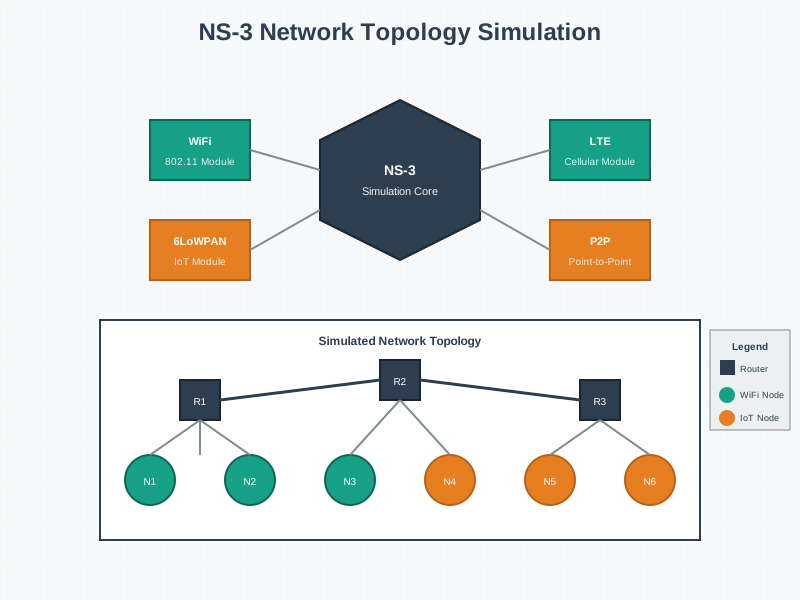
NS-3 provides comprehensive network simulation capabilities, enabling validation of routing protocols, channel models, and network performance before physical deployment.
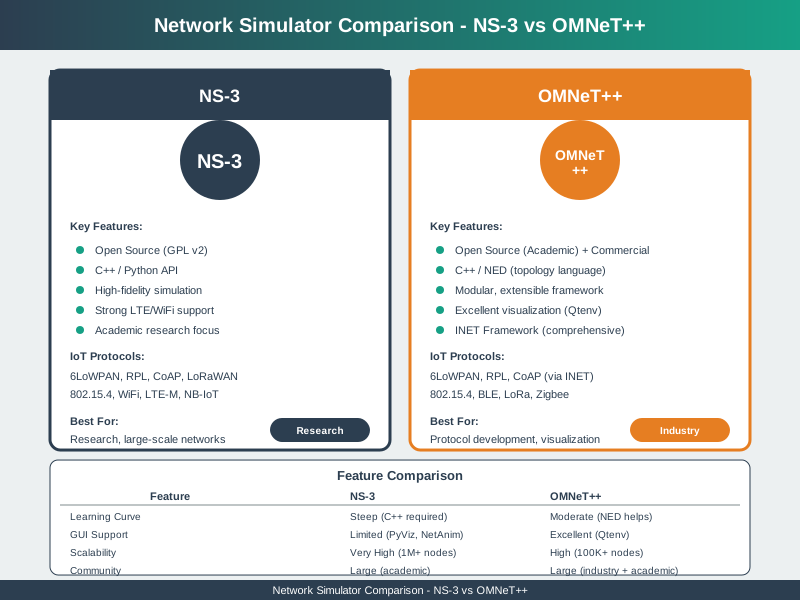
Choosing the right network simulator depends on project requirements, protocol support, scale, and team expertise.
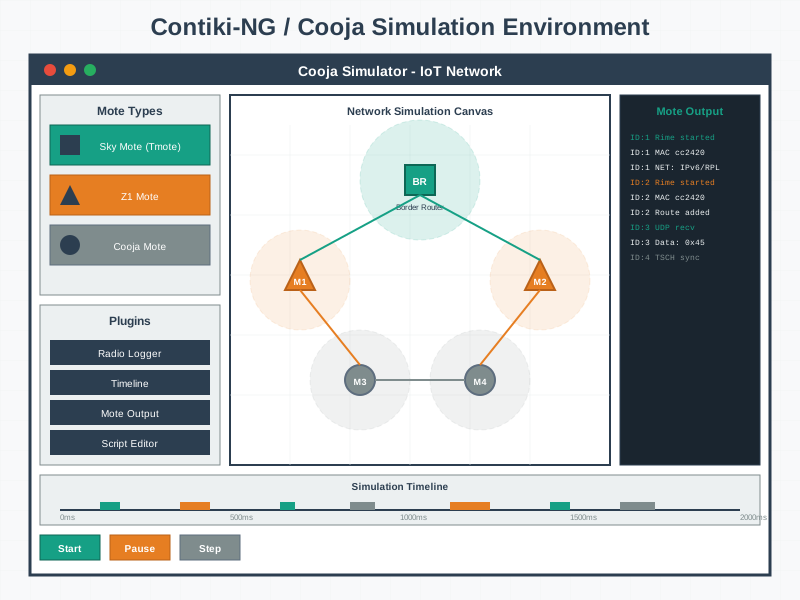
Cooja enables testing actual Contiki firmware on emulated hardware, providing higher fidelity than abstract simulation for wireless sensor networks.
1555.8 Summary
- Hands-On Exercises: Practice network design through three progressive exercises covering Cisco Packet Tracer smart home design, NS-3 Wi-Fi vs Zigbee comparison, and LoRaWAN gateway placement optimization
- Knowledge Validation: Use comprehensive quizzes to test understanding of simulation configuration, statistical analysis, validation methodology, and tool selection
- Planning Worksheets: Apply 12-step planning process covering requirements gathering, protocol selection, topology design, coverage calculation, simulation planning, and deployment validation
- Real-World Application: The exercises and worksheets mirror actual IoT consulting practices for production network deployments
Network Design Series:
- Network Design Fundamentals - Topology and requirements
- Network Simulation Tools - Tool selection
- Network Design Methodology - Systematic process
Design Deep Dives:
- Hardware Prototyping - Physical prototyping
- Software Prototyping - Software development
- Simulation Tools - Hardware simulation
Learning Hubs:
- Quiz Navigator - Design quizzes
- Simulations Hub - Network simulation tools
1555.9 What’s Next
The next section covers Network Traffic Analysis, which examines how to capture, monitor, and analyze the actual traffic flowing through your IoT networks. Understanding real traffic patterns complements simulation and enables optimization and troubleshooting of deployed systems.