%%{init: {'theme': 'base', 'themeVariables': { 'primaryColor': '#2C3E50', 'primaryTextColor': '#fff', 'primaryBorderColor': '#16A085', 'lineColor': '#16A085', 'secondaryColor': '#E67E22', 'tertiaryColor': '#7F8C8D'}}}%%
graph LR
    subgraph IPv4["IPv4 Address Structure (32 bits)"]
        Oct1["Octet 1<br/>192<br/>11000000"]
        Oct2["Octet 2<br/>168<br/>10101000"]
        Oct3["Octet 3<br/>1<br/>00000001"]
        Oct4["Octet 4<br/>100<br/>01100100"]
    end

    Oct1 -.->|"."| Oct2
    Oct2 -.->|"."| Oct3
    Oct3 -.->|"."| Oct4

    style Oct1 fill:#2C3E50,stroke:#16A085,stroke-width:2px,color:#fff
    style Oct2 fill:#16A085,stroke:#2C3E50,stroke-width:2px,color:#fff
    style Oct3 fill:#E67E22,stroke:#2C3E50,stroke-width:2px,color:#fff
    style Oct4 fill:#2C3E50,stroke:#16A085,stroke-width:2px,color:#fff
    style IPv4 fill:#f0f0f0,stroke:#7F8C8D,stroke-width:2px
608 IPv4 Addressing Fundamentals
608.1 Learning Objectives
By the end of this chapter, you will be able to:
- Understand IPv4 address structure: Interpret 32-bit addresses in dotted-decimal and binary notation
- Identify address classes: Recognize historical Class A, B, C, D, and E address ranges
- Apply private IP ranges: Use RFC 1918 addresses for internal IoT networks
- Recognize special-purpose addresses: Identify loopback, link-local, and broadcast addresses
TipMVU: Minimum Viable Understanding
Core concept: An IPv4 address is a 32-bit unique identifier for a device on a network, written as four numbers (0-255) separated by dots like 192.168.1.100.
Why it matters: Every device on a network needs a unique IP address to communicate - incorrect addressing causes silent failures with no helpful error messages.
Key takeaway: Use private IP ranges (10.x.x.x, 172.16-31.x.x, 192.168.x.x) for internal IoT networks to avoid conflicts with public internet addresses.
608.2 Prerequisites
Before diving into this chapter, you should be familiar with:
- Networking Basics: Foundation in networking concepts and protocol basics
- Layered Network Models: Understanding where addressing operates within the OSI/TCP-IP models (Layer 3 - Network Layer)
TipFor Beginners: IP Addressing Basics
Imagine mailing a letter: you need a street address to identify the building. IP addressing works the same way - every device on a network needs a unique IP address.
IPv4 addresses look like 192.168.1.100 - four numbers separated by dots. Each number ranges from 0 to 255 because each is stored in 8 bits (2^8 = 256 possible values).
Private IP ranges are special addresses reserved for internal networks: - 10.0.0.0 - 10.255.255.255 (large organizations) - 172.16.0.0 - 172.31.255.255 (medium networks) - 192.168.0.0 - 192.168.255.255 (home/small office)
These addresses work within your local network but cannot be used directly on the public internet.
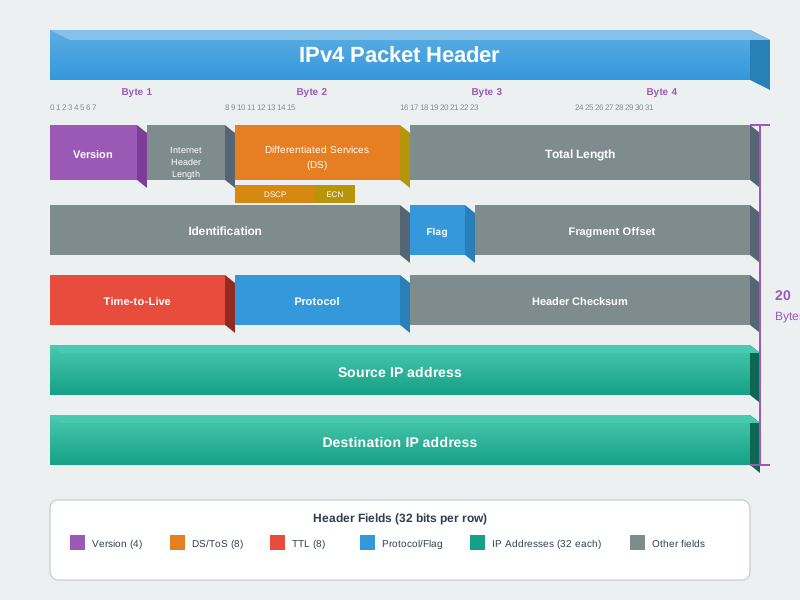
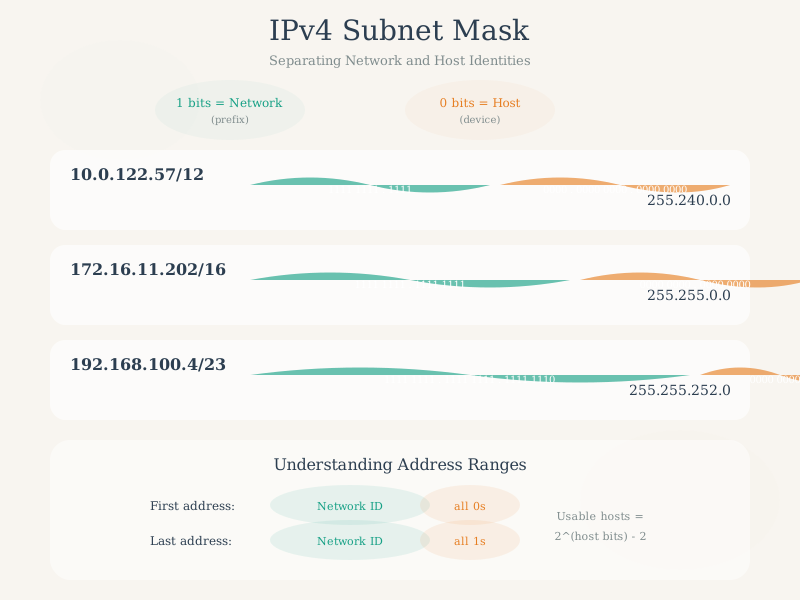
608.3 Address Structure and Binary Representation
An IPv4 address consists of 32 bits divided into four 8-bit octets, typically written in dotted-decimal notation. Understanding the binary representation is crucial for subnetting calculations.
{fig-alt=“IPv4 address structure showing 192.168.1.100 divided into four 8-bit octets with decimal and binary representations for each octet”}
Binary to Decimal Conversion:
Each octet can represent values from 0 to 255 (2^8 - 1). The binary positions represent powers of 2:
| Position | 7 | 6 | 5 | 4 | 3 | 2 | 1 | 0 |
|---|---|---|---|---|---|---|---|---|
| Value | 128 | 64 | 32 | 16 | 8 | 4 | 2 | 1 |
Example: 192 in binary = 11000000 = 128 + 64 = 192
608.4 Address Classes (Historical Context)
Before CIDR (Classless Inter-Domain Routing), IPv4 addresses were organized into classes. While mostly obsolete, understanding classes provides historical context and helps identify network ranges.
%%{init: {'theme': 'base', 'themeVariables': { 'primaryColor': '#2C3E50', 'primaryTextColor': '#fff', 'primaryBorderColor': '#16A085', 'lineColor': '#16A085', 'secondaryColor': '#E67E22', 'tertiaryColor': '#7F8C8D'}}}%%
graph TD
    IPv4[IPv4 Address Classes]

    ClassA["Class A<br/>1-126.x.x.x<br/>/8 mask<br/>16M hosts"]
    ClassB["Class B<br/>128-191.x.x.x<br/>/16 mask<br/>65K hosts"]
    ClassC["Class C<br/>192-223.x.x.x<br/>/24 mask<br/>254 hosts"]
    ClassD["Class D<br/>224-239.x.x.x<br/>Multicast"]
    ClassE["Class E<br/>240-255.x.x.x<br/>Reserved"]

    IPv4 --> ClassA
    IPv4 --> ClassB
    IPv4 --> ClassC
    IPv4 --> ClassD
    IPv4 --> ClassE

    style IPv4 fill:#2C3E50,stroke:#16A085,stroke-width:3px,color:#fff
    style ClassA fill:#16A085,stroke:#2C3E50,stroke-width:2px,color:#fff
    style ClassB fill:#16A085,stroke:#2C3E50,stroke-width:2px,color:#fff
    style ClassC fill:#16A085,stroke:#2C3E50,stroke-width:2px,color:#fff
    style ClassD fill:#E67E22,stroke:#2C3E50,stroke-width:2px,color:#fff
    style ClassE fill:#7F8C8D,stroke:#2C3E50,stroke-width:2px,color:#fff
{fig-alt=“IPv4 address classes diagram showing Class A (1-126, /8, large), Class B (128-191, /16, medium), Class C (192-223, /24, small), Class D (224-239, multicast), and Class E (240-255, reserved)”}
TipAlternative View: Address Class Selection by Network Size
This variant shows address class selection as a decision process based on the number of hosts needed:
%%{init: {'theme': 'base', 'themeVariables': { 'primaryColor': '#2C3E50', 'primaryTextColor': '#fff', 'primaryBorderColor': '#16A085', 'lineColor': '#E67E22', 'secondaryColor': '#16A085'}}}%%
flowchart TD
    START["How many hosts?"] --> Q1{"More than<br/>65,534?"}

    Q1 -->|Yes| CLASSA["Class A /8<br/>Up to 16.7M hosts<br/>10.x.x.x private"]
    Q1 -->|No| Q2{"More than<br/>254?"}

    Q2 -->|Yes| CLASSB["Class B /16<br/>Up to 65,534 hosts<br/>172.16-31.x.x"]
    Q2 -->|No| Q3{"More than<br/>62?"}

    Q3 -->|Yes| CLASSC["Class C /24<br/>Up to 254 hosts<br/>192.168.x.x"]
    Q3 -->|No| CIDR["Use CIDR<br/>/25 to /30<br/>Variable hosts"]

    CLASSA --> NOTE["Modern: Use CIDR<br/>instead of classful"]
    CLASSB --> NOTE
    CLASSC --> NOTE
    CIDR --> NOTE

    style START fill:#E67E22,stroke:#2C3E50,color:#fff
    style Q1 fill:#2C3E50,stroke:#16A085,color:#fff
    style Q2 fill:#2C3E50,stroke:#16A085,color:#fff
    style Q3 fill:#2C3E50,stroke:#16A085,color:#fff
    style CLASSA fill:#16A085,stroke:#2C3E50,color:#fff
    style CLASSB fill:#16A085,stroke:#2C3E50,color:#fff
    style CLASSC fill:#16A085,stroke:#2C3E50,color:#fff
    style CIDR fill:#16A085,stroke:#2C3E50,color:#fff
    style NOTE fill:#7F8C8D,stroke:#2C3E50,color:#fff
While address classes are historical, this decision tree helps understand why CIDR replaced them - classful addressing often wasted addresses by allocating too many for actual needs.
| Class | First Octet Range | Default Mask | Networks | Hosts per Network | Typical Use |
|---|---|---|---|---|---|
| A | 1-126 | 255.0.0.0 (/8) | 126 | 16,777,214 | Large organizations |
| B | 128-191 | 255.255.0.0 (/16) | 16,384 | 65,534 | Medium organizations |
| C | 192-223 | 255.255.255.0 (/24) | 2,097,152 | 254 | Small networks |
| D | 224-239 | N/A | N/A | N/A | Multicast |
| E | 240-255 | N/A | N/A | N/A | Reserved/Experimental |
NoteWhy 127.x.x.x is Missing
The range 127.0.0.0/8 is reserved for loopback addresses. 127.0.0.1 (localhost) is used for a device to communicate with itself, essential for testing and local services.
608.5 Private IP Address Ranges (RFC 1918)
IoT deployments almost exclusively use private IP ranges for internal device networks, with NAT providing internet access when needed.
| Range | CIDR | Class Equivalent | Total Addresses | Common IoT Use Cases |
|---|---|---|---|---|
| 10.0.0.0 - 10.255.255.255 | 10.0.0.0/8 | 1 Class A | 16,777,216 | Large enterprise IoT deployments, smart cities |
| 172.16.0.0 - 172.31.255.255 | 172.16.0.0/12 | 16 Class B | 1,048,576 | Medium-sized industrial IoT networks |
| 192.168.0.0 - 192.168.255.255 | 192.168.0.0/16 | 256 Class C | 65,536 | Home automation, small commercial buildings |
IoT Addressing Best Practices:
- Use 192.168.x.x for small deployments: Home automation, single-building smart systems
- Use 10.x.x.x for large deployments: Campus-wide sensor networks, smart city infrastructure
- Reserve dedicated subnets per device type: Separate cameras, sensors, controllers for security and management
- Document your addressing scheme: Critical for troubleshooting multi-thousand device networks
608.6 Special-Purpose IPv4 Addresses
| Address/Range | Purpose | Example Use in IoT |
|---|---|---|
| 0.0.0.0 | Default route, unknown address | DHCP client before receiving IP |
| 127.0.0.0/8 | Loopback (localhost) | Local MQTT broker testing |
| 169.254.0.0/16 | Link-local (APIPA) | Auto-configuration when DHCP fails |
| 224.0.0.0/4 | Multicast | mDNS, device discovery protocols |
| 255.255.255.255 | Limited broadcast | DHCP discovery messages |
NoteThe Birthday Paradox in Networking
You might think MAC address collisions are rare with 2^48 (281 trillion) possible addresses. But the birthday paradox shows otherwise:
In a room of just 23 people, there’s a 50% chance two share a birthday!
Similarly, collision probability grows faster than expected: - With 2^24 devices (~17 million), MAC collisions become likely - Random addressing in large IoT deployments can cause problems
This is why: - Manufacturers get assigned unique OUI prefixes - IPv6 uses structured address assignment - Large networks use address management systems
The math: P(collision) ≈ 1 - e^(-n²/2m) where n=devices, m=address space
NoteThe Birthday Problem for MAC Addressing: Why Structured Addressing Matters
The surprising collision risk:
You might think with 2^48 MAC addresses (281 trillion), collisions would be rare. But the Birthday Paradox reveals a counterintuitive truth.
The Birthday Problem: In a room of just 23 people, there’s a 50% chance two share a birthday. Why? Because we’re comparing all possible pairs, not individuals against a specific date.
Applied to MAC addresses:
%%{init: {'theme': 'base', 'themeVariables': {'primaryColor': '#2C3E50', 'primaryTextColor': '#fff', 'primaryBorderColor': '#16A085', 'lineColor': '#16A085', 'secondaryColor': '#E67E22', 'tertiaryColor': '#7F8C8D'}}}%%
graph TD
    A["Total MAC Space<br/>2^48 = 281 trillion<br/>addresses"]

    B["Random Assignment<br/>Collision likely at<br/>√(2^48) ≈ 2^24"]

    C["Reality Check<br/>16.7 million devices<br/>= 50% collision risk!"]

    D["Structured Assignment<br/>IEEE OUI blocks<br/>Zero collisions"]

    A --> B
    B --> C
    A --> D

    style A fill:#2C3E50,stroke:#16A085,stroke-width:3px,color:#fff
    style B fill:#E67E22,stroke:#2C3E50,stroke-width:2px,color:#fff
    style C fill:#E67E22,stroke:#2C3E50,stroke-width:3px,color:#fff
    style D fill:#16A085,stroke:#2C3E50,stroke-width:3px,color:#fff
{fig-alt=“MAC address collision probability diagram showing that with random assignment, collisions become likely at square root of address space (16.7 million devices), while structured IEEE OUI assignment prevents collisions”}
The Math:
- Address space: 2^48 ≈ 281 trillion addresses
- Birthday paradox formula: Collisions likely at √N devices
- Collision threshold: √(2^48) = 2^24 ≈ 16.7 million devices
- Reality: Large networks already hit millions of devices
Why random MAC assignment fails:
If manufacturers assigned MAC addresses randomly: - Smart city with 5 million sensors: 63% collision probability - Factory with 100,000 devices: 1.8% collision probability (seems low, but 1 collision = network chaos) - Global IoT (15 billion devices): Guaranteed massive collisions
How structured addressing solves this:
IEEE assigns OUI blocks (Organizationally Unique Identifier): - First 24 bits = manufacturer ID (assigned by IEEE) - Last 24 bits = device serial (assigned by manufacturer) - Result: Each manufacturer has 16.7 million unique addresses
Example:
Cisco OUI:     00:1E:14:xx:xx:xx
Arduino OUI:   A4:CF:12:xx:xx:xx
Espressif OUI: 24:0A:C4:xx:xx:xx
Key takeaway: Address space size alone doesn’t prevent collisions. Without structured assignment, collisions occur at √N, not N. This is why MAC addresses, Bluetooth IDs, and device identifiers all use manufacturer-assigned blocks rather than random generation.
608.7 Summary
- IPv4 addresses are 32-bit identifiers written as four decimal numbers (0-255) separated by dots, like 192.168.1.100
- Binary conversion is essential for subnetting: each octet represents 8 bits with positional values from 128 to 1
- Historical address classes (A, B, C) defined network sizes but have been replaced by flexible CIDR notation
- Private IP ranges (10.x.x.x, 172.16-31.x.x, 192.168.x.x) are reserved for internal networks and cannot be routed on the public internet
- Special addresses like loopback (127.0.0.1), link-local (169.254.x.x), and broadcast (255.255.255.255) serve specific network functions
- Structured addressing (like IEEE OUI for MAC addresses) prevents collisions in large-scale deployments
608.8 What’s Next
Now that you understand IPv4 address fundamentals, continue with:
- Subnetting and CIDR: Learn to divide networks into smaller segments using subnet masks and CIDR notation
- Ports and NAT: Understand how port numbers identify services and how NAT enables internet connectivity
- IPv6 for IoT: Explore the next-generation addressing for massive IoT deployments