1399  OWASP IoT Top 10 Vulnerabilities

1399.1 OWASP IoT Top 10 Vulnerabilities

WarningThe Most Critical IoT Security Risks

The Open Web Application Security Project (OWASP) identifies the top 10 IoT vulnerabilities based on industry-wide research and real-world incident analysis:

Rank Vulnerability Description Real-World Impact Example
I1 Insufficient Security Configurability Weak/default passwords, no password requirements 80% of IoT devices fail basic password requirements Mirai botnet: 600,000+ devices compromised via β€œadmin/admin”
I2 Insecure Web Interface XSS vulnerabilities, weak session management, exposed admin panels Allows remote takeover via browser attacks Unprotected smart camera web interfaces exposing live feeds
I3 Insufficient Authentication Default credentials never changed 540,000 devices in 2010 using factory defaults IP cameras with hardcoded username β€œadmin”, password β€œ12345”
I4 Insecure Network Services Telnet, SSH, UPnP exposed without encryption 70% of IoT devices transmit data unencrypted Exposed Telnet on port 23 allowing remote command execution
I5 Insecure Software/Firmware No update mechanism, unsigned updates β€œUnpatchable” devices with unfixable vulnerabilities Devices running 10+ year old Linux kernels with known CVEs
I6 Hardware Limitations Insufficient CPU/RAM for security features Debug ports (JTAG) accessible, USB tamper JTAG ports exposed allowing firmware extraction and modification
I7 Insecure Cloud Interface Weak API authentication, credential theft Cloud credentials leaked in mobile apps Smart lock APIs exposing user location and access history
I8 Unintended Device Usage Devices used in unintended contexts Privacy violations, cheating, surveillance Smartwatch used for exam cheating by students
I9 Privacy Concerns Excessive data collection, passive tracking Users tracked without consent or knowledge Retail beacons tracking shoppers via smartphone MAC addresses
I10 Insecure Default Settings Debug features enabled, no mandatory password change on first use Devices shipped in insecure state UPnP enabled by default allowing network exposure

1399.2 Case Studies

1399.2.1 Case Study: Mirai Botnet (2016)

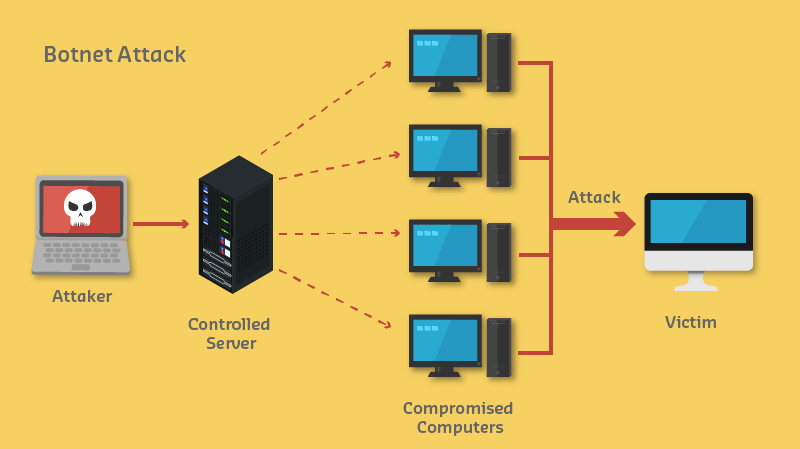
Diagram showing botnet architecture with command and control server directing infected IoT devices to launch DDoS attacks against targets
Figure 1399.1: Botnet attack architecture

What happened: - Malware scanned for IoT devices with default credentials - Infected 300,000+ cameras, DVRs, routers - Launched 620 Gbps DDoS attack on Dyn DNS - Took down Twitter, Netflix, Reddit, CNN

Root cause: I1 (default passwords) + I2 (exposed Telnet)

Lesson: A single vulnerability (default password) compromised hundreds of thousands of devices

1399.2.2 Case Study: LockState Smart Locks (2017)

What happened: - OTA firmware update had critical bug - Bricked 200 smart locks at AirBnB properties - Guests locked out, hosts couldn’t access properties - Required physical lock replacement

Root cause: I4 (insecure update mechanism) - No rollback capability - No staged rollout - No update verification

Lesson: IoT updates must be tested, staged, and reversible

1399.3 Deep Dive: IoT Botnet Attack Patterns and Defense

IoT botnets represent one of the most significant threats to internet infrastructure. Understanding their architecture, propagation methods, and defense strategies is critical for securing IoT deployments at scale.

1399.3.1 Botnet Architecture Evolution

First Generation (Mirai-style, 2016): - Centralized Command & Control server - Single point of failure for takedown - Hardcoded C2 domains

Second Generation (Peer-to-Peer, 2018+): - Decentralized P2P architecture - Commands propagate peer-to-peer - No single point of failure

1399.3.2 Attack Lifecycle Phases

Phase Mirai Method Modern Variants Detection Opportunity
1. Reconnaissance Scan port 23 (Telnet), 22 (SSH) Port 80/443/8080, UPnP discovery Unusual port scan patterns
2. Weaponization Hardcoded 62 default credentials Dictionary attacks, CVE exploits Failed login rate spike
3. Delivery Telnet brute force Zero-day exploits, supply chain Exploit signature matching
4. Installation Memory-resident (survives reboot) Persistent (firmware modification) File integrity monitoring
5. C2 Communication Hardcoded C2 domains DGA (Domain Generation Algorithm) DNS anomaly detection
6. Actions DDoS (TCP/UDP floods) Cryptomining, data exfiltration, ransomware Traffic volume/pattern analysis

1399.3.3 Propagation Techniques

Credential-Based (Most Common):

# Mirai-style credential stuffing (simplified)
DEFAULT_CREDS = [
    ("admin", "admin"), ("root", "root"), ("admin", "1234"),
    ("root", "12345"), ("admin", ""), ("support", "support"),
    # ... 62 credential pairs in original Mirai
]

def scan_and_infect(target_ip):
    for username, password in DEFAULT_CREDS:
        if try_telnet_login(target_ip, username, password):
            download_and_execute_payload(target_ip)
            report_to_c2(target_ip)  # New bot enrolled
            break

Exploit-Based (Increasing): - CVE-2017-17215: Huawei router RCE (Satori botnet) - CVE-2018-10561: GPON router auth bypass (VPNFilter) - CVE-2020-9054: Zyxel NAS command injection - Supply chain: Compromised firmware images, SDK backdoors

1399.3.4 DDoS Attack Types Launched by IoT Botnets

Attack Type Mechanism Mirai Peak Mitigation
UDP Flood High-volume UDP packets 620 Gbps Rate limiting, scrubbing
TCP SYN Flood Exhaust connection tables 300k pps SYN cookies, firewalls
HTTP GET Flood Application layer requests 1.2M rps WAF, CAPTCHA
DNS Amplification Spoofed queries to open resolvers 1.2 Tbps BCP38 (source validation)
GRE Flood Tunnel protocol abuse 400 Gbps Protocol filtering

1399.3.5 Network-Level Defense Strategies

Defense-in-Depth Architecture: 1. DDoS Scrubbing Center (Cloud-based) - Absorbs volumetric attacks 2. Firewall + IPS/IDS - Block known C2 IPs/domains 3. Network Segmentation - Limit lateral movement 4. IoT Gateway - Protocol inspection, anomaly detection

Device-Level Hardening:

# Essential IoT security configuration
# 1. Disable unnecessary services
systemctl disable telnet ssh-legacy
ufw deny 23  # Block Telnet

# 2. Change default credentials (MANDATORY)
passwd root  # Unique, complex password

# 3. Enable automatic updates
apt-get install unattended-upgrades
dpkg-reconfigure -plow unattended-upgrades

# 4. Restrict outbound connections
iptables -A OUTPUT -p tcp --dport 23 -j DROP  # Block Telnet out
iptables -A OUTPUT -p tcp --dport 22 -j DROP  # Block SSH scanning

# 5. Monitor for anomalies
tail -f /var/log/auth.log | grep "Failed password"

1399.3.6 Detection Indicators

Network Traffic Anomalies: | Indicator | Normal Baseline | Botnet Behavior | Alert Threshold | |———–|β€”β€”β€”β€”β€”-|—————–|—————–| | Outbound connections | <10/hour to known services | 1000s to random IPs | >50/hour to new IPs | | DNS queries | <100/hour, cached | DGA: thousands unique | >500 unique domains/hour | | Upload/Download ratio | Download > Upload | Upload spikes (DDoS) | Upload > 10x normal | | Port diversity | 80, 443, 8883 (MQTT) | 23, 22, 37215 | Any non-standard port |

Host-Based Indicators: - Unexpected processes: /tmp/.x, /var/run/.t - Modified binaries: /bin/busybox checksum mismatch - New cron jobs or startup scripts - Memory-resident processes (no disk footprint)

1399.3.7 Implementation Checklist for IoT Manufacturers

1399.3.8 Regulatory Responses

Regulation Region Key Requirements Effective
ETSI EN 303 645 EU No default passwords, vulnerability disclosure 2024
California SB-327 US (CA) Unique passwords, reasonable security 2020
PSTI Act UK Password requirements, update period disclosure 2024
NIST IR 8259 US Baseline capabilities for IoT devices Voluntary

1399.4 Security Tradeoffs

WarningTradeoff: Continuous Vulnerability Scanning vs Periodic Penetration Testing

Option A: Continuous automated vulnerability scanning - cost ~$5-15K/year for enterprise scanner (Qualys, Tenable), detects known CVEs within 24 hours of disclosure, 15-30% false positive rate, covers 100% of network-accessible assets weekly, minimal human expertise required

Option B: Periodic third-party penetration testing - cost ~$15-50K per engagement, discovers unknown/complex vulnerabilities through manual exploitation, 2-5% false positive rate, quarterly or annual coverage, requires 2-4 week engagement windows

Decision Factors: - Choose continuous scanning for large IoT fleets (1,000+ devices), compliance requirements (PCI-DSS, HIPAA), budget constraints, or rapid CVE patching needs - Choose penetration testing for validating security architecture, assessing complex attack chains, compliance mandates (SOC 2 Type II), or testing physical security

Best practice: Combine both - continuous scanning for breadth (known vulnerabilities), annual penetration testing for depth (unknown vulnerabilities). Budget allocation: 70% scanning infrastructure, 30% expert testing.
WarningTradeoff: Zero Trust Architecture vs Perimeter-Based Security

Option A: Zero Trust (β€œnever trust, always verify”) - every device request authenticated/authorized regardless of network location, micro-segmentation isolates each device, implementation cost ~$200-500K, operational overhead increases 40-60%, eliminates lateral movement

Option B: Perimeter-based security with trusted internal network - firewall at boundary, devices trust each other within VLAN, implementation cost ~$50-100K, lower operational overhead, vulnerable to insider threats

Decision Factors: - Choose Zero Trust for high-value targets (medical, industrial control), regulatory requirements (IEC 62443), untrusted physical environments, or safety-critical systems - Choose perimeter security for physically secured facilities, low-value sensors, budget constraints, or legacy device compatibility

Key metric: Average breach dwell time drops from 280 days (perimeter) to 30 days (Zero Trust) due to continuous verification detecting anomalies faster.

1399.5 Knowledge Checks

1399.6 What’s Next

Now that you understand OWASP IoT vulnerabilities, continue to: