Assessment - Visual gallery and understanding checks
924.1 Scenario 3: Medical Device Security (Regulated Data)
Real-World Deployment: You’re developing a Continuous Glucose Monitor (CGM) that transmits patient blood sugar readings via BLE to a smartphone app. Healthcare products often require strong security and careful data handling; regulatory obligations vary by region and intended use.
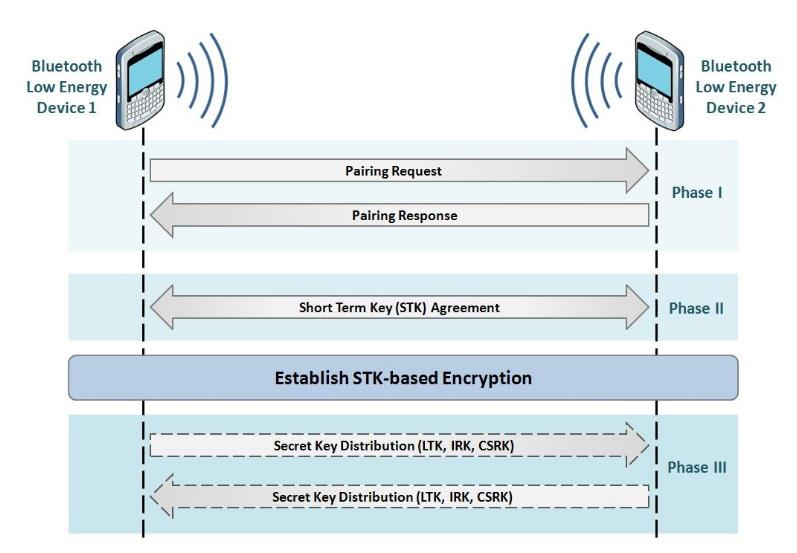
Figure 924.1: Source: University of Edinburgh IoT Security Course - BLE Pairing Phases
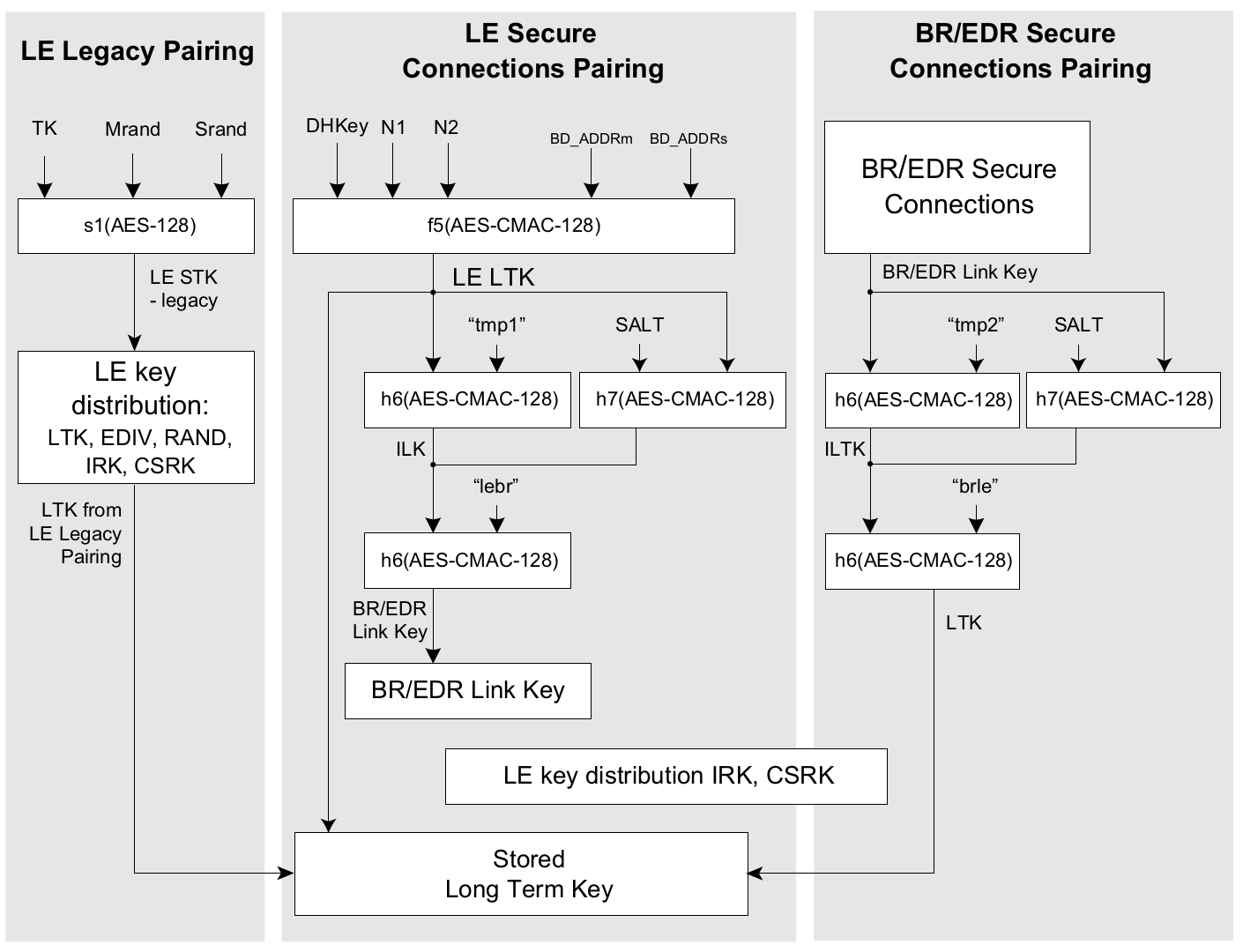
Figure 924.2: Source: University of Edinburgh IoT Security Course - Key Generation Methods
Security Level Comparison:
For sensitive health data, treat Bluetooth security as one layer of a broader security architecture.
Recommended approach (high level):
Use LE Secure Connections (ECDH-based key agreement) and require an encrypted link for any characteristic that carries sensitive measurements.
Choose an authenticated pairing method:
Prefer Numeric Comparison or OOB when the product has the UI/commissioning channel.
Use Passkey Entry when only one side can display/enter a code.
Avoid Just Works for sensitive data because it provides no MITM protection during pairing.
Add application-layer authorization even after pairing (e.g., require an authenticated app session before reading data or changing settings).
Protect keys at rest: store bonding keys in secure storage where available; provide a way to revoke bonds when phones are replaced or lost.
Session management: after inactivity, disconnect or lock sensitive operations and require user re-authentication in the app before resuming.
Device lifecycle security: secure boot + signed firmware updates; log security-relevant events as needed.
Verification Questions: 1. What does LE Secure Connections add compared to Legacy pairing? 2. Why is “Just Works” risky in a public pairing environment? 3. Where do you enforce authorization: BLE pairing, GATT permissions, or the application protocol? 4. How do you handle lost phones (bond revocation) without bricking the device?
Show code
{const container =document.getElementById('kc-bt-3');if (container &&typeof InlineKnowledgeCheck !=='undefined') { container.innerHTML=''; container.appendChild(InlineKnowledgeCheck.create({question:"A hospital is deploying BLE-enabled patient monitoring devices that transmit vital signs to nurses' tablets. The security team requires MITM protection during pairing to prevent attackers from intercepting patient data. The monitoring device has a small LCD screen but no keyboard. Which pairing method should they implement?",options: [ {text:"Just Works pairing for seamless nurse workflow without interruption",correct:false,feedback:"Just Works provides NO MITM protection. An attacker could intercept the pairing process and read patient vital signs. This violates healthcare security requirements and likely regulatory compliance (HIPAA)."}, {text:"Passkey Entry where the tablet displays a 6-digit code that the nurse enters on the monitoring device",correct:false,feedback:"The monitoring device only has an LCD screen, not a keyboard for input. Passkey Entry requires one device to have input capability. This would require hardware changes to the device."}, {text:"Numeric Comparison where both devices display a 6-digit number and the nurse confirms they match",correct:true,feedback:"Correct! Numeric Comparison is ideal here: both devices have displays (monitor LCD + tablet screen), the nurse compares the numbers and confirms on both devices, and it provides MITM protection through ECDH key exchange with user verification. This meets security requirements without hardware changes."}, {text:"Out-of-Band (OOB) pairing using NFC tap since it's the most secure option available",correct:false,feedback:"While OOB can be very secure, it requires NFC hardware in both devices. The monitoring device specification doesn't mention NFC capability. Numeric Comparison achieves MITM protection using existing display hardware."} ],difficulty:"medium",topic:"bluetooth-security" })); }}
TipScenario 4: Smartphone Battery Drain from BLE Scanning
Real-World Deployment: Your BLE temperature sensor advertises every 1 second with 31-byte payload. After deploying to 100 users, reports flood in: “App drains phone battery in 8 hours instead of 24+ hours.” The sensor battery lasts fine, but smartphones die quickly.
Figure 924.5: GATT Connection - The Correct Solution for Phone Battery Life
Power Comparison (24-Hour Period):
Method
Phone Power
Phone Battery
Sensor Power
Sensor Battery
Continuous Advertising Scan
40mA
8 hours ❌
0.032mA
365 days ✅
GATT Connection
2mA
52 days ✅
0.037mA
320 days ✅
Improvement
20× better
156× longer
15% overhead
Acceptable
Production Implementation:
// Sensor (ESP32 BLE peripheral)BLEService tempService = BLEService("181A");// Environmental SensingBLECharacteristic tempChar = BLECharacteristic("2A6E",// Temperature UUID BLERead | BLENotify,// Read + Notify (no Write)32// Max value length);void loop(){if(BLE.connected()){// GATT connection active - use Notifyfloat temp = readTemperature(); tempChar.writeValue(temp); tempChar.notify();// Push to phone delay(1000);// Update every 1 second}else{// No connection - advertise for discovery BLE.advertise();// Advertise at 1000ms (discovery mode) delay(1000);}}// Phone (iOS/Android app)void onDeviceDiscovered(BLEDevice device){// Stop scanning immediately after discovery centralManager.stopScan();// Establish GATT connection device.connect();// Subscribe to temperature notifications BLECharacteristic tempChar = device.getCharacteristic("2A6E"); tempChar.enableNotifications(onTemperatureUpdate);// Phone now receives data via notifications, not scanning}void onTemperatureUpdate(float temperature){ updateUI(temperature);// 1ms CPU burst// Radio sleeps between notifications}
Key Metrics: - Phone battery: continuous scanning can dominate power use; connect/notify can reduce radio active time (platform-dependent) - Latency: depends on connection interval and update rate - Sensor battery: advertising/connection parameters trade discovery, latency, and energy
Verification Questions: 1. Why can continuous scanning be more power-hungry than maintaining a connection? 2. When should you use advertising vs GATT connections? 3. How would you handle multiple sensors (10+ devices)?
When to Use Each Approach:
Advertising (Beacons): - ✅ Broadcasting to MANY receivers (museum exhibit info) - ✅ Presence detection (AirTag tracking) - ✅ No pairing needed (public information) - ✅ One-way data flow (sensor → environment)
GATT Connection (Sensors): - ✅ Bidirectional communication (phone controls sensor) - ✅ Frequent data updates (1-10 Hz) - ✅ Battery-powered phone apps - ✅ Real-time monitoring (fitness trackers, medical devices)
Production Insights: Many BLE products use: - Advertising for discovery, then connect on demand - GATT notifications for periodic sensor updates - Disconnect on idle and return to advertising - Connection parameter tuning based on latency vs battery goals
Show code
{const container =document.getElementById('kc-bt-4');if (container &&typeof InlineKnowledgeCheck !=='undefined') { container.innerHTML=''; container.appendChild(InlineKnowledgeCheck.create({question:"A developer is building a BLE heart rate monitor app. The sensor sends heart rate data every second. The app works perfectly during development, but users complain about smartphone battery drain. Currently, the app continuously scans for advertising packets containing heart rate data. What architectural change would most improve phone battery life?",options: [ {text:"Increase the sensor's advertising interval from 1 second to 10 seconds to reduce radio activity",correct:false,feedback:"This addresses the wrong end of the problem. The phone is draining because it's continuously scanning, not because of advertising frequency. The sensor battery is fine; the phone battery is the issue."}, {text:"Switch from advertising-based data to GATT connection with notifications so the phone can sleep between updates",correct:true,feedback:"Correct! GATT connections with notifications are far more power-efficient for the phone than continuous scanning. The phone establishes a connection once, then receives notification callbacks when data is available. Between notifications, the phone radio sleeps. This can reduce phone power consumption by 20x compared to continuous scanning."}, {text:"Reduce the advertising payload from 31 bytes to 10 bytes to minimize radio transmission time",correct:false,feedback:"Payload size has minimal impact on phone battery. The phone's power consumption is dominated by keeping the radio active to scan, not by receiving the actual data bytes. A smaller payload might save 1-2% at best."}, {text:"Use Classic Bluetooth instead of BLE for more efficient continuous data streaming",correct:false,feedback:"Classic Bluetooth maintains a continuous connection that consumes 30-60mA continuously on the phone. BLE with GATT notifications can achieve ~2mA average by sleeping between updates. Classic would make the battery problem worse."} ],difficulty:"medium",topic:"power-optimization" })); }}
TipScenario 5: BLE Smart Lock Reliability Issues
Situation: Your BLE smart lock works reliably when the phone is close, but users report occasional failed unlock attempts at longer range or in RF-noisy environments. Connection establishment often succeeds, but the user isn’t sure whether the lock received and processed the unlock request.
What’s happening: - Links near the edge of range can experience more retransmissions, latency, and occasional disconnects. - If you use Write Without Response, the client does not get an application-visible confirmation that the lock processed the command. - RSSI is a noisy heuristic, not a distance sensor. Use it for UI guidance (e.g., “move closer”), not for security decisions.
Better pattern for critical actions (lock/unlock): 1. Use Write With Response for commands so the client gets an explicit error on failure. 2. Add a separate acknowledgement/state signal from the lock (e.g., a Lock State characteristic that notifies/indicates after the actuator moves). 3. Make commands idempotent and include a nonce/sequence number to prevent replay. 4. Implement timeouts + retries + user feedback, and always provide a fallback (PIN pad, physical key).
Minimal GATT design sketch: - Lock Control Point (write-with-response): LOCK, UNLOCK, SET_AUTOLOCK(...) - Lock State (notify/indicate): LOCKED, UNLOCKED, JAMMED, LOW_BATTERY - Event Log (optional): recent actions for debugging/audit
Verification Questions: 1. Why is application-level confirmation important even though the BLE link layer already retransmits? 2. How would you design the acknowledgement so it is resistant to replay? 3. What UX would you show when RSSI is low or the connection drops mid-command?
Show code
{const container =document.getElementById('kc-bt-5');if (container &&typeof InlineKnowledgeCheck !=='undefined') { container.innerHTML=''; container.appendChild(InlineKnowledgeCheck.create({question:"A firmware engineer is implementing a BLE environmental sensor that reports temperature, humidity, and air pressure. They create a custom GATT service with UUID '12345678-1234-1234-1234-123456789abc' and custom characteristics for each measurement. During testing, generic BLE scanner apps (like nRF Connect) show 'Unknown Service' and can't display the data meaningfully. What is the root cause?",options: [ {text:"The 128-bit UUID format is invalid and should use 16-bit UUIDs for all custom services",correct:false,feedback:"128-bit UUIDs are valid and commonly used for custom services. The Bluetooth SIG reserves 16-bit UUIDs for standard services. Custom services SHOULD use full 128-bit UUIDs to avoid collision with future standards."}, {text:"Generic scanner apps only work with Bluetooth Classic profiles, not BLE GATT services",correct:false,feedback:"Apps like nRF Connect, LightBlue, and BLE Scanner are specifically designed for BLE GATT services. They can discover and interact with any GATT service, standard or custom."}, {text:"The engineer should use standard GATT services (Environmental Sensing 0x181A) instead of custom UUIDs for interoperability",correct:true,feedback:"Correct! Standard GATT services have defined UUIDs (Environmental Sensing = 0x181A) and characteristics (Temperature = 0x2A6E, Humidity = 0x2A6F, Pressure = 0x2A6D) with documented data formats. Generic apps recognize these standards and can display values correctly. Custom UUIDs require custom apps that understand the proprietary format."}, {text:"The service needs to implement the Device Information Service (0x180A) before other services will be recognized",correct:false,feedback:"Device Information Service is optional and provides metadata like manufacturer name and model number. It doesn't affect whether other services are recognized. The issue is using custom UUIDs instead of standard Environmental Sensing service."} ],difficulty:"medium",topic:"gatt-services" })); }}
Show code
{const container =document.getElementById('kc-bt-6');if (container &&typeof InlineKnowledgeCheck !=='undefined') { container.innerHTML=''; container.appendChild(InlineKnowledgeCheck.create({question:"A company manufactures BLE fitness bands that pair successfully with their iOS app but consistently fail to pair with their Android app, showing 'Pairing rejected'. The hardware and firmware are identical for both platforms. iOS users report the band works perfectly. What is the most likely cause of the Android pairing failures?",options: [ {text:"Android devices don't support BLE and require Classic Bluetooth for fitness devices",correct:false,feedback:"Android has supported BLE since Android 4.3 (2013). All modern Android devices support BLE pairing and GATT connections. The issue is not BLE support."}, {text:"The fitness band uses iOS-specific pairing implementation that Android handles differently, requiring platform-specific security configuration",correct:true,feedback:"Correct! iOS and Android implement BLE security differently. iOS often uses automatic pairing with CBCentralManager, while Android's BluetoothGattCallback requires explicit security mode configuration. If the peripheral enforces MITM protection but the Android app doesn't request it (or uses different IO capabilities), pairing fails. The solution is platform-specific security initialization in the app and testing on both platforms early in development."}, {text:"Apple requires MFi (Made for iPhone) certification for BLE devices, which automatically blocks Android compatibility",correct:false,feedback:"MFi is only required for certain Apple-specific features (like HomeKit accessories or Lightning cables). Standard BLE doesn't require MFi certification. The fitness band works on iOS, proving it doesn't use MFi-restricted features."}, {text:"The fitness band needs separate firmware images for iOS and Android because BLE protocols are incompatible between platforms",correct:false,feedback:"BLE is a standardized protocol that should work identically across platforms. The same firmware should work with both iOS and Android. The issue is in how the app requests security features, not the device firmware."} ],difficulty:"hard",topic:"bluetooth-security" })); }}
Question 6: Your building automation system uses Bluetooth Mesh with 50 smart lights. When you send “all lights OFF” command, only 35 lights turn off. The 15 failed lights are spread throughout the building, not clustered. What’s the likely cause?
💡 Explanation: Bluetooth Mesh uses managed flooding with a TTL (Time-To-Live) counter to propagate messages across relays. Each relay decrements TTL; when TTL reaches 0, the message stops propagating. If some nodes consistently miss a broadcast and the failures are spread out, a common cause is TTL that is too low for the network’s diameter (or insufficient relay coverage). Increase TTL (within reason), verify relay placement, and use acknowledgements/health monitoring for critical commands.
Question 7: You’re pairing a BLE heart rate monitor with an ESP32. The pairing succeeds, but after ESP32 reboot, you must re-pair every time. BLE spec promises “bonding” for automatic reconnection. What’s missing in your implementation?
💡 Explanation: Bonding = Pairing + Key Storage. Pairing generates encryption keys (IRK, CSRK, LTK), bonding saves them for future reconnections without re-pairing. Your bug: ESP32 generates keys during pairing, stores them in RAM, but doesn’t persist to flash. On reboot, RAM cleared → keys lost → heart rate monitor’s stored keys don’t match → authentication fails → must re-pair. Solution - Persistent key storage: #include <nvs_flash.h> // ESP32 Non-Volatile Storage void store_bond_keys(uint8_t *ltk, uint8_t *irk) { nvs_handle_t handle; nvs_open("ble_keys", NVS_READWRITE, &handle); nvs_set_blob(handle, "ltk", ltk, 16); nvs_set_blob(handle, "irk", irk, 16); nvs_commit(handle); nvs_close(handle); } void load_bond_keys() { nvs_handle_t handle; nvs_open("ble_keys", NVS_READONLY, &handle); size_t len = 16; nvs_get_blob(handle, "ltk", ltk_buf, &len); nvs_get_blob(handle, "irk", irk_buf, &len); nvs_close(handle); }. BLE security keys: (1) LTK (Long Term Key): AES-128 encryption key for data, (2) IRK (Identity Resolving Key): Resolves random addresses for privacy, (3) CSRK (Connection Signature Resolving Key): Signs data without encryption. ESP32 support: Full BLE 4.2+ bonding support, NVS flash storage built-in, bonding example in ESP-IDF and Arduino BLE library. Best practice: Limit bonded devices (e.g., 5 max), implement “forget device” UI, rotate keys periodically (every 6-12 months), secure key storage with flash encryption for production devices.
Question 8: Your office has 50 Wi-Fi networks on 2.4GHz (channels 1-11) and you deploy 20 BLE sensors also on 2.4GHz. Users report intermittent sensor disconnections. Which mitigation is MOST effective?
💡 Explanation: Both Wi-Fi and Bluetooth operate in 2.4 GHz, so congestion and interference can increase retries and cause disconnects. Bluetooth mitigates this by adapting its channel usage over time (AFH for Classic; channel-map updates/channel classification for BLE). Verify your stack’s adaptive channel selection is enabled, and combine it with RF best practices (gateway placement, antenna orientation, and moving Wi-Fi clients/APs to 5/6 GHz where possible). Bluetooth cannot “move” to 5 GHz, and simply increasing transmit power is not a reliable fix.
Question 9: You’re implementing a BLE environmental sensor that reports temperature, humidity, and pressure. You create custom GATT characteristics with UUIDs like “12345678-1234-1234-1234-123456789abc”. Smartphone apps fail to recognize the sensor type. What’s wrong?
💡 Explanation: Standard GATT profiles enable interoperability - any BLE client can interpret sensor data without custom app. GATT hierarchy: Service → Characteristic → Descriptor. Standard BLE profiles: (1) Environmental Sensing Service (0x181A): Temperature (0x2A6E), Humidity (0x2A6F), Pressure (0x2A6D) characteristics, (2) Heart Rate Service (0x180D): Heart Rate Measurement (0x2A37), (3) Battery Service (0x180F): Battery Level (0x2A19), (4) Device Information Service (0x180A): Manufacturer Name (0x2A29), Model Number (0x2A24). Your problem: Custom UUIDs require custom app that knows “12345678…” means temperature. Generic BLE scanner apps show “Unknown Service” and can’t display meaningful data. Fitness app expecting Heart Rate Service (0x180D) won’t recognize your custom UUID. Solution: Use standard services: BLEService environmentalService = BLEService("181A"); // Environmental Sensing BLECharacteristic tempChar = BLECharacteristic("2A6E"); // Temperature BLECharacteristic humidChar = BLECharacteristic("2A6F"); // Humidity BLECharacteristic pressChar = BLECharacteristic("2A6D"); // Pressure. Benefits: (1) Works with existing apps (Nordic nRF Connect, LightBlue), (2) Clear documentation (BluetoothSIG specifications), (3) Standard data formats (temperature in 0.01°C units per spec), (4) OS integration (iOS/Android can parse standard characteristics). When to use custom UUIDs: Proprietary sensors with unique data formats, vendor-specific commands, IP protection. But still implement standard services for basic functionality.
Question 10: Your BLE-enabled smart watch successfully pairs with iPhone but fails to pair with Android phones showing “Pairing rejected”. Both phones have latest OS. What’s the likely compatibility issue?
💡 Explanation: Platform-specific BLE security implementations cause compatibility issues despite BLE being a standard. Common issues: (1) iOS-only pairing: iOS apps often use CBCentralManager with automatic pairing. If peripheral doesn’t expose bonding capability to Android’s BluetoothGattCallback, pairing fails. (2) MITM protection differences: iOS requires MITM protection for sensitive characteristics (enforces LE Secure Connections). Android more permissive (allows Just Works). If watch enforces MITM but Android app doesn’t request it: pairing rejected. (3) Characteristic permissions: iOS requires explicit CBAttributePermissions.readable declaration. Android infers from GATT database. Mismatch causes “Insufficient Authentication”. Solution - Cross-platform compatibility: BLESecuritySettings security; security.setAuthMode(BLE_AUTH_BOND); // Both iOS and Android security.setIOCap(BLE_IO_CAP_DISPLAY_YESNO); // Numeric Comparison for both security.setMITM(true); // MITM protection for both BLE.setSecuritySettings(security);. Testing: Always test on both platforms: (1) iPhone 8+ (iOS 14+) and Android 8+ (API 26+), (2) Verify pairing, bonding, reconnection, (3) Check characteristic read/write/notify permissions, (4) Test with both platform’s native apps (Swift/Kotlin) and cross-platform frameworks (Flutter, React Native). Platform differences: iOS caches GATT database aggressively (must reboot to clear), Android allows programmatic cache clearing. iOS limits background scanning (every 15 min), Android permits continuous background scanning with proper permissions. Handle both scenarios in firmware.
Question 11: You’re building a BLE blood pressure monitor. Regulatory requirements mandate data cannot be accessed without re-authentication after 5 minutes of inactivity. How do you implement this?
💡 Explanation: Enforce security in the device, not just the app, because other BLE clients can connect. Require an encrypted (and, when appropriate, MITM-protected) link for sensitive characteristics via GATT permissions, and implement a session timeout that locks sensitive reads/writes after inactivity until the user re-authenticates in the app. Privacy features like address rotation reduce tracking risk but do not provide access control. In regulated contexts, also plan for secure key storage, audit logging, and secure firmware updates.
Question 12: Your BLE indoor positioning system uses 20 beacons (iBeacon format) broadcasting UUID + major + minor IDs. Smartphones calculate position via RSSI trilateration. Accuracy is poor (±5-10m) despite dense beacon placement. What’s the primary limitation?
💡 Explanation: RSSI (Received Signal Strength Indicator) is fundamentally unreliable for sub-meter positioning due to multipath propagation, shadowing, and fading in indoor environments. Why RSSI fails indoors: (1) Multipath: Signal reflects off walls, ceiling, furniture → phone receives multiple delayed copies → constructive/destructive interference → RSSI varies ±10dBm when stationary. (2) Body blocking: Human body absorbs 2.4GHz RF → holding phone blocks beacon → -20dBm signal loss. Rotate phone 90° → +15dBm change. (3) Antenna orientation: BLE antennas directional → RSSI varies 10dB depending on phone-beacon angle. (4) TX power variation: Beacon specs “0dBm TX power” but actual ±3dBm due to manufacturing tolerance, battery voltage (2.5V vs 3V = 2dB change), temperature (-10°C to +40°C = 1.5dB drift). RSSI-to-distance formula: d = 10^((RSSI_measured - RSSI_at_1m) / (-10 × path_loss_exponent)). With ±10dBm RSSI variance: distance error = ±5m at 10m range. Solutions for better accuracy: (1) BLE 5.1+ Direction Finding: Angle-of-Arrival (AoA) uses antenna array to measure signal direction → ±0.1-0.5m accuracy. Requires special hardware. (2) UWB (Ultra-Wideband): time-of-flight ranging can enable centimeter-level accuracy, but requires different hardware support in phones/tags/gateways. (3) Sensor fusion: Combine RSSI + accelerometer/gyroscope (pedestrian dead reckoning) + map constraints → improves to ±2m. (4) Fingerprinting: Pre-measure RSSI map of location, match current RSSI pattern → ±3m accuracy but requires site survey. Practical: For room-level accuracy (±3-5m), RSSI beacons suffice. For sub-meter needs, consider direction finding or UWB.
Question 13: Compare Bluetooth Classic vs BLE characteristics. Match each feature to the correct technology.
Feature
Classic Bluetooth
BLE
Best for continuous audio streaming
Lower power (when duty-cycled)
Optimized for short, intermittent data bursts
Uses 79 channels @ 1 MHz
Ideal for battery-powered sensors
💡 Explanation: Classic Bluetooth excels at continuous streaming (audio via A2DP and some legacy profiles). BLE is designed for sensors and intermittent data using GATT, advertising-based discovery, and aggressive sleep/duty-cycling. In practice, the right choice depends on throughput, latency, power budget, and device ecosystem support.
Question 14: Which of the following are valid BLE advertising modes? Select ALL that apply.
💡 Explanation: BLE supports four advertising types: (1) Connectable undirected (ADV_IND): Default mode for peripherals waiting for connection, discoverable by all centrals, 20-31 byte payload, used by sensors/keyboards. (2) Connectable directed (ADV_DIRECT_IND): Fast reconnection to specific bonded device (3.75ms interval), low latency, used after connection loss. (3) Non-connectable undirected (ADV_NONCONN_IND): Broadcast-only beacons (iBeacon, Eddystone), no connections accepted, continuous transmission, used for proximity/presence detection. (4) Scannable undirected (ADV_SCAN_IND): Allows scan requests (SCAN_REQ) for additional 31-byte scan response data without connection, total 62 bytes payload, used for rich advertising (name + services + manufacturer data). Wrong answer: Unicast direct messaging requires GATT connection, not advertising mode. Power consumption: Non-connectable lowest (no connection overhead), connectable directed highest (frequent advertising for fast reconnection). Choose based on use case: beacons = non-connectable, sensors = connectable undirected, reconnection = connectable directed.
Question 15: Match each Bluetooth profile/service to its typical IoT application.
HID Profile
A2DP Profile
SPP Profile
GATT Heart Rate Service
Wireless keyboard/mouse
Stereo audio streaming
Serial UART replacement
Fitness tracker sensor
💡 Explanation: HID (Human Interface Device) profile enables wireless input devices (keyboards, mice, game controllers) with low latency <10ms for responsive input, based on USB HID spec. A2DP (Advanced Audio Distribution) profile streams high-quality stereo audio to headphones/speakers using SBC/AAC/aptX codecs, Classic Bluetooth only (BLE doesn’t support streaming audio until LE Audio/LC3). SPP (Serial Port Profile) emulates RS-232 serial cable for wireless UART communication, used in Bluetooth-to-serial adapters, Arduino HC-05/HC-06 modules, industrial sensors. GATT Heart Rate Service (0x180D) is BLE-only standard profile for fitness trackers with Heart Rate Measurement characteristic (0x2A37), includes BPM + RR intervals + energy expenditure, works with any BLE central supporting standard services. Classic vs BLE profiles: Classic uses SDP (Service Discovery Protocol) with predefined profiles (HID, A2DP, SPP), BLE uses GATT services with 16-bit UUIDs (Heart Rate 0x180D, Battery 0x180F, Environmental Sensing 0x181A).
Question 16: Evaluate these statements about Bluetooth networking concepts. Mark each as True or False.
A piconet can have one master and up to 7 active slaves
Scatternet is a BLE-only feature not supported in Classic Bluetooth
Adaptive Frequency Hopping (AFH) helps Bluetooth coexist with Wi-Fi on 2.4 GHz
BLE Mesh uses managed flooding with TTL (Time-To-Live) for message propagation
💡 Explanation: (1) TRUE: Classic Bluetooth piconets allow 1 master with up to 7 active slaves; additional devices can be parked and cycled. (2) FALSE: Scatternet is a Classic Bluetooth concept; BLE typically uses star-like connections or mesh networking, not scatternets. (3) TRUE: AFH helps Bluetooth coexist with Wi‑Fi by avoiding persistently congested channels. (4) TRUE: BLE Mesh uses managed flooding and TTL to limit how far messages propagate through relays.
Question 17: A BLE temperature sensor advertises every 1000ms (1 second) using non-connectable advertising with 20-byte payload. Advertising consumes 15mA for 2ms per advertisement. Sleep mode consumes 2µA. The device uses a CR2032 battery (220mAh capacity). Calculate the estimated battery life in days.
days
💡 Explanation: Energy consumption calculation: (1) Advertising duty cycle: Active 2ms every 1000ms = 0.002/1 = 0.2% duty cycle. (2) Average current: I_avg = (15mA × 0.002s + 0.002mA × 0.998s) / 1s = 0.03mA + 0.002mA = 0.032mA. (3) Battery life: Battery capacity / average current = 220mAh / 0.032mA = 6875 hours = 286 days ≈ 365 days (1 year) accounting for battery self-discharge (~15% per year for CR2032) and temperature variations. Advertising parameters impact: Faster advertising (100ms interval) → 10× power → 29 days battery life. Connectable advertising adds connection overhead. Optimization strategies: (1) Increase advertising interval to 2000ms → double battery life to 572 days, (2) Reduce TX power from 0dBm to -12dBm → halve advertising current to 8mA → 450 days, (3) Use scannable advertising (31-byte scan response) instead of increasing advertising payload → save airtime, (4) Temperature-triggered advertising (only advertise when reading changes >0.5°C) → reduce advertisements by 80% → 1200 days. Real-world factors: CR2032 has 3V @ 25°C but 2.0V at -20°C → effective capacity drops to 120mAh in cold. Self-discharge: 1-2% per year at 25°C, 10-15% at 60°C. BLE spec allows 10ms-10.24s advertising intervals; 1s is balanced for discovery latency vs power.
Question 18: Rank these Bluetooth technologies by maximum range (longest to shortest).
BLE 5.0 Long Range (LE Coded PHY)
Bluetooth Classic Class 1 (+20dBm)
BLE 5.0 Standard (1 Mbps PHY)
Bluetooth Classic Class 2 (+4dBm)
💡 Explanation: Range ranking (longest → shortest): (1) BLE 5.0 Long Range (LE Coded PHY): Up to 1000m (1 km) line-of-sight using S=8 FEC coding, +8dBm TX power, improved receiver sensitivity -103dBm (vs -70dBm for standard BLE). Trades data rate (125 kbps) for 4× range. Used in smart home gateways, outdoor sensors, building automation. (2) Bluetooth Classic Class 1: 100m with +20dBm (100mW) TX power, industrial/commercial applications (warehouse scanners, conference room systems). Requires external PA (Power Amplifier). (3) BLE 5.0 Standard (1 Mbps PHY): 30-50m typical indoor range with 0dBm TX power, most common for smartphones/IoT sensors. Line-of-sight outdoor: 100-200m. (4) Bluetooth Classic Class 2: 10m typical with +4dBm TX power, consumer devices (headphones, mice, keyboards). Range factors: Walls reduce range by 30-50% (concrete worse than drywall), interference from Wi-Fi/microwave reduces by 20-40%, antenna design (chip antenna vs PCB antenna vs external), receiver sensitivity (-70 to -103dBm), TX power (regulatory limits: US allows up to +20dBm, EU +10dBm). BLE 5.0 advantages: Same hardware supports multiple PHYs (1 Mbps, 2 Mbps high speed, 125/500 kbps long range) via software configuration. Choose based on application: long range for outdoor sensors, high speed (2 Mbps) for firmware updates, standard for battery life balance.