%%{init: {'theme': 'base', 'themeVariables': { 'primaryColor': '#2C3E50', 'primaryTextColor': '#fff', 'primaryBorderColor': '#16A085', 'lineColor': '#16A085', 'secondaryColor': '#E67E22', 'tertiaryColor': '#ecf0f1', 'fontSize': '14px'}}}%%
graph TB
    subgraph Negative ["Negative Feedback (Stabilizing)"]
        N1["Setpoint:<br/>22 deg C"] --> N2["Error:<br/>+2 deg C too cold"]
        N2 -->|Increase Heat| N3["Temperature<br/>Rises"]
        N3 -->|Error Decreases| N4["Reduce Heat<br/>Output"]
        N4 -.->|Approaches Target| N1
    end

    subgraph Positive ["Positive Feedback (Amplifying)"]
        P1["Small Voltage<br/>Increase"] --> P2["Amplifier<br/>Gain x10"]
        P2 -->|Output| P3["Larger Voltage"]
        P3 -->|Feed Back| P2
        P2 -.->|Continues<br/>Amplifying| P4["Saturates or<br/>Oscillates"]
    end

    style N1 fill:#16A085,stroke:#2C3E50,stroke-width:2px,color:#fff
    style N2 fill:#E67E22,stroke:#16A085,stroke-width:2px,color:#fff
    style N3 fill:#2C3E50,stroke:#16A085,stroke-width:2px,color:#fff
    style N4 fill:#2C3E50,stroke:#16A085,stroke-width:2px,color:#fff
    style P1 fill:#2C3E50,stroke:#16A085,stroke-width:2px,color:#fff
    style P2 fill:#E67E22,stroke:#16A085,stroke-width:2px,color:#fff
    style P3 fill:#16A085,stroke:#2C3E50,stroke-width:2px,color:#fff
    style P4 fill:#E74C3C,stroke:#2C3E50,stroke-width:2px,color:#fff
221 PID: Feedback Fundamentals
221.1 Learning Objectives
By the end of this chapter, you will be able to:
- Explain Feedback Concepts: Describe how feedback loops work in electronic systems and IoT applications
- Identify Feedback Examples: Recognize feedback mechanisms in everyday devices and IoT systems
- Distinguish Feedback Types: Compare positive and negative feedback and their applications
- Understand Distributed Feedback: Explain how IoT systems implement feedback across network boundaries
TipMVU: Minimum Viable Understanding
Core concept: Feedback is when a system uses its output to adjust its input - like checking your speed while driving and adjusting the gas pedal accordingly. Why it matters: Without feedback, systems operate blindly and cannot adapt to changing conditions or disturbances. Key takeaway: Most IoT control applications use negative feedback to maintain stable setpoints, while positive feedback is reserved for specialized applications like signal amplification.
221.2 Prerequisites
Before diving into this chapter, you should be familiar with:
- Sensor Fundamentals and Types: Understanding sensor characteristics and how they measure physical variables is essential for implementing effective feedback control systems
- Actuators: Knowledge of actuator types and control methods is critical since feedback systems ultimately drive actuators
- Processes & Systems: Fundamentals: Familiarity with systems thinking, input-output relationships, and process definitions
TipFor Beginners: Feedback Control
Imagine driving a car and trying to maintain exactly 60 mph. You look at the speedometer (sensor), see you’re at 58 mph (error = 2 mph too slow), so you press the gas pedal a bit (control action). You continuously adjust based on what you see - that’s feedback control.
Everyday Analogy: Your home thermostat is a perfect feedback example. It doesn’t just turn heat “fully on” or “fully off.” Instead, it measures room temperature (output), compares to your target, and adjusts heating accordingly.
| Term | Simple Explanation |
|---|---|
| Feedback | Using output to adjust input, like steering based on where your car is going |
| Set Point | Your desired target value (e.g., 72F room temperature) |
| Error | The difference between where you want to be and where you are |
| Sensor | Device that measures the output (like a thermometer) |
| Actuator | Device that takes action (like a heater or valve) |
Why This Matters for IoT: Feedback enables autonomous operation - your smart home can maintain temperature without you constantly adjusting the thermostat.
TipFor Kids: Meet the Sensor Squad!
Feedback is like having a helper who checks your work and tells you how to do better!
221.2.1 The Sensor Squad Adventure: The Perfect Temperature Room
Lila the LED loved her plants, but they were SO picky! Her tomato plants needed the greenhouse to stay at exactly 75 degrees - not too hot, not too cold.
“How do I know when it’s too hot or too cold?” wondered Lila.
Sammy the Sensor had an idea! “I’ll keep checking the temperature and tell you what’s happening. If it’s too cold, we turn on the heater. If it’s too hot, we turn it off!”
Max the Microcontroller set up the system: “Sammy checks the temperature, tells me the number, I compare it to 75, and decide what to do. It’s like a loop that keeps going around and around!”
And that’s exactly what happened. Every few seconds, Sammy checked, Max decided, and the heater adjusted. The plants stayed happy at exactly 75 degrees!
221.2.2 Key Words for Kids
| Word | What It Means |
|---|---|
| Feedback | When you use information about what happened to decide what to do next |
| Loop | Something that goes around and around, checking and adjusting |
| Sensor | Like your eyes or ears - it notices what’s happening |
| Target | What you’re trying to achieve (like 75 degrees) |
221.2.3 Try This at Home!
The Blindfolded Walking Game: 1. Put a pillow across the room as your target 2. Close your eyes and walk toward it 3. Have a friend say “warmer” or “colder” based on your distance 4. That’s feedback helping you reach your target!
221.3 What is Feedback?
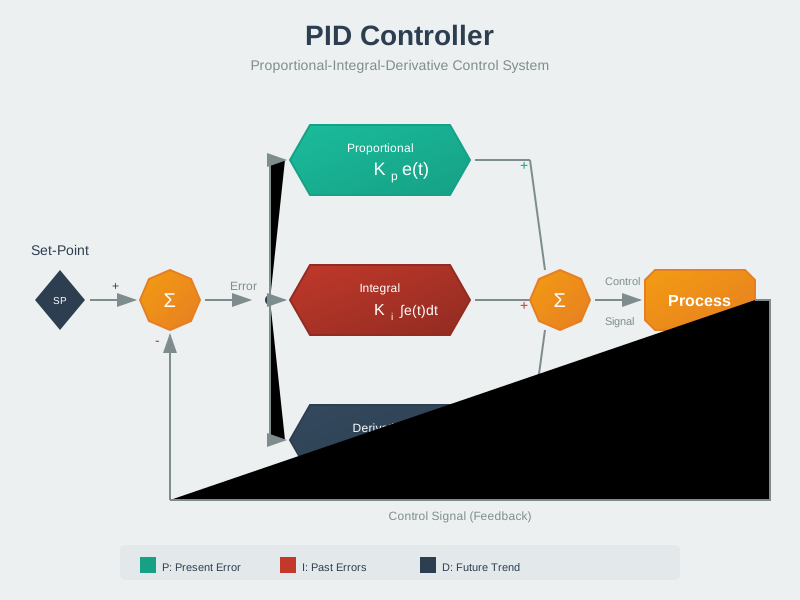
Feedback is a fundamental concept where a portion of a system’s output is routed back to influence the input. This creates a self-regulating mechanism that can improve system performance, stability, and accuracy.
221.4 Everyday Feedback Examples
We encounter feedback constantly in daily life:
- Thermostat: Room temperature (output) is measured and compared to the desired temperature (input), adjusting heating/cooling accordingly
- Cruise control: Vehicle speed (output) is monitored and throttle (input) is adjusted to maintain set speed
- Refrigerator: Internal temperature (output) controls compressor on/off cycles (input)
- Shower temperature: You feel water temperature and adjust hot/cold knobs
In IoT systems, feedback enables autonomous operation and adaptation to changing conditions.
NoteExample: Simple Feedback - The Useless Box
The “useless box” demonstrates basic feedback in action:

Useless Box Feedback Loop: User input triggers sensor detection, microcontroller processing activates servo motor, which mechanically reverses the switch position, creating negative feedback that opposes the user’s action.
This simple system demonstrates negative feedback where the output (switch position) directly counteracts the input (user action), restoring the system to its original state.
221.5 Feedback in IoT Applications
IoT devices leverage feedback for various purposes:
- Environmental Control
- Smart thermostats, greenhouse automation, HVAC systems
- Process Monitoring
- Industrial sensors adjusting manufacturing parameters in real-time
- Safety Systems
- Automatic shutoffs when dangerous conditions detected
- Energy Management
- Battery monitoring systems adjusting charging rates
- Distributed Feedback
- Water quality monitoring where local sensors trigger remote actuators

Distributed IoT Feedback System: Sensor nodes transmit water quality data to cloud platform, where rule engine evaluates conditions and sends commands to remote actuator nodes, creating a closed feedback loop across network boundaries.
This distributed feedback system demonstrates how IoT architectures can implement control loops across multiple devices and network boundaries, with cloud-based decision-making coordinating local sensor and actuator nodes.
221.6 Negative vs Positive Feedback
Understanding the two types of feedback is essential for control system design:
Negative vs Positive Feedback Comparison: Negative feedback opposes changes to stabilize the system (thermostat reducing heat as temperature approaches target). Positive feedback amplifies changes, leading to runaway growth or oscillation.
Negative Feedback (most common in IoT):
- Opposes changes from the set point
- Provides stability and regulation
- Example: Thermostat reducing heat as temperature approaches target
Positive Feedback (less common, specialized uses):
- Reinforces changes from the set point
- Can cause instability or rapid state changes
- Example: Schmitt trigger with hysteresis for noise immunity
NoteAlternative View: Control System Evolution Timeline
This variant shows the historical and conceptual progression from simple on/off control to sophisticated PID control, helping students understand why each advancement was necessary.
%%{init: {'theme': 'base', 'themeVariables': { 'primaryColor': '#2C3E50', 'primaryTextColor': '#fff', 'primaryBorderColor': '#16A085', 'lineColor': '#16A085', 'secondaryColor': '#E67E22', 'tertiaryColor': '#7F8C8D', 'fontSize': '12px'}}}%%
flowchart TB
    subgraph BangBang["1. ON/OFF (Bang-Bang) Control"]
        direction LR
        BB1["Too Cold<br/>→ FULL Heat"] --> BB2["Too Hot<br/>→ NO Heat"]
        BB2 --> BB1
        BB_Issue["❌ Large oscillations<br/>❌ Actuator wear<br/>❌ Energy waste"]
    end

    subgraph PControl["2. Proportional (P) Control"]
        direction LR
        P1["Big Error<br/>→ Big Output"] --> P2["Small Error<br/>→ Small Output"]
        P_Issue["✅ Smoother response<br/>❌ Steady-state error<br/>❌ Cannot fight disturbances"]
    end

    subgraph PIControl["3. PI Control (Most Common)"]
        direction LR
        PI1["P: Immediate<br/>Response"] --> PI2["I: Accumulates<br/>Error Over Time"]
        PI_Issue["✅ Zero steady-state error<br/>⚠️ May overshoot<br/>⚠️ Slower than PD"]
    end

    subgraph PIDControl["4. Full PID Control"]
        direction LR
        PID1["P: Current"] --> PID2["I: Past"]
        PID2 --> PID3["D: Future<br/>(Prediction)"]
        PID_Issue["✅ Fast response<br/>✅ Zero error<br/>✅ Minimal overshoot"]
    end

    BangBang -->|"Add<br/>proportionality"| PControl
    PControl -->|"Add error<br/>accumulation"| PIControl
    PIControl -->|"Add rate-of-change<br/>prediction"| PIDControl

    style BangBang fill:#E74C3C,stroke:#2C3E50,color:#fff
    style PControl fill:#E67E22,stroke:#2C3E50,color:#fff
    style PIControl fill:#16A085,stroke:#2C3E50,color:#fff
    style PIDControl fill:#2C3E50,stroke:#16A085,color:#fff
221.7 Knowledge Check
221.8 Summary
This chapter covered the fundamentals of feedback in control systems:
- Feedback Definition: Output information routed back to influence input, creating self-regulating systems
- Everyday Examples: Thermostats, cruise control, and refrigerators all use feedback
- IoT Applications: Environmental control, safety systems, energy management, and distributed feedback across networks
- Feedback Types: Negative feedback stabilizes systems (most common), positive feedback amplifies changes (specialized uses)
- Foundation for PID: Understanding feedback is essential for implementing proportional-integral-derivative control
221.9 What’s Next
The next chapter explores Open-Loop and Closed-Loop Systems, comparing systems that operate with and without feedback, including decision frameworks for choosing the appropriate control architecture.
NoteRelated Chapters
- Open-Loop and Closed-Loop Systems - Comparing feedback architectures
- PID Control Theory - P, I, D term mathematics
- PID Tuning and Applications - Real-world implementation
- Processes & Systems Fundamentals - Systems thinking foundation