%%{init: {'theme': 'base', 'themeVariables': {'primaryColor':'#2C3E50','primaryTextColor':'#fff','primaryBorderColor':'#16A085','lineColor':'#16A085','secondaryColor':'#E67E22','tertiaryColor':'#7F8C8D','fontSize':'16px'}}}%%
graph TD
    A[Need Cellular IoT?] --> B{Device moves?}
    B -->|Yes, mobile| C{Need voice/SMS?}
    B -->|No, stationary| D{Data rate?}

    C -->|Yes| E[LTE-M: SIM7070<br/>Voice, handoff, 1 Mbps]
    C -->|No| F{Battery life?}

    F -->|1-3 years| G[LTE-M: SIM7070<br/>Faster reconnect]
    F -->|>5 years| H[NB-IoT: SIM7020<br/>Superior PSM]

    D -->|<1 kbps| I[NB-IoT: SIM7020<br/>26 kbps, -164 dBm]
    D -->|1-100 kbps| J{Global deployment?}
    D -->|>100 kbps| K[4G Cat-1: SIM7600<br/>10 Mbps, video]

    J -->|Yes| L[Dual SIM7000<br/>NB-IoT + 2G fallback]
    J -->|No| I

    style E fill:#16A085,stroke:#2C3E50,color:#fff
    style H fill:#16A085,stroke:#2C3E50,color:#fff
    style I fill:#16A085,stroke:#2C3E50,color:#fff
    style K fill:#E67E22,stroke:#2C3E50,color:#fff
    style L fill:#E67E22,stroke:#2C3E50,color:#fff
1155 Cellular IoT Implementations
1155.1 Learning Objectives
By the end of this chapter, you will be able to:
- Select Cellular Modules: Choose appropriate LTE-M, NB-IoT, or 4G modules for specific IoT applications
- Wire Hardware Connections: Connect SIM7000/SIM7600 modules to Arduino and ESP32 platforms
- Program AT Commands: Send AT commands for network registration, SMS, and data transmission
- Implement HTTP/MQTT Clients: Build cellular-connected applications that communicate with cloud services
- Manage SIM Cards: Configure APN settings and understand cellular data plans for IoT
- Troubleshoot Connectivity: Diagnose and resolve common cellular network connection issues
NoteRelated Chapters
Deep Dives: - Cellular IoT Fundamentals - Core concepts of NB-IoT, LTE-M technologies - NB-IoT Fundamentals - Narrowband IoT architecture and deployment modes - NB-IoT Labs and Implementation - Hands-on NB-IoT module configuration
Comparisons: - Cellular IoT Comprehensive Review - LTE-M vs NB-IoT trade-offs - LPWAN Comparison and Review - Cellular IoT vs LoRaWAN vs Sigfox
Application Protocols: - MQTT Fundamentals - Publish-subscribe messaging over cellular - CoAP Fundamentals - Lightweight request-response protocol
Products:
Learning: - Quizzes Hub - Test your cellular IoT implementation knowledge
1155.2 Prerequisites
Before diving into this chapter, you should be familiar with:
- Cellular IoT Fundamentals: Understanding of NB-IoT, LTE-M technologies, their specifications, and when to use each cellular technology is essential for module selection and configuration
- IoT Protocols Fundamentals: Knowledge of the IoT protocol stack, UDP vs TCP transport layers, and application protocols helps you understand how cellular modules fit into the overall architecture
- Networking Basics: Familiarity with IP addressing, DNS, network routing, and basic networking concepts is needed to configure APNs and troubleshoot connectivity issues
TipFor Beginners: Cellular IoT Made Simple
Cellular IoT lets your devices connect to the internet anywhere there’s cell coverage—just like your phone. This chapter teaches you how to actually build with cellular modules.
What You Need:
- Cellular Module: A small board with a radio (like SIM7000)
- SIM Card: Just like in your phone (get an IoT data plan)
- Microcontroller: Arduino, ESP32, or Raspberry Pi
- Antenna: Usually included with the module
- Power Supply: Cellular modules need more power than Wi-Fi
The Basic Connection:
Microcontroller → Serial UART → Cellular Module → Antenna → Cell Tower → Internet
Why Cellular for IoT? - Works anywhere with cell coverage (no Wi-Fi needed) - Low power modes (NB-IoT, LTE-M) - Secure and reliable - Pay-per-device data plans (~$2-10/month)
1155.3 Understanding Check: Asset Tracking with NB-IoT
Scenario: You’re tracking 500 shipping containers across North America. Each container reports GPS location + temperature every 30 minutes. You need 10-year battery life on 2× D-cell batteries (19,000 mAh @ 3.6V). Containers travel through rural areas with spotty coverage. Budget: $50K for 500 devices (hardware + 5-year connectivity).
Think about: 1. Should you use NB-IoT or LTE-M modules? Why? 2. How do you achieve 10-year battery life when cellular transmission consumes 200mA for 2 seconds?
Key Insight: Use NB-IoT modules (e.g., SIM7020 at $15 each) with Power Saving Mode (PSM) and extended DRX. NB-IoT’s superior coverage (-164 dBm vs -140 dBm for LTE-M) ensures connectivity in rural areas and inside metal containers. LTE-M would offer mobility handoff but drain battery 3× faster for this stationary use case.
Power calculation: Each transmission cycle (wake → connect → send 100 bytes → PSM) consumes ~400 mWh. At 48 transmissions/day × 365 days × 10 years = 175,200 transmissions. Total energy: 70 Wh. Two D-cells provide 68 Wh (19Ah × 3.6V) × 85% efficiency ≈ 58 Wh—close but achievable with careful firmware optimization and reducing retries.
Cost: 500 modules × $15 = $7,500 + SIM cards ($5 each) = $10,000 hardware. Connectivity: NB-IoT data plan at $2/month × 500 devices × 60 months = $60,000 (exceeds budget—negotiate bulk discount to $1.20/month = $36K total, or use annual prepaid plans).
Verify Your Understanding: - Why would LTE-M’s mobility features actually waste battery for stationary containers? - How does PSM differ from eDRX for power savings?
NoteCross-Hub Connections
Hands-On Practice: - Simulations Hub - Try the Power Budget Calculator to verify 10-year battery life calculations - Videos Hub - Watch cellular module setup tutorials and AT command demonstrations
Self-Assessment: - Quizzes Hub - Test your understanding of module selection, AT commands, and power optimization
Knowledge Reinforcement: - Knowledge Gaps Hub - Clarify common misconceptions about cellular IoT power consumption and connectivity costs
WarningCommon Misconception: “Cellular IoT is Just Like a Phone”
Myth: You can use cellular IoT modules just like a smartphone—always connected, instant data transfer.
Reality: IoT modules optimize for battery life, not speed. Key differences:
Power Consumption: Smartphone: ~500mA continuous (2-hour battery). IoT module with PSM: 5µA sleep + 200mA for 2sec bursts (10-year battery).
Connection Time: Smartphone: Always connected (0ms). NB-IoT: 5-10 seconds to establish connection from PSM sleep. LTE-M with eDRX: 1-2 seconds.
Data Rate: Smartphone 4G: 100 Mbps download. NB-IoT: 26 kbps download (3,846× slower!). LTE-M: 1 Mbps (100× slower).
Cost Model: Smartphone: Unlimited data ($50/month). IoT SIM: Pay-per-MB ($0.10/MB) or fixed 10MB/month ($2).
Quantified Impact: A developer assumed NB-IoT had “4G speeds” and designed a video streaming application. Reality check: Streaming 1MB video at 26 kbps takes 5 minutes (vs 0.08 seconds on 4G). After 1 week, 500 devices × 1GB/day × $0.10/MB = $50,000/week connectivity bill (expected $1,400/week). Cost overrun: 3,571%.
Best Practice: Design for constrained bandwidth (send JSON payloads <1KB), intermittent connectivity (tolerate 10-second delays), and aggressive power management (sleep 99.9% of the time). This is the opposite of smartphone app development.
1155.4 Module Selection and Hardware Setup
1155.4.1 Popular Cellular IoT Modules
| Module | Technology | Data Rate | Power (TX) | Power (Sleep) | Coverage | Cost | Best For |
|---|---|---|---|---|---|---|---|
| SIM7020 | NB-IoT | 26 kbps | 220mA | 5µA (PSM) | -164 dBm | $15 | Stationary sensors, 10-year battery |
| SIM7070 | LTE-M | 1 Mbps | 230mA | 1mA (eDRX) | -140 dBm | $18 | Mobile trackers, voice |
| SIM7000 | NB-IoT + 2G | 26 kbps | 500mA (2G) | 5µA (PSM) | -164 dBm | $20 | Global fallback (2G) |
| SIM7600 | 4G LTE Cat-1 | 10 Mbps | 2A | 10mA | -110 dBm | $25 | Video streaming, high throughput |
| BG96 | NB-IoT + LTE-M | 375 kbps | 230mA | 5µA (PSM) | -164 dBm | $22 | Dual-mode flexibility |
Selection Decision Tree:
NoteAlternative View: Module Cost vs Capability
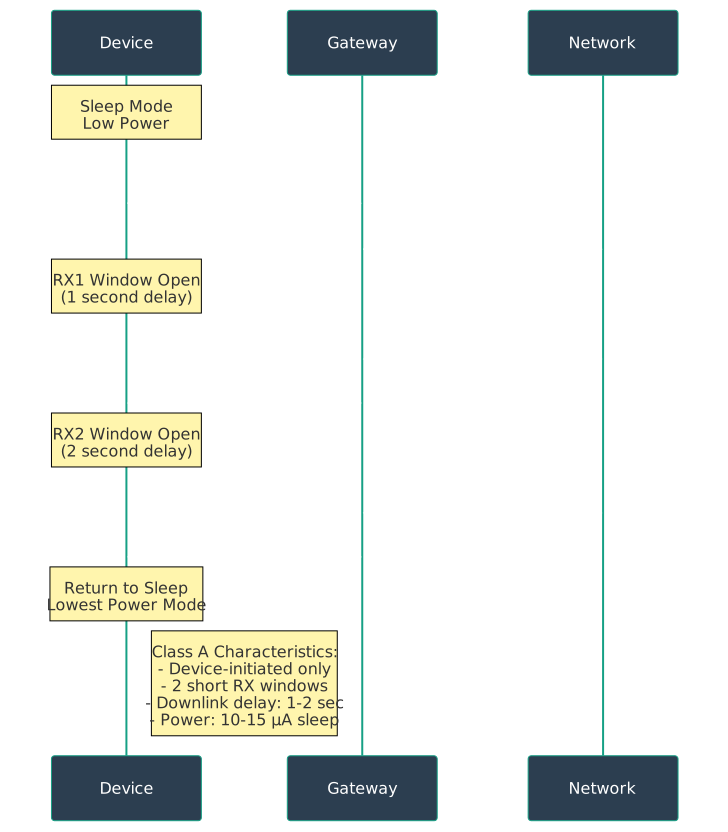
This quadrant chart positions modules by cost and capability, helping designers choose the right module for their budget and performance requirements.
1155.4.2 Hardware Connection: SIM7000 + ESP32
Complete Wiring Diagram:
%%{init: {'theme': 'base', 'themeVariables': {'primaryColor':'#2C3E50','primaryTextColor':'#fff','primaryBorderColor':'#16A085','lineColor':'#16A085','secondaryColor':'#E67E22','tertiaryColor':'#7F8C8D','fontSize':'14px'}}}%%
graph TB
    subgraph ESP32["ESP32 DevKit"]
        GPIO17[GPIO 17 TX]
        GPIO16[GPIO 16 RX]
        VIN[5V VIN]
        GND1[GND]
        GPIO4[GPIO 4 PWR_KEY]
    end

    subgraph SIM7000["SIM7000 Module"]
        RX[RX]
        TX[TX]
        VBAT[VBAT 3.8-4.2V]
        GND2[GND]
        PWRKEY[PWR_KEY]
        SIM[SIM Card Slot]
        ANT[Antenna Connector]
    end

    subgraph Power["Power Supply"]
        LIPO[LiPo Battery<br/>3.7V 2000mAh]
    end

    GPIO17 -->|Serial TX| RX
    GPIO16 -->|Serial RX| TX
    LIPO -->|3.7-4.2V| VBAT
    GND1 --- GND2
    GPIO4 -->|Power On/Off| PWRKEY
    SIM -.->|Insert IoT SIM| SIM
    ANT -.->|Screw On| ANT

    style ESP32 fill:#2C3E50,stroke:#16A085,color:#fff
    style SIM7000 fill:#16A085,stroke:#2C3E50,color:#fff
    style Power fill:#E67E22,stroke:#2C3E50,color:#fff
Critical Hardware Notes:
Power Supply: SIM7000 draws 2A peak during transmission. Use LiPo battery (not USB power—causes brownouts). Add 1000µF capacitor near VBAT for current spikes.
UART Serial: Connect ESP32 GPIO17 (TX) → SIM7000 RX, GPIO16 (RX) → SIM7000 TX. Baud rate: 115200. Use hardware serial, not software serial (timing critical).
PWR_KEY: Hold GPIO4 LOW for 1 second to power on module. LED blinks slowly (1s) when connected to network, rapidly (200ms) when searching.
Antenna: MUST connect external antenna before powering on. Running without antenna damages RF amplifier.
SIM Card: Insert before powering on. Check PIN code is disabled (or use
AT+CPIN=1234to unlock).
1155.5 AT Command Fundamentals
1155.5.1 AT Command Flow
Cellular modules communicate via AT commands (Hayes command set). Basic pattern:
Host → AT+COMMAND=value\r\n
Module → response\r\n
Module → OK\r\n  (or ERROR)
Complete Connection Sequence:
%%{init: {'theme': 'base', 'themeVariables': {'primaryColor':'#2C3E50','primaryTextColor':'#fff','primaryBorderColor':'#16A085','lineColor':'#16A085','secondaryColor':'#E67E22','tertiaryColor':'#7F8C8D','fontSize':'14px'}}}%%
sequenceDiagram
    participant MCU as ESP32/Arduino
    participant MOD as SIM7000 Module
    participant NET as Cellular Network
    participant SRV as Cloud Server

    Note over MCU,MOD: 1. Power On and Initialization
    MCU->>MOD: Hold PWR_KEY LOW (1s)
    MOD-->>MCU: RDY (module ready)
    MCU->>MOD: AT (test connection)
    MOD-->>MCU: OK

    Note over MCU,NET: 2. Network Registration
    MCU->>MOD: AT+CPIN? (check SIM)
    MOD-->>MCU: +CPIN: READY
    MCU->>MOD: AT+COPS=? (scan networks)
    MOD-->>MCU: List of operators (20-60s)
    MCU->>MOD: AT+COPS=0 (auto-select)
    MOD->>NET: Network attach request
    NET-->>MOD: Attach accept + IP address
    MOD-->>MCU: +CREG: 0,1 (registered)

    Note over MCU,SRV: 3. Data Connection
    MCU->>MOD: AT+CGDCONT=1,"IP","iot.1nce.net"
    MOD-->>MCU: OK (APN configured)
    MCU->>MOD: AT+CGACT=1,1 (activate PDP)
    MOD->>NET: PDP context activation
    NET-->>MOD: IP: 10.45.23.12
    MOD-->>MCU: OK

    Note over MCU,SRV: 4. HTTP POST Request
    MCU->>MOD: AT+HTTPINIT
    MOD-->>MCU: OK
    MCU->>MOD: AT+HTTPPARA="URL","http://api.example.com/data"
    MCU->>MOD: AT+HTTPDATA=100,5000 (100 bytes, 5s timeout)
    MOD-->>MCU: DOWNLOAD (ready for data)
    MCU->>MOD: {"temp":23.5,"humidity":60}
    MOD-->>MCU: OK
    MCU->>MOD: AT+HTTPACTION=1 (POST method)
    MOD->>SRV: HTTP POST with JSON payload
    SRV-->>MOD: HTTP 200 OK
    MOD-->>MCU: +HTTPACTION: 1,200,45 (method, status, bytes)

    Note over MCU,MOD: 5. Enter Power Saving Mode
    MCU->>MOD: AT+CPSMS=1 (enable PSM)
    MOD-->>MCU: OK
    MCU->>MOD: AT+CSCLK=2 (deep sleep)
    MOD-->>MCU: OK
    Note over MOD: Sleep 5µA (hours/days)
1155.5.2 Essential AT Commands
Basic Module Control:
AT              // Test connection (returns OK)
ATI             // Module information
AT+CGMR         // Firmware version
AT+CFUN=1       // Full functionality mode
AT+CFUN=0       // Minimum functionality (radio off)
SIM and Network:
AT+CPIN?        // Check SIM status (READY/SIM PIN/ERROR)
AT+CPIN=1234    // Unlock SIM with PIN code
AT+COPS?        // Check registered network operator
AT+COPS=?       // Scan available networks (slow: 20-60s)
AT+COPS=0       // Auto-select network (best signal)
AT+CSQ          // Signal quality (0-31 RSSI, 99=unknown)
                // Good: >15 (-93 dBm), Excellent: >25 (-73 dBm)
AT+CREG?        // Network registration status
                // 0,1 = registered home network
                // 0,5 = registered roaming
AT+CGATT?       // GPRS attach status (1=attached)
Data Connection (APN Configuration):
// Configure APN (Access Point Name) - carrier-specific
AT+CGDCONT=1,"IP","iot.1nce.net"           // 1NCE IoT SIM
AT+CGDCONT=1,"IP","hologram"               // Hologram global SIM
AT+CGDCONT=1,"IP","m2m.com.attz"           // AT&T IoT SIM
AT+CGDCONT=1,"IP","iot.truphone.com"       // Truphone IoT
AT+CGDCONT=1,"IP","soracom.io"             // Soracom global IoT

// Activate PDP context (get IP address)
AT+CGACT=1,1    // Activate context ID 1
AT+CGPADDR=1    // Query assigned IP address
AT+CGDATA="PPP",1  // Enter data mode (PPP connection)
HTTP Client (Quick Cloud Integration):
AT+HTTPINIT                                     // Initialize HTTP
AT+HTTPPARA="CID",1                             // Set PDP context ID
AT+HTTPPARA="URL","http://api.thingspeak.com/update"
AT+HTTPPARA="CONTENT","application/json"        // Set content type
AT+HTTPDATA=50,5000                             // Prepare 50 bytes, 5s timeout
// After DOWNLOAD prompt, send payload:
{"api_key":"ABC123","field1":23.5}
AT+HTTPACTION=1                                 // Execute POST (0=GET, 1=POST, 2=HEAD)
AT+HTTPREAD                                     // Read response
AT+HTTPTERM                                     // Terminate HTTP
MQTT Client (Persistent Connections):
// Configure MQTT broker
AT+SMCONF="URL","mqtt.example.com","1883"       // Broker address and port
AT+SMCONF="CLIENTID","device001"                // Client ID
AT+SMCONF="USERNAME","user"                     // Username (if required)
AT+SMCONF="PASSWORD","pass"                     // Password
AT+SMCONF="KEEPTIME",60                         // Keep-alive interval (seconds)

// Connect to broker
AT+SMCONN                                       // Connect (returns OK or ERROR)
AT+SMSTATE?                                     // Check connection state (1=connected)

// Publish message
AT+SMPUB="sensors/temp",20,1,0                  // Topic, length, QoS, retain
// After > prompt, send payload:
{"temperature":23.5}

// Subscribe to topic
AT+SMSUB="commands/led",1                       // Topic, QoS
// Received messages trigger URC: +SMSUB: "commands/led"

// Disconnect
AT+SMDISC                                       // Disconnect from broker
Power Saving Modes:
// Power Saving Mode (PSM) - deepest sleep
AT+CPSMS=1,"","","00000100","00000001"          // Enable PSM
// T3324 (active timer): 4 seconds, T3412 (periodic TAU): 1 hour
// Module sleeps for ~1 hour between wake-ups

// Extended DRX (eDRX) - periodic paging
AT+CEDRXS=1,5,"0101"                            // Enable eDRX for LTE-M
// Paging interval: 20.48 seconds (balance power vs latency)

// Light sleep (clock gating)
AT+CSCLK=2                                      // Auto sleep when UART idle
// Module enters 1mA sleep between commands (wakes on UART RX)

// Airplane mode (radio off, 0.1mA)
AT+CFUN=4                                       // Airplane mode
AT+CFUN=1                                       // Return to full functionality
1155.6 Complete Arduino Implementation
1155.6.1 Hardware Serial Cellular Library
Example: ESP32 + SIM7000 Sending Sensor Data
#include <HardwareSerial.h>

// SIM7000 on ESP32 hardware serial
HardwareSerial sim7000(1);  // UART1
#define SIM_TX 17
#define SIM_RX 16
#define SIM_PWR_KEY 4

// APN configuration (change for your carrier)
const char* APN = "iot.1nce.net";
const char* SERVER = "api.thingspeak.com";
const char* API_KEY = "YOUR_API_KEY";

void setup() {
  Serial.begin(115200);  // Debug console
  sim7000.begin(115200, SERIAL_8N1, SIM_RX, SIM_TX);  // SIM7000 serial

  // Power on module
  pinMode(SIM_PWR_KEY, OUTPUT);
  powerOnModule();

  // Wait for module ready
  delay(5000);

  // Initialize cellular connection
  if (initCellular()) {
    Serial.println("Cellular connected!");
  } else {
    Serial.println("Connection failed");
  }
}

void loop() {
  // Simulate sensor reading
  float temperature = 23.5 + random(-50, 50) / 10.0;
  float humidity = 60.0 + random(-100, 100) / 10.0;

  // Send data to cloud
  sendData(temperature, humidity);

  // Sleep for 10 minutes
  enterSleepMode(600);  // 600 seconds
}

void powerOnModule() {
  digitalWrite(SIM_PWR_KEY, LOW);
  delay(1000);  // Hold for 1 second
  digitalWrite(SIM_PWR_KEY, HIGH);
  delay(2000);
  Serial.println("Module powered on");
}

bool sendATCommand(String cmd, String expected, int timeout) {
  sim7000.println(cmd);
  long start = millis();
  String response = "";

  while (millis() - start < timeout) {
    while (sim7000.available()) {
      char c = sim7000.read();
      response += c;
      Serial.write(c);  // Echo to console
    }
    if (response.indexOf(expected) != -1) {
      return true;
    }
  }
  return false;
}

bool initCellular() {
  Serial.println("Initializing cellular...");

  // Test module
  if (!sendATCommand("AT", "OK", 2000)) {
    Serial.println("Module not responding");
    return false;
  }

  // Check SIM card
  if (!sendATCommand("AT+CPIN?", "READY", 5000)) {
    Serial.println("SIM card error");
    return false;
  }

  // Configure APN
  String apnCmd = "AT+CGDCONT=1,\"IP\",\"" + String(APN) + "\"";
  if (!sendATCommand(apnCmd, "OK", 2000)) {
    Serial.println("APN config failed");
    return false;
  }

  // Wait for network registration (can take 30-60 seconds)
  Serial.println("Waiting for network... (30-60s)");
  int retries = 30;
  while (retries-- > 0) {
    if (sendATCommand("AT+CREG?", "+CREG: 0,1", 2000) ||
        sendATCommand("AT+CREG?", "+CREG: 0,5", 2000)) {
      Serial.println("Registered on network!");
      break;
    }
    delay(2000);
  }

  if (retries <= 0) {
    Serial.println("Network registration timeout");
    return false;
  }

  // Activate PDP context
  if (!sendATCommand("AT+CGACT=1,1", "OK", 30000)) {
    Serial.println("PDP activation failed");
    return false;
  }

  // Check signal quality
  sim7000.println("AT+CSQ");
  delay(500);
  while (sim7000.available()) {
    Serial.write(sim7000.read());
  }

  return true;
}

bool sendData(float temp, float humidity) {
  Serial.println("Sending data via HTTP...");

  // Initialize HTTP
  if (!sendATCommand("AT+HTTPINIT", "OK", 2000)) {
    return false;
  }

  // Set CID
  if (!sendATCommand("AT+HTTPPARA=\"CID\",1", "OK", 2000)) {
    sendATCommand("AT+HTTPTERM", "OK", 2000);
    return false;
  }

  // Build URL with GET parameters
  String url = "http://" + String(SERVER) + "/update?api_key=" +
               String(API_KEY) + "&field1=" + String(temp) +
               "&field2=" + String(humidity);

  String urlCmd = "AT+HTTPPARA=\"URL\",\"" + url + "\"";
  if (!sendATCommand(urlCmd, "OK", 2000)) {
    sendATCommand("AT+HTTPTERM", "OK", 2000);
    return false;
  }

  // Execute GET request
  if (!sendATCommand("AT+HTTPACTION=0", "+HTTPACTION: 0,200", 10000)) {
    Serial.println("HTTP request failed");
    sendATCommand("AT+HTTPTERM", "OK", 2000);
    return false;
  }

  Serial.println("Data sent successfully!");

  // Terminate HTTP
  sendATCommand("AT+HTTPTERM", "OK", 2000);

  return true;
}

void enterSleepMode(int seconds) {
  Serial.println("Entering power saving mode...");

  // Enable PSM (customize T3324 and T3412 timers as needed)
  sendATCommand("AT+CPSMS=1", "OK", 2000);

  // Light sleep (module wakes on timer or UART activity)
  sendATCommand("AT+CSCLK=2", "OK", 2000);

  // Put ESP32 to deep sleep
  Serial.flush();
  esp_sleep_enable_timer_wakeup(seconds * 1000000ULL);  // microseconds
  esp_deep_sleep_start();
}
Key Implementation Notes:
Hardware Serial: Use
HardwareSerial, notSoftwareSerial. SIM7000 requires precise timing (115200 baud) that software serial can’t guarantee.Power-On Sequence: Hold
PWR_KEYLOW for 1 second, then HIGH. LED should start blinking. Wait 5 seconds forRDYmessage.Network Registration Time: Can take 30-60 seconds in weak signal areas. NB-IoT takes longer than LTE-M due to cell search process.
HTTP vs MQTT: Use HTTP for simple publish (stateless, no persistent connection). Use MQTT for bidirectional, low-latency communication (persistent connection).
Power Saving: Combining ESP32 deep sleep (10µA) + SIM7000 PSM (5µA) achieves ~15µA total system sleep current.
1155.7 Complete IoT Pipeline Architecture
End-to-End System:
%%{init: {'theme': 'base', 'themeVariables': {'primaryColor':'#2C3E50','primaryTextColor':'#fff','primaryBorderColor':'#16A085','lineColor':'#16A085','secondaryColor':'#E67E22','tertiaryColor':'#7F8C8D','fontSize':'14px'}}}%%
graph TB
    subgraph Device["IoT Device"]
        SENSOR[Temperature Sensor<br/>DHT22]
        MCU[ESP32<br/>Deep Sleep 10µA]
        CELL[SIM7000 NB-IoT<br/>PSM 5µA]
        ANT[LTE Antenna]
        BATT[LiPo Battery<br/>2000 mAh]
    end

    subgraph Network["Cellular Network"]
        TOWER[Cell Tower<br/>eNodeB]
        EPC[Evolved Packet Core<br/>MME, SGW, PGW]
        INTERNET[Public Internet]
    end

    subgraph Cloud["Cloud Platform"]
        MQTT_BROKER[MQTT Broker<br/>HiveMQ, AWS IoT]
        DB[Time-Series DB<br/>InfluxDB]
        API[REST API<br/>Node.js]
        DASH[Dashboard<br/>Grafana]
    end

    SENSOR -->|I2C/1-Wire| MCU
    MCU -->|UART AT Commands| CELL
    CELL -->|LTE Radio| ANT
    ANT -.->|868/2100 MHz| TOWER
    TOWER --> EPC
    EPC --> INTERNET
    BATT -->|3.7V| MCU
    BATT -->|3.7V| CELL

    INTERNET -->|TLS 8883| MQTT_BROKER
    MQTT_BROKER -->|Publish| DB
    MQTT_BROKER -->|Subscribe| API
    DB --> DASH
    API --> DASH

    style Device fill:#2C3E50,stroke:#16A085,color:#fff
    style Network fill:#16A085,stroke:#2C3E50,color:#fff
    style Cloud fill:#E67E22,stroke:#2C3E50,color:#fff
Data Flow Timeline:
- Device Wake-Up (10ms): ESP32 wakes from deep sleep, reads DHT22 sensor via I2C
- Module Power-On (1s): ESP32 toggles PWR_KEY to wake SIM7000 from PSM
- Network Attach (5-10s): SIM7000 sends TAU (Tracking Area Update) to eNodeB, receives IP address
- MQTT Connect (2-5s): TCP handshake + TLS handshake + MQTT CONNECT packet
- Publish Data (500ms): MQTT PUBLISH with 50-byte JSON payload
{"temp":23.5,"hum":60} - MQTT Broker (100ms): HiveMQ receives, distributes to subscribers, stores in InfluxDB
- Dashboard Update (200ms): Grafana queries InfluxDB, updates chart in web browser
- Return to Sleep (2s): MQTT DISCONNECT, SIM7000 enters PSM, ESP32 enters deep sleep
Total Active Time: ~10 seconds (0.003% duty cycle for 1-hour reporting interval)
1155.8 Troubleshooting Guide
Common Issues and Solutions:
%%{init: {'theme': 'base', 'themeVariables': {'primaryColor':'#2C3E50','primaryTextColor':'#fff','primaryBorderColor':'#16A085','lineColor':'#16A085','secondaryColor':'#E67E22','tertiaryColor':'#7F8C8D','fontSize':'14px'}}}%%
graph TD
    A[Module Not Responding] --> B{Check Power}
    B -->|No LED blink| C[Voltage too low<br/>Use LiPo battery, not USB]
    B -->|LED rapid blink| D[No antenna connected<br/>CRITICAL: Attach antenna!]
    B -->|LED slow blink| E{Check Serial}

    E -->|No AT response| F[Wrong baud rate<br/>Try 9600, 115200, 19200]
    E -->|Garbled text| G[RX/TX swapped<br/>Reverse connections]

    A2[Network Registration Fails] --> H{Check Signal}
    H -->|AT+CSQ < 10| I[Poor signal<br/>Move outdoors, check antenna]
    H -->|AT+CSQ > 15| J{Check SIM}

    J -->|AT+CPIN ERROR| K[SIM not detected<br/>Reseat SIM, check orientation]
    J -->|AT+CPIN READY| L{Check APN}

    L -->|Wrong APN| M[Verify with carrier<br/>Common: iot.1nce.net, hologram]
    L -->|Correct APN| N[Network congestion<br/>Wait 60s, retry]

    A3[Data Transmission Fails] --> O{Check Connection}
    O -->|AT+CGACT? = 0| P[PDP not activated<br/>Run AT+CGACT=1,1]
    O -->|AT+CGACT? = 1| Q{Check Server}

    Q -->|HTTP 404/500| R[Server error<br/>Check URL, API key]
    Q -->|Timeout| S[Firewall blocking<br/>Use port 80, not HTTPS]

    A4[High Power Consumption] --> T{Check Sleep}
    T -->|Module always warm| U[PSM not enabled<br/>AT+CPSMS=1]
    T -->|ESP32 hot| V[No deep sleep<br/>esp_deep_sleep_start]

    style C fill:#E67E22,stroke:#2C3E50,color:#fff
    style D fill:#E67E22,stroke:#2C3E50,color:#fff
    style I fill:#E67E22,stroke:#2C3E50,color:#fff
    style M fill:#16A085,stroke:#2C3E50,color:#fff
    style U fill:#16A085,stroke:#2C3E50,color:#fff
Diagnostic Commands:
// Module health check
AT+CGMR           // Firmware version (should return version string)
AT+CCID           // SIM card ICCID (20-digit number)
AT+CIMI           // SIM card IMSI (15-digit number)

// Signal diagnostics
AT+CSQ            // Signal quality (15-31 = good, <10 = poor)
AT+CPSI?          // Detailed signal info (RSRP, RSRQ, SNR)
                  // Example: +CPSI: LTE NB-IOT,Online,
                  //          RSRP -95 dBm, RSRQ -10 dB, SNR 5 dB

// Network diagnostics
AT+COPS?          // Current operator (e.g., "AT&T", "Verizon")
AT+CREG=2         // Enable network registration URCs
AT+CREG?          // Registration status + location (LAC, CID)
AT+CGPADDR=1      // Assigned IP address (e.g., 10.45.23.12)

// Data usage tracking
AT+CGDCONT?       // Active PDP contexts (shows APN configuration)
AT+CGACT?         // PDP context activation status (1=active, 0=inactive)

// Power diagnostics
AT+CPSMS?         // PSM configuration (timers T3324, T3412)
AT+CEDRXS?        // eDRX configuration (paging interval)
AT+CPMUTEMP       // Module temperature (°C) - should be <60°C
Common Error Codes:
| Error | Code | Meaning | Solution |
|---|---|---|---|
+CME ERROR: 10 |
SIM not inserted | SIM card not detected | Reseat SIM, check orientation (notch corner) |
+CME ERROR: 14 |
SIM busy | SIM PIN required or initialization | Disable PIN: AT+CLCK="SC",0,"1234" |
+CME ERROR: 30 |
No network service | Not registered on network | Move outdoors, wait 60s, check signal |
+CME ERROR: 32 |
Network not allowed | SIM not activated for roaming | Contact carrier, enable roaming |
ERROR |
Unknown command | AT command syntax error | Check command spelling, add \r\n |
1155.9 Real-World Deployment Considerations
1155.9.1 SIM Card Selection and Activation
IoT SIM Providers:
| Provider | Coverage | Data Plans | Features | Cost |
|---|---|---|---|---|
| 1NCE | 165 countries | 500MB/10 years (prepaid) | Zero config, auto-roaming | $10 one-time |
| Hologram | 196 countries | Pay-as-you-go $0.40/MB | Global SIM, dashboard API | $0.60/month + usage |
| Soracom | 140 countries | $0.10/MB Japan, $0.80/MB global | Virtual SIM (eSIM), VPN | $1.20/month + usage |
| Twilio | 200+ countries | $2/month + $0.10/MB | Programmable, SMS included | $2/month + usage |
| Truphone | 190 countries | $2/month + $0.50/MB | Multi-IMSI, local breakout | $2/month + usage |
Activation Checklist:
- Purchase SIM: Buy IoT SIM (not consumer phone SIM—different APN and billing)
- Register Device: Log into provider portal, register ICCID (SIM card ID) and IMEI (module ID)
- Configure APN: Get APN from provider (e.g.,
iot.1nce.net), configure withAT+CGDCONT - Test Connection: Send test data, verify dashboard shows usage
- Monitor Usage: Set up alerts for 80% data quota (avoid overage charges)
1155.9.2 Data Plan Optimization
Bandwidth Math:
Sending 100-byte JSON payload every 30 minutes for 1 year:
- Packets/day: 24 hours × 2 transmissions/hour = 48 packets/day
- Bytes/day: 48 × 100 bytes = 4.8 KB/day
- Total/year: 4.8 KB × 365 days = 1.75 MB/year
Plan Comparison:
- 1NCE (500MB/10 years): $10 one-time = $1/year → Cheapest for low-data
- Hologram ($0.40/MB): 1.75 MB × $0.40 = $0.70/year + $0.60/month × 12 = $7.90/year
- Twilio ($2/month + $0.10/MB): $24/year + $0.18 = $24.18/year
Best Practice: For low-data applications (<10MB/month), use prepaid plans (1NCE). For high-data or unpredictable usage, use pay-as-you-go (Hologram).
1155.9.3 Antenna Selection and Placement
Antenna Types:
| Type | Gain | Range | Placement | Use Case |
|---|---|---|---|---|
| Stubby (50mm) | 0-2 dBi | Indoor only | On module | Prototyping, indoor sensors |
| Whip (150mm) | 3-5 dBi | Indoor/outdoor | Vertical mount | General IoT, trackers |
| Magnetic (200mm) | 5-7 dBi | Outdoor | Vehicle roof | Asset tracking, mobile |
| External Panel | 8-12 dBi | Long range | Outdoor pole | Remote installations, rural |
Placement Rules:
- Vertical Orientation: LTE antennas are vertically polarized. Mount antenna perpendicular to ground for best signal.
- Ground Plane: Metal surface improves stubby antenna performance by 3-5 dB (vehicle roof, metal enclosure).
- Keep Clear: 10cm clearance from metal objects, batteries, cables (avoid RF detuning).
- Cable Length: Use <5m cables (longer cables = 1 dB loss per meter at 2100 MHz).
Signal Strength Impact:
- Stubby Indoor: -95 dBm (marginal) → 10% packet loss
- Whip Outdoor: -75 dBm (excellent) → <1% packet loss
- External Panel Rural: -105 dBm (usable) → 5% packet loss with NB-IoT
1155.9.4 Power Budget Analysis
Complete Power Profile (SIM7000 NB-IoT):
| State | Current | Duration | Energy per Cycle |
|---|---|---|---|
| Deep Sleep (PSM) | 5 µA | 3599s | 0.018 mAh |
| Wake-Up | 50 mA | 1s | 0.014 mAh |
| Network Attach | 150 mA | 5s | 0.208 mAh |
| TX Peak | 220 mA | 2s | 0.122 mAh |
| RX Listen | 50 mA | 1s | 0.014 mAh |
| Return to Sleep | 10 mA | 2s | 0.006 mAh |
| Total per Hour | — | 3600s | 0.382 mAh/hour |
Battery Life Calculation:
Battery capacity: 2000 mAh (2× AA NiMH) Hourly consumption: 0.382 mAh Battery life: 2000 mAh ÷ 0.382 mAh/hour = 5,236 hours = 218 days = 7.2 months
Extending to 10 Years:
Need: 10 years × 365 days × 24 hours × 0.382 mAh = 33,487 mAh Solution: Use 2× D-cell LiSOCl₂ batteries (19,000 mAh each = 38,000 mAh total)
Verification: 38,000 mAh ÷ (0.382 mAh × 24) = 10.3 years ✓
Power Optimization Tips:
- Increase Reporting Interval: 30 min → 1 hour = 2× battery life
- Reduce TX Power:
-10 dBminstead of+23 dBm= 1.5× battery life (if signal allows) - Use NB-IoT over LTE-M: NB-IoT = 5µA PSM vs LTE-M = 1mA eDRX = 200× better sleep current
- Optimize Payload: 100 bytes → 50 bytes = 1.5× battery life (less TX time)
1155.10 Visual Reference Gallery
NoteVisual: Cellular Modem Architecture
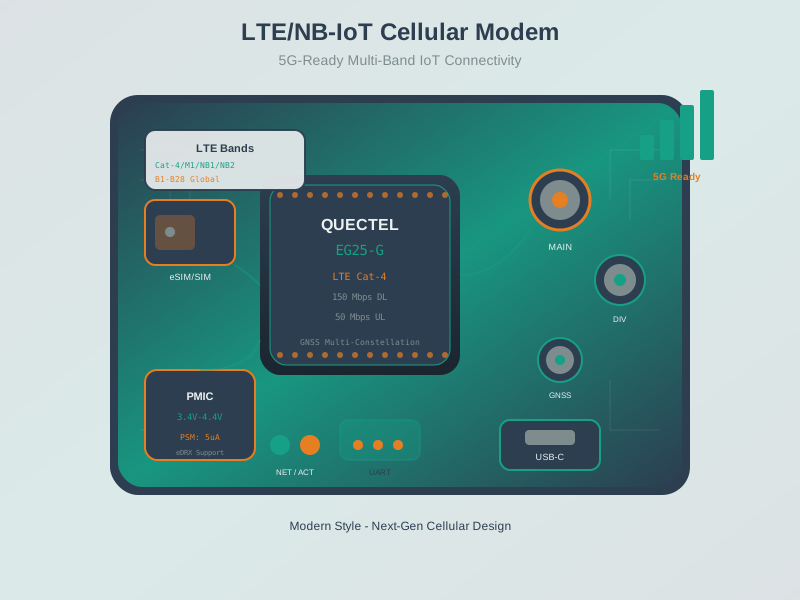
Understanding modem architecture helps explain why proper power supply design (LiPo battery, not USB) and antenna connection are critical for reliable cellular IoT implementations.
NoteVisual: Cellular IoT Evolution
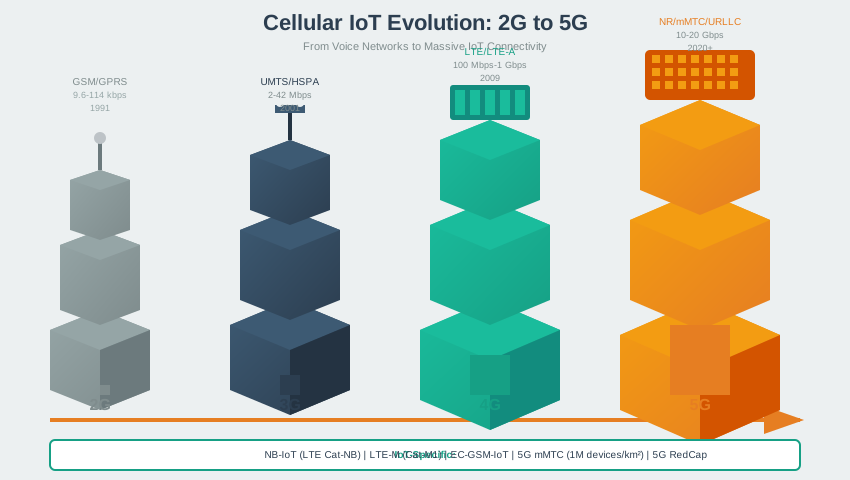
This evolution diagram provides context for why NB-IoT and LTE-M (Release 13) represent optimized cellular technologies specifically designed for IoT applications rather than simply using smartphone connectivity.
NoteVisual: Cellular Handover Mechanism
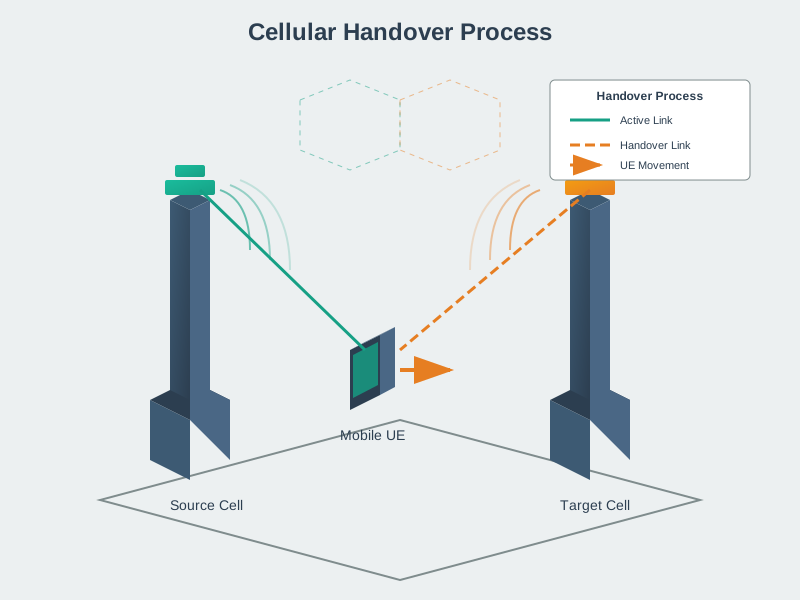
The handover mechanism is essential for mobile asset tracking implementations where vehicles or containers move between cell coverage areas while maintaining continuous connectivity.
1155.11 Summary
Module Selection Strategy guides your choice between NB-IoT and LTE-M based on mobility, data rate, and battery requirements. Use NB-IoT (SIM7020) for stationary sensors requiring 10-year battery life, and LTE-M (SIM7070) for mobile tracking with voice support.
Hardware Configuration requires careful attention to power supply (LiPo battery, not USB), antenna connection before power-on, and hardware serial for reliable AT command communication at 115200 baud.
AT Command Mastery enables network registration, APN configuration, and data transmission. The complete sequence from power-on to data upload typically takes 10-20 seconds, with network registration being the longest step (30-60 seconds in weak signal areas).
Power Optimization combines ESP32 deep sleep (10 microamps) with SIM7000 PSM (5 microamps) to achieve 15 microamps total system current, enabling 10-year battery life with 38,000 mAh D-cell batteries.
Data Plan Economics favor prepaid plans like 1NCE ($10 for 500MB/10 years) for low-data applications, while pay-as-you-go providers suit variable usage patterns. A 100-byte payload every 30 minutes consumes only 1.75 MB/year.
Troubleshooting Diagnostics rely on key AT commands: AT+CSQ for signal quality (aim for >15), AT+CPIN? for SIM status, AT+CREG? for network registration, and AT+CGACT? for PDP context activation.
Common Pitfall Avoidance requires designing for constrained bandwidth (under 1 KB payloads) and intermittent connectivity, not smartphone-style always-on connections. Misunderstanding this causes cost overruns exceeding 3,500%.
1155.12 Knowledge Check
1155.13 What’s Next
In the next chapter, Cellular IoT Comprehensive Review, we’ll compare NB-IoT vs LTE-M in depth, explore network architecture, and review quiz questions to solidify your understanding.
Key Takeaways:
- Module Selection: Use NB-IoT (SIM7020) for stationary, low-data, 10-year battery life. Use LTE-M (SIM7070) for mobile, voice, faster reconnect.
- Hardware: SIM7000 draws 2A peak—use LiPo battery, not USB. Add 1000µF capacitor. MUST connect antenna before power-on.
- AT Commands: Network registration takes 30-60s. Configure APN with
AT+CGDCONT. Use HTTP for simple publish, MQTT for bidirectional. - Power Optimization: Combine ESP32 deep sleep (10µA) + SIM7000 PSM (5µA) = 15µA total. Achieve 10-year battery with 38,000 mAh D-cells.
- Data Plans: 100 bytes/30min = 1.75 MB/year. Use 1NCE prepaid ($10/10 years) for low-data, Hologram pay-as-you-go for variable usage.
- Troubleshooting: Check signal with
AT+CSQ(>15 good). Verify SIM withAT+CPIN?. Test PDP context withAT+CGACT?. - Common Mistake: Assuming cellular IoT has “4G speeds” leads to 3,571% cost overruns. Design for constrained bandwidth (<1 KB payloads).