832 Wi-Fi: Comprehensive Review - Introduction
TipFor Beginners: How to Use This Wi-Fi Review
This chapter assumes you have already worked through:
wifi-fundamentals-and-standards.qmd– radio basics, bands, channels, and security.mobile-wireless-technologies-basics.qmd– shared wireless concepts across Wi-Fi, cellular, and LPWAN.- Any Wi-Fi implementation examples used in your course (e.g. ESP32 labs).
Use this review to apply that knowledge, not to learn Wi-Fi from scratch:
- Focus on how questions combine evolution (Wi-Fi 1→6), bands/channels, and power‑saving tricks in realistic IoT scenarios.
- If a question feels opaque, jump back to the fundamentals chapter section mentioned in the question, then return here.
- Keep the mental model: access point as shared medium, CSMA/CA for contention, and Wi-Fi 6 features (OFDMA, TWT, BSS coloring) as tools to scale dense IoT deployments.
832.1 Learning Objectives
By the end of this review, you will be able to:
- Trace Wi-Fi Evolution: Understand improvements from Wi-Fi 1 through Wi-Fi 6 and their IoT impact
- Compare Frequency Bands: Evaluate 2.4 GHz vs 5 GHz vs 6 GHz trade-offs for IoT deployments
- Apply Wi-Fi 6 Features: Leverage TWT and OFDMA for efficient IoT device communication
- Configure Security: Implement WPA3 for secure Wi-Fi IoT connections
- Plan Channel Allocation: Design interference-free Wi-Fi networks in dense environments
- Optimize Power: Configure sleep modes to extend battery life on Wi-Fi-connected devices
832.2 Prerequisites
Required Chapters: - Wi-Fi Fundamentals - Core 802.11 concepts - Wi-Fi Architecture and Mesh - Network topologies - Networking Fundamentals - Basic concepts
Recommended Reading: - Wi-Fi Security - Security protocols - Wi-Fi IoT Implementations - Practical applications
Technical Background: - OSI model understanding - Basic RF concepts (frequency, channels) - IP networking fundamentals
How to Use This Review:
| Goal | Approach |
|---|---|
| Certification prep | Complete all sections |
| Troubleshooting | Focus on diagnostics sections |
| Design work | Reference architecture patterns |
| Security audit | Emphasize security sections |
Estimated Time: 1.5-2 hours
NoteRelated Chapters
Deep Dives: - Wi-Fi Fundamentals - 802.11 basics and standards - Wi-Fi Architecture - Protocol stack and mesh networks - Wi-Fi IoT Implementations - IoT-specific configurations
Comparisons: - Zigbee Comprehensive Review - Mesh networking alternative - Bluetooth Fundamentals - Short-range alternative - Cellular IoT - Long-range alternative
Protocols: - MQTT over Wi-Fi - Application-layer messaging - CoAP over Wi-Fi - Lightweight protocol option
Architecture: - Edge Computing - Wi-Fi as edge connectivity
Learning: - Quizzes Hub - Test your Wi-Fi knowledge - Videos Hub - Visual learning resources
NoteCross-Hub Connections
Learning Resources: - Quizzes Hub - Test Wi-Fi concepts with interactive assessments - Videos Hub - Visual explanations of Wi-Fi 6 features and OFDMA - Simulations Hub - Interactive Wi-Fi channel planning tools - Knowledge Map - See how Wi-Fi connects to other protocols
Recommended Learning Path: 1. Review Wi-Fi fundamentals chapters before attempting quiz questions 2. Watch OFDMA visualization videos for Wi-Fi 6 concepts 3. Use channel planning simulator to practice interference mitigation 4. Complete comprehensive review questions to validate mastery
WarningCommon Misconception: “Higher TX Power = Better Wi-Fi Range”
The Myth: Increasing Wi-Fi access point transmission power from 20 dBm to 30 dBm (10× power increase) will dramatically improve IoT device connectivity.
The Reality: More AP transmit power improves the downlink, but many IoT links are uplink-limited (the client device’s transmit power/antenna is the bottleneck). Increasing AP power can also increase co-channel interference and may exceed local EIRP limits.
Why It Fails: - Uplink limitation: Many IoT clients transmit at limited power with small antennas. Even if the AP is loud, the AP still must reliably hear the client. - Asymmetric link: Strong downlink + weak uplink = broken communication (TCP ACKs fail, retransmissions spike). - Interference amplification: +10 dB transmit power can increase the interference radius by roughly \(10^{\\frac{10}{10n}}\) (often ~1.8–2.2× for indoor path-loss exponents \(n\\approx3\)–4), meaning ~3–5× more interference area. - Diminishing returns: Range improvements depend on environment and receiver sensitivity; the cleanest fix is usually better placement and more APs, not “turn it up.”
Better Solutions: 1. Add more APs at lower power (10-15 dBm) for denser coverage 2. Optimize placement using site survey tools (Ekahau, NetSpot) 3. External antennas on IoT devices (+5 dBi gain improves both uplink and downlink) 4. Lower data rates / MCS (trade throughput for sensitivity and range margin) 5. Mesh networking (ESP-NOW, Wi-Fi mesh) for multi-hop coverage
In practice, adding APs and reducing transmit power often increases reliability and roaming performance while shrinking contention domains.
832.3 Key Concepts
- IEEE 802.11 Standards: Evolution from Wi-Fi 1 (1999) through Wi-Fi 6 (2019) with increasing efficiency
- Frequency Bands: 2.4 GHz (longer range, more crowded) vs 5 GHz (higher bandwidth, shorter range)
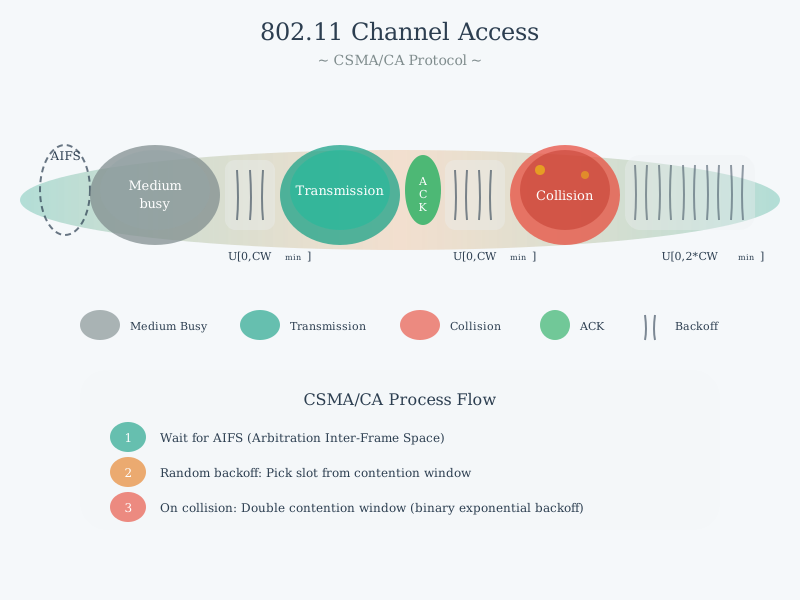
- CSMA/CA: Carrier Sense Multiple Access with Collision Avoidance for shared medium access
- WPA3 Security: Latest standard with encryption, individualized data encryption (OWE), and protection against brute-force attacks
- TWT (Target Wake Time): Wi-Fi 6 feature allowing devices to sleep until scheduled transmission
- OFDMA (Orthogonal Frequency Division Multiple Access): Wi-Fi 6 feature for simultaneous multi-user transmission
- Channel Planning: Careful frequency selection to minimize interference in dense deployments
- Power Management: Sleep modes and deep sleep for extending battery life on Wi-Fi devices
832.4 Interactive Visualizations
832.4.1 Wi-Fi Network Architecture
Understanding Wi-Fi network topology is essential for IoT deployments:
%%{init: {'theme': 'base', 'themeVariables': { 'primaryColor': '#2C3E50', 'primaryTextColor': '#fff', 'primaryBorderColor': '#16A085', 'lineColor': '#16A085', 'secondaryColor': '#E67E22', 'tertiaryColor': '#ecf0f1', 'fontSize': '13px'}}}%%
graph TB
    subgraph ESS["Extended Service Set (ESS)"]
        subgraph BSS1["BSS 1 - Coverage Area 1"]
            AP1[Access Point 1]
            STA1[Station: Camera]
            STA2[Station: Sensor]
            STA3[Station: Phone]
        end

        subgraph BSS2["BSS 2 - Coverage Area 2"]
            AP2[Access Point 2]
            STA4[Station: Laptop]
            STA5[Station: Thermostat]
            STA6[Station: Light]
        end

        DS[Distribution System<br/>Ethernet Backbone]

        AP1 <-->|Wireless| STA1
        AP1 <-->|Wireless| STA2
        AP1 <-->|Wireless| STA3

        AP2 <-->|Wireless| STA4
        AP2 <-->|Wireless| STA5
        AP2 <-->|Wireless| STA6

        AP1 <-->|Wired| DS
        AP2 <-->|Wired| DS
        DS -->|Internet| INTERNET[Internet/Cloud]
    end

    style ESS fill:#ecf0f1,stroke:#2C3E50,stroke-width:3px
    style BSS1 fill:#d5f4e6,stroke:#16A085,stroke-width:2px
    style BSS2 fill:#fdeaa8,stroke:#E67E22,stroke-width:2px
    style AP1 fill:#2C3E50,stroke:#16A085,stroke-width:3px,color:#fff
    style AP2 fill:#2C3E50,stroke:#16A085,stroke-width:3px,color:#fff
    style DS fill:#16A085,stroke:#2C3E50,stroke-width:2px
    style INTERNET fill:#7F8C8D,stroke:#2C3E50,stroke-width:2px
    style STA1 fill:#E67E22,stroke:#2C3E50,stroke-width:1px
    style STA2 fill:#E67E22,stroke:#2C3E50,stroke-width:1px
    style STA3 fill:#E67E22,stroke:#2C3E50,stroke-width:1px
    style STA4 fill:#E67E22,stroke:#2C3E50,stroke-width:1px
    style STA5 fill:#E67E22,stroke:#2C3E50,stroke-width:1px
    style STA6 fill:#E67E22,stroke:#2C3E50,stroke-width:1px
TipAlternative View: Wi-Fi IoT Deployment Decision Guide
This variant helps you select the right Wi-Fi architecture for different IoT scenarios:
%%{init: {'theme': 'base', 'themeVariables': {'primaryColor': '#2C3E50', 'primaryTextColor': '#fff', 'primaryBorderColor': '#16A085', 'lineColor': '#E67E22', 'secondaryColor': '#16A085', 'tertiaryColor': '#7F8C8D', 'fontSize': '11px'}}}%%
flowchart TD
    START["Wi-Fi IoT<br/>Deployment"] --> Q1{"Device<br/>count?"}

    Q1 -->|"< 20 devices"| SINGLE["Single AP<br/>Standard infrastructure"]
    Q1 -->|"20-100 devices"| Q2{"Coverage<br/>area?"}
    Q1 -->|"> 100 devices"| ENTERPRISE["Enterprise APs<br/>Controller-based"]

    Q2 -->|"< 3000 sq ft"| DUAL["2 APs + Roaming<br/>(802.11r optional)"]
    Q2 -->|"> 3000 sq ft"| MESH["Wi-Fi Mesh System<br/>or 3+ APs"]

    SINGLE --> B1["Power: Standard"]
    DUAL --> B2["Power: TWT if Wi-Fi 6"]
    MESH --> B3["Power: Consider AP placement"]
    ENTERPRISE --> B4["Power: OFDMA + TWT"]

    Q3{"Battery<br/>devices?"}
    B1 & B2 & B3 & B4 --> Q3

    Q3 -->|"Yes"| WIFI6["Require Wi-Fi 6<br/>TWT for battery life"]
    Q3 -->|"No (mains)"| ANY["Any Wi-Fi version<br/>Prioritize coverage"]

    style START fill:#2C3E50,stroke:#16A085,color:#fff
    style Q1 fill:#E67E22,stroke:#2C3E50,color:#fff
    style Q2 fill:#E67E22,stroke:#2C3E50,color:#fff
    style Q3 fill:#E67E22,stroke:#2C3E50,color:#fff
    style WIFI6 fill:#16A085,stroke:#2C3E50,color:#fff
    style ANY fill:#16A085,stroke:#2C3E50,color:#fff
    style ENTERPRISE fill:#7F8C8D,stroke:#2C3E50,color:#fff
Key insight for IoT: Wi-Fi 6 Target Wake Time (TWT) is essential for battery-powered devices. Without TWT, Wi-Fi drains batteries in hours/days instead of months/years.
Key Architecture Components:
- Station (STA): Wi-Fi client device (ESP32, sensor, camera)
- Access Point (AP): Coordinates wireless medium access in infrastructure mode
- Basic Service Set (BSS): Single AP with associated stations (coverage cell)
- Extended Service Set (ESS): Multiple interconnected BSSs enabling roaming
- Distribution System (DS): Wired backbone connecting APs (typically Ethernet)
- Fast Roaming (802.11r): Enables seamless handoff between APs (<50ms)
832.4.2 802.11 Protocol Stack
Wi-Fi operates across multiple protocol layers:

Protocol Layer Functions:
- MAC Layer: Implements CSMA/CA collision avoidance, frame acknowledgment, and retry mechanisms
- DCF (Distributed Coordination Function): Default contention-based access using carrier sensing
- HCF (Hybrid Coordination Function): QoS support via EDCA for prioritizing latency-sensitive IoT traffic
- PLCP (Physical Layer Convergence): Adds preamble and header for frame synchronization
- PMD (Physical Medium Dependent): Modulation schemes (OFDM, QAM) and RF transmission across 2.4/5 GHz (and 6 GHz with Wi-Fi 6E/7)
NoteOriginal Source Figures: 802.11 Protocol Details (Alternative Views)
These original figures from the CP IoT System Design Guide provide additional perspectives on 802.11 protocol mechanisms:
Channel Access Mechanism: 
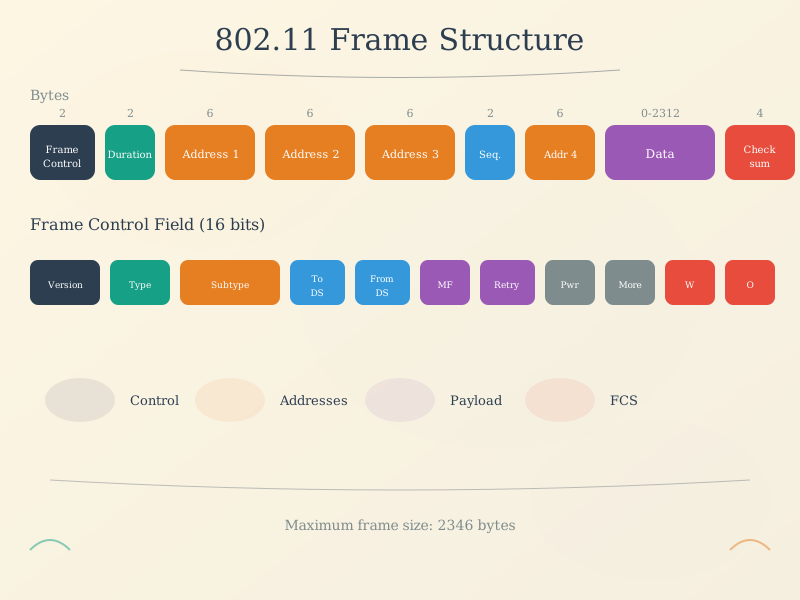
Frame Structure: 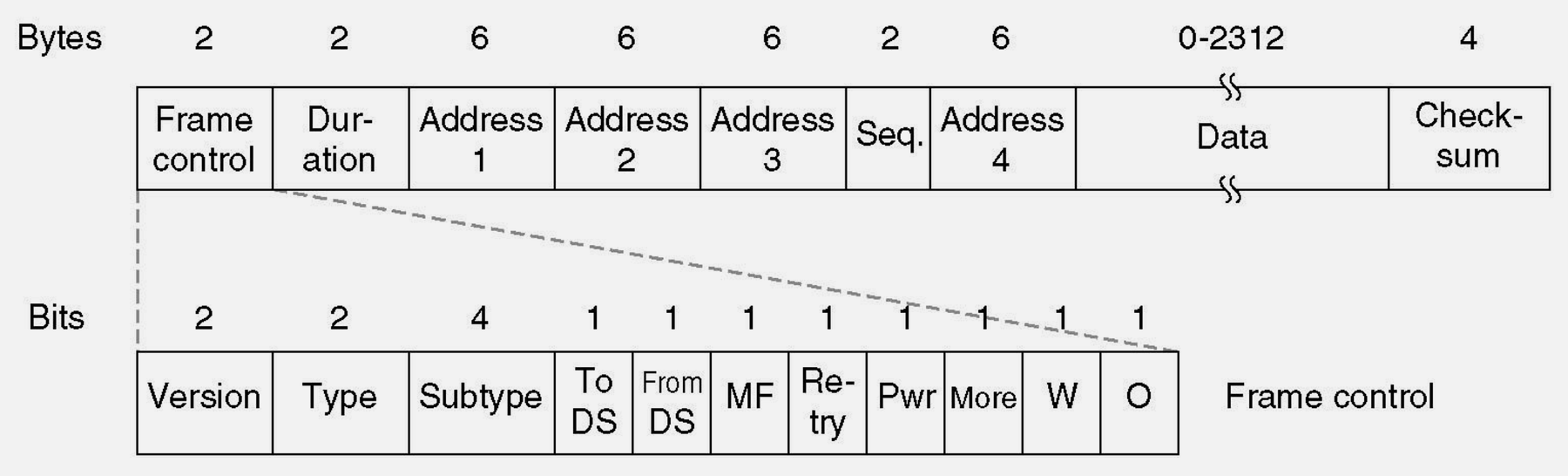
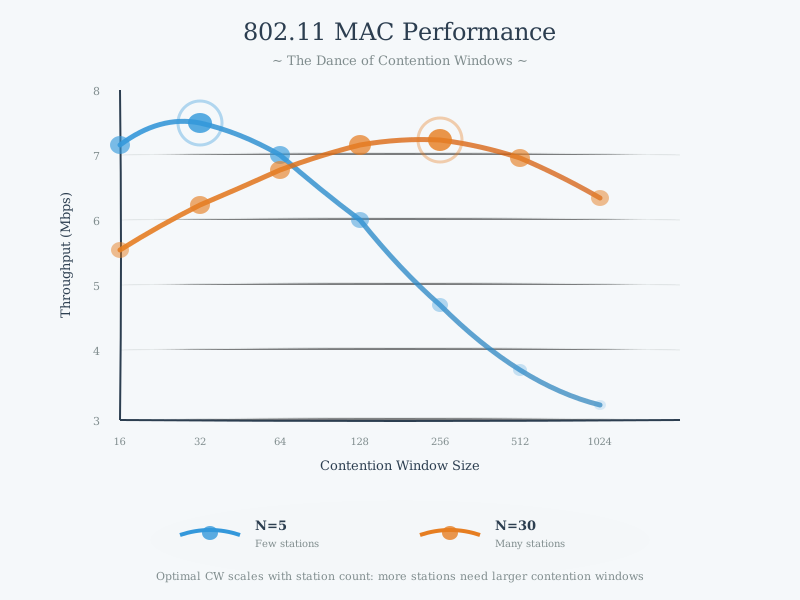
MAC Performance: 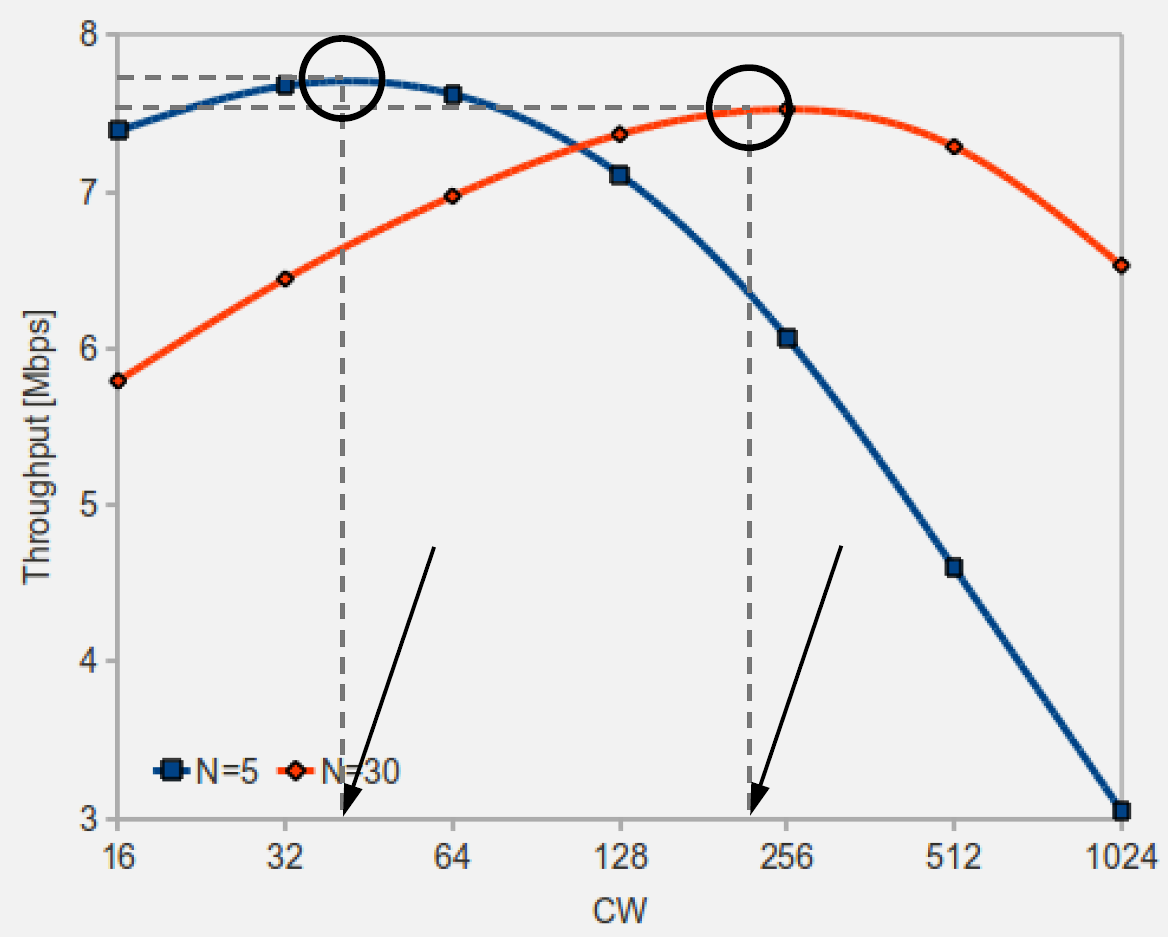
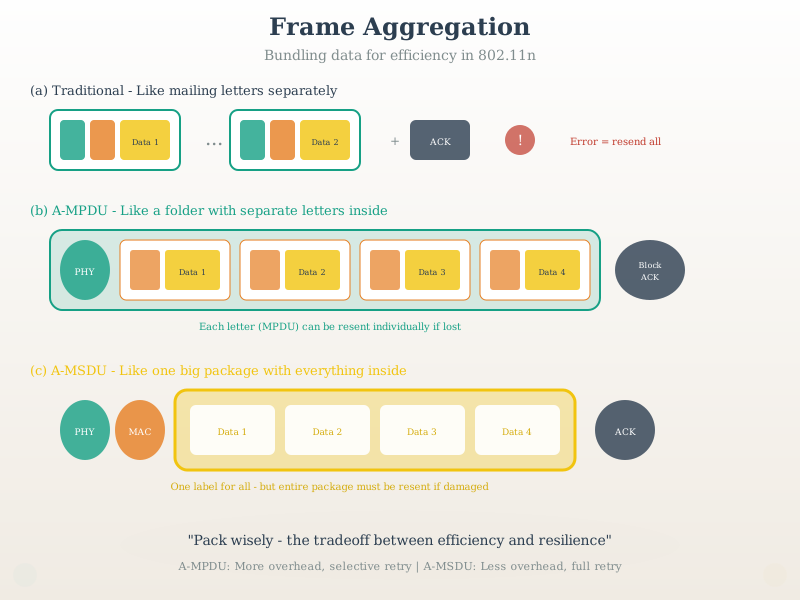
Frame Aggregation (802.11n): 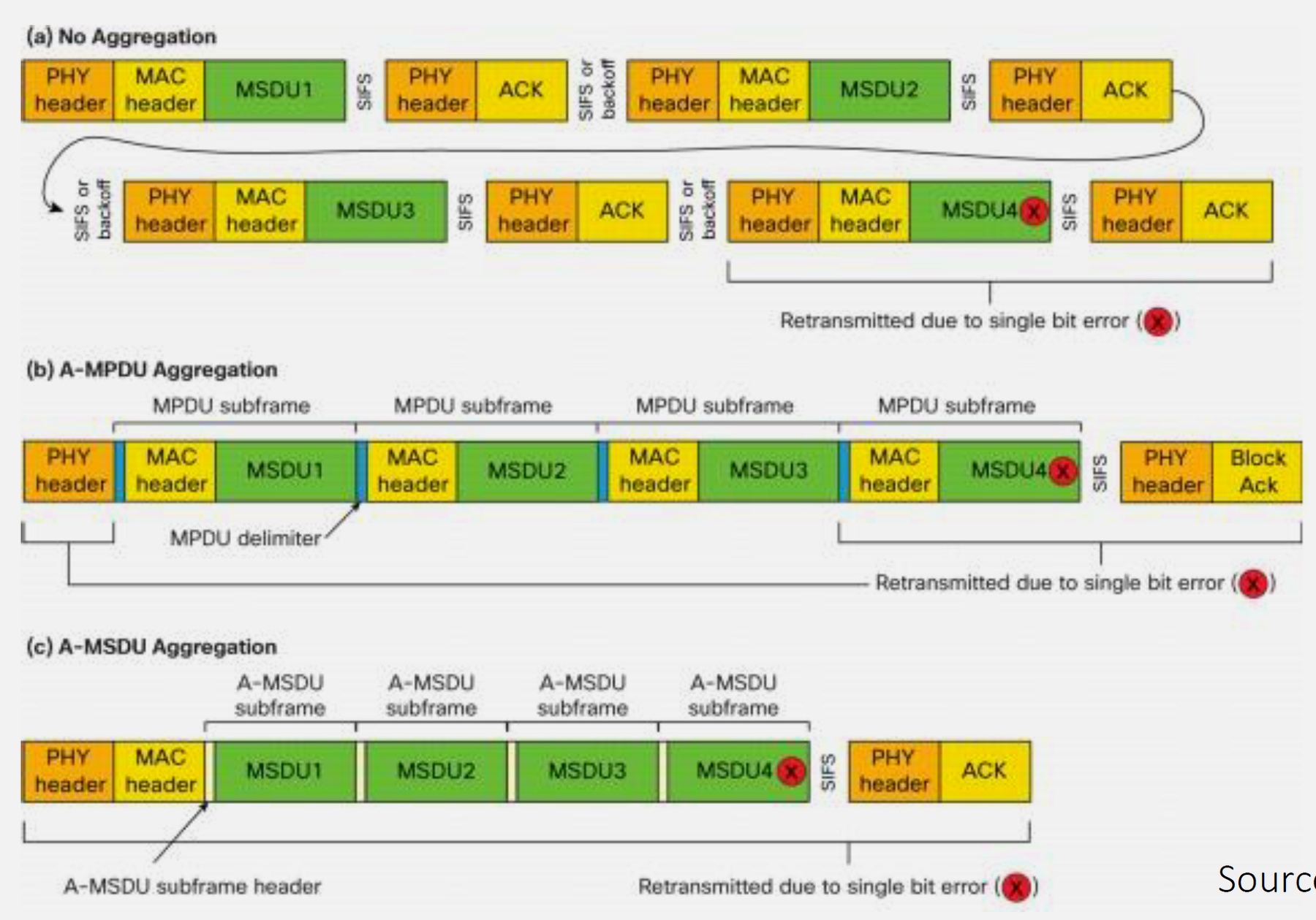
Source: CP IoT System Design Guide, Chapter 4 - Networking
Wi-Fi 6 Benefits for IoT: - OFDMA: Improves efficiency for many small packets in dense networks (reduced contention/latency) - TWT: Negotiated wake schedules for low-duty-cycle sensors (can significantly extend battery life when supported) - BSS Coloring: Identifies overlapping networks → better spectrum reuse - 1024-QAM: Higher modulation → 25% more data per symbol - Uplink MU-MIMO: Multiple IoT devices transmit simultaneously to AP
📱 ESP32 Wi-Fi Channel Selection: - Use Wi-Fi.scanNetworks() to detect congestion on all channels - Wi-Fi.channel(channel_number) to manually set channel after scanning - Monitor RSSI with Wi-Fi.RSSI() - target > -70 dBm for reliable link
⚠️ Wi-Fi Battery Life Reality Check: - Continuously connected Wi-Fi: 2-5 days battery life typical - Deep sleep with periodic wake: Months to years possible - For >1 year battery: Consider LoRaWAN/NB-IoT for sensors, Wi-Fi only for high-bandwidth needs - Hybrid approach: LoRa for alerts (years battery) + Wi-Fi for image/video (on-demand)
📏 Range Extension Strategies: - External Antenna: +5-10 dBi gain → 1.8-3× range increase - Lower Data Rate: Accept 11 Mbps instead of 54 Mbps → 1.5× range improvement - 2.4 GHz over 5 GHz: Double the range for same data rate - Multiple APs: Better than single high-power AP (uplink limited by device TX power) - Mesh Network: ESP-NOW or Wi-Fi mesh for >100m coverage with multi-hop
832.5 What’s Next
Continue to Knowledge Check Quizzes to test your understanding with scenario-based questions on Wi-Fi deployment, channel selection, power optimization, and security.