%%{init: {'theme': 'base', 'themeVariables': {'primaryColor': '#2C3E50', 'primaryTextColor': '#fff', 'primaryBorderColor': '#16A085', 'lineColor': '#16A085', 'secondaryColor': '#E67E22', 'tertiaryColor': '#7F8C8D', 'clusterBkg': '#f9f9f9', 'clusterBorder': '#2C3E50'}}}%%
graph TB
subgraph Segment1["VLAN 10: HVAC"]
HVAC1[Thermostat 1]
HVAC2[Thermostat 2]
HVAC3[Air Handler]
end
subgraph Segment2["VLAN 20: Security"]
Cam1[Camera 1]
Cam2[Camera 2]
Access[Access Control]
end
subgraph Segment3["VLAN 30: Sensors"]
Temp1[Temp Sensor 1]
Motion1[Motion Sensor 1]
Energy1[Energy Meter]
end
subgraph Resources["Resource Servers"]
BMS[Building Mgmt System]
NVR[Video Storage]
Analytics[Analytics DB]
end
HVAC1 -->|Allowed| BMS
HVAC2 -->|Allowed| BMS
HVAC3 -->|Allowed| BMS
Cam1 -->|Allowed| NVR
Cam2 -->|Allowed| NVR
Access -->|Allowed| NVR
Temp1 -->|Allowed| Analytics
Motion1 -->|Allowed| Analytics
Energy1 -->|Allowed| Analytics
HVAC1 -.Blocked.-> NVR
Cam1 -.Blocked.-> BMS
Temp1 -.Blocked.-> NVR
HVAC1 -.Blocked.-> Cam1
style Segment1 fill:#e3f2fd
style Segment2 fill:#fff3e0
style Segment3 fill:#f3e5f5
style Resources fill:#e8f5e9
1374 Zero Trust Network Segmentation and Continuous Verification
1374.1 Learning Objectives
By the end of this chapter, you will be able to:
- Design micro-segmentation strategies for IoT networks
- Implement Software-Defined Perimeters (SDP) for zero trust network access
- Build behavioral baselines for IoT device monitoring
- Apply risk-based access decisions using continuous verification
1374.2 Introduction
Micro-segmentation and continuous verification are the second and third pillars of zero trust security after device identity. Even with strong authentication, a compromised device can cause extensive damage if it has broad network access. This chapter explores how to divide networks into small, isolated zones and continuously monitor device behavior to detect and contain threats.
1374.3 Micro-Segmentation
Micro-segmentation divides the network into small, isolated zones with granular access controls. Instead of a single “trusted” internal network, you create hundreds or thousands of segments, each with specific security policies.
1374.3.1 Network Segmentation for IoT
Traditional Segmentation: VLANs
Virtual LANs separate devices at the network layer. Firewalls control traffic between VLANs.
Example: Smart Building Segmentation
VLAN 10: Building Management (10.1.10.0/24)
- HVAC controllers
- Lighting controllers
- Elevator systems
POLICY: No internet access, limited inter-VLAN communication

VLAN 20: Security Systems (10.1.20.0/24)
- Access control panels
- Security cameras
- Intrusion detection sensors
POLICY: No internet access, only to video storage server

VLAN 30: Occupancy Sensors (10.1.30.0/24)
- Presence sensors
- People counters
- Space utilization trackers
POLICY: Upload to analytics server only, no lateral movement

VLAN 40: Guest Wi-Fi (10.1.40.0/24)
- Visitor devices
POLICY: Internet access only, no access to other VLANs

VLAN 50: IT Management (10.1.50.0/24)
- Admin workstations
- Network management tools
POLICY: Can access all VLANs for maintenance
Firewall Rules Between VLANs:
RULE 1: ALLOW VLAN 10 → Building Mgmt Server (10.1.100.10) port 443
RULE 2: ALLOW VLAN 20 → Video Storage (10.1.100.20) port 8443
RULE 3: ALLOW VLAN 30 → Analytics Server (10.1.100.30) port 443
RULE 4: ALLOW VLAN 50 → ALL (for IT maintenance)
RULE 5: DENY ALL other inter-VLAN traffic
Advanced Segmentation: Application-Layer
Modern zero trust implementations segment at Layer 7 (application layer), not just Layer 3 (network layer).
- Service mesh (Istio, Linkerd) for containerized IoT applications
- Identity-aware proxies (Google BeyondCorp, Palo Alto Prisma)
- API gateways with per-endpoint policies
Benefits: - More granular control (endpoint-level, not network-level) - Works across cloud, on-premises, and hybrid environments - Decouples security from network topology
1374.3.2 Software-Defined Perimeters (SDP)
Also called “Zero Trust Network Access” (ZTNA), SDP makes resources invisible until after authentication.
Traditional Network: - All devices can see all IP addresses on the network - Attackers can scan for vulnerabilities (port scanning, service enumeration) - “Reconnaissance” is the first stage of most attacks
SDP Model: - Resources are “dark” - they don’t respond to unauthenticated requests - Single Packet Authorization (SPA) - device sends cryptographically signed packet - Only after verification does the firewall open a connection - Device can only see resources it’s authorized to access
SDP Flow: 1. Device authenticates to SDP controller 2. Controller verifies identity and policy 3. Controller instructs SDP gateway to open firewall rule for this device 4. Device can now access specific resources 5. All other resources remain invisible
Example: Industrial SCADA System - 1,000 sensors distributed across factory floor - Each sensor should only communicate with its designated data collector - With SDP, sensor cannot even discover other collectors or PLCs - If sensor is compromised, attacker sees a “dark” network with no targets
Let’s visualize micro-segmentation:
The diagram shows that each device can only access its designated resource server. Lateral movement between segments is blocked, and devices in one segment cannot access resources meant for other segments.
1374.4 Continuous Verification
Zero trust doesn’t stop after initial authentication. Continuous verification monitors device behavior in real-time, detecting anomalies that might indicate compromise.
1374.4.1 Behavioral Baselines
Every IoT device has normal behavior patterns. Deviations from these baselines can signal security issues.
Network Traffic Patterns: - Temperature Sensor Baseline: 48-byte packet every 60 seconds to 10.1.100.30:443 - Anomaly: Suddenly sending 1MB data to external IP address - Action: Block connection, quarantine device, alert security team
Access Patterns: - Security Camera Baseline: Uploads video to 10.1.100.20:8443 continuously - Anomaly: Attempts to access building access control system - Action: Deny access, investigate device firmware
Temporal Patterns: - Smart Lock Baseline: 20-50 access events per day, 7 AM - 7 PM - Anomaly: 200 access attempts at 3 AM - Action: Disable lock, alert security, review access logs
Data Characteristics: - Water Meter Baseline: Flow rate 0.5-10 gallons/minute - Anomaly: Reported flow of 1000 gallons/minute - Action: Flag as sensor malfunction or tampering
1374.4.2 Building Behavioral Models
Statistical Approach: - Collect 30+ days of normal device operation - Calculate mean, standard deviation, percentiles - Alert on values outside 3 standard deviations
Machine Learning Approach: - Train models on device behavior (traffic patterns, resource access, timing) - Anomaly detection algorithms: Isolation Forest, One-Class SVM, Autoencoders - Detect subtle deviations that rule-based systems miss
Example: Network Traffic Anomaly Detection
# Simplified example - real implementations are more sophisticated
import numpy as np
from sklearn.ensemble import IsolationForest

# Training data: normal device behavior (packet size, interval, destination)
normal_behavior = [
    [48, 60, 0],  # 48 bytes, 60 sec interval, destination 0 (internal)
    [52, 61, 0],
    [47, 59, 0],
    # ... 1000s of samples
]

# Train anomaly detector
model = IsolationForest(contamination=0.01)  # Expect 1% anomalies
model.fit(normal_behavior)

# Real-time monitoring
new_observation = [10485760, 1, 1]  # 10MB, 1 sec interval, external destination
prediction = model.predict([new_observation])

if prediction == -1:  # Anomaly detected
    quarantine_device()
    alert_security_team()
1374.4.3 Risk-Based Access Decisions
Not all access requests are equal. Zero trust systems calculate risk scores in real-time and adjust security requirements accordingly.
Risk Scoring Factors:
| Factor | Risk Impact | Example |
|---|---|---|
| Device Health | +20 to -30 | Firmware outdated: -20 |
| Authentication Strength | +20 to -40 | Certificate + attestation: +20 API key only: -20 |
| Location | +10 to -30 | Expected location: +10 Unusual location: -30 |
| Time of Access | +5 to -20 | Business hours: +5 3 AM access: -20 |
| Resource Sensitivity | +0 to -50 | Public data: 0 Safety-critical control: -50 |
| Recent Behavior | +10 to -40 | Normal activity: +10 Anomalies detected: -40 |
Access Decision Logic:
Total Risk Score = Σ(Risk Factors)

If score >= 50: ALLOW access
If score 20-49: ALLOW with additional logging
If score 0-19: REQUIRE additional verification (MFA, attestation)
If score < 0: DENY access and quarantine device
Example Scenario: Industrial Robot Arm
NORMAL OPERATION:
Device: robot-arm-07
Certificate: Valid (+20)
Firmware: v3.2.1 - Latest (+20)
Location: Factory floor Zone 3 (+10)
Time: 2:30 PM weekday (+5)
Behavior: Normal operation pattern (+10)
Resource: Motion control system (safety-critical, -50)

Total Risk Score: 15
Decision: REQUIRE additional verification
Action: Request TPM attestation before allowing safety-critical commands
SUSPICIOUS ACTIVITY:
Device: robot-arm-07
Certificate: Valid (+20)
Firmware: v3.1.8 - 2 versions outdated (-20)
Location: Factory floor Zone 3 (+10)
Time: 3:47 AM Sunday (-20)
Behavior: Attempting to access network file server (-40)
Resource: File server (not normally accessed)
Total Risk Score: -50
Decision: DENY access and QUARANTINE
Action: Isolate device, prevent all network communication, alert incident response1374.4.4 Real-Time Monitoring Architecture
%%{init: {'theme': 'base', 'themeVariables': {'primaryColor': '#2C3E50', 'primaryTextColor': '#fff', 'primaryBorderColor': '#16A085', 'lineColor': '#16A085', 'secondaryColor': '#E67E22', 'tertiaryColor': '#7F8C8D', 'clusterBkg': '#f9f9f9', 'clusterBorder': '#2C3E50'}}}%%

graph TB
    subgraph Devices["IoT Devices"]
        D1[Device 1]
        D2[Device 2]
        D3[Device 3]
    end

    subgraph Collection["Data Collection"]
        FW[Firewall Logs]
        Proxy[API Gateway Logs]
        Net[Network Flow Data]
    end

    subgraph Analysis["Analysis Engine"]
        Stream[Stream Processing]
        Baseline[Baseline Comparison]
        ML[ML Anomaly Detection]
        Rules[Rule Engine]
    end

    subgraph Response["Automated Response"]
        Score[Risk Scoring]
        Policy[Policy Enforcement]
        Quarantine[Quarantine]
        Alert[Alert SOC]
    end

    D1 --> FW
    D2 --> Proxy
    D3 --> Net

    FW --> Stream
    Proxy --> Stream
    Net --> Stream

    Stream --> Baseline
    Stream --> ML
    Stream --> Rules

    Baseline --> Score
    ML --> Score
    Rules --> Score

    Score -->|Low Risk| Policy
    Score -->|Medium Risk| Alert
    Score -->|High Risk| Quarantine

    Quarantine --> D1
    Policy --> D2

    style Analysis fill:#e3f2fd
    style Response fill:#fff3e0
This architecture shows how device activity flows through collection, analysis, and automated response systems in real-time.
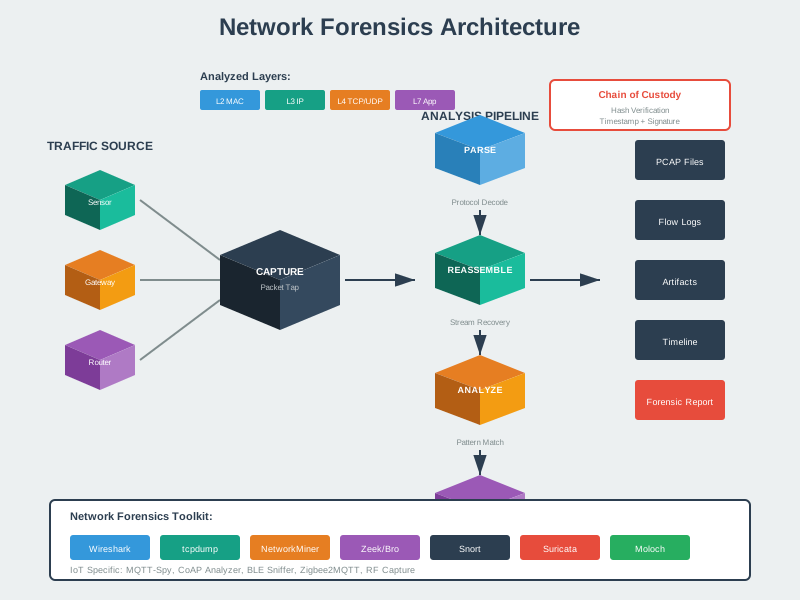
NoteAI-Generated Visual: Network Forensics for IoT
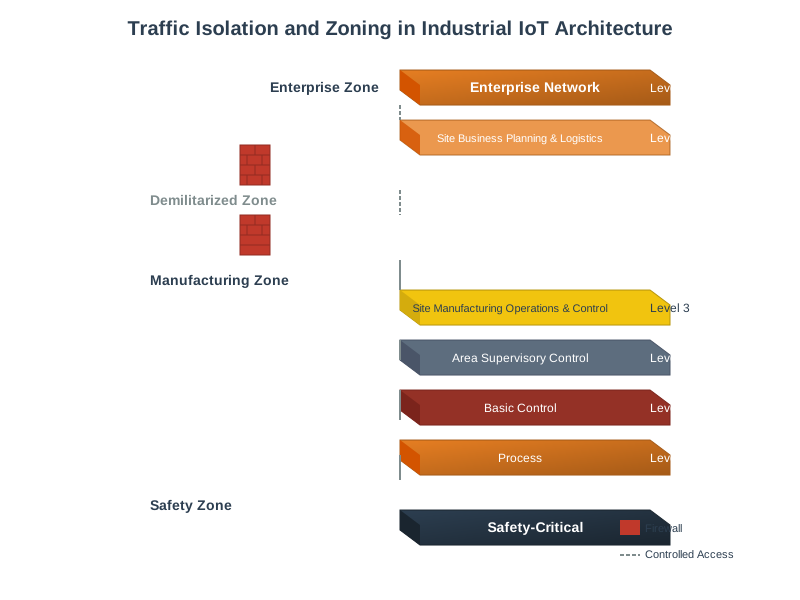
NoteAI-Generated Visual: Traffic Isolation and Zoning
1374.5 Worked Example: Zero Trust Access Control for Smart Factory
NoteWorked Example: Designing Zero Trust Access Control for Smart Factory Floor
Scenario: A manufacturing company implements zero trust security for a smart factory with 150 industrial robots, 500 sensors, and 50 operator workstations. Unlike traditional perimeter security where devices inside the factory network are trusted, zero trust requires every device to authenticate for every access request. Design an access control system that enforces least-privilege access while maintaining the sub-100ms response times required for real-time industrial control.
Given: - 150 industrial robots (PLCs with ARM Cortex-R, 64MB RAM, Linux-based) - 500 sensors (temperature, vibration, vision) on industrial Ethernet - 50 operator workstations (Windows, Linux) - Central manufacturing execution system (MES) coordinating production - Latency requirement: <100ms for control commands, <10ms for safety signals - Uptime requirement: 99.99% (52 minutes downtime/year maximum) - Compliance: IEC 62443 (industrial cybersecurity), ISO 27001
Steps:
- Design identity and policy architecture:
%%{init: {'theme': 'base', 'themeVariables': {'primaryColor': '#2C3E50', 'primaryTextColor': '#fff', 'primaryBorderColor': '#16A085', 'lineColor': '#16A085', 'secondaryColor': '#E67E22', 'tertiaryColor': '#7F8C8D'}}}%%
flowchart TB
    subgraph IdP["Identity Provider (IdP)"]
        direction TB
        DC["Device Certificates<br/>X.509 per robot/sensor/workstation"]
        DC1["Factory Device CA issued"]
        DC2["2-year validity, auto-renewal"]
        DC3["TPM/secure element storage"]
        DC --> DC1 & DC2 & DC3

        UC["User Credentials<br/>AD/LDAP for operators"]
        UC1["MFA: Badge + PIN"]
        UC2["JWT tokens, 8-hour validity"]
        UC --> UC1 & UC2

        SA["Service Accounts<br/>MES-to-device communication"]
        SA1["Certificate-based auth"]
        SA2["Scoped to specific operations"]
        SA --> SA1 & SA2
    end

    subgraph PDP["Policy Decision Point (PDP)"]
        direction TB
        RD["Role Definitions"]
        RD1["Operator: Start/stop, view status"]
        RD2["Technician: Configure, diagnostics"]
        RD3["Engineer: Upload programs, modify safety"]
        RD4["Supervisor: Override, emergency controls"]
        RD --> RD1 & RD2 & RD3 & RD4

        RP["Resource Permissions"]
        RP1["Per-robot granularity"]
        RP2["Time-based restrictions"]
        RP3["Location-based access"]
        RP --> RP1 & RP2 & RP3
    end

    subgraph PEP["Policy Enforcement Points (PEP)"]
        direction TB
        NET["Network PEP<br/>SDN switches"]
        APP["Application PEP<br/>API gateway for MES"]
        DEV["Device PEP<br/>Local agents on PLCs"]
    end

    IdP --> PDP --> PEP

    style DC fill:#2C3E50,stroke:#16A085,color:#fff
    style UC fill:#2C3E50,stroke:#16A085,color:#fff
    style SA fill:#2C3E50,stroke:#16A085,color:#fff
    style RD fill:#E67E22,stroke:#2C3E50,color:#fff
    style RP fill:#E67E22,stroke:#2C3E50,color:#fff
    style NET fill:#16A085,stroke:#2C3E50,color:#fff
    style APP fill:#16A085,stroke:#2C3E50,color:#fff
    style DEV fill:#16A085,stroke:#2C3E50,color:#fff
Calculate authentication latency budget:
Target: 100ms total for authenticated control command
Problem: PDP query for every request is bottleneck
- 150 robots times 10 commands/sec = 1,500 policy decisions/sec
- Single PDP server at 30ms/decision = 50 decisions/sec max
- INSUFFICIENT: Need 30x more capacity
Solution: Distributed policy caching
Cache strategy:
- Policy cache TTL: 60 seconds
- Cache invalidation: Push-based (policy change triggers broadcast)
- Cache miss fallback: Query PDP (adds 28ms)
Design safety-critical bypass mechanism:
EMERGENCY ACCESS PROTOCOL:

Scenario: Network partition isolates robot from PDP server

SAFETY REQUIREMENT: Emergency stop MUST work even without auth
SECURITY REQUIREMENT: Cannot allow arbitrary commands without auth

Solution: Pre-authorized emergency credentials

1. Each robot stores emergency policy locally:
   emergency_policy = {
       "allowed_subjects": [
           "cert:supervisor-badge-*",  # Any supervisor badge
           "cert:emergency-override"   # Physical key
       ],
       "allowed_actions": ["emergency_stop", "safe_state"],
       "max_duration": 3600,  # 1 hour
       "audit_required": true
   }

2. Emergency activation sequence:
   a. Operator attempts normal command → fails (no PDP)
   b. Robot detects PDP unreachable for >5 seconds
   c. Robot enters "degraded security mode"
   d. Robot accepts ONLY emergency commands from pre-authorized certs
   e. All actions logged locally with timestamps

3. Recovery sequence:
   a. PDP connectivity restored
   b. Robot uploads emergency audit log
   c. Security team reviews all emergency actions
   d. Robot returns to full zero trust mode

TRADEOFF: Emergency bypass creates attack surface
MITIGATION: Hardware physical key required (not just certificate)
           Supervisor must be physically present at robot
Define continuous verification and attestation: | Verification | Frequency | Failure Action | |————–|———–|—————-| | Device certificate validity | Per connection | Reject connection, alert | | Workstation health (EDR status) | Every 5 minutes | Reduce permissions to read-only | | PLC firmware attestation | Hourly | Quarantine device, alert engineering | | User session validity | Per request | Force re-authentication | | Network segment isolation | Continuous (SDN) | Block cross-zone traffic | | Anomaly detection (behavior) | Real-time | Flag for human review |
Result: - Every access request authenticated and authorized (zero trust) - Latency: 23ms typical, 75ms worst-case (within 100ms budget) - Throughput: 10,000+ policy decisions/second with distributed caching - Availability: 99.99% with local policy caching and emergency bypass - Granularity: Per-robot, per-operator, per-action access control - Audit: Complete record of every access decision for compliance
Key Insight: Zero trust in industrial environments requires careful balancing of security, performance, and safety. The key enabler is distributed policy caching: rather than querying a central PDP for every decision, each PEP maintains a local cache of recently-used policies with short TTLs. This reduces latency from 75ms to 23ms while maintaining security (policies refresh every 60 seconds). The emergency bypass mechanism is essential: safety-critical systems cannot fail-closed if the authentication system is unreachable. By pre-authorizing specific emergency actions with hardware-backed credentials, the system maintains safety guarantees even during security infrastructure outages. This pattern applies to any real-time system where zero trust must coexist with deterministic response requirements.
1374.6 Summary
Micro-segmentation and continuous verification complete the zero trust security model:
Micro-segmentation divides networks into isolated zones, limiting lateral movement when devices are compromised.
Software-Defined Perimeters make resources invisible to unauthorized devices, eliminating reconnaissance attacks.
Behavioral baselines establish normal device patterns, enabling anomaly detection when devices are compromised.
Risk-based access adjusts security requirements dynamically based on device health, location, time, and behavior.
Real-time monitoring with automated response enables sub-second threat containment.
1374.8 What’s Next
Now that you understand micro-segmentation and continuous verification, continue to Zero Trust Architecture to learn about complete implementation architectures, real-world case studies from Google BeyondCorp and Microsoft Azure, and comprehensive worked examples.