%%{init: {'theme': 'base', 'themeVariables': { 'primaryColor': '#2C3E50', 'primaryTextColor': '#fff', 'primaryBorderColor': '#16A085', 'lineColor': '#E67E22', 'secondaryColor': '#16A085', 'tertiaryColor': '#E8F6F3', 'clusterBkg': '#E8F6F3', 'clusterBorder': '#16A085', 'fontSize': '13px'}}}%%
graph TB
    subgraph App["Application Layer"]
        MQTT["MQTT<br/>(Messaging)"]
        CoAP["CoAP<br/>(RESTful)"]
        HTTP["HTTP/HTTPS<br/>(Web)"]
        AMQP["AMQP<br/>(Enterprise)"]
    end

    subgraph Transport["Transport Layer"]
        TCP["TCP<br/>(Reliable)"]
        UDP["UDP<br/>(Fast)"]
    end

    subgraph Network["Network Layer"]
        IPv4["IPv4"]
        IPv6["IPv6"]
        RPL["RPL<br/>(Routing)"]
    end

    subgraph DataLink["Data Link Layer"]
        Wi-Fi["Wi-Fi<br/>(802.11)"]
        BLE["Bluetooth LE"]
        Zigbee["Zigbee<br/>(802.15.4)"]
        LoRa["LoRaWAN"]
    end

    subgraph Physical["Physical Layer"]
        Radio["2.4GHz / 5GHz<br/>Sub-GHz Radio"]
        Ethernet["Ethernet<br/>(Wired)"]
    end

    MQTT --> TCP
    CoAP --> UDP
    HTTP --> TCP
    AMQP --> TCP

    TCP --> IPv4
    TCP --> IPv6
    UDP --> IPv4
    UDP --> IPv6

    IPv4 --> Wi-Fi
    IPv4 --> BLE
    IPv6 --> Zigbee
    IPv6 --> LoRa

    Wi-Fi --> Radio
    BLE --> Radio
    Zigbee --> Radio
    LoRa --> Radio
    Wi-Fi --> Ethernet

    RPL --> IPv6

    style MQTT fill:#2C3E50,stroke:#16A085,color:#fff
    style CoAP fill:#16A085,stroke:#2C3E50,color:#fff
    style HTTP fill:#E67E22,stroke:#2C3E50,color:#fff
    style AMQP fill:#2C3E50,stroke:#16A085,color:#fff
    style TCP fill:#16A085,stroke:#2C3E50,color:#fff
    style UDP fill:#E67E22,stroke:#2C3E50,color:#fff
    style IPv4 fill:#2C3E50,stroke:#16A085,color:#fff
    style IPv6 fill:#16A085,stroke:#2C3E50,color:#fff
    style RPL fill:#E67E22,stroke:#2C3E50,color:#fff
    style Wi-Fi fill:#2C3E50,stroke:#16A085,color:#fff
    style BLE fill:#16A085,stroke:#2C3E50,color:#fff
    style Zigbee fill:#E67E22,stroke:#2C3E50,color:#fff
    style LoRa fill:#2C3E50,stroke:#16A085,color:#fff
    style Radio fill:#16A085,stroke:#2C3E50,color:#fff
    style Ethernet fill:#E67E22,stroke:#2C3E50,color:#fff
641 Networking: Review and Videos
NoteRelated Chapters
Deep Dives: - Networking Fundamentals - Core networking concepts - Topologies - Network structures and design - Routing - Routing fundamentals
Protocols: - MQTT Protocol - Publish-subscribe messaging - CoAP Protocol - Constrained Application Protocol - IoT Protocols Overview - Protocol comparison
Transport Layer: - Transport Comprehensive Review - TCP vs UDP - Transport Optimizations - IoT adaptations
Wireless: - Wi-Fi Fundamentals - 802.11 networking - Bluetooth Fundamentals - Short-range wireless - LoRaWAN Overview - Long-range LPWAN
Learning: - Quizzes Hub - Test your networking knowledge - Videos Hub - Video learning resources - Simulations Hub - Interactive networking tools
641.1 Learning Objectives
By the end of this review, you will be able to:
- Apply Networking Foundations: Use OSI/TCP-IP models to design robust IoT systems
- Troubleshoot Connectivity: Diagnose common networking issues in IoT deployments
- Select Protocols: Choose appropriate protocols based on power, bandwidth, and reliability needs
- Design for Security: Implement security best practices at the network level
- Plan Scalability: Design networks that grow from prototype to production
- Continue Learning: Connect fundamentals to specific IoT protocols (MQTT, CoAP, Zigbee)
641.2 Prerequisites
Required Chapters: - Networking Fundamentals - Core networking - Topologies - Network structures - Routing - Routing basics
Recommended Reading: - Complete all Part 4 (Networking) chapters before this review
Technical Background: - IP addressing and subnetting - Protocol stack concepts - Wireless communication basics
Review Coverage:
| Topic | Key Concepts |
|---|---|
| Fundamentals | Addressing, routing, protocols |
| Wireless | Wi-Fi, Bluetooth, Zigbee |
| LPWAN | LoRaWAN, Sigfox, NB-IoT |
| Application | MQTT, CoAP, AMQP |
Video Content Note: This chapter includes supplementary video content. Ensure you have completed the prerequisite chapters before watching.
Estimated Time: 2 hours
TipFor Beginners: How to Use This Review
What is this chapter? This review chapter consolidates networking fundamentals and provides video resources to reinforce your learning.
When to use this chapter: - After completing Networking Basics and Fundamentals - When you want visual explanations of concepts - As preparation for more advanced protocol topics
Key Concepts to Master:
| Concept | Why It Matters |
|---|---|
| OSI Model | Framework for understanding network layers |
| IP Addressing | How devices find each other |
| Subnetting | Organizing networks efficiently |
| TCP vs UDP | Choosing the right transport |
Recommended Path: 1. Study Networking Basics first 2. Watch the videos in this chapter 3. Test yourself with the quizzes 4. Move on to IoT-specific protocols
NoteCross-Hub Connections
This review chapter connects to multiple learning hubs for comprehensive mastery:
Knowledge Map Hub - See how networking concepts interconnect with protocols, security, and architectures - Visualize the dependency graph: fundamentals → protocols → applications
Quizzes Hub - Networking Fundamentals Quiz: Test OSI/TCP-IP layers, addressing, subnetting - Protocol Selection Quiz: Practice choosing Wi-Fi vs Bluetooth vs LoRa scenarios - Troubleshooting Quiz: Apply layer-by-layer diagnostic approach
Simulations Hub - Network Topology Visualizer: Compare star, mesh, tree topologies interactively - Subnet Calculator: Practice CIDR notation and subnet mask calculations - Protocol Overhead Comparator: See TCP vs UDP header sizes in action
Videos Hub - OSI Model Explained: Visual walkthrough of all 7 layers with real examples - IPv6 for IoT: Why 128-bit addressing solves IoT scalability - MQTT vs CoAP Comparison: See pub-sub vs RESTful in action
Learning Path Integration: 1. Read this review → Watch hub videos → Take quizzes → Run simulations 2. Struggling with subnetting? Use Subnet Calculator simulation, then retry quiz 3. Confused about protocol selection? Watch comparison videos, use decision tree tool
WarningCommon Misconception: “More Bandwidth = Better IoT”
The Myth: Many beginners assume IoT devices need high-speed connections like Wi-Fi (up to 1 Gbps) for optimal performance.
Why It’s Wrong (With Real Data):
Most IoT sensors transmit tiny payloads at slow intervals. Consider these actual bandwidth requirements:
| Device Type | Payload Size | Frequency | Bandwidth Need |
|---|---|---|---|
| Temperature sensor | 8 bytes | Every 5 min | 0.0021 bps |
| Smart meter | 50 bytes | Every 15 min | 0.0044 bps |
| GPS tracker | 100 bytes | Every 30 sec | 0.027 bps |
| Air quality monitor | 200 bytes | Every 1 min | 0.027 bps |
The Real Numbers: - LoRaWAN: 0.3-50 Kbps is sufficient for 10,000+ sensors - Wi-Fi: 10-1000 Mbps is 20,000× overkill for most IoT use cases - Power Cost: Wi-Fi consumes 100-300 mW, LoRa uses 10-100 mW (3-30× more efficient) - Battery Impact: Wi-Fi lasts weeks, LoRa lasts years on the same battery
Real-World Example: A smart agriculture deployment with 500 soil moisture sensors: - Wrong choice: Wi-Fi 802.11n (150 Mbps capability) - Reality: Using <0.001% of available bandwidth - Power: 150 mW × 500 = 75 W continuous - Range: Need 50+ access points for coverage - Battery life: 2-4 weeks - Cost: $25,000+ for infrastructure
- Right choice: LoRaWAN (50 Kbps capability)
- Reality: Using 2% of available bandwidth (1 Kbps actual)
- Power: 20 mW × 500 = 10 W average
- Range: 3-5 gateways cover entire farm
- Battery life: 3-5 years
- Cost: $2,000 for infrastructure
What Actually Matters for IoT: ✅ Energy efficiency (µW to mW, not watts) ✅ Range (km, not meters) ✅ Reliability (can you tolerate packet loss?) ✅ Cost per device (deploy thousands, not tens) ✅ Latency tolerance (seconds to minutes acceptable for most sensors)
The Right Question: Don’t ask “How fast?” Ask “How efficient, how far, how reliably, and at what cost?”
Counterexample - When High Bandwidth IS Needed: - Real-time video surveillance (5 Mbps per camera) - Industrial vision inspection (10-50 Mbps) - VR/AR headsets (100+ Mbps)
For these, Wi-Fi or 5G is appropriate. But they represent <5% of IoT deployments.
641.3 Visual Reference Gallery
Explore these AI-generated visualizations that illustrate key networking concepts covered in this chapter.
NoteVisual: Common Networking Architecture
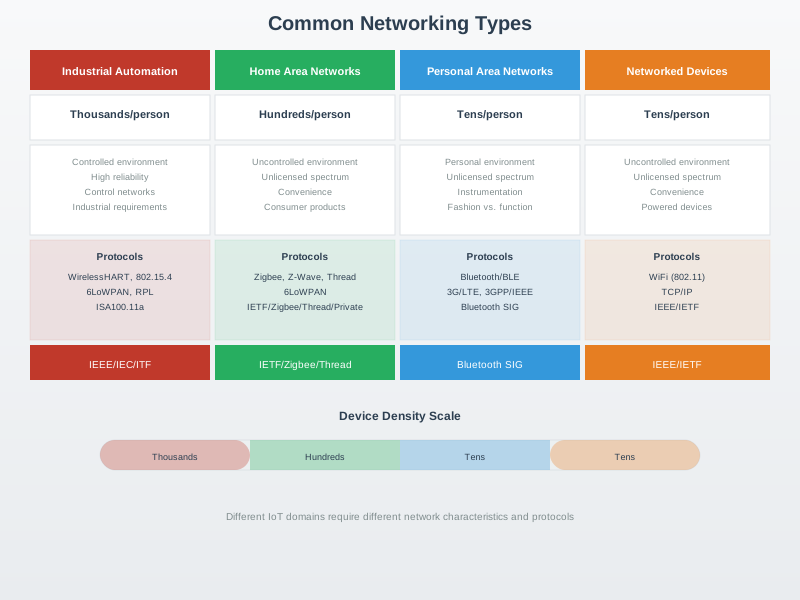
This diagram provides an overview of fundamental networking architecture patterns that underpin IoT systems, from local area networks to wide area connectivity.
NoteVisual: Networking Model Layers
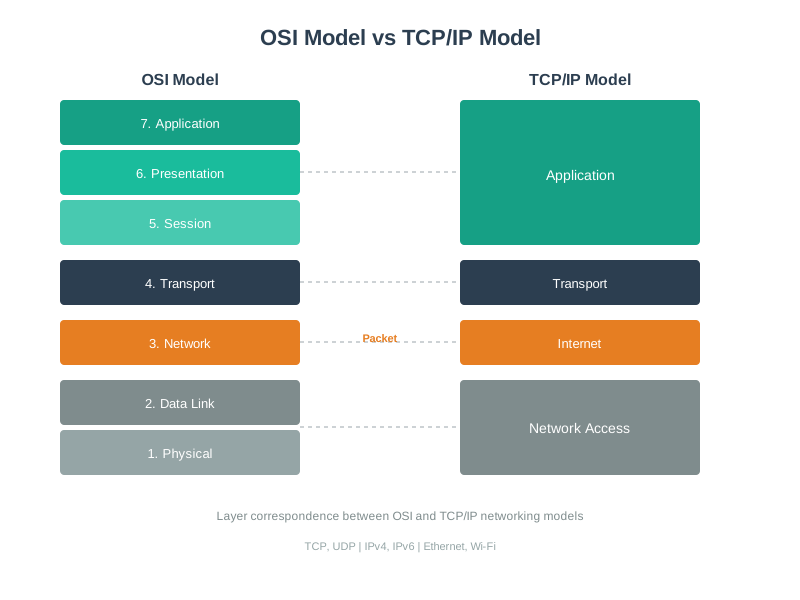
Understanding the layered networking model is essential for troubleshooting and designing IoT communication stacks.
NoteVisual: Packet Switching in Data Networks
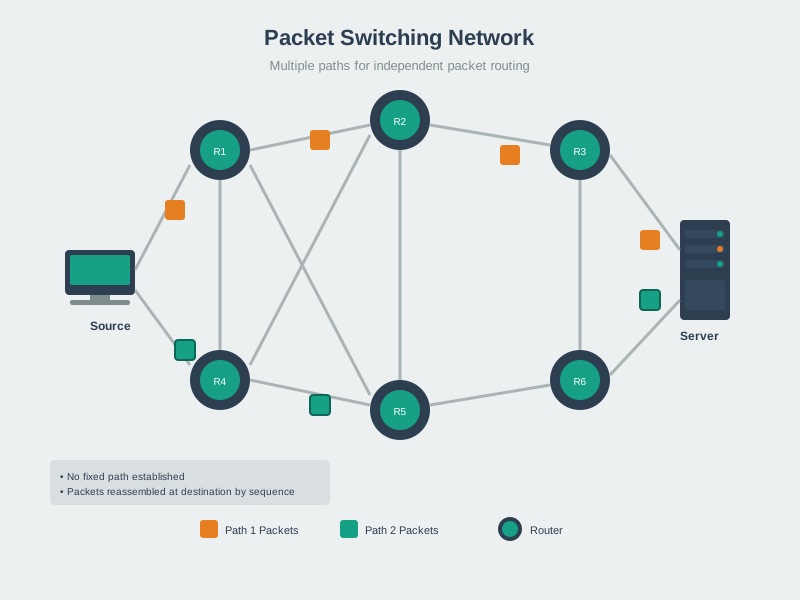
Packet switching is the foundation of modern network communication, enabling efficient data transmission across the Internet and IoT networks.
641.4 Summary
Networking is the foundation of IoT. Understanding the OSI/TCP-IP models, addressing schemes, topologies, and protocols enables you to:
- Design robust IoT systems
- Troubleshoot connectivity issues
- Optimize for bandwidth and power
- Secure your devices and data
- Scale from prototypes to production
Key Takeaways:
✅ OSI provides framework; TCP/IP is practical implementation ✅ IPv6 solves address exhaustion; essential for massive IoT ✅ Topology choice impacts reliability, range, and complexity ✅ Protocol selection depends on power, bandwidth, reliability needs ✅ Security must be designed in, not added later ✅ Real-world networks are messy; design for failure
Next Steps: Now that you understand networking fundamentals, dive into specific IoT protocols (MQTT, CoAP, Bluetooth, Zigbee, LoRa) to see these concepts in action!
641.5 Visual Summaries
641.5.1 IoT Networking Stack Overview
The following diagram shows how IoT networking layers work together, from physical hardware to application protocols:
%%{init: {'theme': 'base', 'themeVariables': { 'primaryColor': '#2C3E50', 'primaryTextColor': '#fff', 'primaryBorderColor': '#16A085', 'lineColor': '#16A085', 'secondaryColor': '#E67E22', 'tertiaryColor': '#7F8C8D'}}}%%
sequenceDiagram
    participant App as Application<br/>(MQTT publish)
    participant Trans as Transport<br/>(TCP segment)
    participant Net as Network<br/>(IPv6 packet)
    participant Link as Data Link<br/>(802.15.4 frame)
    participant Phys as Physical<br/>(Radio signal)

    Note over App,Phys: Sensor Reading: Temperature = 23.5C

    App->>Trans: Data: {"temp": 23.5}
    Note right of App: +MQTT header<br/>Size: 15 bytes

    Trans->>Net: Segment: [TCP hdr + payload]
    Note right of Trans: +TCP header<br/>Size: 35 bytes

    Net->>Link: Packet: [IPv6 hdr + segment]
    Note right of Net: +IPv6 header<br/>Size: 75 bytes

    Link->>Phys: Frame: [MAC hdr + packet + FCS]
    Note right of Link: +MAC header<br/>Size: 102 bytes

    Phys-->>Phys: Modulate & Transmit
    Note right of Phys: Radio waves<br/>at 2.4 GHz
641.5.2 Protocol Selection Quick Reference
Use this decision tree to choose the right protocol for your IoT application:
%%{init: {'theme': 'base', 'themeVariables': { 'primaryColor': '#2C3E50', 'primaryTextColor': '#fff', 'primaryBorderColor': '#16A085', 'lineColor': '#E67E22', 'secondaryColor': '#16A085', 'tertiaryColor': '#E8F6F3', 'clusterBkg': '#E8F6F3', 'clusterBorder': '#16A085', 'fontSize': '12px'}}}%%
flowchart TD
    Start{Range<br/>Requirement}

    Short{<10m<br/>Short Range}
    Medium{<100m<br/>Building}
    Long{>1km<br/>Wide Area}

    Power1{Power<br/>Constrained?}
    Power2{Power<br/>Constrained?}
    Power3{Power<br/>Constrained?}

    Data1{Data Rate<br/>Needs}
    Data2{Data Rate<br/>Needs}
    Data3{Data Rate<br/>Needs}

    BLE["✅ Bluetooth LE<br/>Range: 10m<br/>Power: Very Low<br/>Data: 1-2 Mbps"]
    BT["✅ Bluetooth Classic<br/>Range: 10m<br/>Power: Medium<br/>Data: 3 Mbps"]

    Wi-Fi["✅ Wi-Fi (802.11)<br/>Range: 50-100m<br/>Power: High<br/>Data: 10-1000 Mbps"]
    Zigbee["✅ Zigbee/Thread<br/>Range: 10-100m<br/>Power: Very Low<br/>Data: 250 Kbps"]

    LoRa["✅ LoRaWAN<br/>Range: 2-15 km<br/>Power: Ultra Low<br/>Data: 0.3-50 Kbps"]
    NBIoT["✅ NB-IoT/LTE-M<br/>Range: 10+ km<br/>Power: Low-Med<br/>Data: 100 Kbps-1 Mbps"]

    Start -->|<10m| Short
    Start -->|<100m| Medium
    Start -->|>1km| Long

    Short --> Power1
    Medium --> Power2
    Long --> Power3

    Power1 -->|Yes| BLE
    Power1 -->|No| Data1
    Data1 -->|High| BT
    Data1 -->|Low| BLE

    Power2 -->|Yes| Zigbee
    Power2 -->|No| Wi-Fi

    Power3 -->|Yes| Data3
    Power3 -->|No| NBIoT
    Data3 -->|Very Low| LoRa
    Data3 -->|Low-Med| NBIoT

    style Start fill:#2C3E50,stroke:#16A085,color:#fff
    style Short fill:#16A085,stroke:#2C3E50,color:#fff
    style Medium fill:#16A085,stroke:#2C3E50,color:#fff
    style Long fill:#16A085,stroke:#2C3E50,color:#fff
    style Power1 fill:#E67E22,stroke:#2C3E50,color:#fff
    style Power2 fill:#E67E22,stroke:#2C3E50,color:#fff
    style Power3 fill:#E67E22,stroke:#2C3E50,color:#fff
    style Data1 fill:#2C3E50,stroke:#16A085,color:#fff
    style Data2 fill:#2C3E50,stroke:#16A085,color:#fff
    style Data3 fill:#2C3E50,stroke:#16A085,color:#fff
    style BLE fill:#27AE60,stroke:#229954,color:#fff
    style BT fill:#27AE60,stroke:#229954,color:#fff
    style Wi-Fi fill:#27AE60,stroke:#229954,color:#fff
    style Zigbee fill:#27AE60,stroke:#229954,color:#fff
    style LoRa fill:#27AE60,stroke:#229954,color:#fff
    style NBIoT fill:#27AE60,stroke:#229954,color:#fff
How to use this guide:
- Start with range: What physical distance must your devices communicate?
- Consider power: Battery-powered or always connected?
- Evaluate data needs: Streaming video vs. periodic sensor readings?
- Assess reliability: Can you tolerate occasional packet loss?
- Check constraints: Cost, existing infrastructure, regulatory compliance
641.6 Key Concepts
- OSI Model: 7-layer theoretical framework for network communication (Physical, Data Link, Network, Transport, Session, Presentation, Application)
- TCP/IP Model: 4-layer practical model actually used on the internet (Link, Internet, Transport, Application)
- IPv4 Addressing: 32-bit addresses (e.g., 192.168.1.100) with public, private, and reserved ranges; facing exhaustion
- IPv6 Addressing: 128-bit addresses (e.g., 2001:0db8:85a3::8a2e:0370:7334) with virtually unlimited space for IoT devices
- MAC Addresses: 48-bit hardware identifiers (Layer 2) for local network communication; format: AA:BB:CC:DD:EE:FF
- TCP vs UDP: TCP provides guaranteed delivery with higher overhead; UDP offers speed with best-effort delivery
- Network Topologies: Point-to-point, star, mesh, and tree/hierarchical arrangements each with different trade-offs
- MQTT & CoAP: Application-layer protocols; MQTT uses TCP (port 1883) for reliable messaging, CoAP uses UDP (port 5683) for constrained devices
- Network Troubleshooting: Systematic layer-by-layer approach from Physical (signal strength, obstacles) to Application (DNS, ports)
- IoT Security: Default credential changes, TLS encryption, network segmentation, firmware updates, and minimal port exposure
- RSSI: Received Signal Strength Indicator in dBm; values above -70 dBm are considered good for reliable connections
- Bandwidth & Latency: IoT data is typically small; sensor readings measured in bytes not megabytes; optimize for constraint networks
641.7 Chapter Summary
Networking is the foundation of IoT - without connectivity, you have isolated devices instead of the “Internet of Things.” This chapter covered fundamental networking concepts essential for every IoT developer.
We explored the OSI and TCP/IP models, understanding how they structure network communication from physical transmission (radio waves, copper cables) through application-level protocols (MQTT, CoAP, HTTP). While the OSI model provides a 7-layer theoretical framework, TCP/IP’s 4-layer practical model reflects what actually runs on the internet.
IP addressing was a central focus. IPv4’s 4.3 billion addresses are exhausted, making IPv6 critical for IoT’s future with its 340 undecillion possible addresses. We learned that private IPv4 ranges (10.0.0.0/8, 172.16.0.0/12, 192.168.0.0/16) enable local networks, while NAT translates between private and public addresses - introducing both security and architectural challenges for IoT systems.
Transport protocols determine reliability vs. speed trade-offs: TCP guarantees delivery with higher overhead (20-byte header), while UDP prioritizes speed with 8-byte headers and best-effort delivery. For IoT, UDP is often preferred for sensor readings where occasional loss is acceptable, but TCP is required for firmware updates and critical commands.
Network topologies significantly impact IoT system design. Star topology (central hub) is simple but creates single points of failure. Mesh topology is self-healing and extends range but adds routing complexity. Tree topology scales well but subtree nodes depend on intermediate nodes. The choice depends on coverage area, reliability requirements, power constraints, and scalability needs.
We covered MAC addresses (48-bit Layer 2 identifiers for hardware) vs. IP addresses (Layer 3 for routing), explaining how ARP bridges between them. Ports (0-65535) identify specific services on devices, with well-known ports like 80 (HTTP), 443 (HTTPS), 1883 (MQTT), and 5683 (CoAP).
Practical IoT protocols were introduced: MQTT for general IoT messaging (QoS levels for reliability), CoAP for constrained devices, HTTP/HTTPS for web services, and AMQP for enterprise messaging. Each has different overhead, latency, and reliability characteristics.
Troubleshooting was presented as a systematic layer-by-layer approach: start with Physical layer (signal strength, obstacles), move to Data Link (credentials, channel congestion), then Network (IP address, routing), Transport (TCP/UDP), and Application (DNS, ports). The troubleshooting flowchart provides a decision tree for diagnosing connectivity issues.
Security fundamentals emphasized that IoT devices are prime attack targets. Key practices include changing default credentials, using TLS encryption (port 8883 for MQTT, 5684 for CoAP), network segmentation, regular firmware updates, and minimal port exposure. Security must be designed in from day one, not added later.
Extensive Python implementations provided production-ready code for IPv4 address calculation and subnet analysis, network device scanning with concurrent operations, protocol simulation comparing TCP vs UDP performance, and MAC address analysis with vendor identification.
Hands-on labs provided ESP32 network diagnostics code showing real-time monitoring of Wi-Fi status, IP configuration, signal strength, and connectivity tests, plus a Python network scanner detecting IoT services and security vulnerabilities.
641.8 Knowledge Check
TipUnderstanding Check: Streaming Sensor Data
Scenario: You’re building a real-time air quality monitoring system with 50 sensors across a city. Each sensor sends CO2, PM2.5, and temperature readings every 5 seconds to a cloud dashboard. Your network engineer suggests using UDP instead of TCP for the sensor transmissions.
Think about: 1. What happens if one sensor packet gets lost in the network? 2. Should you use TCP (guaranteed delivery with retransmission) or UDP (best-effort, no retransmission)?
Key Insight: For real-time, loss-tolerant sensor streams, UDP can be a good fit. With readings every 5 seconds, one missed update is quickly replaced by the next reading. TCP adds reliability via retransmissions and flow control (useful when loss is unacceptable), but that reliability can increase latency and airtime for small, frequent messages. The Transport Layer (Layer 4) choice impacts both performance and power consumption.
Practical numbers (headers only): IPv4+UDP adds 28 bytes (20 IP + 8 UDP). IPv4+TCP adds 40 bytes (20 IP + 20 TCP), plus ACKs and connection state. For a 10-byte payload, UDP/IP makes payload 10/38 ≈ 26% of the packet; TCP/IP makes payload 10/50 = 20% before accounting for ACKs, options, or TLS. With millions of tiny messages per year, these differences add up.
Verify Your Understanding: - When would you choose TCP for IoT? (Answer: Firmware updates, configuration changes, or any scenario where data loss is unacceptable and latency doesn’t matter. But for continuous sensor streams, UDP wins.)
TipUnderstanding Check: Subnet Design for IoT
Scenario: Your smart building has 250 IoT devices (thermostats, lights, sensors) that need IP addresses. The IT team gives you 192.168.10.0/24. Your colleague suggests creating 4 separate subnets by department (HVAC, lighting, security, access control) to improve security and troubleshooting.
Think about: 1. How do subnet masks help you divide one network into smaller logical networks? 2. Can you create 4 subnets with 60-70 devices each from a /24 network?
Key Insight: The subnet mask determines which bits represent the “network” vs “host” portion of an IP address. A /24 gives you 254 usable addresses (256 - 2 reserved). To create 4 subnets, borrow 2 bits from the host portion: /24 → /26 gives you 4 subnets with 62 usable hosts each (64 - 2 reserved). Subnets: 192.168.10.0/26 (HVAC), 192.168.10.64/26 (lights), 192.168.10.128/26 (security), 192.168.10.192/26 (access).
Verify Your Understanding: - Why is subnetting valuable for IoT? (Answer: Security isolation - if HVAC devices are compromised, attackers can’t directly access access control systems on another subnet. Troubleshooting - “all lighting subnet is offline” immediately narrows the problem scope. Broadcast domains - reduces network chatter by isolating broadcasts to each subnet.)
TipQuestion 4: IPv6 Advantage
What is the primary advantage of IPv6 for IoT deployments?
Options: - A) Faster data transmission speeds - B) Better encryption capabilities - C) Virtually unlimited address space - D) Lower power consumption
NoteAnswer
Correct: C) Virtually unlimited address space
IPv6 provides 128-bit addresses (340 undecillion possible addresses) compared to IPv4’s 32-bit addresses (4.3 billion), solving address exhaustion and enabling massive IoT device deployments without NAT complexities.
641.9 Exam Preparation Guide
WarningStudy Tips for Networking Fundamentals
641.9.1 Key Concepts to Master
- OSI vs TCP/IP Models: Know all 7 OSI layers and 4 TCP/IP layers, understand which protocols operate at each layer
- IPv4 vs IPv6 Addressing: Calculate subnet masks, understand CIDR notation, explain why IPv6 is critical for IoT
- TCP vs UDP Trade-offs: Compare overhead (20-byte vs 8-byte headers), reliability vs speed, when to use each
- Protocol Selection: Match protocols to requirements (range, power, data rate, reliability)
- Network Troubleshooting: Apply systematic layer-by-layer approach from Physical to Application
641.9.2 Common Exam Questions
“Compare and contrast…” questions: - OSI model vs TCP/IP model: What are the differences and why does TCP/IP have fewer layers? - TCP vs UDP: When would you choose UDP over TCP for an IoT sensor network? - IPv4 vs IPv6: What problems does IPv6 solve for IoT deployments?
“Design a system that…” scenario questions: - Design a network for 500-hectare farm with soil sensors every 100m (Answer: LoRaWAN - long range, low power) - Select transport protocol for firmware updates vs periodic sensor readings (Answer: TCP for firmware, UDP for sensor data) - Choose appropriate topology for smart building deployment (Answer: Mesh for reliability, Star for simplicity)
“Calculate…” numerical problems: - Given a /24 subnet, how many hosts? (Answer: 254 usable hosts) - What is the overhead percentage for MQTT over TCP vs CoAP over UDP? (TCP: 20 bytes + app, UDP: 8 bytes + app) - Calculate throughput for 10-byte sensor reading every 5 minutes (Answer: 0.0027 bits/second average)
641.9.3 Memory Aids
| Acronym/Concept | Stands For | Remember By |
|---|---|---|
| OSI Layers | Physical, Data Link, Network, Transport, Session, Presentation, Application | “Please Do Not Throw Sausage Pizza Away” |
| TCP/IP Layers | Link, Internet, Transport, Application | “LITA” - simpler than OSI |
| MQTT | Message Queue Telemetry Transport | “Message Queue for Tiny Things” (low overhead) |
| CoAP | Constrained Application Protocol | “Compact App Protocol” (UDP-based, lightweight) |
| Port Numbers | 80 (HTTP), 443 (HTTPS), 1883 (MQTT), 8883 (MQTTS), 5683 (CoAP) | HTTP 80 = street address, HTTPS 443 = secure apartment, MQTT 1883 = IoT messaging |
| Private IPv4 Ranges | 10.0.0.0/8, 172.16.0.0/12, 192.168.0.0/16 | 10 = huge corporate, 172.16 = medium business, 192.168 = home network |
641.9.4 Practice Problems
Problem 1: Protocol Selection You need to deploy environmental sensors across a university campus (2 km²). Sensors transmit 50 bytes every 10 minutes. Battery life must be 5+ years. Choose the communication technology.
Click for solution approach
Analysis: - Range: 2 km² suggests need for MAN (Metropolitan Area Network) - Data rate: 50 bytes/10 min = 0.0067 bps (very low) - Power: 5-year battery = ultra-low power requirement
Answer: LoRaWAN - Range: 2-10 km covers campus - Power: Ultra-low (years on battery with proper duty cycling) - Data rate: 0.3-50 kbps sufficient for 0.0067 bps need - Cost: 5-10 gateways cover campus vs 100+ Wi-Fi APs
Why not others: - Wi-Fi: 100m range, high power (weeks on battery) - Bluetooth: 30m range, insufficient coverage - Cellular: High power, expensive monthly feesProblem 2: Troubleshooting A smart lock won’t connect to Wi-Fi. It can see the network but authentication fails. Which OSI layer should you check first?
Click for solution approach
Layer-by-layer analysis: 1. Physical (Layer 1): Signal present? YES (device sees network) 2. Data Link (Layer 2): Likely issue here - check Wi-Fi password, WPA2 vs WPA3 compatibility, MAC filtering 3. Network (Layer 3): Not reached yet (no IP assignment until authenticated)
Answer: Layer 2 (Data Link) - verify Wi-Fi credentials and security protocol compatibility
Diagnostic commands:
# Check Wi-Fi signal strength
iwlist wlan0 scan | grep -A 5 "MyNetwork"

# Verify authentication mode
wpa_cli status
Problem 3: Subnetting You have 192.168.10.0/24 network and need 4 subnets for different IoT device types. What subnet mask do you use?
Click for solution approach
Calculation: - Original: /24 = 256 addresses (254 usable) - Need: 4 subnets - Borrow bits: 2 bits (2² = 4 subnets) - New mask: /24 + 2 = /26
Answer: /26 (255.255.255.192)
Resulting subnets: - 192.168.10.0/26 (hosts 1-62) - 192.168.10.64/26 (hosts 65-126) - 192.168.10.128/26 (hosts 129-190) - 192.168.10.192/26 (hosts 193-254)
Each subnet: 64 addresses (62 usable hosts)641.9.5 Time Management Tips
For multiple choice exams: - Spend ~1-2 minutes per question - Mark difficult questions and return later - Answer easy questions first to build confidence - Leave 15-20% of time for review
For scenario-based questions: - Read the entire scenario first - Identify key constraints (power, range, cost, reliability) - Eliminate clearly wrong options - Draw network diagrams if helpful
For calculation problems: - Show your work (partial credit) - Double-check units (bits vs bytes, kbps vs Mbps) - Verify your answer makes sense (e.g., subnet can’t have more hosts than original network)
641.9.6 Red Flags to Watch For
Common mistakes to avoid: - Confusing OSI layer numbers (Physical = 1, not 0) - Mixing up TCP/UDP port numbers (MQTT 1883 vs MQTTS 8883) - Forgetting that subnet and broadcast addresses are unusable - Choosing Wi-Fi for battery-powered outdoor sensors (power consumption too high) - Selecting TCP for real-time video streaming (latency from retransmissions)
641.9.7 Study Strategy
Week before exam: - Review protocol comparison tables (TCP vs UDP, IPv4 vs IPv6, Wi-Fi vs LoRa) - Practice subnetting calculations - Draw OSI/TCP-IP models from memory - Work through troubleshooting flowcharts
Day before exam: - Quiz yourself on port numbers and acronyms - Review your marked Knowledge Check questions - Skim visual summaries and diagrams - Get good sleep (networking requires clear thinking)
During exam: - For protocol selection: Start with range requirement, then power, then data rate - For troubleshooting: Always start at Physical layer and work up - For design questions: Justify your choices with specific numbers (e.g., “LoRa covers 10km vs Wi-Fi’s 100m”)
641.10 Additional Resources
📚 Books: - “Computer Networking: A Top-Down Approach” by Kurose & Ross - “TCP/IP Illustrated” by W. Richard Stevens
🎥 Videos: - Layered models in practice: Layered Network Models → Videos - See the course-wide Video Gallery: Video Hub
🔧 Tools: - Wireshark: Network traffic analysis - nmap: Network scanning - PingPlotter: Visual traceroute - MQTT Explorer: MQTT broker monitoring
🌐 Standards: - IEEE 802.15.4 - Low-power wireless - RFC 791 - IPv4 Specification - RFC 8200 - IPv6 Specification