1160 Cellular IoT Practical Knowledge
This chapter provides practical knowledge for working with cellular IoT modules:
- AT Commands: The standard way to control cellular modems
- Troubleshooting: How to diagnose and fix common connectivity issues
- Module Selection: Choosing the right hardware for your project
- Real-World Scenarios: Practice exercises based on actual deployment challenges
Work through the examples and quizzes to build confidence before your first deployment.
1160.1 Learning Objectives
By the end of this chapter, you will be able to:
- Use AT Commands: Control cellular modules through standard AT command interface
- Diagnose Issues: Troubleshoot common connectivity problems (registration, PDP context, signal)
- Select Modules: Choose appropriate cellular modules (SIM7000, SIM7020, BG96) for project requirements
- Plan Deployments: Design global IoT solutions leveraging existing cellular infrastructure
- Compare Technologies: Make informed decisions between cellular IoT and alternatives (LoRaWAN, Wi-Fi)
1160.2 Prerequisites
Required Chapters:
- Cellular IoT Technology Selection - Technology comparison
- Cellular IoT Power and Cost Optimization - PSM, eDRX, and cost analysis
Technical Background:
- Basic understanding of NB-IoT and LTE-M
- Familiarity with serial communication
- Understanding of IP networking basics
Estimated Time: 30 minutes
1160.3 AT Commands Reference
AT (Attention) commands are the standard interface for controlling cellular modules.
1160.3.1 Essential AT Commands
| Command | Description | Example Response |
|---|---|---|
AT |
Test communication | OK |
AT+CREG? |
Network registration status | +CREG: 0,1 (registered) |
AT+CSQ |
Signal quality | +CSQ: 18,99 (good signal) |
AT+CGDCONT |
Define PDP context (APN) | OK |
AT+CGACT |
Activate PDP context | OK |
AT+CGPADDR |
Show IP address | +CGPADDR: 1,"10.0.0.1" |
AT+CPSMS |
Configure PSM | OK |
AT+CEDRXS |
Configure eDRX | OK |
AT+CNMP |
Set network mode | OK |
AT+CMNB |
Set NB-IoT/LTE-M mode | OK |
1160.3.2 Network Registration Status (+CREG)
The second value in +CREG: 0,X indicates registration status:
| Value | Meaning |
|---|---|
| 0 | Not registered, not searching |
| 1 | Registered, home network |
| 2 | Not registered, searching |
| 3 | Registration denied |
| 4 | Unknown |
| 5 | Registered, roaming |
1160.3.3 Signal Quality (+CSQ)
The first value (0-31) maps to RSSI:
| CSQ Value | RSSI (dBm) | Quality |
|---|---|---|
| 0-1 | < -111 | No signal |
| 2-9 | -109 to -95 | Marginal |
| 10-14 | -93 to -85 | OK |
| 15-19 | -83 to -75 | Good |
| 20-31 | > -73 | Excellent |
| 99 | Unknown | Error |
Formula: RSSI (dBm) = -113 + (2 × CSQ value)
1160.3.4 Basic Connection Sequence
// 1. Test communication
sendAT("AT");
// Response: OK

// 2. Check SIM status
sendAT("AT+CPIN?");
// Response: +CPIN: READY

// 3. Check network registration
sendAT("AT+CREG?");
// Response: +CREG: 0,1 (registered)

// 4. Check signal quality
sendAT("AT+CSQ");
// Response: +CSQ: 18,99 (good signal, -77 dBm)

// 5. Configure APN
sendAT("AT+CGDCONT=1,\"IP\",\"iot.1nce.net\"");
// Response: OK

// 6. Attach to GPRS
sendAT("AT+CGATT=1");
// Response: OK

// 7. Activate PDP context
sendAT("AT+CGACT=1,1");
// Response: OK

// 8. Get IP address
sendAT("AT+CGPADDR=1");
// Response: +CGPADDR: 1,"10.0.0.123"
1160.3.5 LTE-M Fleet Tracker Configuration
void configureLTEMTracker() {
  // Set LTE-only mode
  sendAT("AT+CNMP=38");
  delay(1000);

  // Select Cat-M1 (LTE-M)
  sendAT("AT+CMNB=1");
  delay(1000);

  // Automatic operator selection (for handover)
  sendAT("AT+COPS=0");
  delay(1000);

  // Configure APN
  sendAT("AT+CGDCONT=1,\"IP\",\"iot.carrier.com\"");
  delay(1000);

  // Enable eDRX for battery backup (not PSM due to frequent updates)
  sendAT("AT+CEDRXS=1,4,\"0101\"");  // Wake every 81.92s
  delay(1000);

  Serial.println("LTE-M tracker configured:");
  Serial.println("- Mode: LTE-M (Cat-M1) with handover support");
  Serial.println("- Power: eDRX enabled for battery backup");
}
1160.4 Troubleshooting Common Issues
1160.4.1 Issue 1: Network Registration Fails
Symptom: +CREG: 0,0 or +CREG: 0,2 (not registered)
Diagnostic Steps:
// Check signal
sendAT("AT+CSQ");
// If CSQ < 10: Signal too weak

// Check SIM
sendAT("AT+CPIN?");
// If not "READY": SIM issue

// Check operator
sendAT("AT+COPS=?");
// Lists available networks

// Force registration
sendAT("AT+COPS=1,2,\"310410\"");  // Example: AT&T
Solutions:
- Improve antenna placement (near window)
- Add external antenna (3-5 dBi gain)
- Check SIM activation with carrier
- Verify NB-IoT/LTE-M coverage in area
1160.4.2 Issue 2: PDP Context Activation Fails
Symptom: Module registers (+CREG: 0,1) but HTTP/MQTT fails with timeout
Diagnostic Steps:
// Check PDP context
sendAT("AT+CGDCONT?");
// Should show configured APN

// Check IP address
sendAT("AT+CGPADDR=1");
// If empty: PDP not activated

// Check attachment
sendAT("AT+CGATT?");
// Should be +CGATT: 1
Solutions:
// Correct sequence:
sendAT("AT+CGDCONT=1,\"IP\",\"YOUR_APN\"");  // Configure APN
sendAT("AT+CGATT=1");                         // Attach to GPRS
sendAT("AT+CGACT=1,1");                       // Activate PDP context
Common APNs:
| Provider | APN |
|---|---|
| 1NCE | iot.1nce.net |
| Hologram | hologram |
| Twilio | wireless.twilio.com |
| Soracom | soracom.io |
1160.4.3 Issue 3: Poor Signal Quality
Symptom: CSQ < 10 (marginal signal), frequent disconnections
Solutions:
- Add external antenna: 3-5 dBi gain improves signal by +3-5 dB
- Relocate device: Move closer to window (indoor attenuation 10-30 dB)
- Check carrier coverage: Use carrier coverage maps
- Try different carrier: Dual-SIM modules can switch carriers
RSRP Thresholds for NB-IoT/LTE-M:
| RSRP (dBm) | Quality | Action |
|---|---|---|
| > -80 | Excellent | Optimal |
| -80 to -100 | Good | Acceptable |
| -100 to -110 | Fair | Consider antenna |
| -110 to -120 | Marginal | External antenna needed |
| < -120 | Poor | Relocate device |
1160.5 Module Selection Guide
1160.5.1 Recommended Modules by Use Case
| Use Case | Module | Technology | Key Features |
|---|---|---|---|
| Smart Meters | SIM7020 | NB-IoT | Ultra-low power, deep coverage |
| Asset Tracking | SIM7000G | LTE-M + GPS | Global bands, mobility |
| Fleet Management | BG96 | LTE-M/NB-IoT + GPS | Dual-mode, global |
| Video Surveillance | SIM7600 | 4G LTE | High bandwidth |
| Industrial Gateway | RM500Q | 5G | Multi-Gbps, ultra-low latency |
1160.5.2 Module Comparison Table
| Feature | SIM7020 | SIM7000G | BG96 | SIM7600 |
|---|---|---|---|---|
| Technology | NB-IoT | LTE-M/NB-IoT | LTE-M/NB-IoT | 4G LTE |
| Data Rate | 127 kbps | 375 kbps | 375 kbps | 10 Mbps |
| PSM Sleep | 3 µA | 7 µA | 5 µA | N/A |
| GPS | No | Yes | Yes | Yes |
| Price | $8-12 | $15-20 | $20-25 | $35-45 |
| Best For | Static sensors | Mobile tracking | Dual-mode | High BW |
1160.6 Practical Exercises
1160.6.1 Exercise 1: Mobile Fleet Tracking Scenario
Scenario: A logistics company needs to track 500 delivery vehicles across the country, reporting location and diagnostics every 5 minutes while vehicles move at highway speeds (60-120 km/h).
Requirements Analysis:
| Requirement | NB-IoT | LTE-M | Decision |
|---|---|---|---|
| Mobility (60-120 km/h) | No handover | Full handover (160 km/h) | LTE-M |
| 5-min GPS updates | OK | OK | Either |
| Firmware OTA (200 KB) | 6.4s (250 kbps) | 1.6s (1 Mbps) | LTE-M |
| Real-time alerts | 1.6-10s latency | 10-15 ms latency | LTE-M |
Conclusion: LTE-M is required for mobile applications with handover support.
Implementation:
// LTE-M configuration for fleet tracker
sendAT("AT+CNMP=38");      // LTE-only mode
sendAT("AT+CMNB=1");       // Cat-M1 (LTE-M)
sendAT("AT+COPS=0");       // Automatic operator selection (for handover)
sendAT("AT+CGDCONT=1,\"IP\",\"iot.carrier.com\"");  // APN
sendAT("AT+CEDRXS=1,4,\"0101\"");  // Wake every 81.92s for battery backup
1160.6.2 Exercise 2: Cellular vs LoRaWAN Comparison
Scenario: Smart parking deployment (1,000 sensors, report every 5 minutes, 10-year battery life)
Cost Analysis:
| Factor | Cellular (NB-IoT) | LoRaWAN |
|---|---|---|
| Module | $10 | $15 |
| SIM/Activation | $5 | $0 |
| Data Plan (10 yr) | $10-100 | $0 |
| Gateway | N/A | $500 shared |
| Per Device | $25-115 | $16-17 |
| 1,000 Devices | $25K-115K | $16K-22K |
Battery Life:
| Technology | PSM Sleep | Battery Life |
|---|---|---|
| NB-IoT | 10 µA | 10+ years |
| LoRa | 1-2 µA | 10+ years |
Conclusion: LoRaWAN is 2-5x cheaper for localized deployments where gateways can be installed. Cellular wins for global coverage and no gateway infrastructure.
1160.7 Knowledge Check
1160.8 Visual Reference Gallery
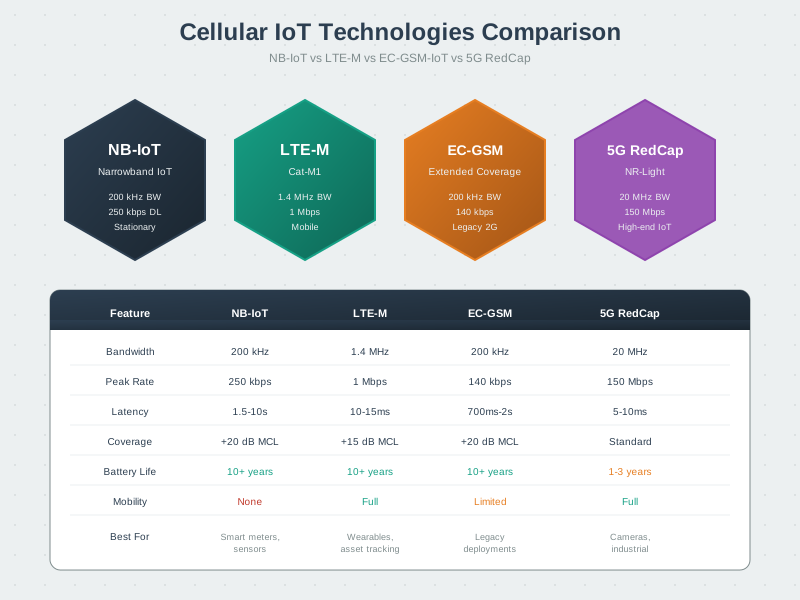
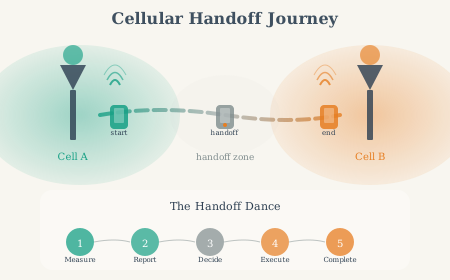
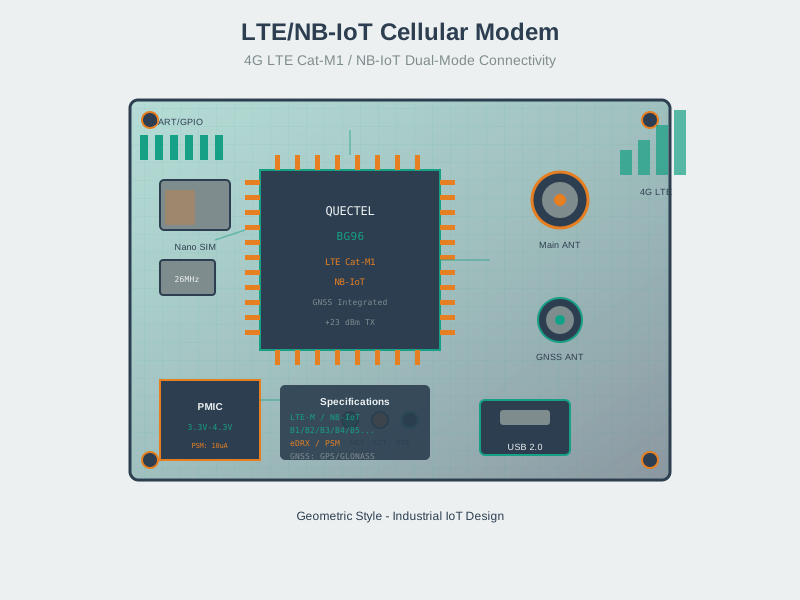
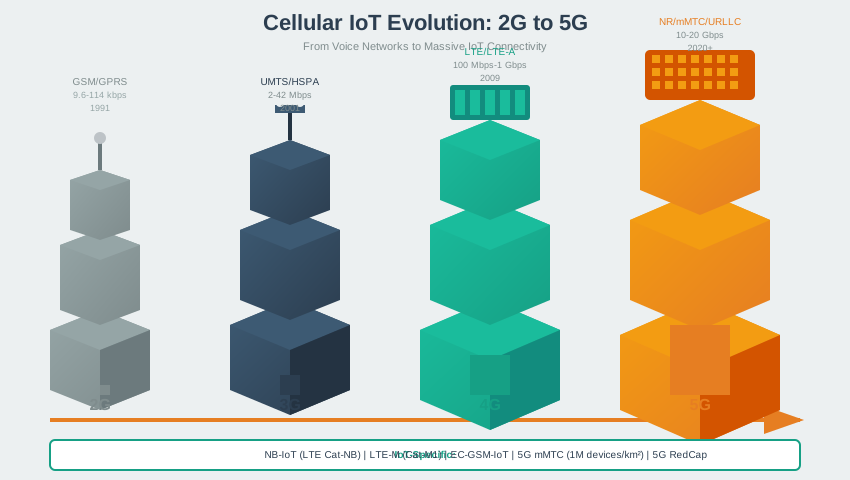
These AI-generated SVG figures provide alternative visual representations of cellular IoT concepts covered in this chapter.
Cellular IoT Technology Comparison
Cellular Handoff Process
IoT Cellular Modem Architecture
Cellular IoT Evolution
1160.9 Summary
This chapter covered practical cellular IoT knowledge:
- AT Commands: Essential commands for module control including
AT+CREG,AT+CSQ,AT+CGDCONT,AT+CPSMS - Signal Interpretation: CSQ values map to RSSI via formula: RSSI (dBm) = -113 + (2 × CSQ); target CSQ >= 15 for reliable operation
- Troubleshooting: Common issues include network registration failure (check signal/SIM), PDP context problems (configure APN correctly), and poor signal (add external antenna)
- Module Selection: SIM7020 for static NB-IoT sensors, SIM7000G for mobile LTE-M tracking, BG96 for dual-mode global deployments
- Technology Comparison: LoRaWAN offers 2-5x lower TCO for localized deployments; cellular wins for global coverage and mobility
Next Steps:
- Get a SIM7000 module and IoT SIM card (Hologram or 1NCE)
- Test basic AT commands and network registration
- Implement MQTT communication to cloud broker
- Enable PSM/eDRX and measure power consumption
- Deploy a real-world cellular IoT sensor project
1160.10 What’s Next
Now that you understand cellular IoT technologies, explore application-layer protocols:
- Next Chapter: MQTT - Learn the most widely-used IoT messaging protocol
- Then: CoAP - Discover the lightweight request-response protocol for constrained devices
- Then: AMQP - Understand advanced message queuing for enterprise IoT
- Data Management: Continue to Part 10 for data management and analytics
Deep Dives:
- NB-IoT Fundamentals - Narrowband IoT deep dive
- Cellular IoT Fundamentals - Core cellular concepts
Comparisons:
- NB-IoT vs LTE-M - Technology comparison
- LoRaWAN vs Cellular - LPWAN alternatives
- IoT Protocols Review - Cross-technology analysis
Application Protocols:
- MQTT Fundamentals - Messaging over cellular
- CoAP Protocol - Lightweight protocol for NB-IoT
Learning:
- Quizzes Hub - Cellular IoT assessments
- Videos Hub - Cellular technology tutorials