%%{init: {'theme': 'base', 'themeVariables': { 'primaryColor': '#2C3E50', 'primaryTextColor': '#fff', 'primaryBorderColor': '#16A085', 'lineColor': '#E67E22', 'secondaryColor': '#16A085', 'tertiaryColor': '#E67E22', 'fontSize': '12px'}}}%%
graph LR
    subgraph SOURCES[Privacy Sources]
        GPS[Location<br/>getLocation]
        CONT[Contacts<br/>getContacts]
        MIC[Microphone<br/>AudioRecord]
        CAM[Camera<br/>takePicture]
        ID[Device ID<br/>getIMEI]
    end

    subgraph APP[Application Processing]
        PROC[App Code]
    end

    subgraph SINKS[Data Sinks]
        NET[Network<br/>sendHTTP]
        SMS[SMS<br/>sendTextMessage]
        FILE[File Storage<br/>writeFile]
        LOG[System Log<br/>Log.d]
    end

    GPS --> PROC
    CONT --> PROC
    MIC --> PROC
    CAM --> PROC
    ID --> PROC

    PROC --> NET
    PROC --> SMS
    PROC --> FILE
    PROC --> LOG

    style SOURCES fill:#16A085,stroke:#0e6655
    style SINKS fill:#c0392b,stroke:#a93226
    style PROC fill:#E67E22,stroke:#d35400,color:#fff
1466 Mobile Privacy Leak Detection
1466.1 Learning Objectives
By the end of this chapter, you will be able to:
- Implement Data Flow Analysis: Track information flow from sources to sinks to detect unauthorized data exfiltration
- Identify Capability Leaks: Understand how malicious apps exploit permission sharing vulnerabilities
- Apply TaintDroid Concepts: Explain real-time taint tracking for dynamic privacy leak detection
- Compare Analysis Approaches: Distinguish between static and dynamic analysis trade-offs
1466.2 Prerequisites
Before diving into this chapter, you should be familiar with:
- Mobile Data Collection and Permissions: Understanding mobile data types and Android permission model
- Security and Privacy Overview: Security threats and privacy risks context
TipRelated Chapters, Products, and Tools
Simulations Hub: Try the TaintDroid simulation to see real-time taint tracking in action. Experiment with different data flows from sources (GPS, contacts) to sinks (network, SMS) and observe how taint labels propagate through variables and method calls.
Videos Hub: Watch curated videos on Android permission models, data flow analysis techniques, and real-world privacy breach case studies. See demonstrations of static analysis tools (FlowDroid, LeakMiner) and dynamic analysis with TaintDroid.
1466.3 Introduction
Even when users grant app permissions, they expect their data to be used for the app’s stated purpose. Privacy leak detection identifies when apps violate this trust by sending sensitive data to unauthorized destinations. This chapter covers the techniques used to detect these violations.
1466.4 Data Flow Analysis (DFA)
Objective: Monitor app behavior to detect when privacy-sensitive information leaves the device without user consent.
Methodology: - Identify sources (sensors, contacts, location services) - Identify sinks (network, SMS, external storage) - Trace data flow paths from sources to sinks - Flag paths without explicit user consent as privacy leaks
Privacy Leak: Any path from source to sink without user consent.
NoteAlternative View: Mobile Privacy Attack Surface
This view maps the complete attack surface for mobile IoT companion apps, showing how attackers can extract user data:
%% fig-alt: "Mobile IoT app privacy attack surface showing six attack vectors: On-device attacks include malware accessing data, side-channel attacks inferring usage, and physical device access. Network attacks include man-in-the-middle capturing traffic, DNS spoofing redirecting requests, and Wi-Fi sniffing on open networks. App-level attacks include SDK data collection by third-party libraries, permission abuse by apps requesting excessive access, and inter-app data leakage. Backend attacks include API vulnerabilities exposing data, cloud misconfigurations leaking databases, and insider threats. Social engineering includes phishing for credentials and pretexting for device access. Supply chain attacks include compromised updates and malicious app stores."
%%{init: {'theme': 'base', 'themeVariables': { 'primaryColor': '#2C3E50', 'primaryTextColor': '#fff', 'primaryBorderColor': '#16A085', 'lineColor': '#E67E22', 'secondaryColor': '#16A085', 'tertiaryColor': '#7F8C8D'}}}%%
flowchart TB
    subgraph SURFACE["MOBILE IoT PRIVACY ATTACK SURFACE"]
        subgraph DEVICE["ON-DEVICE"]
            D1["Malware<br/>Data theft"]
            D2["Side-channel<br/>Usage inference"]
            D3["Physical access<br/>Device cloning"]
        end

        subgraph NETWORK["NETWORK"]
            N1["MITM<br/>Traffic capture"]
            N2["DNS spoofing<br/>Redirect requests"]
            N3["Wi-Fi sniffing<br/>Open networks"]
        end

        subgraph APP["APP-LEVEL"]
            A1["SDK collection<br/>Third-party libs"]
            A2["Permission abuse<br/>Over-requesting"]
            A3["Inter-app leak<br/>Shared storage"]
        end

        subgraph BACKEND["BACKEND"]
            B1["API vuln<br/>Data exposure"]
            B2["Cloud misconfig<br/>Public buckets"]
            B3["Insider threat<br/>Employee access"]
        end
    end

    USER["Mobile User"] --> DEVICE
    USER --> NETWORK
    USER --> APP
    APP --> BACKEND

    style D1 fill:#e74c3c,stroke:#c0392b,color:#fff
    style D2 fill:#E67E22,stroke:#d35400,color:#fff
    style D3 fill:#E67E22,stroke:#d35400,color:#fff
    style N1 fill:#e74c3c,stroke:#c0392b,color:#fff
    style N2 fill:#E67E22,stroke:#d35400,color:#fff
    style N3 fill:#E67E22,stroke:#d35400,color:#fff
    style A1 fill:#e74c3c,stroke:#c0392b,color:#fff
    style A2 fill:#E67E22,stroke:#d35400,color:#fff
    style A3 fill:#E67E22,stroke:#d35400,color:#fff
    style B1 fill:#e74c3c,stroke:#c0392b,color:#fff
    style B2 fill:#e74c3c,stroke:#c0392b,color:#fff
    style B3 fill:#E67E22,stroke:#d35400,color:#fff
    style USER fill:#16A085,stroke:#0e6655,color:#fff
Defense Priority: Focus on app-level defenses first (permission minimization, secure SDK selection), then network security (certificate pinning, encrypted protocols), then on-device protections (secure storage, anti-tampering).
1466.5 Capability Leaks
Explicit Capability Leak: Malicious app hijacks permissions granted to other trusted apps.
Mechanism: - Android allows apps from same developer to share sharedUserID - Apps with same User ID share permissions - Malicious app can exploit trusted app’s permissions
Example: 1. Trusted app has location permission 2. Malicious app from same developer shares User ID 3. Malicious app gains location access without requesting permission
1466.6 Dynamic Analysis: TaintDroid
TaintDroid is a modified Android OS that tracks sensitive data flows in real-time.
1466.6.1 How TaintDroid Works
%%{init: {'theme': 'base', 'themeVariables': { 'primaryColor': '#2C3E50', 'primaryTextColor': '#fff', 'primaryBorderColor': '#16A085', 'lineColor': '#E67E22', 'secondaryColor': '#16A085', 'tertiaryColor': '#E67E22', 'fontSize': '11px'}}}%%
flowchart TB
    SRC1[GPS Source<br/>Taint: LOCATION] --> VAR1[Variable x<br/>Taint: LOCATION]
    SRC2[Contacts Source<br/>Taint: CONTACTS] --> VAR2[Variable y<br/>Taint: CONTACTS]

    VAR1 --> MERGE[z = concat x, y<br/>Taint: LOCATION+CONTACTS]
    VAR2 --> MERGE

    MERGE --> IPC[IPC Message<br/>Taint: LOCATION+CONTACTS]
    IPC --> FILE[File Write<br/>Taint: LOCATION+CONTACTS]
    FILE --> NET[Network Send<br/>Taint: LOCATION+CONTACTS]

    NET --> LOG[TaintDroid Log:<br/>App sent LOCATION+CONTACTS<br/>to server.example.com]

    style SRC1 fill:#16A085,stroke:#0e6655,color:#fff
    style SRC2 fill:#16A085,stroke:#0e6655,color:#fff
    style MERGE fill:#E67E22,stroke:#d35400,color:#fff
    style NET fill:#c0392b,stroke:#a93226,color:#fff
    style LOG fill:#2C3E50,stroke:#16A085,color:#fff
Key Features:
- Automatic Labeling: Data from privacy sources automatically tagged
- Transitive Tainting: Labels propagate through variables, files, IPC
- Multi-level Granularity:
- Variable-level taint tracking
- Message-level taint tracking
- Method-level taint tracking
- File-level taint tracking
- Logging: When tainted data exits (network, SMS), log:
- Data labels (what privacy-sensitive data)
- Application responsible
- Destination (IP address, phone number)
1466.6.2 Challenges Addressed by TaintDroid
- Resource Constraints: Lightweight implementation for smartphones
- Third-Party Trust: Monitors all apps, including untrusted ones
- Dynamic Context: Tracks context-based privacy information
- Information Sharing: Monitors data sharing between apps
1466.7 Static Analysis
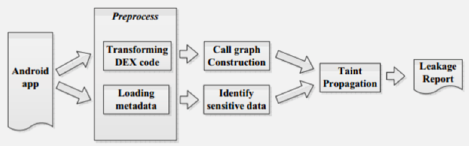
Advantages over Dynamic Analysis: - Covers all possible code paths (not just executed ones) - No runtime overhead - Can be performed offline - Finds leaks that rarely execute
Disadvantages: - Takes longer to analyze - May have false positives - Cannot handle dynamic code loading
1466.7.1 LeakMiner Approach
%%{init: {'theme': 'base', 'themeVariables': { 'primaryColor': '#2C3E50', 'primaryTextColor': '#fff', 'primaryBorderColor': '#16A085', 'lineColor': '#E67E22', 'secondaryColor': '#16A085', 'tertiaryColor': '#E67E22', 'fontSize': '12px'}}}%%
flowchart TB
    APK[Android APK] --> DEC[Decompile to<br/>Bytecode]
    DEC --> CFG[Build Control<br/>Flow Graph]
    CFG --> SRC[Identify Privacy<br/>Sources]
    CFG --> SINK[Identify Data<br/>Sinks]

    SRC --> PATH[Path Analysis:<br/>Source to Sink]
    SINK --> PATH

    PATH --> LEAK{Path without<br/>User Consent?}
    LEAK -->|Yes| REPORT[Report Privacy<br/>Leak]
    LEAK -->|No| SAFE[Legitimate<br/>Data Flow]

    style APK fill:#16A085,stroke:#0e6655,color:#fff
    style PATH fill:#E67E22,stroke:#d35400,color:#fff
    style LEAK fill:#2C3E50,stroke:#16A085,color:#fff
    style REPORT fill:#c0392b,stroke:#a93226,color:#fff
    style SAFE fill:#27ae60,stroke:#1e8449,color:#fff
1466.7.2 Static vs Dynamic Analysis Comparison
| Aspect | Static Analysis | Dynamic Analysis (TaintDroid) |
|---|---|---|
| Coverage | All code paths | Only executed paths |
| Runtime overhead | None | 10-30% CPU |
| False positives | Higher | Lower |
| Dynamic code | Cannot analyze | Fully tracked |
| When to use | Pre-deployment review | Runtime monitoring |
1466.8 Data Flow Analysis Quiz
1466.9 Summary
Privacy leak detection mechanisms identify unauthorized data exfiltration:
Data Flow Analysis: - Tracks information from privacy-sensitive sources to network sinks - Operates at method-level (coarse) or variable-level (fine) granularity - Flags any path from source to sink without user consent
TaintDroid (Dynamic Analysis): - Real-time taint tracking within Android’s Dalvik VM - Automatic propagation through variables, methods, files, IPC - Detects third-party libraries transmitting data without awareness
Static Analysis: - Offline path analysis identifying potential leaks from code structure - Covers all code paths, not just executed ones - Higher false positive rate but comprehensive coverage
Key Takeaway: Use static analysis for comprehensive pre-deployment review, dynamic analysis (TaintDroid) for runtime monitoring. Neither alone is sufficient—combine both for robust privacy protection.
1466.10 What’s Next
Now that you can detect privacy leaks, the next chapter explores Location Privacy Leaks where you’ll understand why location data is especially dangerous and how de-anonymization attacks work even on “anonymized” datasets.
Continue to Location Privacy Leaks →