%%{init: {'theme': 'base', 'themeVariables': {'primaryColor': '#2C3E50', 'primaryTextColor': '#fff', 'primaryBorderColor': '#16A085', 'lineColor': '#16A085', 'secondaryColor': '#E67E22', 'tertiaryColor': '#7F8C8D'}}}%%
graph TB
    subgraph P2P["Peer-to-Peer Mode"]
        P1[Active Device A<br/>Phone] <-->|Bidirectional<br/>424 kbps| P2[Active Device B<br/>Phone]
        P_USE[File sharing<br/>Contact exchange]
    end

    subgraph RW["Reader/Writer Mode"]
        R1[Active Reader<br/>Phone/Terminal] -->|Powers tag<br/>Read/Write| T1[Passive Tag<br/>NTAG/MIFARE]
        RW_USE[Smart posters<br/>Product info]
    end

    subgraph CE["Card Emulation Mode"]
        C1[Active Terminal<br/>POS/Reader] -->|Reads phone<br/>as card| C2[Phone as Card<br/>Secure Element]
        CE_USE[Mobile payments<br/>Access control]
    end

    style P2P fill:#16A085,stroke:#2C3E50,stroke-width:2px
    style RW fill:#E67E22,stroke:#2C3E50,stroke-width:2px
    style CE fill:#2C3E50,stroke:#16A085,stroke-width:2px
    style P1 fill:#2C3E50,stroke:#16A085,color:#fff
    style P2 fill:#2C3E50,stroke:#16A085,color:#fff
    style R1 fill:#E67E22,stroke:#2C3E50,color:#fff
    style T1 fill:#7F8C8D,stroke:#2C3E50,color:#fff
    style C1 fill:#16A085,stroke:#2C3E50,color:#fff
    style C2 fill:#2C3E50,stroke:#16A085,color:#fff
883 NFC Introduction and Operating Modes
883.1 Learning Objectives
By the end of this chapter, you will be able to:
- Understand NFC Fundamentals: Explain what NFC is and how it differs from RFID
- Identify Operating Modes: Describe peer-to-peer, read/write, and card emulation modes
- Compare NFC to RFID: Understand NFC as a specialized subset of HF RFID
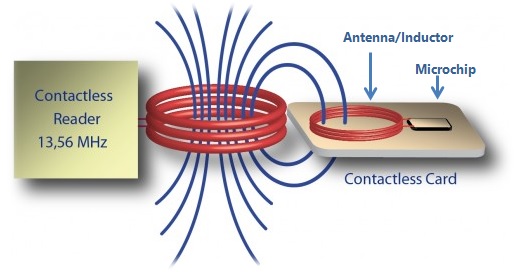
- Explain NFC Communication: Describe how electromagnetic induction powers passive tags
- Choose Appropriate Modes: Select the right NFC mode for different use cases
883.2 Prerequisites
Before diving into this chapter, you should be familiar with:
- Network Access and Physical Layer Protocols: Understanding physical layer concepts and short-range wireless technologies provides context for NFC’s operating principles and 13.56 MHz frequency band
- Networking Basics: Basic knowledge of communication protocols and data exchange helps you understand NFC’s peer-to-peer and reader/writer modes
- RFID Fundamentals: Understanding the parent technology helps you grasp NFC’s relationship to RFID
NoteRelated Chapters
This Series: - NFC Introduction and Operating Modes - This chapter - NFC Tags and NDEF Format - Tag types and data structure - NFC Programming and Applications - Hands-on tag programming - NFC Implementation and Best Practices - IoT integration and Python examples
Comparisons: - NFC Security and Comparisons - NFC vs RFID vs BLE vs QR codes - RFID Fundamentals - Understanding the parent technology - Bluetooth Fundamentals - Alternative short-range protocol
Related Protocols: - RFID Hands-on - Related contactless technology - Bluetooth Applications - BLE pairing and beacons
Security: - IoT Security Overview - Broader security context - Device Security - Securing IoT endpoints
Learning: - Quizzes Hub - Test your NFC knowledge - Videos Hub - Visual learning resources
TipFor Beginners: What is NFC?
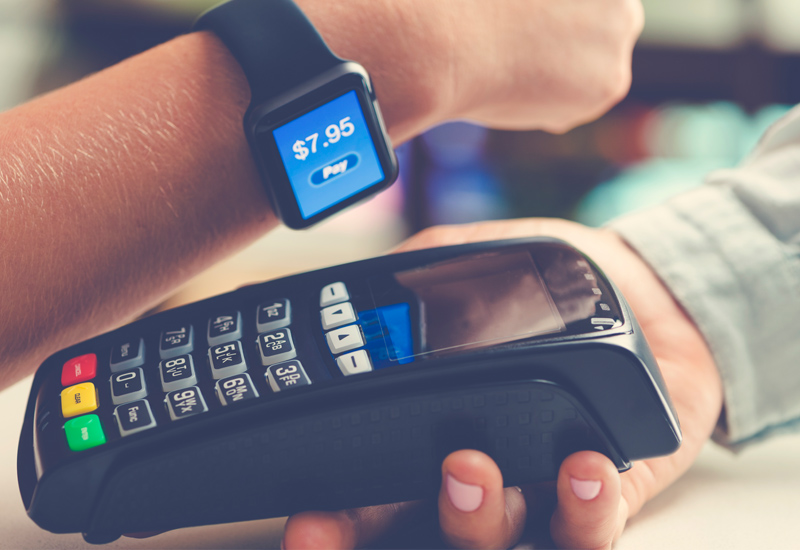
Have you ever tapped your phone to pay at a store, or touched your phone to a poster to get more information? That’s Near Field Communication (NFC) in action. NFC is a wireless technology that works over very short distances—typically just a few centimeters (about 1-2 inches).
Think of NFC as a “digital handshake” between two devices when they touch or get very close. Unlike Wi-Fi or Bluetooth that can work across a room, NFC requires devices to be almost touching. This short range helps reduce risk and makes the tap interaction intentional (though attacks like relays are still possible in some threat models).
How is NFC used in IoT?
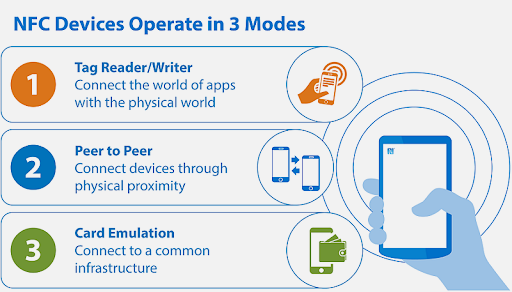
NFC has three main modes: reading tags (like scanning a smart poster), card emulation (your phone pretending to be a credit card), and peer-to-peer (two phones sharing data by tapping). In IoT, NFC is perfect for configuration (tap phone to sensor to set it up), identification (tap badge to unlock door), and quick data exchange (tap phone to smart home device to control it).
The beauty of NFC is that simple NFC tags need no battery—they’re powered by the radio waves from your phone when you bring it close. This makes NFC tags incredibly cheap (10-50 cents each) and they last forever since there’s no battery to die.
| Term | Simple Explanation |
|---|---|
| NFC (Near Field Communication) | Wireless technology for very short-range communication (1-10 cm) |
| Tag | Passive device (no battery) that stores data readable by NFC phones |
| Reader | Active device (like smartphone) that powers and reads NFC tags |
| 13.56 MHz | Radio frequency NFC uses—part of High Frequency (HF) RFID band |
| Passive Tag | Tag with no battery—powered by reader’s radio waves |
| Active Device | Device with battery that can generate its own radio field |
| NDEF | NFC Data Exchange Format—standard way to structure data on tags |
| Peer-to-Peer Mode | Two active devices exchanging data (phone-to-phone) |
TipAlternative View: NFC Operating Modes Comparison
NoteCross-Hub Connections
This chapter connects to multiple learning resources across the book:
Interactive Learning: - Simulations Hub: Try the NFC Reader/Writer simulator to experiment with tag programming and different operating modes without hardware - Quizzes Hub: Test your NFC knowledge with scenario-based questions covering payments, security, and tag types - Videos Hub: Watch the NFC Introduction video (Lesson 4) for visual demonstrations of passive vs active devices
Knowledge Resources: - Knowledge Map: See how NFC fits into the broader RFID and short-range wireless technology ecosystem - Knowledge Gaps: Address common NFC misconceptions like “NFC is just RFID” or “NFC payments are insecure”
Related Technologies: - Compare NFC with Bluetooth for device pairing use cases - Understand parent technology RFID and how NFC extends it - Explore 6LoWPAN for IP-based IoT networking after mastering NFC basics
883.3 What is NFC?
TipKnowledge Check
Test your understanding of these NFC concepts.
883.4 Definition
NFC (Near Field Communication) is a short-range wireless technology based on HF RFID that enables two devices to communicate when brought within 4-10 cm of each other. Operating at 13.56 MHz, NFC provides secure, intuitive touch-to-connect interactions for payments, access control, data transfer, and device pairing.
Key Characteristics:
- Range: 4-10 cm (intentionally short for security)
- Frequency: 13.56 MHz (HF)
- Data Rate: 106, 212, 424, or 848 Kbps
- Power: Passive tags powered by reader field
- Bi-directional: Can both send and receive data
- Ubiquitous: Built into 2+ billion smartphones globally
883.5 NFC vs RFID: Understanding the Relationship
%%{init: {'theme': 'base', 'themeVariables': {'primaryColor': '#2C3E50', 'primaryTextColor': '#fff', 'primaryBorderColor': '#16A085', 'lineColor': '#16A085', 'secondaryColor': '#E67E22', 'tertiaryColor': '#7F8C8D', 'background': '#ffffff', 'mainBkg': '#2C3E50', 'secondBkg': '#16A085', 'tertiaryBkg': '#E67E22'}}}%%
flowchart TD
    RFID[RFID Technology<br/>13.56 MHz - UHF]

    RFID --> LF[LF: 125 kHz<br/>Access Control]
    RFID --> HF[HF: 13.56 MHz<br/>Smart Cards, NFC]
    RFID --> UHF[UHF: 860-960 MHz<br/>Supply Chain]

    HF --> NFC[NFC Subset<br/>13.56 MHz, <10 cm]

    NFC --> P2P[Peer-to-Peer<br/>Device to Device]
    NFC --> RW[Read/Write<br/>Tag Interaction]
    NFC --> CE[Card Emulation<br/>Mobile Payments]

    style RFID fill:#7F8C8D,stroke:#333,color:#fff
    style HF fill:#16A085,stroke:#2C3E50,color:#fff
    style NFC fill:#2C3E50,stroke:#16A085,color:#fff
    style P2P fill:#E67E22,stroke:#2C3E50,color:#fff
    style RW fill:#E67E22,stroke:#2C3E50,color:#fff
    style CE fill:#E67E22,stroke:#2C3E50,color:#fff
NoteNFC is Specialized HF RFID
NFC is a subset of HF RFID (13.56 MHz) with added capabilities:
What makes NFC different: - ✅ Peer-to-peer mode: Two active devices can exchange data - ✅ Card emulation: Phone can act like contactless card - ✅ Built into smartphones: Billions of NFC-enabled devices - ✅ User-initiated: Intentional touch-to-connect experience - ✅ Standardized protocols: NDEF data format for interoperability
| Feature | RFID (General) | NFC |
|---|---|---|
| Frequency | LF, HF, UHF, Microwave | HF only (13.56 MHz) |
| Range | cm to 10m+ | 4-10 cm (intentionally short) |
| Modes | Read-only typically | Peer-to-peer, read/write, emulation |
| Devices | Specialized readers | Smartphones, tablets, wearables |
| Use Cases | Inventory, logistics, access | Payments, pairing, smart marketing |
| Standards | ISO 14443, 15693, 18000 | ISO 14443, ISO 18092, NFC Forum |
883.6 How NFC Works
883.6.1 Basic Operating Principle
%%{init: {'theme': 'base', 'themeVariables': {'primaryColor': '#2C3E50', 'primaryTextColor': '#fff', 'primaryBorderColor': '#16A085', 'lineColor': '#16A085', 'secondaryColor': '#E67E22', 'tertiaryColor': '#7F8C8D', 'background': '#ffffff', 'mainBkg': '#2C3E50', 'secondBkg': '#16A085', 'tertiaryBkg': '#E67E22'}}}%%
sequenceDiagram
    participant I as Initiator<br/>(Active Device)
    participant T as Target<br/>(Passive Tag/Device)

    I->>T: RF Field (13.56 MHz)
    Note over T: Powers up via<br/>electromagnetic induction
    I->>T: Modulated Signal<br/>(Command/Data)
    T->>I: Load Modulation<br/>(Response Data)
    Note over I,T: Bidirectional<br/>Communication
NFC Communication:
- Proximity detection: Devices come within 4-10 cm
- Field generation: Active device creates 13.56 MHz field
- Power transfer: Passive tag harvests energy from field
- Data exchange: Bi-directional communication via load modulation
- Action: Payment, data transfer, or configuration triggered
883.7 NFC Operating Modes
NFC supports three distinct operating modes, making it more versatile than traditional RFID:
883.7.1 Peer-to-Peer Mode
Two active NFC devices exchange data
%%{init: {'theme': 'base', 'themeVariables': {'primaryColor': '#2C3E50', 'primaryTextColor': '#fff', 'primaryBorderColor': '#16A085', 'lineColor': '#16A085', 'secondaryColor': '#E67E22', 'tertiaryColor': '#7F8C8D', 'background': '#ffffff', 'mainBkg': '#2C3E50', 'secondBkg': '#16A085', 'tertiaryBkg': '#E67E22'}}}%%
flowchart LR
    Phone1[Phone 1<br/>Active] <-->|NFC P2P<br/>424 kbps| Phone2[Phone 2<br/>Active]

    Phone1 -.->|Share Contact| Phone2
    Phone1 -.->|Share Photo| Phone2
    Phone1 -.->|Wi-Fi Setup| Phone2

    style Phone1 fill:#2C3E50,stroke:#16A085,color:#fff
    style Phone2 fill:#16A085,stroke:#2C3E50,color:#fff
Use Cases: - File sharing: Photos, contacts, documents between phones - Bluetooth pairing: Touch phones to pair speakers/headphones - Gaming: Transfer game data between devices - Business cards: Exchange contact info
Protocol: ISO 18092 (NFCIP-1)
Example: Android Beam (deprecated but illustrative)
// Share data via NFC P2P
NfcAdapter nfcAdapter = NfcAdapter.getDefaultAdapter(this);
nfcAdapter.setNdefPushMessage(message, this);
883.7.2 Read/Write Mode
Active device reads from or writes to passive NFC tag
%%{init: {'theme': 'base', 'themeVariables': {'primaryColor': '#2C3E50', 'primaryTextColor': '#fff', 'primaryBorderColor': '#16A085', 'lineColor': '#16A085', 'secondaryColor': '#E67E22', 'tertiaryColor': '#7F8C8D', 'background': '#ffffff', 'mainBkg': '#2C3E50', 'secondBkg': '#16A085', 'tertiaryBkg': '#E67E22'}}}%%
flowchart LR
    Phone[Smartphone<br/>Active Reader] -->|Read Data| Tag1[Smart Poster<br/>Passive Tag]
    Phone -->|Write URL| Tag2[Programmable Tag<br/>NTAG215]

    Tag1 -.->|URL, Text, Wi-Fi| Phone
    Phone -.->|Store Config| Tag2

    style Phone fill:#2C3E50,stroke:#16A085,color:#fff
    style Tag1 fill:#16A085,stroke:#2C3E50,color:#fff
    style Tag2 fill:#E67E22,stroke:#2C3E50,color:#fff
Use Cases: - Smart posters: Tap tag to open URL, download app - Product information: Get details, reviews, instructions - Home automation: Tap tag to trigger IoT scene - Museum exhibits: Interactive information displays - Inventory: Track and update asset information
Tag Types: - Type 1-5 (different memory sizes and capabilities) - Writable (can update content) - Read-only (locked after writing)
883.7.3 Card Emulation Mode
Active device emulates a contactless smart card
%%{init: {'theme': 'base', 'themeVariables': {'primaryColor': '#2C3E50', 'primaryTextColor': '#fff', 'primaryBorderColor': '#16A085', 'lineColor': '#16A085', 'secondaryColor': '#E67E22', 'tertiaryColor': '#7F8C8D', 'background': '#ffffff', 'mainBkg': '#2C3E50', 'secondBkg': '#16A085', 'tertiaryBkg': '#E67E22'}}}%%
flowchart LR
    Phone[Smartphone<br/>Emulates Card] -->|NFC Tap| Terminal[Payment Terminal<br/>Active Reader]

    Terminal -->|Request Payment| Phone
    Phone -->|Token + Crypto| Terminal
    Terminal -->|Validate| Bank[Bank Server]

    style Phone fill:#2C3E50,stroke:#16A085,color:#fff
    style Terminal fill:#16A085,stroke:#2C3E50,color:#fff
    style Bank fill:#E67E22,stroke:#2C3E50,color:#fff
Use Cases: - Mobile payments: Apple Pay, Google Pay, Samsung Pay - Transit ticketing: Subway/bus tap-to-pay - Access control: Phone as building/hotel key - Loyalty cards: Digital membership cards
Technologies: - HCE (Host Card Emulation): Software-based, uses phone CPU - SIM-based: Secure element in SIM card - Embedded SE: Dedicated secure chip in phone
883.8 Summary
This chapter introduced Near Field Communication (NFC) as a specialized subset of HF RFID technology operating at 13.56 MHz with an intentionally short range of 4-10 cm. NFC extends traditional RFID with three operating modes: peer-to-peer for device-to-device data exchange, read/write for tag interaction, and card emulation for mobile payments and access control.
The short-range design provides inherent security benefits and intentional user experience—users must deliberately bring devices close together, making NFC ideal for secure payments, quick device pairing, and interactive smart marketing applications.
883.9 What’s Next
Now that you understand NFC fundamentals and operating modes, the next chapter explores NFC tag types and the NDEF (NFC Data Exchange Format) that enables interoperability across devices and platforms.
Continue to: NFC Tags and NDEF Format