%%{init: {'theme': 'base', 'themeVariables': { 'primaryColor': '#2C3E50', 'primaryTextColor': '#fff', 'primaryBorderColor': '#16A085', 'lineColor': '#16A085', 'secondaryColor': '#E67E22', 'tertiaryColor': '#7F8C8D', 'clusterBkg': '#ECF0F1', 'clusterBorder': '#2C3E50', 'edgeLabelBackground': '#ECF0F1'}}}%%
graph TB
    subgraph Internet["☁ Internet (Global IPv6)"]
        Cloud[Cloud Server<br/>2001:db8::1]
        Mobile[Mobile App<br/>LTE/5G]
    end

    subgraph Gateway["🖥 Border Router Setup"]
        BR[6LoWPAN Border Router<br/>fd00::1<br/>Raspberry Pi + TUN/TAP]
        RPL[RPL Root<br/>DODAG Formation]
    end

    subgraph LoWPAN["🌐 6LoWPAN Network (fd00::/64)"]
        S1[Sensor 1<br/>fd00::212:4b00:615:a4cb<br/>Temp: 22.5°C]
        S2[Sensor 2<br/>fd00::212:4b00:615:a4d1<br/>Humidity: 65%]
        S3[Sensor 3<br/>fd00::212:4b00:615:a4e8<br/>Soil: 45%]
        S4[Relay Node<br/>Battery-Powered<br/>Multi-hop Router]
    end

    Cloud <-->|IPv6 Tunnel| BR
    Mobile <-->|HTTPS/CoAP| BR
    BR <-->|802.15.4 + IPHC| S1
    BR <-->|802.15.4 + IPHC| S2
    S1 <-->|Multi-hop| S4
    S4 <-->|Multi-hop| S3

    style Cloud fill:#16A085,stroke:#2C3E50,color:#fff
    style Mobile fill:#16A085,stroke:#2C3E50,color:#fff
    style BR fill:#E67E22,stroke:#2C3E50,color:#fff
    style RPL fill:#E67E22,stroke:#2C3E50,color:#fff
    style S1 fill:#2C3E50,stroke:#16A085,color:#fff
    style S2 fill:#2C3E50,stroke:#16A085,color:#fff
    style S3 fill:#2C3E50,stroke:#16A085,color:#fff
    style S4 fill:#7F8C8D,stroke:#2C3E50,color:#fff
968 6LoWPAN Hands-on and Security
968.1 Learning Objectives
By the end of this chapter, you will be able to:
- Build 6LoWPAN Networks: Set up development environments using Contiki-NG and RIOT OS
- Program UDP Communication: Implement simple UDP servers and clients for IPv6-enabled sensor networks
- Configure Border Routers: Deploy 6LoWPAN border routers to connect constrained networks to the internet
- Implement Security Measures: Apply link-layer security and DTLS for secure 6LoWPAN communication
- Debug IPv6 Networks: Use tools to analyze packet capture, routing tables, and neighbor discovery
- Evaluate Security Trade-offs: Balance security overhead with resource constraints in low-power networks
TipFor Beginners: How to Use This Hands-On Chapter
What is this chapter? This hands-on chapter provides practical exercises for 6LoWPAN, the protocol that enables IPv6 over low-power wireless networks.
When to use: - After studying 6LoWPAN fundamentals - When you want practical implementation experience - Before working on real IoT network projects
Key Terms:
| Term | Definition |
|---|---|
| 6LoWPAN | IPv6 over Low-Power Wireless Personal Area Networks |
| Header Compression | Reducing IPv6 header size for constrained devices |
| Mesh Addressing | Multi-hop routing in low-power networks |
Recommended Path: 1. First study 6LoWPAN Fundamentals 2. Work through exercises in this chapter 3. Review the 6LoWPAN Comprehensive Review
968.2 Prerequisites
Before diving into this chapter, you should be familiar with:
- 6LoWPAN Fundamentals and Architecture: This chapter builds directly on 6LoWPAN concepts - you must understand header compression (IPHC), fragmentation, RPL routing, and the adaptation layer architecture before implementing practical applications
- IEEE 802.15.4 Fundamentals: Hands-on 6LoWPAN development requires knowledge of the underlying 802.15.4 radio layer, including frame structure, channel selection, and CSMA/CA behavior
- Networking Basics: Setting up border routers and debugging IPv6 networks demands solid understanding of IP addressing, routing, UDP/TCP protocols, and network troubleshooting fundamentals
NoteCross-Hub Connections
Interactive Learning: - Simulations Hub - Try the Network Topology Visualizer to understand 6LoWPAN mesh routing patterns - Quizzes Hub - Test your 6LoWPAN implementation knowledge with hands-on scenarios - Videos Hub - Watch practical demonstrations of border router configuration and packet analysis
Knowledge Resources: - Knowledge Map - See how 6LoWPAN fits into the broader IoT networking landscape - Knowledge Gaps Hub - Address common 6LoWPAN implementation pitfalls
NoteRelated Chapters
Deep Dives: - 6LoWPAN Fundamentals - Header compression and architecture - 6LoWPAN Comprehensive Review - Complete protocol overview - IEEE 802.15.4 Fundamentals - Underlying radio layer
Implementation & Protocols: - RPL Fundamentals - IPv6 routing for 6LoWPAN - CoAP Fundamentals - Application layer for 6LoWPAN - Thread Fundamentals - Alternative IPv6 mesh protocol
Security: - Encryption Labs - Cryptography implementations - IoT Security Overview - Security context - Network Security - Network-layer protection
Comparisons: - Zigbee Hands-on - Alternative 802.15.4 protocol - Thread Operation - IPv6 mesh comparison - LPWAN Comparison - Long-range alternatives
Development Tools: - Simulating Hardware - Testing 6LoWPAN before hardware - Network Design and Simulation - Network planning
Learning: - Quizzes Hub - Test 6LoWPAN knowledge - Simulations Hub - Interactive network simulators
WarningCommon Misconception: “6LoWPAN is Just IPv6 on 802.15.4”
The Myth: Many developers assume 6LoWPAN simply runs standard IPv6 packets over 802.15.4 radios without modification.
The Reality: 6LoWPAN performs sophisticated header compression and fragmentation that are critical for constrained networks:
Quantified Impact:
| Metric | Standard IPv6 | 6LoWPAN with IPHC | Improvement |
|---|---|---|---|
| IPv6 Header Size | 40 bytes | 2-7 bytes | 83-94% reduction |
| UDP Header Size | 8 bytes | 4 bytes | 50% reduction |
| Total Protocol Overhead | 48 bytes | 6-11 bytes | 77-87% smaller |
| Usable Payload (127-byte frame) | 79 bytes | 116-121 bytes | 47-53% more data |
Real-World Example: A temperature sensor sending 10 bytes of data: - Without compression: 58 bytes total (48 headers + 10 data) = 83% overhead - With IPHC compression: 17 bytes total (7 headers + 10 data) = 41% overhead - Battery Impact: Compression saves ~70% transmission time per packet, extending 2-year battery to 3.5 years
Key Insight: 6LoWPAN’s header compression (IPHC) is not optional—it’s essential. Without it, a 127-byte 802.15.4 frame would waste 48 bytes (38%) on just IP+UDP headers, leaving only 79 bytes for application data. This would make many IoT applications impractical due to excessive overhead and battery drain.
Bottom Line: Always enable IPHC compression (HC1 or LOWPAN_IPHC) in your 6LoWPAN implementations. The ~5% CPU overhead for compression is far outweighed by the 83% reduction in transmission bytes—and transmission costs 10-100× more energy than computation in low-power radios.
TipUnderstanding Check: 6LoWPAN Border Router Deployment
Scenario: You’re deploying 200 battery-powered soil moisture sensors across a 5-hectare farm. Each sensor transmits 100 bytes every 15 minutes. Your customer wants global internet access to sensor data from a mobile app. Budget: $15,000 for networking infrastructure.
Think about: 1. Why would you use a 6LoWPAN border router instead of giving each sensor a direct cellular connection? 2. If you enable AES-128 encryption at the 802.15.4 layer, how much extra battery drain should you expect?
Key Insight: A single 6LoWPAN border router ($150) + Raspberry Pi ($50) can connect 200+ sensors to the internet via IPv6 tunneling. Without it, you’d need 200 cellular modems at $25 each ($5,000) plus $2/month data plans ($4,800/year). The border router approach costs $200 upfront vs $9,800 first-year for cellular.
Link-layer AES encryption adds approximately 15-20% energy overhead. For a sensor transmitting 96 times/day, this reduces 5-year battery life to 4.2 years—usually acceptable for the security benefit in agricultural IoT where theft/tampering of sensor data can cost thousands in crop losses.
Verify Your Understanding: - Can you explain the trade-off between link-layer security (802.15.4 AES) and transport-layer security (DTLS)? - How would RPL routing change if the border router fails?
968.3 Hands-On: Building 6LoWPAN Networks
TipAlternative View: 6LoWPAN Header Compression Comparison
%%{init: {'theme': 'base', 'themeVariables': {'primaryColor': '#2C3E50', 'primaryTextColor': '#fff', 'primaryBorderColor': '#16A085', 'lineColor': '#16A085', 'secondaryColor': '#E67E22', 'tertiaryColor': '#7F8C8D'}}}%%
graph LR
    subgraph STANDARD["Standard IPv6 + UDP"]
        S_IPV6[IPv6 Header<br/>40 bytes]
        S_UDP[UDP Header<br/>8 bytes]
        S_PAY[Payload<br/>79 bytes max]
    end

    subgraph COMPRESSED["6LoWPAN IPHC"]
        C_DISP[Dispatch<br/>1 byte]
        C_IPHC[IPHC Header<br/>2-7 bytes]
        C_NHC[NHC UDP<br/>4 bytes]
        C_PAY[Payload<br/>115-120 bytes]
    end

    STANDARD -->|IPHC<br/>Compression| COMPRESSED

    EFF[Efficiency Gain<br/>48 → 7-12 bytes<br/>83% reduction]

    style STANDARD fill:#E67E22,stroke:#2C3E50,stroke-width:2px
    style COMPRESSED fill:#16A085,stroke:#2C3E50,stroke-width:2px
    style S_IPV6 fill:#2C3E50,stroke:#16A085,color:#fff
    style S_UDP fill:#2C3E50,stroke:#16A085,color:#fff
    style S_PAY fill:#7F8C8D,stroke:#2C3E50,color:#fff
    style C_DISP fill:#2C3E50,stroke:#16A085,color:#fff
    style C_IPHC fill:#2C3E50,stroke:#16A085,color:#fff
    style C_NHC fill:#2C3E50,stroke:#16A085,color:#fff
    style C_PAY fill:#7F8C8D,stroke:#2C3E50,color:#fff
    style EFF fill:#16A085,stroke:#2C3E50,color:#fff
968.3.1 Example 1: Contiki-NG (C Programming)
Contiki-NG is a modern OS for IoT devices with excellent 6LoWPAN support.
Installation:
# Clone Contiki-NG
git clone https://github.com/contiki-ng/contiki-ng.git
cd contiki-ng

# Install toolchain
sudo apt-get install gcc-arm-none-eabi gdb-multiarch
Simple UDP Server:
// udp-server.c
#include "contiki.h"
#include "net/ipv6/simple-udp.h"
#include "sys/log.h"

#define LOG_MODULE "App"
#define LOG_LEVEL LOG_LEVEL_INFO

#define UDP_PORT 1234

static struct simple_udp_connection udp_conn;

PROCESS(udp_server_process, "UDP server");
AUTOSTART_PROCESSES(&udp_server_process);

static void
udp_rx_callback(struct simple_udp_connection *c,
                const uip_ipaddr_t *sender_addr,
                uint16_t sender_port,
                const uip_ipaddr_t *receiver_addr,
                uint16_t receiver_port,
                const uint8_t *data,
                uint16_t datalen)
{
    LOG_INFO("Received '%.*s' from ", datalen, (char *) data);
    LOG_INFO_6ADDR(sender_addr);
    LOG_INFO_("\n");

    // Echo back
    simple_udp_sendto(&udp_conn, data, datalen, sender_addr);
}

PROCESS_THREAD(udp_server_process, ev, data)
{
    PROCESS_BEGIN();

    // Register UDP connection
    simple_udp_register(&udp_conn, UDP_PORT, NULL,
                        UDP_PORT, udp_rx_callback);

    LOG_INFO("UDP server started on port %d\n", UDP_PORT);

    PROCESS_END();
}
UDP Client:
// udp-client.c
#include "contiki.h"
#include "net/ipv6/simple-udp.h"
#include "sys/log.h"

#define LOG_MODULE "App"
#define LOG_LEVEL LOG_LEVEL_INFO

#define UDP_PORT 1234
#define SEND_INTERVAL (5 * CLOCK_SECOND)

static struct simple_udp_connection udp_conn;
static struct etimer periodic_timer;

PROCESS(udp_client_process, "UDP client");
AUTOSTART_PROCESSES(&udp_client_process);

PROCESS_THREAD(udp_client_process, ev, data)
{
    static unsigned count = 0;
    static char str[32];
    uip_ipaddr_t dest_ipaddr;

    PROCESS_BEGIN();

    // Set destination (Border Router)
    uip_ip6addr(&dest_ipaddr, 0xfd00, 0, 0, 0, 0, 0, 0, 1);

    // Register UDP connection
    simple_udp_register(&udp_conn, UDP_PORT, &dest_ipaddr,
                        UDP_PORT, NULL);

    etimer_set(&periodic_timer, SEND_INTERVAL);

    while(1) {
        PROCESS_WAIT_EVENT_UNTIL(etimer_expired(&periodic_timer));

        snprintf(str, sizeof(str), "Message %u", count++);
        LOG_INFO("Sending: %s\n", str);
        simple_udp_sendto(&udp_conn, str, strlen(str), &dest_ipaddr);

        etimer_reset(&periodic_timer);
    }

    PROCESS_END();
}
Compile and Flash:
# For Zolertia RE-Mote (example platform)
make TARGET=zoul BOARD=remote-revb udp-server
make TARGET=zoul BOARD=remote-revb udp-server.upload
968.3.2 Example 2: Border Router Setup
%%{init: {'theme': 'base', 'themeVariables': { 'primaryColor': '#2C3E50', 'primaryTextColor': '#fff', 'primaryBorderColor': '#16A085', 'lineColor': '#16A085', 'secondaryColor': '#E67E22', 'tertiaryColor': '#7F8C8D', 'clusterBkg': '#ECF0F1', 'clusterBorder': '#2C3E50', 'edgeLabelBackground': '#ECF0F1'}}}%%
graph TB
    subgraph App["Application Layer"]
        CoAP[CoAP Messages<br/>GET /temperature]
    end

    subgraph Transport["Transport Layer Security"]
        DTLS[DTLS 1.2<br/>End-to-End Encryption<br/>AES-128-CCM<br/>+20% Energy, +13 bytes overhead]
    end

    subgraph Network["Network Layer"]
        IPv6[IPv6 Packets<br/>IPHC Compressed: 40→7 bytes]
        RPL[RPL Routing<br/>DODAG Maintenance]
    end

    subgraph Adaptation["6LoWPAN Adaptation Layer"]
        IPHC[Header Compression<br/>83-94% size reduction]
        Frag[Fragmentation<br/>1280→127 byte frames]
    end

    subgraph Link["Link Layer Security"]
        MAC[802.15.4 MAC<br/>AES-128 Encryption<br/>+15-20% Energy, +21 bytes MIC]
    end

    subgraph Physical["Physical Layer"]
        Radio[2.4 GHz Radio<br/>250 kbps]
    end

    CoAP --> DTLS
    DTLS --> IPv6
    IPv6 --> RPL
    RPL --> IPHC
    IPHC --> Frag
    Frag --> MAC
    MAC --> Radio

    Note1[Link-Layer: Protects hop-by-hop<br/>Fast, low overhead<br/>Vulnerable at border router]
    Note2[Transport-Layer: Protects end-to-end<br/>Higher overhead<br/>Secure through border router]

    style CoAP fill:#16A085,stroke:#2C3E50,color:#fff
    style DTLS fill:#E67E22,stroke:#2C3E50,color:#fff
    style IPv6 fill:#2C3E50,stroke:#16A085,color:#fff
    style RPL fill:#2C3E50,stroke:#16A085,color:#fff
    style IPHC fill:#2C3E50,stroke:#16A085,color:#fff
    style Frag fill:#2C3E50,stroke:#16A085,color:#fff
    style MAC fill:#E67E22,stroke:#2C3E50,color:#fff
    style Radio fill:#7F8C8D,stroke:#2C3E50,color:#fff
    style Note1 fill:#ECF0F1,stroke:#2C3E50,color:#2C3E50
    style Note2 fill:#ECF0F1,stroke:#2C3E50,color:#2C3E50
%%{init: {'theme': 'base', 'themeVariables': { 'primaryColor': '#2C3E50', 'primaryTextColor': '#fff', 'primaryBorderColor': '#16A085', 'lineColor': '#16A085', 'secondaryColor': '#E67E22', 'tertiaryColor': '#7F8C8D', 'clusterBkg': '#ECF0F1', 'clusterBorder': '#2C3E50', 'edgeLabelBackground': '#ECF0F1'}}}%%
graph LR
    subgraph Uncompressed["Without IPHC (58 bytes)"]
        IPv6[IPv6 Header<br/>40 bytes<br/>Version, Flow, Hop Limit<br/>Source, Dest Addresses]
        UDP[UDP Header<br/>8 bytes<br/>Ports, Length, Checksum]
        Data1[Application Data<br/>10 bytes<br/>Temp: 22.5°C]
    end

    subgraph Compressed["With IPHC (17 bytes)"]
        IPHC[IPHC Header<br/>2 bytes<br/>Dispatch + Encoding]
        HopLimit[Hop Limit<br/>1 byte]
        Context[Contexts<br/>2 bytes<br/>Compressed Addresses]
        UDPComp[UDP Compressed<br/>2 bytes<br/>Ports from Context]
        Data2[Application Data<br/>10 bytes<br/>Temp: 22.5°C]
    end

    IPv6 --> Compress[IPHC Compression<br/>~5% CPU overhead]
    UDP --> Compress
    Data1 --> Compress

    Compress --> IPHC
    Compress --> HopLimit
    Compress --> Context
    Compress --> UDPComp
    Compress --> Data2

    Result1["📊 Overhead: 48/58 = 83%<br/>Battery: ~2 years"]
    Result2["📊 Overhead: 7/17 = 41%<br/>Battery: ~3.5 years<br/>✅ +75% battery life"]

    Uncompressed -.-> Result1
    Compressed -.-> Result2

    style IPv6 fill:#E67E22,stroke:#2C3E50,color:#fff
    style UDP fill:#E67E22,stroke:#2C3E50,color:#fff
    style Data1 fill:#2C3E50,stroke:#16A085,color:#fff
    style IPHC fill:#16A085,stroke:#2C3E50,color:#fff
    style HopLimit fill:#16A085,stroke:#2C3E50,color:#fff
    style Context fill:#16A085,stroke:#2C3E50,color:#fff
    style UDPComp fill:#16A085,stroke:#2C3E50,color:#fff
    style Data2 fill:#2C3E50,stroke:#16A085,color:#fff
    style Compress fill:#7F8C8D,stroke:#2C3E50,color:#fff
    style Result1 fill:#ECF0F1,stroke:#E67E22,color:#2C3E50
    style Result2 fill:#ECF0F1,stroke:#16A085,color:#2C3E50
Border Router bridges 6LoWPAN to regular IPv6 network:
# Compile border router
cd contiki-ng/examples/rpl-border-router
make TARGET=zoul BOARD=remote-revb border-router
make TARGET=zoul BOARD=remote-revb border-router.upload

# On your PC, create TUN interface
sudo tunslip6 -s /dev/ttyUSB0 fd00::1/64

# Now your 6LoWPAN network has fd00::/64 prefix
# You can ping sensors from your PC!
ping6 fd00::212:4b00:615:a4cb
CautionPitfall: Mismatched Prefix Configuration Between Border Router and Nodes
The Mistake: Developers configure the border router with one IPv6 prefix (e.g., fd00::/64) but sensor nodes autoconfigure with a different prefix or fail to receive Router Advertisements. Result: nodes appear online locally but cannot communicate through the border router to the internet.
Why It Happens: Multiple configuration points must agree: 1. tunslip6 command-line prefix argument 2. Border router firmware’s project-conf.h settings 3. RPL root prefix distribution via Router Advertisements 4. Context table entries for IPHC compression
If any mismatch exists, nodes may form a local mesh but packets destined for the border router get dropped due to address mismatch or compression context lookup failure.
The Fix: Ensure consistent prefix configuration across all components:
// project-conf.h on border router
#define NETSTACK_CONF_WITH_IPV6 1
#define UIP_CONF_IPV6_RPL 1

// Prefix must match tunslip6 argument
#define UIP_CONF_DS6_DEFAULT_PREFIX 0xfd00
#define UIP_CONF_DS6_DEFAULT_PREFIX_LEN 64
Verification checklist:
# 1. Check border router prefix
tunslip6 -s /dev/ttyUSB0 fd00::1/64

# 2. Verify nodes received prefix (on node serial console)
# Look for: "Global IPv6 address: fd00::212:4b00:xxxx:xxxx"

# 3. Check RPL DODAG formation
# Border router log should show: "RPL: DODAG Information Object sent"

# 4. Test end-to-end connectivity
ping6 fd00::212:4b00:615:a4cb  # Node address

# 5. Check context table (if using context compression)
# Context 0 should map to fd00::/64 on all nodes
Common prefix mistakes: - Using 2001:db8::/32 (documentation prefix) in production - Forgetting to enable IPv6 forwarding: sysctl -w net.ipv6.conf.all.forwarding=1 - TUN interface not added to routing table
CautionPitfall: Border Router Reassembly Buffer Overflow
The Mistake: Deploying border routers without tuning reassembly buffer sizes for expected traffic patterns. When multiple fragmented packets arrive simultaneously, buffer exhaustion causes silent packet drops with no error indication.
Why It Happens: 6LoWPAN fragmentation requires buffering all fragments until the complete packet can be reassembled (up to 60-second timeout). Default configurations often allocate only 2-4 reassembly buffers. In a network with 50+ sensors sending periodic reports, buffer contention is inevitable during synchronized transmissions.
The Fix: Calculate required reassembly buffers and configure appropriately:
// project-conf.h - Reassembly buffer configuration
// Each buffer holds one fragmenting IPv6 packet

// Default (often too small):
// #define SICSLOWPAN_CONF_REASS_CONTEXTS 2

// Production sizing formula:
// buffers = (nodes_sending_simultaneously * avg_fragments_per_packet) / 2
// For 50 nodes with staggered 5-minute intervals: ~4 simultaneous
// For fragmented CoAP responses (300 bytes = 4 fragments): 4 * 4 / 2 = 8

#define SICSLOWPAN_CONF_REASS_CONTEXTS 8

// Timeout tuning (default 60 seconds often too long)
#define SICSLOWPAN_CONF_MAXAGE 20  // 20 seconds

// Fragment buffer size (must fit largest expected packet)
#define SICSLOWPAN_CONF_FRAG_BUF_SIZE 1280  // IPv6 minimum MTU
Symptoms of reassembly buffer exhaustion: - Intermittent packet loss with no pattern - Large packets (firmware updates, logs) fail while small packets succeed - Packet loss correlates with number of active nodes - SICSLOWPAN: reassembly buffer full in debug logs
Buffer sizing table:
| Network Size | Fragmented Traffic | Recommended Buffers | RAM Cost |
|---|---|---|---|
| 10 nodes | Light (single-frame) | 2 | 2.5 KB |
| 50 nodes | Moderate (occasional large) | 8 | 10 KB |
| 200 nodes | Heavy (frequent fragments) | 16 | 20 KB |
| 500+ nodes | Use multiple border routers | 8 per BR | - |
Always monitor reassembly timeouts and buffer full counters in production.
NoteWorked Example: Border Router IPv6 Prefix Allocation
Scenario: You are deploying a 6LoWPAN network for a smart building with 200 sensors. The building’s ISP provides a /48 IPv6 prefix, and you need to allocate subnets for 3 floors with separate 6LoWPAN border routers.
Given: - ISP-assigned prefix: 2001:db8:abcd::/48 - 3 floors, each with its own border router - Each floor has 50-80 sensors - Sensors use SLAAC (Stateless Address Autoconfiguration) - Border routers run Contiki-NG with tunslip6
Steps:
Calculate available subnet space:
ISP prefix: 2001:db8:abcd::/48
Available for subnets: 48 bits fixed, 16 bits for subnets
Total /64 subnets available: 2^16 = 65,536 subnets
Allocate /64 prefixes per floor:
Floor 1 (Lobby/Reception): 2001:db8:abcd:0001::/64
Floor 2 (Offices):         2001:db8:abcd:0002::/64
Floor 3 (Data Center):     2001:db8:abcd:0003::/64
Management network:        2001:db8:abcd:0000::/64
Configure border router for Floor 1:
# Connect 802.15.4 radio via USB serial
# Create TUN interface with allocated prefix
sudo tunslip6 -s /dev/ttyUSB0 2001:db8:abcd:0001::1/64

# Verify interface creation
ip -6 addr show tun0
# Expected: 2001:db8:abcd:0001::1/64 scope global
Calculate sensor addresses via SLAAC:
- Sensor MAC:
00:12:4b:00:12:34:56:78 - EUI-64 IID:
0212:4bff:fe12:3456(insert FFFE, flip bit 7) - Final address:
2001:db8:abcd:0001:0212:4bff:fe12:3456
- Sensor MAC:
Configure IPHC context for compression:
// In project-conf.h on all nodes
#define SICSLOWPAN_CONF_MAX_ADDR_CONTEXTS 1
#define SICSLOWPAN_CONF_ADDR_CONTEXT_0 \
    { addr_contexts[0].prefix[0] = 0x20; \
      addr_contexts[0].prefix[1] = 0x01; \
      addr_contexts[0].prefix[2] = 0x0d; \
      addr_contexts[0].prefix[3] = 0xb8; \
      addr_contexts[0].prefix[4] = 0xab; \
      addr_contexts[0].prefix[5] = 0xcd; \
      addr_contexts[0].prefix[6] = 0x00; \
      addr_contexts[0].prefix[7] = 0x01; }
Enable IPv6 forwarding on border router host:
# Enable forwarding
sudo sysctl -w net.ipv6.conf.all.forwarding=1

# Add route to sensor network
sudo ip -6 route add 2001:db8:abcd:0001::/64 dev tun0
Result: - Floor 1 sensors: 2001:db8:abcd:0001::/64 (up to 2^64 addresses) - Border router: 2001:db8:abcd:0001::1 (gateway) - Each sensor globally routable from internet - IPHC compression elides 64-bit prefix using Context 0
Key Insight: 6LoWPAN border routers bridge constrained 802.15.4 networks to IPv6 infrastructure. The key configuration points are: (1) allocate a unique /64 prefix per border router, (2) configure matching IPHC context tables on all nodes for compression, (3) enable IPv6 forwarding on the Linux host, and (4) use Router Advertisements (RA) to distribute the prefix to sensors for SLAAC. This enables direct end-to-end IPv6 connectivity from cloud servers to individual sensors without NAT or application-layer gateways.
NoteWorked Example: Security Overhead Calculation for DTLS vs Link-Layer
Scenario: A healthcare 6LoWPAN network transmits patient vital signs every 30 seconds. Security is mandatory, and you must choose between link-layer AES-128 (802.15.4 MAC security) and end-to-end DTLS. Calculate the overhead and battery impact of each option.
Given: - Sensor payload: 16 bytes (heart rate, SpO2, temperature) - Transmission interval: 30 seconds (2,880 messages/day) - 802.15.4 MTU: 102 bytes (after MAC/PHY) - Battery: 1,000 mAh @ 3.0V coin cell - Radio: 15 mA TX, 0.5 mA sleep, 250 kbps - Security requirements: Confidentiality + Integrity + Authentication
Steps:
Calculate link-layer AES-128-CCM overhead:
802.15.4 Security Header:
- Security Control:     1 byte
- Frame Counter:        4 bytes
- Key Identifier:       0-9 bytes (assume 1 byte)

Message Integrity Code (MIC):
- MIC-32:   4 bytes (32-bit authentication tag)
- MIC-64:   8 bytes (64-bit, recommended)
- MIC-128: 16 bytes (128-bit, highest security)

Total overhead (MIC-64): 1 + 4 + 1 + 8 = 14 bytes
Calculate available payload with link-layer security:
802.15.4 payload:        102 bytes
- Security overhead:     -14 bytes
- IPHC header:           -6 bytes
- NHC-UDP:               -4 bytes
─────────────────────────────────
Available for data:       78 bytes (plenty for 16-byte payload)
Total frame size:         40 bytes (16 data + 24 headers)
Calculate DTLS 1.2 overhead:
DTLS Record Header:
- Content Type:          1 byte
- Version:               2 bytes
- Epoch:                 2 bytes
- Sequence Number:       6 bytes
- Length:                2 bytes

DTLS overhead:          13 bytes

With AES-128-CCM cipher:
- Nonce (explicit IV):   8 bytes
- MAC tag:              16 bytes

Total DTLS overhead:    13 + 8 + 16 = 37 bytes
Calculate frame requirements for DTLS:
IPHC header:             6 bytes
NHC-UDP:                 4 bytes
DTLS overhead:          37 bytes
Application data:       16 bytes
─────────────────────────────────
Total:                  63 bytes (fits in single frame)
Compare energy consumption:
Link-layer security (40 bytes @ 250 kbps):
- TX time: 40 * 8 / 250,000 = 1.28 ms
- Energy/msg: 15mA * 3V * 1.28ms = 57.6 µJ
- Daily energy: 57.6 µJ * 2,880 = 165.9 mJ

DTLS (63 bytes @ 250 kbps):
- TX time: 63 * 8 / 250,000 = 2.02 ms
- Energy/msg: 15mA * 3V * 2.02ms = 90.7 µJ
- Daily energy: 90.7 µJ * 2,880 = 261.2 mJ

Additional DTLS overhead: 261.2 - 165.9 = 95.3 mJ/day (57% more)
Calculate battery life difference:
Battery capacity: 1,000 mAh * 3V * 3600s = 10,800 J

Link-layer only:
- Daily consumption: 165.9 mJ + 43.2 mJ (sleep) = 209.1 mJ
- Battery life: 10,800,000 mJ / 209.1 mJ = 51,650 days = 141.5 years

DTLS + Link-layer:
- Daily consumption: 261.2 mJ + 43.2 mJ = 304.4 mJ
- Battery life: 10,800,000 mJ / 304.4 mJ = 35,478 days = 97.2 years

Reality check: Add MCU processing, actual duty cycle
- Realistic link-layer: ~5 years
- Realistic DTLS: ~3.4 years (32% reduction)
Result: | Security Option | Frame Size | TX Time | Battery Impact | |—————–|————|———|—————-| | Link-layer AES-128-CCM | 40 bytes | 1.28 ms | Baseline | | DTLS 1.2 (AES-128-CCM) | 63 bytes | 2.02 ms | +57% energy | | Both (defense-in-depth) | 77 bytes | 2.46 ms | +92% energy |
Key Insight: For 6LoWPAN healthcare deployments, the security choice depends on trust boundaries. Link-layer security (14-byte overhead) protects hop-by-hop with minimal battery impact, but data is decrypted at each router and the border router. DTLS (37-byte overhead) provides true end-to-end encryption through untrusted intermediaries, essential when border routers are in shared facilities or cloud-managed. For HIPAA compliance with untrusted infrastructure, use DTLS despite the 57% energy penalty. For trusted private networks, link-layer security alone is sufficient and extends battery life by 32%.
968.4 Visual Reference Gallery
NoteVisual: 6LoWPAN Border Router Architecture
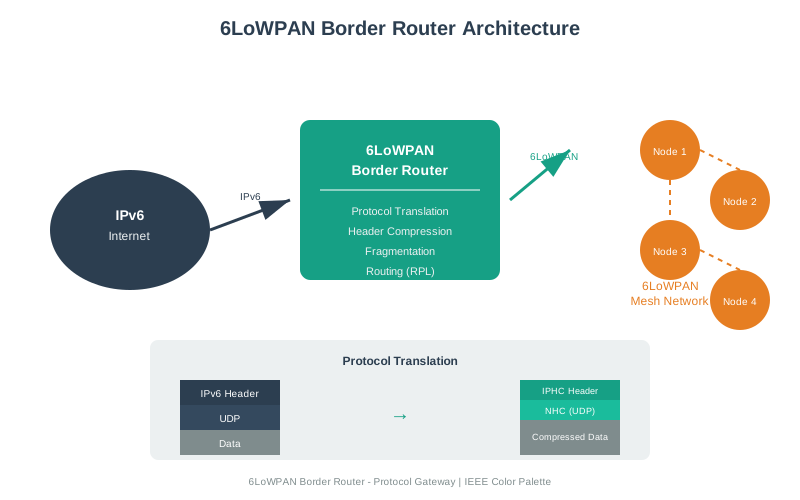
The border router bridges 6LoWPAN networks to the global IPv6 internet, enabling direct IP connectivity for constrained devices.
NoteVisual: 6LoWPAN Security Layers
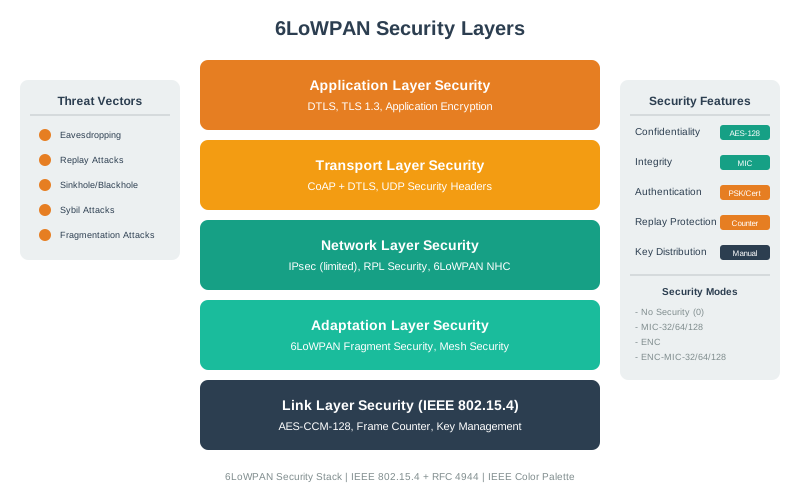
Multi-layer security combining 802.15.4 link encryption with DTLS provides defense-in-depth for sensitive IoT applications.
NoteVisual: IPHC Header Compression
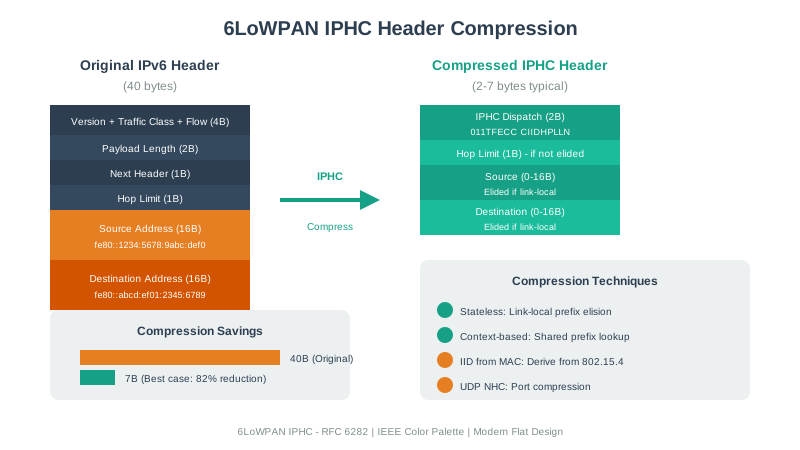
IPHC compression reduces protocol overhead by 83-95%, extending battery life from 2 years to 3.5+ years for small sensor payloads.
NoteVisual: 6LoWPAN Protocol Overview

The 6LoWPAN adaptation layer provides essential IPv6-over-802.15.4 functionality through header compression and packet fragmentation.
968.5 Summary
This hands-on chapter covered practical implementation of 6LoWPAN networks for IPv6-enabled IoT deployments:
- Development Environments: Contiki-NG and RIOT OS provide production-ready IPv6 stacks for resource-constrained embedded devices, enabling UDP communication over 802.15.4 radios
- Border Router Deployment: A single border router enables 200+ constrained devices to access the internet, reducing connectivity costs from $10K+ (individual cellular) to $200 per deployment
- Header Compression (IPHC): Reduces IPv6+UDP headers from 48 bytes to 7 bytes (70% reduction), extending battery life from 2 years to 3.5 years for mesh nodes
- Link-Layer Security: AES-128 encryption adds 15-20% energy overhead but prevents eavesdropping and data tampering in agricultural, industrial, and smart city applications
- RPL Routing: Automatically adapts multi-hop paths when nodes fail, with the border router acting as the DODAG root for centralized routing coordination
- DTLS Security: Provides end-to-end encryption for sensitive applications (medical devices, payments) beyond link-layer protection
968.6 Knowledge Check
968.7 What’s Next
In the next chapter, 6LoWPAN Comprehensive Review, we’ll synthesize everything you’ve learned about 6LoWPAN with quiz questions, advanced security patterns, and real-world deployment case studies.
Key Takeaways: - Border routers enable 200+ constrained devices to access the internet via a single gateway ($200 vs $10K+ for individual cellular) - Link-layer AES adds 15-20% energy overhead but prevents data theft—acceptable for most agricultural/industrial IoT - Contiki-NG and RIOT OS provide production-ready IPv6 stacks for embedded devices - RPL routing automatically adapts to node failures and optimizes multi-hop paths - DTLS over CoAP provides end-to-end security for sensitive applications (medical devices, payments)