Build a functional digital twin system using ESP32 and sensors
Implement bidirectional synchronization between physical and digital entities
Extend the lab with predictive analytics and anomaly detection features
508.2 Knowledge Check
Test your understanding of digital twin concepts with these questions.
NoteQuiz: Digital Twin Fundamentals
Question 1: What is the KEY difference between a digital shadow and a digital twin?
Explanation: The fundamental distinction is data flow direction. A digital shadow receives sensor data from the physical system (Physical -> Digital one-way flow) but cannot send commands back. It mirrors reality but cannot change it. A digital twin enables bidirectional synchronization: physical state updates the digital model, AND digital model insights can be sent as control commands to optimize the physical system. For example, a building’s digital shadow shows current temperature, but a digital twin can automatically adjust HVAC setpoints based on predicted occupancy.
Question 2: A manufacturing plant is implementing digital twins for 500 CNC machines. Each machine generates 50 sensor readings per second. What is the most appropriate synchronization architecture?
Explanation: At 25,000 readings/second (500 machines x 50 sensors), sending raw data directly to cloud is impractical due to bandwidth costs (~200 MB/second = 17 TB/day) and latency requirements. Edge computing is the standard industrial pattern: edge gateways perform local aggregation (calculate 1-minute averages), filtering (discard unchanged values), and anomaly detection (only forward significant deviations). This achieves 95-99% data reduction while preserving actionable insights. Batch daily uploads lose real-time benefits; manual inspections defeat the purpose of digital twins.
Question 3: In DTDL (Digital Twin Definition Language), what is the distinction between a “Property” and “Telemetry”?
Explanation: DTDL distinguishes data by change frequency and purpose:
Properties represent static or slowly-changing characteristics that describe the twin: roomNumber, floorArea, manufacturer, installationDate. These are updated infrequently (when equipment is reconfigured).
Telemetry represents time-series sensor data that changes continuously: current temperature, vibration readings, power output. These are streamed frequently (every second or minute).
This distinction enables different storage strategies (properties in document stores, telemetry in time-series databases) and query patterns (properties for metadata filtering, telemetry for trend analysis).
Question 4: A building operator notices their digital twin shows Room 305’s temperature as 22.0C, but a handheld thermometer reads 24.5C. The discrepancy has persisted for 3 days. Using the “Physical-Wins” conflict resolution strategy, what should happen?
Explanation: “Physical-Wins” means the physical world is the source of truth. When discrepancy is detected:
Acknowledge physical reality: The handheld reading (24.5C) is correct.
Diagnose root cause: The embedded sensor is drifting - this is a maintenance issue, not a software bug.
Update twin state: Correct the displayed value and flag the sensor as “degraded accuracy.”
Predictive maintenance: Log the drift pattern - sensors often fail progressively, enabling replacement before complete failure.
Simply averaging values hides the problem. Ignoring discrepancies defeats the purpose of digital twins. The physical world is authoritative in monitoring-focused applications.
Question 5: A smart city is deploying digital twins for traffic management. They need to model 50,000 intersections, 10,000 traffic lights, and relationships like “intersection A is upstream of intersection B.” Which platform characteristic is MOST critical for this use case?
Explanation: Traffic management fundamentally depends on relationships between entities: upstream/downstream intersections, connected traffic lights, adjacent roads, and dependency chains. Queries like “Which intersections will be affected if I change timing on Main Street?” require traversing relationship graphs. Graph-based relationship modeling (as provided by Azure Digital Twins or Neo4j) enables these spatial and connectivity queries efficiently.
While 3D visualization is nice-to-have, most traffic operations use 2D maps. Sub-millisecond latency is overkill (traffic signals change over seconds). Video analytics is one input source but not the core architectural requirement.
NoteScenario: Wind Farm Digital Twin
You’re designing a digital twin system for a 50-turbine offshore wind farm. Each turbine has 100 sensors monitoring blade vibration, temperature, wind speed, power output, and mechanical stress. Sensors report data every second.
Questions:
What is your data ingestion rate, and how would you architect for it?
What relationships would you model in your twin graph?
How would you handle a turbine going offline for 6 hours?
What predictive analytics would you prioritize?
Solution:
1. Data Ingestion Rate: - 50 turbines × 100 sensors × 1 reading/second = 5,000 readings/second - At ~200 bytes per reading: 1 MB/second = 86.4 GB/day raw data - Architecture: Edge gateway at each turbine for local aggregation, sending only anomalies and 1-minute averages to cloud (99% data reduction). High-frequency raw data stored locally for 48 hours for deep diagnostics on demand.
3. Turbine Offline Handling: - Immediate: Mark twin as “DisconnectedState” with last-known values visible - During Outage: Use neighboring turbine data + weather station to estimate what offline turbine would be experiencing (wake effects, wind patterns) - Reconciliation: When turbine reconnects, upload locally-stored detailed logs (edge storage). Cloud twin replays historical data to update predictions and calibrate models. - Alerting: Distinguish network failure from mechanical failure (check adjacent turbines, attempt ping, review last telemetry for anomalies)
4. Priority Predictive Analytics: - Blade Damage Prediction (highest value): Vibration pattern analysis detects micro-cracks 4-6 weeks before failure. One prevented blade failure saves $500K+ in emergency repairs and downtime. - Gearbox Wear: Oil analysis + temperature trends predict bearing failures 2-3 weeks ahead. Allows scheduled maintenance vs. emergency shutdown. - Power Optimization: ML models find optimal yaw angle and blade pitch for current wind conditions, boosting output 2-5%. - Wake Effect Management: Coordinate turbine orientations to minimize downwind interference, increasing farm-wide efficiency 8-12%.
Show code
{const container =document.getElementById('kc-twin-21');if (container &&typeof InlineKnowledgeCheck !=='undefined') { container.innerHTML=''; container.appendChild(InlineKnowledgeCheck.create({question:"A wind farm operator is designing their digital twin system. They have 50 turbines, each generating 5,000 sensor readings per second. During network outages to the cloud, what should happen to ensure no data is lost?",options: [ {text:"Accept data loss during outages - real-time twins cannot buffer historical data",correct:false,feedback:"Accepting data loss means losing the ability to analyze what happened during the outage. Digital twin architectures should include buffering strategies for disconnected operation."}, {text:"Stream all data directly to cloud with no local storage - cloud providers guarantee 100% availability",correct:false,feedback:"No cloud provider guarantees 100% availability. Network outages, maintenance windows, and connectivity issues are inevitable. Local buffering is essential for reliable operation."}, {text:"Edge gateways should buffer data locally (e.g., 48 hours), send aggregates in real-time, and backfill detailed data when connectivity restores",correct:true,feedback:"Correct! The wind farm scenario describes exactly this: edge gateways store high-frequency raw data locally for 48 hours, send only anomalies and 1-minute averages to cloud (99% data reduction), and backfill detailed logs when needed for deep diagnostics. This handles outages gracefully."}, {text:"Reduce sensor polling frequency during outages to minimize data accumulation",correct:false,feedback:"Reducing sensor frequency during outages is exactly when you might miss critical events. The solution is local buffering, not reduced monitoring."} ],difficulty:"medium",topic:"digital-twins" })); }}
TipFor Beginners: Why So Many Sensors?
You might wonder why a wind turbine needs 100 sensors. Here’s why:
Safety: Vibration sensors on blades detect cracks before catastrophic failure. A blade breaking off could destroy the turbine and endanger workers.
Efficiency: Tiny adjustments to blade angle based on wind sensors can boost power output by 5%. Over 50 turbines for 20 years, that’s millions of dollars.
Maintenance: Temperature sensors in the gearbox detect bearing wear weeks before failure. Replacing a bearing costs $50K and takes a day. Emergency repairs after failure cost $500K and two weeks of downtime.
The digital twin correlates all these sensors to find patterns: “When blade vibration increases 3% AND wind gusts exceed 40 mph AND temperature drops below freezing, blade stress reaches dangerous levels.” That’s impossible for humans to spot manually across 50 turbines.
508.3 Visual Reference Gallery
NoteDigital Twin Architecture
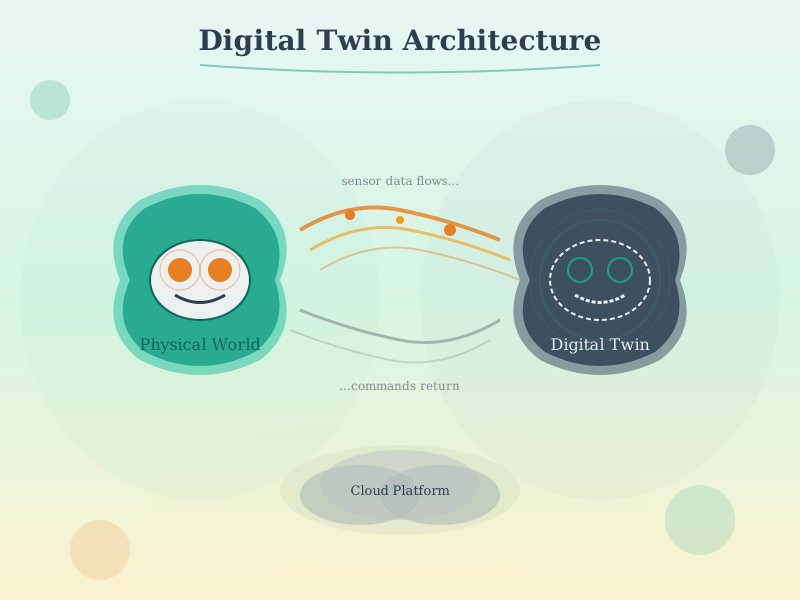
Digital Twin Architecture
The fundamental architecture of digital twins showing physical-to-virtual synchronization.
NoteTwin Synchronization
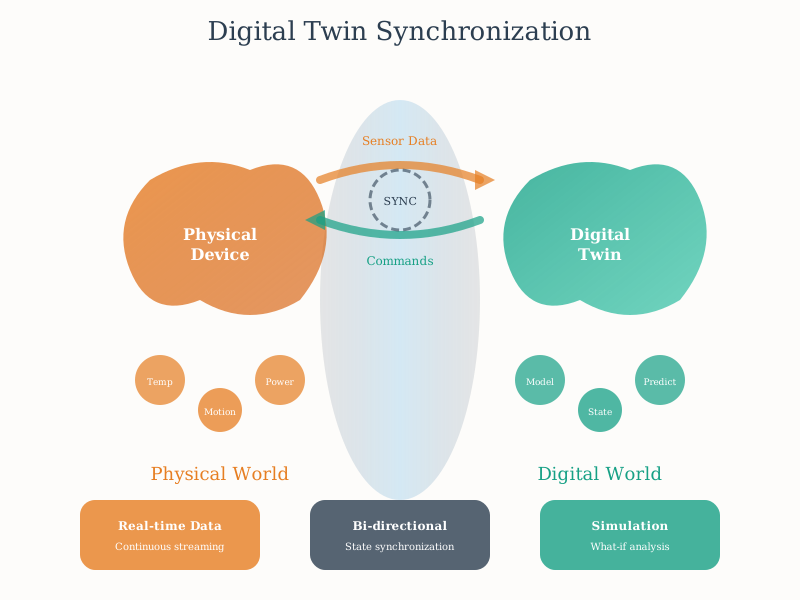
Digital Twin Sync
Real-time synchronization between physical systems and their digital counterparts.
NoteTwin Lifecycle Management
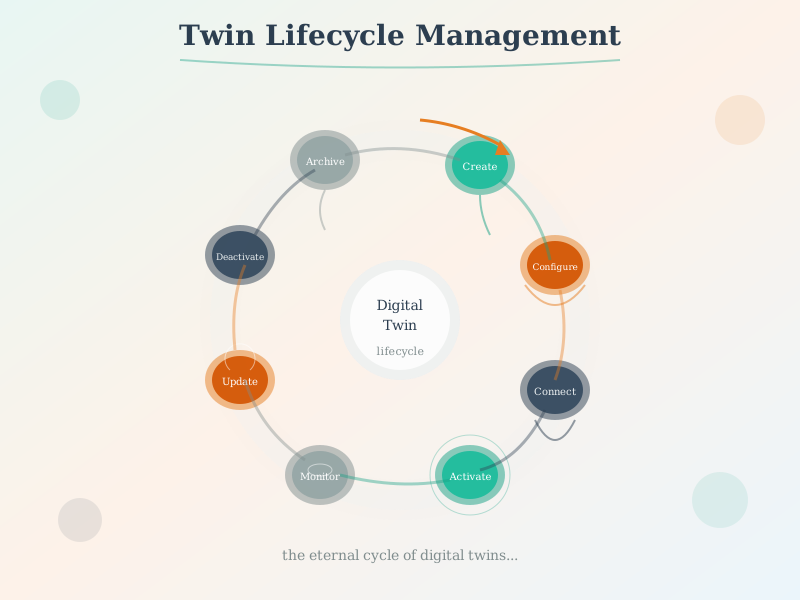
Twin Lifecycle
Complete lifecycle management of digital twins from creation to retirement.
508.4 Lab: Build a Simple Digital Twin System
Duration: ~45 min | Hands-on | Hardware: ESP32 + Temperature Sensor + LED + Button
In this lab, you will build a functional digital twin system that demonstrates the core concepts of physical-digital synchronization, state mirroring, history tracking, and predictive analytics.
508.4.1 Learning Objectives
By completing this lab, you will be able to:
Implement bidirectional state synchronization between physical and digital entities
Create a circular buffer for state history tracking
Build simple trend-based prediction algorithms
Understand how physical sensor data mirrors into a digital twin
Demonstrate how digital commands can control physical actuators
508.4.2 Components Required
Component
Purpose
Wokwi Part
ESP32
Microcontroller (physical device)
esp32
DHT22
Temperature/humidity sensor
dht22
LED (Red)
Status indicator (actuator)
led
Push Button
User input trigger
pushbutton
10K Resistor
Pull-down for button
resistor
220 Ohm Resistor
Current limiter for LED
resistor
508.4.3 Wokwi Simulator
Use the embedded simulator below to build and test your digital twin system. Click “Start Simulation” after entering the code.
TipWokwi Setup Instructions
In the Wokwi editor, add components from the “+” menu: ESP32, DHT22, LED (red), Push Button, and resistors
Wire the DHT22 data pin to GPIO 4
Wire the LED (with 220 ohm resistor) to GPIO 2
Wire the button (with 10K pull-down resistor) to GPIO 15
Copy the code below into the editor
Click the green play button to start simulation
508.4.4 Complete Arduino Code
Copy this code into the Wokwi editor:
/* * Digital Twin Demonstration - ESP32 * * This program demonstrates core digital twin concepts: * 1. Physical State Monitoring - Reading sensors (temperature, button) * 2. Digital Twin State - Maintaining a virtual copy of device state * 3. Bidirectional Sync - Physical updates twin, twin controls LED * 4. State History - Circular buffer tracking past states * 5. Prediction - Simple trend analysis for forecasting * * Hardware: ESP32 + DHT22 + LED + Button */#include <DHT.h>// ============ PIN DEFINITIONS ============#define DHT_PIN 4// DHT22 data pin#define LED_PIN 2// LED output pin#define BUTTON_PIN 15// Button input pin#define DHT_TYPE DHT22// ============ DIGITAL TWIN CONFIGURATION ============#define HISTORY_SIZE 10// Circular buffer size for state history#define SYNC_INTERVAL 2000// Milliseconds between sync cycles#define PREDICTION_HORIZON 3// Predict N cycles ahead// ============ DATA STRUCTURES ============// Physical Device State - What the actual hardware reportsstruct PhysicalState {float temperature;float humidity;bool buttonPressed;bool ledState;unsignedlong timestamp;};// Digital Twin State - Virtual copy with additional metadatastruct DigitalTwin {// Mirrored physical statefloat temperature;float humidity;bool buttonPressed;bool ledState;// Twin-specific metadataunsignedlong lastSyncTime;unsignedlong syncCount;bool isOnline;float syncLatencyMs;// Derived analyticsfloat avgTemperature;float tempTrend;// Degrees per cycle (positive = rising)float predictedTemp;// Forecasted temperature String healthStatus;// Alert thresholds (configurable from "cloud")float tempAlertHigh;float tempAlertLow;};// State History Entrystruct HistoryEntry {float temperature;float humidity;bool buttonState;unsignedlong timestamp;};// ============ GLOBAL VARIABLES ============DHT dht(DHT_PIN, DHT_TYPE);PhysicalState physicalDevice;DigitalTwin digitalTwin;HistoryEntry stateHistory[HISTORY_SIZE];int historyIndex =0;int historyCount =0;unsignedlong lastSyncTime =0;unsignedlong lastButtonTime =0;bool lastButtonState =false;// ============ INITIALIZATION ============void setup(){ Serial.begin(115200); delay(1000);// Initialize hardware pinMode(LED_PIN, OUTPUT); pinMode(BUTTON_PIN, INPUT); dht.begin();// Initialize digital twin with defaults initializeDigitalTwin(); Serial.println("\n========================================"); Serial.println(" DIGITAL TWIN DEMONSTRATION"); Serial.println("========================================"); Serial.println("Physical Device: ESP32 + DHT22 + LED + Button"); Serial.println("Digital Twin: Virtual state mirror with predictions"); Serial.println("----------------------------------------"); Serial.println("Press button to trigger manual sync"); Serial.println("Watch temperature trends and predictions"); Serial.println("========================================\n");}void initializeDigitalTwin(){ digitalTwin.temperature =0; digitalTwin.humidity =0; digitalTwin.buttonPressed =false; digitalTwin.ledState =false; digitalTwin.lastSyncTime =0; digitalTwin.syncCount =0; digitalTwin.isOnline =true; digitalTwin.syncLatencyMs =0; digitalTwin.avgTemperature =0; digitalTwin.tempTrend =0; digitalTwin.predictedTemp =0; digitalTwin.healthStatus ="Initializing"; digitalTwin.tempAlertHigh =30.0;// Alert if above 30C digitalTwin.tempAlertLow =15.0;// Alert if below 15C}// ============ MAIN LOOP ============void loop(){// Check for button press (manual sync trigger) handleButtonInput();// Periodic synchronization cycleif(millis()- lastSyncTime >= SYNC_INTERVAL){ performSyncCycle(); lastSyncTime = millis();}}// ============ BUTTON HANDLING ============void handleButtonInput(){bool currentButton = digitalRead(BUTTON_PIN)== HIGH;// Debounce and detect pressif(currentButton &&!lastButtonState &&(millis()- lastButtonTime >200)){ lastButtonTime = millis(); physicalDevice.buttonPressed =true; Serial.println("\n[PHYSICAL] Button pressed - Triggering immediate sync");// Button press toggles LED (bidirectional: physical input -> twin -> physical output) toggleLedFromTwin(); performSyncCycle();}else{ physicalDevice.buttonPressed =false;} lastButtonState = currentButton;}// ============ SYNCHRONIZATION CYCLE ============void performSyncCycle(){unsignedlong syncStart = millis(); Serial.println("\n========== SYNC CYCLE ==========");// STEP 1: Read Physical State (Physical -> Digital) readPhysicalState();// STEP 2: Update Digital Twin (Mirror physical state) updateDigitalTwin();// STEP 3: Record History (Circular buffer) recordStateHistory();// STEP 4: Run Analytics (Twin-side processing) runTwinAnalytics();// STEP 5: Make Predictions (Forecasting) calculatePredictions();// STEP 6: Execute Twin Commands (Digital -> Physical) executeTwinCommands();// Calculate sync latency digitalTwin.syncLatencyMs = millis()- syncStart; digitalTwin.syncCount++;// STEP 7: Display Twin Status displayTwinStatus();}// ============ PHYSICAL STATE READING ============void readPhysicalState(){ Serial.println("[PHYSICAL] Reading sensor data...");// Read DHT22 sensorfloat temp = dht.readTemperature();float hum = dht.readHumidity();// Validate readingsif(isnan(temp)|| isnan(hum)){ Serial.println("[PHYSICAL] WARNING: Sensor read failed, using last known values");// Keep previous values if read fails}else{ physicalDevice.temperature = temp; physicalDevice.humidity = hum;} physicalDevice.ledState = digitalRead(LED_PIN)== HIGH; physicalDevice.timestamp = millis(); Serial.print("[PHYSICAL] Temp: "); Serial.print(physicalDevice.temperature,1); Serial.print("C, Humidity: "); Serial.print(physicalDevice.humidity,1); Serial.print("%, LED: "); Serial.println(physicalDevice.ledState ?"ON":"OFF");}// ============ DIGITAL TWIN UPDATE ============void updateDigitalTwin(){ Serial.println("[TWIN] Synchronizing state from physical device...");// Mirror physical state to twin (Physical -> Digital sync) digitalTwin.temperature = physicalDevice.temperature; digitalTwin.humidity = physicalDevice.humidity; digitalTwin.buttonPressed = physicalDevice.buttonPressed; digitalTwin.ledState = physicalDevice.ledState; digitalTwin.lastSyncTime = millis(); digitalTwin.isOnline =true; Serial.println("[TWIN] State synchronized successfully");}// ============ STATE HISTORY RECORDING ============void recordStateHistory(){// Store current state in circular buffer stateHistory[historyIndex].temperature = physicalDevice.temperature; stateHistory[historyIndex].humidity = physicalDevice.humidity; stateHistory[historyIndex].buttonState = physicalDevice.buttonPressed; stateHistory[historyIndex].timestamp = millis();// Advance circular buffer index historyIndex =(historyIndex +1)% HISTORY_SIZE;if(historyCount < HISTORY_SIZE){ historyCount++;} Serial.print("[HISTORY] Recorded state "); Serial.print(digitalTwin.syncCount); Serial.print(" (buffer: "); Serial.print(historyCount); Serial.print("/"); Serial.print(HISTORY_SIZE); Serial.println(" entries)");}// ============ TWIN ANALYTICS ============void runTwinAnalytics(){ Serial.println("[ANALYTICS] Processing twin data...");// Calculate average temperature from historyif(historyCount >0){float sum =0;for(int i =0; i < historyCount; i++){ sum += stateHistory[i].temperature;} digitalTwin.avgTemperature = sum / historyCount;}// Calculate temperature trend (simple linear regression)if(historyCount >=3){// Compare recent readings to determine trendint newestIdx =(historyIndex -1+ HISTORY_SIZE)% HISTORY_SIZE;int olderIdx =(historyIndex - min(3, historyCount)+ HISTORY_SIZE)% HISTORY_SIZE;float newestTemp = stateHistory[newestIdx].temperature;float olderTemp = stateHistory[olderIdx].temperature;int samples = min(3, historyCount);// Trend = change per cycle digitalTwin.tempTrend =(newestTemp - olderTemp)/ samples;}// Determine health status based on thresholdsif(physicalDevice.temperature > digitalTwin.tempAlertHigh){ digitalTwin.healthStatus ="WARNING: High Temp";}elseif(physicalDevice.temperature < digitalTwin.tempAlertLow){ digitalTwin.healthStatus ="WARNING: Low Temp";}elseif(abs(digitalTwin.tempTrend)>0.5){ digitalTwin.healthStatus ="NOTICE: Rapid Change";}else{ digitalTwin.healthStatus ="NORMAL";} Serial.print("[ANALYTICS] Avg Temp: "); Serial.print(digitalTwin.avgTemperature,1); Serial.print("C, Trend: "); Serial.print(digitalTwin.tempTrend >=0?"+":""); Serial.print(digitalTwin.tempTrend,2); Serial.println("C/cycle");}// ============ PREDICTION ENGINE ============void calculatePredictions(){ Serial.println("[PREDICTION] Forecasting future state...");// Simple linear extrapolation: predicted = current + (trend * horizon) digitalTwin.predictedTemp = digitalTwin.temperature +(digitalTwin.tempTrend * PREDICTION_HORIZON); Serial.print("[PREDICTION] In "); Serial.print(PREDICTION_HORIZON); Serial.print(" cycles, predicted temp: "); Serial.print(digitalTwin.predictedTemp,1); Serial.println("C");// Predictive alert: warn if prediction crosses thresholdif(digitalTwin.predictedTemp > digitalTwin.tempAlertHigh && digitalTwin.temperature <= digitalTwin.tempAlertHigh){ Serial.println("[PREDICTION] ALERT: Temperature predicted to exceed high threshold!");}if(digitalTwin.predictedTemp < digitalTwin.tempAlertLow && digitalTwin.temperature >= digitalTwin.tempAlertLow){ Serial.println("[PREDICTION] ALERT: Temperature predicted to drop below low threshold!");}}// ============ TWIN COMMAND EXECUTION ============void executeTwinCommands(){// This demonstrates Digital -> Physical command flow// The twin can decide to turn LED on/off based on conditions// Example rule: Turn LED on if temperature exceeds high thresholdbool shouldLedBeOn = digitalTwin.temperature > digitalTwin.tempAlertHigh;// Alternative: LED follows button toggle state (already handled)// Here we show how twin-side logic could override physical stateif(shouldLedBeOn &&!digitalTwin.ledState){ Serial.println("[COMMAND] Twin activating LED due to high temperature"); digitalWrite(LED_PIN, HIGH); digitalTwin.ledState =true;}}void toggleLedFromTwin(){// Twin-mediated LED toggle (button press -> twin logic -> LED control)bool newState =!digitalTwin.ledState; digitalWrite(LED_PIN, newState ? HIGH : LOW); digitalTwin.ledState = newState; Serial.print("[COMMAND] Twin toggled LED to: "); Serial.println(newState ?"ON":"OFF");}// ============ STATUS DISPLAY ============void displayTwinStatus(){ Serial.println("\n-------- DIGITAL TWIN STATUS --------"); Serial.println("Physical Device State:"); Serial.print(" Temperature: "); Serial.print(physicalDevice.temperature,1); Serial.println(" C"); Serial.print(" Humidity: "); Serial.print(physicalDevice.humidity,1); Serial.println(" %"); Serial.print(" LED State: "); Serial.println(physicalDevice.ledState ?"ON":"OFF"); Serial.println("\nDigital Twin Mirror:"); Serial.print(" Temperature: "); Serial.print(digitalTwin.temperature,1); Serial.println(" C (synced)"); Serial.print(" Humidity: "); Serial.print(digitalTwin.humidity,1); Serial.println(" % (synced)"); Serial.print(" LED State: "); Serial.println(digitalTwin.ledState ?"ON":"OFF"); Serial.println("\nTwin Analytics:"); Serial.print(" Avg Temp ("); Serial.print(historyCount); Serial.print(" samples): "); Serial.print(digitalTwin.avgTemperature,1); Serial.println(" C"); Serial.print(" Temp Trend: "); Serial.print(digitalTwin.tempTrend >=0?"+":""); Serial.print(digitalTwin.tempTrend,2); Serial.println(" C/cycle"); Serial.print(" Predicted: "); Serial.print(digitalTwin.predictedTemp,1); Serial.print(" C (in "); Serial.print(PREDICTION_HORIZON); Serial.println(" cycles)"); Serial.println("\nTwin Metadata:"); Serial.print(" Sync Count: "); Serial.println(digitalTwin.syncCount); Serial.print(" Sync Latency: "); Serial.print(digitalTwin.syncLatencyMs); Serial.println(" ms"); Serial.print(" Status: "); Serial.println(digitalTwin.healthStatus); Serial.println("--------------------------------------\n");}
508.4.5 Step-by-Step Instructions
Step 1: Understanding the Code Structure
The code is organized around core digital twin concepts:
Code Section
Digital Twin Concept
PhysicalState struct
Represents the actual hardware state
DigitalTwin struct
Virtual mirror with analytics metadata
HistoryEntry array
Circular buffer for state history
performSyncCycle()
The synchronization loop
runTwinAnalytics()
Twin-side data processing
calculatePredictions()
Forecasting based on trends
executeTwinCommands()
Digital -> Physical control
Step 2: Wire the Circuit
In the Wokwi simulator:
Add an ESP32 board
Add a DHT22 sensor, connect: VCC to 3.3V, GND to GND, DATA to GPIO 4
Add a red LED with 220 ohm resistor from GPIO 2 to GND
Add a pushbutton with 10K pull-down resistor from GPIO 15 to GND
Step 3: Run and Observe
Start the simulation
Open the Serial Monitor (baud rate: 115200)
Watch the sync cycles every 2 seconds
Observe how the digital twin mirrors physical state
Press the button to trigger manual sync and toggle LED
Step 4: Experiment with Temperature
In Wokwi, you can adjust the DHT22 temperature:
Click on the DHT22 sensor
Drag the temperature slider up or down
Watch the twin detect the trend
See predictions adjust based on trend direction
When temperature exceeds 30C, observe the LED turn on automatically
508.4.6 Challenge Exercises
NoteChallenge 1: Add Humidity Prediction
Extend the prediction engine to also forecast humidity:
// Add to DigitalTwin struct:float humidityTrend;float predictedHumidity;// Add to calculatePredictions():// Calculate humidity trend similar to temperature// Generate predictedHumidity value
Goal: Make the twin predict both temperature AND humidity trends.
NoteChallenge 2: Implement Anomaly Detection
Add code to detect anomalies (sudden spikes):
void detectAnomalies(){// If current reading differs from average by more than 2 standard deviations// Set healthStatus to "ANOMALY DETECTED"// Consider: How would you calculate standard deviation from history?}
Goal: Alert when sensor values change unexpectedly fast.
NoteChallenge 3: Add a “What-If” Simulation Mode
Create a mode where you can test hypothetical scenarios:
void simulateWhatIf(float hypotheticalTemp){// Temporarily set twin temperature to hypotheticalTemp// Run analytics and predictions// Show what WOULD happen without changing physical state// This demonstrates a key digital twin capability}
Goal: Test scenarios virtually before affecting the physical system.
NoteChallenge 4: Network Simulation
Simulate network latency and disconnection:
bool networkConnected =true;unsignedlong lastNetworkCheck =0;void simulateNetworkConditions(){// Randomly disconnect for 5-10 seconds every minute// When disconnected, twin should show "Stale" indicator// Buffer physical readings during outage// Replay buffered data when connection restores}
Goal: Understand graceful degradation when sync fails.
508.4.7 Key Digital Twin Concepts Demonstrated
This lab illustrates the fundamental concepts that distinguish digital twins from simple monitoring:
TipConcept 1: Bidirectional Synchronization
Physical -> Digital: Sensor readings update the twin state every 2 seconds.
Digital -> Physical: Button press is processed by twin logic, which then commands the LED. Temperature threshold triggers automatic LED activation.
This bidirectional flow is what makes it a twin, not just a shadow.
TipConcept 2: State History and Trends
The circular buffer maintains the last 10 readings, enabling:
Basis for prediction: Historical data feeds forecasting algorithms
Real digital twins store months or years of history for sophisticated ML models.
TipConcept 3: Predictive Analytics
The simple linear extrapolation demonstrates how twins forecast future states:
Predicted = Current + (Trend × Horizon)
Industrial twins use advanced ML models trained on historical data, but the principle is identical: use patterns from the past to predict the future.
TipConcept 4: Twin-Side Intelligence
The twin makes decisions independently:
Calculates health status based on thresholds
Generates alerts for predicted threshold crossings
Commands the LED based on conditions
This intelligence lives in the “digital” side, not the physical device, enabling remote updates and complex logic without modifying hardware.
508.4.8 Connection to Real-World Digital Twins
Lab Concept
Industrial Implementation
ESP32 + DHT22
Industrial PLC + 100+ sensors
10-entry history buffer
Time-series database (years of data)
Linear trend prediction
ML models (random forest, LSTM)
Serial output display
3D visualization dashboard
Button toggle
SCADA operator commands
LED indicator
Industrial actuators, valves, motors
The lab demonstrates the same architectural patterns used in enterprise digital twins, just at a smaller scale suitable for learning.
Show code
{const container =document.getElementById('kc-twin-22');if (container &&typeof InlineKnowledgeCheck !=='undefined') { container.innerHTML=''; container.appendChild(InlineKnowledgeCheck.create({question:"In the ESP32 digital twin lab, the code maintains a 10-entry circular buffer for state history. When entry 11 arrives, what happens to the oldest entry?",options: [ {text:"The system throws an error because the buffer is full",correct:false,feedback:"Circular buffers do not throw errors when full - that is the point of circular (ring) buffers. They handle continuous data streams gracefully."}, {text:"Entry 11 is discarded to preserve the original 10 entries",correct:false,feedback:"Discarding new data would prevent the twin from tracking current trends. Circular buffers prioritize recent data."}, {text:"Entry 1 is overwritten by entry 11, maintaining a sliding window of the 10 most recent states",correct:true,feedback:"Correct! Circular buffers wrap around when full, overwriting the oldest entry. This maintains a sliding window of recent history - exactly what is needed for trend analysis and prediction without unbounded memory growth."}, {text:"The buffer automatically doubles in size to accommodate more entries",correct:false,feedback:"Embedded systems like ESP32 have limited memory. Dynamic resizing is dangerous and unnecessary - circular buffers provide fixed-size history by design."} ],difficulty:"easy",topic:"digital-twins" })); }}
Show code
{const container =document.getElementById('kc-twin-11');if (container &&typeof InlineKnowledgeCheck !=='undefined') { container.innerHTML=''; container.appendChild(InlineKnowledgeCheck.create({question:"In the ESP32 digital twin lab, the button press is handled by the twin logic which then controls the LED. This demonstrates which key digital twin concept?",options: [ {text:"Physical-to-digital synchronization only",correct:false,feedback:"Button reading is physical-to-digital, but the LED control that follows is digital-to-physical. The complete flow demonstrates bidirectional communication."}, {text:"Bidirectional synchronization where physical input flows through twin logic before commanding physical output",correct:true,feedback:"Correct! The button press (physical) updates the twin state, the twin logic decides to toggle the LED, and then sends a command to the physical LED. This physical -> digital -> physical flow is the essence of bidirectional twin synchronization."}, {text:"Edge computing for low-latency response",correct:false,feedback:"While the ESP32 is technically edge computing, the lab specifically demonstrates the twin pattern where physical inputs are processed through digital logic before commanding outputs."}, {text:"State history recording in a circular buffer",correct:false,feedback:"The circular buffer is demonstrated separately for trend analysis. The button-LED interaction specifically shows bidirectional command flow through the twin."} ],difficulty:"easy",topic:"digital-twins" })); }}
508.5 Summary
Digital twins represent a paradigm shift in how we monitor, understand, and optimize physical systems. Key takeaways:
Conceptual Foundation: - Digital twins go beyond simulation by maintaining bidirectional synchronization with physical counterparts - They evolve from digital shadows (one-way monitoring) to full twins (bidirectional control) - Effective twins combine real-time state, historical data, and predictive models
Architectural Components: - Physical layer (sensors/actuators), connectivity layer (IoT protocols), synchronization engine, analytics layer, and user interfaces - Edge computing crucial for high-frequency applications requiring low latency - Graph-based relationship modeling captures spatial and functional hierarchies
Synchronization Strategies: - Update frequency ranges from 10ms (robotics) to daily (city planning) - Event-driven updates reduce bandwidth while ensuring critical changes propagate immediately - Conflict resolution strategies depend on use case: physical-wins for monitoring, digital-wins for control
Data Modeling Standards: - DTDL provides interoperable way to define properties, telemetry, commands, and relationships - Relationship graphs enable powerful queries across interconnected twins - Semantic modeling allows twins from different vendors to interoperate
Platform Landscape: - Azure Digital Twins: Best for relationship-heavy applications, building management, smart cities - AWS IoT TwinMaker: Optimal for manufacturing with strong 3D visualization needs - Open source (Ditto, StreamPipes): Maximum flexibility and control, avoid vendor lock-in
Real-World Impact: - Manufacturing: GE saved $1.5B through predictive maintenance across 1.2M twins - Smart Buildings: Microsoft reduced energy consumption 25% using campus-wide twins - Healthcare: Siemens reduced surgical complications 30% with patient-specific twins - Smart Cities: Singapore optimized urban planning across entire nation
Digital twins are no longer experimental—they’re becoming essential infrastructure for data-driven operation of complex physical systems.
Show code
{const container =document.getElementById('kc-twin-12');if (container &&typeof InlineKnowledgeCheck !=='undefined') { container.innerHTML=''; container.appendChild(InlineKnowledgeCheck.create({question:"Your company wants to start with digital twins. The CTO asks: 'What's the minimum viable digital twin that will show value quickly?' Based on the chapter's recommendations, what should you propose?",options: [ {text:"A comprehensive platform with 3D visualization, physics simulation, and ML prediction from day one",correct:false,feedback:"This approach takes months to implement and may build features you don't need. The chapter emphasizes starting simple and iterating based on actual needs."}, {text:"Start with telemetry mirroring and threshold-based alerts, then add prediction capabilities as historical data accumulates",correct:true,feedback:"Correct! The chapter's key takeaway is 'Start simple with telemetry mirroring before adding simulation and prediction capabilities.' Basic monitoring with alerts provides immediate value. ML models need historical data to train on, which you collect while running the simple version. This MVP approach typically shows ROI in weeks."}, {text:"Wait until you have 2 years of historical data before starting any digital twin implementation",correct:false,feedback:"You can't collect historical data without deploying sensors. Start collecting data now with simple monitoring, and prediction capabilities can be added later as data accumulates."}, {text:"Begin with the most complex, highest-value asset and build a complete twin before expanding",correct:false,feedback:"Starting with the most complex asset increases implementation risk. Better to prove the concept on simpler assets first, learn from the experience, then tackle complex cases."} ],difficulty:"medium",topic:"digital-twins" })); }}
TipCross-Hub Connections
Explore Further:
Simulations Hub - Try interactive digital twin simulations and visualization tools
Videos Hub - Watch digital twin implementations and case studies
Quizzes Hub - Test your understanding of digital twin concepts
Knowledge Gaps Hub - Common misconceptions about digital twins vs. simulations
The following AI-generated figures provide alternative visual representations of concepts covered in this chapter. These “phantom figures” offer different artistic interpretations to help reinforce understanding.
508.5.1 Additional Figures
Digital Twin Platform
Digital Twin Sync
Twin Maker
508.6 What’s Next
Now that you understand digital twins as virtual representations synchronized with physical systems, the next chapters will explore related architectural patterns:
Production Architecture Management - Learn how to deploy and manage IoT systems at scale, including the operational aspects of running digital twin platforms in production environments.
Sensor Behaviors and Applications - Dive deeper into how sensor data flows into digital twins, including behavioral modeling and state machines.
Data in the Cloud - Explore cloud architectures for storing and processing the massive data streams generated by digital twin systems.
Digital twins bridge the physical and digital worlds. As you continue, you’ll see how they integrate into broader IoT architectures for end-to-end system design.
508.7 Summary
In this chapter, you:
Completed comprehensive quizzes testing digital twin fundamentals
Analyzed the Wind Farm Digital Twin scenario with real-world constraints
Built a functional digital twin system on ESP32 with temperature sensors
Implemented bidirectional synchronization with command processing
Extended the lab with humidity prediction, anomaly detection, and what-if simulations
Explored key concepts: synchronization, state history, predictive analytics, and twin-side intelligence
Congratulations! You have completed the comprehensive digital twin series. You now understand the evolution from simulation to digital twin, core architecture components, synchronization patterns, data modeling with DTDL, major platforms, and real-world implementations - plus hands-on experience building a working twin system.
508.8 What’s Next
For further exploration:
Edge Computing: Learn how edge processing enables low-latency digital twins (Edge and Fog Computing)
IoT Security: Secure your digital twin deployments (IoT Security)
Time-Series Data: Optimize storage for digital twin telemetry (Time-Series Databases)