%%{init: {'theme': 'base', 'themeVariables': { 'primaryColor': '#2C3E50', 'primaryTextColor': '#fff', 'primaryBorderColor': '#16A085', 'lineColor': '#E67E22', 'secondaryColor': '#16A085', 'tertiaryColor': '#E67E22', 'fontSize': '13px'}}}%%
flowchart LR
    subgraph WITHOUT["Without IoT"]
        P1[Phone] --> D1[Device Data:<br/>Location, Contacts]
        D1 --> A1[Advertisers]
    end

    subgraph WITH["With IoT"]
        P2[Phone as<br/>Gateway Hub] --> AGG[Aggregated Data]

        SL[Smart Lock<br/>Entry Patterns] --> AGG
        TH[Thermostat<br/>Occupancy Data] --> AGG
        CAM[Camera<br/>Video Feeds] --> AGG
        FIT[Health Tracker<br/>Biometrics] --> AGG

        AGG --> A2[Advertisers]
        AGG --> INS[Insurance]
        AGG --> EMP[Employers]
        AGG --> UNK[Unknown<br/>Third Parties]
    end

    style WITHOUT fill:#e8f5e9,stroke:#4caf50
    style WITH fill:#ffebee,stroke:#f44336
    style P1 fill:#2C3E50,stroke:#16A085,color:#fff
    style P2 fill:#E67E22,stroke:#d35400,color:#fff
    style AGG fill:#c0392b,stroke:#a93226,color:#fff
    style A2 fill:#16A085,stroke:#0e6655,color:#fff
    style INS fill:#16A085,stroke:#0e6655,color:#fff
    style EMP fill:#16A085,stroke:#0e6655,color:#fff
    style UNK fill:#E67E22,stroke:#d35400,color:#fff
1465 Mobile Data Collection and Permissions
1465.1 Learning Objectives
By the end of this chapter, you will be able to:
- Identify Mobile Data Types: Understand what data mobile devices collect through sensors, location services, and network connections
- Understand Android Permission Model: Explain the three permission tiers and their privacy implications
- Assess Permission Risks: Evaluate which permission combinations pose the highest privacy risks
- Recognize Data Flow Risks: Map how mobile data flows through IoT ecosystems and where privacy risks emerge
1465.2 Prerequisites
Before diving into this chapter, you should be familiar with:
- Introduction to Privacy: Establishes fundamental privacy concepts, regulations (GDPR, CCPA), and privacy principles that apply specifically to mobile devices and their role in IoT ecosystems
- Security and Privacy Overview: Provides understanding of security threats and privacy risks that contextualizes mobile-specific vulnerabilities and attack vectors
- Networking Basics: Understanding network protocols (Wi-Fi, cellular, Bluetooth) helps comprehend how mobile devices communicate with IoT devices and what data is exposed during transmission
TipFor Beginners: Why Does Mobile Privacy Matter for IoT?
Your phone knows more about you than your best friend.
It knows where you sleep, where you work, who you call, what apps you use, and even how you walk (from accelerometer data). When your phone connects to IoT devices, all this information can flow to third parties.
What data does your phone collect?
| Data Type | What It Reveals | IoT Connection |
|---|---|---|
| Location | Where you live, work, travel | Smart home knows when you’re away |
| Wi-Fi scans | Places you’ve visited | Devices you’ve connected to |
| Bluetooth | Nearby devices, headphones | All your IoT devices |
| Contacts | Your social network | Shared device access |
| App usage | Your habits and interests | What automations you use |
Why mobile + IoT = bigger privacy risks:
Key insight: Your phone is the “hub” connecting all your IoT devices. If an app on your phone is leaky, it can expose data from ALL your connected devices—not just the phone itself.
Quick protection tips: 1. Review app permissions regularly 2. Use “Only while using” for location when possible 3. Disable Bluetooth/Wi-Fi when not needed 4. Check what data IoT apps upload to the cloud
1465.3 Introduction
Mobile devices generate vast amounts of sensitive user data through sensors, location services, Wi-Fi connections, and cellular networks. Understanding how this data is collected, shared, and potentially leaked is crucial for protecting user privacy in IoT ecosystems where mobile phones often serve as gateways.
WarningCommon Misconception: “I Have Nothing to Hide” and Anonymization Myths
Myth #1: “If I’m not doing anything wrong, privacy doesn’t matter”
This misconception ignores that privacy protects far more than just illegal activity. Your mobile phone’s data reveals:
- Health conditions: 85% accuracy detecting diabetes from search patterns, hospital visit patterns reveal diagnoses
- Financial status: Shopping locations, app usage reveal income level (plus or minus $10K accuracy)
- Social relationships: Wi-Fi probe requests expose who you meet, where, and when
- Political views: Location traces to rallies, campaign offices, places of worship
- Personal vulnerabilities: Mental health tracking (gym cancellations + mood app data), relationship problems (dating app usage patterns + location data)
Real-world harm examples: 1. Insurance discrimination: Health insurance companies purchase location data showing gym visits, fast-food frequency. Premiums adjusted without consumer knowledge. 2. Employment screening: Prospective employers purchase “anonymized” location datasets, correlate with home addresses from applications, filter candidates visiting addiction centers or union halls. 3. Stalking enablement: Domestic abusers purchase phone location data from data brokers for $500, tracking victims despite restraining orders.
Myth #2: “Permission systems protect me”
Reality: Android/iOS permissions have critical gaps:
- Coarse granularity: “Location permission” allows app to use GPS for any purpose—weather functionality + ad network tracking + analytics profiling
- No destination control: Permission grants access to sensor, not control over data recipients. App can send to unlimited third parties.
- Third-party libraries: Apps contain 15-30 SDKs on average. Each SDK inherits app permissions. You consent to app, unknowingly granting Facebook, Google, Chinese ad networks.
- Background collection: 70% of apps continue data collection after closure. Permissions remain active until explicitly revoked.
Quantified leak statistics: - 73% of apps send data to third-party tracking companies (Exodus Privacy audit, 100K apps) - Average app shares data with 10 third parties (data brokerage study) - Sensor data access: Motion sensors (accelerometer/gyroscope) require zero permissions, enabling keystroke inference (70-80% accuracy) and activity tracking
1465.4 Mobile Phone Data Collection
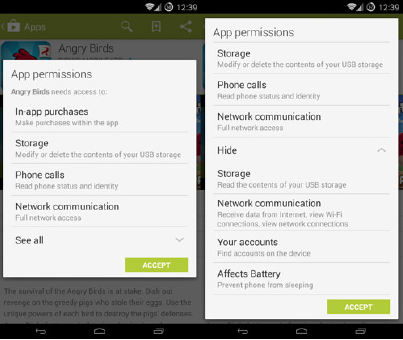
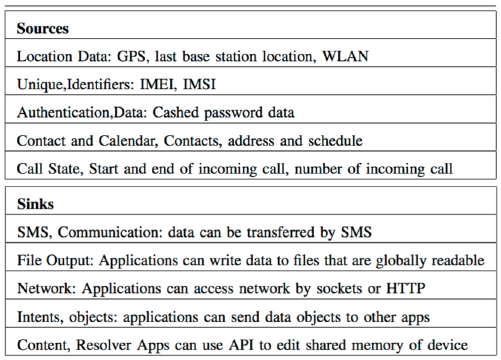
Mobile phones are sophisticated sensing platforms that continuously collect:
- Location data: GPS, cell tower triangulation, Wi-Fi positioning
- Sensor data: Accelerometer, gyroscope, magnetometer, proximity
- Network data: Wi-Fi SSIDs, Bluetooth devices, cellular towers
- Usage data: App activity, screen time, touch patterns
- Communication data: Calls, messages, contacts
%%{init: {'theme': 'base', 'themeVariables': { 'primaryColor': '#2C3E50', 'primaryTextColor': '#fff', 'primaryBorderColor': '#16A085', 'lineColor': '#E67E22', 'secondaryColor': '#16A085', 'tertiaryColor': '#E67E22', 'fontSize': '12px'}}}%%
graph TB
    PHONE[Mobile Phone<br/>Data Collection]

    LOC[Location Data<br/>GPS, Wi-Fi, Cellular] --> PHONE
    SENS[Sensor Data<br/>Accel, Gyro, Proximity] --> PHONE
    NET[Network Data<br/>Wi-Fi SSIDs, Bluetooth] --> PHONE
    USE[Usage Data<br/>Apps, Screen Time] --> PHONE
    COMM[Communication<br/>Calls, Messages] --> PHONE

    PHONE --> AD[Advertising]
    PHONE --> AN[Analytics]
    PHONE --> THIRD[Unknown<br/>Third Parties]

    style PHONE fill:#E67E22,stroke:#d35400,color:#fff
    style LOC fill:#2C3E50,stroke:#16A085,color:#fff
    style SENS fill:#2C3E50,stroke:#16A085,color:#fff
    style NET fill:#2C3E50,stroke:#16A085,color:#fff
    style USE fill:#2C3E50,stroke:#16A085,color:#fff
    style COMM fill:#2C3E50,stroke:#16A085,color:#fff
    style AD fill:#c0392b,stroke:#a93226,color:#fff
    style AN fill:#c0392b,stroke:#a93226,color:#fff
    style THIRD fill:#c0392b,stroke:#a93226,color:#fff
Key Privacy Concern: Apps often collect far more data than needed for their functionality, primarily for advertising and analytics purposes.
Transparency Problem: Operating systems don’t clearly indicate where collected data ultimately goes—users grant permissions to the app, but don’t know all the third parties receiving the data.
1465.5 Android Permission Model
%%{init: {'theme': 'base', 'themeVariables': { 'primaryColor': '#2C3E50', 'primaryTextColor': '#fff', 'primaryBorderColor': '#16A085', 'lineColor': '#E67E22', 'secondaryColor': '#16A085', 'tertiaryColor': '#E67E22', 'fontSize': '12px'}}}%%
graph TB
    PERM[Android Permissions]

    PERM --> NORM[Normal Permissions<br/>Auto-granted]
    PERM --> DANG[Dangerous Permissions<br/>User consent required]
    PERM --> SPEC[Special Permissions<br/>Settings configuration]

    NORM --> N1[Internet Access]
    NORM --> N2[Bluetooth]
    NORM --> N3[Wake Lock]

    DANG --> D1[Location]
    DANG --> D2[Camera]
    DANG --> D3[Microphone]
    DANG --> D4[Contacts]
    DANG --> D5[Storage]

    SPEC --> S1[Accessibility Services]
    SPEC --> S2[Device Admin]
    SPEC --> S3[Draw Over Apps]

    style PERM fill:#E67E22,stroke:#d35400,color:#fff
    style NORM fill:#16A085,stroke:#0e6655,color:#fff
    style DANG fill:#c0392b,stroke:#a93226,color:#fff
    style SPEC fill:#2C3E50,stroke:#16A085,color:#fff
NoteAlternative View: Mobile-IoT Data Flow Risk Pipeline
This diagram shows how mobile data flows through the IoT ecosystem and where privacy risks emerge at each stage:
%% fig-alt: "Mobile-IoT data flow risk pipeline showing data journey from collection through processing to monetization. Stage 1 Collection shows sensors (GPS, accelerometer, microphone) feeding raw data to apps. Stage 2 Aggregation shows app combining with IoT device data (smart home, wearables, car). Stage 3 Processing shows cloud analytics creating user profiles. Stage 4 Distribution shows data flowing to advertisers, data brokers, insurance, employers. Each stage shows privacy risk level increasing and potential for re-identification growing."
%%{init: {'theme': 'base', 'themeVariables': { 'primaryColor': '#2C3E50', 'primaryTextColor': '#fff', 'primaryBorderColor': '#16A085', 'lineColor': '#E67E22', 'secondaryColor': '#E67E22', 'tertiaryColor': '#7F8C8D'}}}%%
flowchart LR
    subgraph S1["STAGE 1: COLLECTION"]
        direction TB
        SEN["Phone Sensors"]
        GPS1["GPS"]
        ACC["Accelerometer"]
        MIC1["Microphone"]
        SEN --> GPS1
        SEN --> ACC
        SEN --> MIC1
    end

    subgraph S2["STAGE 2: AGGREGATION"]
        direction TB
        AGG["Data Aggregator"]
        IOT1["Smart Home"]
        IOT2["Wearables"]
        IOT3["Smart Car"]
        AGG --> IOT1
        AGG --> IOT2
        AGG --> IOT3
    end

    subgraph S3["STAGE 3: PROCESSING"]
        direction TB
        CLOUD["Cloud Analytics"]
        PROF["User Profile"]
        PRED["Predictions"]
        CLOUD --> PROF
        CLOUD --> PRED
    end

    subgraph S4["STAGE 4: DISTRIBUTION"]
        direction TB
        DIST["Data Recipients"]
        AD["Advertisers"]
        BROKER["Data Brokers"]
        INS["Insurance"]
        EMP["Employers"]
        DIST --> AD
        DIST --> BROKER
        DIST --> INS
        DIST --> EMP
    end

    S1 -->|"Raw Data"| S2
    S2 -->|"Enriched Data"| S3
    S3 -->|"Profiles + Predictions"| S4

    R1["Risk: Collection scope"]
    R2["Risk: Cross-device linking"]
    R3["Risk: Inference attacks"]
    R4["Risk: Re-identification"]

    S1 -.-> R1
    S2 -.-> R2
    S3 -.-> R3
    S4 -.-> R4

    style S1 fill:#D4F4DD,stroke:#16A085,stroke-width:2px
    style S2 fill:#FFF3CD,stroke:#E67E22,stroke-width:2px
    style S3 fill:#FFE6E6,stroke:#e74c3c,stroke-width:2px
    style S4 fill:#e74c3c,stroke:#c0392b,stroke-width:2px
    style R1 fill:#16A085,stroke:#0e6655,color:#fff
    style R2 fill:#E67E22,stroke:#d35400,color:#fff
    style R3 fill:#e74c3c,stroke:#c0392b,color:#fff
    style R4 fill:#c0392b,stroke:#922b21,color:#fff
Privacy risks compound at each stage. Even “anonymized” data can be re-identified when combined across multiple sources.
NoteAlternative View: Permission Risk Assessment Matrix
Use this matrix to evaluate which app permissions pose the highest privacy risks:
%% fig-alt: "Permission risk assessment matrix plotting data sensitivity (low to critical) against collection frequency (one-time to continuous). High risk red zone contains continuous collection of critical data like always-on location and background microphone. Medium risk orange zone contains periodic collection of sensitive data like contacts sync and photo library access. Low risk green zone contains one-time access to non-sensitive data like device model queries. Each zone shows recommended user actions from allow to deny."
%%{init: {'theme': 'base', 'themeVariables': { 'primaryColor': '#2C3E50', 'primaryTextColor': '#fff', 'primaryBorderColor': '#16A085', 'lineColor': '#16A085', 'secondaryColor': '#E67E22', 'tertiaryColor': '#7F8C8D'}}}%%
quadrantChart
    title Permission Risk Assessment
    x-axis One-time Access --> Continuous Collection
    y-axis Low Sensitivity --> Critical Sensitivity
    quadrant-1 HIGH RISK - Deny or Limit
    quadrant-2 MEDIUM RISK - Review Carefully
    quadrant-3 LOW RISK - Generally Safe
    quadrant-4 MODERATE - Context Dependent

    Location Always: [0.95, 0.95]
    Background Mic: [0.9, 0.85]
    Camera Always: [0.85, 0.8]
    Contacts Sync: [0.6, 0.7]
    Photo Library: [0.5, 0.65]
    Health Data: [0.4, 0.9]
    Calendar: [0.55, 0.5]
    Device ID: [0.7, 0.6]
    Wi-Fi State: [0.8, 0.3]
    Bluetooth: [0.75, 0.35]
    Internet: [0.95, 0.2]
    Vibration: [0.3, 0.1]
Decision Guide: - Red Zone (High Risk): Deny unless absolutely essential for core functionality - Orange Zone (Medium Risk): Grant only to trusted apps, review periodically - Yellow Zone (Moderate): Evaluate based on app purpose and developer reputation - Green Zone (Low Risk): Generally safe to allow
Problem: Even with permission model, users don’t know: - How often permission is used - What specific data is collected - Where data is sent - Who has access to data
| Permission | Android | iOS | Why It Matters |
|---|---|---|---|
| Location | “Allow always” or “Only while using” | Similar + “Precise” toggle | Can track your daily routine |
| Bluetooth | Required for IoT | Near-field permission | Reveals nearby devices |
| Camera/Mic | Per-app consent | Indicator lights | Can spy on you |
1465.6 Permission Combination Risks
1465.7 Summary
Mobile data collection presents significant privacy challenges:
Data Types Collected: - Continuous sensor data (location, accelerometer, microphone) - Network information (Wi-Fi, Bluetooth, cellular) - Usage patterns and app activity
Android Permission Tiers: - Normal permissions: Auto-granted, low privacy risk - Dangerous permissions: User consent required, high privacy risk - Special permissions: Settings configuration, system-level access
Key Risks: - Permission granularity too coarse (all-or-nothing) - No control over data destinations - Third-party SDKs inherit app permissions - Background collection continues after app closure
Key Takeaway: Permission grants give apps access to sensors, but provide no control over where that data goes or how it’s used.
1465.8 What’s Next
Now that you understand how mobile devices collect data and the limitations of permission models, the next chapter explores Privacy Leak Detection where you’ll learn to detect unauthorized data flows using data flow analysis, TaintDroid, and static analysis techniques.
Continue to Privacy Leak Detection →