1227CoAP Practice: Examples, Exercises, and Resources
1227.1 Visual Reference Gallery
NoteCoAP Protocol Diagrams
These visual references provide alternative perspectives on CoAP protocol concepts covered in this chapter.
CoAP Protocol Architecture
Figure 1227.1: CoAP architecture overview showing the UDP-based transport layer with RESTful resource addressing designed for constrained IoT environments.
CoAP Features and Extensions
Figure 1227.2: CoAP protocol features including the Observe extension for push notifications, block-wise transfers for large payloads, and multicast support for efficient group operations.
CoAP Fundamentals and Message Types
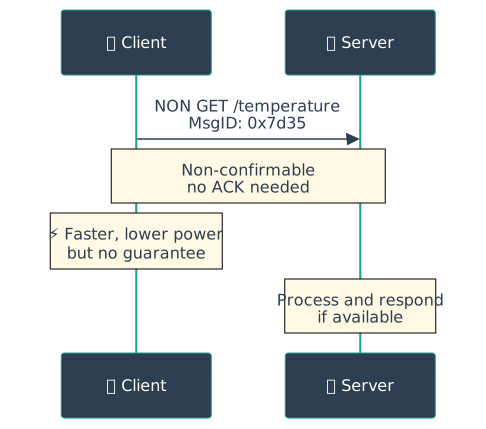
Figure 1227.3: CoAP message fundamentals comparing confirmable (CON) and non-confirmable (NON) message types with their respective reliability and efficiency trade-offs.
1227.2 Worked Examples
NoteWorked Example: CoAP Payload Optimization for Battery-Powered Sensors
Scenario: A building deploys 200 battery-powered environmental sensors reporting temperature, humidity, CO2, and light levels every 5 minutes. Each sensor runs on a CR2032 coin cell (225 mAh capacity).
Given:
Current JSON payload: {"device_id":"ENV-042","temp":22.5,"humidity":45,"co2":412,"light":350,"ts":1704067200} = 82 bytes
Batch 3 readings per transmission (every 15 minutes)
NON message (no ACK wait) saves 200 ms radio-on time
Messages per day: 96 (every 15 minutes)
Batched CBOR payload: 3 × 23 bytes = 69 bytes
Daily energy: 96 × 15.30 mJ = 1,469 mJ = 1.47 J
Battery life: 2,430 J / 1.47 J/day = 1,653 days = 4.5 years (exceeds target)
Result: JSON to CBOR encoding reduces payload from 82 to 23 bytes (72% reduction). Combined with 15-minute batching, daily energy drops from 4.49 J to 1.47 J. Battery life extends from 1.5 years to 4.5 years, exceeding the 3-year target by 50%.
Key Insight: Radio startup energy (15 mJ) dominates per-byte transmission cost (0.005 mJ/byte). Batching 3 readings reduces daily transmissions from 288 to 96, saving 2.88 J/day - far more than the 0.08 J/day saved by payload compression alone. Always minimize transmission count before optimizing payload size.
NoteWorked Example: CoAP vs HTTP Energy Comparison for Smart Thermostat
Scenario: A smart thermostat needs to report current temperature and receive setpoint commands. Comparing CoAP over UDP vs HTTP over TCP for a device on Wi-Fi with 10% packet loss.
Given:
Read operation: GET current temperature (response: 8 bytes = “22.5”)
Write operation: PUT new setpoint (request: 8 bytes = “24.0”)
Energy savings: 22,520 - 2,263 = 20,257 J/year (90% reduction)
Result: CoAP uses 0.26 J/hour vs HTTP’s 2.57 J/hour - a 10× energy reduction. For a thermostat on USB power (unlimited energy), this difference is negligible. For a battery-powered variant with 10 Wh (36,000 J) battery, CoAP enables 16 years of operation vs HTTP’s 1.6 years.
Key Insight: HTTP’s TCP handshake (180 bytes, 150 ms) costs more than CoAP’s entire transaction (82 bytes, 25 ms). For request-response IoT patterns with small payloads, CoAP’s UDP-based approach provides 10× energy efficiency. However, CoAP requires application-level retry logic for reliability, while HTTP/TCP handles retransmission automatically - choose based on whether developer simplicity or energy efficiency is the priority.
Show code
{const container =document.getElementById('kc-coap-11');if (container &&typeof InlineKnowledgeCheck !=='undefined') { container.innerHTML=''; container.appendChild(InlineKnowledgeCheck.create({question:"A smart city deploys 500 street lighting controllers using CoAP. Each controller reports energy usage every hour (1KB payload) and receives dimming commands. The network uses 6LoWPAN with 127-byte frames. During initial deployment, engineers notice that energy reports are partially received (only first 100 bytes arrive). What is the most likely cause and solution?",options: [ {text:"6LoWPAN is fragmenting the packets and losing fragments - increase radio power",correct:false,feedback:"Incorrect. While 6LoWPAN does fragment, increasing radio power won't solve the fundamental problem. The issue is that IP-layer fragmentation over lossy wireless networks has poor reliability - if any fragment is lost, the entire IP packet fails."}, {text:"CoAP message size exceeds UDP datagram limit - switch to TCP-based MQTT",correct:false,feedback:"Incorrect. 1KB is well within UDP limits (65KB max). The issue isn't UDP but rather that the 1KB payload requires many 6LoWPAN fragments. Switching to MQTT doesn't solve the underlying fragmentation problem on constrained networks."}, {text:"Need to use CoAP Block2 option to transfer the 1KB response in smaller application-layer blocks",correct:true,feedback:"Correct! Block-wise transfer (RFC 7959) divides the 1KB payload into CoAP-layer blocks (e.g., 64 or 128 bytes each). Each block fits in a single 6LoWPAN frame and is individually acknowledged. If one block fails, only that block is retransmitted. This provides much better reliability than relying on IP fragmentation over lossy wireless networks."}, {text:"The 6LoWPAN adaptation layer doesn't support payloads over 100 bytes - use Wi-Fi instead",correct:false,feedback:"Incorrect. 6LoWPAN supports larger payloads through fragmentation. The problem is that fragmentation is unreliable on lossy networks. CoAP Block-wise transfer provides application-layer reliability that IP fragmentation lacks."} ],difficulty:"hard",topic:"coap-blockwise-practical" })); }}
Show code
{const container =document.getElementById('kc-coap-12');if (container &&typeof InlineKnowledgeCheck !=='undefined') { container.innerHTML=''; container.appendChild(InlineKnowledgeCheck.create({question:"A developer is debugging a CoAP implementation. The client sends a CON GET request and receives a response with a different Message ID than the request. The client is confused whether this is valid. Under what condition is this response valid?",options: [ {text:"This is always invalid - ACK messages must have the same Message ID as the CON request",correct:false,feedback:"Partially correct for ACK messages, but not the full picture. If the server sent an empty ACK first (matching the original MID), it can later send a separate CON response with a NEW Message ID. The client matches this to the original request using the Token, not the Message ID."}, {text:"This is valid if it's a separate response - the server sent an empty ACK earlier with the matching MID, and this is the delayed response with a new MID but same Token",correct:true,feedback:"Correct! In the separate response pattern, the server sends an empty ACK immediately (with matching MID) to stop client retransmission, then sends the actual response later as a new CON message with a new MID. The client correlates request and response using the Token (which must match), not the Message ID. This is essential for long-running operations."}, {text:"Message IDs are randomly generated and never need to match between request and response",correct:false,feedback:"Incorrect. Message IDs serve a specific purpose: matching ACK to CON and detecting duplicates. For piggybacked responses (ACK with payload), the MID must match. Only in separate responses does the response have a different MID."}, {text:"This is valid if the server is using NON messages for the response",correct:false,feedback:"Incorrect. Whether the response is CON or NON doesn't determine MID matching. The key is whether it's a piggybacked response (same MID) or separate response (different MID). The Token is what links the response to the original request in both cases."} ],difficulty:"hard",topic:"coap-message-correlation" })); }}
1227.3 Summary
This chapter covered the Constrained Application Protocol (CoAP) for resource-constrained IoT devices:
Lightweight Design: 4-byte minimum header overhead (25× smaller than HTTP) enables efficient communication on constrained networks with limited bandwidth and battery power
UDP-Based Transport: Built on UDP rather than TCP, eliminating connection setup overhead and reducing latency, ideal for battery-powered sensors that need quick request-response cycles
RESTful Architecture: GET, POST, PUT, DELETE methods with URI-based resource addressing familiar to HTTP developers, making CoAP easy to learn and integrate with web services
Confirmable vs Non-Confirmable: CON messages require acknowledgment for reliability (critical commands), while NON messages provide fire-and-forget efficiency for frequent sensor readings
Observe Extension: Publish-subscribe pattern where clients observe resources and servers push updates when values change, eliminating constant polling and saving battery
Block-wise Transfers: Large payloads fragmented into manageable blocks for transmission over constrained networks with limited MTU sizes
Multicast Support: IPv6 multicast address (FF0X::FD) enables one-to-many communication for device discovery and group commands without requiring individual requests
Build practical skills with these hands-on CoAP exercises, progressing from resource discovery to production-grade implementations.
NoteExercise 1: CoAP Resource Discovery
Objective: Implement CoAP resource discovery using .well-known/core endpoint.
Tasks: 1. Set up a CoAP server with multiple resources: - /sensors/temperature (readable) - /sensors/humidity (readable) - /actuators/led (writable) - /config/network (readable and writable) 2. Implement .well-known/core endpoint that returns resources in CoRE Link Format 3. Create CoAP client that: - Performs resource discovery: GET coap://server/.well-known/core - Parses Link Format response - Displays available resources with their attributes (content-type, methods) 4. Test resource filtering: GET coap://server/.well-known/core?rt=temperature
Expected Outcome: - Server responds with all resources in CoRE Link Format - Client successfully discovers and lists all available endpoints - Resource types (rt), interfaces (if), and content formats visible - Filtering by resource type returns subset of resources
Hints: - CoRE Link Format: </path>;rt="resource-type";if="interface";ct=0 - Use semicolon to separate attributes, comma to separate resources - Implement resource filtering on server side based on query parameters - Test with: coap-client -m get coap://localhost/.well-known/core
import aiocoapimport aiocoap.resource as resourceclass WellKnownCore(resource.Resource):asyncdef render_get(self, request):# Generate CoRE Link Format response links = ['</sensors/temperature>;rt="temperature-c";ct=0','</sensors/humidity>;rt="humidity-p";ct=0','</actuators/led>;rt="light-ctl";if="actuator"','</config/network>;rt="config";ct=50;if="config"' ] payload =','.join(links).encode('utf-8')return aiocoap.Message( payload=payload, content_format=40# application/link-format )# Register resourceroot = resource.Site()root.add_resource(['.well-known', 'core'], WellKnownCore())
NoteExercise 2: ESP32 CoAP Actuator Control
Objective: Build hardware actuator control system using CoAP PUT requests.
Tasks: 1. Set up ESP32 with: - LED connected to GPIO pin - Wi-Fi connectivity - CoAP server library (coap-simple or MicroCoAP) 2. Implement CoAP resources: - GET /led/status - Returns “on” or “off” - PUT /led/state - Accepts “1” (on) or “0” (off) to control LED - GET /system/uptime - Returns device uptime in seconds 3. Create Python CoAP client that: - Discovers ESP32 resources via .well-known/core - Toggles LED every 5 seconds using PUT requests - Verifies state changes with GET requests - Logs uptime periodically 4. Test with both CON and NON message types, measure latency
Expected Outcome: - ESP32 responds to PUT requests by toggling LED - GET requests return current LED state and uptime - Observe latency difference: CON (~50-100ms), NON (~20-50ms) - System runs reliably without memory leaks
Hints: - Use client.setCallback() to handle incoming PUT requests on ESP32 - Return 2.04 Changed response code after successful LED toggle - Add Last Will Testament to detect ESP32 disconnection - Test reliability by disconnecting ESP32 Wi-Fi temporarily
import asyncioimport aiocoapasyncdef toggle_led(): protocol =await aiocoap.Context.create_client_context()for i inrange(10):# Toggle LED on request = aiocoap.Message(code=aiocoap.PUT, uri='coap://esp32.local/led/state', payload=b'1')await protocol.request(request).responseprint("LED ON")await asyncio.sleep(2)# Toggle LED off request = aiocoap.Message(code=aiocoap.PUT, uri='coap://esp32.local/led/state', payload=b'0')await protocol.request(request).responseprint("LED OFF")await asyncio.sleep(2)asyncio.run(toggle_led())
NoteExercise 3: CoAP Multicast Device Discovery
Objective: Implement multicast group communication for automatic device discovery.
Tasks: 1. Create multiple CoAP servers (3-5 instances) simulating different sensors: - Temperature sensor on port 5683 - Humidity sensor on port 5684 - Pressure sensor on port 5685 2. Configure each server to: - Listen on IPv6 multicast address FF02::FD (link-local all-CoAP-nodes) - Respond to multicast GET requests - Provide unique device ID and sensor type in response 3. Create multicast client that: - Sends NON GET request to coap://[FF02::FD]/sensors - Collects responses from all reachable sensors (wait 2 seconds) - Displays discovered devices with their capabilities 4. Test with devices on same network segment
Expected Outcome: - Single multicast request discovers all sensors simultaneously - Each sensor responds with its device ID and sensor type - Client receives multiple responses within 2-second window - Understand multicast efficiency vs. individual unicast requests
Hints: - Use NON messages for multicast (CON not supported for multicast) - Set multicast TTL (hop limit) appropriately: link-local (255) vs. site-local - Handle duplicate responses (some sensors may respond multiple times) - Test with: coap-client -m get -N coap://[FF02::FD]/sensors
import asyncioimport aiocoapasyncdef discover_sensors(): protocol =await aiocoap.Context.create_client_context() request = aiocoap.Message( code=aiocoap.GET, uri='coap://[ff02::fd]/sensors', mtype=aiocoap.NON # Multicast must use NON )print("Sending multicast discovery...") discovered = []try: response =await asyncio.wait_for( protocol.request(request).response, timeout=2.0 ) discovered.append(response.payload.decode())except asyncio.TimeoutError:passprint(f"Discovered {len(discovered)} devices:")for device in discovered:print(f" - {device}")asyncio.run(discover_sensors())
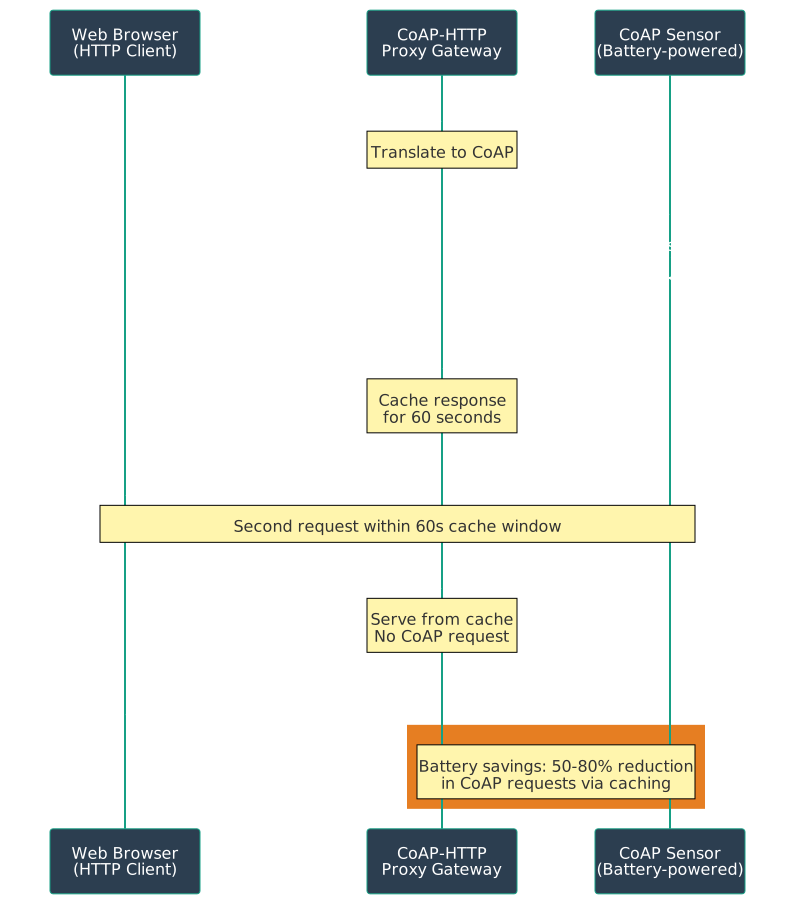
NoteExercise 4: CoAP-HTTP Proxy Gateway
Objective: Understand how CoAP devices can be integrated with HTTP-based web services through protocol translation.
Concept: A CoAP-HTTP proxy acts as a bridge, allowing HTTP clients (web browsers, mobile apps) to access CoAP devices without implementing CoAP themselves.
How It Works:
%%{init: {'theme': 'base', 'themeVariables': { 'primaryColor': '#2C3E50', 'primaryTextColor': '#fff', 'primaryBorderColor': '#16A085', 'lineColor': '#E67E22', 'secondaryColor': '#16A085', 'tertiaryColor': '#E67E22'}}}%%
sequenceDiagram
    participant Browser as Web Browser<br/>(HTTP Client)
    participant Proxy as CoAP-HTTP<br/>Proxy Gateway
    participant Sensor as CoAP Sensor<br/>(Battery-powered)

    Browser->>Proxy: HTTP GET /coap/sensor1/temperature
    Note over Proxy: Translate to CoAP
    Proxy->>Sensor: CoAP GET /temperature

    Sensor->>Sensor: Read sensor
    Sensor->>Proxy: CoAP 2.05 Content<br/>Payload: "23.5°C"<br/>Max-Age: 60s

    Note over Proxy: Cache response<br/>for 60 seconds
    Proxy->>Browser: HTTP 200 OK<br/>{"temp": "23.5", "cached": false}

    Note over Browser,Sensor: Second request within 60s cache window

    Browser->>Proxy: HTTP GET /coap/sensor1/temperature
    Note over Proxy: Serve from cache<br/>No CoAP request
    Proxy->>Browser: HTTP 200 OK<br/>{"temp": "23.5", "cached": true}

    rect rgb(230, 126, 34)
        Note over Proxy,Sensor: Battery savings: 50-80% reduction<br/>in CoAP requests via caching
    end
Figure 1227.4: CoAP-HTTP Proxy Gateway with Caching for Web Integration
Key Concepts:
1. Protocol Translation: - HTTP GET → CoAP GET - HTTP POST → CoAP POST - HTTP PUT → CoAP PUT - HTTP DELETE → CoAP DELETE - HTTP 200 OK ← CoAP 2.05 Content - HTTP 404 Not Found ← CoAP 4.04 Not Found
Production Proxies: Californium cf-proxy, Eclipse Leshan
Practical Applications: - Web dashboards accessing CoAP sensors - Mobile apps controlling CoAP smart home devices - Cloud services aggregating CoAP data - Legacy HTTP systems integrating with modern CoAP networks
Testing Tools:
# Test CoAP directlycoap-client-m get coap://sensor1.local/temperature# Test via HTTP proxycurl http://localhost:8000/coap/sensor1/temperature
Trade-offs: - ✅ Web compatibility (use standard HTTP tools) - ✅ Battery savings through caching - ✅ Simplified client development - ⚠️ Added latency (proxy hop) - ⚠️ Single point of failure - ⚠️ Requires proxy infrastructure
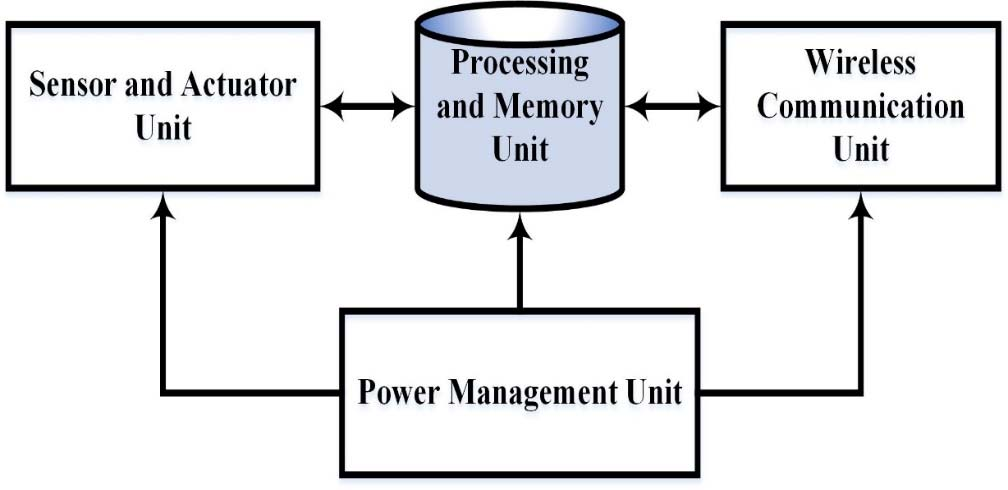
The following figure from the NPTEL Internet of Things course provides additional perspective on IoT architectures relevant to CoAP implementations.
IoT Sensor Node Architecture:
Sensor node architecture showing Processing, Communication, Sensing, and Power Management units
This sensor node architecture illustrates the constrained devices that CoAP is designed for - devices with limited processing, memory, and power resources where CoAP’s lightweight design provides significant advantages over HTTP.
Related Protocol Stacks:
For IEEE 802.15.4 protocol stack and OSI mapping, see the 6LoWPAN Fundamentals chapter. CoAP runs at the Application layer, using UDP/IP over 6LoWPAN adaptation, which in turn uses IEEE 802.15.4 for the lower layers.
Source: NPTEL Internet of Things Course, IIT Kharagpur