%% fig-alt: "Wi-Fi security protocol evolution diagram showing three categories: Legacy protocols (WEP with RC4 encryption and WPA with TKIP, marked as DO NOT USE), Current Standard (WPA2-PSK with AES-CCMP for home use and WPA2-Enterprise with 802.1X RADIUS for corporate IoT), and Modern protocols (WPA3-Personal with SAE Dragonfly and forward secrecy, and WPA3-Enterprise with an optional 192-bit security suite for high-security IoT). Arrows show upgrade path from Legacy to Current to Modern."
%%{init: {'theme': 'base', 'themeVariables': { 'primaryColor': '#2C3E50', 'primaryTextColor': '#fff', 'primaryBorderColor': '#16A085', 'lineColor': '#16A085', 'secondaryColor': '#E67E22', 'tertiaryColor': '#ecf0f1', 'fontSize': '13px'}}}%%
graph TB
    subgraph LEGACY["❌ Legacy (DO NOT USE)"]
        WEP[WEP<br/>RC4 Encryption<br/>Static Keys<br/>Broken Security]
        WPA[WPA<br/>TKIP Encryption<br/>Deprecated]
    end

    subgraph CURRENT["✅ Current Standard"]
        WPA2_PSK[WPA2-PSK<br/>AES-CCMP<br/>Pre-Shared Key<br/>Home/Small Office]
        WPA2_ENT[WPA2-Enterprise<br/>AES-CCMP<br/>802.1X RADIUS<br/>Corporate IoT]
    end

    subgraph MODERN["🌟 Modern (Recommended)"]
        WPA3_PSK[WPA3-Personal (SAE)<br/>AES-CCMP (128-bit)<br/>SAE (Dragonfly)<br/>Forward Secrecy]
        WPA3_ENT[WPA3-Enterprise<br/>AES-CCMP / GCMP<br/>802.1X (EAP/RADIUS)<br/>Optional 192-bit suite]
    end

    LEGACY -.->|Upgrade| CURRENT
    CURRENT -.->|Migrate| MODERN

    style WEP fill:#e74c3c,stroke:#2C3E50,stroke-width:2px
    style WPA fill:#e74c3c,stroke:#2C3E50,stroke-width:2px
    style WPA2_PSK fill:#F39C12,stroke:#2C3E50,stroke-width:2px
    style WPA2_ENT fill:#F39C12,stroke:#2C3E50,stroke-width:2px
    style WPA3_PSK fill:#16A085,stroke:#2C3E50,stroke-width:2px
    style WPA3_ENT fill:#16A085,stroke:#2C3E50,stroke-width:2px
844 Wi-Fi Security and Provisioning
844.1 Learning Objectives
By the end of this chapter, you will be able to:
- Compare Wi-Fi Security Protocols: Evaluate WEP, WPA, WPA2, and WPA3 for IoT deployments
- Implement Secure Provisioning: Configure Wi-Fi credentials securely on headless IoT devices
- Understand WPA3 Enhancements: Explain SAE (Dragonfly), forward secrecy, and protected management frames
- Analyze Enterprise vs Personal Security: Select appropriate authentication modes for different IoT scales
- Design Secure Wi-Fi Networks: Apply network segmentation, VLANs, and guest isolation for IoT
- Troubleshoot Wi-Fi Security Issues: Diagnose authentication failures and security misconfigurations
844.2 Prerequisites
Before diving into this chapter, you should be familiar with:
- Wi-Fi Fundamentals and Standards: Understanding basic Wi-Fi operation, 802.11 standards, and how Wi-Fi networks function is essential for comprehending security mechanisms
- Networking Basics: Knowledge of network fundamentals including IP addressing, subnets, VLANs, and network segmentation concepts used in secure IoT deployments
- Security Fundamentals: Basic cryptography concepts (encryption, hashing, public/private keys) are needed to understand WPA2/WPA3 security protocols
NoteEthics and Safety
This chapter discusses vulnerabilities and defensive controls. Only perform Wi-Fi security testing on networks you own or where you have explicit permission. When possible, use provided captures/simulations for analysis instead of capturing traffic on real networks.
NoteRelated Chapters
Deep Dives: - Wi-Fi Fundamentals and Standards - Wi-Fi protocol basics - Wi-Fi Architecture and Mesh - Mesh network security considerations - Wi-Fi Comprehensive Review - Security review and assessment
Comparisons: - Bluetooth Security - BLE vs Wi-Fi security approaches - Cellular IoT Security - Mobile network security - LoRaWAN Security - LPWAN security trade-offs
Security Context: - Security and Privacy Overview - Broader IoT security principles - Encryption Architecture and Levels - Understanding WPA2/WPA3 encryption - Device Security - Hardware-level IoT security - Network Design and Simulation - Secure network architecture
Learning Resources: - Quizzes Hub - Test Wi-Fi security knowledge - Videos Hub - WPA2/WPA3 explained visually
TipFor Beginners: Wi-Fi Security Explained Simply
Wi-Fi security is like protecting your home. Just as you lock your doors and only give keys to trusted people, Wi-Fi security ensures only authorized devices can connect and that data is kept private.
The Four Security Generations:
| Protocol | Analogy | Security Level |
|---|---|---|
| WEP | Broken lock (easy to pick) | Never use |
| WPA | Old lock (better but dated) | Avoid |
| WPA2 | Modern deadbolt | Good for most IoT |
| WPA3 | Smart lock with fingerprint | Best available |
Two Key Concepts:
- Authentication: Proving you’re allowed to connect (like showing your ID)
- PSK (Pre-Shared Key): Same password for everyone (home Wi-Fi)
- Enterprise: Each device has unique credentials (corporate Wi-Fi)
- Encryption: Scrambling data so eavesdroppers can’t read it
- Without encryption: Anyone nearby can see your data
- With encryption: Data is scrambled and unreadable to others
Provisioning is how you get the Wi-Fi password onto a device. For smart home devices without screens (like sensors), this is tricky:
- WPS: Press buttons on device and router (convenient but has security flaws)
- Soft AP: Device creates its own Wi-Fi network; you connect and configure
- Bluetooth: Use phone app to send Wi-Fi credentials via Bluetooth
- QR Code: Scan a code to auto-configure
Simple Rule: Always use WPA2 or WPA3. Put IoT devices on a separate network from your main devices.
844.3 Wi-Fi Security for IoT
844.3.1 Security Protocols
NoteAlternative View: Wi-Fi Security Selection Decision Tree
This decision tree helps select the appropriate Wi-Fi security protocol for IoT deployments.
%% fig-alt: Decision tree for selecting Wi-Fi security protocol based on device capabilities, deployment scale, and security requirements
%%{init: {'theme': 'base', 'themeVariables': {'primaryColor': '#2C3E50', 'primaryTextColor': '#fff', 'primaryBorderColor': '#16A085', 'lineColor': '#E67E22'}}}%%
flowchart TD
    START([Wi-Fi Security<br/>Selection]) --> Q1{Device<br/>supports WPA3?}

    Q1 -->|Yes| Q2{Deployment<br/>scale?}
    Q1 -->|No| Q3{WPA2<br/>support?}

    Q2 -->|Enterprise 100+| WPA3_E[/WPA3-Enterprise/]
    Q2 -->|Home/SMB| WPA3_P[/WPA3-Personal/]

    Q3 -->|Yes| Q4{Manage<br/>RADIUS?}
    Q3 -->|No| UPGRADE[/Upgrade Device<br/>or Isolate/]

    Q4 -->|Yes| WPA2_E[/WPA2-Enterprise/]
    Q4 -->|No| WPA2_P[/WPA2-PSK/]

    WPA3_E --> E_CFG["802.1X + RADIUS<br/>Per-device certs<br/>192-bit optional"]
    WPA3_P --> P_CFG["SAE Dragonfly<br/>Forward secrecy<br/>Strong passwords"]
    WPA2_E --> E2_CFG["EAP-TLS preferred<br/>RADIUS server<br/>Certificate PKI"]
    WPA2_P --> P2_CFG["Strong passphrase 20+<br/>VLAN isolation<br/>Rotate annually"]

    style START fill:#2C3E50,color:#fff
    style WPA3_E fill:#16A085,color:#fff,stroke:#2C3E50,stroke-width:3px
    style WPA3_P fill:#16A085,color:#fff,stroke:#2C3E50,stroke-width:3px
    style WPA2_E fill:#E67E22,color:#fff,stroke:#2C3E50,stroke-width:2px
    style WPA2_P fill:#E67E22,color:#fff,stroke:#2C3E50,stroke-width:2px
    style UPGRADE fill:#e74c3c,color:#fff
844.3.2 Security Protocol Comparison
| Protocol | Encryption | Key Management | IoT Recommendation |
|---|---|---|---|
| WEP | RC4 (weak) | Static keys | ❌ Never use |
| WPA | TKIP | PSK/Enterprise | ❌ Deprecated |
| WPA2-PSK | AES-CCMP | Pre-shared key | ✅ Minimum standard |
| WPA2-Enterprise | AES-CCMP | 802.1X (RADIUS) | ✅ Corporate IoT |
| WPA3-Personal (SAE) | AES-CCMP (128-bit) | SAE (Dragonfly) | 🌟 Best for new devices |
| WPA3-Enterprise | AES-CCMP / GCMP (optional 192-bit suite) | 802.1X (EAP/RADIUS) | 🌟 High-security IoT |
NoteCross-Hub Connections
Want to explore Wi-Fi security further?
- Quizzes Hub - Test your understanding of WPA2/WPA3 protocols, authentication modes, and network segmentation with interactive quizzes
- Videos Hub - Watch visual explanations of WPA2 4-way handshake, WPA3 SAE (Dragonfly) protocol, and enterprise authentication flows
- Simulations Hub - Interactive Wi-Fi provisioning simulator showing SoftAP, BLE, and SmartConfig methods for headless IoT devices
- Knowledge Gaps Hub - Common Wi-Fi security misconceptions (WPS security, MAC filtering effectiveness, PSK vs Enterprise trade-offs)
Hands-on labs: - Configure WPA2-Enterprise on ESP32 using certificates - Implement BLE provisioning for headless sensors - Set up VLAN isolation for IoT network segmentation - Analyze a WPA2 4-way handshake capture (provided PCAP) with Wireshark
CautionCommon Misconception: “MAC Filtering Provides Strong Security”
The Misconception: Many IoT deployments rely on MAC address filtering as primary security, believing only devices with whitelisted MAC addresses can connect to the network.
The Reality: MAC filtering provides minimal security and is easily bypassed:
Example (why this fails): - A building deploys sensors on an open Wi-Fi network and relies only on a MAC whitelist - MAC addresses are visible on the local network, so an attacker nearby can observe an authorized device’s MAC address - Many systems allow changing a network interface MAC address in software, enabling impersonation of whitelisted devices - Result: unauthorized access despite the whitelist
Why MAC Filtering Fails: 1. Trivially Spoofed: MAC addresses are Layer 2, transmitted in plaintext, easily changed in software 2. No Encryption: Even with MAC filtering, traffic is visible without WPA2/WPA3 3. Maintenance Burden: Every new device requires manual whitelist entry 4. False Sense of Security: Teams neglect real security (WPA2, segmentation) relying on MAC filtering
Proper Security Architecture: - Primary: WPA2/WPA3 encryption (not optional) - Segmentation: IoT VLAN isolated from main network - Optional Addition: MAC filtering as defense-in-depth (not primary control) - Monitoring: Intrusion detection to identify spoofed MACs
Key Takeaway: Never use MAC filtering as primary security. Always use WPA2-PSK minimum (16+ char password) or WPA3-SAE. MAC filtering can supplement but never replace encryption.
WarningIoT Security Best Practices
- Always use WPA2 or WPA3 - Never WEP or open networks
- Strong passwords - Minimum 16 characters, random
- Separate IoT network - VLAN or guest network isolation
- Disable WPS - Known vulnerabilities in PIN method
- Enable MAC filtering (optional) - Additional layer, not primary security
- Regular firmware updates - Both AP and IoT devices
- Monitor connected devices - Detect unauthorized access
- Use VPN for remote access - Don’t expose IoT devices to internet
WarningNever Use Open Wi-Fi for IoT Devices
Deploying IoT devices on open (no password) Wi-Fi networks is a critical security mistake:
- Anyone within range can connect and intercept all traffic
- No encryption means sensor data, commands, and credentials sent in plain text
- Easy man-in-the-middle attacks - attacker can modify commands or inject malicious data
- Device impersonation - attacker can pretend to be your sensor or controller
Even for “non-critical” sensors like temperature monitors, open Wi-Fi allows attackers to map your network, learn patterns (when you’re home/away), and pivot to attack other devices. Always use WPA2-PSK minimum, WPA3-SAE for modern deployments.
WarningHardcoded Wi-Fi Credentials: A Deployment Nightmare
Embedding Wi-Fi credentials directly in firmware causes severe problems:
Security risks: - Password visible in source code (GitHub, shared repos) - Firmware dumps expose credentials to anyone with physical access - One compromised device reveals network password
Operational issues: - Cannot deploy same firmware to multiple locations - Password change requires reflashing all devices - No way to provision devices in the field
Solution: Implement Wi-Fi provisioning via BLE, SoftAP, or SmartConfig. Store credentials in NVS (Non-Volatile Storage) and protect them at rest with flash/NVS encryption where supported—never in source code. For mass deployments, use WPA2-Enterprise with unique credentials (e.g., EAP-TLS certificates) per device.
Knowledge Check: Wi-Fi Security Test Your Understanding
844.4 Knowledge Check
Test your understanding of these networking concepts.
Question 1: A smart home has 20 IoT devices (cameras, sensors, smart plugs) all connected to the same Wi-Fi network as laptops and phones. What security architecture should be implemented?
💡 Explanation: Separate IoT devices onto a dedicated VLAN or guest network isolated from the main network. Reasons: 1) Containment - if an IoT device is compromised, attacker can’t access personal computers/phones, 2) Traffic isolation - IoT traffic doesn’t interfere with critical devices, 3) Different security policies - restrict IoT devices from internet access if not needed, 4) Monitoring - easier to detect unusual IoT traffic patterns. Implementation: Create “IoT_Network” VLAN with firewall rules allowing IoT→Internet and blocking IoT→Main_Network. Only allow specific ports (e.g., MQTT 1883, HTTP 80) as needed.
Question 2: Why should WPA2-PSK use a password of at least 16 random characters, not a dictionary word?
💡 Explanation: WPA2-PSK security depends heavily on passphrase entropy. If an attacker captures the WPA2 4-way handshake, they can test password guesses offline—so weak, guessable passwords (common patterns or dictionary words) are risky. Use a long random passphrase (16+ characters) or move to WPA3-SAE to make guessing attacks impractical.
Question 3: A company deploys 1000 sensors using WPA2-PSK with the same password. One sensor is stolen. What’s the security risk and solution?
💡 Explanation: Critical risk: Thief extracts the Wi-Fi password from stolen sensor (firmware dump, EEPROM read, side-channel attack) and gains access to the entire network. WPA2-PSK problem: All devices share one credential - compromise of one = compromise of all. Solutions: 1) WPA2-Enterprise (802.1X) - each device has unique certificate/credentials so you can revoke only the stolen sensor, 2) Certificate-based authentication - PKI with device-specific certs, 3) MAC filtering + monitoring (weak, spoofable but can add a layer), 4) Network segmentation per device group. Best practice: Use WPA2/3-Enterprise for larger fleets or higher-risk deployments.
Question 4: An ESP32 IoT device connects to Wi-Fi using WPA2-PSK and stores the password in plaintext in the source code. What are the vulnerabilities and proper solutions?
💡 Explanation: Vulnerabilities: 1) Source code exposure - if code is on GitHub/shared, password is public, 2) Firmware dumps - attackers can extract firmware and read password, 3) No separation of credentials - same firmware image = same password for all deployments. Proper solutions: 1) Store credentials in NVS (Non-Volatile Storage) and protect them at rest with flash/NVS encryption where supported (not in source code), 2) Provisioning - use SmartConfig, BLE, or SoftAP to set credentials during setup (never hardcode), 3) Secure boot - helps prevent firmware tampering, 4) Prefer per-device credentials for larger fleets (e.g., WPA2/3-Enterprise with EAP-TLS).
844.5 Wi-Fi Security for IoT Deployments
844.5.1 Network Segmentation
%% fig-alt: "Wi-Fi network segmentation architecture diagram showing Internet connected to Wi-Fi Router/Firewall, which separates traffic into two VLANs: Main Network (VLAN 10) containing laptops, desktops, and phones with full internet access, and IoT Network (VLAN 20) containing IP cameras, sensors, and smart devices with restricted access. Firewall rules prevent IoT devices from accessing Main Network while allowing IoT to Internet and Main to IoT control traffic. Arrows show IoT devices connecting to cloud services."
%%{init: {'theme': 'base', 'themeVariables': { 'primaryColor': '#2C3E50', 'primaryTextColor': '#fff', 'primaryBorderColor': '#16A085', 'lineColor': '#16A085', 'secondaryColor': '#E67E22', 'tertiaryColor': '#ecf0f1', 'fontSize': '13px'}}}%%
graph TB
    INTERNET[Internet]
    ROUTER[Wi-Fi Router<br/>Firewall]

    subgraph MAIN_NET["Main Network (VLAN 10)"]
        LAPTOP[Laptops]
        DESKTOP[Desktops]
        PHONE[Phones]
    end

    subgraph IOT_NET["IoT Network (VLAN 20)"]
        CAMERA[IP Cameras]
        SENSOR[Sensors]
        SMART[Smart Devices]
    end

    INTERNET <-->|WAN| ROUTER
    ROUTER <-->|Full Access| MAIN_NET
    ROUTER <-->|Restricted Access| IOT_NET

    MAIN_NET -.->|Can Control| IOT_NET
    IOT_NET -.->|Cannot Access| MAIN_NET
    IOT_NET -->|Internet Only| CLOUD[Cloud Services]

    ROUTER -.->|Firewall Rules| FW[Rules:<br/>1. IoT → Internet ✅<br/>2. IoT → Main ❌<br/>3. Main → IoT ✅<br/>4. IoT ← IoT ❌]

    style INTERNET fill:#7F8C8D,stroke:#2C3E50,stroke-width:2px
    style ROUTER fill:#2C3E50,stroke:#16A085,stroke-width:3px,color:#fff
    style LAPTOP fill:#16A085,stroke:#2C3E50,stroke-width:1px
    style DESKTOP fill:#16A085,stroke:#2C3E50,stroke-width:1px
    style PHONE fill:#16A085,stroke:#2C3E50,stroke-width:1px
    style CAMERA fill:#E67E22,stroke:#2C3E50,stroke-width:1px
    style SENSOR fill:#E67E22,stroke:#2C3E50,stroke-width:1px
    style SMART fill:#E67E22,stroke:#2C3E50,stroke-width:1px
    style CLOUD fill:#7F8C8D,stroke:#2C3E50,stroke-width:2px
    style FW fill:#ecf0f1,stroke:#2C3E50,stroke-width:2px
Security Architecture: 1. Separate IoT VLAN - Isolate IoT devices from main network 2. Firewall rules - IoT devices can’t access main network 3. IoT can access internet - For cloud connectivity 4. Main network can access IoT - For control/monitoring
844.5.2 WPA3 SAE (Dragonfly) Handshake
WPA3 introduces SAE (Simultaneous Authentication of Equals), also known as Dragonfly, which replaces WPA2-Personal’s PSK-based password authentication. SAE provides forward secrecy and makes offline dictionary attacks against captured handshakes impractical.
%% fig-alt: "WPA3 SAE (Dragonfly) handshake protocol diagram showing four stages: Commit phase where IoT Device and Access Point exchange commit messages with password elements and scalars, Confirm phase where both sides verify shared secret and derive PMK, Key Derivation where PMK generates PTK using PRF function, and Data Encryption where encrypted traffic flows using AES-CCMP (or GCMP depending on negotiated suite). Diagram highlights forward secrecy and resistance to offline password guessing."
%%{init: {'theme': 'base', 'themeVariables': { 'primaryColor': '#2C3E50', 'primaryTextColor': '#fff', 'primaryBorderColor': '#16A085', 'lineColor': '#16A085', 'secondaryColor': '#E67E22', 'tertiaryColor': '#ecf0f1', 'fontSize': '13px'}}}%%
sequenceDiagram
    participant IoT as IoT Device
    participant AP as Access Point

    rect rgb(213, 244, 230)
    note over IoT,AP: Stage 1: Commit Phase
    IoT->>AP: Commit (Password Element + Scalar)
    AP->>IoT: Commit (Password Element + Scalar)
    note over IoT,AP: Both derive shared secret (no offline attacks)
    end

    rect rgb(253, 234, 168)
    note over IoT,AP: Stage 2: Confirm Phase
    IoT->>AP: Confirm (verify shared secret)
    AP->>IoT: Confirm (verify shared secret)
    note over IoT,AP: Mutual authentication complete
    end

    rect rgb(236, 240, 241)
    note over IoT,AP: Stage 3: Key Derivation
    note over IoT: Derive PMK from shared secret
    note over AP: Derive PMK from shared secret
    note over IoT,AP: PMK → PTK (using PRF)
    end

    rect rgb(213, 244, 230)
    note over IoT,AP: Stage 4: Encrypted Communication
    IoT->>AP: Encrypted Data (AES-CCMP/GCMP)
    AP->>IoT: Encrypted Data (AES-CCMP/GCMP)
    note over IoT,AP: Forward Secrecy: Each session unique PMK
    end

    note right of AP: Key WPA3 Advantages:<br/>✅ Forward Secrecy<br/>✅ No offline dictionary attacks<br/>✅ Protected Management Frames<br/>✅ 192-bit security (Enterprise)
WPA3 Security Improvements:
- SAE (Dragonfly) authentication: Replaces WPA2‑PSK’s password→PMK derivation; captured handshakes don’t enable offline dictionary attacks (the 4‑way handshake still runs to derive session keys)
- Forward secrecy: Session keys are derived from ephemeral exchanges, reducing the impact of password compromise on past sessions
- Protected Management Frames (PMF): Required in WPA3, reducing deauthentication/disassociation spoofing attacks
- Enterprise 192‑bit suite (optional): Stronger cipher suites for high-security deployments
WPA2 vs WPA3 Vulnerability: - WPA2-PSK: A captured 4-way handshake can enable offline password guessing if the passphrase is weak - WPA3-SAE: Eliminates the offline guessing vector; attackers must interact online with the AP (rate limited)
844.5.3 Implementing Device Authentication
// ESP32 WPA2-Enterprise (802.1X) Authentication
#include <Wi-Fi.h>
#include "esp_wpa2.h"

const char* ssid = "Enterprise-Wi-Fi";
const char* identity = "device_id_001";
const char* username = "iot_device";
const char* password = "device_password";

void setup() {
  Serial.begin(115200);

  Wi-Fi.disconnect(true);
  Wi-Fi.mode(WIFI_STA);

  // Configure WPA2-Enterprise
  esp_wifi_sta_wpa2_ent_set_identity((uint8_t *)identity, strlen(identity));
  esp_wifi_sta_wpa2_ent_set_username((uint8_t *)username, strlen(username));
  esp_wifi_sta_wpa2_ent_set_password((uint8_t *)password, strlen(password));
  esp_wifi_sta_wpa2_ent_enable();

  Wi-Fi.begin(ssid);

  while (Wi-Fi.status() != WL_CONNECTED) {
    delay(500);
    Serial.print(".");
  }

  Serial.println("\nConnected to Enterprise Wi-Fi");
  Serial.println("IP: " + Wi-Fi.localIP().toString());
}

void loop() {
  // Your application code
}
For production WPA2-Enterprise deployments, prefer certificate-based EAP-TLS when possible and validate the RADIUS server certificate (CA pinning) to avoid credential theft via rogue access points. Also avoid hardcoding secrets—provision credentials securely and store them in NVS protected by flash/NVS encryption where supported.
844.5.4 Wi-Fi Provisioning Methods
Provisioning is the process of securely configuring Wi-Fi credentials on headless IoT devices (devices without screens or keyboards). Different methods offer trade-offs between security, user experience, and implementation complexity.
%% fig-alt: "Wi-Fi provisioning methods comparison diagram showing four approaches: WPS (Push Button) where user presses buttons on both router and device (convenient but vulnerable to PIN attacks), SoftAP (Temporary Access Point) where device creates temporary Wi-Fi network for smartphone configuration, Bluetooth Provisioning where smartphone app sends credentials via BLE secure channel, and SmartConfig (UDP Broadcast) where smartphone broadcasts encrypted credentials over Wi-Fi. Each method shows flow between smartphone, IoT device, and Wi-Fi router, with security ratings and typical use cases."
%%{init: {'theme': 'base', 'themeVariables': { 'primaryColor': '#2C3E50', 'primaryTextColor': '#fff', 'primaryBorderColor': '#16A085', 'lineColor': '#16A085', 'secondaryColor': '#E67E22', 'tertiaryColor': '#ecf0f1', 'fontSize': '13px'}}}%%
graph TB
    subgraph WPS["WPS (Push Button)"]
        WPS_USER[User presses button<br/>on router + device]
        WPS_PIN[WPS PIN/PBC exchange]
        WPS_CONN[Auto-configuration]
        WPS_USER --> WPS_PIN --> WPS_CONN
        WPS_SECURITY[❌ Security: LOW<br/>Vulnerable to PIN brute-force<br/>⚠️ Use: Not recommended]
    end

    subgraph SOFTAP["SoftAP (Temporary AP)"]
        SAP_DEVICE[Device creates Wi-Fi AP<br/>SSID: IoT_Device_Setup]
        SAP_PHONE[Phone connects to device AP]
        SAP_WEB[Web interface/app<br/>provides credentials]
        SAP_SWITCH[Device switches to<br/>target Wi-Fi network]
        SAP_DEVICE --> SAP_PHONE --> SAP_WEB --> SAP_SWITCH
        SAP_SECURITY[✅ Security: MEDIUM<br/>Local communication only<br/>✅ Use: Consumer IoT]
    end

    subgraph BLE["Bluetooth Provisioning"]
        BLE_ADV[Device advertises BLE]
        BLE_PAIR[Phone pairs via BLE]
        BLE_SEND[App sends Wi-Fi credentials<br/>over encrypted BLE]
        BLE_CONN[Device connects to Wi-Fi]
        BLE_ADV --> BLE_PAIR --> BLE_SEND --> BLE_CONN
        BLE_SECURITY[✅ Security: HIGH<br/>Out-of-band channel<br/>✅ Use: Recommended]
    end

    subgraph SMART["SmartConfig (UDP Broadcast)"]
        SC_PHONE[Phone broadcasts<br/>encrypted credentials]
        SC_LISTEN[Device in promiscuous mode<br/>captures UDP packets]
        SC_DECODE[Decode Wi-Fi credentials]
        SC_CONN[Connect to Wi-Fi]
        SC_PHONE --> SC_LISTEN --> SC_DECODE --> SC_CONN
        SC_SECURITY[⚠️ Security: MEDIUM<br/>Broadcast visible to nearby devices<br/>✅ Use: Fast setup, no BLE]
    end

    PHONE[Smartphone with<br/>Provisioning App]
    IOT[IoT Device<br/>Unconfigured]
    ROUTER[Wi-Fi Router<br/>Target Network]

    PHONE -.-> WPS
    PHONE -.-> SOFTAP
    PHONE -.-> BLE
    PHONE -.-> SMART

    WPS -.-> ROUTER
    SOFTAP -.-> ROUTER
    BLE -.-> ROUTER
    SMART -.-> ROUTER

    style WPS_USER fill:#e74c3c,stroke:#2C3E50,stroke-width:2px,color:#fff
    style SAP_DEVICE fill:#E67E22,stroke:#2C3E50,stroke-width:2px,color:#fff
    style BLE_ADV fill:#16A085,stroke:#2C3E50,stroke-width:2px,color:#fff
    style SC_PHONE fill:#E67E22,stroke:#2C3E50,stroke-width:2px,color:#fff
    style PHONE fill:#2C3E50,stroke:#16A085,stroke-width:2px,color:#fff
    style IOT fill:#E67E22,stroke:#2C3E50,stroke-width:2px
    style ROUTER fill:#7F8C8D,stroke:#2C3E50,stroke-width:2px
Provisioning Method Comparison:
| Method | Security | User Experience | Implementation | Use Case |
|---|---|---|---|---|
| WPS | ❌ Low (PIN attack) | Simple (button press) | Easy | ❌ Avoid |
| SoftAP | ⚠️ Medium | Good (web interface) | Medium | Consumer IoT |
| BLE | ✅ High | Excellent (app-based) | Medium-Hard | Recommended |
| SmartConfig | ⚠️ Medium | Very fast | Easy-Medium | Quick setup |
| QR Code | ✅ High | Very easy | Easy | Simple devices |
| NFC | ✅ High | Tap-to-configure | Medium | Phones available |
Best Practices: 1. BLE provisioning for production IoT devices (most secure out-of-band method) 2. SoftAP for consumer devices where BLE not available (good UX) 3. Never use WPS in production (known PIN attack vulnerabilities) 4. Always encrypt credentials during provisioning (TLS, AES) 5. Factory reset option if provisioning fails or credentials need changing 6. Store credentials in NVS and protect them at rest (flash/NVS encryption + secure boot where supported), never in plaintext or hardcoded
844.6 Visual Reference Gallery
Explore alternative visual representations of Wi-Fi security concepts and protocols.
NoteWi-Fi Security Protocol Evolution
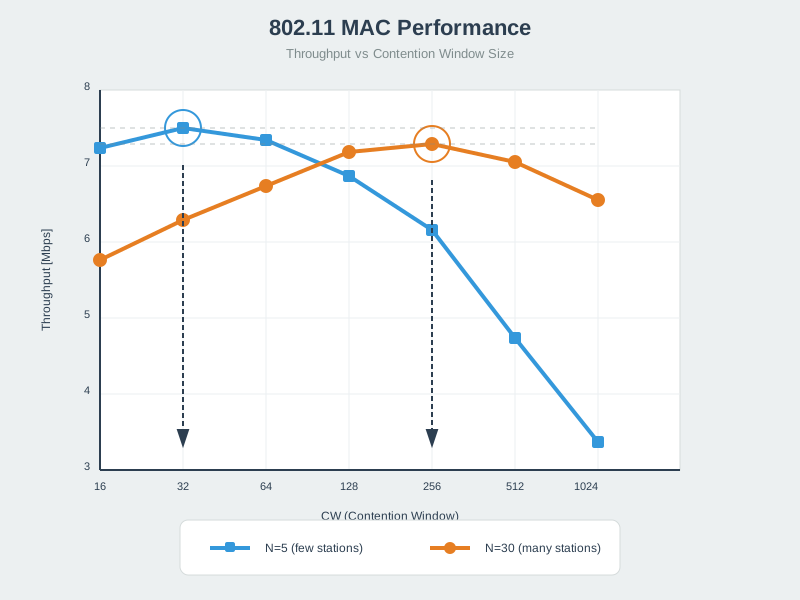
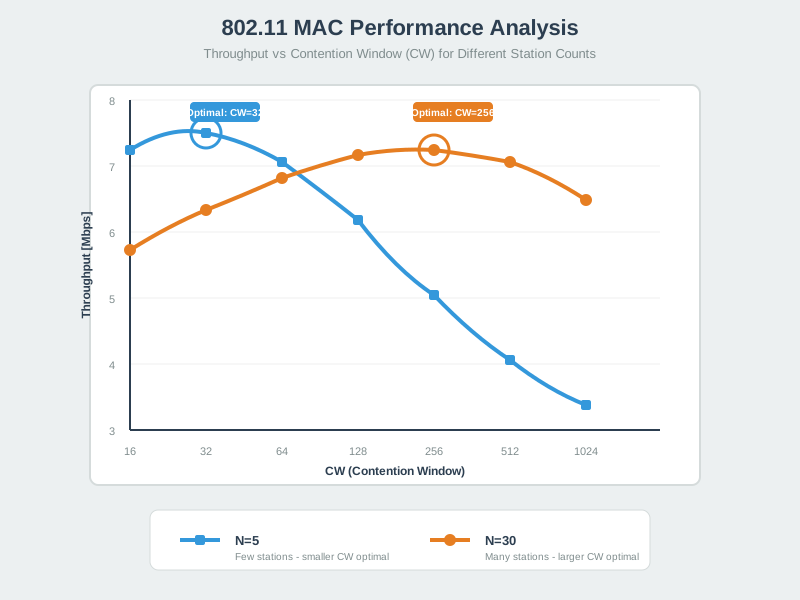
Understanding MAC layer behavior is essential for optimizing Wi-Fi security without sacrificing performance in IoT deployments.
NoteMesh Network Security
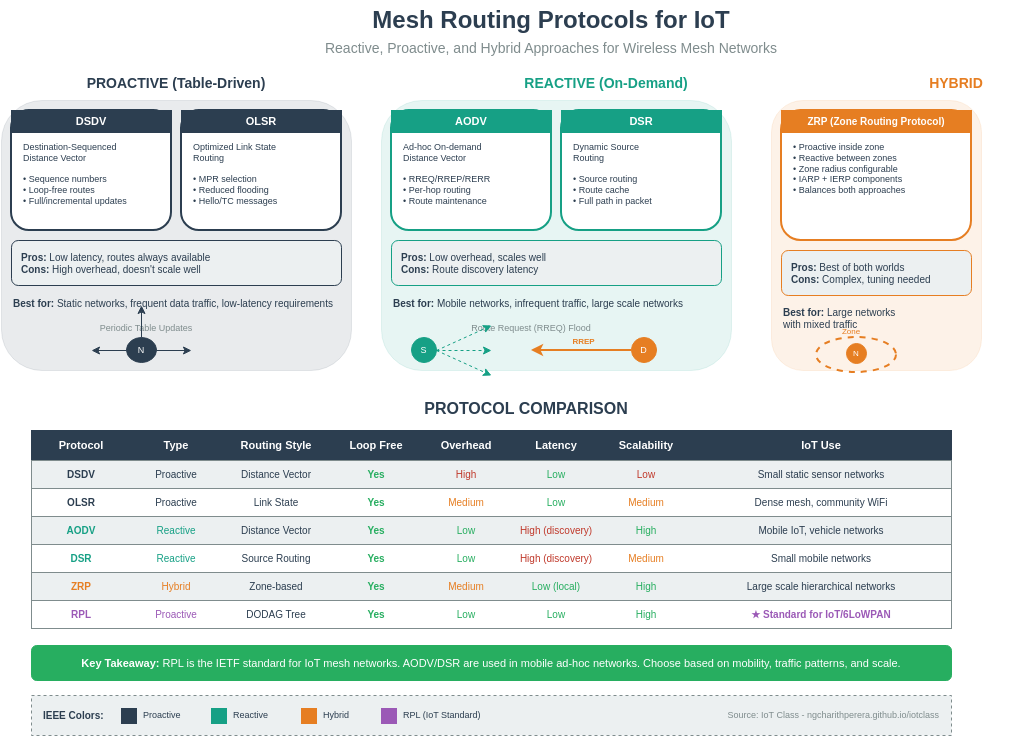
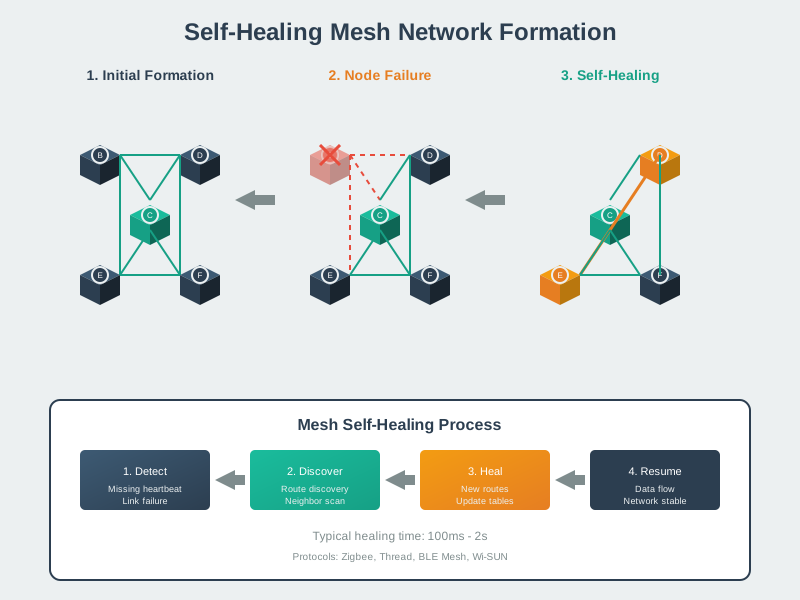
Wi-Fi mesh networks require additional security considerations for multi-hop routing, including per-hop encryption and secure peer authentication.
NoteAddress and Access Control
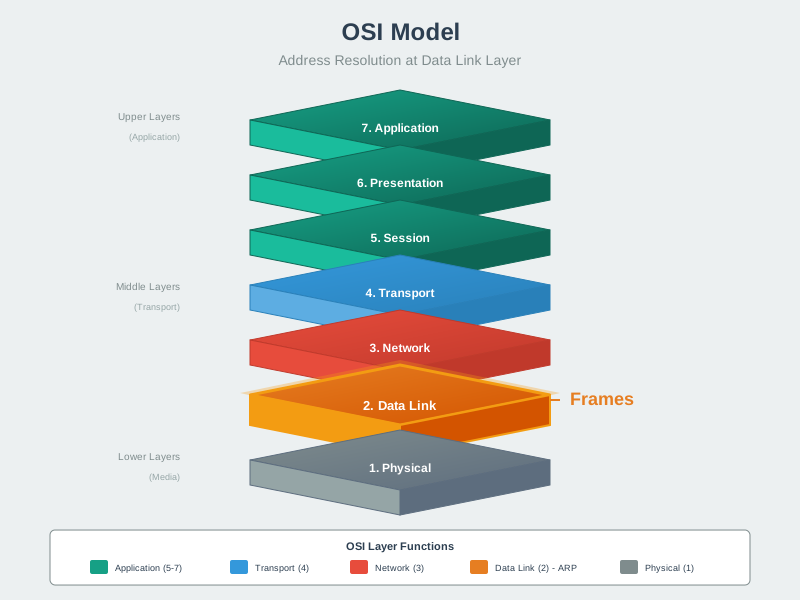
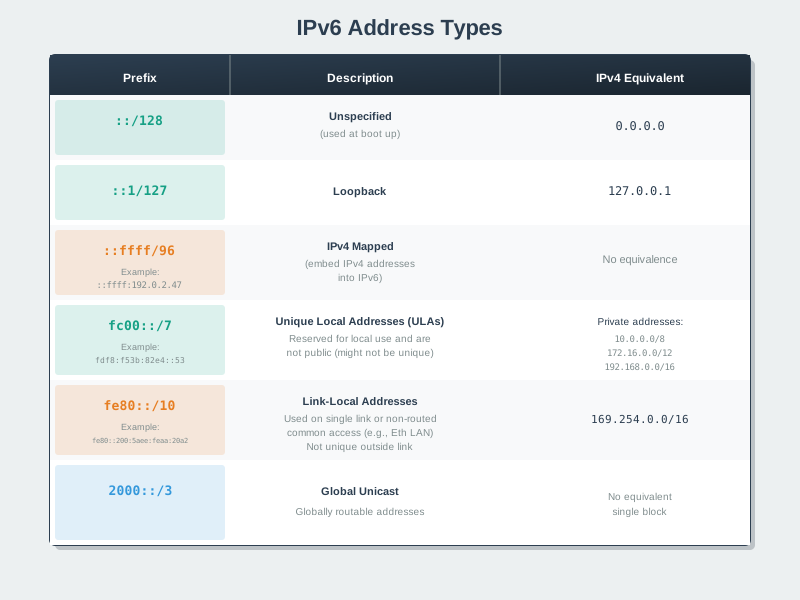
Proper address management and access control are foundational to Wi-Fi security, preventing MAC spoofing and unauthorized network access.
844.7 Summary
This chapter covered Wi-Fi security and provisioning for IoT deployments:
- Security Protocol Evolution: WEP (obsolete, crackable), WPA (deprecated TKIP), WPA2-PSK (minimum standard with AES-CCMP), and WPA3-SAE (modern with Dragonfly handshake, forward secrecy) provide progressively stronger protection against attacks
- WPA2-PSK Risk: If an attacker captures a WPA2 4-way handshake, weak passphrases may be guessed offline; use long random passphrases (or WPA3-SAE) to make guessing impractical
- WPA2-Enterprise for Scale: 802.1X with RADIUS provides per-device credentials (certificates or username/password) instead of shared PSK, enabling secure credential revocation when devices are stolen without affecting entire network
- Network Segmentation: IoT VLAN/subnet isolation with firewall rules prevents compromised sensors from attacking the main network, allows IoT→Internet where needed, and blocks unnecessary east‑west access
- Hardcoded Credential Risks: Passwords in source code expose credentials via GitHub/firmware dumps; use secure provisioning (BLE/SoftAP/SmartConfig) and store credentials in NVS protected by flash/NVS encryption where supported
- Wi-Fi Provisioning Methods: SmartConfig (UDP broadcast), SoftAP (temporary AP mode), BLE (out-of-band), and QR code scanning allow headless devices to receive Wi-Fi credentials without hardcoding or physical configuration interface
- Defense in Depth: Combine WPA2/3 encryption, strong passwords (16+ chars), network segmentation, disabled WPS, MAC filtering (additional layer), regular firmware updates, and VPN for remote access to create comprehensive IoT security
- WPA3 SAE Protocol: Dragonfly handshake eliminates WPA2’s offline brute-force vulnerability through commit-confirm exchange, provides forward secrecy (unique PMK per session), and mandates Protected Management Frames preventing deauthentication attacks
- Provisioning Security: BLE provisioning (recommended for production) uses out-of-band secure channel, SoftAP creates temporary AP for web configuration, SmartConfig broadcasts encrypted credentials, while WPS should be avoided due to PIN attack vulnerability
844.8 What’s Next
The next chapter explores Cellular IoT Technologies, covering NB-IoT and LTE-M for wide-area connectivity, comparing with Wi-Fi/LoRaWAN for mobile and remote deployments, power consumption trade-offs, and cloud integration strategies.