%%{init: {'theme': 'base', 'themeVariables': { 'primaryColor': '#2C3E50', 'primaryTextColor': '#fff', 'primaryBorderColor': '#16A085', 'lineColor': '#16A085', 'secondaryColor': '#E67E22'}}}%%
sequenceDiagram
    participant D as Device
    participant G as Gateway
    participant NS as Network Server
    participant JS as Join Server

    D->>G: Join Request (DevEUI, AppEUI, DevNonce)
    G->>NS: Forward Join Request
    NS->>JS: Validate Join Request
    JS->>JS: Verify AppKey, Generate Session Keys
    JS->>NS: Join Accept + AppSKey + NwkSKey
    NS->>G: Join Accept (encrypted with AppKey)
    G->>D: Join Accept
    D->>D: Derive AppSKey and NwkSKey from AppKey
    Note over D: Fresh session keys, FCnt = 0
1094 LoRaWAN Review: Security and Activation
TipFor Beginners: LoRaWAN Security Essentials
This section covers LoRaWAN security mechanisms and activation methods:
Two Activation Methods:
| Method | Keys | Security | Best For |
|---|---|---|---|
| OTAA | Generated per session | Dynamic, more secure | Production deployments |
| ABP | Pre-configured | Static, simpler | Testing only |
Key Security Concepts: - Frame Counter: Prevents replay attacks - MIC (Message Integrity Code): Validates packet authenticity - AES-128 Encryption: Protects payload data
1094.1 Learning Objectives
By the end of this section, you will be able to:
- Compare Activation Methods: Understand OTAA vs ABP trade-offs
- Identify Frame Counter Issues: Diagnose and fix ABP vulnerabilities
- Implement Secure Deployments: Choose appropriate security configuration
- Troubleshoot MIC Errors: Understand causes of invalid MIC rejections
1094.2 Prerequisites
Before this section, complete:
- LoRaWAN Review: Architecture - Network topology and device classes
- LoRaWAN Review: Configuration - Configuration best practices
1094.3 OTAA vs ABP: Activation Method Comparison
1094.3.1 Over-The-Air Activation (OTAA)
OTAA is the recommended activation method for production deployments:
OTAA Parameters: - DevEUI: 64-bit unique device identifier - AppEUI (JoinEUI): 64-bit application identifier - AppKey: 128-bit AES root key (never transmitted)
Derived Session Keys: - AppSKey: Application session key (encrypts payload) - NwkSKey: Network session key (validates MIC)
OTAA Join Procedure:
1094.3.2 Activation By Personalization (ABP)
ABP uses pre-configured keys - simpler but less secure:
ABP Configuration: - DevAddr: 32-bit device address (hardcoded) - NwkSKey: Network session key (hardcoded) - AppSKey: Application session key (hardcoded)
ABP Limitation: Keys never change unless manually reprogrammed.
1094.4 Quiz: ABP Frame Counter Vulnerability
A smart water metering company deploys 10,000 LoRaWAN meters using ABP activation. After 6 months: 15-20% packet loss (signal quality is good), loss correlates with power outages, network server logs show “invalid MIC” errors. Root cause and solution?
ABP Frame Counter Reset Vulnerability:
ABP Configuration (Static Keys):
- DevAddr: 0x26011234 (hardcoded)
- NwkSKey: 0x2B7E1516... (hardcoded, validates MIC)
- AppSKey: 0x2B7E1516... (hardcoded, encrypts payload)
- Frame Counter (FCnt): Starts at 0, increments with each transmission

Normal Operation:
Message 1: FCnt=0 -> Network server validates MIC
Message 2: FCnt=1 -> Network server validates MIC
Message 3: FCnt=2 -> Network server validates MIC

Power Outage Occurs:
Device reboots, FCnt resets to 0

Post-Reboot:
Message 4: FCnt=0 (reset!) -> Network server expects FCnt=3+ -> REJECTS
Message 5: FCnt=1 -> Network server expects FCnt=3+ -> REJECTS
Message 6: FCnt=2 -> Network server expects FCnt=3+ -> REJECTS

Result: ALL packets rejected until FCnt exceeds last known value (3)
Or manual intervention: Reset frame counter on network server (security risk!)Explanation: This demonstrates the ABP frame counter reset vulnerability and why OTAA is required for production:
Problem Analysis:
ABP Activation:
Pre-configured (hardcoded in device):
- DevAddr: 32-bit device address
- NwkSKey: Network session key (validates MIC)
- AppSKey: Application session key (encrypts payload)

These keys NEVER change (unless manually reprogrammed)
Frame Counter Behavior:
Normal operation:
Boot -> FCnt = 0
Message 1 -> FCnt = 1 (Network server expects FCnt >= 1)
Message 2 -> FCnt = 2 (Network server expects FCnt >= 2)
...
Message 1000 -> FCnt = 1000 (Network server expects FCnt >= 1000)
After power outage (ABP devices):
Device reboots -> FCnt resets to 0
Message 1001 -> FCnt = 0 (sent with FCnt=0)

Network server validation:
- Expected: FCnt >= 1000
- Received: FCnt = 0
- Decision: REJECT (security violation: frame counter went backwards)

Error logged: "invalid message integrity code (MIC)"
Why “invalid MIC” error?
Message Integrity Code calculation:
MIC = aes128_cmac(
    NwkSKey,  // Network session key
    MHDR | DevAddr | FCnt | FCtrl | FPort | FRMPayload
)
The MIC includes the frame counter. When device sends FCnt=0 but server expects FCnt=1001, the calculated MICs don’t match -> “invalid MIC” error.
Why OTAA Solves the Problem:
After power outage with OTAA:
1. Device reboots (power restored)
2. Device doesn't have session keys (lost in RAM)
3. Device sends Join Request
4. Network server generates NEW session keys:
   - New AppSKey (different from previous)
   - New NwkSKey (different from previous)
5. Network server resets expected FCnt to 0 (legitimate new session)
6. Device starts with FCnt=0 using NEW keys
7. All packets accepted (new session, new keys, FCnt=0 is expected)
Security with OTAA:
Old captured packets (before power outage):
- Encrypted with old AppSKey
- MIC calculated with old NwkSKey
- Device now uses NEW AppSKey and NEW NwkSKey

Attacker tries to replay old packet:
- Packet MIC calculated with old NwkSKey
- Network server validates with NEW NwkSKey
- received_mic (old key) != expected_mic (new key)
- Packet rejected (invalid MIC)

Result: Replay attack prevented
Old packets useless after device rejoins
Why Other Options Are Wrong:
B: Add Battery Backup - Partial solution, doesn’t address root cause - Cost: $5-12 per device x 10,000 = $50,000-$120,000 - Doesn’t help with long outages or firmware resets - Still vulnerable to replay attacks
C: Reconfigure with Correct NwkSKey - Problem is NOT wrong key - problem is frame counter - Same key, different FCnt -> different MIC -> validation fails
D: Synchronize Network Server Time with NTP - MIC calculation doesn’t use timestamps - Only uses: keys, frame counter, payload - Time synchronization completely irrelevant to MIC validation
OTAA Migration Plan:
Step 1: Update device firmware
// Old ABP configuration (remove):
// static const u4_t DEVADDR = 0x260B1234;
// static const u1_t NWKSKEY[16] = { ... };
// static const u1_t APPSKEY[16] = { ... };

// New OTAA configuration (add):
static const u1_t PROGMEM APPEUI[8] = { 0x00, 0x00, ... };
static const u1_t PROGMEM DEVEUI[8] = { 0x01, 0x23, ... };
static const u1_t PROGMEM APPKEY[16] = { 0x00, 0x11, ... };
Step 2: Register devices on network server
Step 3: Deploy updated firmware
Expected Results:
Before (ABP):
Total devices: 10,000
Devices affected by power outages: 15-20% (1,500-2,000)
Packet loss: 15-20%
Manual intervention: 167 hours after each outage
Security: Vulnerable to replay attacks
After (OTAA):
Total devices: 10,000
Devices affected by power outages: 15-20% (1,500-2,000)
Packet loss: <1% (automatic rejoin after power restoration)
Manual intervention: None (automatic)
Security: Protected against replay attacks (new keys after each join)
Real-world case study: Smart water metering deployment in Madrid: - Initial: 50,000 meters using ABP - Problem: 10-15% packet loss after storms (power outages) - Solution: Firmware update to OTAA over 6 months - Result: Packet loss reduced from 15% to 0.8% - Operational cost: Reduced by $500,000/year (eliminated manual frame counter resets)
1094.5 Security Best Practices
DO: 1. Always use OTAA for production (not ABP) 2. Protect AppKey - never hardcode in public repositories 3. Monitor frame counters - investigate large jumps or resets 4. Implement join retry logic with exponential backoff 5. Log join events - track device lifecycle 6. Use separate applications for different security contexts
DON’T: 1. Use ABP for production deployments 2. Disable frame counter checks (security vulnerability) 3. Hardcode session keys in firmware 4. Assume devices never reset 5. Share AppKey across multiple devices
1094.6 Frame Counter Security
The frame counter (FCnt) is critical for LoRaWAN security:
Purpose: - Prevents replay attacks - Ensures packet freshness - Detects out-of-order delivery
Behavior: - Increments with each uplink/downlink - Network server rejects packets with FCnt <= last received - 16-bit counter (0-65535) with optional 32-bit extension
Common Issues:
| Symptom | Cause | Solution |
|---|---|---|
| All packets rejected after reboot | ABP frame counter reset | Use OTAA |
| Intermittent rejections | Frame counter rollover | Enable 32-bit FCnt |
| “Invalid MIC” errors | FCnt mismatch | Check device/server sync |
1094.7 Visual Reference Gallery
NoteVisual: LoRaWAN Frame Format
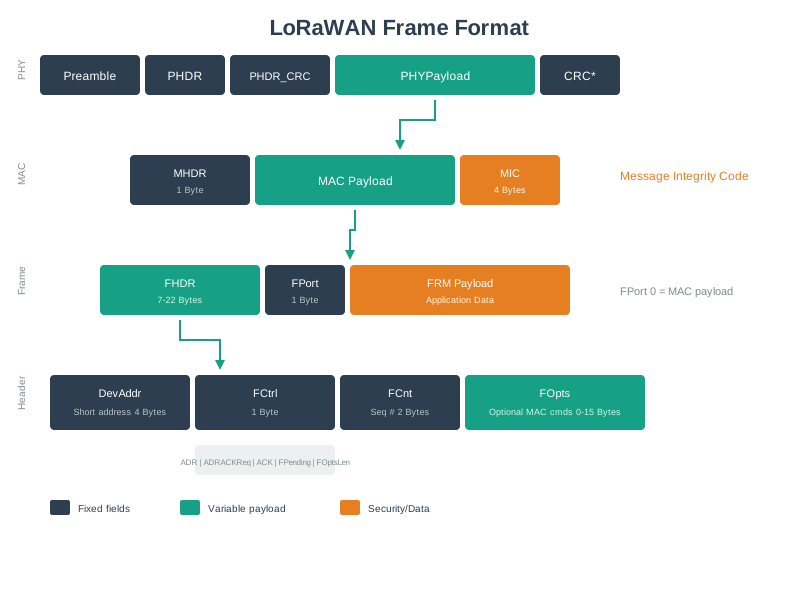
Understanding the frame format is essential for calculating airtime, optimizing payload sizes, and troubleshooting network issues where frame counter or MIC validation failures occur.
1094.8 Summary
This section covered LoRaWAN security fundamentals:
- OTAA vs ABP: OTAA recommended for production (dynamic keys, automatic rejoin)
- Frame Counter: Critical for replay attack prevention, ABP vulnerability
- MIC Validation: How message integrity is verified
- Best Practices: Secure deployment configuration
1094.9 What’s Next
You’ve completed the LoRaWAN Comprehensive Review! Continue your learning:
- Return to Overview: LoRaWAN Comprehensive Review - Main index page
- Compare Technologies: LPWAN Comparison - LoRaWAN vs Sigfox vs NB-IoT
- Next Protocol: Sigfox - Ultra-narrow-band LPWAN
- Cellular Alternative: NB-IoT - Cellular LPWAN option