%%{init: {'theme': 'base', 'themeVariables': { 'primaryColor': '#2C3E50', 'primaryTextColor': '#fff', 'primaryBorderColor': '#16A085', 'lineColor': '#16A085', 'secondaryColor': '#E67E22', 'tertiaryColor': '#ECF0F1', 'fontFamily': 'Inter, system-ui, sans-serif'}}}%%
graph LR
    CPU["General Purpose<br/>CPU"] --> DSP["DSP<br/>Digital Signal<br/>Processor"]
    DSP --> FPGA["FPGA<br/>Field Programmable<br/>Gate Array"]
    FPGA --> ASIC["ASIC<br/>Application-Specific<br/>IC"]

    CPU -.-> C1["Flexible<br/>Medium performance<br/>Low NRE cost"]
    DSP -.-> D1["Arithmetic-heavy<br/>High performance<br/>Medium NRE cost"]
    FPGA -.-> F1["Reconfigurable<br/>Very high performance<br/>Medium-High NRE cost"]
    ASIC -.-> A1["Fixed function<br/>Maximum performance<br/>Highest NRE cost"]

    style CPU fill:#E67E22,stroke:#2C3E50,stroke-width:2px,color:#fff
    style DSP fill:#3498DB,stroke:#2C3E50,stroke-width:2px,color:#fff
    style FPGA fill:#16A085,stroke:#2C3E50,stroke-width:2px,color:#fff
    style ASIC fill:#2C3E50,stroke:#16A085,stroke-width:2px,color:#fff
1622 Hardware Optimization Strategies
1622.1 Learning Objectives
By the end of this chapter, you will be able to:
- Compare hardware acceleration options: Understand the spectrum from CPU to DSP to FPGA to ASIC
- Evaluate ASIC specialization dimensions: Instruction set, functional units, memory, interconnect, and control
- Apply heterogeneous multicore concepts: Understand ARM big.LITTLE and workload migration strategies
- Select appropriate hardware platforms: Match hardware capabilities to application requirements
- Analyze NRE vs production cost trade-offs: Make informed decisions about custom hardware
1622.2 Prerequisites
Before diving into this chapter, you should be familiar with:
- Optimization Fundamentals: Understanding optimization trade-offs and the four key dimensions
- Computer Architecture Basics: Understanding processor architectures and memory hierarchies
1622.3 Hardware Optimisation
1622.3.1 Additional Processors
NoteVariant View: Hardware Acceleration Decision Matrix
This matrix variant helps engineers decide which acceleration approach fits their project constraints based on volume, time-to-market, and performance requirements.
%% fig-cap: "Hardware Acceleration Decision Matrix"
%% fig-alt: "Decision matrix comparing four hardware acceleration options across five criteria. CPU offers lowest performance but fastest development with no NRE cost, suitable for prototyping and low volume. DSP provides 10x performance with weeks development time and low-medium NRE, good for signal processing. FPGA offers 100x performance with months development and medium NRE at 10K-100K units, ideal for iterating designs. ASIC provides 1000x performance with 1-2 years development and high NRE at 1M+ units, required for mass consumer products."

%%{init: {'theme': 'base', 'themeVariables': { 'primaryColor': '#2C3E50', 'primaryTextColor': '#fff', 'primaryBorderColor': '#16A085', 'lineColor': '#16A085', 'secondaryColor': '#E67E22', 'tertiaryColor': '#fff', 'fontSize': '11px'}}}%%
graph LR
    subgraph Decision["CHOOSE YOUR ACCELERATION"]
        Q1{{"Volume?"}} --> Low["< 1K units"]
        Q1 --> Med["1K-100K units"]
        Q1 --> High["> 100K units"]

        Low --> CPU["CPU/MCU<br/>1x perf<br/>Days dev<br/>$0 NRE"]
        Med --> FPGA["FPGA<br/>100x perf<br/>Months dev<br/>$$$ NRE"]
        High --> ASIC["ASIC<br/>1000x perf<br/>1-2 years<br/>$$$$ NRE"]

        DSP["DSP<br/>10x perf<br/>Weeks dev<br/>$$ NRE"]
    end

    style CPU fill:#E67E22,stroke:#2C3E50,color:#fff
    style DSP fill:#2C3E50,stroke:#16A085,color:#fff
    style FPGA fill:#16A085,stroke:#2C3E50,color:#fff
    style ASIC fill:#2C3E50,stroke:#E67E22,color:#fff
    style Low fill:#7F8C8D,stroke:#2C3E50,color:#fff
    style Med fill:#7F8C8D,stroke:#2C3E50,color:#fff
    style High fill:#7F8C8D,stroke:#2C3E50,color:#fff
{fig-alt=“Hardware acceleration progression from general-purpose CPU through DSP and FPGA to ASIC showing increasing performance and NRE cost with decreasing flexibility”}
DSPs (Digital Signal Processors): Implement specialized routines for specific applications - Designed for arithmetic-heavy applications - Lots of arithmetic instructions and parallelism - Examples: Radio baseband (4G), image/audio processing, video encoding, vision
FPGAs (Field Programmable Gate Arrays): Popular accelerator in embedded systems - Ultimate re-configurability - Can be reconfigured unlimited times “in the field” - Useful for software acceleration with potential for upgrades - Invaluable during hardware prototyping
ASICs (Application-Specific Integrated Circuits): Logical next step for highly customized applications - Designed for fixed application (e.g., Bitcoin mining) - Highest performance over silicon and power consumption - Lowest overall cost (at volume) - No gate-level reconfigurability
1622.3.2 ASIC Specializations
%%{init: {'theme': 'base', 'themeVariables': { 'primaryColor': '#2C3E50', 'primaryTextColor': '#fff', 'primaryBorderColor': '#16A085', 'lineColor': '#16A085', 'secondaryColor': '#E67E22', 'tertiaryColor': '#ECF0F1', 'fontFamily': 'Inter, system-ui, sans-serif'}}}%%
mindmap
  root((ASIC<br/>Specialization))
    Instruction Set
      Minimal instructions
      Compressed encoding
      App-specific ops
      Vector operations
    Functional Units
      Multiply-accumulate
      Crypto accelerators
      Custom datapaths
    Memory System
      Bank count
      Cache config
      Access ports
      Multiple blocks
    Interconnect
      Bus width
      Network-on-chip
      Direct connections
    Control Logic
      Custom FSMs
      Simplified decode
{fig-alt=“Mind map showing five dimensions of ASIC specialization: instruction set, functional units, memory system, interconnect, and control logic with specific optimization techniques under each category”}
1622.3.2.1 Instruction Set Specialization
- Implement bare minimum required instructions, omit unused ones
- Compress instruction encodings to save space
- Introduce application-specific instructions:
- Multiply-accumulate operations
- Encoding/decoding, filtering
- Vector operations
- String manipulation/matching
- Pixel operations/transformations
1622.3.2.2 Memory Specialization
- Number and size of memory banks + access ports
- Cache configurations (separate/unified, associativity, size)
- Multiple smaller blocks increase parallelism and reduce power
- Application-dependent (profiling very important!)
1622.3.3 Memory and Register Visualizations
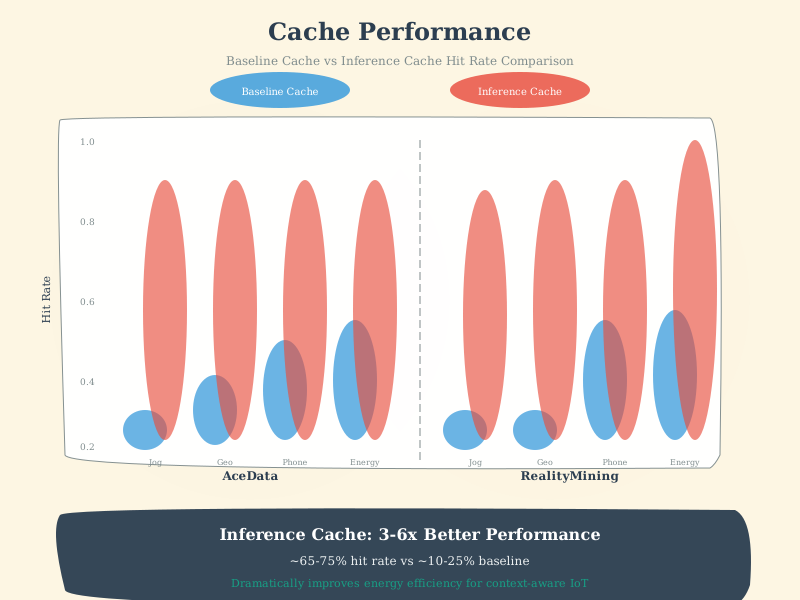
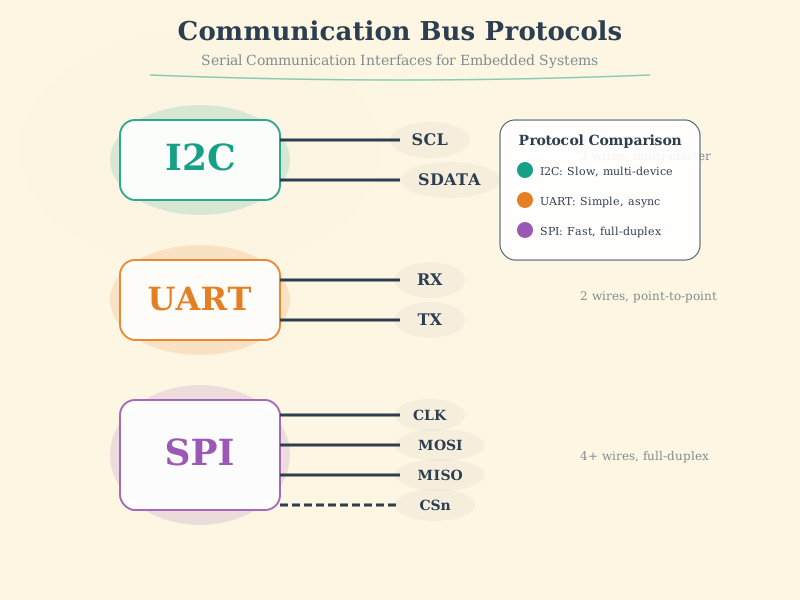
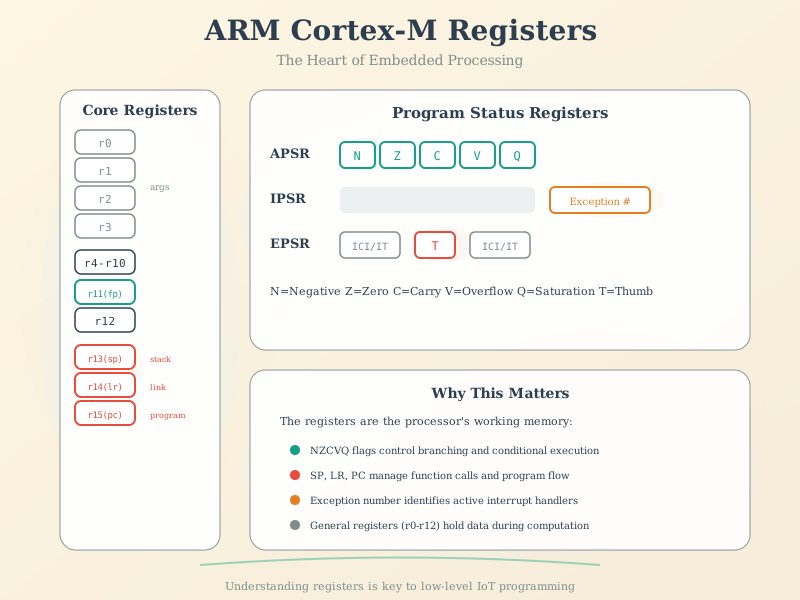
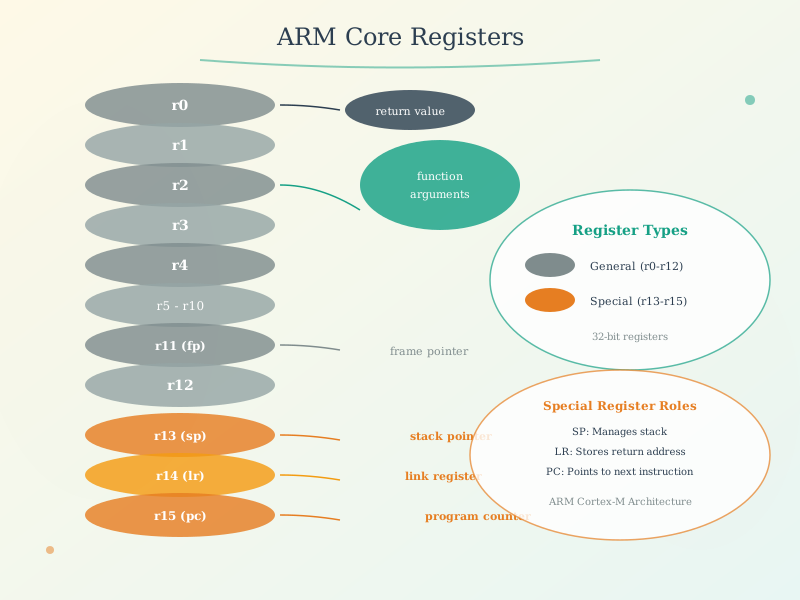
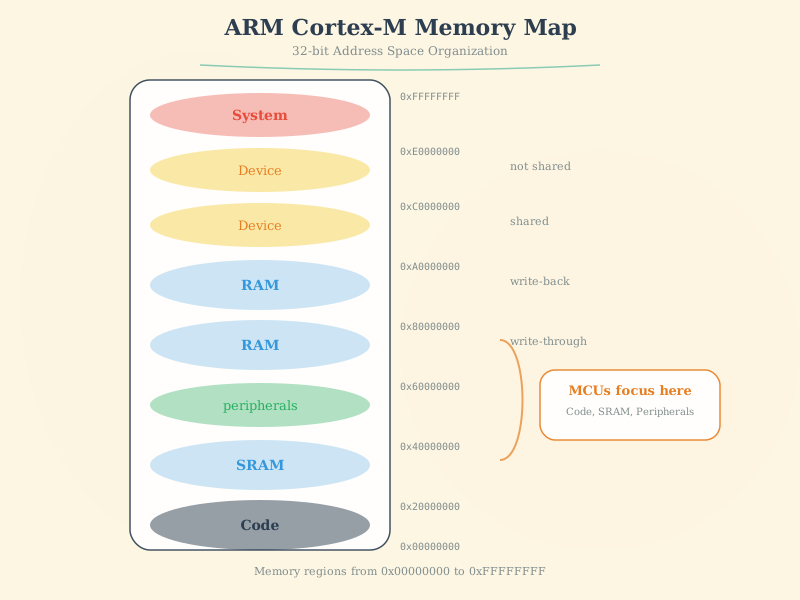
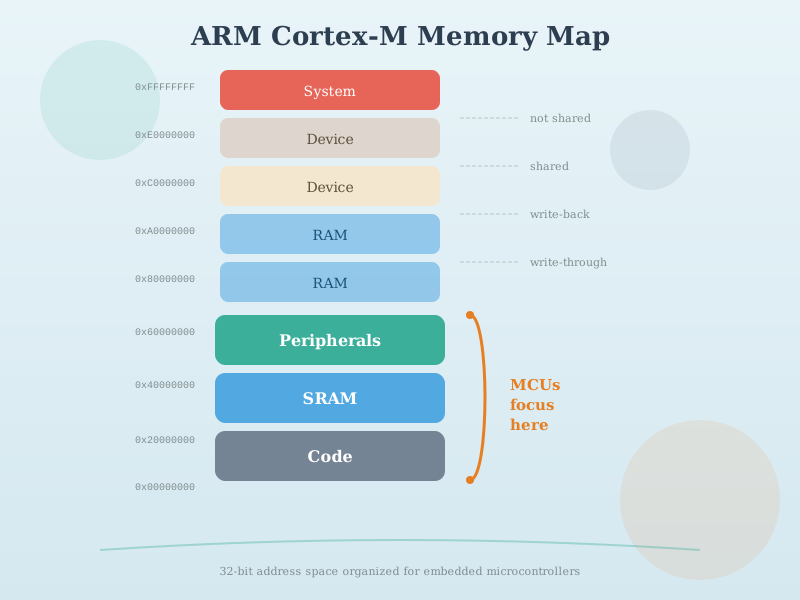
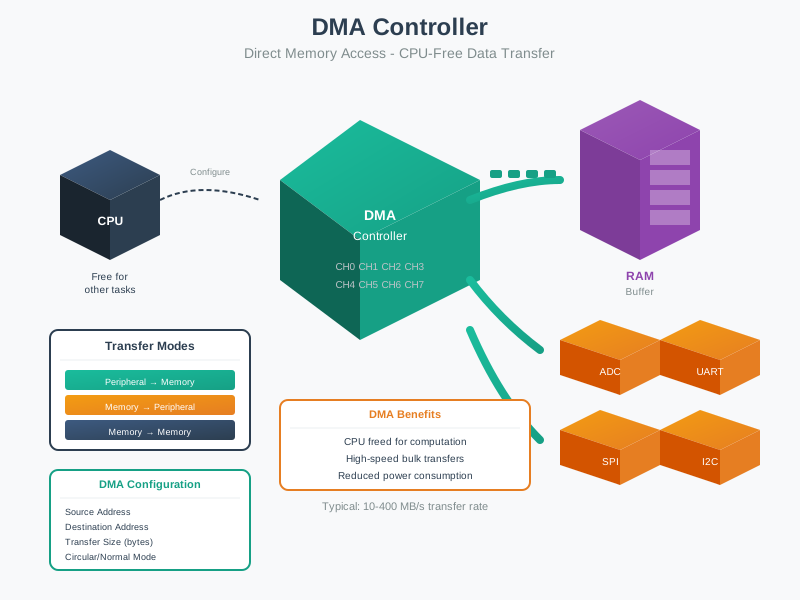
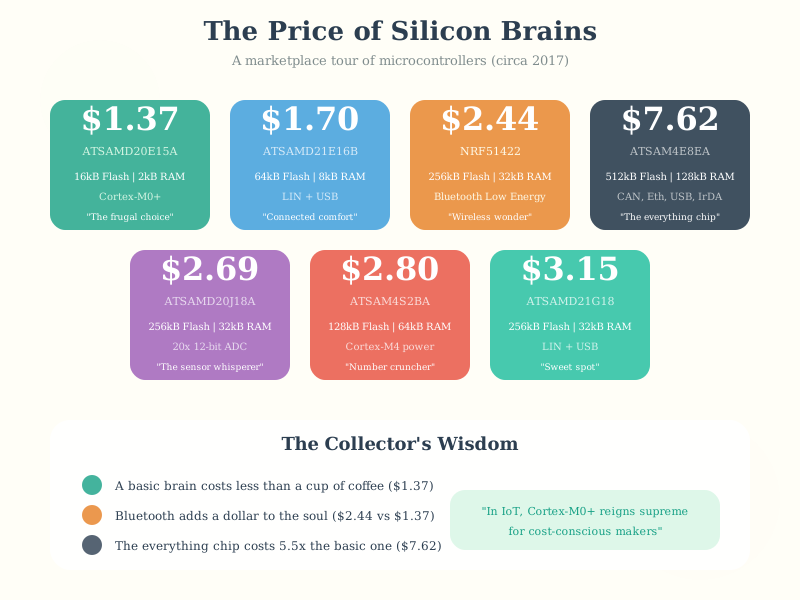
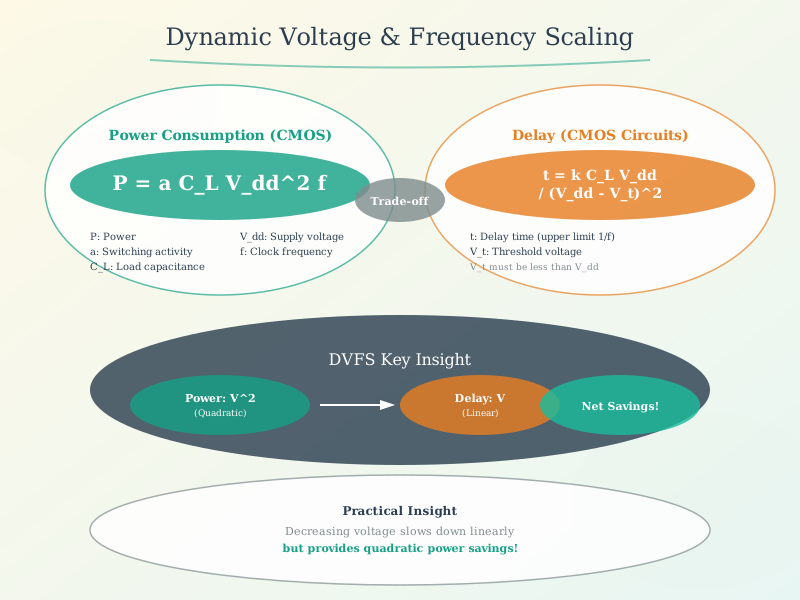
The following AI-generated diagrams illustrate memory architecture and register concepts critical for IoT firmware optimization.
1622.3.4 Heterogeneous Multicores
%%{init: {'theme': 'base', 'themeVariables': { 'primaryColor': '#2C3E50', 'primaryTextColor': '#fff', 'primaryBorderColor': '#16A085', 'lineColor': '#16A085', 'secondaryColor': '#E67E22', 'tertiaryColor': '#ECF0F1', 'fontFamily': 'Inter, system-ui, sans-serif'}}}%%
graph TB
    subgraph "ARM big.LITTLE Architecture"
        subgraph "LITTLE Cluster (Low Power)"
            A7_1["Cortex-A7<br/>Core 0"]
            A7_2["Cortex-A7<br/>Core 1"]
            A7_3["Cortex-A7<br/>Core 2"]
            A7_4["Cortex-A7<br/>Core 3"]
        end

        subgraph "big Cluster (High Performance)"
            A15_1["Cortex-A15<br/>Core 4"]
            A15_2["Cortex-A15<br/>Core 5"]
            A15_3["Cortex-A15<br/>Core 6"]
            A15_4["Cortex-A15<br/>Core 7"]
        end
    end

    SCHED["Task Scheduler"] --> A7_1
    SCHED --> A7_2
    SCHED --> A15_1
    SCHED --> A15_2

    A7_1 -.->|"Migrate workload"| A15_1
    A7_2 -.->|"Migrate workload"| A15_2

    style A7_1 fill:#16A085,stroke:#2C3E50,stroke-width:2px,color:#fff
    style A7_2 fill:#16A085,stroke:#2C3E50,stroke-width:2px,color:#fff
    style A7_3 fill:#16A085,stroke:#2C3E50,stroke-width:2px,color:#fff
    style A7_4 fill:#16A085,stroke:#2C3E50,stroke-width:2px,color:#fff
    style A15_1 fill:#E74C3C,stroke:#2C3E50,stroke-width:2px,color:#fff
    style A15_2 fill:#E74C3C,stroke:#2C3E50,stroke-width:2px,color:#fff
    style A15_3 fill:#E74C3C,stroke:#2C3E50,stroke-width:2px,color:#fff
    style A15_4 fill:#E74C3C,stroke:#2C3E50,stroke-width:2px,color:#fff
    style SCHED fill:#E67E22,stroke:#2C3E50,stroke-width:2px,color:#fff
{fig-alt=“ARM big.LITTLE heterogeneous multicore architecture showing LITTLE cluster with four Cortex-A7 cores for low power tasks and big cluster with four Cortex-A15 cores for high performance with task scheduler managing workload migration between clusters”}
Heterogeneous Multicore: Processor containing multiple cores with the same architecture but different power/performance profiles
Example: ARM big.LITTLE with four Cortex-A7 and four Cortex-A15 cores
Run-state Migration Strategies:
- Clustered Switching: Either all fast cores OR all slow cores
- CPU Migration: Pairs of fast/slow cores, threads migrate between pairs
- Global Task Scheduling: Each core seen separately, threads scheduled on appropriate core
1622.4 Knowledge Check
CautionPitfall: Forgetting to Enable Peripheral Clocks Before Register Access
The Mistake: Writing to peripheral configuration registers (GPIO, UART, SPI, I2C) before enabling the peripheral’s clock gate, causing hard faults, bus errors, or silent failures where writes appear to succeed but have no effect.
Why It Happens: On ARM Cortex-M microcontrollers (STM32, nRF52, SAM, LPC), peripherals are clock-gated by default to save power. Unlike desktop CPUs where all hardware is always accessible, embedded peripherals exist in a powered-down state until explicitly enabled via RCC (Reset and Clock Control) registers. Developers familiar with Arduino’s pinMode() don’t realize it internally calls clock enable functions.
The Fix: Always enable peripheral clocks as the first step before any register access. Check your MCU’s reference manual for the specific RCC register and bit field:
// WRONG: Accessing GPIO before clock enable (STM32F4 example)
GPIOA->MODER |= GPIO_MODER_MODE5_0;  // Hard fault or silent fail!

// CORRECT: Enable clock first, then configure
RCC->AHB1ENR |= RCC_AHB1ENR_GPIOAEN;  // Enable GPIOA clock
__DSB();  // Data Synchronization Barrier - ensure clock is active
GPIOA->MODER |= GPIO_MODER_MODE5_0;  // Now safe to configure

// STM32 HAL equivalent:
__HAL_RCC_GPIOA_CLK_ENABLE();
// For UART1:
__HAL_RCC_USART1_CLK_ENABLE();
// For SPI1:
__HAL_RCC_SPI1_CLK_ENABLE();
Debugging Tip: If a peripheral “doesn’t work” but code compiles, check clock enable first. Use a debugger to read the peripheral registers - if they all read as 0x00000000, the clock isn’t enabled. On Cortex-M3/M4, accessing an unclocked peripheral triggers a BusFault or HardFault (BFSR register shows PRECISERR).
CautionPitfall: Incorrect NVIC Priority Configuration Breaking Nested Interrupts
The Mistake: Setting interrupt priorities without understanding that ARM Cortex-M uses inverted priority numbering (lower number = higher priority), and failing to configure priority grouping correctly, causing critical interrupts to be blocked by less important ones.
Why It Happens: Priority numbering on Cortex-M is counterintuitive: priority 0 is the HIGHEST priority, not lowest. Additionally, the NVIC supports priority grouping (preemption priority + sub-priority), but the number of implemented priority bits varies by MCU (STM32F4 uses 4 bits = 16 levels, nRF52 uses 3 bits = 8 levels, ESP32’s Xtensa uses different scheme). Developers often assume more bits or use HAL defaults without understanding implications.
The Fix: Explicitly configure priority grouping at startup and assign priorities systematically, remembering lower numbers preempt higher numbers:
// WRONG: Assuming priority 10 > priority 5 (backwards!)
NVIC_SetPriority(USART1_IRQn, 5);   // This is HIGHER priority
NVIC_SetPriority(TIM2_IRQn, 10);    // This is LOWER priority (won't preempt USART1)

// CORRECT: Design priority scheme with awareness of inversion
// Priority 0-1: Safety-critical (motor control, watchdog)
// Priority 2-3: Time-critical (encoder, high-speed ADC)
// Priority 4-7: Standard peripherals (UART, SPI)
// Priority 8-15: Low-priority (LED status, debug)

// Configure priority grouping first (4 bits preemption, 0 bits subpriority)
NVIC_SetPriorityGrouping(0);  // Or HAL_NVIC_SetPriorityGrouping(NVIC_PRIORITYGROUP_4)

// Set priorities (lower number = higher priority = CAN preempt others)
NVIC_SetPriority(EXTI0_IRQn, 2);     // High priority - emergency stop button
NVIC_SetPriority(TIM2_IRQn, 3);      // Motor control PWM - critical timing
NVIC_SetPriority(USART1_IRQn, 6);    // Serial - can be delayed
NVIC_SetPriority(I2C1_EV_IRQn, 8);   // Sensor polling - lowest priority

// Enable interrupts
NVIC_EnableIRQ(EXTI0_IRQn);
NVIC_EnableIRQ(TIM2_IRQn);
Debugging Tip: Use debugger to read NVIC->IP[] (Interrupt Priority) registers and verify values. If a high-priority interrupt isn’t preempting, check that (1) priorities are different, (2) priority grouping allows preemption, and (3) the pending interrupt’s priority number is numerically LOWER than the running ISR.
1622.5 Visual Reference Gallery
NoteEnergy Optimization Strategies

Energy optimization combines hardware and software techniques to minimize power consumption while maintaining required performance levels.
1622.6 Summary
Hardware optimization provides the foundation for high-performance IoT systems:
- Hardware Spectrum: CPU -> DSP -> FPGA -> ASIC with increasing performance and NRE cost
- DSPs: Ideal for arithmetic-heavy applications (signal processing, audio, video)
- FPGAs: Reconfigurable acceleration, valuable for prototyping and field updates
- ASICs: Maximum performance and efficiency at volume, but high NRE and inflexible
- ASIC Specialization: Instruction set, functional units, memory, interconnect, control logic
- Heterogeneous Multicores: big.LITTLE balances performance with energy efficiency
- Memory Architecture: Understanding caches, DMA, and peripheral access is critical
The key is matching hardware capabilities to application requirements while considering production volume and time-to-market constraints.
1622.7 What’s Next
The next chapter covers Software Optimization, which explores compiler optimization flags, code size strategies, SIMD vectorization, function inlining, and other software techniques for embedded IoT firmware.