%% fig-cap: "Simulation vs Emulation Comparison"
%% fig-alt: "Comparison diagram between simulation and emulation approaches for IoT network validation. Simulation side shows abstract models of protocols and network behavior running in software with fast execution speed, supporting 100,000+ nodes, providing estimated performance metrics, and suitable for early design exploration and large-scale studies. Emulation side shows real code running on virtual or actual hardware with real-time or slower execution, supporting hundreds of nodes, providing actual device behavior, and suitable for firmware validation and protocol compliance testing. Center decision box indicates choosing simulation for scale and speed or emulation for accuracy and code validation. Examples show NS-3 and OMNeT++ for simulation tools and Cooja, hardware-in-loop, and testbeds for emulation approaches."
%%{init: {'theme': 'base', 'themeVariables': {'primaryColor': '#2C3E50', 'primaryTextColor': '#fff', 'primaryBorderColor': '#1a252f', 'lineColor': '#16A085', 'secondaryColor': '#E67E22'}}}%%
flowchart LR
subgraph SIM["Simulation"]
S1[Abstract Models]
S2[Fast Execution<br/>100x real-time]
S3[100,000+ Nodes]
S4[Protocol Estimates]
S5["Tools: NS-3, OMNeT++"]
end
subgraph EMU["Emulation"]
E1[Real Code Execution]
E2[Real-time or Slower]
E3[100s of Nodes]
E4[Actual Behavior]
E5["Tools: Cooja, HIL"]
end
subgraph USE["Use Case Selection"]
U1{What do you<br/>need to test?}
end
SIM --> U1
EMU --> U1
U1 -->|Scale & Speed| SIM
U1 -->|Code Accuracy| EMU
subgraph HYBRID["Hybrid Approach"]
H1[Simulate network<br/>at scale]
H2[Emulate critical<br/>nodes with real code]
end
SIM --> HYBRID
EMU --> HYBRID
style SIM fill:#2C3E50,stroke:#16A085,color:#fff
style EMU fill:#E67E22,stroke:#2C3E50,color:#fff
style USE fill:#16A085,stroke:#2C3E50,color:#fff
style HYBRID fill:#7F8C8D,stroke:#2C3E50,color:#fff
1559 Network Simulation Tools
1559.1 Network Simulation Tools
This section covers network simulation tools for validating IoT network designs before deployment.
1559.2 Learning Objectives
By the end of this chapter, you will be able to:
- Select appropriate network simulation tools for IoT system validation
- Configure NS-3 for large-scale IoT network simulation
- Use Cooja for wireless sensor network firmware testing
- Compare simulation vs emulation approaches for validation
- Understand trade-offs between different simulation platforms
1559.3 Prerequisites
Before diving into this chapter, you should be familiar with:
- Network Design Fundamentals: Understanding network topologies and design requirements is essential before selecting simulation tools
- Networking Basics: Knowledge of protocols and the OSI model helps configure simulation parameters
- Sensor Fundamentals: Familiarity with sensor power consumption informs energy modeling in simulation
TipFor Beginners: What is Network Simulation?
Think of network simulation like a flight simulator for pilots.
Pilots train in simulators before flying real planes. It’s safer and cheaper to make mistakes virtually. Similarly, network simulation lets you test your IoT network design before buying thousands of devices and deploying them in the field.
Why simulate instead of just building?
| Physical Testing | Simulation |
|---|---|
| Buy 1000 sensors = $50,000 | Model 1000 sensors = $0 |
| Change configuration = weeks | Change configuration = seconds |
| Test failure scenarios = risky | Test failures = completely safe |
| Limited to what you own | Test unlimited scale |
What can you test in simulation?
| Metric | Question It Answers |
|---|---|
| Latency | “How long until data reaches the cloud?” |
| Throughput | “How much data can flow through my network?” |
| Packet Loss | “How many messages get lost?” |
| Energy | “How long will batteries last?” |
| Congestion | “What happens when all sensors report at once?” |
Popular IoT simulation tools:
| Tool | Best For | Difficulty |
|---|---|---|
| Cisco Packet Tracer | Learning networking basics | Beginner |
| NS-3 | Research, academic papers | Advanced |
| Cooja (Contiki) | 6LoWPAN, mesh networks | Intermediate |
| OMNeT++ | Detailed protocol analysis | Advanced |
Key takeaway: Simulation saves money, reduces risk, and lets you experiment freely. Always simulate complex IoT networks before deployment!
1559.3.1 Network Simulation Tool Visualizations
The following visualizations provide insights into network simulation concepts and tool comparisons for IoT system design.
1559.4 Network Simulation Tools Overview
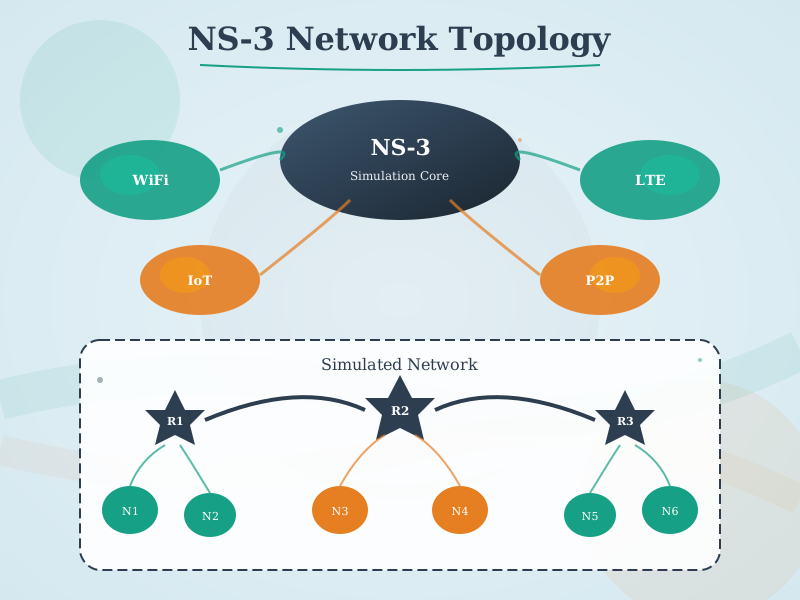
1559.4.1 NS-3 (Network Simulator 3)
Description: Open-source discrete-event network simulator widely used in academic research and industry.
Key Features:
- Comprehensive protocol library (Wi-Fi, LTE, LoRaWAN, 6LoWPAN, Zigbee)
- Scalable to large networks (tested with 100,000+ nodes)
- Detailed PHY/MAC layer modeling
- Integration with real network stacks (emulation mode)
- Python and C++ APIs
- Extensive visualization tools
IoT Protocols Supported:
- IEEE 802.15.4 (physical layer for Zigbee, Thread)
- LoRaWAN (long-range IoT)
- 6LoWPAN (IPv6 over low-power networks)
- Wi-Fi (802.11 variants)
- LTE and 5G NR (cellular IoT)
Typical Use Cases:
- Large-scale sensor network performance analysis
- Protocol comparison studies
- Energy consumption modeling
- Network capacity planning
Getting Started Example:
// Simple NS-3 simulation: 10 sensor nodes sending to gateway
#include "ns3/core-module.h"
#include "ns3/network-module.h"
#include "ns3/wifi-module.h"
#include "ns3/mobility-module.h"
#include "ns3/internet-module.h"

using namespace ns3;

int main() {
    // Create nodes
    NodeContainer sensorNodes;
    sensorNodes.Create(10);
    NodeContainer gateway;
    gateway.Create(1);

    // Configure Wi-Fi
    WifiHelper wifi;
    wifi.SetStandard(WIFI_STANDARD_80211n);

    YansWifiPhyHelper wifiPhy;
    YansWifiChannelHelper wifiChannel = YansWifiChannelHelper::Default();
    wifiPhy.SetChannel(wifiChannel.Create());

    WifiMacHelper wifiMac;
    Ssid ssid = Ssid("iot-network");

    // Install Wi-Fi on sensors (stations)
    wifiMac.SetType("ns3::StaWifiMac", "Ssid", SsidValue(ssid));
    NetDeviceContainer sensorDevices = wifi.Install(wifiPhy, wifiMac, sensorNodes);

    // Install Wi-Fi on gateway (AP)
    wifiMac.SetType("ns3::ApWifiMac", "Ssid", SsidValue(ssid));
    NetDeviceContainer apDevices = wifi.Install(wifiPhy, wifiMac, gateway);

    // Mobility model (random positions)
    MobilityHelper mobility;
    mobility.SetPositionAllocator("ns3::RandomRectanglePositionAllocator",
                                   "X", StringValue("ns3::UniformRandomVariable[Min=0.0|Max=100.0]"),
                                   "Y", StringValue("ns3::UniformRandomVariable[Min=0.0|Max=100.0]"));
    mobility.SetMobilityModel("ns3::ConstantPositionMobilityModel");
    mobility.Install(sensorNodes);
    mobility.Install(gateway);

    // Run simulation
    Simulator::Stop(Seconds(100.0));
    Simulator::Run();
    Simulator::Destroy();

    return 0;
}
Strengths:
- Highly accurate and detailed
- Active development community
- Excellent documentation
- Free and open source
Limitations:
- Steep learning curve (C++ knowledge required)
- Complex setup for beginners
- Visualization requires external tools
1559.4.2 Cooja (Contiki Network Simulator)
Description: Simulator specifically designed for wireless sensor networks, part of the Contiki OS project.
Key Features:
- Simulates actual Contiki OS code (cross-level simulation)
- Node-level and network-level simulation
- Interactive GUI for visualization
- Radio medium simulation (UDGM, MRM)
- Support for real sensor platforms (Sky, Z1, etc.)
- Timeline and packet tracking
IoT Protocols Supported:
- ContikiMAC, X-MAC (MAC protocols)
- RPL (routing protocol for LLNs)
- 6LoWPAN
- CoAP (application layer)
- MQTT over constrained networks
Typical Use Cases:
- WSN protocol development
- RPL routing optimization
- Power consumption analysis
- Code testing before hardware deployment
Getting Started Example:
Through Cooja GUI:
- Create new simulation
- Add mote types (e.g., Sky mote running Contiki)
- Upload compiled Contiki firmware
- Add motes to simulation area
- Configure radio medium (e.g., UDGM with transmission range 50m)
- Add visualizations (network graph, timeline, mote output)
- Start simulation and observe behavior
Strengths:
- Runs actual embedded code (high fidelity)
- Excellent visualization
- Perfect for Contiki/Contiki-NG development
- Interactive debugging
Limitations:
- Limited to Contiki ecosystem
- Smaller scale (<1000 nodes practical)
- CPU-intensive for large networks
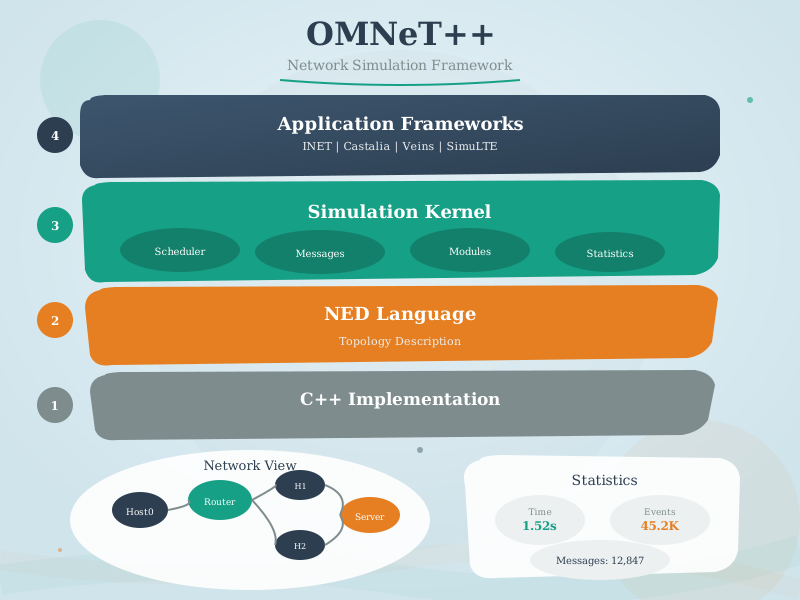
1559.4.3 OMNeT++ with INET Framework
Description: Modular discrete-event simulator with extensive networking framework.
Key Features:
- Modular architecture (NED language)
- GUI-based model design
- Comprehensive protocol library in INET
- Scalable parallel simulation
- Rich visualization and analysis tools
- Academic and commercial licenses
IoT Protocols Supported (via INET/extensions):
- 802.11, 802.15.4
- RPL, AODV routing
- MQTT, CoAP
- LoRaWAN (via Flora extension)
- TSN (time-sensitive networking)
Typical Use Cases:
- Protocol development and validation
- Performance comparison studies
- Network optimization
- Academic research
Getting Started Example:
// Simple NED network definition
network IoTNetwork {
    parameters:
        int numSensors = default(20);

    submodules:
        gateway: StandardHost {
            @display("p=250,250;i=device/server");
        }

        sensor[numSensors]: WirelessHost {
            @display("p=uniform(0,500),uniform(0,500);i=device/sensor");
        }

        radioMedium: Ieee802154NarrowbandScalarRadioMedium {
            @display("p=50,50");
        }
}
Strengths:
- Powerful modular design
- Excellent IDE integration
- Professional-grade tooling
- Strong academic community
Limitations:
- Complex learning curve
- Commercial license required for some uses
- Heavy resource requirements
NoteAcademic Resource: WSN Simulation Architecture (IIT Kharagpur NPTEL)
This diagram from IIT Kharagpur’s NPTEL IoT course illustrates how simulation environments integrate with real sensor hardware for WSN testing:
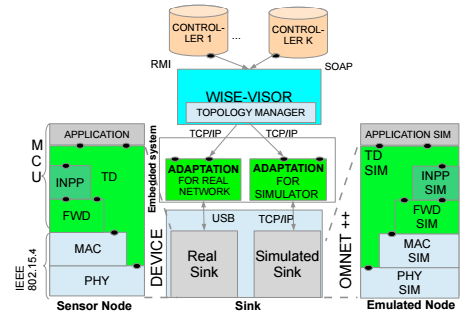
Key Concepts Illustrated:
- WISE-VISOR: Middleware that bridges real and simulated environments
- IEEE 802.15.4 Stack: Physical sensor node implementation (PHY to MAC to FWD to INPP to TD to Application)
- Hybrid Testing: Same protocol implementation tested on real hardware AND simulation
- Real/Simulated Sink: Enables seamless switching between physical deployment and virtual testing
Source: NPTEL Introduction to Internet of Things, IIT Kharagpur
1559.4.4 OPNET (Riverbed Modeler)
Description: Commercial network simulation platform with enterprise-grade features.
Key Features:
- Hierarchical modeling (network/node/process)
- Extensive protocol library
- Cloud simulation support
- Professional support and training
- Application performance modeling
- Integration with real devices
IoT Protocols Supported:
- Zigbee, Wi-Fi, LTE
- MQTT, CoAP, HTTP
- Industrial protocols (Modbus, OPC UA)
- Custom protocol development
Typical Use Cases:
- Enterprise IoT deployments
- Critical infrastructure planning
- Performance guarantees for commercial products
- Large-scale network design
Strengths:
- Professional support
- Proven in industry
- Comprehensive features
- Excellent documentation
Limitations:
- Expensive licensing
- Closed source
- Not suitable for academic budgets
1559.4.5 Simulation vs Emulation
Understanding the difference between simulation and emulation is critical for choosing the right validation approach:
| Aspect | Simulation | Emulation |
|---|---|---|
| Code | Abstract models | Real firmware/code |
| Speed | 10-1000x real-time | Real-time or slower |
| Scale | 100,000+ nodes | Hundreds of nodes |
| Accuracy | Approximate | Exact behavior |
| Use Case | Design exploration | Code validation |
| Tools | NS-3, OMNeT++ | Cooja, Hardware-in-Loop |
1559.4.6 Other Simulation Tools
CupCarbon:
- Smart city and IoT simulation
- Visual map-based interface
- LoRa, Zigbee support
- Educational focus
NetSim:
- Commercial simulator with free academic version
- IoT-specific modules (WSN, LoRa, 5G)
- User-friendly GUI
- Performance analysis tools
Packet Tracer (Cisco):
- Network learning tool
- IoT device support
- Limited protocol depth
- Free for Cisco Academy users
Custom Simulators:
- Python-based (SimPy, ns3-python)
- MATLAB/Simulink
- Domain-specific tools
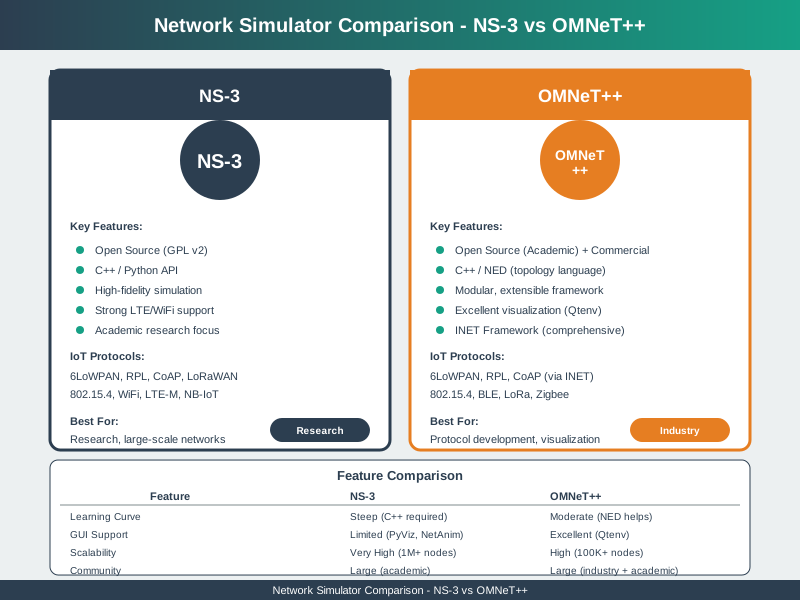
1559.4.7 IoT Simulation Tool Comparison
The following diagram compares major IoT network simulation tools across key dimensions:
%%{init: {'theme': 'base', 'themeVariables': { 'primaryColor': '#2C3E50', 'primaryTextColor': '#fff', 'primaryBorderColor': '#16A085', 'lineColor': '#16A085', 'secondaryColor': '#E67E22', 'tertiaryColor': '#fff'}}}%%
graph LR
    subgraph "Simulation Tools Comparison"
        NS3[NS-3<br/>Academic Research<br/>High Accuracy<br/>Steep Learning Curve]
        Cooja[Cooja/Contiki<br/>6LoWPAN/Mesh<br/>Embedded Focus<br/>Medium Complexity]
        OMNET[OMNeT++<br/>Protocol Analysis<br/>Modular Design<br/>Advanced Users]
        Cisco[Cisco Packet Tracer<br/>Network Learning<br/>Easy GUI<br/>Beginner Friendly]
    end

    NS3 --> Use1[Research papers<br/>Protocol validation]
    Cooja --> Use2[WSN simulation<br/>Contiki OS testing]
    OMNET --> Use3[Custom protocols<br/>Performance analysis]
    Cisco --> Use4[Education<br/>Quick prototyping]

    style Cisco fill:#16A085,stroke:#2C3E50,color:#fff
    style Cooja fill:#2C3E50,stroke:#16A085,color:#fff
    style NS3 fill:#E67E22,stroke:#2C3E50,color:#fff
    style OMNET fill:#E67E22,stroke:#2C3E50,color:#fff
Comparison of major IoT simulation tools showing NS-3 (scalable to 100,000+ nodes, comprehensive protocols, steep C++ learning curve, free open source for large-scale research), Cooja (under 1,000 nodes, code-level WSN simulation with Contiki OS, moderate GUI-based learning, free for firmware development), OMNeT++ (large-scale with parallel simulation, modular NED design, academic/commercial licensing for protocol development), and OPNET Riverbed (enterprise-grade cloud support, hierarchical modeling, expensive commercial license for critical infrastructure). Selection based on project needs for scale, firmware testing, protocol development, or enterprise deployment.
1559.5 Tool Selection Guide
Choose NS-3 when:
- Research requires peer-review credibility
- Large-scale simulation (10,000+ nodes) needed
- Detailed protocol behavior analysis required
- Team has C++ programming expertise
Choose Cooja when:
- Developing Contiki/Contiki-NG firmware
- Need to test actual embedded code
- WSN with 6LoWPAN or RPL routing
- Interactive debugging required
Choose OMNeT++ when:
- Developing new protocols
- Need modular, reusable models
- Professional IDE environment preferred
- Academic research with INET framework
Choose Packet Tracer when:
- Learning networking concepts
- Quick topology prototyping
- Educational demonstrations
- Limited programming expertise
1559.6 Key Concepts
Simulation Tools:
- NS-3: Large-scale, comprehensive protocol modeling
- Cooja: WSN simulation, code-level emulation
- OMNeT++: Modular, framework-based simulation
- OPNET/Riverbed: Commercial enterprise tools
Selection Criteria:
- Scale requirements (nodes, area)
- Protocol support needed
- Fidelity level (abstract vs code-level)
- Team expertise and learning curve
- Budget (free vs commercial)
Simulation vs Emulation:
- Simulation: Fast, scalable, approximate
- Emulation: Slower, accurate, code-level
- Hybrid: Combine for best of both
1559.7 Summary
- NS-3 for Scale: Use NS-3 for large-scale IoT network research with 100,000+ nodes, comprehensive protocol support, and peer-review credibility for academic publications
- Cooja for Firmware: Choose Cooja when testing actual Contiki/Contiki-NG embedded code on simulated hardware, providing high-fidelity WSN simulation with interactive debugging
- OMNeT++ for Modularity: Select OMNeT++ for modular protocol development with the INET framework, offering professional IDE integration and reusable component design
- Simulation vs Emulation: Understand the trade-off between simulation (fast, scalable, approximate) and emulation (slower, accurate, code-level) to choose appropriate validation approach
NoteRelated Chapters & Resources
Continue Learning:
- Network Design Fundamentals - Topology and requirements
- Network Design Methodology - Systematic design process
- Network Design Exercises - Hands-on practice
Interactive Tools:
- Simulations Hub - Network simulation tools
1559.8 What’s Next
The next section covers Network Design Methodology, which presents the systematic approach to configuring simulations, running experiments, collecting data, and validating results against real deployments.