44 Data Formats Practice and Assessment
44.1 Learning Objectives
By the end of this chapter, you will be able to:
- Solve format selection scenarios: Apply decision frameworks to real-world IoT cases
- Calculate payload sizes: Design efficient binary encodings for specific sensor data
- Debug encoding issues: Identify and fix common serialization problems
- Design migration strategies: Plan format upgrades without service disruption
- Justify recommendations: Defend format choices with quantitative analysis
This is part of a series on IoT Data Formats:
- IoT Data Formats Overview - Introduction and text formats
- Binary Data Formats - CBOR, Protobuf, custom binary
- Data Format Selection - Decision guides and real-world examples
- Data Formats Practice (this chapter) - Scenarios, quizzes, worked examples
44.2 Prerequisites
Before starting this chapter, you should have completed:
- IoT Data Formats Overview: Understanding JSON and format basics
- Binary Data Formats: CBOR, Protobuf, and custom binary
- Data Format Selection: Decision frameworks
44.3 Knowledge Check Scenarios
Test your understanding of IoT data formats with these scenario-based questions.
44.4 Worked Example: Payload Design for Battery-Constrained Sensor
44.5 Worked Example: Optimizing Payload Size for LoRaWAN Sensor
Scenario: You are designing a soil moisture sensor for precision agriculture. The sensor runs on 2x AA batteries and must operate for 2+ years. It connects via LoRaWAN (max payload 51 bytes in SF12 mode) and sends readings every 15 minutes. Each reading includes: soil moisture (0-100%), temperature (-40 to +60C), battery voltage (2.0-3.6V), and timestamp.
Goal: Design the most efficient payload format that fits LoRaWAN constraints while maximizing battery life.
What we do: Determine the precision and range needed for each data field.
Why: Choosing appropriate precision prevents wasting bytes on unnecessary accuracy.
Field analysis:
| Field | Range | Required Precision | Example Value |
|---|---|---|---|
| Soil moisture | 0-100% | 0.5% resolution | 42.5% |
| Temperature | -40 to +60C | 0.1C resolution | 23.7C |
| Battery voltage | 2.0-3.6V | 0.01V resolution | 3.24V |
| Timestamp | Unix epoch | 1-second resolution | 1702732800 |
Key insight: We don’t need floating point! All values can be encoded as integers with implied decimal places:
- 42.5% becomes 425 (divide by 10 on receive)
- 23.7C becomes 237 (divide by 10 on receive)
- 3.24V becomes 324 (divide by 100 on receive)
What we do: Calculate payload size for JSON, CBOR, and custom binary formats.
Why: Size directly impacts battery life (transmission energy) and LoRaWAN feasibility.
JSON approach (human-readable):
{"m":42.5,"t":23.7,"v":3.24,"ts":1702732800}- Size: 44 bytes
- Pros: Debuggable, self-describing
- Cons: Quotes, colons, braces waste 20+ bytes
CBOR approach (binary JSON):
A4                          # Map with 4 items
  61 6D                     # "m" (1 char)
  F9 4528                   # 42.5 as float16
  61 74                     # "t" (1 char)
  F9 43C3                   # 23.7 as float16
  61 76                     # "v" (1 char)
  F9 40A3                   # 3.24 as float16
  62 7473                   # "ts" (2 chars)
1A 6577F080 # 1702732800 as uint32- Size: 22 bytes
- Pros: Self-describing, standard format
- Cons: Field names still consume bytes
Custom binary approach (maximum efficiency):
Byte layout:
[0-1]:   moisture = 425 (uint16, value/10 = 42.5%)
[2-3]:   temperature = 637 (uint16 with offset, (val-400)/10 = 23.7C)
[4-5]:   battery = 324 (uint16, value/100 = 3.24V)
[6-9]:   timestamp (uint32, seconds since epoch)

Hex: 01A9 027D 0144 6577F080- Size: 10 bytes (77% smaller than JSON!)
- Pros: Minimal size, maximum battery life
- Cons: Not self-describing, requires documentation
What we do: Show exact byte-by-byte calculations for the custom binary format.
Why: Understanding the encoding enables implementation and debugging.
Custom binary encoding detail:
| Field | Raw Value | Encoding | Bytes | Hex |
|---|---|---|---|---|
| Moisture | 42.5% | 42.5 x 10 = 425 | 2 | 0x01A9 |
| Temperature | 23.7C | (23.7 + 40) x 10 = 637 | 2 | 0x027D |
| Battery | 3.24V | 3.24 x 100 = 324 | 2 | 0x0144 |
| Timestamp | 1702732800 | Direct uint32 | 4 | 0x6577F080 |
| Total | 10 |
Temperature encoding trick: Adding 40 offset makes -40C = 0, allowing unsigned integer storage:
- -40C becomes (-40+40) x 10 = 0
- +60C becomes (60+40) x 10 = 1000
- Range 0-1000 fits in uint16 (0-65535)
Decoding formula (receiver side):
def decode_sensor_payload(data):
    moisture = struct.unpack('>H', data[0:2])[0] / 10.0      # 425 -> 42.5%
    temp_raw = struct.unpack('>H', data[2:4])[0]
    temperature = (temp_raw / 10.0) - 40.0                    # 637 -> 23.7C
    battery = struct.unpack('>H', data[4:6])[0] / 100.0      # 324 -> 3.24V
    timestamp = struct.unpack('>I', data[6:10])[0]           # Direct
    return moisture, temperature, battery, timestamp
What we do: Quantify how payload size affects battery life.
Why: For LoRaWAN devices, transmission energy dominates power budget.
LoRaWAN transmission energy (SF12, 14dBm):
- Base overhead: ~60 bytes (header, CRC, etc.)
- Energy per byte: ~0.5 mJ (millijoules)
Daily energy consumption:
| Format | Payload | Total TX | Energy/msg | Msgs/day | Energy/day |
|---|---|---|---|---|---|
| JSON | 44 bytes | 104 bytes | 52 mJ | 96 | 4,992 mJ |
| CBOR | 22 bytes | 82 bytes | 41 mJ | 96 | 3,936 mJ |
| Binary | 10 bytes | 70 bytes | 35 mJ | 96 | 3,360 mJ |
Battery life calculation (2x AA = 2000 mAh = 27,000 J at 3V):
| Format | Daily Energy | Battery Life | Improvement |
|---|---|---|---|
| JSON | 4,992 mJ | 5,413 days (14.8 years) | Baseline |
| CBOR | 3,936 mJ | 6,861 days (18.8 years) | +27% |
| Binary | 3,360 mJ | 8,036 days (22.0 years) | +49% |
Reality check: These calculations assume only TX energy. Real battery life is 2-3 years due to sensor, MCU, and leakage. But relative differences still apply!
Outcome: Custom binary format maximizes battery life within LoRaWAN constraints.
Final payload specification:
+--------+--------+--------+--------+--------+--------+--------+--------+--------+--------+
| Byte 0 | Byte 1 | Byte 2 | Byte 3 | Byte 4 | Byte 5 | Byte 6 | Byte 7 | Byte 8 | Byte 9 |
+--------+--------+--------+--------+--------+--------+--------+--------+--------+--------+
|    Moisture     |   Temperature   |    Battery      |           Timestamp             |
|    (uint16)     | (uint16+offset) |    (uint16)     |            (uint32)             |
+--------+--------+--------+--------+--------+--------+--------+--------+--------+--------+

Encoding:
- Moisture: value x 10 (42.5% becomes 425)
- Temperature: (value + 40) x 10 (23.7C becomes 637)
- Battery: value x 100 (3.24V becomes 324)
- Timestamp: Unix epoch seconds (big-endian)

Total: 10 bytes (fits LoRaWAN SF12 with room to spare)
Key design decisions:
- No field names - Documentation-based format (77% size reduction)
- Fixed-point integers - Avoid float overhead, preserve precision
- Temperature offset - Enables unsigned encoding of negative values
- Big-endian - Network byte order for consistency
- Timestamp included - Handles network delays, out-of-order delivery
Implementation note:
// ESP32/Arduino encoding
void encode_payload(uint8_t* buf, float moisture, float temp, float battery, uint32_t ts) {
    uint16_t m = (uint16_t)(moisture * 10);
    uint16_t t = (uint16_t)((temp + 40) * 10);
    uint16_t v = (uint16_t)(battery * 100);
    buf[0] = m >> 8; buf[1] = m & 0xFF;
    buf[2] = t >> 8; buf[3] = t & 0xFF;
    buf[4] = v >> 8; buf[5] = v & 0xFF;
    buf[6] = ts >> 24; buf[7] = (ts >> 16) & 0xFF;
    buf[8] = (ts >> 8) & 0xFF; buf[9] = ts & 0xFF;
}
44.6 Additional Knowledge Check
Knowledge Check: Data Format Selection Quick Check
Concept: Choosing the right data format for IoT applications.
Question: A smart home system sends temperature readings every 5 seconds over Wi-Fi. The developer wants easy debugging during development but acceptable production performance. Which format is best?
Explanation: B is correct. Wi-Fi has plenty of bandwidth (50+ Mbps typical), so JSON’s overhead is negligible. JSON’s human-readability enables easy debugging during development. Custom binary and Protobuf add complexity without meaningful benefit when bandwidth isn’t constrained.
Question: What is the primary advantage of CBOR over JSON for IoT applications?
Explanation: C is correct. CBOR (Concise Binary Object Representation) is essentially “binary JSON” - it maintains the self-describing, schema-less flexibility of JSON but encodes values in binary, reducing size by 30-60%. It does support additional types (like binary blobs) but the size reduction is the primary IoT benefit.
Question: A LoRaWAN sensor must transmit 4 sensor values (each 0-1000) in a 12-byte payload limit. What encoding approach fits?
Explanation: A is correct. Values 0-1000 fit in 2-byte unsigned integers (0-65535 range). 4 values x 2 bytes = 8 bytes, well under the 12-byte limit. JSON would be ~18 bytes minimum. CBOR/MessagePack would be 12-14 bytes (borderline). Custom binary is the only format that fits comfortably with margin for headers.
Question: A company deploys sensors that will run for 10 years. The data format may need to evolve (add new fields). Which format handles schema evolution best?
Explanation: D is correct. Protocol Buffers uses field numbers that enable backward compatibility (old code ignores new fields) and forward compatibility (new code handles missing fields). JSON allows adding fields but lacks type safety. Custom binary version bytes work but require manual migration code. Protobuf’s field numbering system was specifically designed for long-term schema evolution.
44.7 Visual Reference Gallery
The following AI-generated figures provide alternative visual perspectives on data format concepts.
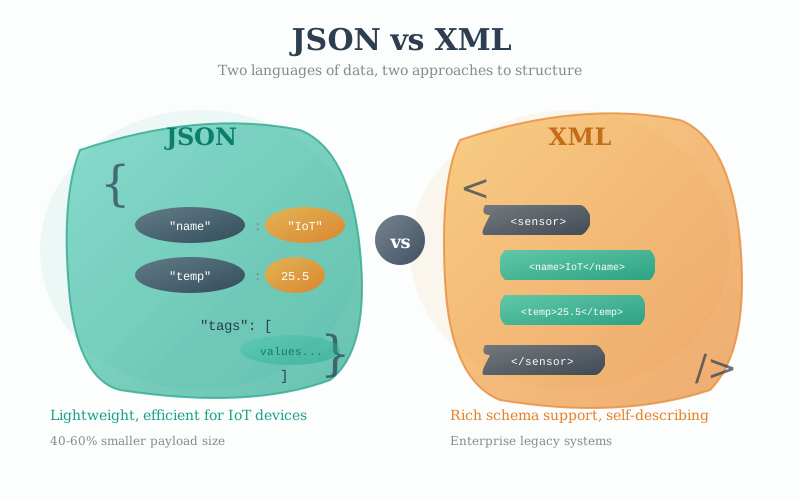
JSON and XML are the two most widely used text-based data formats in IoT. This visualization contrasts their structural approaches: XML uses hierarchical tags with explicit opening and closing elements, while JSON uses a more compact key-value notation with curly braces and square brackets. For IoT applications, JSON typically offers 30-50% smaller payloads than equivalent XML, faster parsing on resource-constrained devices, and broader support in modern programming languages and cloud platforms.
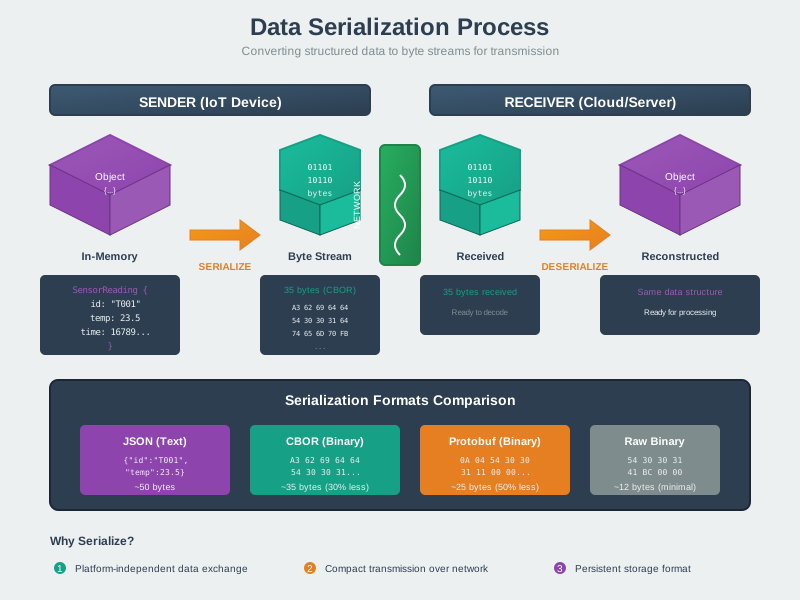
Serialization transforms structured data (objects, arrays, sensor readings) into a sequential byte stream for transmission or storage. This process is fundamental to IoT communication: sensor readings in memory must be serialized before network transmission, then deserialized at the receiving end. The choice of serialization format directly impacts transmission size, parsing speed, and interoperability between heterogeneous IoT devices and cloud services.
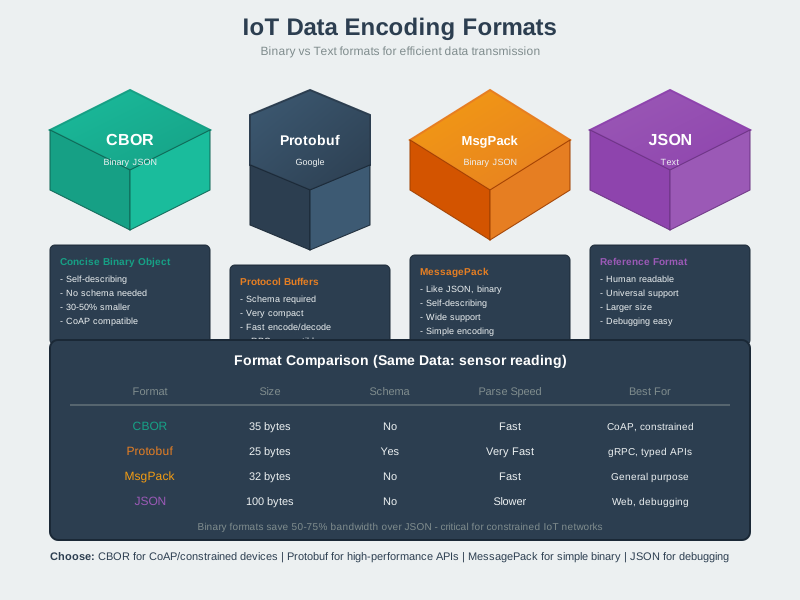
IoT systems can choose from multiple data encoding formats, each with distinct trade-offs. Text formats (JSON, XML) prioritize human readability and debugging ease. Binary formats (CBOR, MessagePack, Protocol Buffers) optimize for compact size and parsing speed. Custom binary formats offer maximum efficiency but sacrifice interoperability. This visualization helps engineers select the appropriate format based on their bandwidth constraints, processing power, and ecosystem requirements.
44.8 Summary
Key Takeaways from Practice:
- Context matters more than raw size - JSON is often fine for Wi-Fi deployments
- Calculate total cost of ownership - Include development, maintenance, and debugging costs
- Plan for evolution - Schema changes are inevitable over device lifetimes
- Use two-tier strategies - Different formats for local vs cloud communication
- Migration requires careful planning - Never remove support for old formats immediately
Practice Checklist:
- Can you calculate payload sizes for JSON, CBOR, Protobuf, and custom binary?
- Can you design a custom binary encoding for given sensor data?
- Can you justify format choices with quantitative analysis?
- Can you plan a migration strategy from JSON to binary formats?
44.9 What’s Next
Now that you’ve practiced data format selection and design:
- Apply knowledge: Packet Structure and Framing - See how formats fit into protocol headers
- Build projects: MQTT Fundamentals - Implement JSON/CBOR with MQTT
- Interactive tool: Protocol Selector Wizard - Get recommendations for your specific scenario