%%{init: {'theme': 'base', 'themeVariables': { 'primaryColor': '#2C3E50', 'primaryTextColor': '#fff', 'primaryBorderColor': '#16A085', 'lineColor': '#E67E22', 'secondaryColor': '#16A085', 'tertiaryColor': '#E67E22', 'fontSize': '12px'}}}%%
flowchart TB
    PHONE[Phone Wi-Fi<br/>Scanning] --> PROBE[Probe Requests<br/>Broadcast SSIDs]

    PROBE --> MAC[MAC Address:<br/>aa:bb:cc:dd:ee:ff]
    PROBE --> SSID1[SSID: Home-Wi-Fi-123]
    PROBE --> SSID2[SSID: OfficeCorpNet]
    PROBE --> SSID3[SSID: Mom_House_Guest]
    PROBE --> SSID4[SSID: GymFit24]

    MAC --> TRACK[Device Tracking<br/>Across Locations]
    SSID1 --> INFER[Location Inference]
    SSID2 --> INFER
    SSID3 --> SOC[Social Graph<br/>Relationships]
    SSID4 --> HABIT[Habits and Routines]

    style PHONE fill:#16A085,stroke:#0e6655,color:#fff
    style PROBE fill:#E67E22,stroke:#d35400,color:#fff
    style TRACK fill:#c0392b,stroke:#a93226,color:#fff
    style INFER fill:#c0392b,stroke:#a93226,color:#fff
    style SOC fill:#c0392b,stroke:#a93226,color:#fff
    style HABIT fill:#c0392b,stroke:#a93226,color:#fff
1468 Wi-Fi and Sensing Privacy
1468.1 Learning Objectives
By the end of this chapter, you will be able to:
- Identify Wi-Fi Privacy Leaks: Understand how Wi-Fi probe requests and MAC addresses enable tracking
- Explain Sensing De-anonymization: Describe how motion sensor data creates unique behavioral fingerprints
- Assess MAC Randomization: Evaluate the effectiveness of MAC address randomization as a privacy defense
- Recognize Side-Channel Attacks: Understand how motion sensors enable keystroke and activity inference
1468.2 Prerequisites
Before diving into this chapter, you should be familiar with:
- Location Privacy Leaks: Understanding de-anonymization and anonymity sets
- Bluetooth: Wireless protocol identifiers
- Wi-Fi Fundamentals: Understanding Wi-Fi operation
TipCross-Hub Connections
Knowledge Gaps Tracker: Common confusion points include assuming MAC randomization prevents tracking (probe requests still leak configured SSIDs). Document your gaps here for targeted review.
Networking foundations (Bluetooth, Wi-Fi): Understand how wireless protocols expose device identifiers and enable tracking
1468.3 Introduction
Beyond GPS location, mobile devices leak privacy through Wi-Fi and Bluetooth signals. Even without connecting to networks, devices continuously broadcast probe requests containing unique identifiers. Motion sensors provide another tracking vector through behavioral fingerprinting.
1468.4 Wi-Fi-Based Privacy Leaks
Wi-Fi connections reveal sensitive information:
- MAC Address: Permanent device identifier, enables tracking across locations
- WLAN Fingerprints: Scanned Wi-Fi networks reveal location history
- Network Lists: Configured networks reveal frequented locations
- Social Relationships: Shared configured networks indicate social connections
1468.4.1 Wi-Fi Attack Scenarios
- Retail Tracking: Stores track MAC addresses to analyze foot traffic
- Social Graph Inference: Shared Wi-Fi configs reveal family, coworkers
- Location History: Scanned network list reveals travel patterns
- De-anonymization: MAC address + Wi-Fi fingerprint = unique identifier
1468.5 MAC Address Randomization
Modern devices attempt to protect privacy by randomizing MAC addresses. However, this defense has significant limitations.
1468.5.1 Why MAC Randomization Fails
WarningMAC Randomization Limitations
- Probe request timing: Even with random MAC, probe request patterns (timing, order, RSSI) fingerprint devices (87% re-identification accuracy)
- SSID leakage: Randomized MAC still broadcasts configured SSID list—unique network combinations identify users
- Association fallback: Upon connection, device reverts to hardware MAC—tracking continues
- Bluetooth co-tracking: BLE randomization not synchronized with Wi-Fi—correlated signals de-anonymize
1468.6 Mobile Sensing De-anonymization
Even “anonymized” datasets can be de-anonymized using behavioral patterns from motion sensors.
1468.6.1 Data Sparsity Creates Unique Patterns
Mobile sensing data exhibits unique patterns that serve as fingerprints: - Activity correlations (gym after train ride) - Temporal patterns (coffee at 8am daily) - Location sequences (home then gym then work)
1468.6.2 Auxiliary Information Attacks
Attackers can observe targets to collect samples: - Public social media check-ins - Physical observation - Social engineering
Netflix Challenge Lesson: With 8 movie ratings and dates (plus or minus 14 days), researchers identified 99% of users in “anonymized” dataset by cross-referencing IMDB.
Mobile Sensing is Worse: Broader range of activities and stronger correlations make de-anonymization easier.
1468.7 Motion Sensor Side-Channel Attacks
WarningZero-Permission Sensors
Mobile apps can access motion sensors (accelerometer, gyroscope) without requesting runtime permissions, enabling side-channel attacks that infer user behavior and keystrokes.
1468.7.1 Motion Sensor Attack Capabilities
| Attack | Sensor | Accuracy | Implication |
|---|---|---|---|
| Keystroke inference | Accelerometer | 70-80% | PIN/password theft |
| Activity recognition | Accelerometer + Gyro | 90%+ | Behavior profiling |
| Indoor location | Accelerometer + Gyro | Room-level | Retail tracking |
| Speech detection | Accelerometer | Limited | Eavesdropping |
1468.8 Visual Reference Gallery
NoteVisual: Man-in-the-Middle Attack on Mobile Devices
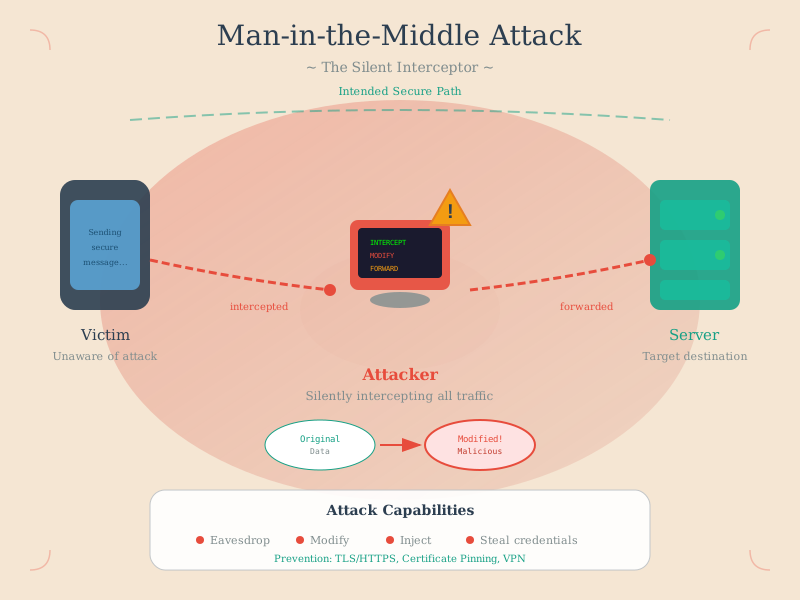
MITM attacks on mobile devices exploit network trust assumptions, particularly dangerous on public Wi-Fi where attackers can intercept sensitive data before encryption or after decryption at compromised endpoints.
NoteVisual: Fitness Tracker MITM Vulnerability
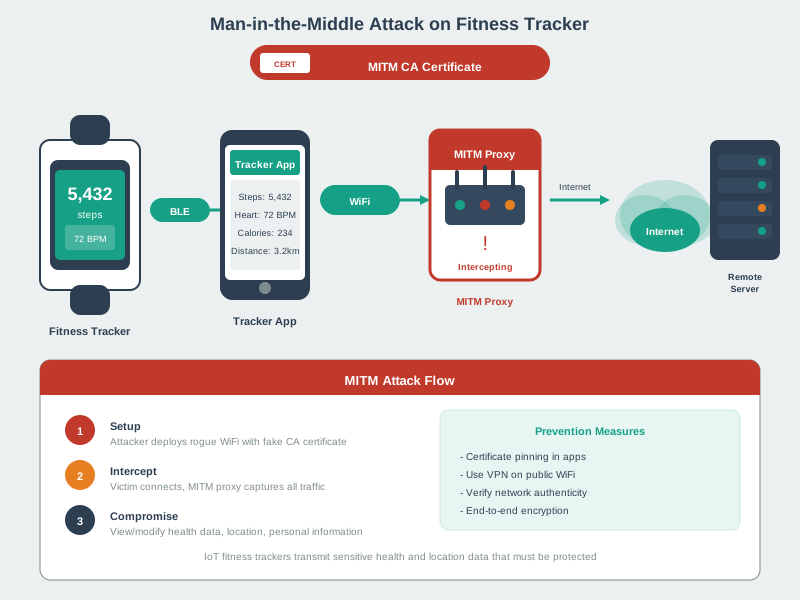
Fitness trackers and wearables present unique MITM vulnerabilities due to Bluetooth Low Energy’s pairing weaknesses, enabling attackers to intercept health data, location traces, and activity patterns.
1468.9 Comprehensive Protection Framework
Effective mobile privacy protection requires multiple layers:
Wi-Fi Defenses: 1. Disable Wi-Fi when not actively using 2. Remove unused network configurations 3. Use generic SSID names (avoid “JohnsHome”) 4. Verify MAC randomization is enabled
Sensor Privacy: 1. Review app sensor permissions 2. Use browsers with motion sensor restrictions 3. Monitor app background activity 4. Prefer apps with transparent data practices
Behavioral Privacy: 1. Vary daily routines when possible 2. Limit public social media check-ins 3. Be aware of patterns in aggregate data 4. Review what third-party SDKs apps contain
1468.10 Summary
Wi-Fi and sensing create additional privacy attack vectors:
Wi-Fi Privacy Leaks: - MAC addresses enable cross-location tracking - Probe requests broadcast configured network lists - SSID combinations create unique fingerprints - Social relationships inferred from shared networks
MAC Randomization Limitations: - Timing patterns still fingerprint devices (87% accuracy) - SSIDs still broadcast during probing - Hardware MAC used upon connection - Bluetooth not synchronized
Sensing De-anonymization: - Motion patterns create behavioral fingerprints - Activity correlations unique to individuals - No permissions required for accelerometer/gyroscope - 70-80% keystroke inference accuracy
Key Takeaway: Even “anonymized” mobile data is highly identifiable. Privacy protection requires preventing data collection, not just anonymization.
1468.11 What’s Next
You’ve completed the Mobile Privacy series. Return to Mobile Privacy Overview for a summary and links to related chapters, or continue to Secure Data and Software to learn about secure coding practices and protecting IoT protocols.
Continue to Secure Data and Software →