624 Networking Basics: Labs and Practice
624.1 Learning Objectives
By the end of this chapter, you will be able to:
- Build Network Diagnostics Tools: Create ESP32 and Python network analysis tools
- Analyze Network Configurations: Use Python to calculate subnets and analyze IP addresses
- Test Your Knowledge: Complete comprehensive knowledge checks with detailed explanations
- Reference Key Concepts: Use the glossary for quick term lookups
624.2 Prerequisites
Before diving into this chapter, you should be familiar with:
- Networking Basics: Introduction: Core networking concepts
- Networking Basics: Protocols and MAC: Protocol layers and MAC classification
- Networking Basics: Hands-On Configuration: Configuration, troubleshooting, and security basics
624.3 Hands-On Labs
624.3.1 Lab 1: ESP32 Network Diagnostics Dashboard
Objective: Create comprehensive network diagnostics tool on ESP32 that reports all network parameters.
Materials:
- ESP32 development board
- Wi-Fi network
- Serial monitor
Complete Code:
#include <WiFi.h>
#include <HTTPClient.h>

const char* ssid = "YOUR_WIFI_SSID";
const char* password = "YOUR_WIFI_PASSWORD";

void printNetworkDiagnostics() {
    Serial.println("\n============================================================");
    Serial.println("ESP32 Network Diagnostics Report");
    Serial.println("============================================================");

    // Wi-Fi Status
    Serial.println("\n1. Wi-Fi Connection:");
    Serial.print("   Status: ");
    Serial.println(WiFi.status() == WL_CONNECTED ? "Connected" : "Disconnected");
    Serial.print("   SSID: ");
    Serial.println(WiFi.SSID());
    Serial.print("   RSSI: ");
    Serial.print(WiFi.RSSI());
    Serial.print(" dBm (");

    int rssi = WiFi.RSSI();
    if (rssi > -50) Serial.print("Excellent");
    else if (rssi > -60) Serial.print("Good");
    else if (rssi > -70) Serial.print("Fair");
    else Serial.print("Poor");
    Serial.println(")");

    Serial.print("   Channel: ");
    Serial.println(WiFi.channel());

    // IP Configuration
    Serial.println("\n2. IP Configuration:");
    Serial.print("   IP Address: ");
    Serial.println(WiFi.localIP());
    Serial.print("   Subnet Mask: ");
    Serial.println(WiFi.subnetMask());
    Serial.print("   Gateway: ");
    Serial.println(WiFi.gatewayIP());
    Serial.print("   DNS: ");
    Serial.println(WiFi.dnsIP());

    // MAC Address
    Serial.println("\n3. Hardware:");
    Serial.print("   MAC Address: ");
    Serial.println(WiFi.macAddress());

    // Network calculations
    IPAddress ip = WiFi.localIP();
    IPAddress subnet = WiFi.subnetMask();

    // Network address
    IPAddress network(ip[0] & subnet[0], ip[1] & subnet[1],
                     ip[2] & subnet[2], ip[3] & subnet[3]);

    Serial.println("\n4. Network Information:");
    Serial.print("   Network Address: ");
    Serial.println(network);

    // Broadcast address
    IPAddress broadcast(ip[0] | ~subnet[0], ip[1] | ~subnet[1],
                       ip[2] | ~subnet[2], ip[3] | ~subnet[3]);
    Serial.print("   Broadcast Address: ");
    Serial.println(broadcast);

    // Connectivity tests
    Serial.println("\n5. Connectivity Tests:");
    Serial.print("   Gateway Reachable: ");
    Serial.println(WiFi.gatewayIP() != IPAddress(0, 0, 0, 0) ? "Yes" : "No");

    // DNS test
    Serial.print("   DNS Resolution: ");
    IPAddress result;
    int dnsResult = WiFi.hostByName("www.google.com", result);
    if (dnsResult == 1) {
        Serial.print("Working (google.com = ");
        Serial.print(result);
        Serial.println(")");
    } else {
        Serial.println("Failed");
    }

    Serial.println("\n============================================================");
}

void setup() {
    Serial.begin(115200);
    delay(1000);

    Serial.println("\nESP32 Network Diagnostics Tool");
    Serial.println("Connecting to Wi-Fi...");

    WiFi.begin(ssid, password);

    int attempts = 0;
    while (WiFi.status() != WL_CONNECTED && attempts < 20) {
        delay(500);
        Serial.print(".");
        attempts++;
    }

    if (WiFi.status() == WL_CONNECTED) {
        Serial.println("\nWi-Fi Connected!");
        printNetworkDiagnostics();
    } else {
        Serial.println("\nWi-Fi Connection Failed!");
    }
}

void loop() {
    // Run diagnostics every 30 seconds
    delay(30000);
    if (WiFi.status() == WL_CONNECTED) {
        printNetworkDiagnostics();
    }
}
Expected Output:
============================================================
ESP32 Network Diagnostics Report
============================================================

1. Wi-Fi Connection:
   Status: Connected
   SSID: MyHomeNetwork
   RSSI: -45 dBm (Excellent)
   Channel: 6

2. IP Configuration:
   IP Address: 192.168.1.100
   Subnet Mask: 255.255.255.0
   Gateway: 192.168.1.1
   DNS: 192.168.1.1

3. Hardware:
   MAC Address: DC:A6:32:AB:CD:EF

4. Network Information:
   Network Address: 192.168.1.0
   Broadcast Address: 192.168.1.255

5. Connectivity Tests:
   Gateway Reachable: Yes
   DNS Resolution: Working (google.com = 172.217.14.206)

============================================================
Learning Outcomes:
- Retrieve all network configuration parameters
- Perform connectivity diagnostics
- Understand Wi-Fi signal strength (RSSI)
- Calculate network and broadcast addresses
- Test DNS resolution
624.3.2 Lab 2: Python Network Scanner with Service Detection
Objective: Build network scanner that identifies IoT devices by detecting open ports and services.
Materials:
- Python 3.7+
- Local network access
Complete Code:
#!/usr/bin/env python3
"""Advanced network scanner for IoT device discovery."""

import socket
import concurrent.futures
from typing import List, Dict, Tuple

# Common IoT ports and their services
IOT_PORTS = {
    22: "SSH",
    80: "HTTP",
    443: "HTTPS",
    1883: "MQTT",
    8883: "MQTTS",
    5683: "CoAP",
    5684: "CoAPS",
    8080: "HTTP-Alt",
    502: "Modbus"
}

def scan_port(ip: str, port: int, timeout: float = 1.0) -> Tuple[str, int, bool, str]:
    """Scan a single port on a host."""
    try:
        sock = socket.socket(socket.AF_INET, socket.SOCK_STREAM)
        sock.settimeout(timeout)
        result = sock.connect_ex((ip, port))
        sock.close()

        if result == 0:
            service = IOT_PORTS.get(port, "Unknown")
            return (ip, port, True, service)
        return (ip, port, False, "")
    except socket.error:
        return (ip, port, False, "")

def scan_network(network_prefix: str, ports: List[int] = None) -> Dict[str, List[dict]]:
    """Scan entire network for devices with open ports."""
    if ports is None:
        ports = list(IOT_PORTS.keys())

    devices = {}
    tasks = []

    print(f"Scanning {network_prefix}.0/24 for IoT devices...")
    print(f"Checking {len(ports)} ports on 254 hosts...\n")

    with concurrent.futures.ThreadPoolExecutor(max_workers=100) as executor:
        for i in range(1, 255):
            ip = f"{network_prefix}.{i}"
            for port in ports:
                tasks.append(executor.submit(scan_port, ip, port))

        for future in concurrent.futures.as_completed(tasks):
            ip, port, is_open, service = future.result()
            if is_open:
                if ip not in devices:
                    devices[ip] = []
                devices[ip].append({"port": port, "service": service})
                print(f"  Found: {ip}:{port} ({service})")

    return devices

def analyze_security(devices: Dict[str, List[dict]]) -> None:
    """Analyze security of discovered devices."""
    print("\n" + "=" * 60)
    print("Security Analysis")
    print("=" * 60)

    insecure_services = {
        80: ("HTTP", "Use HTTPS (443)"),
        1883: ("MQTT", "Use MQTTS (8883)"),
        5683: ("CoAP", "Use CoAPS (5684)"),
        23: ("Telnet", "Use SSH (22)")
    }

    for ip, ports in devices.items():
        warnings = []
        for port_info in ports:
            port = port_info["port"]
            if port in insecure_services:
                name, fix = insecure_services[port]
                warnings.append(f"  - {name} (port {port}): {fix}")

        if warnings:
            print(f"\n{ip}:")
            print("  Security Warnings:")
            for w in warnings:
                print(w)

def main():
    # Get local IP to determine network
    s = socket.socket(socket.AF_INET, socket.SOCK_DGRAM)
    try:
        s.connect(('8.8.8.8', 80))
        local_ip = s.getsockname()[0]
    finally:
        s.close()

    network_prefix = '.'.join(local_ip.split('.')[:-1])

    print("=" * 60)
    print("IoT Network Scanner")
    print("=" * 60)
    print(f"Local IP: {local_ip}")
    print(f"Scanning: {network_prefix}.0/24\n")

    devices = scan_network(network_prefix)

    print("\n" + "=" * 60)
    print(f"Scan Complete: {len(devices)} devices found")
    print("=" * 60)

    for ip, ports in sorted(devices.items()):
        print(f"\nDevice: {ip}")
        print("  Open Ports:")
        for p in sorted(ports, key=lambda x: x["port"]):
            print(f"    {p['port']}: {p['service']}")

    analyze_security(devices)

if __name__ == "__main__":
    main()
Expected Output:
============================================================
IoT Network Scanner
============================================================
Local IP: 192.168.1.50
Scanning: 192.168.1.0/24

  Found: 192.168.1.1:80 (HTTP)
  Found: 192.168.1.1:443 (HTTPS)
  Found: 192.168.1.100:80 (HTTP)
  Found: 192.168.1.100:1883 (MQTT)
  Found: 192.168.1.150:22 (SSH)
  Found: 192.168.1.150:1883 (MQTT)

============================================================
Scan Complete: 3 devices found
============================================================

Device: 192.168.1.1
  Open Ports:
    80: HTTP
    443: HTTPS

Device: 192.168.1.100
  Open Ports:
    80: HTTP
    1883: MQTT

Device: 192.168.1.150
  Open Ports:
    22: SSH
    1883: MQTT

============================================================
Security Analysis
============================================================

192.168.1.100:
  Security Warnings:
  - HTTP (port 80): Use HTTPS (443)
  - MQTT (port 1883): Use MQTTS (8883)

192.168.1.150:
  Security Warnings:
  - MQTT (port 1883): Use MQTTS (8883)
Learning Outcomes:
- Perform service detection and port scanning
- Identify common IoT protocols by port
- Detect security vulnerabilities
- Use concurrent programming for efficiency
624.4 Knowledge Check
Test your understanding with these questions.
Question 1: What is the main difference between the OSI model and TCP/IP model?
OSI is a 7-layer theoretical framework; TCP/IP is a 4-layer practical implementation actually used on the internet.
OSI Model (7 layers):
- Application, Presentation, Session, Transport, Network, Data Link, Physical
- Created by ISO as a reference model
- More granular separation of concerns
TCP/IP Model (4 layers):
- Application, Transport, Internet, Link
- Based on actual internet protocols
- Combines OSI layers 5-7 into single Application layer
- Combines OSI layers 1-2 into Link layer
For IoT:
- TCP/IP is what you actually implement
- OSI helps understand where different protocols fit
- Many IoT protocols simplify further (e.g., BLE stack)
Example:
MQTT (Application) -> TCP (Transport) -> IP (Internet) -> Wi-Fi (Link)Question 2: Why is IPv6 essential for IoT?
IPv6 provides enough addresses for billions of IoT devices, while IPv4 has run out.
IPv4 limitations:
- Only 4.3 billion addresses (2^32 = 4,294,967,296)
- Already exhausted globally
- Requires NAT (Network Address Translation) which complicates direct device access
IPv6 advantages for IoT:
- 340 undecillion addresses (2^128 = 3.4 x 10^38)
- Every device gets unique global address
- No NAT needed - simpler, more secure
- Built-in IPsec security
- Auto-configuration (SLAAC)
- Header compression with 6LoWPAN for constrained devices
Example:
IPv4: 192.168.1.100 (behind NAT, not globally addressable)
IPv6: 2001:0db8:85a3::8a2e:0370:7334 (globally unique)
6LoWPAN adapts IPv6 for IEEE 802.15.4 networks (Zigbee, Thread), compressing 40-byte header to ~6 bytes.
Question 3: When should you use UDP instead of TCP for IoT?
Use UDP when low latency is more important than guaranteed delivery, especially for real-time sensor data where occasional loss is acceptable.
Use UDP for:
- Periodic sensor readings (temperature every 10 seconds - if one packet is lost, next reading comes soon)
- Real-time applications (voice, video streaming)
- DNS queries (single request-response, retry if needed)
- Multicast/broadcast (DHCP discover, mDNS)
- Low-power devices (less overhead = longer battery life)
Use TCP for:
- Firmware updates (every byte must arrive correctly)
- Configuration changes (critical commands)
- File transfers
- When order matters (sequential commands)
Trade-offs:
TCP:
  + Guaranteed delivery
  + In-order packets
  - Higher overhead (20-byte header vs 8-byte UDP)
  - Connection setup latency (3-way handshake)
  - Retransmissions add delay

UDP:
  + Lower latency
  + Lower overhead
  + Simpler (no connection state)
  - Packets may be lost
  - May arrive out of order
IoT protocols handle this smartly:
- MQTT can run over TCP (reliable) or UDP (fast)
- CoAP uses UDP but adds application-level confirmations when needed
Question 4: What is the difference between a MAC address and an IP address?
MAC addresses identify hardware (Layer 2, local network); IP addresses identify location in network (Layer 3, can route across networks).
MAC Address (Media Access Control):
- Layer 2 (Data Link)
- 48 bits (6 bytes):
AA:BB:CC:DD:EE:FF - Burned into hardware (NIC) by manufacturer
- Local scope: Only matters on local network segment
- First 3 bytes = OUI (vendor), last 3 bytes = unique ID
- Cannot route across networks
IP Address:
- Layer 3 (Network)
- IPv4: 32 bits (
192.168.1.100), IPv6: 128 bits - Assigned by network (DHCP or static)
- Global scope: Can route across the internet
- Changes when device moves networks
Analogy:
- MAC = Your home address (fixed, identifies building)
- IP = Your mailing address (changes if you move)
In practice:
ARP (Address Resolution Protocol) maps IP -> MAC
Example:
  "Who has IP 192.168.1.100?" -> "I do, my MAC is DC:A6:32:AB:CD:EF"
Why both?
- Routers use IP addresses to forward between networks
- Switches use MAC addresses to forward within a network
- Each layer has different responsibilities
Question 5: Which network topology is best for IoT and why?
It depends on the application, but mesh topology is often preferred for IoT due to self-healing and extended range.
Topology comparison:
Star Topology:
- Pros: Simple, low latency, easy to add devices
- Cons: Hub is single point of failure, range limited to hub
- Best for: Wi-Fi home networks, cellular IoT
Mesh Topology:
- Pros: Self-healing (reroutes around failures), extended range (multi-hop), no single point of failure
- Cons: Complex routing, higher power (relay traffic)
- Best for: Zigbee, Thread, Bluetooth Mesh, LoRa networks
Tree/Hierarchical:
- Pros: Scalable, efficient aggregation
- Cons: Intermediate node failure affects subtree
- Best for: Industrial IoT, building automation
Decision factors:
- Coverage area: Mesh for large areas
- Reliability: Mesh for critical applications
- Power: Star for battery devices (no relaying)
- Scalability: Tree for thousands of devices
- Cost: Star is cheapest (one gateway)
Example:
Smart Home: Star (Wi-Fi to router)
Smart Building: Mesh (Zigbee sensors throughout)
Industrial: Tree (hierarchical aggregators)
Question 6: What does RSSI measure and what values are good?
RSSI (Received Signal Strength Indicator) measures Wi-Fi signal strength in dBm (decibel-milliwatts). Higher (less negative) is better.
RSSI Scale:
-30 dBm: Excellent (right next to access point)
-50 dBm: Very Good
-67 dBm: Good (typical home/office use)
-70 dBm: Fair (minimum for reliable connection)
-80 dBm: Poor (frequent disconnections)
-90 dBm: Unusable (no stable connection)
Why it matters for IoT:
- Battery life: Weak signal -> device transmits at higher power -> drains battery faster
- Data rate: Weak signal -> lower speeds
- Reliability: Weak signal -> packet loss, retransmissions
- Connection stability: Below -70 dBm, expect issues
dBm is logarithmic:
-30 dBm = 1 mW
-40 dBm = 0.1 mW (10x weaker)
-50 dBm = 0.01 mW (100x weaker)
Every 3 dB = 2x power difference
Improving RSSI:
- Move closer to access point
- Remove obstacles (walls, metal)
- Use external antenna
- Add Wi-Fi extenders/mesh
- Switch to less congested channel
Check RSSI in code:
int rssi = WiFi.RSSI();
Serial.print("Signal: ");
Serial.print(rssi);
Serial.println(" dBm");
Question 7: What ports do MQTT and CoAP use?
MQTT: 1883 (plain), 8883 (TLS) | CoAP: 5683 (plain), 5684 (DTLS)
MQTT (Message Queuing Telemetry Transport):
- Port 1883: MQTT over TCP (unencrypted)
- Port 8883: MQTT over TLS/SSL (encrypted)
- Transport: TCP (reliable delivery)
- Use: General IoT messaging, telemetry
CoAP (Constrained Application Protocol):
- Port 5683: CoAP over UDP (unencrypted)
- Port 5684: CoAP over DTLS (encrypted)
- Transport: UDP (lightweight)
- Use: Constrained devices, low-power sensors
Other important IoT ports:
80   - HTTP
443  - HTTPS
22   - SSH
23   - Telnet (avoid - insecure!)
502  - Modbus TCP
5353 - mDNS (local device discovery)
Security best practice:
- Always use encrypted ports in production (8883 for MQTT, 5684 for CoAP)
- Plain ports (1883, 5683) only for development/testing
- Why: IoT devices are prime attack targets
Question 8: What is NAT and why is it problematic for IoT?
NAT (Network Address Translation) allows multiple devices to share one public IP, but makes direct device-to-device communication difficult.
How NAT works:
Home Network (Private IPs):
  - Sensor: 192.168.1.100
  - Camera: 192.168.1.101
  - Phone: 192.168.1.102
     |
  Router (NAT)
     |
Internet (One Public IP): 203.0.113.42
Why NAT exists:
- IPv4 address exhaustion (only 4.3 billion addresses)
- Allows billions of devices to share limited public IPs
Problems for IoT:
- No direct inbound connections:
- Can’t directly access home camera from internet
- Workarounds: Port forwarding, VPN, cloud relay
- Complicates peer-to-peer:
- Devices in different homes can’t connect directly
- Need STUN/TURN servers or cloud intermediary
- Breaks some protocols:
- Protocols that embed IP addresses in payload
- Some IoT protocols assume end-to-end connectivity
Solutions:
IPv6: Every device gets global address, no NAT needed
Port Forwarding: Manually map external port to device
UPnP/NAT-PMP: Automatic port forwarding (security risk!)
Cloud Services: Devices connect out, cloud relays
VPN: Secure tunnel into home network
624.5 Visual Reference Gallery
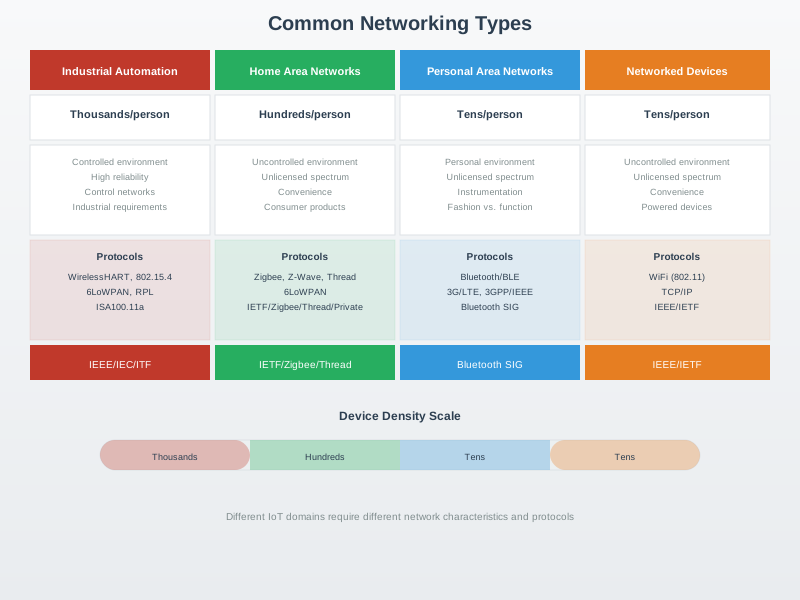
This visualization provides an overview of core networking concepts that form the foundation for understanding IoT communication systems.
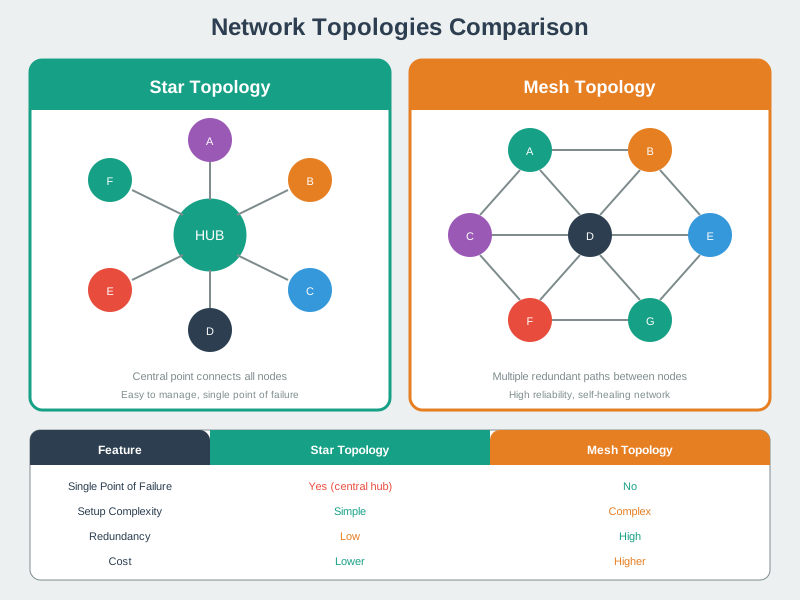
Understanding topology differences helps in selecting the right network structure for IoT deployments based on reliability, scalability, and management requirements.
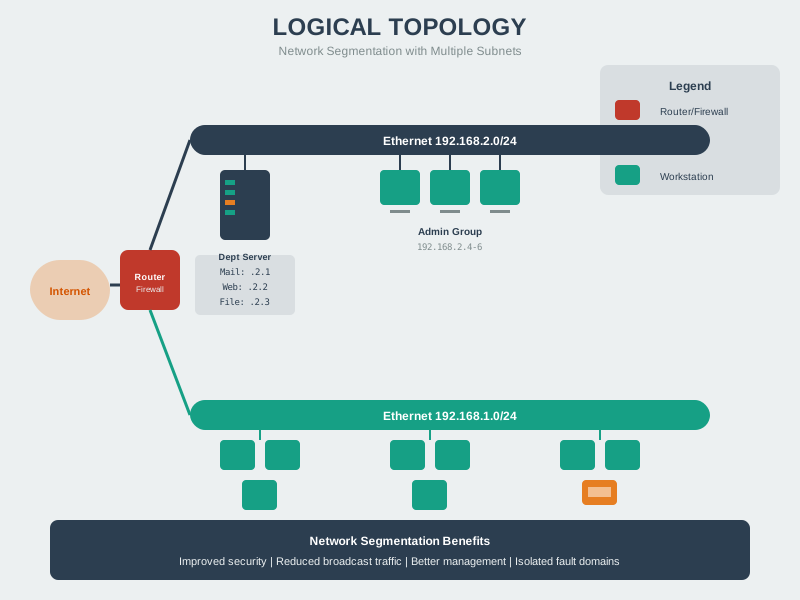
Logical topologies describe data flow patterns independent of physical cabling, helping network designers understand communication pathways.
624.6 Quick Glossary
This glossary provides quick definitions for essential networking concepts used throughout this chapter.
| Term | Definition | Example/Context |
|---|---|---|
| IP Address | Unique numerical identifier for a device on a network | IPv4: 192.168.1.100, IPv6: 2001:db8::1 |
| MAC Address | Hardware address burned into network interface card (NIC) | 00:1A:2B:3C:4D:5E (48 bits, Layer 2) |
| Port Number | 16-bit number identifying application/service on a device | HTTP: 80, HTTPS: 443, MQTT: 1883 |
| Router | Layer 3 device that forwards packets between different networks | Home router connects LAN to internet |
| Switch | Layer 2 device that forwards frames within same network | Connects multiple devices in LAN |
| Gateway | Device connecting different network types/protocols | IoT gateway: Zigbee sensors -> Wi-Fi -> cloud |
| NAT | Network Address Translation, maps private IPs to single public IP | 192.168.1.x -> 203.0.113.42:port |
| Subnet | Logical subdivision of IP network for organization/security | Home: 192.168.1.0/24 (256 addresses) |
| Subnet Mask | Defines which portion of IP is network vs host | 255.255.255.0 = /24 (first 3 octets = network) |
| DNS | Domain Name System, converts names to IP addresses | iot.example.com -> 203.0.113.42 |
| DHCP | Dynamic Host Configuration Protocol, assigns IPs automatically | Router assigns 192.168.1.100 to new device |
| RSSI | Received Signal Strength Indicator in dBm | -50 dBm = good, -80 dBm = poor |
| TCP | Transmission Control Protocol, reliable connection-oriented transport | HTTP, MQTT, FTP use TCP (Layer 4) |
| UDP | User Datagram Protocol, unreliable connectionless transport | DNS, CoAP, streaming video use UDP |
| IPv4 | Internet Protocol version 4, 32-bit addresses (4.3 billion) | 192.168.1.1, exhausted for IoT scale |
| IPv6 | Internet Protocol version 6, 128-bit addresses (340 undecillion) | 2001:0db8:85a3::8a2e:0370:7334 |
| 6LoWPAN | IPv6 over Low-power Wireless PANs, compresses IPv6 for 802.15.4 | 40-byte IPv6 header -> 2-8 bytes |
| OSI Model | 7-layer reference model for network protocols | Physical, Data Link, Network, Transport, Session, Presentation, Application |
| TCP/IP Model | 4-layer practical internet model | Link, Internet, Transport, Application |
Network Topologies:
| Topology | Description | Pros | Cons | IoT Use Case |
|---|---|---|---|---|
| Star | All devices connect to central hub/switch | Easy to add devices, failure isolated | Hub is single point of failure | Wi-Fi access point, home network |
| Mesh | Devices interconnect with multiple paths | Redundant, self-healing | Complex routing, more power | Zigbee, Thread, WSN |
| Bus | All devices on single cable | Simple, cheap | Collisions, single point of failure | CAN bus (automotive) |
| Tree | Hierarchical star networks | Scalable, organized | Central points of failure | Industrial networks, buildings |
| Ring | Devices in closed loop | Predictable latency | Break disrupts all | Rarely used in IoT |
TCP vs UDP Comparison:
| Feature | TCP | UDP | When to Use |
|---|---|---|---|
| Connection | Connection-oriented (3-way handshake) | Connectionless | TCP: Critical data; UDP: Real-time |
| Reliability | Guaranteed delivery, retransmissions | Best-effort, no guarantees | TCP: Commands; UDP: Streaming |
| Ordering | In-order delivery | No ordering guarantee | TCP: File transfer; UDP: Gaming |
| Overhead | 20+ bytes header, state management | 8 bytes header, no state | TCP: MQTT; UDP: CoAP, DNS |
| Speed | Slower (reliability mechanisms) | Faster (no handshake) | TCP: Cloud sync; UDP: Voice |
624.7 Summary
Networking is the foundation of IoT. Understanding the OSI/TCP-IP models, addressing schemes, topologies, and protocols enables you to:
- Design robust IoT systems
- Troubleshoot connectivity issues
- Optimize for bandwidth and power
- Secure your devices and data
- Scale from prototypes to production
Key Takeaways:
- OSI provides framework; TCP/IP is practical implementation
- IPv6 solves address exhaustion; essential for massive IoT
- Topology choice impacts reliability, range, and complexity
- Protocol selection depends on power, bandwidth, reliability needs
- Security must be designed in, not added later
- Real-world networks are messy; design for failure
Next Steps: Now that you understand networking fundamentals, dive into specific IoT protocols (MQTT, CoAP, Bluetooth, Zigbee, LoRa) to see these concepts in action!
624.8 Additional Resources
Books:
- “Computer Networking: A Top-Down Approach” by Kurose and Ross
- “TCP/IP Illustrated” by W. Richard Stevens
Videos:
- Layered models in practice: Layered Network Models Review
- See the course-wide Video Gallery: Video Hub
Tools:
- Wireshark: Network traffic analysis
- nmap: Network scanning
- PingPlotter: Visual traceroute
- MQTT Explorer: MQTT broker monitoring
Standards:
- IEEE 802.15.4 - Low-power wireless
- RFC 791 - IPv4 Specification
- RFC 8200 - IPv6 Specification
624.9 What’s Next
You’ve completed the Networking Basics series! Continue your IoT journey with:
- IoT Protocols Overview - Deep dive into MQTT, CoAP, and other protocols
- Transport Protocols - TCP, UDP, and IoT-specific transport considerations
- Wi-Fi Fundamentals - IEEE 802.11 for IoT
Return to the Networking Basics Overview for navigation to all related chapters.