1185MQTT Architecture and Publish-Subscribe Pattern
1185.1 MQTT Architecture
This chapter explores the broker-centric architecture that makes MQTT efficient for IoT applications, including the publish-subscribe pattern, broker components, and real-world system design.
1185.2 Learning Objectives
By the end of this chapter, you will be able to:
Explain the Publish-Subscribe Pattern: Understand how decoupled messaging enables scalable IoT systems
Describe Broker Architecture: Identify broker components and their functions
Design MQTT Systems: Apply architectural principles to real-world IoT scenarios
Compare Connection Topologies: Analyze when MQTT provides advantages over peer-to-peer approaches
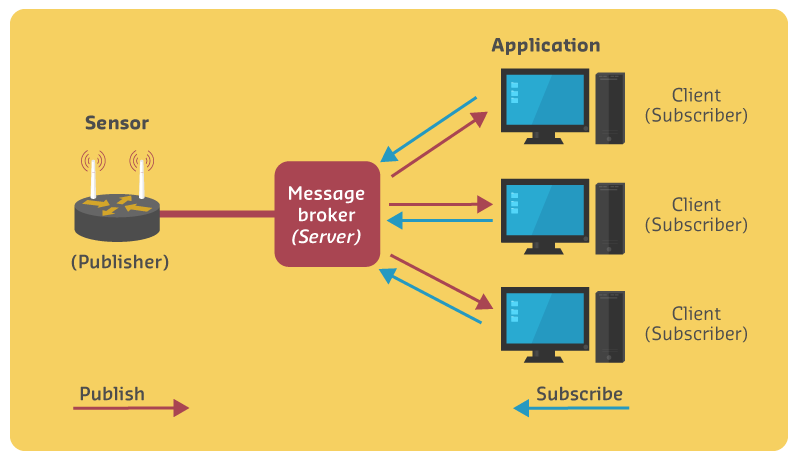
MQTT Publish-Subscribe Architecture
Figure 1185.1: MQTT publish-subscribe framework with broker architecture
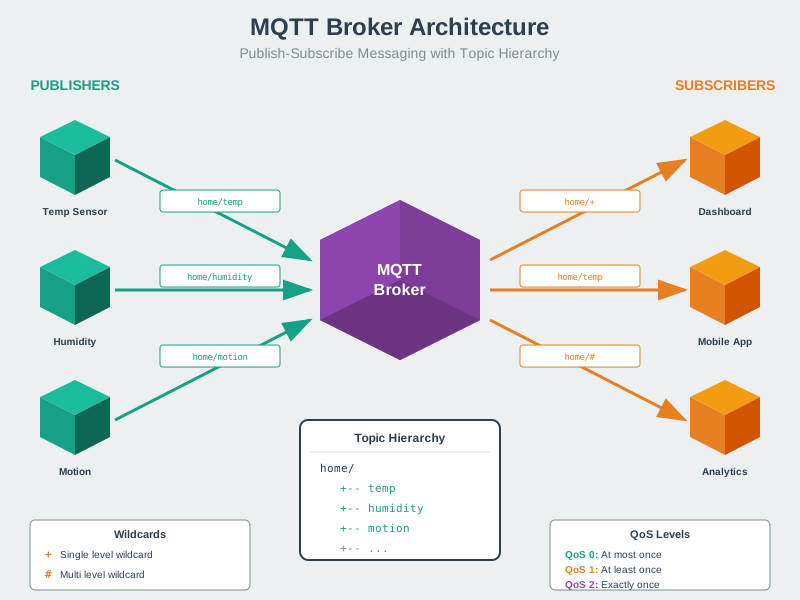
MQTT System Architecture
Figure 1185.2: MQTT’s publish-subscribe pattern decouples message producers from consumers. Publishers send messages to topics without knowing who will receive them, while subscribers register interest in topics without knowing who publishes to them. The broker handles all routing, persistence, and delivery guarantees.
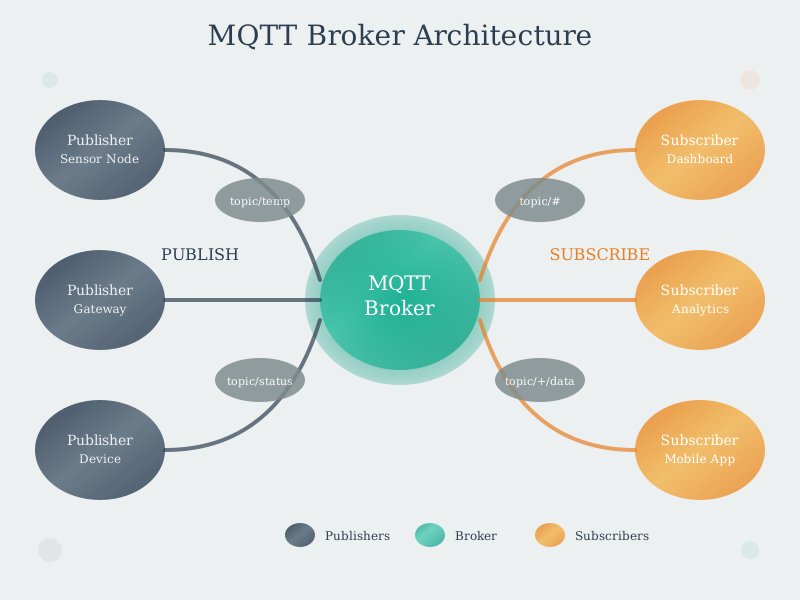
MQTT Broker Architecture
Figure 1185.3: Inside the MQTT broker: topic tree organization enables efficient message routing, while session state management supports persistent connections and offline message queuing. The broker stores retained messages and manages QoS acknowledgments.
1185.3 The Publish-Subscribe Pattern
The publish-subscribe (pub-sub) pattern is the foundation of MQTT’s architecture. Unlike request-response models (HTTP, CoAP), pub-sub decouples message producers from consumers.
TipReal-World Example: Smart Thermostat System
Scenario: You have a Nest thermostat in your living room that reports temperature every 5 minutes to maintain comfort and optimize energy usage.
What happens behind the scenes: 1. Sensor reads: Thermostat measures temperature (22.5C) 2. MQTT publish: Sends tiny message to topic home/living-room/temperature -> Broker 3. Broker distributes: Forwards to 3 subscribers: - Your phone app (shows current temperature) - Home automation system (triggers AC if >25C) - Data logger (stores for analysis)
Why MQTT is perfect for this: - Small messages: Temperature reading is <100 bytes (vs HTTP’s 200+ byte overhead) - Works over flaky Wi-Fi: QoS 1 ensures important readings aren’t lost during brief disconnections - Battery-friendly: ESP32-based sensor lasts 6+ months on batteries (vs 2-3 weeks with HTTP polling) - Easy to add subscribers: Want to add a Google Home display? Just subscribe to the topic-no changes to the thermostat needed!
Actual message payload: {"temp": 22.5, "humidity": 45, "timestamp": 1702314567}
Real deployment: This exact pattern is used by Nest, Ecobee, and most commercial smart thermostats. The Nest thermostat publishes to Google’s MQTT broker every 1-5 minutes depending on activity.
1185.4 Architecture Components
Components:
Broker: Central server that routes messages (e.g., Mosquitto, HiveMQ)
Publisher: Client that sends messages to topics
Subscriber: Client that receives messages from topics
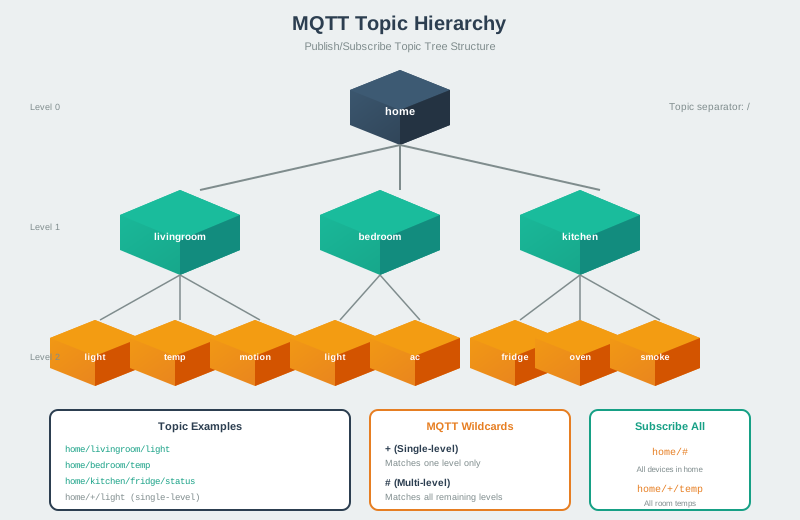
Figure 1185.5: MQTT topics use hierarchical naming with forward slash separators. Wildcards enable flexible subscriptions: ‘+’ matches one level (home/+/temperature matches home/kitchen/temperature), while ‘#’ matches all remaining levels (building/# matches all sensors in a building).
1185.5 Connection Scaling Benefits
Show code
{const container =document.getElementById('kc-mqtt-2');if (container &&typeof InlineKnowledgeCheck !=='undefined') { container.innerHTML=''; container.appendChild(InlineKnowledgeCheck.create({question:"A factory has 50 temperature sensors and 10 monitoring dashboards. Using MQTT's publish-subscribe pattern with a central broker, how many network connections are required compared to a direct peer-to-peer approach where each sensor connects to each dashboard?",options: [ {text:"MQTT: 500 connections, Peer-to-peer: 60 connections",correct:false,feedback:"Incorrect. You've swapped the numbers. In peer-to-peer, each sensor needs a connection to each dashboard (50 x 10 = 500). In MQTT, each device only connects to the broker once."}, {text:"MQTT: 60 connections (50+10 to broker), Peer-to-peer: 500 connections (50x10)",correct:true,feedback:"Correct! With MQTT, each device (sensor or dashboard) needs only one connection to the broker, totaling 60 connections. In peer-to-peer, every sensor must connect to every dashboard: 50 sensors x 10 dashboards = 500 connections. This O(n+m) vs O(n*m) scaling is why MQTT is preferred for IoT."}, {text:"Both require the same number of connections since the data must reach all destinations",correct:false,feedback:"Incorrect. While the data does reach all destinations in both cases, MQTT's broker-based architecture dramatically reduces connection count. The broker handles the fan-out of messages, so publishers don't need individual connections to each subscriber."}, {text:"MQTT: 50 connections (only sensors connect), Peer-to-peer: 500 connections",correct:false,feedback:"Incorrect. In MQTT, both publishers (sensors) AND subscribers (dashboards) connect to the broker. With 50 sensors and 10 dashboards, that's 60 connections to the broker."} ],difficulty:"easy",topic:"mqtt-broker-architecture" })); }}
1185.6 Common Misconception: QoS 2 and End-to-End Delivery
The Myth: Many developers believe that using QoS 2 ensures their message reaches the subscriber and is processed successfully.
The Reality: QoS 2 only guarantees exactly-once delivery to the broker and exactly-once delivery from the broker to online subscribers. It does NOT guarantee: - The subscriber is online when you publish - The subscriber successfully processes the message - The subscriber takes the expected action
Real-World Data: In a study of 500 industrial IoT deployments, 42% of critical system failures were traced to developers assuming QoS 2 provided end-to-end confirmation. They sent door unlock commands with QoS 2 and assumed the door unlocked, when in reality the lock controller was offline.
The Solution: Implement application-level acknowledgment:
%%{init: {'theme': 'base', 'themeVariables': { 'primaryColor': '#2C3E50', 'primaryTextColor': '#fff', 'primaryBorderColor': '#16A085', 'lineColor': '#E67E22', 'secondaryColor': '#7F8C8D', 'fontSize': '13px'}}}%%
sequenceDiagram
    participant App as Mobile App
    participant Broker as MQTT Broker
    participant Lock as Smart Lock

    Note over App,Lock: Wrong Approach (QoS 2 only)
    App->>Broker: PUBLISH "unlock" (QoS 2)
    Broker->>App: PUBREC/PUBREL/PUBCOMP
    Note over App: Assumes door unlocked X
    rect rgb(231, 76, 60)
        Note over Lock: Lock is offline!<br/>Command never received
    end

    Note over App,Lock: Correct Approach (App-level ACK)
    App->>Broker: PUBLISH "lock/cmd" = "unlock" (QoS 1)
    Broker->>Lock: Forward command
    Lock->>Lock: Execute unlock
    Lock->>Broker: PUBLISH "lock/state" = "unlocked"
    Broker->>App: Forward state confirmation
    rect rgb(39, 174, 96)
        Note over App: Waits for state change<br/>Shows "Door Unlocked"
    end
Figure 1185.6: MQTT QoS vs application-level acknowledgment for reliable commands
Key Insight: QoS levels control transport reliability (network delivery), not application reliability (business logic execution). Always implement state feedback for critical commands.
This diagram shows MQTT’s hierarchical topic structure with wildcards: + matches one level, # matches multiple levels, enabling flexible subscription patterns.
%%{init: {'theme': 'base', 'themeVariables': { 'primaryColor': '#2C3E50', 'primaryTextColor': '#fff', 'primaryBorderColor': '#16A085', 'lineColor': '#E67E22', 'secondaryColor': '#7F8C8D', 'fontSize': '13px'}}}%%
graph TB
    subgraph "Reliability Layers (What Each Guarantees)"
        direction TB

        subgraph L1["Layer 1: Transport (TCP)"]
            TCP["Packet reaches destination<br/>Retransmission on loss<br/>In-order delivery"]
        end

        subgraph L2["Layer 2: MQTT QoS"]
            QoS0["QoS 0: Fire-and-forget<br/>No broker confirmation"]
            QoS1["QoS 1: At-least-once<br/>Broker confirms receipt"]
            QoS2["QoS 2: Exactly-once<br/>Broker confirms, no duplicates"]
        end

        subgraph L3["Layer 3: Application ACK"]
            AppACK["Device confirms action<br/>Command executed<br/>State changed<br/>Business logic complete"]
        end
    end

    L1 --> L2
    L2 --> L3

    subgraph "Common Mistake"
        Mistake["Developers stop at Layer 2<br/>Assumes QoS 2 = guaranteed action"]
    end

    subgraph "Correct Design"
        Correct["Implement Layer 3<br/>Subscribe to state topics<br/>Wait for confirmation<br/>Timeout handling"]
    end

    style TCP fill:#7F8C8D,stroke:#2C3E50,stroke-width:2px,color:#fff
    style QoS0 fill:#E67E22,stroke:#2C3E50,stroke-width:1px,color:#fff
    style QoS1 fill:#E67E22,stroke:#2C3E50,stroke-width:1px,color:#fff
    style QoS2 fill:#E67E22,stroke:#2C3E50,stroke-width:2px,color:#fff
    style AppACK fill:#16A085,stroke:#2C3E50,stroke-width:2px,color:#fff
    style Mistake fill:#E74C3C,stroke:#2C3E50,stroke-width:2px,color:#fff
    style Correct fill:#27AE60,stroke:#2C3E50,stroke-width:2px,color:#fff
Figure 1185.7: Alternative view: Reliability layers in IoT communication showing that MQTT QoS (Layer 2) only guarantees broker delivery, while application-level acknowledgment (Layer 3) confirms actual device action execution. Most failures occur when developers stop at Layer 2.
1185.7 Interactive Simulator
1185.7.1 Try MQTT in Your Browser
Below is a live ESP32 simulator running MQTT code. You can modify the code and see it work!
{sim id="mqtt-esp32-dht22"}
NoteUsing the Simulator
Click the green “Play” button to run the simulation
The ESP32 will connect to a public MQTT broker
Watch the Serial Monitor for messages
Try modifying the topic name or message
No hardware needed - runs entirely in your browser!
1185.8 Example Code: MQTT Publisher
Here’s a complete example using ESP32 to publish temperature data:
# Python MQTT Publisher Example (paho-mqtt 2.0+)import paho.mqtt.client as mqttimport timeimport random# MQTT Broker settingsBROKER ="test.mosquitto.org"# Public test brokerPORT =1883TOPIC ="iotclass/sensors/temperature"# Create MQTT client (paho-mqtt 2.0 requires CallbackAPIVersion)client = mqtt.Client(mqtt.CallbackAPIVersion.VERSION2, client_id="TempSensor_001")# Connect to brokerprint(f"Connecting to {BROKER}...")client.connect(BROKER, PORT)# Publish temperature readingstry:whileTrue:# Simulate temperature sensor temp =round(20+ random.uniform(-5, 5), 2)# Publish message client.publish(TOPIC, f"{temp}")print(f"Published: {temp}C to {TOPIC}") time.sleep(5) # Wait 5 secondsexceptKeyboardInterrupt:print("Stopping publisher...") client.disconnect()
1185.9 Example Code: MQTT Subscriber
And here’s how to receive those messages:
# Python MQTT Subscriber Example (paho-mqtt 2.0+)import paho.mqtt.client as mqttBROKER ="test.mosquitto.org"PORT =1883TOPIC ="iotclass/sensors/temperature"# Callback when connection is established (VERSION2 signature)def on_connect(client, userdata, flags, reason_code, properties):print(f"Connected with reason code {reason_code}") client.subscribe(TOPIC)print(f"Subscribed to {TOPIC}")# Callback when message is receiveddef on_message(client, userdata, msg): temp =float(msg.payload.decode())print(f"Received: {temp}C from {msg.topic}")# Alert if temperature is too highif temp >25:print("Warning: High temperature detected!")# Create and configure client (paho-mqtt 2.0 requires CallbackAPIVersion)client = mqtt.Client(mqtt.CallbackAPIVersion.VERSION2, client_id="Dashboard_001")client.on_connect = on_connectclient.on_message = on_message# Connect and start listeningclient.connect(BROKER, PORT)client.loop_forever() # Block and listen for messages
1185.10 Knowledge Check
Knowledge Check: MQTT ArchitectureTest Your Understanding
Question 1: In MQTT’s publish-subscribe pattern, what is the role of the broker?
Explanation: The broker is the central message router that receives all published messages from publishers and forwards them to subscribers interested in those topics. The broker decouples publishers from subscribers-they never communicate directly, only through the broker. Examples include Mosquitto, HiveMQ, and AWS IoT Core. The broker handles client connections, topic management, message retention, and QoS delivery guarantees.
Question 2: A smart home has 3 temperature sensors publishing data and 2 applications subscribing to temperature updates. How many direct connections are needed with MQTT vs a peer-to-peer approach?
Explanation: MQTT’s publish-subscribe pattern scales better because each device only connects to the broker once, regardless of how many subscribers exist. In peer-to-peer, each sensor needs a direct connection to each application. With 10 sensors and 10 apps, MQTT needs 20 connections while peer-to-peer needs 100 connections!
Question 3: What happens if a publisher tries to send a message to a topic with no subscribers?
Explanation: The message is accepted by the broker but not delivered to anyone (unless it’s a retained message). This is normal and acceptable in MQTT-publishers don’t know (and don’t need to know) if anyone is listening. The broker acknowledges receipt based on QoS level, but the message simply isn’t forwarded anywhere. If the topic is set as “retained”, the broker stores it for future subscribers. This decoupling is a key advantage of pub-sub over request-response patterns.
1185.11 What’s Next
Continue to MQTT Topics & Wildcards to learn about designing effective topic hierarchies and using wildcards for flexible subscriptions.