%%{init: {'theme': 'base', 'themeVariables': {'primaryColor': '#2C3E50', 'primaryTextColor': '#fff', 'primaryBorderColor': '#16A085', 'lineColor': '#E67E22', 'secondaryColor': '#ECF0F1', 'tertiaryColor': '#fff', 'nodeTextColor': '#2C3E50'}}}%%
graph TB
subgraph "OpenDaylight TSDR Architecture"
Sources["Data Sources:<br/>- Flow statistics<br/>- Port statistics<br/>- Syslogs<br/>- NetFlow/sFlow"]
Collectors["TSDR<br/>Collectors"]
Queue["Data<br/>Queue"]
Persistence["TSDR<br/>Persistence Layer"]
HBase["HBase<br/>(Distributed,<br/>scalable)"]
Cassandra["Cassandra<br/>(High write<br/>throughput)"]
Elastic["Elasticsearch<br/>(Full-text<br/>search)"]
Query["TSDR<br/>Query API"]
Apps["Analytics<br/>Applications"]
end
Sources --> Collectors
Collectors --> Queue
Queue --> Persistence
Persistence --> HBase
Persistence --> Cassandra
Persistence --> Elastic
HBase --> Query
Cassandra --> Query
Elastic --> Query
Query --> Apps
style Sources fill:#2C3E50,stroke:#16A085,color:#fff
style Persistence fill:#E67E22,stroke:#2C3E50,color:#fff
style Query fill:#16A085,stroke:#2C3E50,color:#fff
297 SDN Controllers and Advanced Use Cases
297.1 Learning Objectives
By the end of this chapter, you will be able to:
- Compare SDN Controllers: Evaluate ONOS, OpenDaylight, Ryu, Floodlight, and Faucet for different deployment scenarios
- Implement Traffic Engineering: Design QoS-based path selection for smart factory and data center applications
- Build Predictive Maintenance: Use ML-based failure prediction with weighted feature scoring
- Detect IoT Botnets: Implement multi-stage detection with graduated response actions
- Optimize Energy-Aware Routing: Balance network lifetime in software-defined wireless sensor networks
297.2 Prerequisites
Before diving into this chapter, you should be familiar with:
- SDN Analytics Implementation: Understanding statistics collection and baseline establishment provides context for controller features
- SDN Anomaly Detection: Knowledge of detection methods informs advanced botnet detection algorithms
297.3 SDN Controllers with Analytics Capabilities
Modern SDN controllers provide varying levels of built-in analytics capabilities. Choosing the right controller depends on your deployment scale, performance requirements, and analytics needs.
297.3.1 Controller Comparison
| Controller | Language | Analytics Features | Best For | Learning Curve |
|---|---|---|---|---|
| ONOS | Java | Built-in GUI, REST API, intent framework, real-time metrics | Large-scale IoT deployments, carrier-grade networks | Moderate |
| OpenDaylight | Java | Extensive plugin ecosystem, TSDR (time-series data repository) | Enterprise IoT, multi-vendor environments | High |
| Ryu | Python | Lightweight, flexible, easy custom analytics | Research, prototyping, small-to-medium IoT | Low |
| Floodlight | Java | Modular architecture, web GUI, circuit pusher | Educational use, medium-scale deployments | Low-Moderate |
| POX | Python | Simple, educational-focused, basic statistics | Learning SDN concepts, classroom labs | Very Low |
| Faucet | Python | High-performance, configuration-driven, Prometheus integration | Production IoT networks, data centers | Low |
297.3.2 ONOS (Open Network Operating System)
Key Analytics Features: - Distributed architecture for scalability (handles 100+ switches) - Real-time flow statistics visualization through web GUI - Intent-based northbound interface (express goals, not mechanisms) - Built-in applications for traffic engineering and failover
Analytics Implementation Approach:
ONOS applications use a component-based architecture to implement traffic monitoring:
Core Implementation Steps:
- Service Registration: Application registers for FlowRuleService and DeviceService to access network state
- Periodic Collection: Scheduled executor queries flow statistics from all devices every 15 seconds
- Rate Calculation: For each flow entry, calculate bytes/sec and packets/sec based on duration
- Anomaly Detection: Compare packet rates against thresholds to identify suspicious traffic
- Mitigation: Install flow rules with meter tables to rate-limit anomalous flows
Example Monitoring Workflow:
FOR each connected device (switch):
  Query all flow entries via FlowRuleService
  FOR each flow entry:
    Calculate rate = packets / (duration / 1000.0)
    IF rate > THRESHOLD:
      Log warning with packet rate and source
      Install meter-based rate limit:
        - Create TrafficTreatment with meter ID
        - Build FlowRule: selector + treatment + priority 1000
        - Apply rule via flowRuleService
Deployment Considerations:
| Aspect | Recommendation | Notes |
|---|---|---|
| Memory | 4-8 GB RAM | Moderate deployments (10-50 switches) |
| Clustering | 3-5 controller instances | High availability and load distribution |
| Integration | REST API | External analytics platforms (Splunk, Grafana) |
| Community | Active open-source | Strong documentation, regular releases |
| Learning Curve | Moderate | Java proficiency required, well-documented APIs |
297.3.3 OpenDaylight
Key Analytics Features: - Time-Series Data Repository (TSDR) for historical analytics - Plugin architecture supports custom analytics modules - YANG models for standardized device interaction - Integration with Apache Kafka for streaming analytics
TSDR Architecture:
{fig-alt=“OpenDaylight TSDR Architecture showing data sources (flow/port statistics, syslogs, NetFlow/sFlow) feeding TSDR collectors, queuing data for persistence layer which stores to three backend options (HBase for distributed scalability, Cassandra for high write throughput, Elasticsearch for full-text search), TSDR query API providing unified access for analytics applications”}
Storage Backend Options: - HBase: Distributed, scalable, handles millions of metrics - Cassandra: High write throughput, time-series optimized - HSQLDB: Lightweight, suitable for small deployments - Elasticsearch: Full-text search, excellent for log analysis
297.3.4 Ryu Controller
Key Analytics Features: - Python-based, easy to extend with NumPy/Pandas for analytics - Event-driven architecture simplifies statistics handling - Lightweight footprint suitable for edge deployments - Excellent for rapid prototyping and custom analytics
Multi-Method Anomaly Detection:
Ryu controllers can implement sophisticated analytics using Python’s data science ecosystem:
%%{init: {'theme': 'base', 'themeVariables': {'primaryColor': '#2C3E50', 'primaryTextColor': '#fff', 'primaryBorderColor': '#16A085', 'lineColor': '#E67E22', 'secondaryColor': '#ECF0F1', 'tertiaryColor': '#fff', 'nodeTextColor': '#2C3E50'}}}%%
graph TB
    subgraph "Ryu Multi-Method Anomaly Detection"
        Stats["Flow Statistics<br/>Reply"]

        Method1["Method 1:<br/>Z-Score Detection<br/>If |Z| > 3σ:<br/>Statistical outlier"]

        Method2["Method 2:<br/>Sudden Change<br/>If rate > 5x prev:<br/>Spike detected"]

        Method3["Method 3:<br/>Trend Analysis<br/>Linear regression<br/>If slope > 0.5:<br/>Sustained increase"]

        Decision{"Any<br/>Anomaly<br/>Detected?"}

        Response["Trigger Response:<br/>- Create meter<br/>- Install flow rule<br/>- Log event"]

        Continue["Store Stats<br/>Continue Monitoring"]
    end

    Stats --> Method1
    Stats --> Method2
    Stats --> Method3

    Method1 --> Decision
    Method2 --> Decision
    Method3 --> Decision

    Decision -->|Yes| Response
    Decision -->|No| Continue

    style Stats fill:#2C3E50,stroke:#16A085,color:#fff
    style Decision fill:#E67E22,stroke:#2C3E50,color:#fff
    style Response fill:#16A085,stroke:#2C3E50,color:#fff
{fig-alt=“Ryu Multi-Method Anomaly Detection flowchart: Flow statistics reply analyzed by three parallel detection methods (Method 1 Z-Score detecting statistical outliers beyond 3 standard deviations, Method 2 Sudden Change detecting rate spikes over 5x previous, Method 3 Trend Analysis using linear regression for sustained increases with slope greater than 0.5), decision point checking any anomaly detected, triggering response (create meter, install flow rule, log event) if yes, or storing stats and continuing monitoring if no”}
Detection Methods:
| Method | Algorithm | Trigger Condition | Use Case |
|---|---|---|---|
| Z-Score | z = (current - mean) / std |
abs(z) > 3 |
Detect sudden spikes (DDoS, malware) |
| Change Ratio | ratio = current / previous |
ratio > 5 |
Identify rapid rate increases |
| Trend | Linear regression slope | slope > 0.5 |
Catch gradual traffic growth |
| Error Rate | errors / packets |
rate > 0.01 |
Port/link issues |
Advantages of Ryu for IoT Analytics:
| Feature | Benefit | Example Use Case |
|---|---|---|
| Python Ecosystem | Use pandas, scikit-learn, TensorFlow | Train ML models on historical flow data |
| Lightweight | Runs on Raspberry Pi (512 MB RAM) | Edge SDN controller for local sensor networks |
| Rapid Development | 50-100 lines for complete analytics app | Prototype custom detection algorithms in hours |
| Educational | Clear code structure, extensive docs | Learning SDN programming and network analytics |
| Event-Driven | Decorators simplify OpenFlow handling | No manual message parsing overhead |
297.3.5 Faucet Controller
Key Analytics Features: - Production-grade performance (100,000+ flows/second) - Prometheus integration for metrics export - Configuration-driven (YAML files, no programming required) - Built-in support for Grafana dashboards
Prometheus Metrics Export Example:
# faucet.yaml configuration
dps:
  iot-switch-1:
    dp_id: 0x1
    hardware: "Open vSwitch"
    interfaces:
      1:
        name: "sensor-network"
        native_vlan: 100
      2:
        name: "gateway"
        native_vlan: 200

# Enable Prometheus metrics
faucet:
  prometheus_port: 9302
  prometheus_addr: "0.0.0.0"
Exported Metrics: - faucet_packet_ins: Packet-in events per switch - faucet_flow_mods: Flow rule installations - port_status: Link up/down events - learned_macs: MAC address learning - vlan_hosts: Devices per VLAN
Grafana Dashboard Query:
# Alert on high packet-in rate (potential flow table miss)
rate(faucet_packet_ins{dp_name="iot-switch-1"}[5m]) > 100

# Track device count per VLAN
sum(faucet_vlan_hosts_learned) by (vlan)

# Monitor flow table utilization
faucet_dp_flowcount / faucet_dp_max_flows
297.4 Advanced Analytics Use Cases
297.4.1 Traffic Engineering for IoT
SDN analytics enables intelligent traffic engineering that adapts to IoT application requirements:
Use Case: Smart Factory
%%{init: {'theme': 'base', 'themeVariables': {'primaryColor': '#2C3E50', 'primaryTextColor': '#fff', 'primaryBorderColor': '#16A085', 'lineColor': '#E67E22', 'secondaryColor': '#ECF0F1', 'tertiaryColor': '#fff', 'nodeTextColor': '#2C3E50'}}}%%
graph TB
    subgraph "Smart Factory Traffic Engineering"
        Factory["Smart Factory<br/>Network"]

        Critical["Critical Traffic:<br/>Robotic arms<br/>(1ms latency)<br/>Priority: HIGHEST"]

        High["High Priority:<br/>Vision systems<br/>(100 Mbps bandwidth)<br/>Priority: HIGH"]

        Medium["Medium Priority:<br/>Sensor data<br/>(Low latency tolerance)<br/>Priority: MEDIUM"]

        Low["Low Priority:<br/>Logging, backups<br/>(Best effort)<br/>Priority: LOW"]

        SDN["SDN Controller<br/>Traffic Classification<br/>& QoS Mapping"]

        Path1["Path 1:<br/>Low-latency<br/>dedicated links"]

        Path2["Path 2:<br/>High-bandwidth<br/>links"]

        Path3["Path 3:<br/>Standard paths"]

        Monitor["Dynamic<br/>Adjustment<br/>(Congestion detection)"]
    end

    Factory --> Critical
    Factory --> High
    Factory --> Medium
    Factory --> Low

    Critical --> SDN
    High --> SDN
    Medium --> SDN
    Low --> SDN

    SDN --> Path1
    SDN --> Path2
    SDN --> Path3

    Critical --> Path1
    High --> Path2
    Medium --> Path3
    Low --> Path3

    SDN --> Monitor
    Monitor -.->|Reroute| SDN

    style Critical fill:#E74C3C,stroke:#2C3E50,color:#fff
    style SDN fill:#2C3E50,stroke:#16A085,color:#fff
    style Monitor fill:#16A085,stroke:#2C3E50,color:#fff
{fig-alt=“Smart Factory Traffic Engineering diagram: Factory network traffic classified into four priority levels (Critical robotic arms needing 1ms latency highest priority, High priority vision systems needing 100 Mbps bandwidth, Medium priority sensor data, Low priority logging/backups), SDN Controller performs traffic classification and QoS mapping routing critical traffic to low-latency dedicated links, high priority to high-bandwidth links, medium and low to standard paths, with dynamic adjustment monitoring congestion and triggering rerouting”}
Implementation Strategy:
- Traffic Classification: Identify application types based on port numbers, packet sizes, or DSCP markings
- QoS Mapping: Assign priority levels (Critical > High > Medium > Low)
- Path Selection: Route critical traffic through low-latency paths, bulk transfers through high-bandwidth paths
- Dynamic Adjustment: Monitor link utilization and reroute when congestion detected
Analytics Metrics: - Per-class latency: Track end-to-end delay for each traffic class - Bandwidth utilization: Monitor link usage to prevent over-subscription - Packet loss rate: Detect congestion and trigger rerouting - Application SLA compliance: Measure adherence to service-level agreements
297.4.2 Predictive Maintenance Using SDN Analytics
SDN analytics can predict network failures before they occur:
%%{init: {'theme': 'base', 'themeVariables': {'primaryColor': '#2C3E50', 'primaryTextColor': '#fff', 'primaryBorderColor': '#16A085', 'lineColor': '#E67E22', 'secondaryColor': '#ECF0F1', 'tertiaryColor': '#fff', 'nodeTextColor': '#2C3E50'}}}%%
graph TB
    subgraph "Predictive Maintenance Using SDN"
        Monitor["Continuous<br/>Monitoring"]

        Features["Feature Extraction:<br/>- Error rate trends<br/>- Temperature anomalies<br/>- Latency degradation<br/>- Traffic pattern changes"]

        ML["Machine Learning<br/>Model:<br/>Failure prediction"]

        Threshold{"Failure<br/>Probability<br/>>80%?"}

        Proactive["Proactive Actions:<br/>- Reroute traffic<br/>- Alert maintenance<br/>- Schedule replacement"]

        Continue["Continue<br/>Monitoring"]

        Prevent["Failure<br/>Prevented"]
    end

    Monitor --> Features
    Features --> ML
    ML --> Threshold

    Threshold -->|Yes| Proactive
    Threshold -->|No| Continue
    Continue -.-> Monitor
    Proactive --> Prevent
    Prevent -.-> Monitor

    style Monitor fill:#2C3E50,stroke:#16A085,color:#fff
    style ML fill:#E67E22,stroke:#2C3E50,color:#fff
    style Proactive fill:#16A085,stroke:#2C3E50,color:#fff
{fig-alt=“Predictive Maintenance Using SDN flowchart: Continuous monitoring feeds feature extraction analyzing error rate trends, temperature anomalies, latency degradation, and traffic pattern changes; Machine learning model predicts failure probability; Decision point at 80% threshold triggers proactive actions (reroute traffic, alert maintenance, schedule replacement) to prevent failure, or continues monitoring if below threshold, creating continuous loop for failure prevention”}
Feature Extraction and Scoring:
| Feature | Calculation | Weight | Threshold | Normalization |
|---|---|---|---|---|
| Error Trend | Linear regression slope of error rates | 30% | Trend > 0.01 (1% increase) | min(trend / 0.01, 1.0) |
| Temperature Trend | Slope of temperature over time | 20% | Trend > 2 deg C/hour | min(trend / 2.0, 1.0) |
| Error Spike | Recent errors / baseline errors | 30% | Ratio > 5x | min(spike / 5.0, 1.0) |
| Critical Temp | Binary flag for overheating | 20% | >70 deg C | 1 if temp > 70, else 0 |
Prediction Algorithm:
Function: predict_port_failure(port_stats_history)

  Requirements: >= 100 historical samples
  IF len(history) < 100:
    RETURN 0.0  # Insufficient data

  Extract Features:
    error_rates = (rx_errors + tx_errors) / (rx_packets + tx_packets)
    temperatures = temperature values from stats

  Feature 1 - Error Rate Trend:
    error_trend = linear_regression_slope(error_rates)
    score_1 = 0.3 x min(error_trend / 0.01, 1.0)

  Feature 2 - Temperature Trend:
    temp_trend = linear_regression_slope(temperatures)
    score_2 = 0.2 x min(temp_trend / 2.0, 1.0)

  Feature 3 - Recent Error Spike:
    recent_errors = mean(error_rates[-10:])
    baseline_errors = mean(error_rates[-100:-10])
    error_spike = recent_errors / baseline_errors
    score_3 = 0.3 x min(error_spike / 5.0, 1.0)

  Feature 4 - Critical Temperature:
    temp_critical = 1 if max(temperatures[-10:]) > 70 else 0
    score_4 = 0.2 x temp_critical

  Failure Probability = score_1 + score_2 + score_3 + score_4
  RETURN failure_probability (0.0 to 1.0)
297.4.3 Security Analytics: IoT Botnet Detection
SDN provides ideal visibility for detecting compromised IoT devices:
Detection Signatures:
| Botnet Behavior | SDN Detection Method | Response |
|---|---|---|
| C&C Communication | Unusual destinations, periodic beaconing patterns | Block C&C IP, quarantine device |
| DDoS Participation | High packet rate to external target, SYN floods | Rate-limit, drop attack traffic |
| Lateral Movement | IoT device scanning internal network | Isolate to separate VLAN |
| Data Exfiltration | Large outbound transfers from sensor | Alert, capture packets |
Multi-Stage Detection:
%%{init: {'theme': 'base', 'themeVariables': {'primaryColor': '#2C3E50', 'primaryTextColor': '#fff', 'primaryBorderColor': '#16A085', 'lineColor': '#E67E22', 'secondaryColor': '#ECF0F1', 'tertiaryColor': '#fff', 'nodeTextColor': '#2C3E50'}}}%%
graph TB
    subgraph "Multi-Stage Botnet Detection"
        Device["IoT Device<br/>Traffic"]

        Stage1["Stage 1:<br/>Baseline Deviation<br/>(Traffic spike?)"]

        Stage2["Stage 2:<br/>Destination Analysis<br/>(New IPs?)"]

        Stage3["Stage 3:<br/>Protocol Analysis<br/>(Unexpected protocols?)"]

        Stage4["Stage 4:<br/>Behavioral Signatures<br/>(Scanning? Beaconing?<br/>DDoS pattern?)"]

        Score["Calculate<br/>Risk Score<br/>(0-100)"]

        Decision{Risk Level?}

        Low["<30: Low Risk<br/>Enhanced logging"]
        Med["30-60: Medium Risk<br/>Packet capture enabled"]
        High["60-80: High Risk<br/>Severe rate limit"]
        Critical["80+: Critical<br/>Full quarantine"]
    end

    Device --> Stage1
    Stage1 --> Stage2
    Stage2 --> Stage3
    Stage3 --> Stage4
    Stage4 --> Score
    Score --> Decision

    Decision -->|<30| Low
    Decision -->|30-60| Med
    Decision -->|60-80| High
    Decision -->|80+| Critical

    style Device fill:#2C3E50,stroke:#16A085,color:#fff
    style Score fill:#E67E22,stroke:#2C3E50,color:#fff
    style Critical fill:#E74C3C,stroke:#2C3E50,color:#fff
{fig-alt=“Multi-Stage Botnet Detection pipeline: IoT device traffic analyzed through four sequential stages (Stage 1 baseline deviation checking traffic spikes, Stage 2 destination analysis for new IPs, Stage 3 protocol analysis for unexpected protocols, Stage 4 behavioral signatures checking for scanning, beaconing, or DDoS patterns), risk score calculated 0-100, decision point routes to graduated response (Low less than 30 enhanced logging, Medium 30-60 packet capture, High 60-80 severe rate limit, Critical 80+ full quarantine)”}
Risk Scoring Algorithm:
| Detection Stage | Risk Points | Trigger Condition | Indicator Logged |
|---|---|---|---|
| Stage 1: Baseline Deviation | +20 | Current rate > mean + 3 sigma | “Traffic spike: X pps (baseline: Y)” |
| Stage 2: Destination Analysis | +25 | >5 new destination IPs | “N new destination IPs” |
| Stage 3: Protocol Analysis | +15 | Unexpected protocols (not TCP/UDP) | “Unexpected protocols: {proto_ids}” |
| Stage 4a: Scanning | +30 | >10 destinations, <10 packets each | “Scanning pattern: N dests, avg M pkts” |
| Stage 4b: Beaconing | +25 | Coefficient of variation < 0.2 | “Periodic beaconing: X second interval” |
| Stage 4c: DDoS | +35 | >80% traffic to single target, >10k packets | “DDoS pattern: X packets to Y” |
Real-World Performance: - Detection Time: 30-60 seconds (2-4 polling intervals) - False Positive Rate: ~3-5% with proper baseline (24-hour training) - Computational Overhead: <5% CPU on modern controller (1000 devices) - Storage: ~50 KB per device (100 flow records x 500 bytes)
297.4.4 Energy-Aware Routing Analytics (SD-WSN)
For software-defined wireless sensor networks, analytics optimize energy consumption:
%%{init: {'theme': 'base', 'themeVariables': {'primaryColor': '#2C3E50', 'primaryTextColor': '#fff', 'primaryBorderColor': '#16A085', 'lineColor': '#E67E22', 'secondaryColor': '#ECF0F1', 'tertiaryColor': '#fff', 'nodeTextColor': '#2C3E50'}}}%%
graph TB
    subgraph "SD-WSN Energy-Aware Routing"
        Nodes["Sensor Nodes<br/>Report Battery Levels"]

        Controller["SDN Controller<br/>(Central Intelligence)"]

        Cost["Calculate Route Costs:<br/>Cost = (hop count) x (energy_weight)<br/>/ (remaining_battery)"]

        Dijkstra["Dijkstra's Algorithm<br/>(Custom cost function)"]

        Routes["Install Energy-Efficient<br/>Routes"]

        Monitor["Monitor Battery<br/>Levels"]

        Threshold{"Battery<br/>Change<br/>>10%?"}

        Rebalance["Recalculate<br/>Routes"]

        Benefits["Benefits:<br/>- 25-40% energy savings<br/>- 1.3-1.7x network lifetime<br/>- Balanced node depletion"]
    end

    Nodes --> Controller
    Controller --> Cost
    Cost --> Dijkstra
    Dijkstra --> Routes
    Routes --> Monitor
    Monitor --> Threshold

    Threshold -->|Yes| Rebalance
    Threshold -->|No| Monitor
    Rebalance --> Cost

    Routes -.-> Benefits

    style Controller fill:#2C3E50,stroke:#16A085,color:#fff
    style Dijkstra fill:#E67E22,stroke:#2C3E50,color:#fff
    style Benefits fill:#16A085,stroke:#2C3E50,color:#fff
{fig-alt=“SD-WSN Energy-Aware Routing diagram: Sensor nodes report battery levels to SDN Controller with central intelligence, controller calculates route costs using formula (hop count times energy_weight divided by remaining_battery), applies Dijkstra’s algorithm with custom cost function, installs energy-efficient routes, monitors battery levels continuously, triggers route recalculation when battery change exceeds 10%, achieving benefits of 25-40% energy savings, 1.3-1.7x network lifetime extension, and balanced node depletion”}
Energy-Aware Routing Algorithm:
- Collect Energy Metrics: Nodes report battery levels to controller
- Calculate Route Costs: Cost = (hop count) x (energy_weight) / (remaining_battery)
- Install Energy-Efficient Routes: Use Dijkstra’s algorithm with custom cost function
- Dynamic Rebalancing: Recalculate routes when battery levels change significantly
Analytics Insights: - Network lifetime prediction: Estimate time until first node failure - Hotspot identification: Detect nodes handling disproportionate traffic - Energy efficiency metrics: Measure packets delivered per joule consumed - Sleep schedule optimization: Coordinate duty cycling based on traffic patterns
297.5 Performance Benchmarks
Real-world SDN analytics implementations achieve significant improvements:
| Metric | Traditional Network | SDN with Analytics | Improvement |
|---|---|---|---|
| DDoS Detection Time | 5-30 minutes | 5-15 seconds | 20-360x faster |
| Mitigation Deployment | 30-60 minutes (manual) | 1-5 seconds (automated) | 360-3600x faster |
| False Positive Rate | 15-25% | 2-5% (ML-based) | 3-12.5x reduction |
| Network Visibility | 5-10% (sampled NetFlow) | 100% (all flows) | 10-20x increase |
| Energy Savings (WSN) | Baseline | 25-40% improvement | 1.3-1.7x lifetime |
| Traffic Engineering Efficiency | Static routes | 30-50% better utilization | 1.3-1.5x capacity |
Source Data: - DDoS detection: Industry reports from Arbor Networks, Cloudflare - Energy savings: Academic research on SD-WSN deployments - Traffic engineering: Google B4 SDN deployment case study
297.6 Knowledge Check
NoteAlternative View: SDN Control Plane Decision Loop
This variant shows the SDN controller decision-making process as a continuous loop, emphasizing the reactive nature of centralized control.
%%{init: {'theme': 'base', 'themeVariables': { 'primaryColor': '#2C3E50', 'primaryTextColor': '#fff', 'primaryBorderColor': '#16A085', 'lineColor': '#16A085', 'secondaryColor': '#E67E22', 'tertiaryColor': '#7F8C8D', 'fontSize': '11px'}}}%%
graph TB
    subgraph DataPlane["DATA PLANE (Switches)"]
        PKT_IN["Unknown Packet<br/>No matching flow"]
        FWD["Forward at<br/>Line Rate"]
        MATCH["Packet matches<br/>installed flow"]
    end

    subgraph ControlPlane["CONTROL PLANE (Controller)"]
        TOPO["Topology<br/>Database"]
        POLICY["Policy<br/>Engine"]
        COMPUTE["Path<br/>Computation"]
    end

    PKT_IN -->|"PACKET_IN"| TOPO
    TOPO --> POLICY
    POLICY --> COMPUTE
    COMPUTE -->|"FLOW_MOD"| FWD
    MATCH --> FWD
    FWD -->|"Flow expires"| PKT_IN

    NOTE["First packet: ~10ms controller delay<br/>Subsequent: ~1us switch forwarding"]

    style PKT_IN fill:#E67E22,stroke:#2C3E50,color:#fff
    style FWD fill:#16A085,stroke:#2C3E50,color:#fff
    style COMPUTE fill:#2C3E50,stroke:#16A085,color:#fff
NoteAlternative View: SDN IoT Analytics Pipeline Stages
This variant shows the analytics processing stages from IoT device to actionable insight, emphasizing where SDN adds value.
%%{init: {'theme': 'base', 'themeVariables': { 'primaryColor': '#2C3E50', 'primaryTextColor': '#fff', 'primaryBorderColor': '#16A085', 'lineColor': '#E67E22', 'secondaryColor': '#E67E22', 'tertiaryColor': '#7F8C8D', 'fontSize': '11px'}}}%%
graph LR
    subgraph Collect["1. COLLECTION"]
        IOT["10K+ IoT Devices<br/>1M events/min"]
    end

    subgraph Aggregate["2. AGGREGATION"]
        EDGE["Edge Processing<br/>80% data reduction"]
    end

    subgraph Analyze["3. FLOW ANALYSIS"]
        SDN["SDN Controller<br/>Traffic correlation"]
    end

    subgraph Infer["4. ML INFERENCE"]
        ML["Anomaly Detection<br/>DDoS identification"]
    end

    subgraph Act["5. ACTION"]
        RULES["Auto Flow Rules<br/><50ms response"]
    end

    Collect --> Aggregate
    Aggregate --> Analyze
    Analyze --> Infer
    Infer --> Act
    Act -.->|"Feedback"| Collect

    style IOT fill:#7F8C8D,stroke:#2C3E50,color:#fff
    style EDGE fill:#E67E22,stroke:#2C3E50,color:#fff
    style SDN fill:#2C3E50,stroke:#16A085,color:#fff
    style ML fill:#16A085,stroke:#2C3E50,color:#fff
    style RULES fill:#16A085,stroke:#2C3E50,color:#fff
297.7 Visual Reference Gallery
NoteVisual: SDN Architecture for IoT
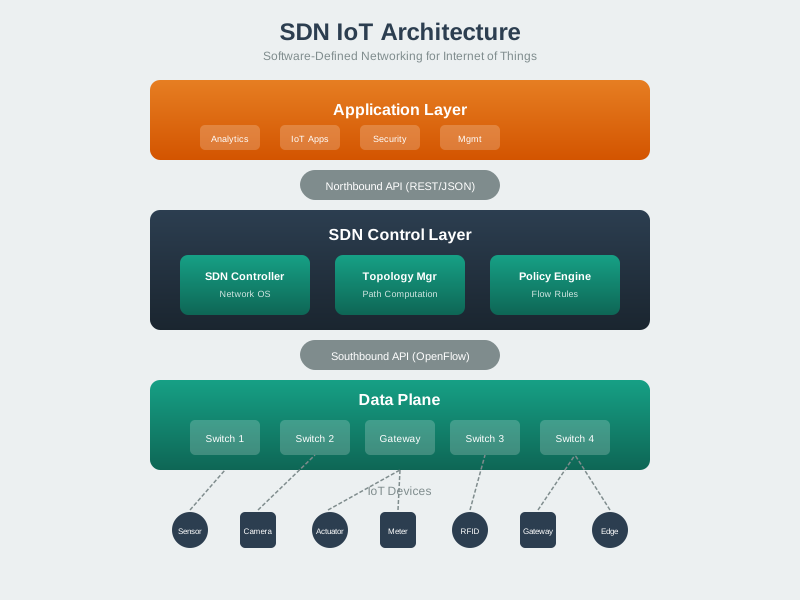
NoteVisual: SDN Controller Design
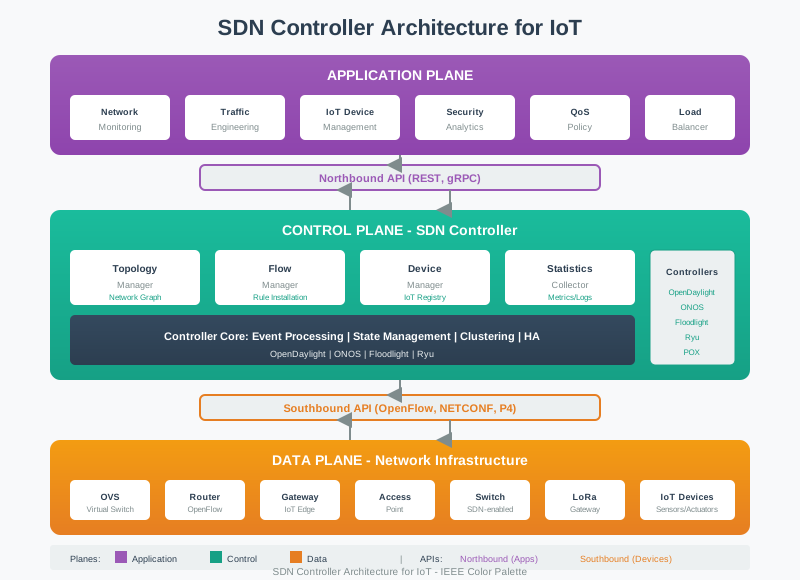
NoteVisual: SDN Controller Operation
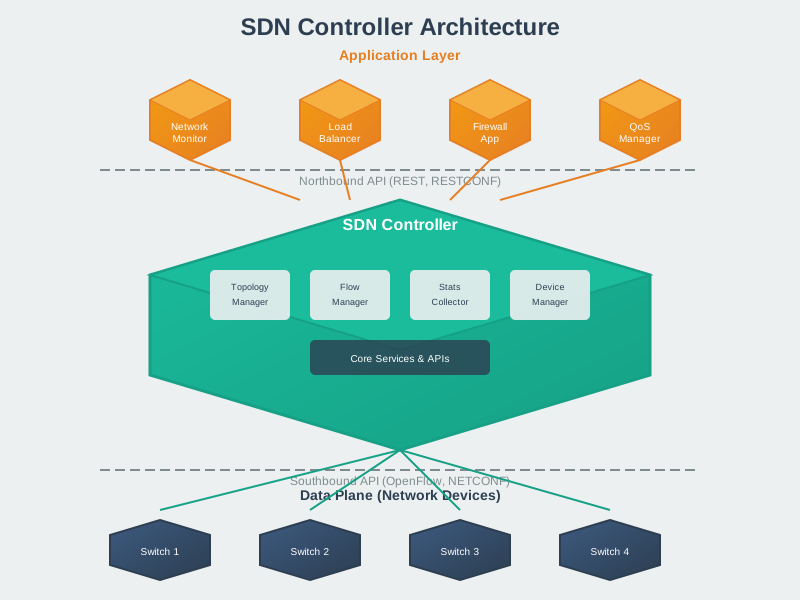
297.8 Summary
This chapter covered SDN controllers and advanced analytics use cases:
Controller Comparison: - ONOS: Java-based, distributed, carrier-grade, intent framework for large deployments - OpenDaylight: Enterprise-focused, TSDR for time-series storage, plugin ecosystem - Ryu: Python-based, lightweight, NumPy/Pandas integration, ideal for prototyping - Faucet: Configuration-driven, Prometheus/Grafana integration, production-grade performance
Traffic Engineering: - QoS-based classification (Critical > High > Medium > Low priority) - Path selection based on latency and bandwidth requirements - Dynamic adjustment responding to congestion detection - 30-50% better link utilization vs. static routing
Predictive Maintenance: - Feature extraction: error trends, temperature, latency degradation - Weighted scoring model with 80% failure probability threshold - Proactive rerouting before component failure - ML model integration for production deployments
Botnet Detection: - Four-stage analysis: baseline deviation, destinations, protocols, behavioral signatures - Risk scoring (0-100) with graduated response - 30-60 second detection time, 3-5% false positive rate - Automated quarantine for critical-risk devices
Energy-Aware Routing: - Battery-based cost function for route calculation - 25-40% energy savings, 1.3-1.7x network lifetime - Dynamic rebalancing when battery changes >10% - Sleep schedule optimization based on traffic patterns
297.9 What’s Next
The next chapter explores SDN Production and Review, covering enterprise deployment considerations, scalability patterns, and production best practices for SDN analytics systems.