%% fig-cap: "IoT Network Topology Comparison"
%% fig-alt: "Comparison diagram of four IoT network topologies: Star topology shows central hub with 4 sensor nodes connected directly, offering simple design and low latency but creating single point of failure. Mesh topology displays 4 interconnected sensor nodes with multiple paths between each, providing self-healing capability and extended range through multi-hop routing but with higher complexity. Tree topology illustrates hierarchical structure with gateway at top connecting to routers which connect to sensors, enabling efficient data aggregation but vulnerable to parent node failures. Hybrid topology combines mesh clusters connected via backbone network to gateway, balancing flexibility with complexity for large deployments. Each topology suited for different IoT application requirements based on scale, reliability, latency, and power constraints."
%%{init: {'theme': 'base', 'themeVariables': {'primaryColor': '#2C3E50', 'primaryTextColor': '#fff', 'primaryBorderColor': '#1a252f', 'lineColor': '#16A085', 'secondaryColor': '#E67E22'}}}%%
flowchart TB
subgraph Star["Star Topology"]
SH[Hub/Gateway]
S1((Sensor 1))
S2((Sensor 2))
S3((Sensor 3))
S4((Sensor 4))
S1 --> SH
S2 --> SH
S3 --> SH
S4 --> SH
end
subgraph Mesh["Mesh Topology"]
M1((Node 1))
M2((Node 2))
M3((Node 3))
M4((Node 4))
M1 <--> M2
M2 <--> M3
M3 <--> M4
M4 <--> M1
M1 <--> M3
M2 <--> M4
end
subgraph Tree["Tree Topology"]
TG[Gateway]
TR1[Router 1]
TR2[Router 2]
TS1((Sensor))
TS2((Sensor))
TS3((Sensor))
TS4((Sensor))
TG --> TR1
TG --> TR2
TR1 --> TS1
TR1 --> TS2
TR2 --> TS3
TR2 --> TS4
end
subgraph Hybrid["Hybrid Topology"]
HG[Gateway]
HC1[Cluster 1]
HC2[Cluster 2]
HG --> HC1
HG --> HC2
HC1 <-.-> HC2
end
style SH fill:#2C3E50,stroke:#16A085,color:#fff
style TG fill:#2C3E50,stroke:#16A085,color:#fff
style HG fill:#2C3E50,stroke:#16A085,color:#fff
style TR1 fill:#E67E22,stroke:#2C3E50,color:#fff
style TR2 fill:#E67E22,stroke:#2C3E50,color:#fff
style HC1 fill:#E67E22,stroke:#2C3E50,color:#fff
style HC2 fill:#E67E22,stroke:#2C3E50,color:#fff
style M1 fill:#16A085,stroke:#2C3E50,color:#fff
style M2 fill:#16A085,stroke:#2C3E50,color:#fff
style M3 fill:#16A085,stroke:#2C3E50,color:#fff
style M4 fill:#16A085,stroke:#2C3E50,color:#fff
1557 Network Design and Simulation: Introduction
1557.1 Network Design and Simulation
This section provides a stable anchor for cross-references to network design and simulation content across the book.
1557.2 Learning Objectives
By the end of this chapter, you will be able to:
- Understand fundamental IoT network design principles and topologies
- Identify key network requirements and constraints for IoT applications
- Select appropriate network simulation tools for IoT system validation
- Design and simulate IoT networks to evaluate performance before deployment
- Analyze network metrics including latency, throughput, packet loss, and energy consumption
- Apply best practices for scalable and reliable IoT network architectures
- Validate network designs through simulation before costly physical deployment
1557.3 Prerequisites
Before diving into this chapter, you should be familiar with:
- Networking Basics: Understanding network fundamentals including IP addressing, routing, protocols, and the OSI model is essential for designing and simulating IoT networks
- Wireless Communication Protocols: Knowledge of IoT communication protocols (Wi-Fi, Zigbee, LoRaWAN, BLE) provides context for selecting appropriate technologies and configuring simulation parameters
- IoT Reference Models: Understanding IoT architectures including edge, fog, and cloud layers helps design network topologies that match application deployment patterns
- Sensor Fundamentals and Power Management: Familiarity with sensor power consumption and battery constraints informs energy-aware network design and duty cycling strategies
TipFor Beginners: What is Network Design and Simulation?
Think of network simulation like a flight simulator for pilots.
Pilots train in simulators before flying real planes—it’s safer and cheaper to make mistakes virtually. Similarly, network simulation lets you test your IoT network design before buying thousands of devices and deploying them in the field.
Why simulate instead of just building?
| Physical Testing | Simulation |
|---|---|
| Buy 1000 sensors = $50,000 | Model 1000 sensors = $0 |
| Change configuration = weeks | Change configuration = seconds |
| Test failure scenarios = risky | Test failures = completely safe |
| Limited to what you own | Test unlimited scale |
What can you test in simulation?
| Metric | Question It Answers |
|---|---|
| Latency | “How long until data reaches the cloud?” |
| Throughput | “How much data can flow through my network?” |
| Packet Loss | “How many messages get lost?” |
| Energy | “How long will batteries last?” |
| Congestion | “What happens when all sensors report at once?” |
Popular IoT simulation tools:
| Tool | Best For | Difficulty |
|---|---|---|
| Cisco Packet Tracer | Learning networking basics | Beginner |
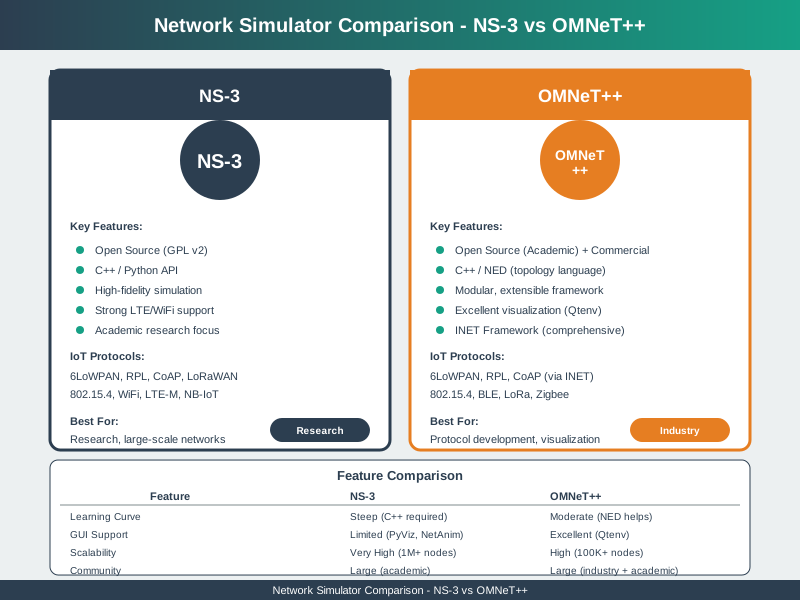
| NS-3 | Research, academic papers | Advanced |
| Cooja (Contiki) | 6LoWPAN, mesh networks | Intermediate |
| OMNeT++ | Detailed protocol analysis | Advanced |
Real-world analogy: Architects don’t build 50 versions of a building to see which one works best—they create models and simulations first. IoT network simulation is the same idea: test virtually, deploy confidently.
Key takeaway: Simulation saves money, reduces risk, and lets you experiment freely. Always simulate complex IoT networks before deployment!
TipFor Kids: Meet the Sensor Squad! 🌟
Network Simulation is like practicing with toy cars before driving a real one!
Imagine you’re building a giant marble run. Would you rather: - A) Buy thousands of pieces and build it, only to find out it doesn’t work? - B) Draw it on paper first and test if the marbles will roll correctly?
Network simulation is like option B - we use computers to pretend we have a whole network and see if it works BEFORE we spend money on real devices!
1557.3.1 The Sensor Squad Adventure: The Virtual Practice Field
The Sensor Squad had a big mission: build a network for the entire city zoo to track all the animals! But there was a problem - they couldn’t afford to buy 500 sensors just to find out if their plan would work.
“What if we test it on a computer first?” suggested Sammy the Sensor, who had heard about something called a “simulator.” Max the Microcontroller got excited. “Great idea! We can create a pretend version of the whole zoo network!”
The team built a virtual model on their computer. They created pretend sensors for the lions, elephants, penguins, and all 200 other animal exhibits. “Look!” pointed Lila the LED. “Our pretend network says there’s a problem - the penguin house is too far from the nearest gateway!”
“In real life, that would have meant lost messages about whether the penguins are okay!” realized Bella the Battery. They quickly moved a pretend gateway closer and ran the simulation again. This time, all the virtual messages arrived perfectly!
“This is amazing,” cheered the team. “We found and fixed the problem without spending a single penny on real equipment!” They tested different weather conditions, what happens if one gateway breaks, and even how the network handles 500 animals sending updates at the same time. After weeks of virtual testing, they were finally ready to build the real thing - and it worked perfectly on the first try! The end!
1557.3.2 Key Words for Kids
| Word | What It Means |
|---|---|
| Simulation | Pretending something is real on a computer to test if it works |
| Virtual | Not real, but acts like the real thing (like a video game world) |
| Model | A smaller or pretend version of something bigger |
| Topology | The shape or map of how devices are connected together |
| Latency | How long messages take to travel (like waiting for a reply) |
| Throughput | How much data can flow through, like water through a pipe |
1557.3.3 Try This at Home!
Build a Paper Network Simulation!
- Draw a big rectangle (that’s your house)
- Draw small circles for devices: TV, smart speaker, phone, tablet, thermostat
- Draw a star in the middle for your Wi-Fi router
- Draw lines from each device to the router (these are your connections)
- Now pretend the router can only handle 3 connections at once - which devices get connected?
- Try moving the router to different spots - can you find a place where lines to all devices are shortest?
Congratulations! You just did network design and simulation! Real engineers use computers to do this same thing, but with thousands of devices and much more detail. The idea is exactly the same - plan first, build second!
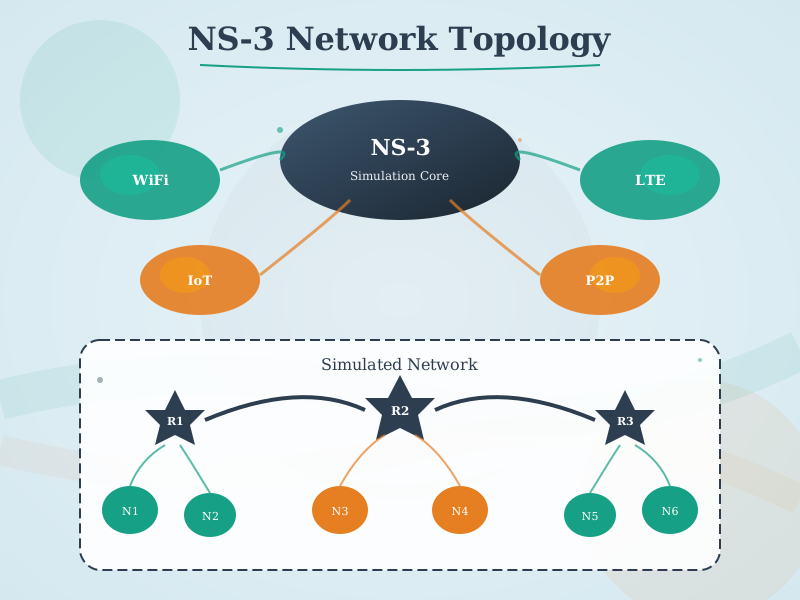
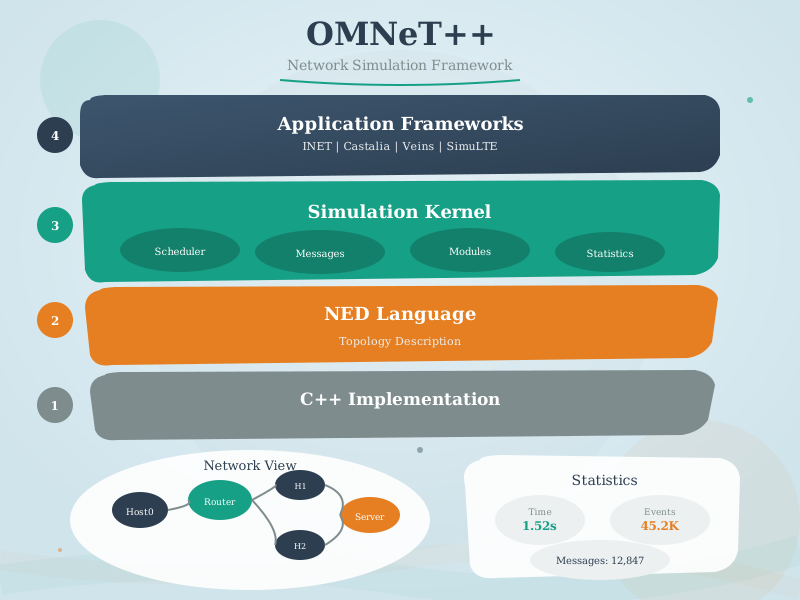
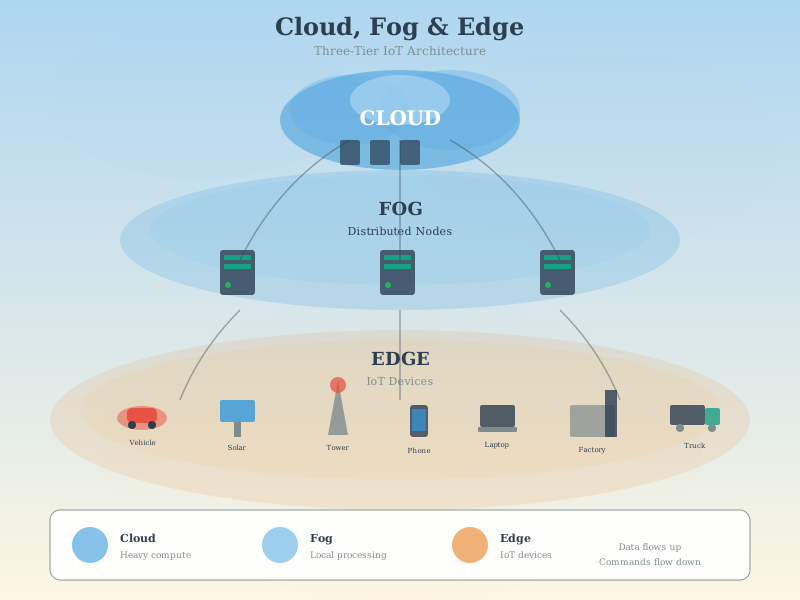
1557.3.4 Network Simulation Tool Visualizations
The following visualizations provide insights into network simulation concepts and tool comparisons for IoT system design.
1557.4 Hands-On Exercises
TipExercise 1: Design and Simulate a Smart Home Network with Cisco Packet Tracer
Objective: Learn network topology design by creating a complete smart home IoT network with star topology, testing connectivity, and measuring performance metrics.
Prerequisites: Download free Cisco Packet Tracer (requires Cisco NetAcad account)
Steps:
- Create Network Topology (20 minutes):
- Add 1 Home Gateway (2911 Router or Home Gateway device)
- Add 1 Wi-Fi Access Point (connect to gateway via Ethernet)
- Add 10 IoT devices:
- 5 Smart Sensors (temperature, motion, door)
- 3 Smart Lights
- 2 Smart Cameras
- Connect all wireless devices to the AP
- Configure IP Addressing (15 minutes):
- Gateway: 192.168.1.1/24
- Access Point: 192.168.1.2/24
- IoT devices: DHCP (192.168.1.100-254 range)
- Verify connectivity using ping from each device to gateway
- Test and Measure (25 minutes):
- Use Packet Tracer’s simulation mode
- Send data from sensors to gateway
- Measure metrics:
- Latency (packet travel time)
- Packet delivery success rate
- Number of hops
- Document results in a table
Expected Outcome: - Functional smart home network with 10+ devices - All devices can communicate with gateway - Understanding of star topology advantages (simple, centralized) and disadvantages (single point of failure) - Measured baseline performance metrics
Challenge Extension: - Add redundancy: Second gateway/AP for failover - Implement VLANs to separate IoT traffic from main network - Add firewall rules to prevent IoT devices from accessing internet directly - Simulate device failure: What happens when AP goes down?
Success Criteria: - ✓ All devices receive DHCP addresses - ✓ 100% packet delivery from sensors to gateway - ✓ Latency < 50ms for all connections - ✓ Network remains functional if one sensor fails
TipExercise 2: Compare Wi-Fi vs Zigbee Mesh Performance with NS-3
Objective: Use network simulation to understand protocol trade-offs by comparing Wi-Fi star topology vs Zigbee mesh topology for the same application.
Prerequisites: - Linux or WSL on Windows - NS-3 installed (installation guide) - Alternatively: Use online NS-3 sandbox (search “NS3 online simulator”)
Scenario: 20 sensor nodes in a 100m × 100m building need to send data to a gateway. Compare two approaches: - Approach A: Wi-Fi star (all → gateway) - Approach B: Zigbee mesh (multi-hop routing)
Steps:
- Setup Wi-Fi Star Simulation (30 minutes):
- Create 20 Wi-Fi station nodes + 1 AP (gateway)
- Random node placement in 100m × 100m area
- Each node sends 100-byte packet every 60 seconds
- Run for 1000 simulated seconds
- Record: PDR, average latency, energy consumption
- Setup Zigbee Mesh Simulation (30 minutes):
- Create 20 802.15.4 nodes with routing enabled
- Same placement and traffic pattern
- Enable AODV or RPL routing protocol
- Run for 1000 simulated seconds
- Record same metrics
- Analyze and Compare (20 minutes):
- Calculate metrics for both scenarios
- Create comparison table
- Identify strengths/weaknesses of each approach
Expected Outcome:
| Metric | Wi-Fi Star | Zigbee Mesh | Winner |
|---|---|---|---|
| Packet Delivery Ratio | ~70-85% | ~95-99% | Mesh |
| Average Latency | 50-100ms | 100-300ms | Star |
| Energy per Packet | High (80mA TX) | Low (30mA TX) | Mesh |
| Coverage | Limited (all must reach AP) | Extended (multi-hop) | Mesh |
| Network Lifetime | Days-weeks | Months-years | Mesh |
Challenge Extension: - Add node mobility (walking sensors) - Simulate AP/gateway failure - which recovers better? - Add interference from Wi-Fi channel congestion - Test scalability: 50 nodes, 100 nodes - when does each break?
Learning Points: - Star topology has lower latency but limited range - Mesh topology trades latency for reliability and coverage - Energy consumption differs dramatically between protocols - No one-size-fits-all solution - depends on requirements!
Resources: - NS-3 Wi-Fi Tutorial - NS-3 802.15.4 Tutorial - Example Code Repository
TipExercise 3: Optimize LoRaWAN Network Placement for Smart Agriculture
Objective: Learn network optimization by using propagation models to determine optimal gateway placement for maximum coverage and minimal packet loss.
Prerequisites: - Pen and paper OR - Free online tool: RadioMobile OR - Python with matplotlib (for plotting)
Scenario: You need to monitor 50 soil moisture sensors across a 2km × 2km farm. Sensors transmit once per hour. Where should you place LoRaWAN gateways to ensure 99% PDR while minimizing gateway cost?
Steps:
- Understand Constraints (10 minutes):
- LoRa range: 2-5km (depends on terrain, obstructions)
- Gateway cost: $500 each
- Sensor cost: $50 each
- Required: 99% of sensors must reach at least 1 gateway
- Budget: Minimize total gateway count
- Initial Design - Single Gateway (15 minutes):
- Place 1 gateway at farm center
- Use path loss formula: PL(d) = PL(d₀) + 10n log₁₀(d/d₀)
- Assume n=2.5 (outdoor with some obstacles)
- Calculate which sensors can reach gateway (RSSI > sensitivity)
- Likely result: ~60-70% coverage (FAILS requirement!)
- Optimized Design - Multiple Gateways (30 minutes):
- Try 2 gateways at strategic locations
- Calculate coverage for each gateway
- Identify overlap zones (good!) and dead zones (bad!)
- Iterate placement until 99% coverage achieved
- Most likely solution: 2-3 gateways
- Validate with Simulation (20 minutes):
- Model in Python or spreadsheet
- Random sensor placement (simulate 100 different farm layouts)
- Calculate average PDR for your gateway placement
- Adjust if needed to hit 99% target
Expected Outcome: - Optimal gateway placement map - Coverage heat map showing RSSI across farm - Cost analysis: 2 gateways ($1000) + 50 sensors ($2500) = $3500 total - Understanding of coverage-cost trade-off
Code Template (Python):
import matplotlib.pyplot as plt
import numpy as np

# Farm dimensions
farm_size = 2000  # meters

# LoRa parameters
tx_power = 14  # dBm
sensitivity = -137  # dBm
path_loss_exponent = 2.5

def calculate_rssi(distance, tx_power, path_loss_exponent):
    # Log-distance path loss model
    if distance < 1:
        distance = 1
    pl = 40 + 10 * path_loss_exponent * np.log10(distance)
    return tx_power - pl

# Sensor locations (random)
np.random.seed(42)
sensors = np.random.rand(50, 2) * farm_size

# Gateway locations (you optimize these!)
gateways = np.array([
    [1000, 1000],  # Center
    [500, 500],    # Southwest
    # Add more as needed
])

# Calculate coverage
covered = 0
for sensor in sensors:
    can_reach_gateway = False
    for gateway in gateways:
        distance = np.linalg.norm(sensor - gateway)
        rssi = calculate_rssi(distance, tx_power, path_loss_exponent)
        if rssi > sensitivity:
            can_reach_gateway = True
            break
    if can_reach_gateway:
        covered += 1

pdr = (covered / len(sensors)) * 100
print(f"Coverage: {pdr:.1f}%")
print(f"Gateways needed: {len(gateways)}")
print(f"Total cost: ${500 * len(gateways) + 50 * len(sensors)}")

# Visualize coverage map
plt.figure(figsize=(10, 10))
plt.scatter(sensors[:, 0], sensors[:, 1], c='blue', label='Sensors', alpha=0.6)
plt.scatter(gateways[:, 0], gateways[:, 1], c='red', s=200, marker='^', label='Gateways')

# Draw coverage circles
for gw in gateways:
    max_range = 10 ** ((tx_power - sensitivity - 40) / (10 * path_loss_exponent))
    circle = plt.Circle((gw[0], gw[1]), max_range, color='green', alpha=0.1)
    plt.gca().add_patch(circle)

plt.xlim(0, farm_size)
plt.ylim(0, farm_size)
plt.xlabel('Distance (m)')
plt.ylabel('Distance (m)')
plt.title(f'LoRaWAN Coverage Map ({pdr:.1f}% coverage)')
plt.legend()
plt.grid(True, alpha=0.3)
plt.axis('equal')
plt.show()
Challenge Extension: - Add elevation data (hills block signals) - Consider gateway solar power and backhaul (cellular vs Ethernet) - Optimize for redundancy: every sensor reaches 2+ gateways - Calculate battery lifetime if sensors use duty cycling
Real-World Application: This exact exercise is what IoT consultants do when designing deployments! Your optimized design could save thousands in real projects.
1557.5 Introduction
Network design and simulation are critical phases in IoT system development that enable architects to validate network performance, identify bottlenecks, and optimize configurations before physical deployment. Unlike traditional IT networks, IoT networks present unique challenges including massive scale (thousands to millions of devices), resource constraints (limited power and bandwidth), diverse communication patterns, and stringent reliability requirements.
TipDefinition
IoT Network Simulation is the process of modeling IoT communication networks in software to predict performance, validate designs, and optimize parameters without requiring physical hardware deployment. Simulation enables rapid iteration, cost-effective experimentation, and risk reduction before committing to production infrastructure.
1557.5.1 Why Simulation Matters for IoT
Cost Reduction: Testing network configurations with thousands of physical devices is prohibitively expensive. Simulation enables testing at any scale for minimal cost.
Risk Mitigation: Identifying network failures, congestion points, and security vulnerabilities in simulation prevents costly production issues.
Rapid Iteration: Network parameters can be modified and retested in minutes rather than weeks required for physical reconfiguration.
Scale Testing: Simulating networks with thousands or millions of nodes is trivial, while physical testing at scale is often impossible during prototyping.
What-If Analysis: Simulation enables exploration of failure scenarios, attack vectors, and edge cases difficult or dangerous to test physically.
Performance Validation: Quantitative metrics (latency, throughput, packet loss, energy consumption) can be measured precisely and reproducibly.
1557.6 IoT Network Design Fundamentals
1557.6.1 Network Topology Patterns
IoT networks employ various topologies based on application requirements, scale, and communication patterns. The following diagram compares the four primary IoT network topologies:
NoteAlternative View: Topology Selection Decision Tree
%%{init: {'theme': 'base', 'themeVariables': {'primaryColor': '#2C3E50', 'primaryTextColor': '#fff', 'primaryBorderColor': '#16A085', 'lineColor': '#16A085', 'secondaryColor': '#E67E22', 'tertiaryColor': '#7F8C8D'}}}%%
flowchart TD
    START(["Select Network<br/>Topology"]) --> Q1{"Network<br/>Scale?"}

    Q1 -->|"< 50 devices"| Q2{"Single point<br/>of failure OK?"}
    Q1 -->|"50-500 devices"| Q3{"Need self-<br/>healing?"}
    Q1 -->|"500+ devices"| HYBRID["HYBRID<br/>Mesh clusters + backbone"]

    Q2 -->|"Yes"| STAR["STAR<br/>Simple, low latency<br/>Wi-Fi, BLE"]
    Q2 -->|"No"| Q4{"Range<br/>extension needed?"}

    Q3 -->|"Yes"| MESH["MESH<br/>Self-healing, extended range<br/>Zigbee, Thread"]
    Q3 -->|"No"| TREE["TREE<br/>Data aggregation<br/>Building automation"]

    Q4 -->|"Yes"| MESH
    Q4 -->|"No"| TREE

    STAR --> PROTO1["Protocols:<br/>Wi-Fi, BLE, Zigbee"]
    MESH --> PROTO2["Protocols:<br/>Zigbee, Thread, Z-Wave"]
    TREE --> PROTO3["Protocols:<br/>BACnet, Modbus, 6LoWPAN"]
    HYBRID --> PROTO4["Protocols:<br/>Mix of above"]

    style START fill:#2C3E50,stroke:#16A085,color:#fff
    style STAR fill:#16A085,stroke:#2C3E50,color:#fff
    style MESH fill:#E67E22,stroke:#2C3E50,color:#fff
    style TREE fill:#16A085,stroke:#2C3E50,color:#fff
    style HYBRID fill:#7F8C8D,stroke:#2C3E50,color:#fff
    style PROTO1 fill:#7F8C8D,stroke:#2C3E50,color:#fff
    style PROTO2 fill:#7F8C8D,stroke:#2C3E50,color:#fff
    style PROTO3 fill:#7F8C8D,stroke:#2C3E50,color:#fff
    style PROTO4 fill:#7F8C8D,stroke:#2C3E50,color:#fff
1557.6.1.1 Star Topology
Description: All devices connect to a central hub or gateway. Most common for short-range protocols like Wi-Fi, Bluetooth, and Zigbee.
Advantages: - Simple to design and implement - Easy troubleshooting and device management - Hub provides centralized security and control - Low device complexity (nodes only talk to hub)
Disadvantages: - Single point of failure at hub - Limited range (all devices must reach hub) - Hub becomes bottleneck as network scales - No device-to-device communication
IoT Applications: - Smart home systems (devices → hub → cloud) - Bluetooth Low Energy sensor networks - Wi-Fi-connected IoT devices
Design Considerations: - Hub capacity (maximum concurrent connections) - Radio coverage area (ensure all devices within range) - Hub redundancy for critical applications - Bandwidth allocation per device
1557.6.1.2 Mesh Topology
Description: Devices form peer-to-peer connections, enabling multi-hop routing where messages can relay through intermediate nodes.
Advantages: - Self-healing (automatic rerouting around failures) - Extended range through multi-hop - No single point of failure - Scalable to large areas
Disadvantages: - Complex routing protocols - Higher latency (multi-hop delays) - Increased power consumption (routing duties) - Network instability if nodes frequently join/leave
IoT Applications: - Zigbee and Thread networks - Smart city street lighting - Industrial sensor networks - Agricultural monitoring across large fields
Design Considerations: - Maximum hop count limits - Routing protocol selection (AODV, RPL, etc.) - Network density (enough nodes for connectivity) - Power budget for routing overhead
1557.6.1.3 Tree/Hierarchical Topology
Description: Organized in parent-child relationships, forming a hierarchical structure often used in industrial and building automation.
Advantages: - Scalable organization - Clear data aggregation paths - Efficient for many-to-one traffic patterns - Simplified addressing schemes
Disadvantages: - Parent node failure affects all children - No path diversity (no alternate routes) - Unbalanced trees create hotspots - Limited flexibility
IoT Applications: - Building automation systems (floors → wings → building → campus) - Industrial control hierarchies - Wireless sensor network clusters
Design Considerations: - Tree depth (impacts latency) - Balancing branches (avoid hotspots) - Parent node reliability requirements - Aggregation strategies
1557.6.1.4 Hybrid Topologies
Description: Combination of topologies to leverage strengths of each. For example, mesh clusters connected via backbone, or star networks linked through gateways.
Advantages: - Optimized for specific requirements - Flexibility in design - Can combine best features of multiple topologies
Disadvantages: - Increased design complexity - More complex management - Potential interoperability challenges
IoT Applications: - Smart city infrastructure (mesh zones + backbone) - Campus IoT deployments - Multi-protocol IoT systems
1557.6.2 Network Design Requirements
1557.6.2.1 Scale and Density
Device Count: How many devices must the network support simultaneously?
- Small: <100 devices (home/office)
- Medium: 100-10,000 devices (building/campus)
- Large: 10,000-1M+ devices (city/industrial)
Spatial Density: How many devices per unit area?
- Sparse: <1 device/100m² (agriculture)
- Medium: 1-10 devices/100m² (office)
- Dense: >10 devices/100m² (factory, stadium)
Simulation Impact: Dense networks require modeling collision avoidance, channel contention, and interference. Sparse networks focus on coverage and routing efficiency.
1557.6.2.2 Latency Requirements
Real-Time (< 10ms): Industrial control, robotics, autonomous vehicles requiring immediate response.
Near Real-Time (10-100ms): Interactive applications like smart home controls, gaming, AR/VR.
Soft Real-Time (100ms-1s): Environmental monitoring, health tracking with timely but not critical updates.
Batch/Delay-Tolerant (>1s): Data logging, firmware updates, analytics where delay is acceptable.
Simulation Impact: Latency testing requires modeling propagation delay, processing time, queuing delays, and multi-hop routing overhead.
1557.6.2.3 Bandwidth and Throughput
Data Rate Per Device: - Ultra-low: <1 kbps (temperature sensor reporting hourly) - Low: 1-100 kbps (sensor streams) - Medium: 100 kbps-1 Mbps (video doorbell, audio) - High: >1 Mbps (HD camera, bulk transfers)
Aggregate Network Throughput: Total bandwidth = devices × per-device rate × duty cycle
Example: 1,000 sensors × 10 kbps × 10% duty = 1 Mbps aggregate
Simulation Impact: Model channel capacity, collision probability, retransmission overhead, and bandwidth allocation strategies.
1557.6.2.4 Reliability and Availability
Packet Delivery Ratio (PDR): - Critical: >99.99% (medical, safety systems) - High: 95-99.99% (industrial monitoring) - Medium: 90-95% (smart home) - Low: <90% (delay-tolerant sensor networks)
Mean Time Between Failures (MTBF): Network uptime requirements drive redundancy needs.
Simulation Impact: Model packet loss, retransmission mechanisms, error correction, and redundancy strategies.
1557.6.2.5 Energy Constraints
Battery-Powered Devices: Lifetime requirements (months to years) dictate duty cycling, transmission power, and protocol efficiency.
Energy Harvesting: Variable power availability requires buffering and adaptive protocols.
Mains-Powered: No energy constraint but may still optimize to reduce infrastructure load.
Simulation Impact: Model transmission energy costs, sleep/wake cycles, and battery lifetime under various traffic patterns.